

Spring1_入门小程序
@
HelloSpring
1、导入jar包
手动导入
commons-logging-1.2.jar
spring-beans-5.2.3.RELEASE.jar
spring-context-5.2.3.RELEASE.jar
spring-core-5.2.3.RELEASE.jar
spring-expression-5.2.3.RELEASE.jar
Maven方式
pom.xml
<?xml version="1.0" encoding="UTF-8"?>
<project xmlns="http://maven.apache.org/POM/4.0.0"
         xmlns:xsi="http://www.w3.org/2001/XMLSchema-instance"
         xsi:schemaLocation="http://maven.apache.org/POM/4.0.0 http://maven.apache.org/xsd/maven-4.0.0.xsd">
    <modelVersion>4.0.0</modelVersion>

    <groupId>com.mashibing</groupId>
    <artifactId>spring_demo</artifactId>
    <version>1.0-SNAPSHOT</version>

    <dependencies>
        <!-- https://mvnrepository.com/artifact/org.springframework/spring-context -->
        <dependency>
            <groupId>org.springframework</groupId>
            <artifactId>spring-context</artifactId>
            <version>5.2.3.RELEASE</version>
        </dependency>
    </dependencies>
</project>
2、编写java类和IOC容器配置文件
Person.java
package com.lxg.HelloSpring;

public class Person {
    private int id;
    private String name;
    private int age;
    private String gender;

    public Person() {

    }

    public Person(int id, String name, int age, String gender) {
        this.id = id;
        this.name = name;
        this.age = age;
        this.gender = gender;
    }

    public int getId() {
        return id;
    }

    public void setId(int id) {
        this.id = id;
    }

    public String getName() {
        return name;
    }

    public void setName(String name) {
        this.name = name;
    }

    public int getAge() {
        return age;
    }

    public void setAge(int age) {
        this.age = age;
    }

    public String getGender() {
        return gender;
    }

    public void setGender(String gender) {
        this.gender = gender;
    }

    @Override
    public String toString() {
        return "Person{" +
                "id=" + id +
                ", name='" + name + '\'' +
                ", age=" + age +
                ", gender='" + gender + '\'' +
                '}';
    }
}
ioc.xml
<?xml version="1.0" encoding="UTF-8"?>
<beans xmlns="http://www.springframework.org/schema/beans"
       xmlns:xsi="http://www.w3.org/2001/XMLSchema-instance"
       xsi:schemaLocation="http://www.springframework.org/schema/beans http://www.springframework.org/schema/beans/spring-beans.xsd">

    <!--注册一个对象,Spring会自动创建这个对象-->
    <!--
        一个bean标签就表示一个对象
        id:这个对象的唯一标识
        class:注册对象的完全限定名
    -->
    <bean id="person" class="com.lxg.HelloSpring.Person">

        <!--
          property标签给类的属性赋值
          name:表示类属性的名称
          value:表示属性的值
        -->
        <property name="id" value="1"></property>
        <property name="name" value="张三"></property>
        <property name="age" value="18"></property>
        <property name="gender" value="男"></property>
     </bean>
</beans>
3、编写测试类
SpringDemoText.java
package com.lxg.HelloSpring;

import org.springframework.context.ApplicationContext;
import org.springframework.context.support.ClassPathXmlApplicationContext;

public class SpringDemoText {
    public static void main(String[] args) {

        //ApplicationContext:表示ioc容器
        //ClassPathXmlApplicationContext:表示从当前classpath路径中获取xml文件的配置
        //根据spring的配置文件来获取ioc容器对象
        ApplicationContext applicationContext = new ClassPathXmlApplicationContext("ioc.xml");

        Person person = (Person) applicationContext.getBean("person");

        System.out.println(person);

    }
}
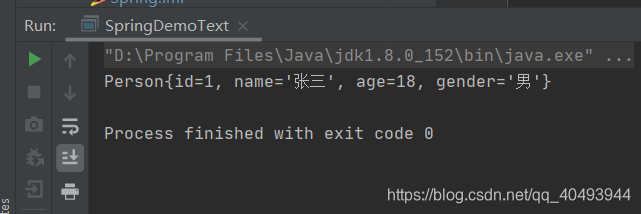
运行结果
4、总结
搭建spring项目需要注意的点:
1、一定要将配置文件添加到类路径中,使用idea创建项目的时候要放在resource目录下
2、导包的时候别忘了commons-logging-1.2.jar包
细节点:
1、ApplicationContext就是IOC容器的接口,可以通过此对象获取容器中创建的对象
2、对象在Spring容器创建完成的时候就已经创建完成,不是需要用的时候才创建
3、对象在IOC容器中存储的时候都是单例的,如果需要多例需要修改属性
4、创建对象给属性赋值的时候是通过setter方法实现的
5、对象的属性是由setter/getter方法决定的,而不是定义的成员属性

 浙公网安备 33010602011771号