node 的模块运行机制
2020-01-02 11:02 罗小二 阅读(883) 评论(0) 收藏 举报node 的模块运行机制简单了解。 涉及大概流程,略过的底层系统区别。
- CommonJS 的规范
- node 模块加载过程
- 小结
1.CommonJS 的规范
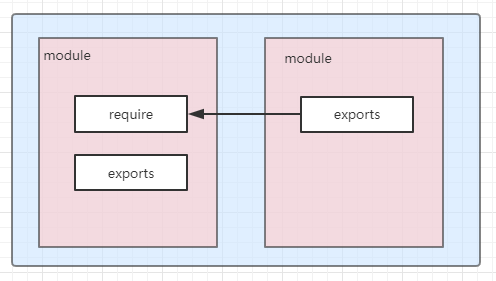
CommonJS 的规范,包括模块引用,模块定义,模块标识,3个部分
模块引用: 模块通过require方法来同步加载所依赖的模块
模块定义: 在node中一个文件就是一个模块,提供exports对象导出当前模块的方法或变量
模块标识: 模块标识传递给require()方法的参数,可以是按小驼峰(camelCase)命名的字符串,也可以是文件路径。
1.1.node 模块中CommonJS 的应用
模块内容导出两种方式:
a.js的内容如下,
方式一:可将需要导出的变量或函数挂载到 exports 对象的属性上
// node.js 每一个文件都是一个单独模块
// Node对获取的Javascript文件的内容进行了包装,以传入如下变量
console.log(exports, require, module, __filename, __dirname);
// 可将需要导出的变量或函数挂载到 exports 对象的属性上,
exports.name = 'luoxiaobu';
exports.age = '18'
方式二:使用 module.exports 对象整体导出一个变量对象或者函数
// node.js 每一个文件都是一个单独模块
// Node对获取的Javascript文件的内容进行了包装,以传入如下变量
console.log(exports, require, module, __filename, __dirname);
let name = 'luoxiaobu';
let age = '18'
// 使用 module.exports 对象整体导出一个变量对象或者函数,
module.exports = {name,age};
模块的引用的方式: 按照引用模块的来源来分
// 核心模块的引入 node自己的模块
let crypto = require('crypto')

// 用户自己编写的模块引入
let aModule = require('./a.js')
// 第三方,别人实现发布的模块(其实也是其他用户编写)
let proxy = require('http-proxy');
2.node 模块加载过程
node.js 每一个文件都是一个单独模块,每个模块都用一个module对象来表示自身。
非 node NativeModule
// 非 node NativeModule
function Module(id = '', parent) {
  this.id = id;
  this.path = path.dirname(id);
  this.exports = {};
  this.parent = parent;
  updateChildren(parent, this, false);
  this.filename = null;
  this.loaded = false;
  this.children = [];
}
NativeModule
// Set up NativeModule.
function NativeModule(id) {
  this.filename = `${id}.js`;
  this.id = id;
  this.exports = {};
  this.module = undefined;
  this.exportKeys = undefined;
  this.loaded = false;
  this.loading = false;
  this.canBeRequiredByUsers = !id.startsWith('internal/');
}
2.1 node 模块加载简述
加载过程大概流程:(Module._load 加载函数)
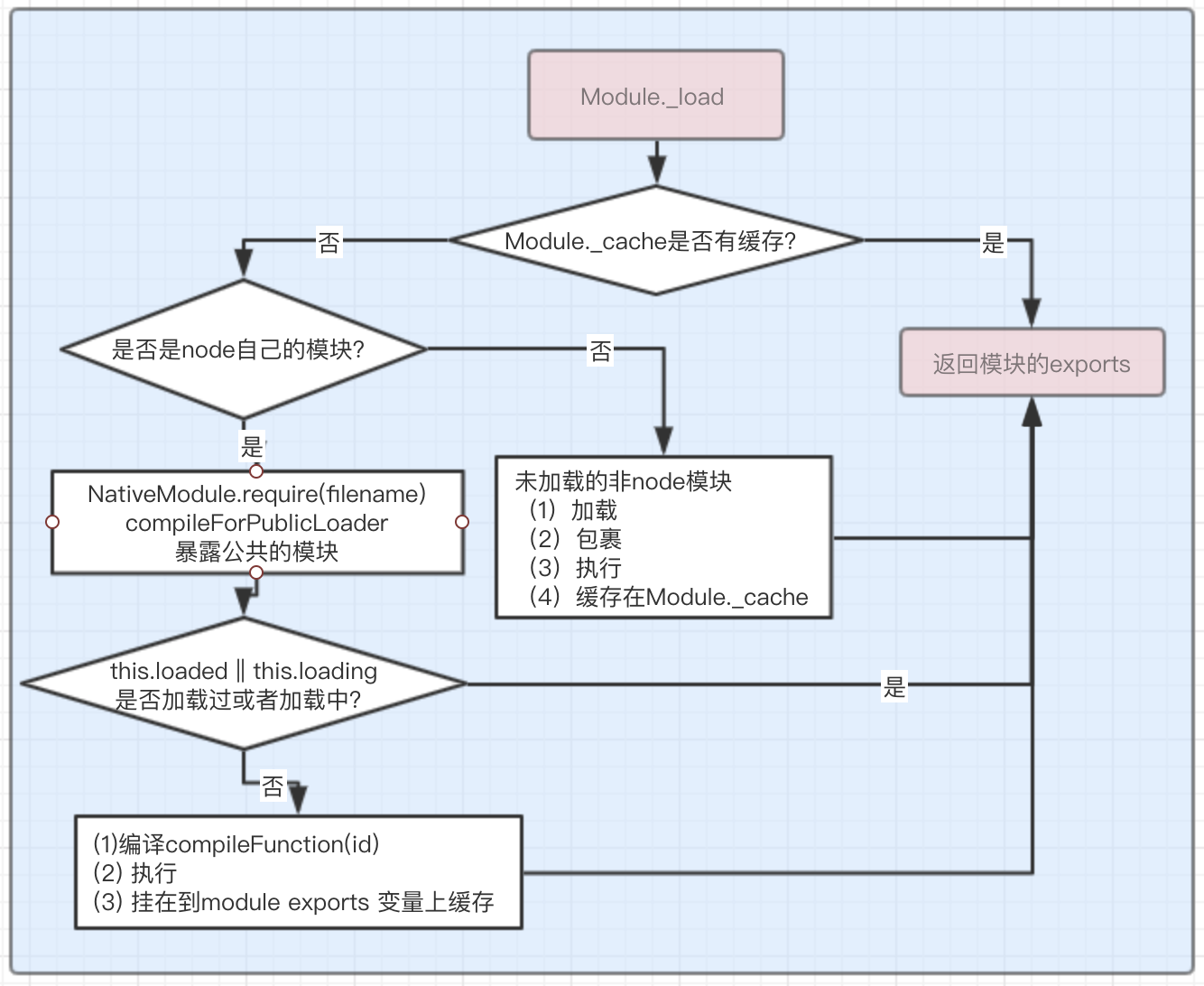
代码略微删减
// Check the cache for the requested file.
// 1. If a module already exists in the cache: return its exports object.
// 2. If the module is native: call
//    `NativeModule.prototype.compileForPublicLoader()` and return the exports.
// 3. Otherwise, create a new module for the file and save it to the cache.
//    Then have it load  the file contents before returning its exports
//    object.
Module._load = function(request, parent, isMain) {
    let relResolveCacheIdentifier;
    if (parent) {
      debug('Module._load REQUEST %s parent: %s', request, parent.id);
      ...
    }
    // 查找文件具体位置
    const filename = Module._resolveFilename(request, parent, isMain);
    // 存在缓存,则不需要再次执行 返回缓存
    const cachedModule = Module._cache[filename];
    if (cachedModule !== undefined) {
      updateChildren(parent, cachedModule, true);
      if (!cachedModule.loaded)
        return getExportsForCircularRequire(cachedModule);
      return cachedModule.exports;
    }
    // 加载node原生模块,原生模块loadNativeModule
    // 如果有 且能被用户引用 返回 mod.exports(这包括node模块的编译创建module对象,将模块运行结果保存在module对象上)
    const mod = loadNativeModule(filename, request);
    if (mod && mod.canBeRequiredByUsers) return mod.exports;

    // 创建一个模块
    // Don't call updateChildren(), Module constructor already does.
    const module = new Module(filename, parent);

    if (isMain) {
      process.mainModule = module;
      module.id = '.';
    }
    // 缓存模块
    Module._cache[filename] = module;
    if (parent !== undefined) {
      relativeResolveCache[relResolveCacheIdentifier] = filename;
    }
    // 加载执行新的模块
    module.load(filename);

    return module.exports;
  };
node 缓存的是编译和执行后的对象
相同:
node模块和非node模块经历的过程都是,有执行后的缓存对象,返回缓存对象
没有执行后的缓存对象,创建module对象,执行模块,存储执行后得到的对象,返回执行后的结果exports
不同:
缓存对象不同
加载模块文件方式不同
2.2 node 源码目录
大概源码结构:(只标注了部分感兴趣的)
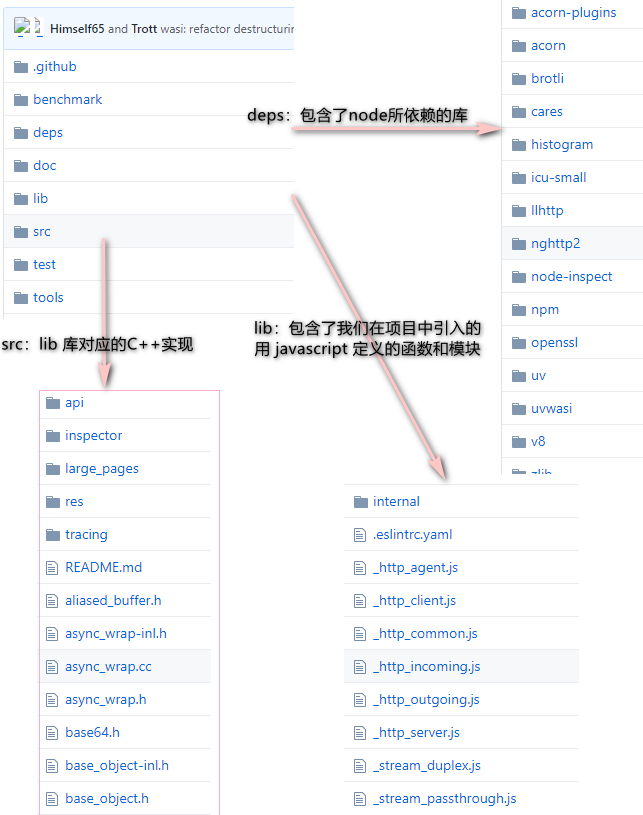
我们可以看到 node 库的目录,其中:
deps:包含了node所依赖的库,如v8,libuv,zlib 等,
lib:包含了用 javascript 定义的函数和模块(可能会通过internalBinding调用c++模块,c++ 模块实现在目录src 下),
src:包括了lib 库对应的C++实现,其中很多 built-in(C++实现) 模块都在这里
会有所困惑,js跟c++ 之间的相互调用?
Node.js主要包括这几个部分,Node Standard Library,Node Bindings,V8,Libuv,架构图如下:
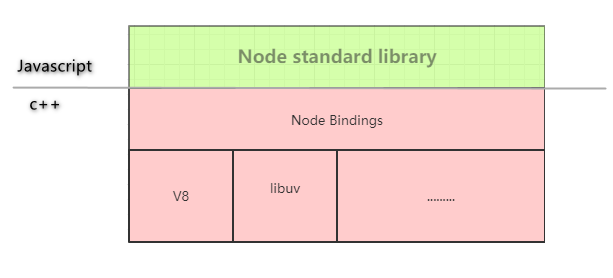
Node Bindings: 是沟通JS 和 C++的桥梁,将V8 引擎暴露的c++ 接口转换成JS API
V8: JavaScript的引擎,提供JavaScript运行环境
c++ 模块的引用大概流程
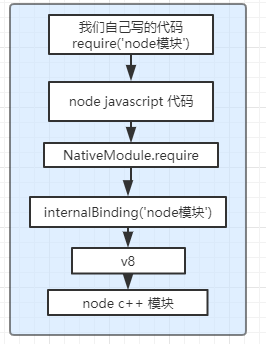
C++ 和 JS 交互 参考文章:(感兴趣可以了解一下)
2.3 node 模块分类
// This file creates the internal module & binding loaders used by built-in// modules. In contrast, user land modules are loaded using// lib/internal/modules/cjs/loader.js (CommonJS Modules) or// lib/internal/modules/esm/* (ES Modules).//// This file is compiled and run by node.cc before bootstrap/node.js// was called, therefore the loaders are bootstraped before we start to// actually bootstrap Node.js. It creates the following objects:
node.cc编译和运行的node/lib/internal/bootstrap/loaders.js 文件的时候会,创建内部模块, 绑定内置模块使用的加载程序。
而用户的模块加载运行依靠lib/internal/modules/cjs/loader.js 或者 lib/internal/modules/esm/*
所以node的模块大致分为两类:
- node的核心模块
- node的核心模块js实现
- node核心模块c++实现,js包裹调用c++模块
- 第三方模块,或者用户自己编写模块
-
JavaScript 模块,我们开发写的JavaScript 模
- JSON 模块,一个 JSON 文件
- C/C++ 扩展模块,使用 C/C++ 编写,编译后后缀名为 .node(感兴趣可以了解动态链接库)
-
2.3.1 node的核心模块
⑴ C++ binding loaders:(对c++核心模块的引入)
process.binding():旧版C ++绑定加载程序,可从用户空间访问,因为它是附加到全局流程对象的对象。这些C ++绑定是使用NODE_BUILTIN_MODULE_CONTEXT_AWARE()创建的,并且其nm_flags设置为NM_F_BUILTIN。我们无法确保这些绑定的稳定性,但是仍然必须时时解决由它们引起的兼容性问题。
process._linkedBinding():在应用程序中添加额外的其他C ++绑定。可以使用带有标志NM_F_LINKED 的 NODE_MODULE_CONTEXT_AWARE_CPP()创建这些C ++绑定。
internalBinding():私有内部C ++绑定加载程序,(除非通过`require('internal / test / binding')`,否则无法从用户区域访问)。 这些C ++绑定是使用NODE_MODULE_CONTEXT_AWARE_INTERNAL()创建的,其nm_flags设置为NM_F_INTERNAL。
⑵Internal JavaScript module loader:
该模块是用于加载 lib/**/*.js 和 deps/**/*.js 中的JavaScript核心模块的最小模块系统。
所有核心模块都通过由 js2c.py 生成的 node_javascript.cc 编译成 Node 二进制文件,这样可以更快地加载它们,而不需要I/O成本。
此类使lib / internal / *,deps / internal / *模块和internalBinding()在默认情况下对核心模块可,并允许核心模块通require('internal / bootstrap / loaders')来引用自身,即使此文件不是以CommonJS风格编写的。
核心模块的加载大概如下:(internalBinding是process.binding的替代可以简单这样理解)
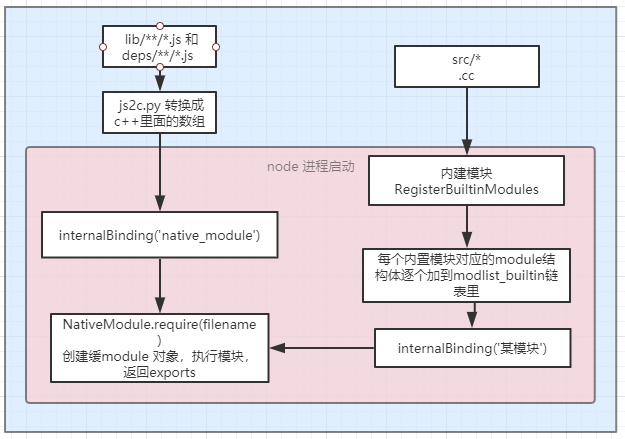
Process.binding / InternalBinding 实际上是C++函数,是用于将Node标准库中C++端和Javascript端连接起来的桥梁。
2.3.2 node的非 核心模块
- JavaScript 模块,我们开发写的JavaScript 模(或着第三方模块)
- JSON 模块,一个 JSON 文件
- C/C++ 扩展模块,使用 C/C++ 编写,编译后后缀名为 .node(感兴趣可以了解动态链接库)
此类模块的大概加载流程:
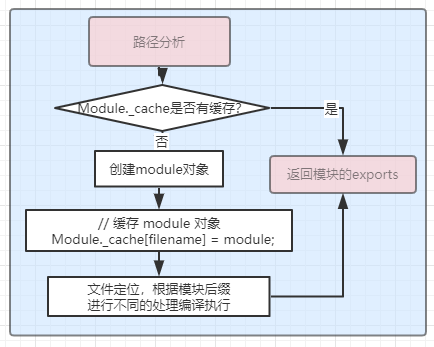
路径分析
const filename = Module._resolveFilename(request, parent, isMain);
是否有缓存
 const cachedModule = Module._cache[filename];
  if (cachedModule !== undefined) {
    updateChildren(parent, cachedModule, true);
    return cachedModule.exports;
  }
创建module对象
  const module = new Module(filename, parent);
// 缓存 module 对象
  Module._cache[filename] = module;
文件定位根据后缀编译执行
// Native extension for .js
Module._extensions['.js'] = function(module, filename) {
  if (experimentalModules && filename.endsWith('.js')) {
    const pkg = readPackageScope(filename);
    if (pkg && pkg.type === 'module') {
      throw new ERR_REQUIRE_ESM(filename);
    }
  }
  const content = fs.readFileSync(filename, 'utf8');
  module._compile(stripBOM(content), filename);
};


// Native extension for .json
Module._extensions['.json'] = function(module, filename) {
  const content = fs.readFileSync(filename, 'utf8');

  if (manifest) {
    const moduleURL = pathToFileURL(filename);
    manifest.assertIntegrity(moduleURL, content);
  }

  try {
    module.exports = JSON.parse(stripBOM(content));
  } catch (err) {
    err.message = filename + ': ' + err.message;
    throw err;
  }
};


// Native extension for .node
Module._extensions['.node'] = function(module, filename) {
  if (manifest) {
    const content = fs.readFileSync(filename);
    const moduleURL = pathToFileURL(filename);
    manifest.assertIntegrity(moduleURL, content);
  }
  // Be aware this doesn't use `content`
  return process.dlopen(module, path.toNamespacedPath(filename));
};
返回module.exports 对象。
3.总结
node 的模块运行机制简单了解。 涉及大概流程,略过的底层系统区别。
文章整理了相关资料,记录了部分实践和自己的理解,理解不准确之处,还请教正。欢迎一起讨论学习。
参考资料:

 浙公网安备 33010602011771号