
ArubaMM-VA+MC-VA (五)aruba vmc 开机虚拟引导配置
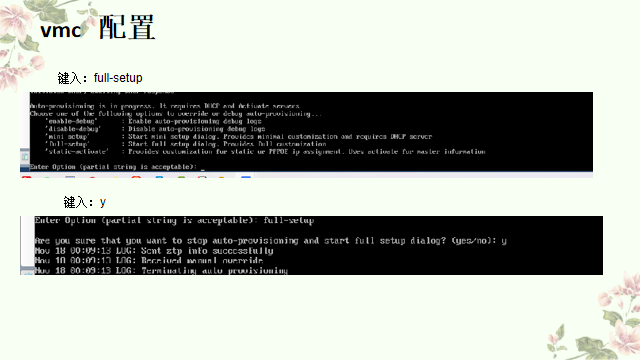
引导向配置详解
Enter Susten mame [ArubaMC-UA_FT_6F_38]:Aruba-MC-VA-2
Enter Switch Role (stabdalone|md): md
Enter IP type to terninate IPSec tumnel or secured websocketcomection(ipv4lipv6)[ipv4]: ipv4
Enter Master swuitch IP address/FQDN or ACP IP address/FQDN: 192.168.233.11 master ip地址
Enter Master switch TYPE?(MM|ACP) [MM]:MM 选择 mm
Is this a VPN concentrator for nanaged device to reach Master suitch (yeslno) [no]:no
This device connnects to Msater switch via VPN concentrator (yes|no) [no]:no
vpn Master suitch Authemticatfon method(PSkwithiP|PSkwithMAC) [PSkwitchip]:PSkwitchip
Enter IPSer Pre-shared Key :aruba123 ipser密码 Re-enter IPSer Pre-shared key :aruba123 重复ipser密码
Do you want to enable L3 Redundancu (yes|no) [no]:no Enter Uplink VLAN ID [1]: 233 管理vlan
Enter Up1ink port [GE 0/0/0]:GE 0/0/0 上联端口
Enter Uplink port mode (access l trunk) [access] :trunk trunk
Enter Native Vlan ID [1]: 1 native vlan
Enter Uplink Ulan IP assigmnent method (dhcp l static|pppoe) :[static] vmc 地址
Enter Uplink vlan static IP adress [172.16.0.25]: 192.168.233.13 自己的IP地址
Enter Uplink vlan static IP netmask [255.255.255.0]: 255.255.255.0 子网掩码
Enter IP default gateuay [none]:192.168.233.1 网关
Enter DNS IP address [none]: 192.168.233.1 dns 地址
Do you wish to configure IPV6 address on vlan (yes | no) [yes] : no
Do you uant to configure dunanic port-chamme (yes | no) [no] :no
Enter Country code (IS0-3166)<ctrl-L> for supported list : cn 中国
You have chosen Country code CN for China (yes | no )?: y
Enter the controller's IANA Time zone [America/Los_Angeles] : Asia/Shanghai 时区上海
Enter Time in UTC [00:00:00] : Enter Date ( MM/DD/YYYY) [11/19/2020 ]:
Do you want to create admin account (yes |no ) [yes]: yes
Enter password for admin login (up to 32 chars) : britel,123 admin密码
Re-type password for admin login : britel,123 重复输入admin密码
这里选择y 会重启
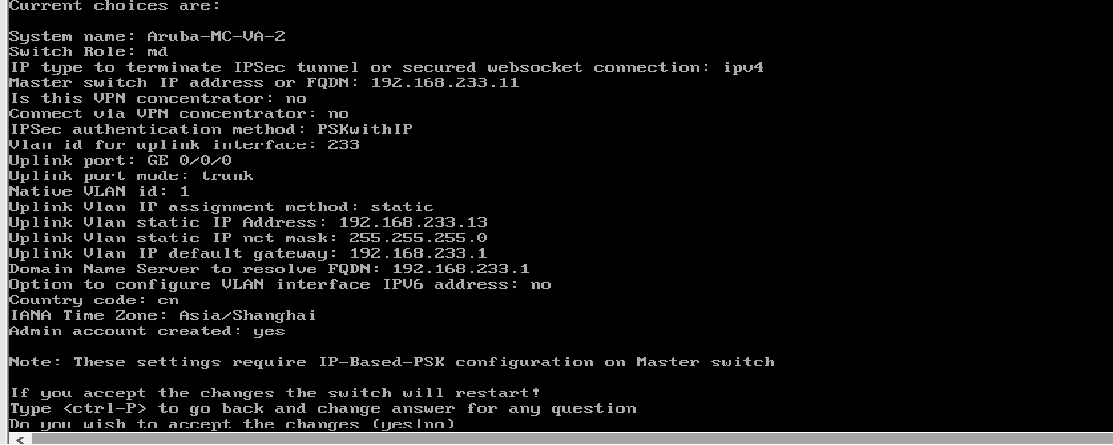
等重启完成 登录刚配置的账号密码
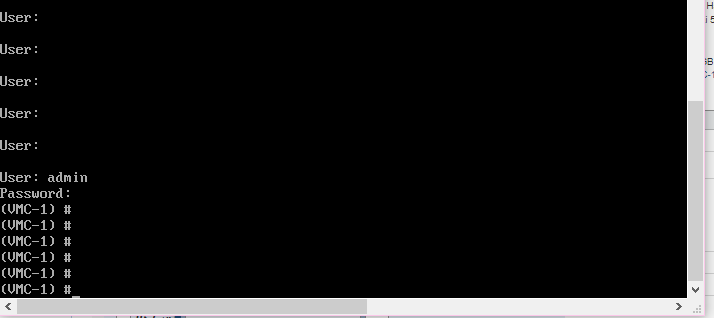
ping 通网关地址后 完成vmc基础配置

 浙公网安备 33010602011771号