
通过界面查看通过web界面查看时Nginx需要开启status模块,也就是安装Nginx时加上 --with-http_stub_status_module
可以通过命令nginx-V查看是否开启status模块
[root@localhost conf]# nginx -V #显示已开启
nginx version: nginx/1.16.0
built by gcc 4.8.5 20150623 (Red Hat 4.8.5-44) (GCC)
built with OpenSSL 1.0.2k-fips 26 Jan 2017
TLS SNI support enabled
configure arguments: --user=nginx --group=nginx --prefix=/application/nginx-1.16.0/ --with-http_stub_status_module --with-http_ssl_module
接下来只需要修改配置文件nginx.conf即可
[root@localhost conf]# vim nginx.conf
worker_processes 1;
events {
worker_connections 1024;
}
http {
include mime.types;
default_type application/octet-stream;
sendfile on;
keepalive_timeout 65;
server {
listen 80;
server_name localhost;
location / {
root html;
index index.html index.htm;
}
location /Nginxstatus { #新添加的内容
stub_status on;
access_log /application/nginx/logs/status.log; #日志
auth_basic "NginxStatus";
}
error_page 500 502 503 504 /50x.html;
location = /50x.html {
root html;
}
}
}
[root@localhost conf]# nginx -t
nginx: the configuration file /application/nginx-1.16.0//conf/nginx.conf syntax is ok
nginx: configuration file /application/nginx-1.16.0//conf/nginx.conf test is successful
[root@localhost conf]# nginx -s reload
配置文件修改完之后进入浏览器进行访问,网址为http://192.168.6.10/Nginxstatus
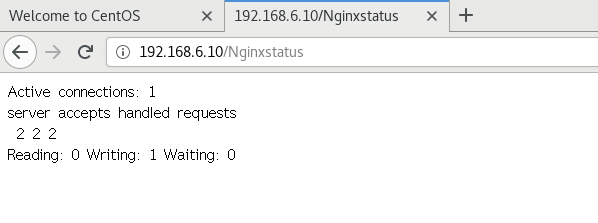
完成!!!

 浙公网安备 33010602011771号