
mysql慢查询
MySQL的慢查询,全名是慢查询日志,是MySQL提供的一种日志记录,用来记录在MySQL中响应时间超过阀值的语句。
具体环境中,运行时间超过long_query_time值的SQL语句,则会被记录到慢查询日志中。long_query_time的默认值为10,意思是记录运行10秒以上的语句。
默认情况下,MySQL数据库并不启动慢查询日志,需要手动来设置这个参数。当然,如果不是调优需要的话,一般不建议启动该参数,因为开启慢查询日志会或多或少带来一定的性能影响。慢查询日志支持将日志记录写入文件和数据库表。
要完成慢查询登录数据库,进行检查,
[root@localhost mysql]# mysql -uroot -p
mysql: [ERROR] unknown variable 'slow_query_log=1'
[root@localhost mysql]# vim /etc/my.cnf
[root@localhost mysql]# vim /etc/my.cnf
[root@localhost mysql]# systemctl restart mysqld
[root@localhost mysql]# mysql -uroot -p
Enter password:
Welcome to the MySQL monitor. Commands end with ; or \g.
Your MySQL connection id is 2
Server version: 5.7.26 MySQL Community Server (GPL)
Copyright (c) 2000, 2019, Oracle and/or its affiliates. All rights reserved.
Oracle is a registered trademark of Oracle Corporation and/or its
affiliates. Other names may be trademarks of their respective
owners.
Type 'help;' or '\h' for help. Type '\c' to clear the current input statement.
wangju [(none)]>show variables like '%slow_query_log%';
+---------------------+--------------------------------------------+
| Variable_name | Value |
+---------------------+--------------------------------------------+
| slow_query_log | OFF |
| slow_query_log_file | /application/mysql/data/localhost-slow.log |
+---------------------+--------------------------------------------+
2 rows in set (0.01 sec)
wangju [(none)]> set global slow_query_log=1;
Query OK, 0 rows affected (0.04 sec)
wangju [(none)]> show variables like '%slow_query_log%';
+---------------------+--------------------------------------------+
| Variable_name | Value |
+---------------------+--------------------------------------------+
| slow_query_log | ON |
| slow_query_log_file | /application/mysql/data/localhost-slow.log |
+---------------------+--------------------------------------------+
2 rows in set (0.00 sec)
wangju [(none)]>
使用set global slow_query_log=1开启了慢查询日志只对当前数据库生效,如果MySQL重启后则会失效。如果要永久生效,就必须修改配置文件my.cnf。
wangju [(none)]>CREATE DATABASE wangju; #创建数据库wangju
Query OK, 1 row affected (0.00 sec)
wangju [(none)]>show databases; #查询
+--------------------+
| Database |
+--------------------+
| information_schema |
| mysql |
| performance_schema |
| sys |
| wangju |
+--------------------+
5 rows in set (0.00 sec)
wangju [(none)]>use wangju; #进入数据库
Database changed
wangju [wangju]>
wangju [wangju]>show tables; #查看当前数据库中的表,是空的
Empty set (0.00 sec)
wangju [wangju]>CREATE TABLE news (id int(10),name char(20),phone int(12)); #创建表news
Query OK, 0 rows affected (0.07 sec)
wangju [wangju]>CREATE TABLE mine (name char(20),phone int(12)); #创建mine表
Query OK, 0 rows affected (0.01 sec)
wangju [wangju]>show tables;
+------------------+
| Tables_in_wangju |
+------------------+
| mine |
| news |
+------------------+
2 rows in set (0.00 sec)
wangju [wangju]>INSERT INTO news(id,name,phone) VALUES(01,'Tom',110110110); #写入数据
Query OK, 1 row affected (0.03 sec)
wangju [wangju]>INSERT INTO news VALUES(02,'Jack',119119119);
Query OK, 1 row affected (0.27 sec)
wangju [wangju]>INSERT INTO news(id,name) VALUES(03,'Rose');
Query OK, 1 row affected (0.26 sec)
wangju [wangju]>SELECT * FROM news; #查看数据
+------+------+-----------+
| id | name | phone |
+------+------+-----------+
| 1 | Tom | 110110110 |
| 2 | Jack | 119119119 |
| 3 | Rose | NULL |
+------+------+-----------+
3 rows in set (0.00 sec)
wangju [(none)]>quit
Bye
[root@localhost mysql]# cd /tmp/file #退出数据库,进入备份目录,进行备份
[root@localhost file]# mysqldump -u root -p wangju > wangju.sql
Enter password:
[root@localhost file]# ls
wangju.sql
还原数据库
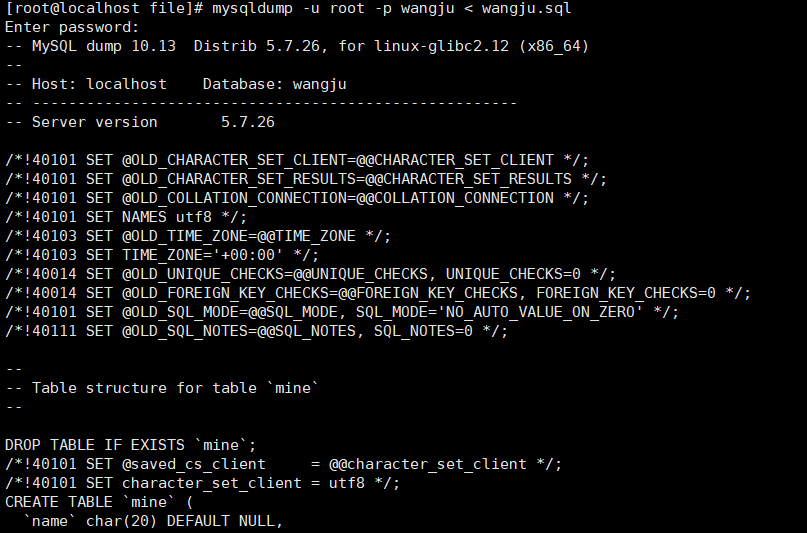
省略部分过程。

 浙公网安备 33010602011771号