
Docker是一个非常强大的工具,它帮助企业扩大产品规模,并简化部署容器化应用程序的流程。当需要停止、重新部署一个容器并需要保留数据时,那该怎么办呢? 为了能够保存数据(或者在容器之间共享数据),您必须用到数据卷,它是存在于主机文件系统上的目录(或文件)。具体过程如下:
创建测试环境
[root@localhost opt]# mkdir docker.html #创建共享目录
[root@localhost opt]# ls
50x.html apache-tomcat-8.5.65 docker.html index.html nginx.tar.gz tomcat
[root@localhost opt]# cp *.html docker.html
[root@localhost opt]# cd docker.html
[root@localhost docker.html]# ls
50x.html index.html
[root@localhost docker.html]# cat index.html
wangju test docker
建立数据卷映射
[root@localhost ~]# docker run -d --name="nginx_3" -p 83:80 -v /opt/docker.html:/usr/share/nginx/html nginx #此过程中注意Windows端口号不能重复,新的容器名称不能重复
48948b340f71240de6b1e4de6eaefa16523b1ca2b9b13a7dc9a1b6e8f36f860a
[root@localhost ~]# docker container exec -it nginx_3 /bin/bash #进入容器查看
root@48948b340f71:/# cd /usr/share/nginx/html
root@48948b340f71:/usr/share/nginx/html# ls
50x.html index.html
root@48948b340f71:/usr/share/nginx/html# cat index.html
wangju test docker
root@48948b340f71:/usr/share/nginx/html#
在宿主机中修改index.html,重新在容器中查看文件,就发现信息已经修改
[root@localhost docker.html]# vim index.html #注意此刻是在宿主机中修改文件
在容器重新查看,发现容器中的文件内容已经发生改变
root@48948b340f71:/usr/share/nginx/html# cat index.html
wangju test docker
wangju jiayou!!!
此时,在访问网页192.168.146.100:83,发现信息发生变更
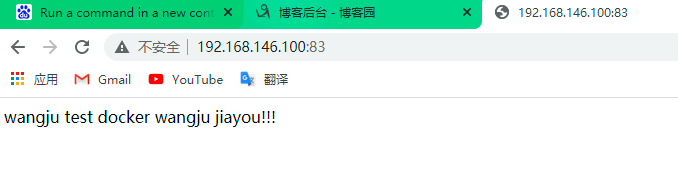
通过建立数据卷方法,我们就可以修改容器中的文件信息,方便快捷,数据卷还有一个特点就是保持数据持久性,一般情况下,我们将容器删除之后,在那个容器上创建的数据一同被删除,但是建立了数据卷之后,即使我们将容器删除,我们还可以将建立好的数据卷挂到其他容器,这样就可以查看删除的那个容器的数据信息了。
实例:开启两个Nginx容器(90,91),共同挂载一个数据卷,实现静态资源共享
首先进入创建的数据卷目录,编辑文件index.html #注意此刻在宿主机中编辑文件
[root@localhost ~]# cd /opt/docker.html
[root@localhost docker.html]# vim index.html
现在将数据卷挂到容器中
[root@localhost ~]# docker container run -d -p 90:80 --name="vol1" -v /opt/docker.html:/usr/share/nginx/html nginx
dceac9103d7f7a0a1ad9ef82f45cc71c4c726ae45c7401590f3242546c0ecf72
[root@localhost ~]# docker container run -d -p 91:80 --name="vol2" -v /opt/docker.html:/usr/share/nginx/html nginx
370474a9268acd7d2129181dad6a0f7be5408f4c3b1d8b23a9113a43722ab46d
挂号之后访问网页,查看信息,发现两个页面的信息一致
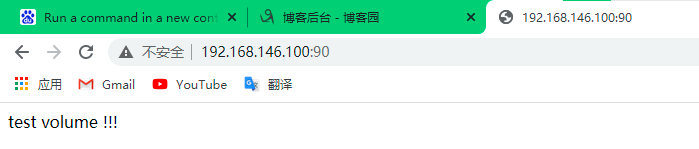
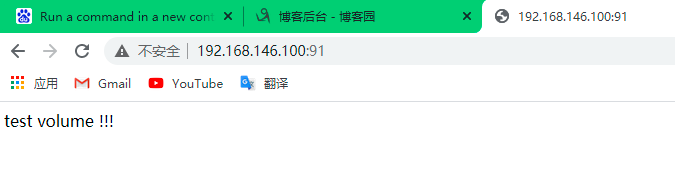
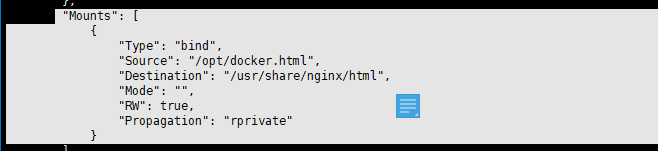
当我们挂的数据卷过多的时候,不确定那个容器中挂的是那个数据卷的时候使用命令docker container inspect +容器名,来查看容器所使用的数据卷
[root@localhost ~]# docker container inspect vol2 #查找下图中的信息块儿即可。
数据卷容器
宿主机模拟数据目录
[root@localhost ~]# mkdir -p /opt/volume/a
[root@localhost ~]# mkdir -p /opt/volume/b
[root@localhost ~]# touch /opt/volume/a/a.txt
[root@localhost ~]# touch /opt/volume/b/b.txt
启动数据卷容器
[root@localhost ~]# docker run -it --name "test.volumes" -v /opt/volume/a:/opt/a -v /opt/volume/b:/opt/b centos:6.9 /bin/bash
[root@bad67b9c8242 /]# cd /opt #查看数据卷容器是否挂过来
[root@bad67b9c8242 opt]# ls
a b
[root@bad67b9c8242 opt]#
对于交互式容器,让其退出使用Ctrl+p+q ,不能用Ctrl+d,否则容器就直接死掉了
[root@bad67b9c8242 opt]# [root@localhost ~]# #使用Ctrl+p+q的结果显示,并且使用Ctrl+p+q只是退出来前台,容器还在运行中
[root@localhost ~]#
[root@localhost ~]# docker container ls -a
CONTAINER ID IMAGE COMMAND CREATED STATUS PORTS NAMES
bad67b9c8242 centos:6.9 "/bin/bash" 7 minutes ago Up 7 minutes test.volumes
使用数据卷容器
[root@localhost ~]# docker run -d -p 8085:80 --volumes-from test.volumes --name "n8085" nginx
40fd1864fc05574b2551abbdaf75a43cbdb46471c95fa940fb6456c3c8867e11
[root@localhost ~]# docker run -d -p 8086:80 --volumes-from test.volumes --name "n8086" nginx
c6ae5811a7e2a0056dd1f2715e1b8318bf74671dd60a9959d137a5ca3a376548
[root@localhost ~]#
首先编辑文件/opt/volume/a/a.txt,然后重新复制一个端口,登录到容器中,检查是否有目录,检查发现,文件信息存在
[root@localhost ~]# docker container exec -it n8085 bin/bash 3注意,这里是一个新的端口
root@40fd1864fc05:/# cd /opt
root@40fd1864fc05:/opt# ls
a b
root@40fd1864fc05:/opt# cd a
root@40fd1864fc05:/opt/a# cat a.txt
ni hao jiu shi guang
root@40fd1864fc05:/opt/a#
使用数据卷容器的作用是在集中管理集群中,大批量的容器都需要挂载相同的多个数据卷,可以采用数据卷容器统一管理。

 浙公网安备 33010602011771号