
【Azure Storage Account】Azure Table Storage 跨区批量迁移方案
问题描述
在实际环境中,需要将 Azure Storage Account 中大量 Table Storage 表 从一个 Region 复制到另一个 Region 的需求。
由于 Table 数量较多,使用 Azure Storage Explorer 手动逐表复制成本高、效率低,并且存在误操作风险。
那么,是否有支持批量迁移,可脚本化并重复执行的办法呢?
问题解答
因为Azure Storage Account并没有直接复制数据到另一个 Region的方案。只能采用“先导出+在导入”的办法。
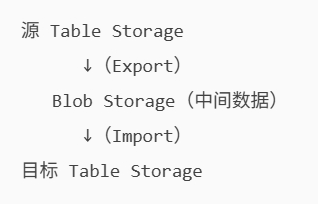
阶段一:从源 Table 导出到 Blob(Export)
示例脚本
AzCopy.exe \
  /Source:https://<source-storage-account>.table.core.chinacloudapi.cn/<table-name> \
  /Dest:https://<backup-storage-account>.blob.core.chinacloudapi.cn/<container-name> \
  /SourceKey:<SourceStorageKey> \
  /DestKey:<DestStorageKey> \
  /Manifest:"<table-name>_export.manifest"
- /Source 指向源 Table Storage 表
- /Dest 指向Blob Storage 中的容器
- /Manifest 生成迁移清单文件,用于后续 Import 或重试
阶段二:从 Blob 导入到目标 Table(Import)
示例脚本
AzCopy.exe \
  /Source:https://<backup-storage-account>.blob.core.chinacloudapi.cn/<container-name> \
  /Dest:https://<target-storage-account>.table.core.chinacloudapi.cn/<table-name> \
  /SourceKey:<SourceStorageKey> \
  /DestKey:<DestStorageKey> \
  /Manifest:"<table-name>_export.manifest" \
  /EntityOperation:"InsertOrReplace"
- /EntityOperation:"InsertOrReplace"
- 若目标表存在相同 PartitionKey + RowKey
- 则直接覆盖,避免冲突失败
- 使用与 Export 阶段相同的 Manifest 文件
参考资料
Export a table to Blob storage:https://learn.microsoft.com/en-us/previous-versions/azure/storage/storage-use-azcopy#export-a-table-to-blob-storage
Import entities into a table from Blob storage:https://learn.microsoft.com/en-us/previous-versions/azure/storage/storage-use-azcopy#import-entities-into-a-table-from-blob-storage
当在复杂的环境中面临问题,格物之道需:浊而静之徐清,安以动之徐生。 云中,恰是如此!

 浙公网安备 33010602011771号