
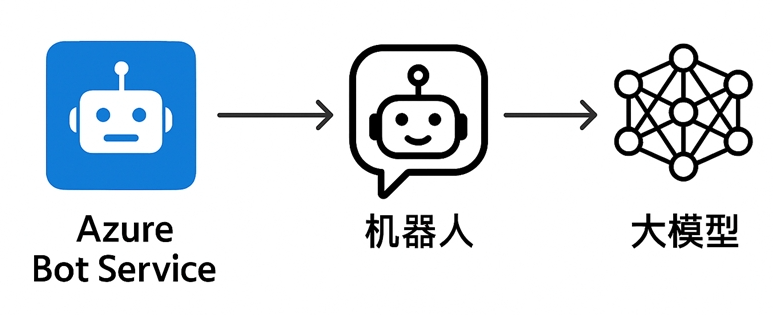
【Azure Bot Service】在机器人服务中如何调用LLM来回答问题呢?
问题描述
使用Azure Bot Service来部署机器人服务,如何把大模型嵌入其中呢?
比如在对话消息时候,能让大模型来提供回答?
问题解答
其实很简单,在Bot代码中添加大模型的调用就行。
以Python代码为例, 首先是准备好调用LLM的请求代码
## 示例中使用的是Azure OpenAI的模型
import requests

# Azure OpenAI 客户端
def get_openai_answer(prompt):

    api_key = "your api key"
    endpoint = "your deployment endpoint, like: https://<your azure ai name>.openai.azure.com/openai/deployments/<LLM Name>/chat/completions?api-version=2025-01-01-preview"
    if not api_key or not endpoint:
        raise ValueError("请配置 Azure OpenAI 信息")

    headers = {
        "Content-Type": "application/json",
        "api-key": api_key
    }

    systemprompt  = f"""" 您是一个有趣的聊天智能体,能愉快的和人类聊天"""
    data = {
        "messages": [
            {"role": "system", "content": systemprompt},
            {"role": "user", "content": prompt}
        ],
        "max_tokens": 5000,
        "temperature": 0.7
    }
    response = requests.post(endpoint, headers=headers, json=data)
    response.raise_for_status()
    result = response.json()
    return result["choices"][0]["message"]["content"]

# 示例用法
if __name__ == "__main__":
    prompt = "请介绍一下Azure OpenAI的主要功能。"
    print(get_openai_answer(prompt))
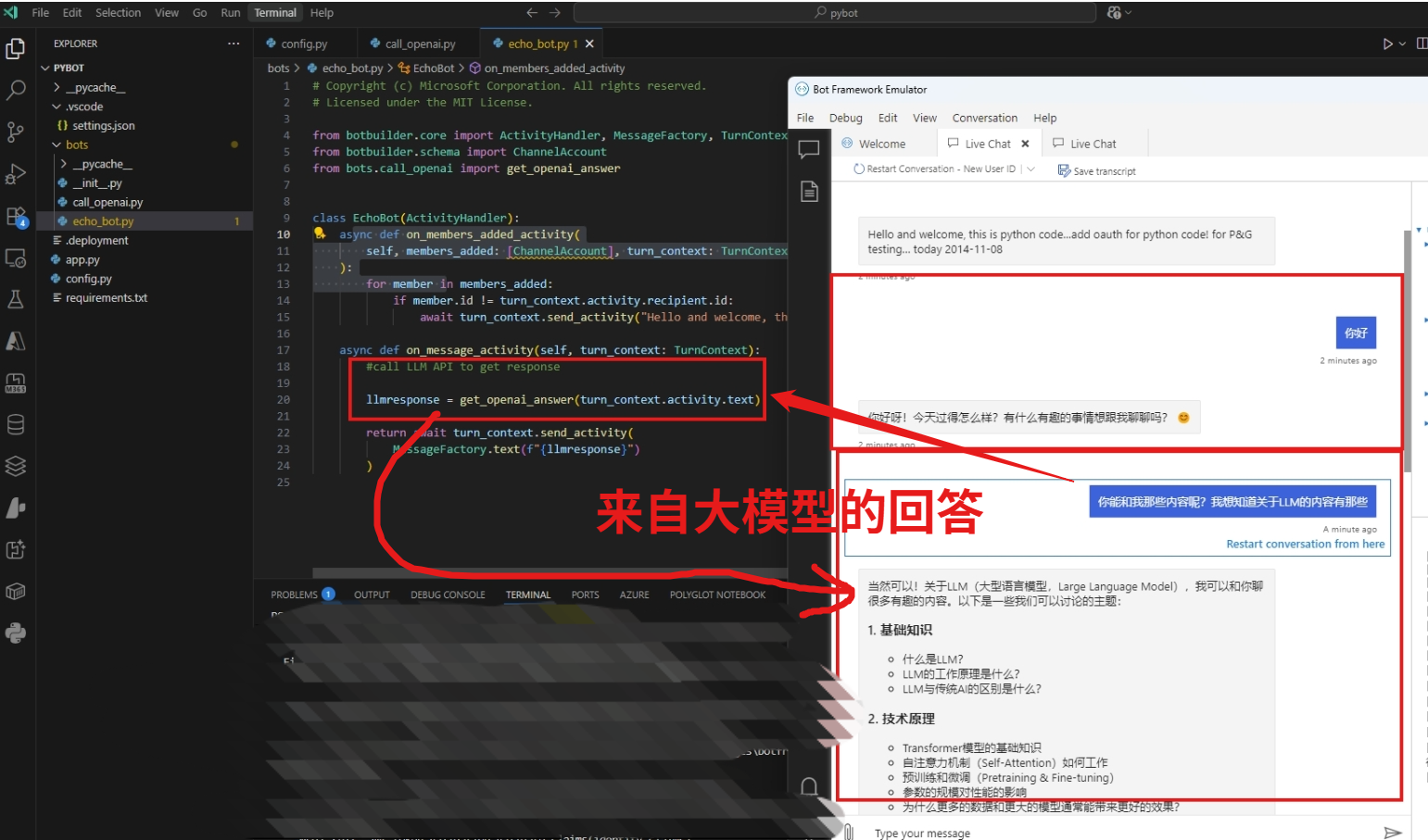
然后,在 EchoBot 的 on_message_activity 中调用OpenAI接口即可
# Copyright (c) Microsoft Corporation. All rights reserved.
# Licensed under the MIT License.

from botbuilder.core import ActivityHandler, MessageFactory, TurnContext
from botbuilder.schema import ChannelAccount
from bots.call_openai import get_openai_answer


class EchoBot(ActivityHandler):
    async def on_members_added_activity(self, members_added: [ChannelAccount], turn_context: TurnContext):
        for member in members_added:
            if member.id != turn_context.activity.recipient.id:
                await turn_context.send_activity("Hello and welcome, this is python code.")

    async def on_message_activity(self, turn_context: TurnContext):
        #call LLM API to get response
        llmresponse = get_openai_answer(turn_context.activity.text)
        return await turn_context.send_activity(
            MessageFactory.text(f"{llmresponse}")
        )
测试效果:
[完]
参考资料
当在复杂的环境中面临问题,格物之道需:浊而静之徐清,安以动之徐生。 云中,恰是如此!

 浙公网安备 33010602011771号