
PostgreSQL源码编译安装
PostgreSQL教程
一、数据库搭建
1.1 源码编译安装
这里以Rocky Linux 9.5 (Blue Onyx)安装postgresql-15.12为例:
软件下载:
[root@localhost ~]# wget https://ftp.postgresql.org/pub/source/v15.12/postgresql-15.12.tar.gz
-bash: wget: command not found
#没有下载工具,先安装wget
[root@localhost ~]# dnf -y install wget
# 下载
[root@localhost ~]# wget https://ftp.postgresql.org/pub/source/v15.12/postgresql-15.12.tar.gz
[root@localhost ~]# tar -zxvf postgresql-15.12.tar.gz
-bash: tar: command not found
# 提示没有tar解压工具,安装它
[root@localhost ~]# dnf -y install tar
# 解压
[root@localhost ~]# tar -zxvf postgresql-15.12.tar.gz
软件编译安装:
[root@localhost ~]# cd postgresql-15.12
#可以使用help参数查看编译参数
[root@localhost postgresql-15.12]# ./configure -help
#把它装到/opt路径下面
[root@localhost postgresql-15.12]# mkdir /opt/pgsql
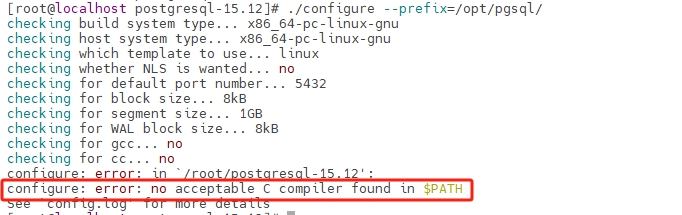
[root@localhost postgresql-15.12]# ./configure --prefix=/opt/pgsql/
这里提示没有C语言编译器:
#安装它
[root@localhost postgresql-15.12]# dnf -y install gcc-c++
#再次编译
[root@localhost postgresql-15.12]# ./configure --prefix=/opt/pgsql/
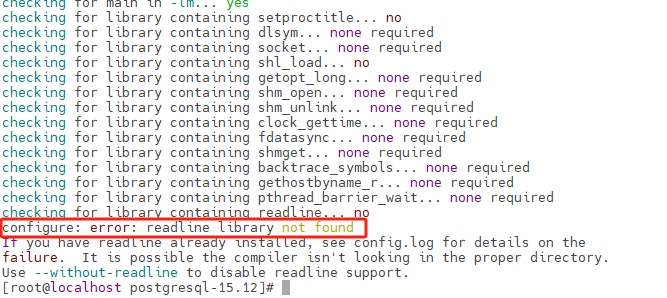
提示没有找到到readline依赖库没有找到:
# 安装它
[root@localhost postgresql-15.12]# dnf -y install readline-devel
# 再次编译
[root@localhost postgresql-15.12]# ./configure --prefix=/opt/pgsql/
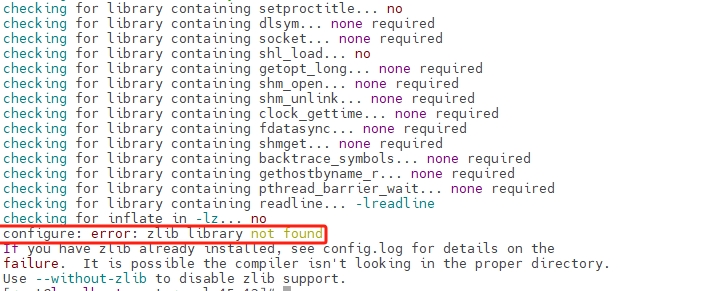
提示没有找到zlib依赖库没有找到:
# 安装它
[root@localhost postgresql-15.12]# dnf -y install zlib-devel
# 再次编译
[root@localhost postgresql-15.12]# ./configure --prefix=/opt/pgsql/
# 安装
[root@localhost postgresql-15.12]# make && make install
到这里就可以编译通过了,但是可能还需要其它插件的支持,可能需要根据实际情况安装其它插件,我这里就不安装了。
软件配置:
创建用户和用户组:
[root@localhost postgresql-15.12]# groupadd postgres
[root@localhost postgresql-15.12]# useradd -g postgres postgres
[root@localhost postgresql-15.12]# id postgres
uid=1000(postgres) gid=1000(postgres) groups=1000(postgres)
创建数据存放目录:
[root@localhost postgresql-15.12]# mkdir -p /data/postgresql/data
[root@localhost postgresql-15.12]# chown -R postgres:postgres /data/postgresql
配置环境变量:
[root@localhost ~]# cat >/etc/profile.d/pgsql.sh<<'EOF'
#!/bin/bash
export PGHOME=/opt/pgsql
export PGDATA=/data/postgresql/data
export PATH=$PATH:$PGHOME/bin
EOF
initdb初使化数据库:
[root@localhost ~]# su - postgres
[postgres@localhost ~]$ source /etc/profile.d/pgsql.sh
[postgres@localhost ~]$ initdb
配置服务:
[postgres@localhost data]$ vi /data/postgresql/data/postgresql.conf
# 求掉注释并修改listen_addresses = 'localhost'为如下配置,允许所有地址可以远程,如果本地连接也可以不改。
listen_addresses = '*'
修改/opt/pgsql/postgresql/data目录下pg_hba.conf 文件,该文件 配置对数据库的访问权限。
[postgres@localhost data]$ vi /data/postgresql/data/pg_hba.conf
# 如下添加一行
# IPv4 local connections:
host    all             all             127.0.0.1/32            trust
host    all             all             0.0.0.0/0               trust
这里发现rocky没有/etc/init.d目录用于存放服务启动脚本,手动安装一下chkconfig
[root@localhost ~]# su - root
[root@localhost ~]# dnf install chkconfig
[root@localhost ~]# cp postgresql-15.12/contrib/start-scripts/linux /etc/init.d/postgresql
[root@localhost ~]# chmod +x /etc/init.d/postgresql
# 再改一下配置
[root@localhost ~]# vi /etc/init.d/postgresql
# 修改下面两项内容成我们预定的路径
prefix=/opt/pgsql
PGDATA="/data/postgresql/data"
启动测试:
[root@localhost ~]# /etc/init.d/postgresql start
Starting PostgreSQL: ok
[root@localhost ~]# ss -ntl|grep 5432
LISTEN 0      244          0.0.0.0:5432      0.0.0.0:*
LISTEN 0      244             [::]:5432         [::]:*
设置开机自启(可选):
[root@localhost ~]# chkconfig --add postgresql
[root@localhost ~]# chkconfig
Note: This output shows SysV services only and does not include native
      systemd services. SysV configuration data might be overridden by native
      systemd configuration.

      If you want to list systemd services use 'systemctl list-unit-files'.
      To see services enabled on particular target use
      'systemctl list-dependencies [target]'.

postgresql      0:off   1:off   2:on    3:on    4:on    5:on    6:off
OK!!!
测试本地连接:
[root@localhost ~]# su - postgres
Last login: Wed Mar  5 23:10:07 EST 2025 on pts/0
[postgres@localhost ~]$ psql
psql (15.12)
Type "help" for help.

postgres=#
1.2 设置连接密码
[postgres@localhost ~]$ psql
# 可以看到密码字段已有值,是使用默认的加密方式生成的密文
postgres=# alter user postgres with password '123456';
postgres=# select rolname, rolpassword from pg_authid where rolname = 'postgres';
 rolname  |                                                              rolpassword
----------+---------------------------------------------------------------------------------------------------------------------------------------
 postgres | SCRAM-SHA-256$4096:HynTxZyl2R4J3Ey14ucwvg==$YpEF6SBeFcW1OOaLnbAKDqnh4RSegWRD27R9iW4uxAc=:pripSAckXyampt0lDbrNhAIGOdHIW8h2emgr+unWCEA=
(1 row)
完成了,现在把前面pg_hba.conf配置文件中的METHOD设置成默认的加密方式,如下:

重启数据库:
[root@localhost ~]# /etc/init.d/postgresql restart
Restarting PostgreSQL: ok
这时候本地登录还是不用密码,但是远程需要使用刚刚设置的密码才能登录了。

 浙公网安备 33010602011771号