
iperf3测试宽带速率
iperf3测试宽带
一、软件安装
iperf3 是一款开源工具,专门用于测量网络吞吐量、延迟、抖动等网络性能。它广泛应用于 TCP、UDP、SCTP 协议的性能测试,尤其适合网络优化和评估。iperf3 提供客户端和服务器模式,通过数据传输来衡量网络性能,是网络调优、带宽评估中的得力工具。iperf3用于测试两个设备之间的传输速率,需要两端都安装该软件并同时运行。
下载地址:iPerf - Download iPerf3 and original iPerf pre-compiled binaries
服务端(Linux):
[root@localhost ~]# yum install -y iperf3
客户端(Windows):
直接下载解压即可使用:Releases · ar51an/iperf3-win-builds
二、使用方法
2.1 简单用法
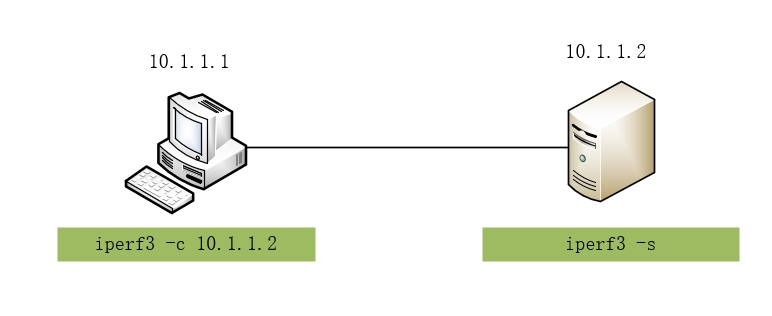
服务端先运行iperf3:
[root@localhost ~]# iperf3 -s
-----------------------------------------------------------
Server listening on 5201
-----------------------------------------------------------
可以看见默认监听5201端口。
客户端进行测试:
C:\Users\guoji\Downloads>iperf3 -c 10.1.1.2
Connecting to host 10.1.1.2, port 5201
[  5] local 10.1.1.1 port 62872 connected to 10.1.1.2 port 5201
[ ID] Interval           Transfer     Bitrate
[  5]   0.00-1.01   sec   278 MBytes  2.31 Gbits/sec
[  5]   1.01-2.01   sec   453 MBytes  3.79 Gbits/sec
[  5]   2.01-3.01   sec   470 MBytes  3.95 Gbits/sec
[  5]   3.01-4.01   sec   494 MBytes  4.14 Gbits/sec
[  5]   4.01-5.01   sec   447 MBytes  3.74 Gbits/sec
[  5]   5.01-6.01   sec   473 MBytes  4.00 Gbits/sec
[  5]   6.01-7.00   sec   453 MBytes  3.82 Gbits/sec
[  5]   7.00-8.01   sec   535 MBytes  4.45 Gbits/sec
[  5]   8.01-9.01   sec   449 MBytes  3.76 Gbits/sec
[  5]   9.01-10.01  sec   457 MBytes  3.85 Gbits/sec
- - - - - - - - - - - - - - - - - - - - - - - - -
[ ID] Interval           Transfer     Bitrate
[  5]   0.00-10.01  sec  4.40 GBytes  3.78 Gbits/sec                  sender
[  5]   0.00-10.01  sec  4.40 GBytes  3.78 Gbits/sec                  receiver

iperf Done.
Interval: 程序的运行时间
Transferf: 传输的数据总量
Bitrate: 测试出的带宽比特率,也就是速率。
2.2 常用参数说明
| 参数 | 说明 |
|---|---|
| -s | 启动服务端模式。 |
| -c | 启动客户端模式。 |
| -p | 指定服务端口。 |
| -t | 设置持续时间。 |
| -i | 设置报告间隔时间,单位为秒 |
| -P | 启用并发连接数,默认情况下,iperf3 通过单个线程进行测试。 |
| -u | 使用 UDP 协议进行测试。默认情况下,iperf3 使用 TCP 协议。如果需要测试 UDP 网络性能,可以使用该参数。 |
| -b | 指定目标带宽。如:iperf3 -c 10.1.1.2 -b 10000M |
| -R | 反向测试。默认情况下,客户端向服务器发送数据。使用该参数后,服务器向客户端发送数据,适用于需要测试反向带宽的场景。 |
注意:默认测试的是客户端到服务端的速率,就是上传速率,如果下载的话要加-R参数。

 浙公网安备 33010602011771号