
解决在使用MassTransit时连接RabbitMQ失败问题
通过查看日志信息如下:
System.AggregateException: One or more errors occurred. (Broker unreachable: guest@192.168.26.139:5672/test) ---> MassTransit.RabbitMqTransport.RabbitMqConnectionException: Broker unreachable: guest@192.168.26.139:5672/test ---> RabbitMQ.Client.Exceptions.BrokerUnreachableException: None of the specified endpoints were reachable ---> RabbitMQ.Client.Exceptions.OperationInterruptedException: The AMQP operation was interrupted: AMQP close-reason, initiated by Peer, code=530, text="NOT_ALLOWED - vhost test not found"
“vhost test not found” 由异常信息最后一句得知,RabbitMQ 缺少 test虚拟机,需要去控制台界面配置。
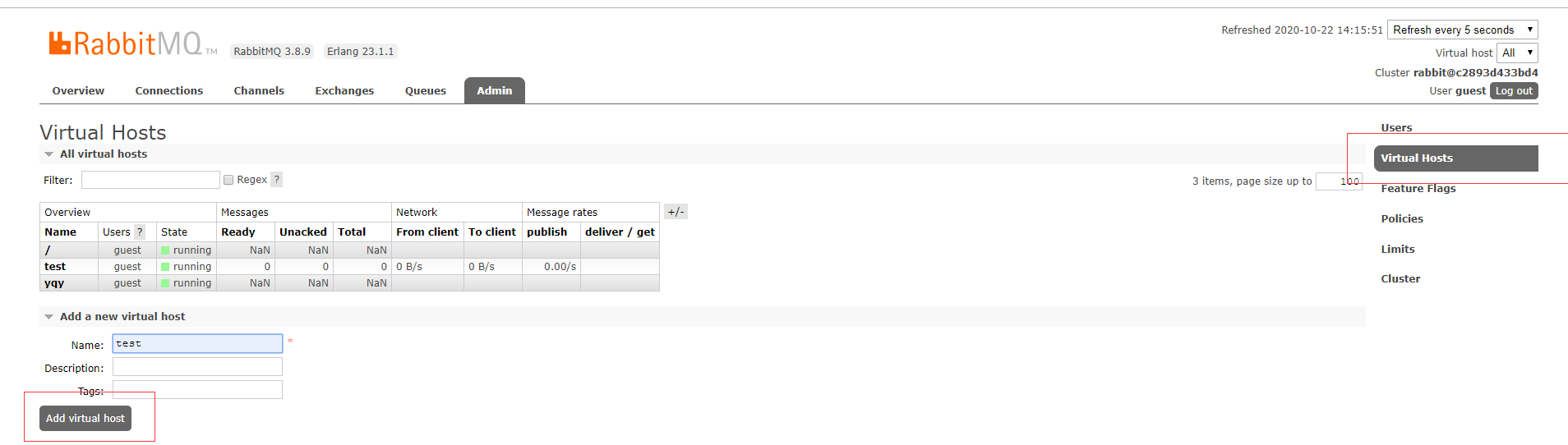
打开RabbitMQ后台管理界面,选择Admin主页,选择右边"Virtual Host" 菜单,然后点击左下方 “Add virtual host”,添加相应虚拟机即可。

 浙公网安备 33010602011771号