
SpringBoot使用Junit单元测试
SpringBoot使用Junit单元测试
pom.xml依赖
一般使用idea新建一个SpringBoot web项目时,都会自动引入此依赖。
        <dependency>
            <groupId>org.springframework.boot</groupId>
            <artifactId>spring-boot-starter-test</artifactId>
            <scope>test</scope>
        </dependency>

        <dependency>
            <groupId>junit</groupId>
            <artifactId>junit</artifactId>
            <scope>test</scope>
        </dependency>
测试类基类
项目结构:
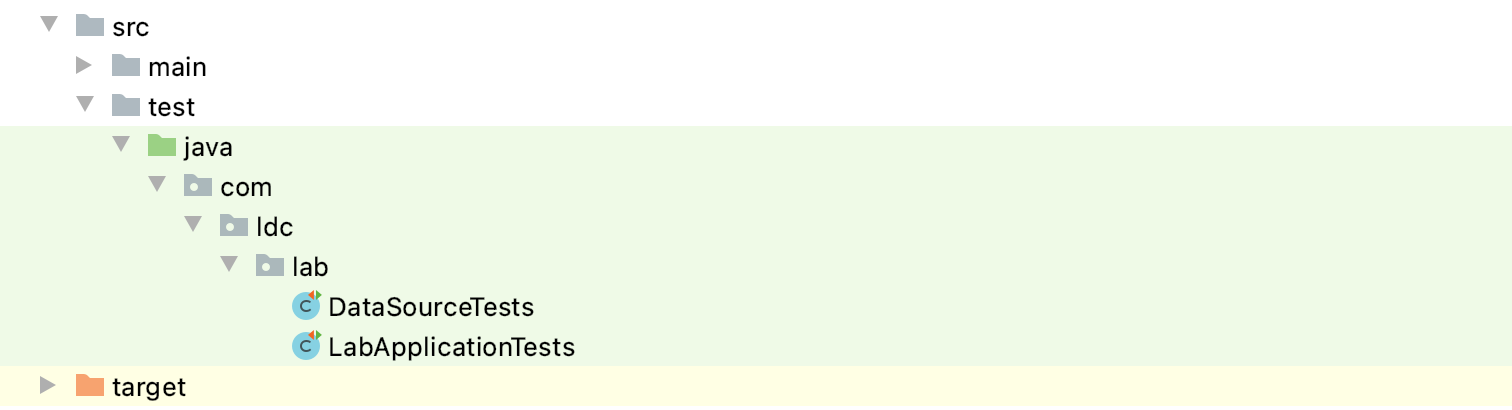
由于一个项目中会写很多测试类,而每建一个测试类都需要去补注解,故创建一个测试类基类,其他测试类直接继承它:
import org.junit.After;
import org.junit.Before;
import org.junit.runner.RunWith;
import org.springframework.boot.test.context.SpringBootTest;
import org.springframework.test.context.junit4.SpringRunner;
import org.springframework.test.context.web.WebAppConfiguration;

@RunWith(SpringRunner.class)
@SpringBootTest
//由于是Web项目,Junit需要模拟ServletContext,因此我们需要给我们的测试类加上@WebAppConfiguration。
@WebAppConfiguration
public class LabApplicationTests {

    @Before
    public void init() {
        System.out.println("开始测试-----------------");
    }

    @After
    public void after() {
        System.out.println("测试结束-----------------");
    }
}
测试类
import org.junit.Test;
import org.springframework.beans.factory.annotation.Autowired;
import org.springframework.context.ApplicationContext;
import javax.sql.DataSource;

public class DataSourceTests extends LabApplicationTests{
    @Autowired
    ApplicationContext applicationContext;

    @Test
    public void testDataSource() throws Exception {
        // 获取配置的数据源
        DataSource dataSource = applicationContext.getBean(DataSource.class);
        System.out.println(dataSource.getClass().getName());
    }
}
将测试方法运行起来,即可在控制台中看到对应的数据源的输出信息。

 浙公网安备 33010602011771号