


数据转换
数据转换
就是将原数据整理成想要的格式,和数据清洗有点像!
比如:本案例
数据转换前:
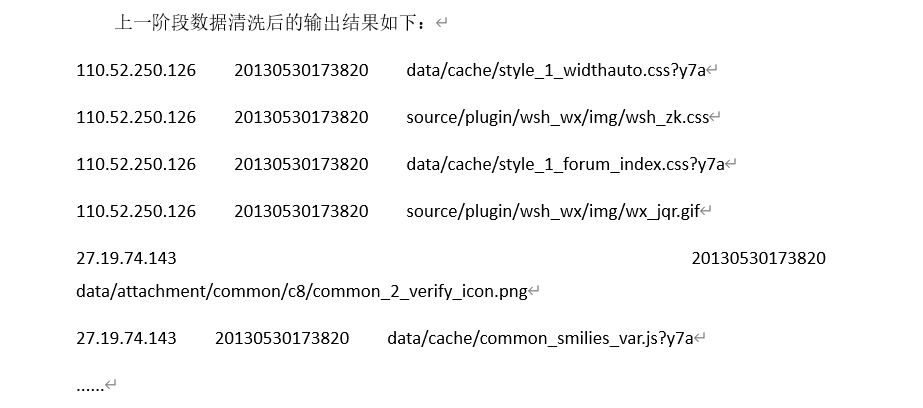
每一列对应的含义:ip、时间、url
数据转换后:
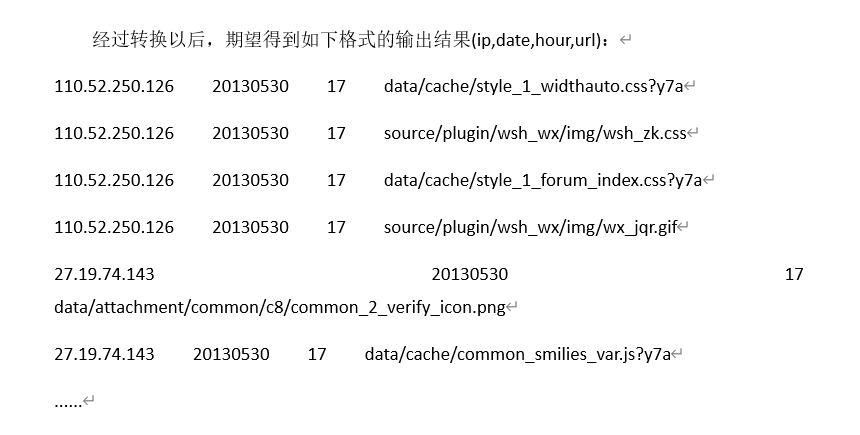
详细代码如下:
代码思路和数据清洗一样
package com.simple.mr;
import java.io.IOException;
import java.net.URI;
import java.util.HashMap;
import org.apache.hadoop.fs.FSDataInputStream;
import org.apache.hadoop.fs.FileSystem;
import org.apache.hadoop.fs.Path;
import org.apache.hadoop.io.LongWritable;
import org.apache.hadoop.io.Text;
import org.apache.hadoop.mapreduce.Mapper;
import org.apache.hadoop.mapreduce.Mapper.Context;
/*
* 转换操作
* 转换日期中的hour值为单独的列,以便于后续按小时统计聚合
*
*/
public class BBSMapper2 extends Mapper<LongWritable, Text, LongWritable, Text> {
Text outputValue = new Text();
@Override
protected void map(LongWritable key, Text value, Context context)
throws IOException, InterruptedException{
String line = value.toString(); // 转换为String
String[] fields = line.split("\t");
if(fields.length != 3) {
return;
}
String[] tFields = new String[6];
tFields[0] = fields[0];
tFields[1] = fields[1];
tFields[2] = fields[2];
// 提取date时间段
tFields[4] = fields[1].substring(0, 8);
// 提取hour时间段
tFields[5] = fields[1].substring(8, 10);
// ip, date, hour, timestamp, url
outputValue.set(tFields[0] + "\t" + tFields[4] + "\t" + tFields[5] + "\t" + tFields[2]);
context.write(key, outputValue);
}
}
5.5 代码实现:编写Reducer类
在项目【src】目录下,创建一个名为”com.simple.mr.BBSReducer2”类,并指定其继承自org.apache.hadoop.mapreduce.Reducer类。编辑该类的代码如下:
package com.simple.mr;
import java.io.IOException;
import org.apache.hadoop.io.LongWritable;
import org.apache.hadoop.io.NullWritable;
import org.apache.hadoop.io.Text;
import org.apache.hadoop.mapreduce.Reducer;
public class BBSReducer2 extends Reducer<LongWritable, Text, Text, NullWritable> {
protected void reduce(LongWritable k2, Iterable<Text> v2s, Context context)
throws IOException, InterruptedException {
for (Text v2 : v2s) {
context.write(v2, NullWritable.get());
}
}
}
5.6 代码实现:编写驱动程序类
在项目【src】目录下,创建一个名为”com.simple.mr.BBSDriver2”类,包含main方法。编辑该类的代码如下:
package com.simple.mr;
import java.net.URI;
import org.apache.hadoop.conf.Configuration;
import org.apache.hadoop.conf.Configured;
import org.apache.hadoop.fs.FileSystem;
import org.apache.hadoop.fs.Path;
import org.apache.hadoop.io.LongWritable;
import org.apache.hadoop.io.NullWritable;
import org.apache.hadoop.io.Text;
import org.apache.hadoop.mapreduce.Job;
import org.apache.hadoop.mapreduce.lib.input.FileInputFormat;
import org.apache.hadoop.mapreduce.lib.output.FileOutputFormat;
import org.apache.hadoop.util.Tool;
import org.apache.hadoop.util.ToolRunner;
public class BBSDriver2 extends Configured implements Tool {
static final String INPUT_PATH = "hdfs://localhost:9000/output.txt";
static final String OUT_PATH = "hdfs://localhost:9000/output2";
public static void main(String[] args) {
Configuration conf = new Configuration();
try {
int res = ToolRunner.run(conf, new BBSDriver2(), args);
System.exit(res);
} catch (Exception e) {
e.printStackTrace();
}
}
@Override
public int run(String[] args) throws Exception {
// 清理已存在的输出文件
FileSystem fs = FileSystem.get(new URI(INPUT_PATH), getConf());
Path outPath = new Path(OUT_PATH);
if (fs.exists(outPath)) {
fs.delete(outPath, true);
}
final Job job = Job.getInstance(getConf(), "BBS论坛日志分析2");
// 设置为可以打包运行
job.setJarByClass(BBSDriver2.class);
job.setMapperClass(BBSMapper2.class);
job.setMapOutputKeyClass(LongWritable.class);
job.setMapOutputValueClass(Text.class);
job.setReducerClass(BBSReducer2.class);
job.setOutputKeyClass(Text.class);
job.setOutputValueClass(NullWritable.class);
FileOutputFormat.setOutputPath(job, new Path(OUT_PATH));
FileInputFormat.setInputPaths(job, INPUT_PATH);
boolean success = job.waitForCompletion(true);
// 如果清理数据成功输出 及 清理失败输出
if (success) {
System.out.println("Clean process success!");
}else {
System.out.println("Clean process failed!");
}
return 0;
}
}

 浙公网安备 33010602011771号