


第二讲 布局
第二讲 布局
重要:在安卓布局里有且只有一个根布局所以最外层只能有一个Layout但是内部可以嵌套多个类似于树!
在activity_main.xml里面写布局
线性布局
元素按比重划分大小,注意标红的地方不能改
1:1:2划分
线性布局里面的控件只能水平摆或者垂直摆,
看orientation
horizonta水平
vertical垂直
<?xml version="1.0" encoding="utf-8"?>
<LinearLayout android:layout_width="match_parent"
android:layout_height="match_parent"
xmlns:android="http://schemas.android.com/apk/res/android"
android:orientation="horizontal"
>
<Button
android:layout_height="wrap_content"
android:layout_width="0sp"
android:layout_weight="1"
android:text="@string/love"/>
<Button
android:layout_marginLeft="40sp"
android:layout_height="wrap_content"
android:layout_width="0sp"
android:layout_weight="1"
android:text="@string/love"/>
<Button
android:layout_marginLeft="40sp"
android:layout_height="wrap_content"
android:layout_width="0sp"
android:layout_weight="2"
android:text="@string/love"/>
</LinearLayout>
<LinearLayout android:layout_width="match_parent"
android:layout_height="match_parent"
xmlns:android="http://schemas.android.com/apk/res/android"
android:orientation="horizontal"
>
<Button
android:layout_height="wrap_content"
android:layout_width="0sp"
android:layout_weight="1"
android:text="@string/love"/>
<Button
android:layout_marginLeft="40sp"
android:layout_height="wrap_content"
android:layout_width="0sp"
android:layout_weight="1"
android:text="@string/love"/>
<Button
android:layout_marginLeft="40sp"
android:layout_height="wrap_content"
android:layout_width="0sp"
android:layout_weight="2"
android:text="@string/love"/>
</LinearLayout>
表格布局
1.拉伸列
<?xml version="1.0" encoding="utf-8"?>
<TableLayout
xmlns:android="http://schemas.android.com/apk/res/android"
android:layout_height="wrap_content"
android:layout_width="wrap_content"
android:stretchColumns="1,2"可拉伸的列下标,列标是从0开始。
>
<TableRow>
<Button
android:text="1"
android:layout_column="0"
/>
<Button
android:text="2"
android:layout_column="1"
/>
<Button
android:text="3"
android:layout_column="2"
/>
</TableRow>
</TableLayout>
<TableLayout
xmlns:android="http://schemas.android.com/apk/res/android"
android:layout_height="wrap_content"
android:layout_width="wrap_content"
android:stretchColumns="1,2"可拉伸的列下标,列标是从0开始。
>
<TableRow>
<Button
android:text="1"
android:layout_column="0"
/>
<Button
android:text="2"
android:layout_column="1"
/>
<Button
android:text="3"
android:layout_column="2"
/>
</TableRow>
</TableLayout>
补充说明
1.隐藏列
android:collapseColumns="要隐藏的列标"
例如:隐藏下标为1的列
<?xml version="1.0" encoding="utf-8"?>
<TableLayout
    xmlns:android="http://schemas.android.com/apk/res/android"
  android:layout_height="wrap_content"
   android:layout_width="wrap_content"
android:collapseColumns="1"
    >
<TableRow>
    <Button
        android:text="1"
        android:layout_column="0"
        android:layout_height="wrap_content"
        android:layout_width="wrap_content"
        />
    <Button
        android:text="2"
        android:layout_column="1"
        android:layout_height="wrap_content"
        android:layout_width="wrap_content"
        />
    <Button
        android:text="3"
        android:layout_column="2"
        android:layout_height="wrap_content"
        android:layout_width="wrap_content"
        />
</TableRow>
</TableLayout>
2.设定列,当前内容在哪一列
 android:layout_column="列标"
2.收缩列展示
<?xml version="1.0" encoding="utf-8"?>
<TableLayout
xmlns:android="http://schemas.android.com/apk/res/android"
android:layout_height="wrap_content"
android:layout_width="wrap_content"
android:collapseColumns="1"
android:shrinkColumns="0"
>
<TableRow>
<Button
android:text="1"
android:layout_column="0"
android:layout_height="wrap_content"
android:layout_width="wrap_content"
/>
<Button
android:text="2"
android:layout_column="1"
android:layout_height="wrap_content"
android:layout_width="wrap_content"
/>
<Button
android:text="3"
android:layout_column="2"
android:layout_height="wrap_content"
android:layout_width="wrap_content"
/>
<Button
android:text="1"
android:layout_column="0"
android:layout_height="wrap_content"
android:layout_width="wrap_content"
/>
<Button
android:text="2"
android:layout_column="1"
android:layout_height="wrap_content"
android:layout_width="wrap_content"
/>
<Button
android:text="3"
android:layout_column="2"
android:layout_height="wrap_content"
android:layout_width="wrap_content"
/>
</TableRow>
</TableLayout>
<TableLayout
xmlns:android="http://schemas.android.com/apk/res/android"
android:layout_height="wrap_content"
android:layout_width="wrap_content"
android:collapseColumns="1"
android:shrinkColumns="0"
>
<TableRow>
<Button
android:text="1"
android:layout_column="0"
android:layout_height="wrap_content"
android:layout_width="wrap_content"
/>
<Button
android:text="2"
android:layout_column="1"
android:layout_height="wrap_content"
android:layout_width="wrap_content"
/>
<Button
android:text="3"
android:layout_column="2"
android:layout_height="wrap_content"
android:layout_width="wrap_content"
/>
<Button
android:text="1"
android:layout_column="0"
android:layout_height="wrap_content"
android:layout_width="wrap_content"
/>
<Button
android:text="2"
android:layout_column="1"
android:layout_height="wrap_content"
android:layout_width="wrap_content"
/>
<Button
android:text="3"
android:layout_column="2"
android:layout_height="wrap_content"
android:layout_width="wrap_content"
/>
</TableRow>
</TableLayout>
效果展示
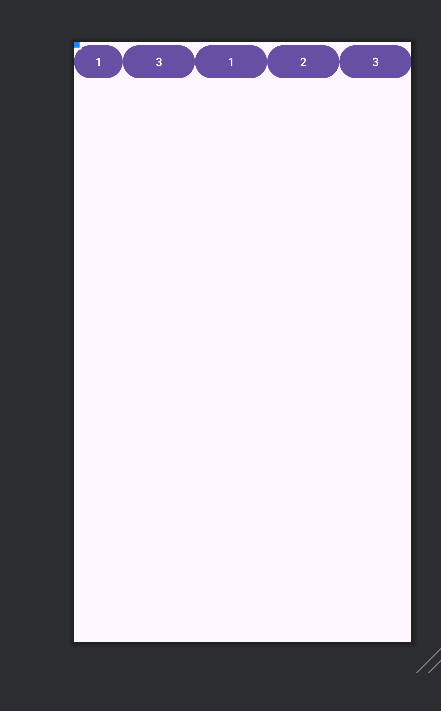
收缩列,多个列逗号隔
android:shrinkColumns="列下标,列下标..."目的是:收缩指定列以满足当前内容不超过父容器
3.横跨多列
android:layout_span="横跨几列"
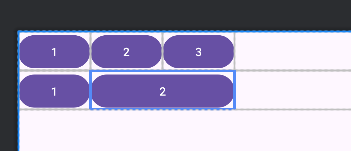
注意:横跨必须现有标准才知道怎么合并!
<?xml version="1.0" encoding="utf-8"?>
<TableLayout
xmlns:android="http://schemas.android.com/apk/res/android"
android:layout_height="match_parent"
android:layout_width="match_parent"
>
<TableRow>
<Button
android:text="1"
android:layout_column="0"
/>
<Button
android:text="2"
android:layout_column="1"
/>
<Button
android:text="3"
android:layout_column="2"
/>
</TableRow>
<TableRow>
<Button
android:text="1"
android:layout_column="0"
/>
<Button
android:text="2"
android:layout_span="2"
android:layout_column="1"
/>
</TableRow>
</TableLayout>
<TableLayout
xmlns:android="http://schemas.android.com/apk/res/android"
android:layout_height="match_parent"
android:layout_width="match_parent"
>
<TableRow>
<Button
android:text="1"
android:layout_column="0"
/>
<Button
android:text="2"
android:layout_column="1"
/>
<Button
android:text="3"
android:layout_column="2"
/>
</TableRow>
<TableRow>
<Button
android:text="1"
android:layout_column="0"
/>
<Button
android:text="2"
android:layout_span="2"
android:layout_column="1"
/>
</TableRow>
</TableLayout>
注意事项
在表格布局里,这一列的宽度由本列最大宽度定(不算合并列)
<?xml version="1.0" encoding="utf-8"?>
<TableLayout
    xmlns:android="http://schemas.android.com/apk/res/android"
  android:layout_height="match_parent"
   android:layout_width="match_parent"
    >
<TableRow>
    <Button
        android:text="1"
android:layout_column="0"
android:layout_width="100sp"
        />

    <Button
        android:text="2"
        android:layout_width="100sp"
       android:layout_column="1"
        />
    <Button
        android:text="3"
        android:layout_column="2"
        android:layout_width="200sp"
        />


</TableRow>
<TableRow>
    <Button
        android:text="1"
        android:layout_column="0"
        android:layout_width="100sp"
        />

    <Button
        android:text="2"
        android:layout_width="100sp"

        />
    <Button
        android:text="2"
        android:layout_width="100sp"

        />
</TableRow>
</TableLayout>
上述代码展示图:
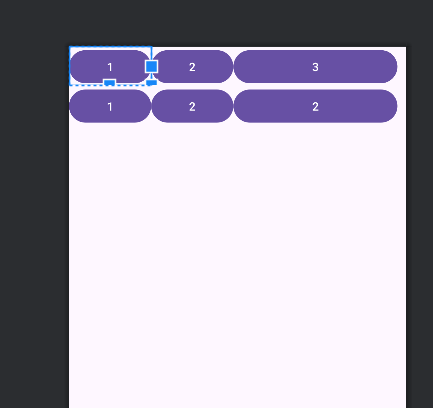
整个表格大小取决于父容器

 浙公网安备 33010602011771号