
2021年1月31日 Map双列集合
Map的定义要点:
-
每个元素都是键值对存在
- 建不可以重复
- <K,V> 中键和值可以是任意类型
Map常用方法:
- 测试一下put方法的用法
     HashMap<Integer,String> hm = new HashMap<>();
        hm.put(1,"Tom");
        System.out.println(hm.put(2,"Alice"));//null
        System.out.println(hm);//{1=Tom, 2=Alice}
        hm.put(1,"Bruce");
        System.out.println(hm);//{1=Bruce, 2=Alice}
        System.out.println(hm.remove(2));//Alice
        System.out.println(hm);//{1=Bruce}
- get方法如果获取不到就要会返回null
     HashMap<Integer,String> hm = new HashMap<>();
        hm.put(1,"Tom");

        System.out.println(hm.get(2));//null

        hm.remove(1);

        System.out.println(hm.size());//0
Map怎么遍历?
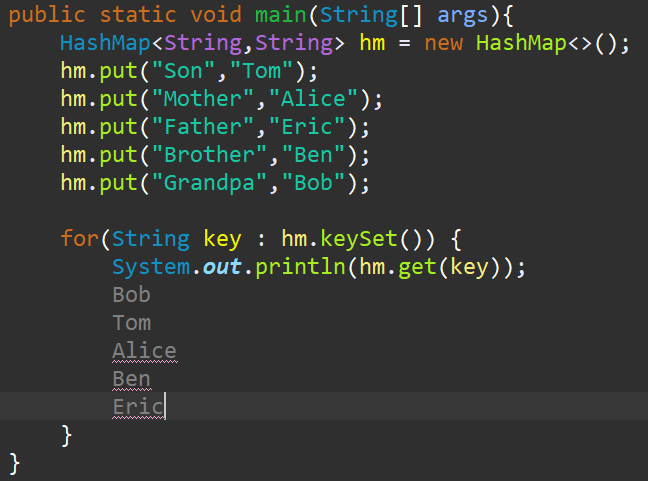
方式一:通过键找值
步骤:先获取所有键组成的集合(是个Set),然后遍历这个集合里所有的建,再通过建找值
代码示例如下:
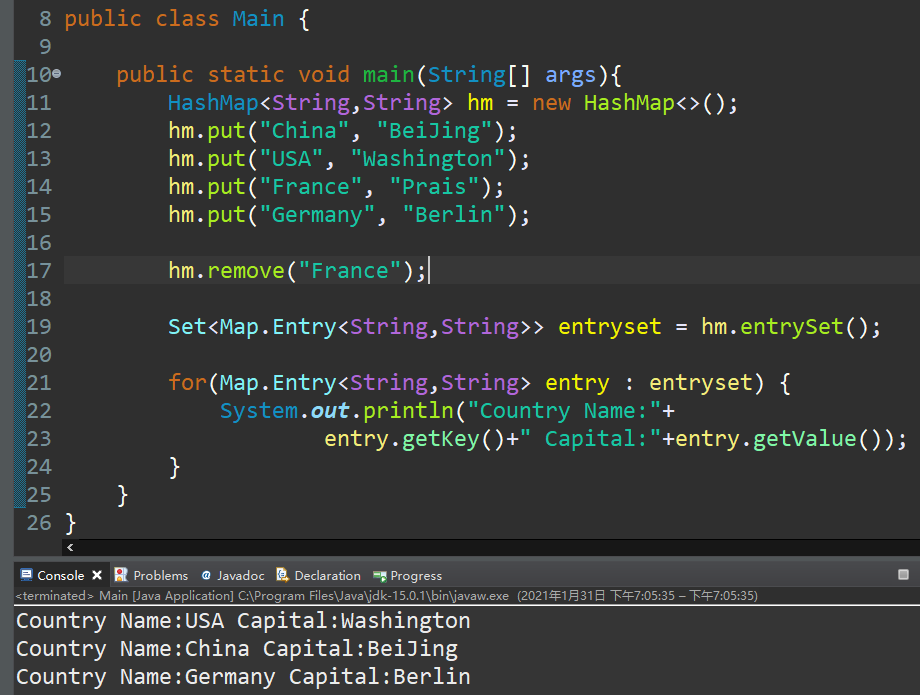
方式二:通过 Entry键值对对象
Map.Entry<K,V>是个接口,通过多态形式引用匿名实现类。
Map子类对象的entrySet()方法可以返回一个Set<Map.Entry<K,V>>的集合
如果该HashMap中,键为自定义类型,为了保证键不重复,需要重写hashCode和equals方法:
现在需求是建立一个HashMap,能存长方形(长、宽)和它的面积:
首先定义长方形类,定义长宽属性并定义全参构造方法和toString、hashcode、equals方法
class Rect{
    private int Width;
    private int Height;
    public int getWidth() {
        return Width;
    }
    public void setWidth(int width) {
        Width = width;
    }
    public int getHeight() {
        return Height;
    }
    public void setHeight(int height) {
        Height = height;
    }
    public Rect(int width, int height) {
        super();
        Width = width;
        Height = height;
    }
    @Override
    public String toString() {
        return "Rect [Width=" + Width + ", Height=" + Height + "]";
    }
    @Override
    public int hashCode() {
        return Width+Height;//这里这样写是为了让旋转九十度相同的正方形hashcode是相等的
    }
    @Override
    public boolean equals(Object obj) {
        if (this == obj)
            return true;
        if (obj == null)
            return false;
        if (getClass() != obj.getClass())
            return false;
        Rect other = (Rect) obj;
        if (Height == other.Height&&Width==other.Width)
            return true;
        if (Height == other.Width&&Height==other.Width)
            return true;//长宽对应宽长相同的也叫同一个长方形
        return false;
    }

}
由此可见equals和hashcode的重写需要根据实际情况决定
接下来使用两种方法遍历
HashMap<Rect,Integer> rects = new HashMap<>();
        rects.put(new Rect(3,4), 12);
        rects.put(new Rect(4,3), 12);
        rects.put(new Rect(3,3), 9);
        rects.put(new Rect(3,5), 15);
        rects.put(new Rect(5,3), 15);

        //使用keySet遍历:
        for(Rect r:rects.keySet()) {
            System.out.println(r+" size:"+rects.get(r));
        }
        //使用entrySet遍历:
        Set<Map.Entry<Rect, Integer>> entrySet = rects.entrySet();

        for(Map.Entry<Rect, Integer> entrys : entrySet) {
            System.out.println(entrys.getKey()+" size:"+entrys.getValue());
        }
集合嵌套:
ArrayList套ArrayList,类似于二维数组:
import java.util.ArrayList;
import java.util.Collections;
import java.util.Iterator;
import java.util.Map;

public class Main {
    public static void main(String[] args) {
        //创建矩阵
        ArrayList<ArrayList<Integer>> matrix = new ArrayList<>();
        //创建第一行并添加数据
        ArrayList<Integer> row1 = new ArrayList<Integer>();
        Collections.addAll(row1, 1,2,3);
        //创建第二行并添加数据
        ArrayList<Integer> row2 = new ArrayList<Integer>();
        Collections.addAll(row2, 4,5,6);
        //创建第三行并添加数据
        ArrayList<Integer> row3 = new ArrayList<Integer>();
        Collections.addAll(row3, 7,8,9);

        //将三行添加至矩阵

        Collections.addAll(matrix, row1,row2,row3);

        //遍历矩阵

        //方式1:增强for循环

        for(ArrayList<Integer> row : matrix) {
            for(Integer col:row) {
                System.out.print(col+" ");
            }
            System.out.println();
        }
        //方式2:迭代器
        Iterator<ArrayList<Integer>> AL_iter = matrix.iterator();

        while(AL_iter.hasNext()) {
            ArrayList<Integer> row = AL_iter.next();
            Iterator<Integer> INT_iter = row.iterator();
            while(INT_iter.hasNext()) {
                Integer _int = INT_iter.next();
                System.out.print(_int+" ");
            }
            System.out.println();
        }
    }
}
HashMap套HashMap(复杂):
原理:一个子HashMap作为父HashMap的键类型
     HashMap<Integer,HashMap<String,Double>> Scores
        = new HashMap<>();

        //创建1班
        HashMap<String,Double> class1 = new HashMap<>();
        class1.put("张三", 65.7);
        class1.put("李四", 87.9);
        class1.put("张三", 95.3);

        //创建2班
        HashMap<String,Double> class2 = new HashMap<>();
        class2.put("王五", 83.5);
        class2.put("赵六", 98.3);
        class2.put("田七", 66.7);
        //将子HashMap存入父HashMap中

        Scores.put(1, class1);
        Scores.put(2, class2);
共有4种遍历方式:
1、增强for遍历keySet
for(Integer classnum:Scores.keySet()) {
            HashMap<String,Double> eachclass = Scores.get(classnum);
            for(String studentName:eachclass.keySet()) {
                System.out.println(classnum+"班,姓名:"+studentName+" 成绩:"+eachclass.get(studentName));
            }
        }
2、增强for遍历entrySet
for(Map.Entry<Integer, HashMap<String,Double>> classNumAndClass:Scores.entrySet()) {
            Integer classNum = classNumAndClass.getKey();
            for(Map.Entry<String, Double> nameAndScore:classNumAndClass.getValue().entrySet()) {
                System.out.println(classNum+"班,姓名:"+nameAndScore.getKey()+" 成绩:"+nameAndScore.getValue());
            }
        }
3、迭代器遍历keySet
Iterator<Integer> OuterIt = Scores.keySet().iterator();
        while(OuterIt.hasNext()) {
            Integer OuterKey = OuterIt.next();
            HashMap<String,Double> InnerHashMap = Scores.get(OuterKey);
            Iterator<String> InnerIt = InnerHashMap.keySet().iterator();
            while(InnerIt.hasNext()) {
                String InnerKey = InnerIt.next();
                System.out.println(OuterKey+"班,姓名:"+InnerKey+" 成绩:"+InnerHashMap.get(InnerKey));
            }
        }
4、迭代器遍历entrySet
Iterator<Map.Entry<Integer, HashMap<String,Double>>> OuterIt= Scores.entrySet().iterator();
        while(OuterIt.hasNext()) {
            Map.Entry<Integer, HashMap<String,Double>> OuterEntry = OuterIt.next();
            Integer OuterKey = OuterEntry.getKey();
            HashMap<String,Double> OuterValue = OuterEntry.getValue();
            Iterator<Map.Entry<String, Double>> InnerIt = OuterValue.entrySet().iterator();
            while(InnerIt.hasNext()) {
                Map.Entry<String,Double> InnerEntry = InnerIt.next();
                System.out.println(OuterKey+"班,姓名:"+InnerEntry.getKey()+" 成绩:"+InnerEntry.getValue());
            }
        }

 浙公网安备 33010602011771号