Erlang04_文件编程
总篇:16
编辑于 2025/5/14 22:50
截稿于: 2025/5/14 23:30
简介
file模块一般用consult,一次读取文件中所有erlang term 配置项,然后筛选。
原语
- {ok,Terms} = file:consult(FileName):读取目标文件中的所有erlang term项(.结尾), 也要求该文件内必须全是erlang term项,否则报错
- {ok, IoDevice} = file:open(Filename, Options) :以Options配置打开文件。在需要多次写入时使用
 {ok, IoDevice}  = file:open(Filename, Options)
IoDevice:指向打开的文件的引用,可以注册在其他地方使用(写入/读取)
Options:[
    read,        % 只读
    write,       % 写入(覆盖)
    append,      % 追加
    binary,      % 二进制模式
    {encoding, utf8},  % 指定编码
    raw          % 原始模式
].
- ok= file:write_file(FileName,Str):覆盖写入文件 |
ok =file:write_file(FileName,Str,[append]):追加写入文件。在只写一次时使用
- ok =file:close(Fd):open之后需主动关闭,否则引用一直存在。
student.cfg
- 输入一个配置名,输出对应配置
- 读取student_cfg,输出到log
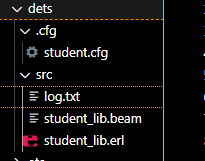
目录结构:
-module(student_lib).
-export([write_student_log/0, get_config/1]).

write_student_log() ->
    case file:consult("../.cfg/student.cfg") of
        {ok, Terms} ->
            case lists:keyfind(student_cfg, 1, Terms) of
                {student_cfg, Students} ->
                    write_to_log(Students);
                false ->
                    {error, no_student_cfg}
            end;
        {error, Reason} ->
            {error, Reason}
    end.

get_config(ConfigName) ->
    case file:consult("../.cfg/student.cfg") of
        {ok, Terms} ->
            case lists:keyfind(ConfigName, 1, Terms) of
                false ->
                    {error, {config_not_found, ConfigName}};
                Config ->
                    %%如果有内层配置,再find一下就和zm_config接近了,
                    % 但是需要处理目录文件相对位置才能写出一个通用的配置读取工具函数
                    Config
            end;
        {error, Reason} ->
            {error, Reason}
    end.

write_to_log(Students) ->
    Date = calendar:local_time(),
    Log = io_lib:format("~n~p~n-> at ~p~n", [Students, Date]),
    file:write_file("log.txt", Log, [append]).
{student_cfg,
    [
        {sid,1001,{student,"张三",15}},
        {sid,1002,{student,"李四",16}},
        {sid,1003,{student,"王五",17}},
        {sid,1004,{student,"赵六",18}},
        {sid,1005,{student,"孙七",19}}
    ]}.
{sid_cfg,[
    {init,[1001,1002,1003,1004,1005]}
    ]}.
读写方法都有了可以实现配置文件的读,日志文件的写,但需要一些目录相关(需要翻一下用户手册)的函数才能完成一个通用zm_confg:get(FileName,CfgName)配置文件读取函数。

 浙公网安备 33010602011771号