

Java基础语法
1. 注释
(1)单行注释
//
(2)多行注释
/* 注释 */
(3)文档注释
  JavaDoc  /**
            * @Description HelloWorld
            * @Author 刷刷
            */
2. 标识符和关键字
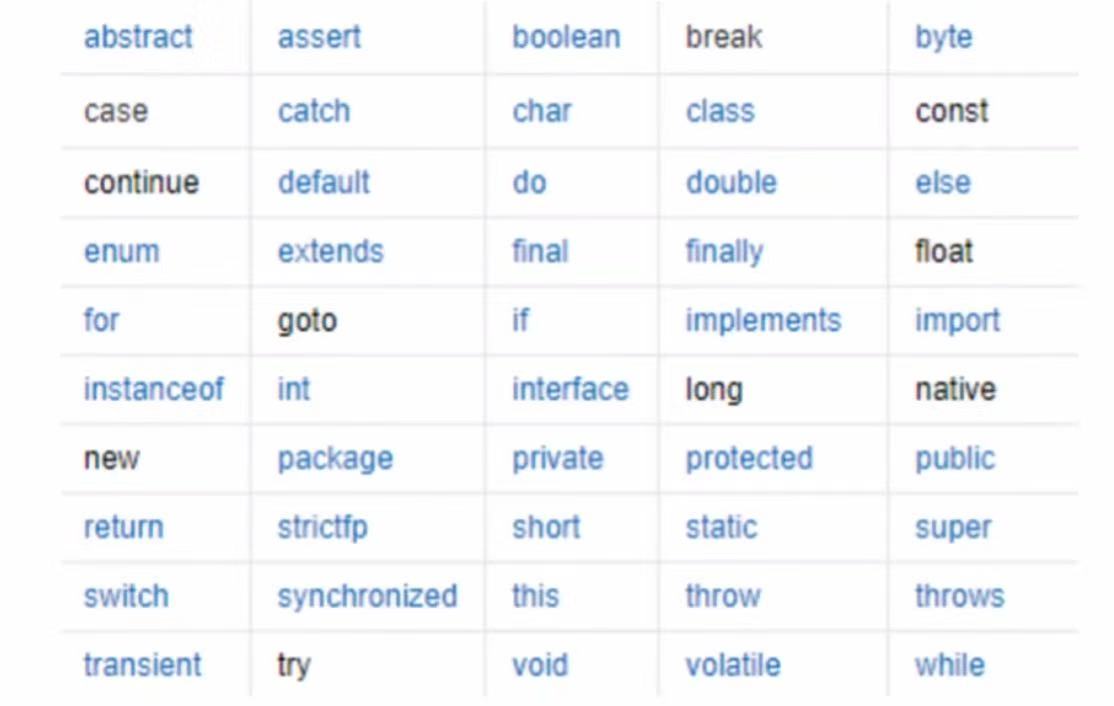
关键字
标识符:类名、变量名、方法名
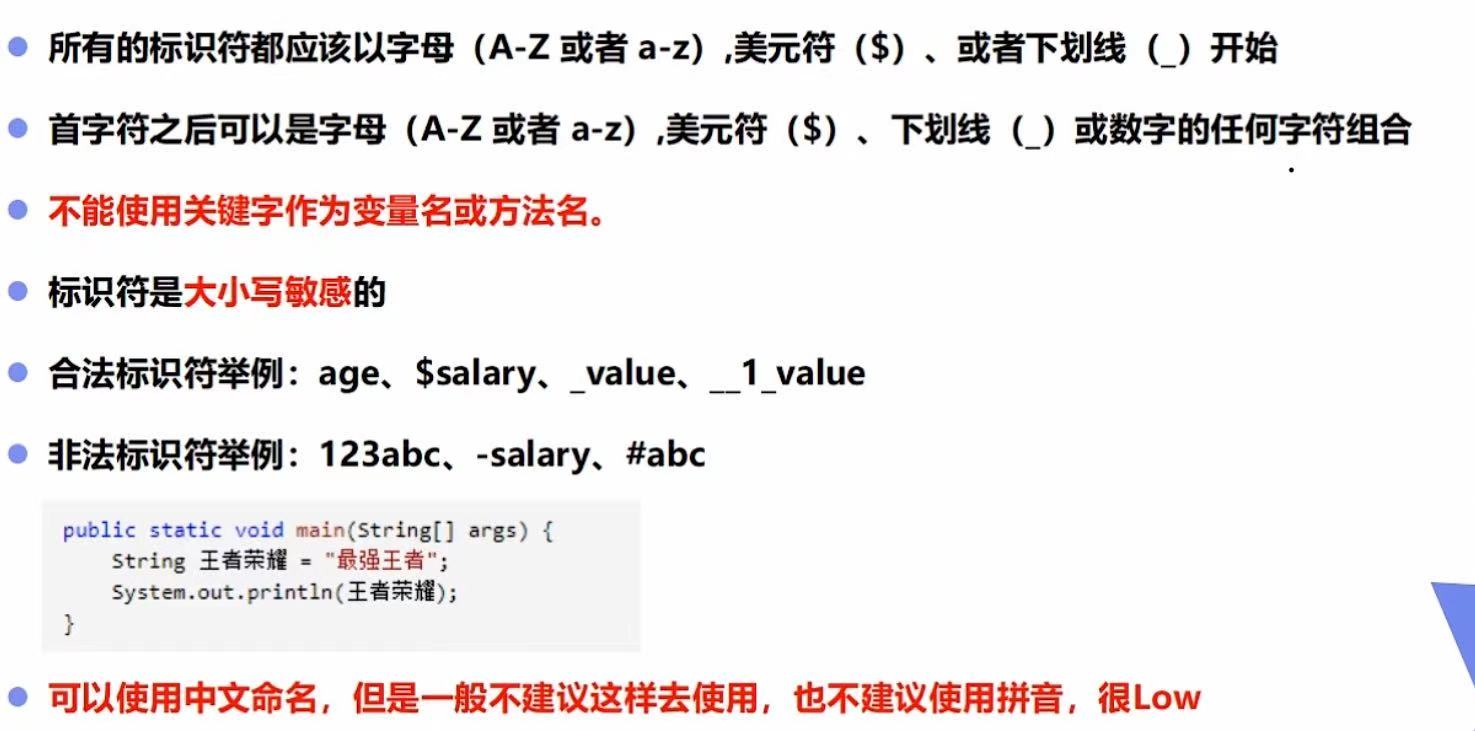
标识符注意点
代码示例
public class Hello {
    public static void main(String[] args) {
        // 单行注释
        System.out.println("Hello,World!");
        String Ahello = "a";
        String ahello = "a";
        String $hello = "a";
        String _hello = "a";
    }
}
3. 数据类型
强类型语言和弱类型语言
变量的使用要严格符合规定,所有变量都必须先定义后才能使用。
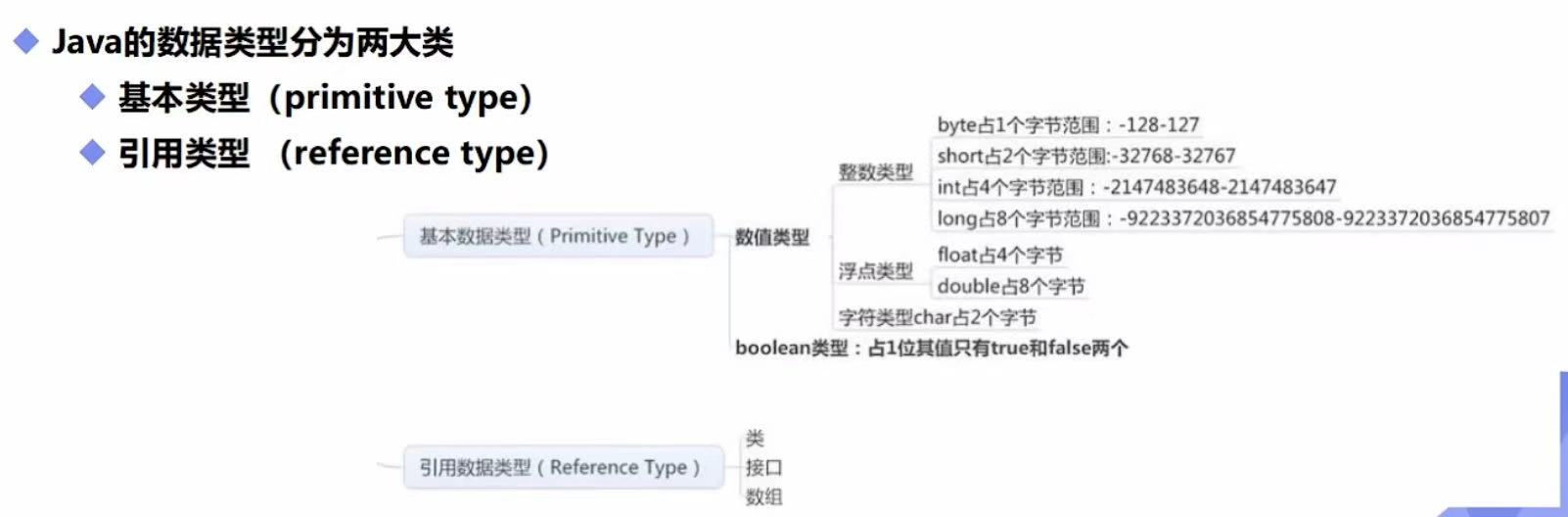
Java的数据类型分为两大类
(1)基本类型(primitive type)
(2)引用类型(reference type)
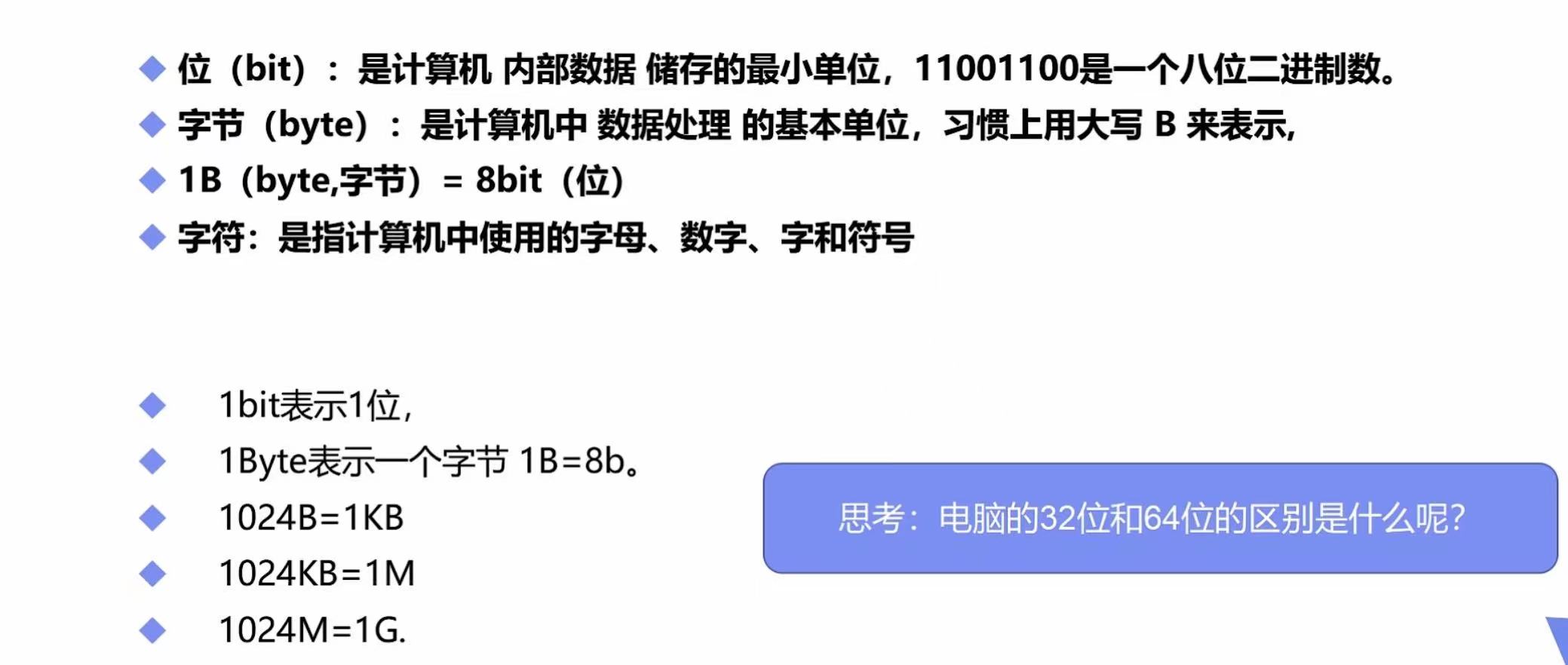
什么是字节?
代码示例
public class Hello {
    public static void main(String[] args) {
        // 八大基本数据类型

        // 整数
        int num1 = 10; // 最常用
        byte num2 = 20;
        short num3 = 30;
        long hum4 = 30L; // 数字后+L

        // 小数
        // 浮点数
        float num5 = 50.1F; // 数字后+F
        double num6 = 3.1415926535;

        // 字符
        char name = 'A';
        // 字符串,String不是关键字,是类
        String namea = "A";

        // bool值
        boolean flag = true;
    }
}
4. 数据类型扩展
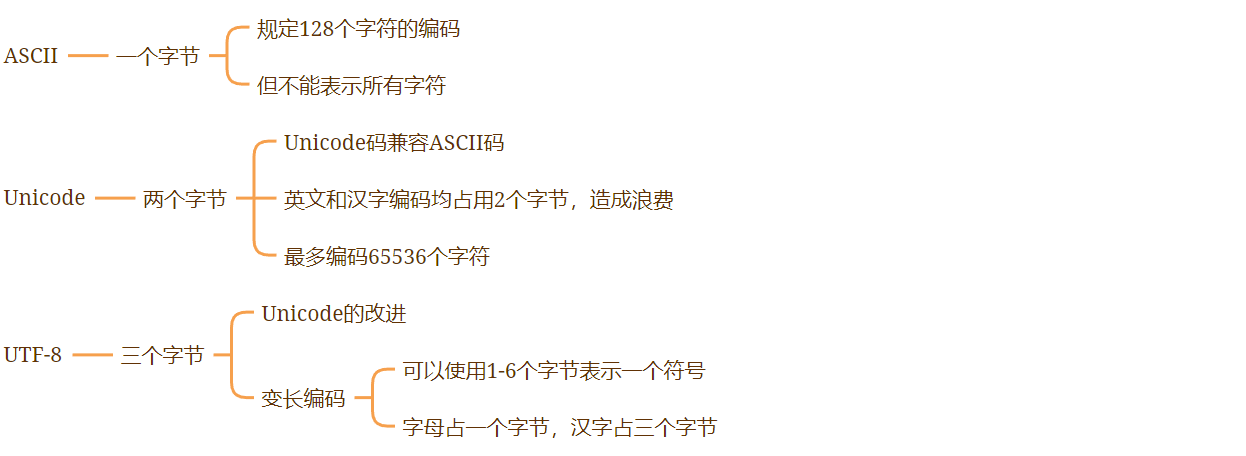
字符扩展的三种编码
代码示例
public class Hello {
    public static void main(String[] args) {
        // 整数拓展
        // 二进制 0b       十进制     八进制 0       十六进制 0x
        int i = 10;
        int i2 = 010;
        int i3 = 0x10;
        int i4 = 0b10;

        System.out.println(i);
        System.out.println(i2);
        System.out.println(i3);
        System.out.println(i4);

        // ------------------------------------------------------------------
        // 浮点数扩展
        // BigDecimal 数学工具类
        // float      有限 离散 舍入误差 大约 接近但不等于
        float f = 0.1f;
        double d = 1.0/10;

        System.out.println(f==d); // False

        float d1 = 232323232232323f;
        float d2 = d1 + 1;
        System.out.println(d1==d2); // True

        // -------------------------------------------------------------------
        // 字符扩展
        // 所有字符本质还是数字
        // 编码 Unicode 2字节 0 - 65536
        // U0000 UFFFF
        char c1 = 'a';
        char c2 = '中';
        char c3 = '\u0061'; // a

        System.out.println(c1);
        System.out.println((int)c1);  // 强制转换

        System.out.println(c2);
        System.out.println((int)c2); // 强制转换

        System.out.println(c3); // a

        // ----------------------------------------------------
        // 转义字符
        // \t 制表符
        // \n 换行
        // ...
        System.out.println("Hello\tWorld!");

        // -----------------------------------------------------
        // 从内存分析
        String sa = new String("abc!");
        String sb = new String("abc!");
        System.out.println(sa==sb);

        String sc = "abc!";
        String sd = "abc!";
        System.out.println(sc==sd);

        // ------------------------------------------------------
        // 布尔值扩展
        boolean flag = true;
        if(flag){}
    }
}
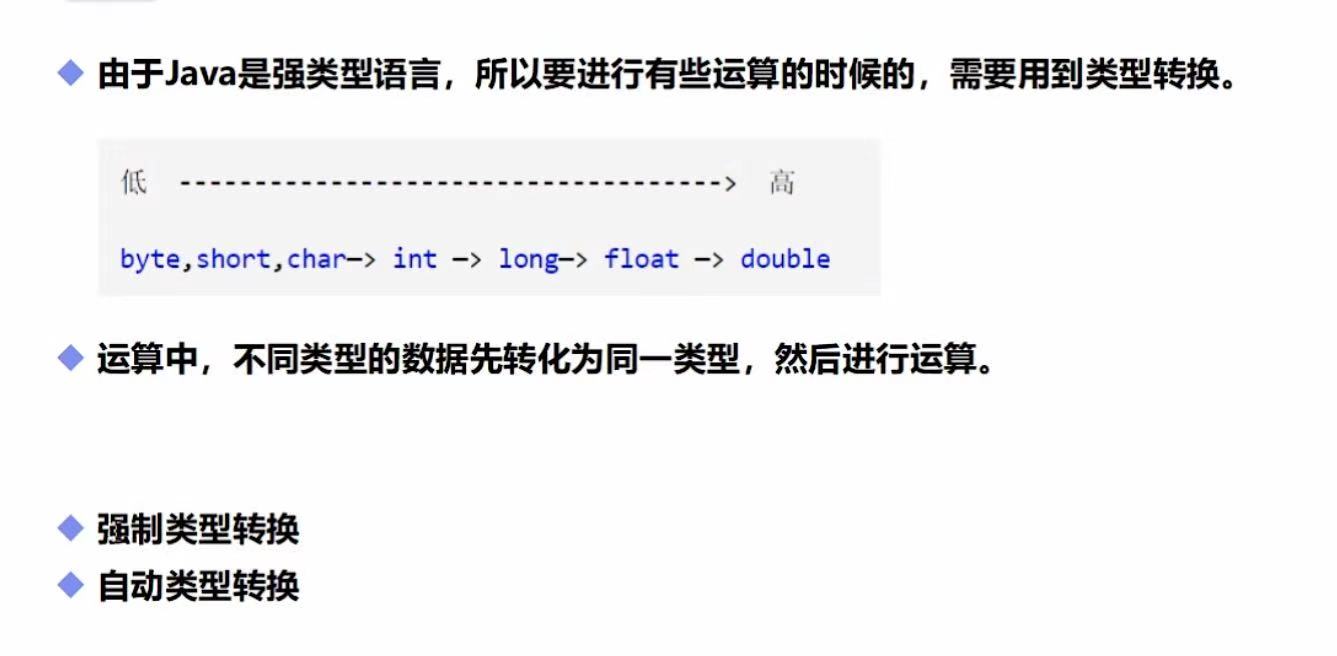
5. 类型转换
代码示例
public class Hello {
    public static void main(String[] args) {
        int i = 128;
        // 强制转换 (类型)变量名   高 -> 低
        byte b = (byte)i; // 内存溢出
        // 自动转换              低 -> 高
        double d = i;

        System.out.println(i);
        System.out.println(b);
        System.out.println(d);

        /*
        注意点:
            1. 不能对布尔值进行转换
            2. 不能把对象类型转换为不相干的类型
            3. 在把高容量转换到低容量的时候,强制转换
            4. 转换的时候可能存在内存溢出,或者精度问题!
         */

        System.out.println("--------------------------------");
        System.out.println((int)23.7);
        System.out.println((int)-45.89f);

        System.out.println("--------------------------------");
        char c = 'a';
        int f = c + 1;
        System.out.println(f);
        System.out.println((char)f);

        // 操作数大的时候,注意溢出问题
        // JDK7特性:数字之间可以用下划线分割
        int money = 10_0000_0000;
        System.out.println(money);
        int year = 20;
        int total = money * year; // 溢出
        long total2 = money * year; // 默认是int,已经存在问题了
        long total3 = money * ((long)year);
        System.out.println(total);
        System.out.println(total2);
        System.out.println(total3);
    }
}
6. 变量、常量、作用域
(1)变量
Java变量是程序中最基本的存储单元,其要素包括变量名、变量类型和作用域
变量作用域:
a. 类变量
b. 实例变量
c. 局部变量
代码示例
public class Hello {
    // 属性:变量

    // 类变量 static
    static double saLary = 2500;

    // 实例变量;从属于对象
    // 布尔值:默认是false
    // 除了基本类型,其余默认值都是null
    String name;
    int age; // 默认值为0

    // main方法
    public static void main(String[] args) {
        // 局部变量;必须声明和初始化值
        int i = 10;
        System.out.println(i);

        Hello hello = new Hello();
        System.out.println(hello.age);
        System.out.println(hello.name);
        System.out.println(saLary);
    }

    // 其他方法
    public void add(){

    }
}
(2)常量
常量关键字:final 常量名 用大写字母表示
代码示例
public class Hello {
    // 修饰符,不存在先后顺序
    public static final double PI = 3.14;

    public static void main(String[] args) {
        System.out.println(PI);
    }
}
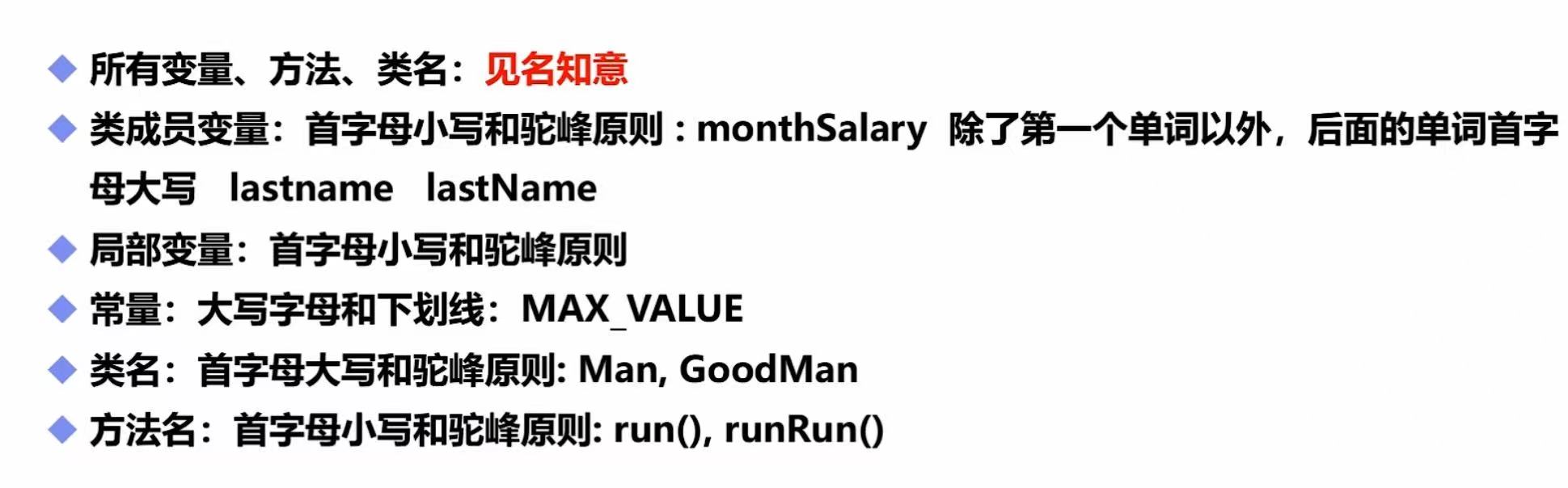
注意点:
7. 基本运算符
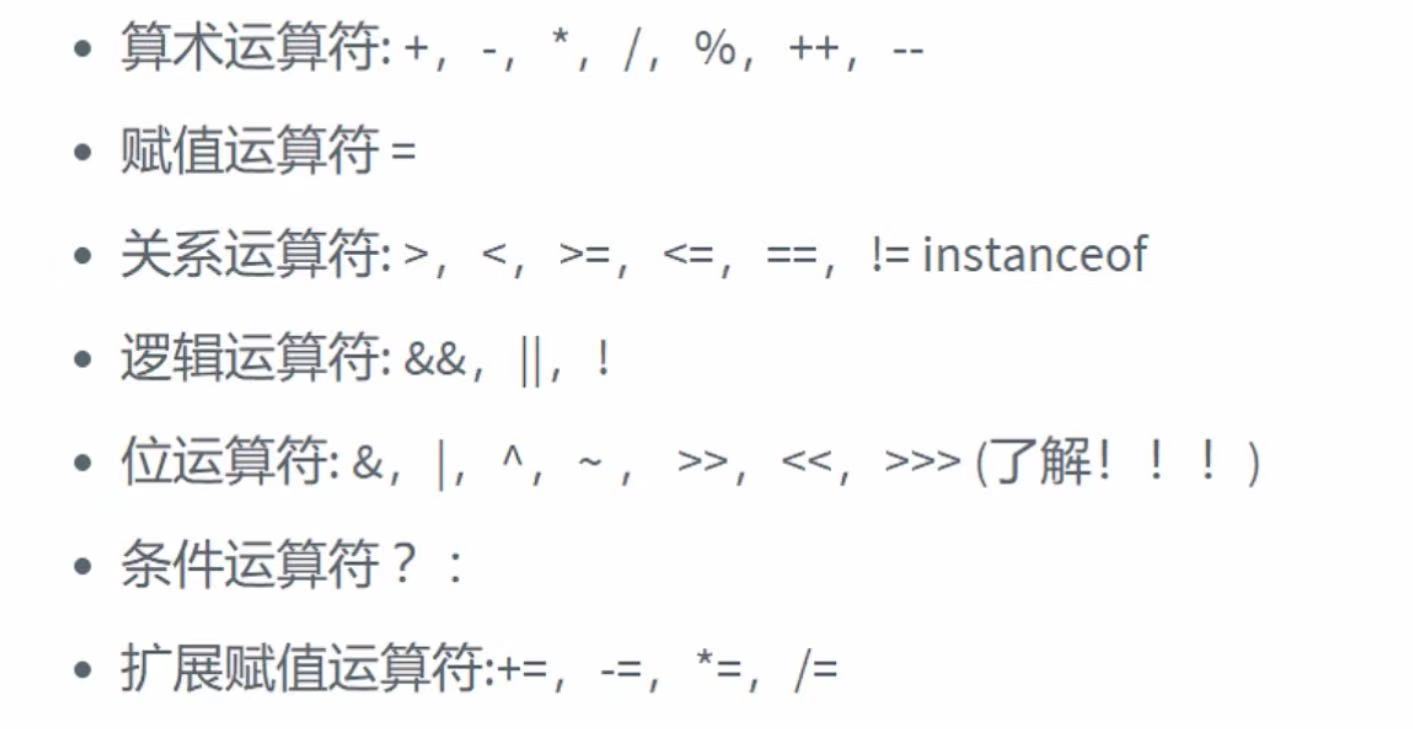
运算符
代码示例
public class Hello {
    public static void main(String[] args) {
        long a = 123123123123L;
        int b = 123;
        short c = 10;
        byte d = 8;

        System.out.println(a+b+c+d); // long
        System.out.println(b+c+d); // int
        System.out.println(c+d); // int
    }
}
8. Math类
代码示例
public class Hello {
    public static void main(String[] args) {
        // 幂运算
        double pow = Math.pow(2,3);
        System.out.println(pow);
    }
}
9. 逻辑运算符和位运算符
代码示例
public class Hello {
    public static void main(String[] args) {
        // ----------------逻辑运算符----------------
        boolean a = true;
        boolean b = false;

        System.out.println("a  &&  b : "+(a && b));
        System.out.println("a  ||  b : "+(a || b));
        System.out.println("!(a && b):"+!(a && b));

        // 短路运算
        int c = 5;
        boolean d = (c<4) && (c++<4);
        System.out.println(d);
        System.out.println(c);

        // -------------------位运算符---------------------
        /*
        A = 0011 1100
        B = 0000 1101

        A&B = 0000 1100
        A|B = 0011 1101
        A^B = 0011 0001
        ~B = 1111 0010

        2 * 8 = 16 如何快速运算? -> 位运算(效率高)
                   << 左移 *2
                   >> 右移 /2
         */
        System.out.println(2<<3);
    }
}
10. 三元运算符
代码示例
public class Hello {
    public static void main(String[] args) {
        int a = 10;
        int b = 20;

        // 字符串连接符
        System.out.println("" + a + b); // 1020
        System.out.println(a + b + ""); // 30

        // 三元运算符
        int score = 60;
        String type = score < 60 ? "不及格" : "及格";
        System.out.println(type);
    }
}
11. 包机制
包机制
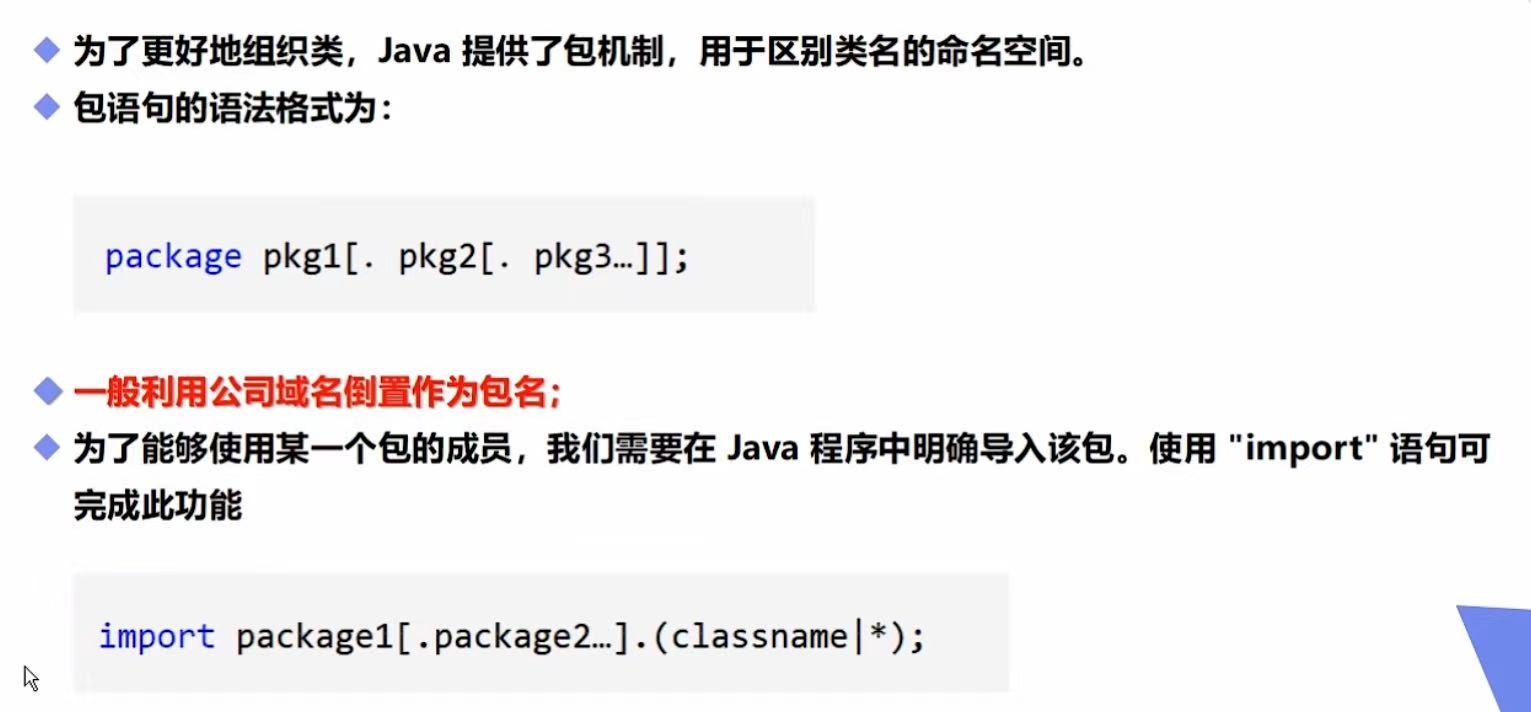
代码示例
package com.baidu.www;

// 导入包内所有的类
import java.util.*;

public class Hello {
    public static void main(String[] args) {

    }
}
12. JAVADoc生成文档
参数说明
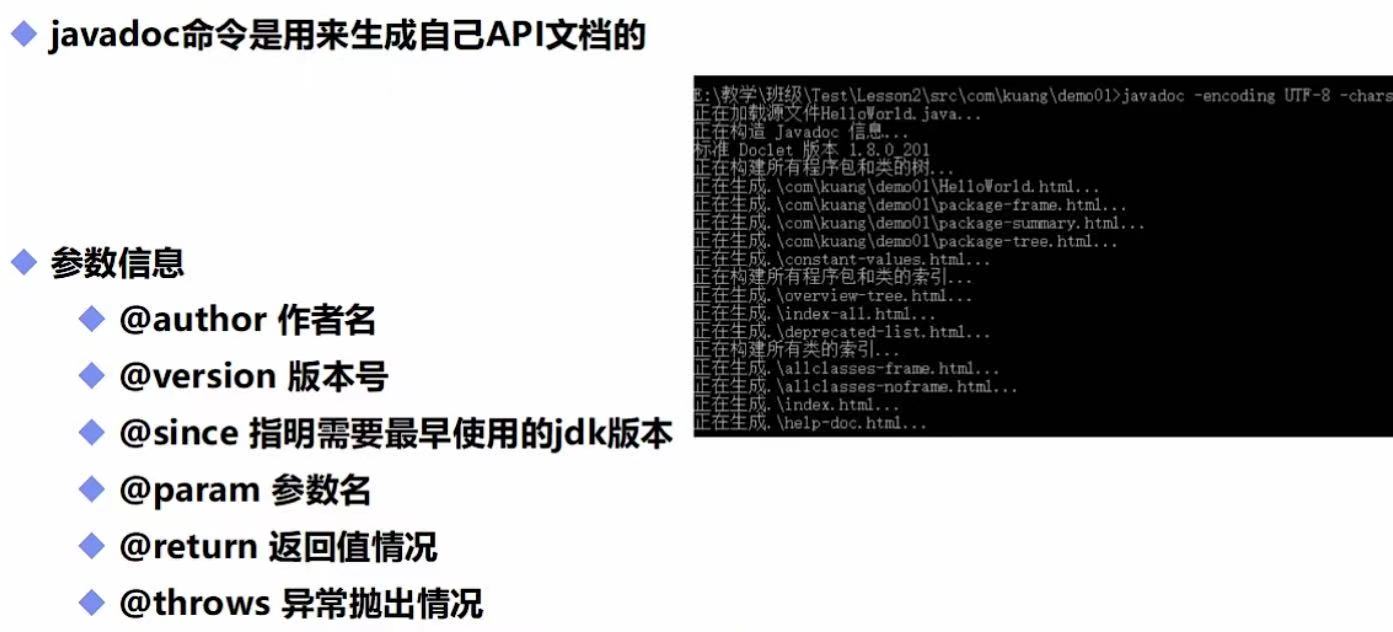
代码示例
package com.baidu.www;

/*
* @author Shuashua
* @version 1.0
* @since 1.8
* */

public class Hello {
    String name;

    /**
     * @author shuashua
     * @param name
     * @return
     * @throws Exception
     */
    public String test(String name) throws Exception{
        return name;
    }
}
CMD命令行示例


 浙公网安备 33010602011771号