
uniapp 使用 uview 自定义tabbar
1. components文件夹下新建tabar组件
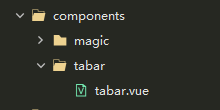
<template>
    <view>
        <u-tabbar :value="current?current:0" @change="changeTab" :fixed="true" :placeholder="false"
            :safeAreaInsetBottom="true" :border="false">
            <u-tabbar-item v-for="(item,index) in list" :key="index" :text="item.text">
                <image class="u-page__item__slot-icon" slot="active-icon" :src="item.iconPath"></image>
                <image class="u-page__item__slot-icon" slot="inactive-icon" :src="item.selectedIconPath"></image>
            </u-tabbar-item>
        </u-tabbar>
    </view>
</template>

<script>
    export default {
        name: 'tabar',
        props: {
            current: Number
        },
        data() {
            return {
                list: [{
                        iconPath: "../../static/tabar/1.png",
                        selectedIconPath: "../../static/tabar/4.png",
                        text: '首页',
                        customIcon: false,
                        pagePath: "pages/index/index"
                    },
                    {
                        iconPath: "../../static/tabar/2.png",
                        selectedIconPath: "../../static/tabar/5.png",
                        text: '已购课程',
                        customIcon: false,
                        pagePath: "pages/cart/index"
                    },
                    {
                        iconPath: "../../static/tabar/3.png",
                        selectedIconPath: "../../static/tabar/6.png",
                        text: '我的',
                        customIcon: false,
                        pagePath: "pages/mine/index"
                    }
                ],
            }
        },
        methods: {
            changeTab(e) {
                console.log(e)
                uni.switchTab({
                    url: '/' + this.list[e].pagePath,
                })
            }
        }
    }
</script>

<style scoped>
    image {
        width: 32rpx;
        height: 32rpx;
    }
</style>
2.main.js挂载组件
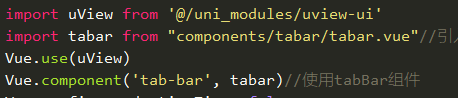
3.page.json添加tabbar
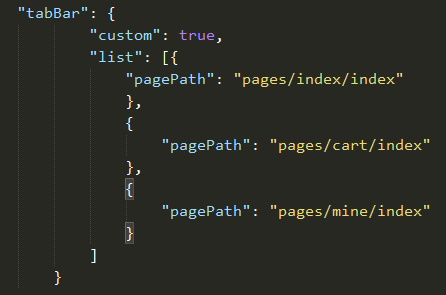
4.在使用tabbar的页面使用组件


 浙公网安备 33010602011771号