
Compling_Windows_Server_2003
Compling_Windows_Server_2003
通过泄露的Windows 2003源码编译操作系统
https://www.bilibili.com/video/BV1Nz4y1f7eh
声明:视频出自 www.youtube.com/NTDEV
新手UP不知道有自制和转载这样的设定所以导致投成了自制。
现在这个视频收藏的人有点多,我删掉别人收藏的就没有了,所以不删。
我自己打包好的已经装好的虚拟机、编译教程、编译好的文件、编译成功截图都在这里
( https://pan.baidu.com/s/1YPycAmFWrlMg94niE1KXdg 提取码:axu7 ),有需要自行提取。
虚拟机需要60G的磁盘空间,顺利的话,5-6个小时后,你就有了自己的可以安装系统的ISO文件了。
下面这个想了解更多的话,自行下载测试。
1、使用迅雷、FDM等软件下载
磁力链接:magnet:?xt=urn:btih:3D8B16242B56A3AAFB8DA7B5FC83EF993EBCF35B
2、misc目录中的windows_xp_source.rar的解压密码是:internaldev 亦或 _microsoft
3、下载的时候,misc目录中有个 ms_patents.7z 的大文件,这是微软的专利证书的PDF,很大,如果没什么必要的话可以不用下载。
Windows泄露文件目录分析
来源 https://www.77169.net/html/269502.html
1)种子链接:https://itorrents.org/torrent/3D8B16242B56A3AAFB8DA7B5FC83EF993EBCF35B.torrent?title=[limetorrents.info]Microsoft.leaked.source.code.archive_2020-09-24
看了下大小是42.93GB
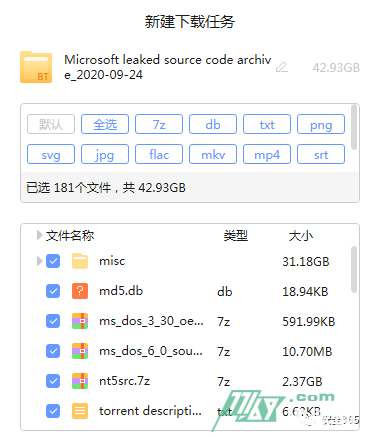
(2)用迅雷下载有坑。下载成功了,但是发现每次只下了10几个G,折腾很久,终于全部拿到。
(3)主目录如下:
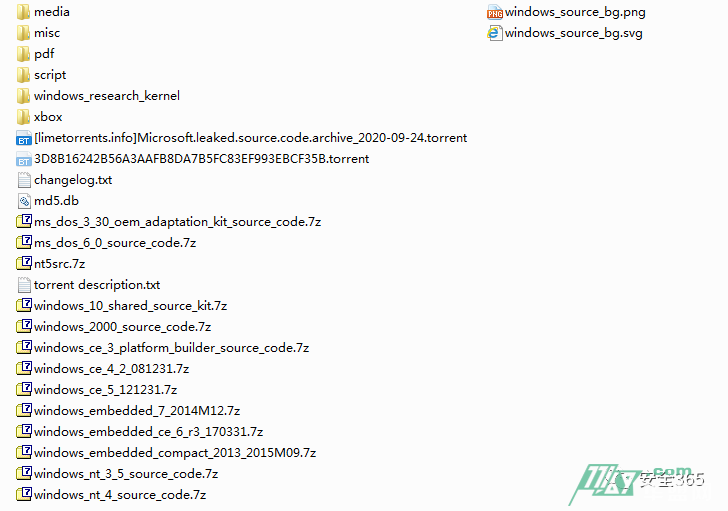
(4)照惯例先读下txt
Torrent description.txt* MS-DOS 3.30 OEM Adaptation Kit (source code)* MS-DOS 6.0 (source code)* DDKs / WDKs stretching from Win 3.11 to Windows 7 (source code)* Windows NT 3.5 (source code)* Windows NT 4 (source code)* Windows 2000 (source code)* Windows XP SP1 (source code)* Windows Server 2003 (build 3790) (source code) (file name is 'nt5src.7z')* Windows CE 3.0 Platform Builder (source code)* Windows CE 4.2 Shared Source (source code)* Windows CE 5.0 Shared Source (source code)* Windows CE 6.0 R3 Shared Source (source code)* Windows Embedded Compact 7.0 Shared Source (source code)* Windows Embedded Compact 2013 (CE 8.0) Shared Source (source code)* Windows 10 Shared Source Kit (source code)* Windows Research Kernel 1.2 (source code)* Xbox Live (source code) (most recent copyright notice in the code says 2009)* Xbox OS (source code) (both the "Barnabas" release from 2002, and the leak that happened in May 2020)
以上这些文件在主目录下都有,XP和2003的在那个nt5src.7z的压缩包里,解开就行了。
后面还有一堆英文,可以直接丢进翻译里看下。大意就是这不一定是完整的代码,请大家fcuk微软。
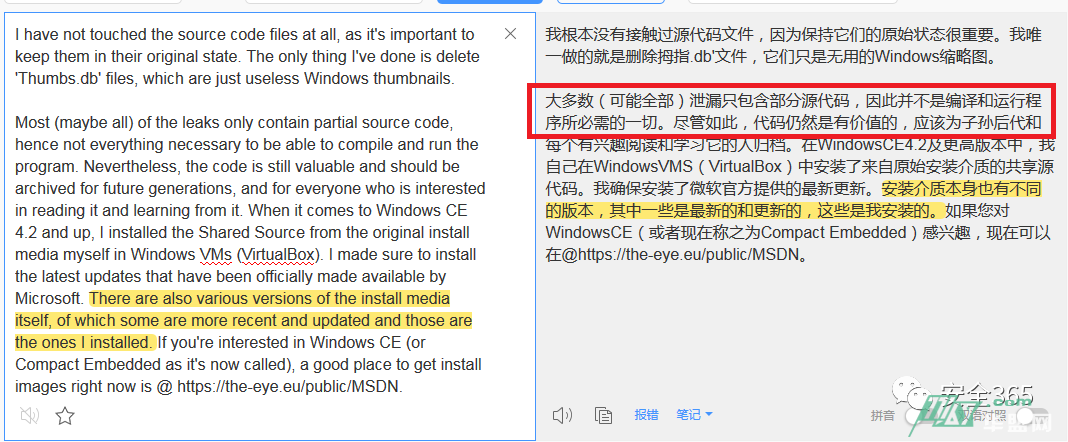
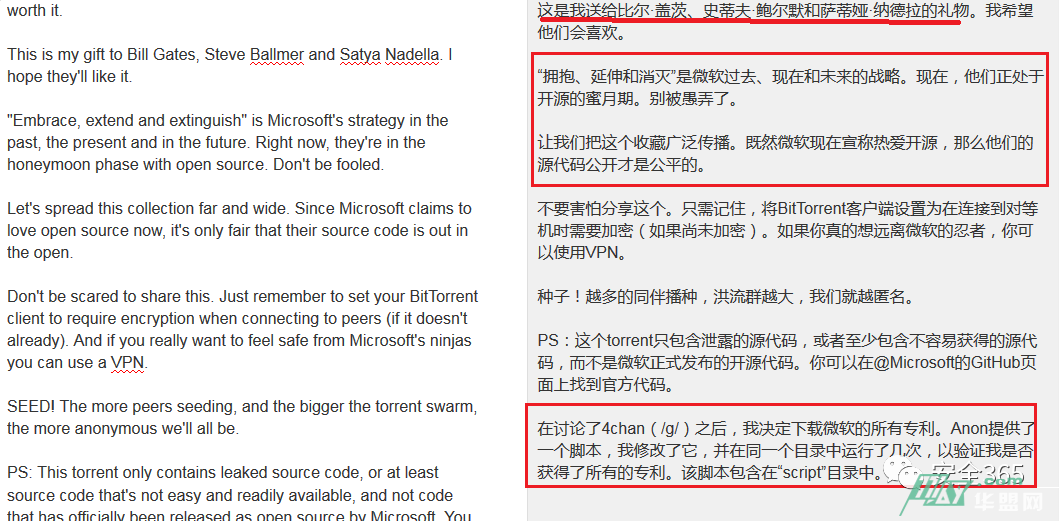
另外就是changelog.txt是这个版本的种子里面与之前的种子的区别,md5.db是每个文件的md5值,不放心的小伙伴们可以校验一下对照下。
(5)Media目录Media目录有3.5G左右,但是仔细看下都是历史上Bill Gates和Steve Jobs的采访视频,有一个用hashcat和John 来破解RAR密码的视频可以看下。(其余的下不下载无所谓了)
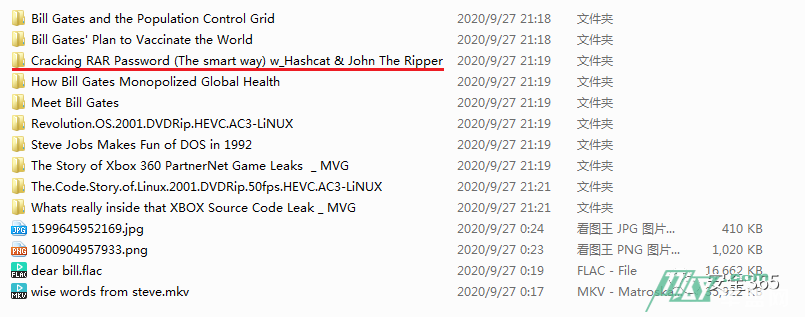
(6)MiscMisc文件夹的目录结构如下:

ebooks:随便解压了两个,都是书籍哈,可以看到有Windows的注册表原理的说明,还有NT-2000API等,全英文的,可以慢慢啃(相信也有不少大佬以前都读过了,毕竟不是第一次泄露)。
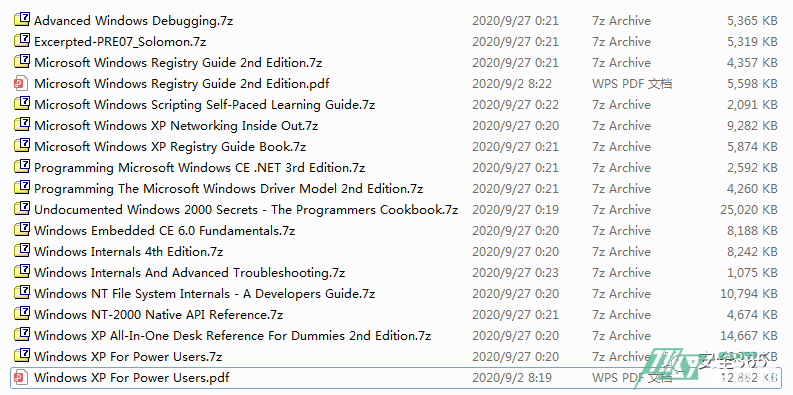
Wikileaks:顾名思义,就是wiki泄露的东西。

一个是微软牌的咖啡,一个是微软牌的间谍(you know,I’m kidding,微软怎么可能(不)从事间谍)。
Computer Online Forensic Evidence Extractor (COFEE) is a live information and volatile data forensics acquisition system.是一个实时的信息和易失性数据取证系统。里面有安装包和工具文档,可以44。
那这个spy到底是啥呢,Microsoft®联机服务全球犯罪合规手册,大意也是如何取证一些东西(感兴趣的朋友可仔详细阅读下)。
windows_research_kernel目录:这个目录下有两个压缩包,一个是Windows Kernel Source Code like,一个是wrktools。第一个目录下有一个子目录是undocumented file formats,这个感觉比较有意思哈。
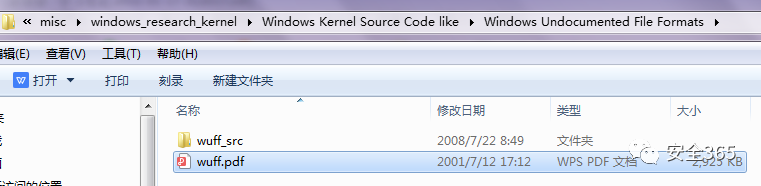
一个ddk_wdk.7z,里面是从win2k_me到winxp的所有版本的ddk工具。(设备开发包)
来解压一个叫Documented Windows Nt Kernel And Source Code Html.7z的压缩包,解压后接近400M,都是html格式的,打开index.html,比较清晰了(难道这个就是宝藏?)。
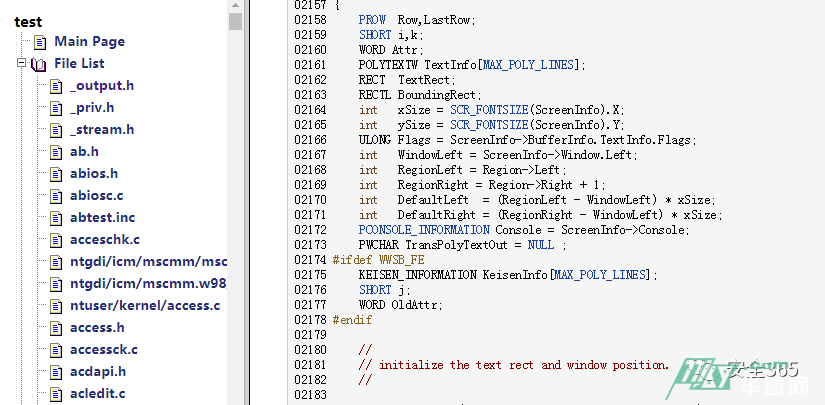
接下来是microsoft-gaming-zone和misc_microsoft_gamedev_source_code两个跟游戏开发有关的源码包。
接着是最大的单体文件ms_patents.7z,高达27.5GB,这不是源代码,是所有的专利文件,最早的可以追溯到1986年,最下面的是一个刚申请的,如下,如前面作者描述,他下载了微软的所有专利,再看看这个大小,共44561个PDF,压缩后还有27.5G,没有十分真也有八分了。
【这个也是宝藏呀】

OpenNT_final_build:作者在描述中提到,这个项目官方已经不维护了,但是在上面提到的GitHub存储库似乎仍然不时地收到一些小的更新。包括在'github.com/stephanosio'是截至2020-08-21的最新版本。
最新的官方OpenNT版本(sr687)的完整源代码在'file.opennt.net/release/obsolite/sr687/old文件-src-sr687.tar'。
然后是Windows 2000 Native API (source code),里面有C语言的示例及原始API代码。
windows_xp_source.rar,XP的源码,收集的人卖了个关子,加了密(解压密码: internaldev 亦或 _microsoft ),要自己破解。(不知道怎么破解?Media目录下不是有个视频教程嘛~)还有两个激活码的txt,不再赘述。
(7)Pdf目录:搜集的一些文档,比如2017年win10泄露32T源码事件等。
(8)Script目录:是3个脚本,作者用来对比每次泄露的目录差异,将它分享出来是想让其他人也可以使用。
(9)主目录下的windows_research_kernel与misc下的一样,属于重复。
(10)Xbox目录三个文件如下,可以看到最下面的是一个2020年5月刚泄露的版本。
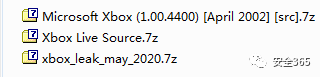
(11)剩下这一堆就是每个版本源码了:
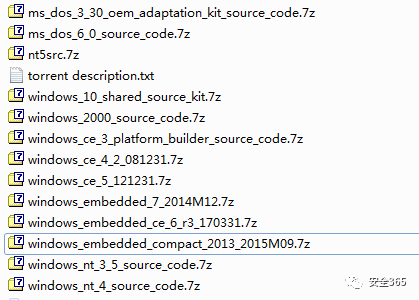
nt5src.7z这个解压后是2003和XPSp1的代码,解压后有13G左右,也有一些文档和工具。
--------------------
从源码开始构建Windows Server 2003 - ClassSoft Blog
本篇文章中的内容仅供教学目的使用
The content in this article is for educational purposes only
前言
在前段时间,作者写了一篇通过脚本续订构建Windows XP/ Server 2003的测试证书的文章,主要介绍了如何通过脚本生成构建XP/2003的测试证书,而本篇文章则着重记录作者构建Windows Server 2003 STD(Standard Edition)的过程。
本文以构建x86版本的Windows Server 2003 STD(Standard Edition)为例,记录整个编译过程和错误诊断,参考文章:Windows Server 2003 (NT 5.2.3790.0) build guide
构建环境的准备
本文构建环境:
- VMware虚拟机,分配了4核CPU和4GB RAM
- Windows Thin PC x86 英文版
- 大于40GB的硬盘空间
Windows XP/Server(NT5)以上的系统均可进行构建,也有基于x64的Windows7/10/11进行编译且成功的案例,但为了避免额外的错误,最好选择x86的Windows环境进行构建。
需使用英语版本的Windows进行编译
所需构建文件(请自行搜索下载)
- nt5src.7z
- win2003_prepatched_v10a.zip
- win2003_x86-missing-binaries_v2.7z 或是 Windows Server 2003 srv/sbs/ads/dtc/bla的安装iso文件(根据你想构建的
sku决定)
建议软件:
- Everything (X86 Version),用于快速搜索文件
- Notepad ++或其他文本编辑器
- 7zip
虚拟机软件,例如Qemu Manager- UltraISO
提取nt5src.7z内的win2k3文件夹,双击X.cmd将文件提取到一个文件夹内,该文件夹必须被命名为srv03rtm,否则会导致预构建的DirectUI文件丢失。如丢失相应文件,需从原版的Win2k3安装盘的i386文件夹中提取所缺失的文件,并手动补全到由oscdimg.cmd生成的iso文件中。
证书问题
截止到本文发布时,原本包含在泄漏文件中的测试证书已经过期(证书有效期截止到2021年10月份),如果直接运行,则会提示“The signer's certificate is not valid for signing” ,需要手动设置系统的系统的时间或生成新的测试证书。
以下方法任意选其一:
方法一、修改系统时间
这是最简单的方法,也适合虚拟机环境。
确保虚拟机的BIOS和系统时间都设置为2020.10至2021.10之间,并确保没有像Vmware Tools的软件同步宿主机时间,再进行下一步的操作。
方法二、生成新的证书文件
请参考以下文章:
https://classsoft.net/archives/60.html
https://bbs.kanxue.com/thread-274551.htm
方法三、修改cmdline.c(未经测试)
修改位于base\ntsetup\syssetup的cmdline.c文件,
注释掉与NT5.cat和NT5INF.cat有关的证书校验部分。
修改后的文件:
modified_cmdline.c
可用此文件替换位于base\ntsetup\syssetup的cmdline.c
应用win2003_prepatched_v10a等其他补丁
在源码目录srv03rtm,包括子文件夹和文件(subfolders and files)上取消设置只读(Read-Only)
使用7zip等工具解压补丁文件,并确保根据需要覆盖现有的文件。
开始构建
好消息是,泄漏的文件中包含了完整的构建工具链,因此不需要其他额外工具。
对于Windows Vista以上的系统(使用UAC),以管理员权限(Run as Administrator)打开命令提示符(CMD),使用cd命令到到源码所在文件夹srv03rtm,执行:
tools\razzle.cmd free offline如果一切没有问题,输出应该如下图所示:
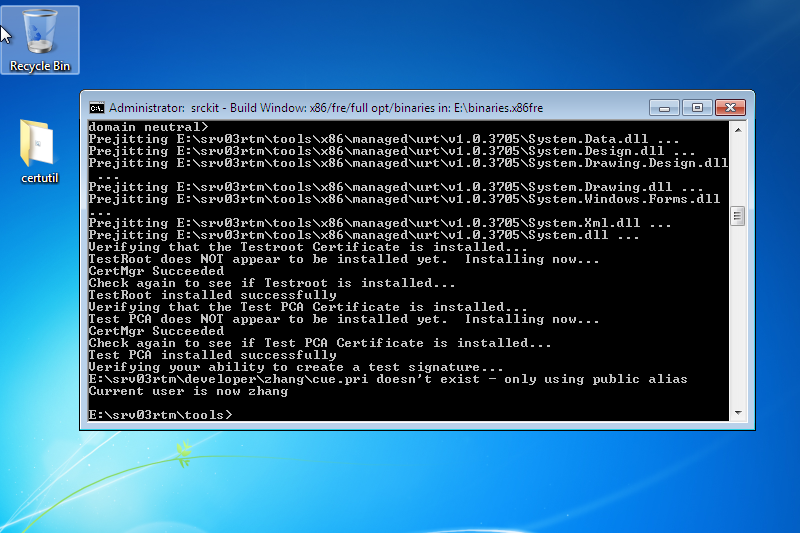
如遇到与证书或者无法创建测试签名有关的问题,请回顾上文的证书问题部分。
运行以下命令进行编译:
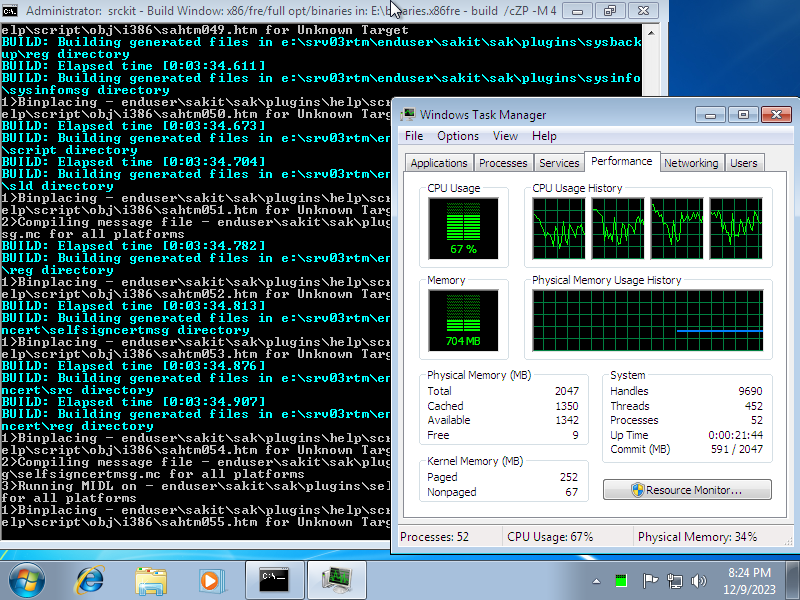
build /cZP -M 4
其中4为虚拟机处理器的核心数,可根据需要设置,一般不建议设置为比4更大的数。
接下来请慢慢等待,视电脑配置不同,可能需要1小时~5小时的编译时间。
编译完成后的二进制文件会被保存至binaries.x86fre目录。
如果上面的操作没有问题,razzle不会出现错误信息
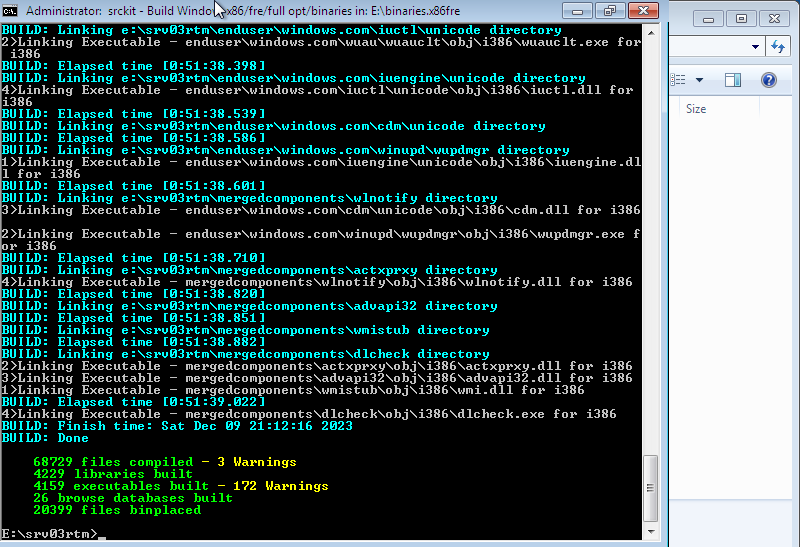
编译完成后
将win2003_x86-missing-binaries_v2.7z中的binaries.x86fre目录内文件复制到系统中的binaries.x86fre,这会补全源码包中缺失的二进制文件,如提示覆盖文件夹,请选择"YES"。
然后执行postbuild.cmd:
tools\postbuild.cmd-sku:srv filechk
- srv: Windows Server 2003 标准版
- sbs: Windows Server 2003 小型企业版
- ads: Windows Server 2003 企业版
- dtc: Windows Server 2003 数据中心版
- bla: Windows Server 2003 Web 版
如果前面的步骤操作正确,postbuild.cmd不会输出任何错误信息。
如果提示错误信息,从错误日志postbuild.err可以查到缺失的文件。
除了使用missing-binaries.7z包之外,也可以从原版的Windows server 2003安装盘中提取出缺少的二进制文件,方法如下:
先将iso文件挂载为G盘符,然后在razzle窗口内运行tools\missing.cmd,它会自动补全缺失的二进制文件。
创建可启动的ISO文件
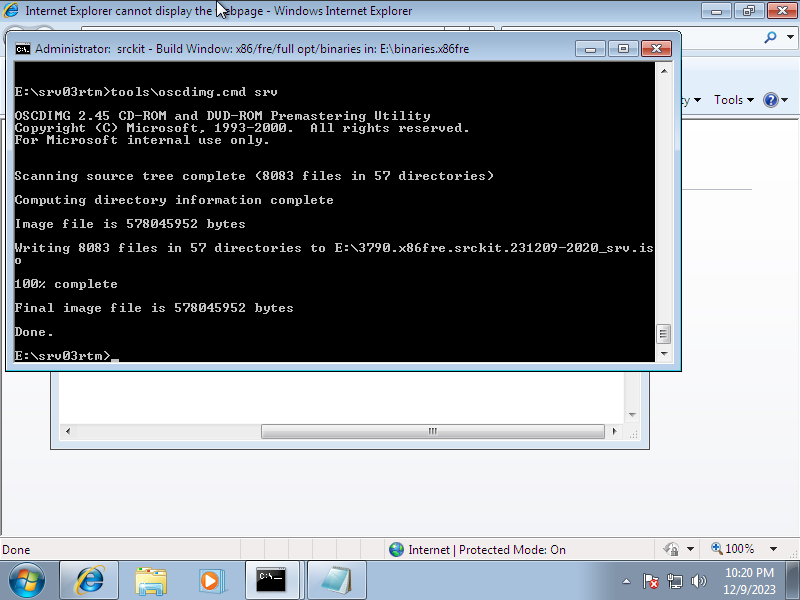
运行命令如下
tools\oscdimg.cmd srv
各sku的代码请参考上文。
除非指定,否则iso文件将会被默认保存至binaries.x86fre目录所在的磁盘。
测试ISO文件
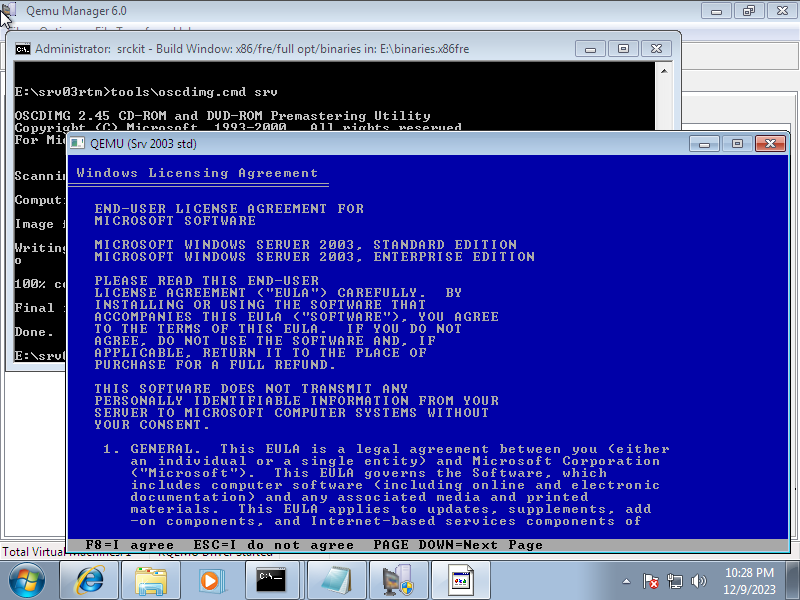
如果在上文中通过了“修改系统时间”的方式避免了证书过期的问题,则需要在用于测试的虚拟机中也同样将时间设置为2020.10至2021.10之间。安装完毕后改回时间
在QEMU中如遇到鼠标漂移的问题,可在启动命令中增加上-usb -usbdevice tablet
时间炸弹(Timebomb)
可以在\tools\postbuildscripts\timebomb.cmd(44行)按天数更改时间炸弹的日期,将DAYS设置为0即禁用时间炸弹
只有某些参数有效(0、5、15、30、60、90、120、150、180、240、360、444)

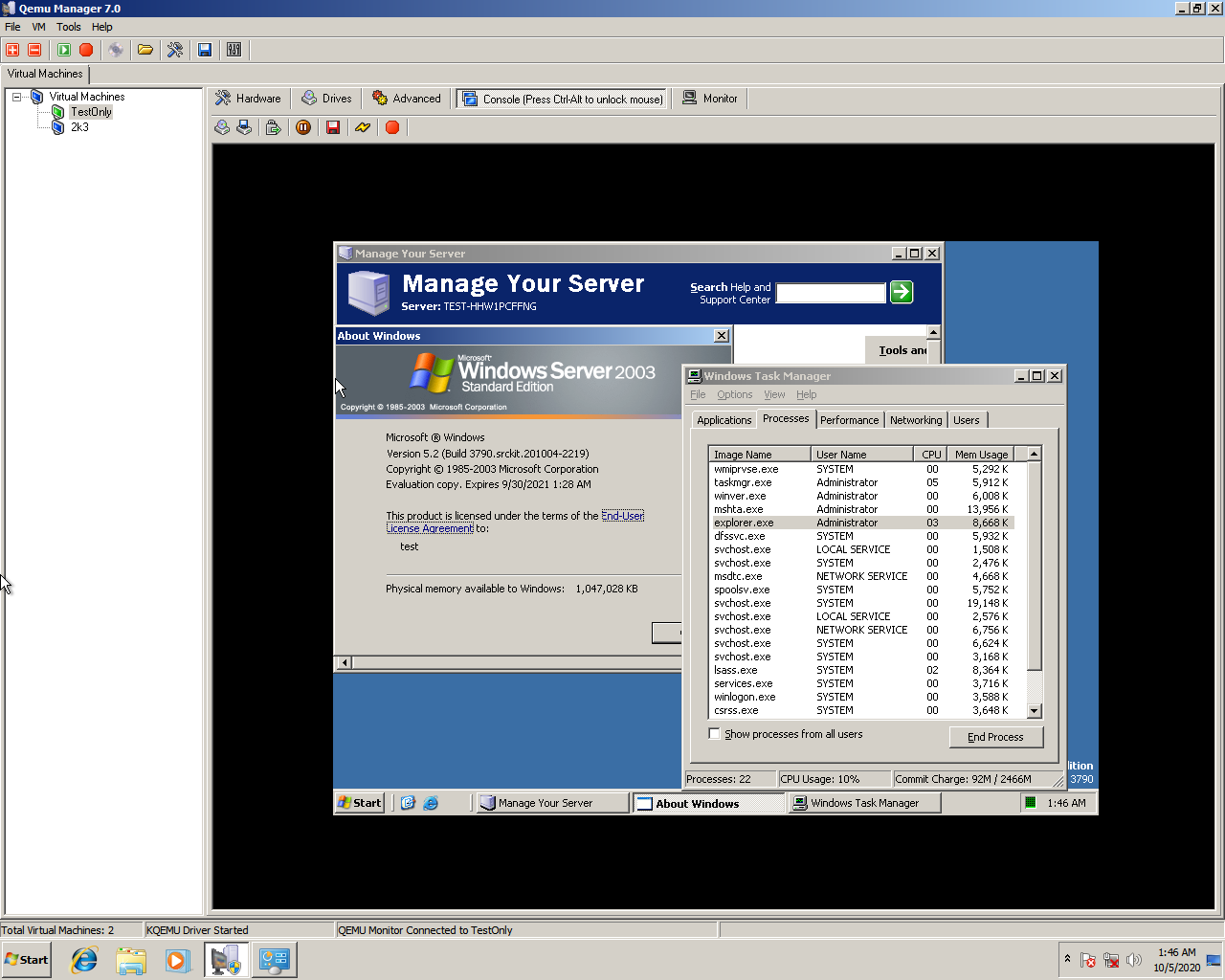
安装时缺少文件
如安装程序再安装时提示缺少文件,可从相同SKU的Windows Server 2003安装盘的i386目录中复制相应的文件。
例如,安装程序提示缺少shell32.dll,则可以复制安装盘i386目录中的SHELL32.DL_
---------------------
通过脚本续订构建Windows XP/ Server 2003的测试证书
此篇文章的内容仅供教学目的使用。
The content of this post is for educational purposes only.
背景
在2023年,若想从泄露的nt5src.7z构建出完整可启动的操作系统,面临的第一个问题便是构建证书的续订。
在nt5src.7z或win2003_prepatched_v10a内包含的构建证书已经过期,在运行razzle进行编译的时候会出现错误
SignTool Error: ISignedCode::Sign returned error: 0x80880253
        The signer's certificate is not valid for signing.
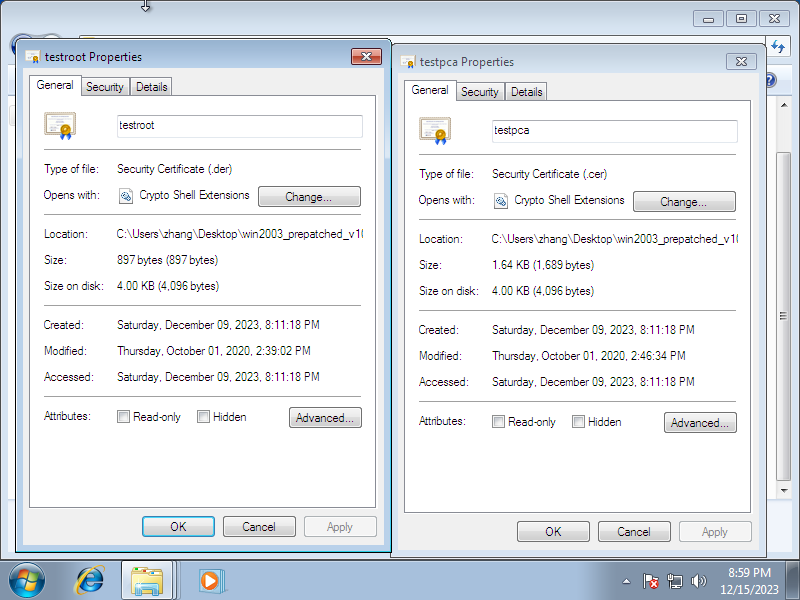
在泄漏的源码中,原先的测试证书已经被硬编码至部分源文件中。
幸运的是,有人提供了一个脚本,可以生成新的证书,它并且也能够修补这些源文件,使razzle可以正常运行。
Win2K3 test certificates utility
在开始,需要将提取win2k的源代码,将原文件名更改为srv03rtm后,将win2003_prepatched_v10a解压并覆盖到源代码目录,接着新建一个为certuil的目录,执行以下操作。
、
| 源文件 | 复制为 |
|---|---|
| srv03rtm/base/ntsetup/syssetup/crypto.c | certutil/source/base-ntsetup-syssetup-crypto.c |
| srv03rtm/base/win32/fusion/sxs/strongname.cpp | certutil/source/base-win32-fusion-sxs-strongname.cpp |
| srv03rtm/ds/security/cryptoapi/mincrypt/lib/vercert.cpp | certutil/source/ds-security-cryptoapi-mincrypt-lib-vercert.cpp |
| srv03rtm/ds/security/cryptoapi/pki/certstor/policy.cpp | certutil/source/ds-security-cryptoapi-pki-certstor-policy.cpp |
| srv03rtm/ds/win32/ntcrypto/mincrypt/vercert.cpp | certutil/source/ds-win32-ntcrypto-mincrypt-vercert.cpp |
| srv03rtm/shell/shell32/defview.cpp | certutil/source/shell-shell32-defview.cpp |
| srv03rtm/tools/checktestpca.cmd | certutil/source/tools-checktestpca.cmd |
| srv03rtm/tools/checktestroot.cmd | certutil/source/tools-checktestroot.cmd |
| srv03rtm/tools/postbuildscripts/crypto.cmd | certutil/source/tools-postbuildscripts-crypto.cmd |
| srv03rtm/windows/core/ntuser/kernel/server.c | certutil/source/windows-core-ntuser-kernel-server.c |
上文链接里提到的脚本和配套文件。
certutil.7z Password:classsoft.net
上文提到的脚本需要在*nix环境运行,因此可以尝试使用MinGW或Git For Windows的老版本。
运行generate.sh
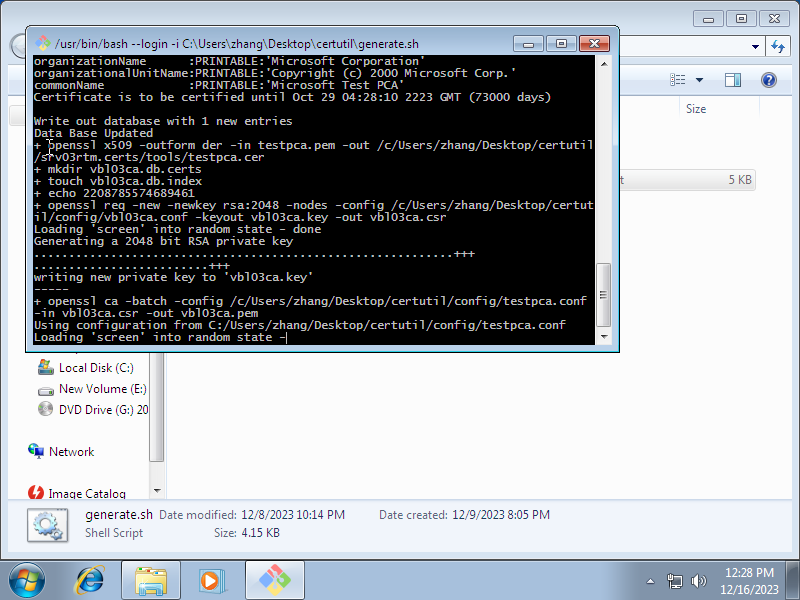
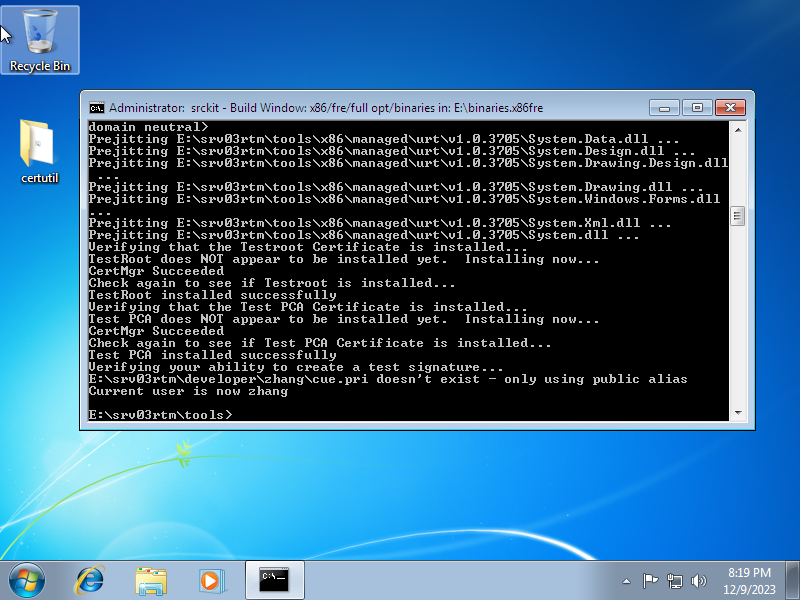
安装srv03rtm.certs/tools生产的证书文件(空密码)后,将生成的srv03rtm.certs覆盖到srv03rtm,随后再打开razzle,一切都应该可以正常工作。
----------------------------
Windows Server 2003 (NT 5.2.3790.0) build guide
see https://rentry.co/build-win2k3
Version 10b, last updated 2021/10/21
Instructions tested under XP SP3 x86, Win7 SP1 x86/x64 & Win10 x64, results may vary under other operating systems.
Guide maintained by a nameless anon with no affiliation with any group working on the code.Do not trust anyone claiming authorship!
Contents
- A small request
- FAQ
- Build Preparations
- Building
a. Troubleshooting - Debugging
- Additional Info
- Code Additions
- Changelog
- File Hashes
A small request
Hey all, been a while, thought I'd lost the password for editing this page but actually did have it tucked away somewhere, phew!
Unfortunately it seems over the past year almost everything linked here has died - whoever came up with the "everything on the internet is forever" meme was a real idiot.
Luckily I still have most of the things mentioned on this page, so I've reupped them to (hopefully) better file hosts, and might try getting a torrent working soon.
There's just a few things that I'm still missing however:
win2003_x86-missing-binaries_v2.7zthe source-port from WXP for(thanks to the same anon for reupping it, have added link below)processr.sys, amdk6.sys, amdk7.sys, p3.sys & crusoe.sys- the source-port for folder
shell\osshell\accessib\magnify - the source-port for folder
base\fs\utils\dfrg the(found! many thanks to the anon that reupped it)20201202__KERNEL32.DLL.v6.zippackage linked by https://rentry.co/kernel32-extrasthe(found! thanks to the anon that reupped it)20201202_downlevel.zippackage linked by https://rentry.co/extras-downlevel- vaguely recall that a smart RE-anon made a better pidgen than pidgenXP_cracked, unfortunately can't remember much about it now though (or it might have been license-related things that were reversed besides pidgen, stuff related to server licensing maybe?)
Would really like to get hold of those so I can make sure the page is fully updated, if you happen to still have any of these files from the old /wxp/ threads please help us by reuploading them! (you can post them in the /t/ source-code thread, I usually lurk there so should see it hopefully, feel free to leak any other sources you have there too of course!)
FAQ
What source code leaked?
On 23rd September 2020 a ~2.9GB file was posted to 4chan's /g/ board, containing leaked partial (~70% complete) source code for Windows XP SP1 & Server 2003.nt5src.7z
This code has apparently been going around in private circles for several years, but was mostly unknown to the wider internet until this recent leak.
The archive contains a majority of the code needed for a full Windows XP/Server2003 install, minus any activation/cryptographic or third-party code.
If you want to find a clean, original copy of the leak, just search for "nt5src.7z notrepacked" on your favorite search engine, the legit torrent magnet starts with magnet:?xt=urn:btih:1a4e5...
Can we build a working OS from the code?
Yes! Many anons have built their own versions of Server2003, and XP-on-2003-kernel. Users on /g/ were actually the first to publicly show a working build made from the code (installing & booting successfully) less than a week after the leak showed up!
Unfortunately the process requires some files that don't have source included though, but these are all linked in the build guide below.
It's also worth pointing out that while the leak contained two different source trees (XPSP1 build 2600.1106 + Server2003 build 3790), we've only managed to get a Server2003 build completely working so far, which is why this guide focuses more on Server2003 than XP.
This is probably a good thing anyway as the Server2003 code is almost a year newer than XPSP1 (though it'd still be nice if XPSP1 could be made to work eventually...)
What about 64-bit? Can I build x64 editions?
64-bit support is kinda here, the leak has code for both IA64 & AMD64 processors, but while XP/Server2003 both released with IA64 versions from day one, AMD64 support was only added many years later with XP x64 & Server2003 SP1 (in other words, many years after this source code...)
IA64 support will probably work fine since the XP/Server2003 from the time of this source code had support for it (though afaik it hasn't actually been tried yet), but seems AMD64 was still in development at the time.
The v10 release of this guide improves support for making AMD64 builds, and some anons have even some success getting AMD64 builds to start booting, but unfortunately problems with Wow64 & possibly other things are preventing it from starting properly atm. (see amd64 build support section for more info)
What's needed to build? Do I need Visual Studio?
Fortunately the complete build toolchain was included in the leak, all that's required is a Windows build machine running XP or later.
Visual Studio isn't needed, and currently there aren't any VS solution files/projects for interacting with the code, would be really nice to have them though.
Will this help get XP tools/kernel running on *nix?
Unlikely since the tools are coded to work in a completely different environment, maybe if someone wanted to put in the months of work to port it over, but it's far from being code you can just copy-paste into *nix and then build.
Is this code going to help ReactOS/WINE in any way?
No, those projects would never want to make use of such stolen/illegal code (ReactOS even performed their own year-long code audit when it was claimed that they used an older leaked codebase!).
Even hinting that you have knowledge of Windows internals learned through code like this is enough to disqualify you from contributing to them (on that note, if you ever want to work on ReactOS/WINE in the future you should probably quit looking into this source code while you still can!)
Did this leak come from the passworded RAR I heard about?
No, the passworded RAR was a completely different thing which turned out to be fake.
Before the real leak came about some anons on /g/ were trying to organise a source code collection for various OS's, with that collection also containing a passworded file that was dug up after years of being unseeded (posted in ~2007), which some anons spent several weeks trying to crack.windows_xp_source.rar
Sometime after the nt5src file leaked the password for that RAR was eventually found, being , which revealed that the RAR was nothing but a fake archive that made use of similar directory structures to the older NT4 leak.internaldev
Unfortunately the weeks of posts about the lost-then-found RAR file being followed by an actual source code leak led many anons to confuse the two things as being the same, so just to emphasise: the passworded-rar has nothing to do with the recent leak!.
What's the deal with this NOTREPACKED/repackfag guy?
The confusion around the leaks was made even worse thanks to some idiot almost immediately deciding to repack the original nt5src.7z leak with different compression - using the exact same filename for his repacked version - and then making the first torrent of the leak contain that repack instead of the original, pretty much fragmenting the leak & attempting to erase the history behind it, all just to save a few hundred MB.
Luckily it didn't take long for NOTREPACKED-chad to come through with a proper torrent of the non-repacked files that were originally gifted to us by leaker-anon, which has been linked in the threads ever since.
The repackfag will usually come along to the thread every now and then to stir things up & spam schizo-tier narratives, likely in some attempt at convincing any tourists that might be visiting (which is pretty sad when 90% of the time the thread has the exact same people inside it who have long tired of his act). It's safe to say this guy has no interest in actually contributing and just wants to bring down the threads (odd considering this guy spent weeks making begging threads for the XP code...)
Anyway if you need to check what version of the leak you have, refer to the hashes of the original nt5src.7z above.
Build Preparations
- It's recommended to disable any AV before extracting/building, as both of those actions create a lot of new files (your AV will likely try scanning every one, slowing down the extraction/build by quite a bit) - this also counts for any other tools that monitor files such as voidtools' Everything.
- Ensure build machine date is current - there's no longer any need to set date to 2003 or anything.
- Extract source tree to a folder named on the root of a drive (important, as pre-built DirectUI files will only link properly under this path), any drive letter (besides C:) should be fine, use as the path to match RTM binaries.
srv03rtmD:\srv03rtm\ - Unset Read-only on extracted directory, including subfolders and files (note that after unsetting this and closing/reopening the folder properties again you might see that read-only has been set again, this is fine, as long as you unset it once it should let the build work without issue)
- Extract the win2003_prepatched_v10a.zip into your source tree, overwriting existing files as necessary
- If using a 64-bit host OS to build with: copy the contents of the ZIPs folder into the source tree, overwriting if asked.
_x64 - If using this guide after Oct 2021: you'll need to renew the test certificates used during the build first - a helpful anon has made a guide for doing this here: https://rentry.co/win2k3-certutil
If your OS doesn't use UAC (XP/2003):
- Create desktop shortcut for (see below for explanation) and change to
%windir%\system32\cmd.exe /k D:\srv03rtm\tools\razzle.cmd free offlineStart inD:\srv03rtm - If using 64-bit host OS use in the shortcut instead of
razzle64.cmdrazzle.cmd - Open razzle window using shortcut you created.
If your OS uses UAC (Vista+):
- Run command-prompt as administrator (can usually be done by typing cmd into start menu, right click
Command Prompt->Run as administrator) - In the command-prompt, change to the drive you extracted source-code to by typing in the drive letter , eg.
E: - Change to the source folder:
cd srv03rtm - Now start razzle: (If using 64-bit host OS use instead)
tools\razzle.cmd free offlinetools\razzle64.cmd free offline
The first time you run razzle inside that copy of the source code it'll need to initialise a few things, give it a few minutes, after a while a Notepad window will appear - make sure to close this for the initialisation to continue.
Important: Once razzle has initialised run to finish preparing the build environment (only need to run once after initing razzle for first time in this tree)tools\prebuild.cmd
Building
Important: Currently the build doesn't seem to play well when building with more than 4 threads. If your build machine has more than that it's recommended to cap it to 4 threads maximum via the switch, added to the build command (eg. , or -M 4build /cZP -M 4bcz -M 4)
Clean build
Performs clean rebuild of all components (recommended for first build!):
build /cZP(bczis also aliased to this)
"Dirty" build
Builds only components that have changed since last clean build:
build /ZP(bzis also aliased to this)
Post-build
- Download the win2003_x86-missing-binaries_v2.7z pack, which contains missing binaries for both x86fre & x86chk builds.
- (unfortunately this is quite a big pack, and it's likely the link will inevitably go down some day, however this pack isn't actually required - instead you can make use of with each of the win2k3 ISOs listed below, which should be pretty simple to track down)
missing.cmd - From that 7z, extract the contents of the binaries folder for the build type you're building into your build trees binaries folder (eg. , should have been created during the build), the 7z should contain files for all SKUs (uses pidgen.dll from Win2003 Enterprise, so your builds should accept Enterprise product keys)
D:\binaries.x86fre - When asked during extraction to overwrite folders select
Yes, but when asked to overwrite files like DUser.pdb/dll make sure to selectNo! - Once missing files have been added, you should have files such as , , etc.
binaries.x86{fre/chk}\_pop3_00.htmbinaries.x86{fre/chk}\ql10wnt.sys - Inside the razzle window run (use if you want to process only specific one (no brackets!), expect errors if you ignore this and didn't use missing.7z / missing.cmd with every sku)
tools\postbuild.cmd-sku:{sku}filechk
Once postbuild has finished, assuming you used the file above and followed the guide properly, it should have hopefully succeeded without errors, and there shouldn't be any file!win2003_x86-missing-binaries.7zbinaries.x86fre\build_logs\postbuild.err
Otherwise take a look inside the - most messages in here are negligible, but if you see errors associated with the edition you want to use, you may need to re-run , or extract again.postbuild.errfilechkmissing.cmd2k3-missing.7z
If contains messages like or try re-importing the key-file (double-click it, press Next through the prompts, password is empty), and make sure your system date is set to the current date (updated test certs are only valid from October 2020 to October 2021)postbuild.err(crypto.cmd) ERROR(ntsign.cmd) ERRORtools\driver.pfx
Creating bootable ISO files
- Execute where is one of:
tools\oscdimg.cmd {sku} [destination-file (optional)]{sku}srv- Windows Server 2003 Standard Editionsbs- Windows Server 2003 Small Business Editionads- Windows Server 2003 Enterprise Editiondtc- Windows Server 2003 Datacenter Editionbla- Windows Server 2003 Web Editionper- Windows XP Home Editionpro- Windows XP Professional
- ISO will be saved to , unless is provided as a parameter.
{build-drive}\{build-tag}_{sku}.iso[destination-file]
Troubleshooting
If you get any problems during the build hopefully your problem might be answered here, if it's not feel free to post in the thread.
After running razzle it shows a bunch of errors, "tfindcer not recognized" etc
You're likely on a 64-bit system but running directly, you should use instead, this'll set things up so that razzle will use the correct tools for you. Hopefully with that the & other errors should go away.razzle.cmdrazzle64.cmdtfindcer not recognized
During build I get a error, mentioning directui.lib(parse.obj) LNK2011precompiled object not linked in
This is caused by the pre-built parse.obj file we currently have to use in order to build a working directui.lib, currently this file requires your source tree to be inside a folder on the root of a drive, using any other folder will cause the error to happen. Sadly attempts to fix this such as editing the parse.obj or updating the code to build parse.cpp instead haven't been successful yet.srv03rtm
Any idea how to fix error?CK1011: type information corrupt, recompile module map_kv.cxx
Seems to be caused by switching between fre/chk, clean-build fails to delete some remnant from whatever you built last which breaks the build.
Manually deleting the folder & file should allow clean-build to work again, after that just inside the dir.\com\ole32\olethunk\ole16\compobj\obj\\com\ole32\olethunk\ole16\compobj\msvc.pdbbcz\com\ole32\olethunk\ole16\
After a full build I get 1000+ errors, build.err has errors insidehas bad storage class
Seems to be caused by your locale, this is reported to happen with Simplified Chinese language, but can probably happen with other languages too.
Besides changing your locale/language settings, you could also try editing the source files to remove the characters that cause problems, an anon posted a list of the files that need changes here
On Windows 7 I get NTVDM crashes while building
All NTVDM errors should have hopefully been solved in the v8 release of this guide/ZIP, but if you still run into any NTVDM error a copy of your build.log file would help a lot to figure out what caused it, if you ZIP that up and post in the thread hopefully we can figure something out.
Debugging
Kernel debugging can be enabled by editing the file in your installed build, and adding to the end of a config line.C:\boot.ini/debug /debugport=COM1 /baudrate=115200
For example here's a boot.ini with two choices, one with debugging & one without, with this NTLDR will show an OS boot choice menu at startup:
[boot loader]
timeout=30
default=multi(0)disk(0)rdisk(0)partition(1)\WINDOWS
[operating systems]
multi(0)disk(0)rdisk(0)partition(1)\WINDOWS="Windows Server 2003, Enterprise" /fastdetect
multi(0)disk(0)rdisk(0)partition(1)\WINDOWS="Windows Server 2003, Enterprise" /fastdetect /debug /debugport=COM1 /baudrate=115200
(even though they're named the same , NTLDR will add a tag to it on the OS selection menu.)Windows Server 2003, Enterprise[debugger enabled]
chk (checked) builds are preferred for debugging as they enable asserts & debug messages, though will run a lot slower than builds. builds can also be debugged fine, but usually with a lot less debug output.chkfrefre
Ideally you should also configure WinDbg to use the & symbols folders too, if WinDbg is running on the same machine that compiled the build it should then also be able to do source-level debugging against the actual source files.binaries.{buildtype}\symbols.pri\retailbinaries.{buildtype}\symbols\retail
Note that if you're using a VM to host your build on you'll have to pass-through the emulated COM port over to a pipe somehow, for WinDbg/KD/IDA/etc to make use of.
There is apparently a way to get KDNET working on 2003 too (see https://github.com/MovAX0xDEAD/KDNET), but this is as-of-yet untested with our builds, seems like it should have support for VMware's emulated network hardware at least.
(TODO: add more VM guides here... if anyone wants to post one in the thread I'm happy to add it here)
VMware setup
For a VMware VM, just open the VM hardware options, remove the printer hardware, then click and choose .Add...Serial Port
In the serial-port config panel, set it to , and enter a pipe name into the textbox, eg. . The pipe should be setup as & .Use named pipe\\.\pipe\vmThis end is the serverThe other end is a virtual machine
It's apparently recommended to use the option, but I've had success without it, it's up to you.Yield CPU on poll
With that setup now just open WinDbg, choose , open the tab and enter the baud-rate and pipe name you selected for your VM, then hit OK.Attach to kernelCOM
Now WinDbg should start with text showing, and hopefully when you next boot up your VM it'll connect up to WinDbg by itself.Waiting for reconnect
Debugging Setup/Installation
A debugger can be attached to setup by pressing F8 at the right time - for text-mode setup the right time is when asked , spamming it while that message is showing should make it connect to COM1 with 19200 baud-rate (debug options can be changed inside , the line specifies options to apply when F8 is pressed). After debug connection is made it might take a couple extra minutes for it to pass the stage.Press F6 if you need to install a third party SCSI or RAID drivertxtsetup.sifSetupDebugOptionsSetup is starting Windows
Similarly, GUI setup can be debugged by pressing F8 before the Windows bootloader starts (progress bar etc), this should bring up a menu with options for , , etc. Choosing will make it attach to COM1 before starting setup, again at 19200 baudrate.Safe ModeDebugging ModeDebugging Mode
Changing default baudrate
The default 19200 baudrate can be changed by editing the file, search for inside there and change it to e.g. , now it should use that by default without needing any parameter, or eg. when using from the boot options menu.base\boot\kdcom\xxkdsup.cBD_19200BD_115200/baudrateDebugging Mode
Un-filtering kernel messages
Even with a chk build you may notice that the kernel doesn't seem to output much over KD, this seems to be because most of the kernel components use , which allows filtering KD messages to certain components (although MS's docs seem to suggest KdPrintEx filtering was only used in Vista, it does seem that 2003 makes use of it too)KdPrintEx
To enable components you'll need to open the registry of your installed build to the following key (or create it if it doesn't exist)
HKEY_LOCAL_MACHINE\SYSTEM\CurrentControlSet\Control\Session Manager\Debug Print Filter
Then create a DWORD value named the component you want to enable (eg. ), and set the value to hexadecimal .LDRFFFFFFFF
A list of the component registry names can be found inside after a build. This also contains the symbol names for the component (eg. ), which can be set directly through WinDbg/KD via the symbol name. (eg. , with symbols loaded this should set the LDR components filter value in real-time)base\published\obj\i386\dpfiltercm.cKd_LDR_Masked nt!Kd_LDR_Mask 0xFFFFFFFF
The components value (default ) is added to every components value, essentially making the default value for all components - so setting this to should make every component print to KD. You'll get a ton more debug output from this, but all the KD prints will likely slow down the system a lot (unfortunately it doesn't seem possible to disable a component when using WIN2000 to enable them all)WIN20001WIN2000FFFFFFFF
If you need to enable components before your build is installed (eg. kernel is having problems before setup is completed), you'll need to edit the file, anon made a post about that here, though it hasn't been tried yet afaik.mergedcomponents\setupinfs\hivesys.inx
Additional Info
prepatched.zip additions list
- New unexpired test-signing certificates (valid to October 2021 - tools\openssl.txt describes how to generate them)
- Updated / from Win2003 SP1 DDK, fixes olepro32.dll errors
midl.exemidlc.exe - Reordered file to ensure that is built before it gets used
dirsconlibk.lib - parse.cpp/parse.hpp files required to build DirectUI.lib, and the bison.exe/Bison.skl files used to generate them.
- Pre-compiled parse.obj file, as the parse.cpp/parse.hpp mentioned above has some issues parsing things.. (parse.obj taken from win2003 directuid.lib - causes LNK4206 warnings when using it though, suppressed via changes to files)
sources - Pre-compiled GdiPlus v1.0.100.0 from RTM ISO, to be included into (x86 only), as the GdiPlus code sadly can't be built.
asms01.cab - Updated DUser build scripts, to make sure it gets placed in the proper location & gets built with the right optimization flags.
- Updated file to allow DUser/DirectUI to get built during main build
windows\advcore\dirs - Updated 16-bit build tools inside com\ole32\olethunk\ole16\tools\, and updated olethunk code so it'll build fine with them. (updates are only used if OS requires them to build, XP/2003 should be able to build them fine without changes)
- Disabled fixprn.pl, ntbackuponpersonal.cmd, gpmc.cmd, msi.cmd & incbbt.cmd calls from pbuild.dat, as we're missing required build-files for those (you can grab the results of those scripts from RTM ISO, or from the pack)
2k3-missing-x86fre.7z - Updated & to add a delay between async calls, fixes an issue with filename-collisions. (update only needed under newer OS's, older OS's like XP don't seem to have this issue)
setupw95.cmddrivercab.cmd - Updated to always set variable, allows build tag built into kernel to match with BuildName.txt (and won't leak your build OS username into the build-tag any more)
razzle.cmd__BUILDMACHINE__ - Updated to always set , the build already uses FixPdbPaths.exe to remove file-paths from PDB, but that method leaves null-characters in place which aren't in the retail files, may as well enable this since there's no reason not to.
razzle.cmdNO_PDB_PATHS=1 - Updated makefile, to prevent MIDL2346 warning from breaking the build (warning seems locale related, for some reason only worked when defined inside makefile, pretty strange)
ixssoBUILD_ALLOW_MIDL_WARNINGS - Reordered file to help with single-core builds (from idkwhy's OpenXP git repo)
windows\appcompat\dirs - Updated , now closes the MSI package handle when finished (prevents stalling postbuild on Win10), and added fix for 64-bit build OS (redirects SysWOW64 to System32)
msitoddf.cpp - Updated reference file - used to compare mshtml output against known-good one? last updated in 1999(!), without updating it seems to randomly cause build error in certain conditions (I'm not sure why we never had problems with this until we tried 64-bit stuff though...)
mshtml.ref - [x64] Added 32-bit mapsym.exe & rc.bat MSDOS-Player wrapper to dir, since some anons seemed to get errors from this folder.
printscan\faxsrv\print\faxprint\faxdrv\win9x\sdk\binw16 - [x64] Replaced with 32-bit versions (taken from Sizzle), as some anons had issues with MS-DOS Player reporting a bad DOS version, breaking those two tools as they require DOS 2.0+
masm.exe/mkpublic.exe - [x64] Replaced MS-DOS Player for some 16-bit tools with recompiled amd64 versions, provided by an anon in the threads (many thanks!), source available inside
_x64\tools\tools16\16_bit_build_tools_v2.zip - Added missing library needed for amd64 build, taken from XPSP1 tree.
public\internal\windows\lib\amd64\usp10p.lib - Added parse.obj to & folder, extracted from amd64 file.
windows\advcore\duser\directui\engine\parser\obj\amd64objddirectui.lib - Added & from the winlogon200X pack, these will make amd64 builds of msgina/userenv use the SP1 export ordinal numbers, improving compatibility with SP1 winlogon & possibly other SP1 files.
msgina_sp1.defuserenv_sp1.def - Added & from anon's decompilations, along with original exp.h (to overwrite older modified exp.h from earlier prepatched zip)
exinit.csystime.c - Added pre-generated file, includes defs for both x86/x64, should help with issues switching between x86/x64 builds.
inetsrv\iis\svcs\cmp\webdav\davcprox\fhcache_p.c - Added / wrappers for /, which randomize TEMP env var and give it 5 retries before failing.
link.batlink16.batlink.exelink16.exe - Updated rc16 call inside , changed define to to fix an error under some NTVDM versions.
net\tapi\thunk\makefile.incWINNT=1WINNT razzle64.cmdwhich can take care of converting 16-bit tools to 32-bit (via ), and setting required environment variables before launching razzle.MS-DOS Playerprebuild.cmdthat can handle installing driver.pfx keys, fixing file attributes, removing updated files if OS doesn't require them, and copying GdiPlus SxS policies.missing.cmdthat can copy files we don't have source for from a mounted ISO.oscdimg.cmdto generate an ISO image from a finished post-build.
x64 build OS support
prepatched.zip v9 adds support for using x64 build OS's such as Win10 x64, this is done by wrapping certain 16-bit tools using , using .bat files to redirect calls to use the player, changing some makefiles to use 32-bit equivalents, etc.MS-DOS Player
Unfortunately some of the wrapped 16-bit tools can still randomly error without rhyme or reason for it, as a workaround the .bat files of the worst offenders will give it 5 attempts before failing, hopefully this should be enough to allow builds to complete fine, but there's still a chance one of the other 16-bit tools could error too... maybe in future I'll apply this 5-attempts bandaid over all the 16-bit tools.
Huge thanks to the anon who initially worked on fixing the 16-bit tools over at https://rentry.co/16bit-msbuild!
amd64 build support
As of update v10 an amd64 build can be created by initialising razzle with the options, the build should mostly complete without errors, but note that postbuild+ hasn't been updated at all to work properly with amd64 yet.win64 amd64
Unfortunately as the leak didn't come with exinit.obj/systime.obj for amd64 these need to be built from anon's decompilations instead. v10a adds newer exinit.c/systime.c decompilations that are apparently an exact match to the x86 .obj files included in the leak, hopefully these should work well with other architectures too.
Some anons have been slowly working on amd64, being able to get past text-mode setup and start booting GUI-mode setup, though sadly as of this release nobody has been able to actually get GUI mode to fully start up.
Note that this source code is from around ~2 years before amd64 was officially released by MS as Server2003 SP1, so there's likely a lot missing. (WRK may have some newer kernel-mode parts, being both based on SP1 and including support for amd64, though note that WRK also has many things removed too...)
However there's also many indications in the leak that MS did have amd64 running at this point, so it should eventually be possible for us to get it working too.
Timebomb
- Time can be adjusted by editing variable inside (line 44)
DAYS\tools\postbuildscripts\timebomb.cmd - Setting to will disable the timebomb.
DAYS0 - Only certain parameters are valid (0, 5, 15, 30, 60, 90, 120, 150, 180, 240, 360, 444)
DAYS
Different build options
You can modify your razzle shortcut (or execute it manually inside your source folder) to include (or remove) additional argument(s):
free- build 'free' bits (production, omitting it will generated checked bits)chkkernel- build 'checked' (testing) kernel/hal/ntdll when building 'free' bitsno_opts- disable binary optimization (useful for debugging, but will most likely fail a full build, some code can't be built without optimization)verbose- enable verbose output of the build processbinaries_dir <basepath>- specifies custom output directory (default is , the suffix added after is non-customizable)binaries.officialbuild- sets razzle to build this as an "official" build, requires updating BuildMachines.txt, see the section belowwin64 amd64- builds for amd64 instead of x86, see section above.amd64 build support
Other options are not described here, see for details.razzle.cmd /?
'OfficialBuild' parameter / BuildMachines.txt
The razzle parameter changes a few things in the build, which will make it match up closer to the retail builds, should be useful if you need to compare against retail for any reason.OfficialBuild
For a list of things affected by the OfficialBuild parameter see https://pastebin.com/VgVph3Xv & https://pastebin.com/gYzWGLM5, thanks to the anon that compiled them! (note that these aren't complete lists, and not all things mentioned here are guaranteed to take effect).
However, using this parameter requires a file to be updated with info about your build machine first!
An easy way to update the file required is to run the following command inside a razzle window, at the root of the source tree:
echo %COMPUTERNAME%,primary,%_BuildBranch%,%_BuildArch%,%_BuildType%,ntblus >> tools\BuildMachines.txt
After that you can run to make sure it was setup correctly, if there's any problem an error message will show, otherwise the command will return without any message.tools\verifybuildmachine.cmd
With that in place you should now be able to use the OfficialBuild parameter next time you init razzle, eg. tools\razzle.cmd free offline officialbuild
Some small notes to be aware of:
- if you change build arch or build type (eg. to amd64, or to a checked build) you'll need to run the echo command again to add your machine for that build arch/type combination
- if you see after initing razzle, rerun the echo command and then close down/reinit razzle again, else the build won't properly count itself as official.
Clearing OFFICIAL_BUILD_MACHINE variable
Pseudo-localization builds
An anon has made some progress with localization, allowing "Pseudo-Localization" (PLOC) builds to be created in 3 different configurations, via certain razzle options & postbuild script changes, these builds should come in useful for people looking into creating non-English builds.
The three configs available are PSU (Pseudo), FE (Far East) and MIR (Mirrored), representing some of the main changes that localization might require (such as right-to-left text, etc)
Their instructions for creating these builds have been archived here: http://archive.rebeccablacktech.com/g/post/78862319/ & http://archive.rebeccablacktech.com/g/post/78862415/
Creating fresh postbuild
tools\postbuild.cmd -fulltools\missing.cmdtools\postbuild.cmd
Use if you want to process only specific one (no brackets!)-sku:{sku}
Building specific components
Most components can be built seperately. For example, if you wish to rebuild component, perform these steps:ntos
cd base\ntos(you can also use alias that razzle has set up for you)ntosbcz(alias forbuild /cPZ)
Generally is clever enough to include your changes properly without needing fresh build as it uses to find differences.postbuild.cmdbindiff
Generating new build number/name
Version information is stored in \public\sdk\inc\ntverp.h
You can also use to generate new build name quickly.m0 set_builddate set_buildnum set_buildname
Original CD filenames
5.2.3790.0.srv03_rtm.030324-2048_x86fre_server-standard_retail_en-us-NRMSFPP_EN.iso(SHA1: A600409482A5678EF6AF2B26D3576D6D9894178D)5.2.3790.0.srv03_rtm.030324-2048_x86fre_server-datacenter_retail_en-us-NRMDOEM_EN.iso(SHA1: E2B47A7CE45C6C6305594CEE4C1B64894805AAF4)5.2.3790.0.srv03_rtm.030324-2048_x86fre_server-enterpriseserver_retail_en-us-NRMEFPP_EN.iso(SHA1: 0309FFB4181BA5122C692A6E1079E9FC1D53FCE4)5.2.3790.0.srv03_rtm.030324-2048_x86fre_server-webserver_retail_en-us-NRMWFPP_EN.iso(SHA1: 46C1CCB2CFC96803E304A35BEF50CD71B2C1DE38)sbs.iso(converted from mdf; SHA1: CDB30C80FDE314C16CA11F5CD31650ECBEC7A214)5.2.3790.0.srv03_rtm.030324-2048_x86chk_server-enterpriseserver_retail_en-us-NRMECHK_EN.iso(SHA1: EEF5F921CC8FC20FB29A862E1E132359E0D151BB)5.2.3790.1830.srv03_sp1_rtm.050324-1447_amd64fre_server-enterprise_retail_en-us-ARMEXFPP_EN.iso(SHA1: 076EDCF017EDE0B2D0D8067FA52CF3D44EEEF79A)5.2.3790.1830.srv03_sp1_rtm.050324-1447_amd64chk_server-enterprise_retail_en-us-AX2EXCFPP_EN.iso(SHA1: 8916DFBB1D93A9CECB1FE8600BE2E2C752E85E7F)5.1.2600.0.xpclient.010817-1148_x86fre_client-home_retail_en-us-WXHFPP_EN.iso(SHA1: B273C8D41E3844E3E46722F52F5A4CF9F206C8D0)5.1.2600.0.xpclient.010817-1148_x86fre_client-professional_retail_en-us-WXPFPP_EN.iso(SHA1: 1400DED4402D50F3864ED3D8DCF5CC52BA79A04A)5.1.2600.0.xpclient.010817-1148_x86chk_client-professional_retail_en-us-WXPFPP_EN.iso(SHA1: 017F10E4555D1A9280874B9B0243442F045F1B2D)
Product keys
- Standard Edition: M6RJ9-TBJH3-9DDXM-4VX9Q-K8M8M
- Enterprise Edition: QW32K-48T2T-3D2PJ-DXBWY-C6WRJ
- Enterprise x64: KK2WD-BFYJ6-77X87-8TRBF-9B343
Code Additions
Some /g/ users have also added missing components & other fixes to the source, where available links have been provided here (though due to the nature of the internet, it's very likely these links will eventually go down... if anyone ever makes a torrent for these files please let me know, I'd be happy to help seed it!)
Win2k3 extra patches
A set of patches created by a helpful anon, recommend checking their guide out here, contains some very useful info: https://rentry.co/win2k3-extra-patches
XP source-ports
Some components missing from the Win2003 source can be found in the XPSP1 tree, although usually older than the component binaries shipped with Win2003 RTM (missing certain bugfixes etc). Some anons have had success porting them over to the Win2003 tree, & even updating them based on the Win2003 binaries.
base\hals\processor\: responsible forprocessr.sys, amdk6.sys, amdk7.sys, p3.sys & crusoe.sys
Wouldn't build in the Win2k3 tree at first but an anon found what edits were needed to build, another anon later added updates to the code based on the Win2003 driver binaries. Has mostly been updated to Win2003 SP0 level, except for the function.GetAcpiTable
Latest version as of last guide update: processorXP_win2003_update.7z
base\ntsetup\pidgen\: responsible forpidgen.dll
The Win2003 RTM binaries expose some new exports missing from the XP version, required for Win2003 setup and other things to use it.
These were added by an anon, but it was later found that Win2003 also makes use of a newer crypto library that allows for larger public keys to be used, which sadly isn't available anywhere in the source packages.
This makes updating the XP code to match Win2003's binaries a lot more difficult, but the updated code that uses newer exports can still come in useful for making a DLL that win2003's setup can work with - eg. an anon has used this code to make a pidgen that accepts any key, seems to work great as long as winlogon doesn't have WPA crap active.
Latest version as of last guide update: win2003_pidgenXP_cracked.zip (requires winlogon200X or patched winlogon 2003)
shell\osshell\accessib\magnify: responsible formagnify.exe & mag_hook.dll
Builds fine under Win2003, one anon figured how to update magnify.exe code to match the Win2003 binary (as narrator.exe code had the same changes made, and luckily we have the Win2003 version of that, the changes could easily be copied over)
base\fs\utils\dfrg: responsible fordefrag.exe, dfrgntfs.exe, dfrgfat.exe, dfrgres.dll, dfrgsnap.dll & dfrgui.dll
Builds fine under Win2003, code is older than the actual Win2003 binaries though and missing some small updates/bugfixes.
An anon later provided patched code that brings it closer to the Win2003 versions, although:
I couldn't get GetExtentListManuallyFat & ScanNtfs matching, decided to leave those as they were in XPSP1 as I don't trust my filesystem-code-writing skills that much.
Maybe some filesystem-wizard could get it updated fully, besides that there were also troubles with PDB paths, these were found to be mostly caused by razzle.cmd which was then fixed in a newer update of this guides accompanying ZIP file.
winlogon.exe
Unfortunately code for winlogon wasn't included in this source kit, likely due to winlogon being one of the main files used in WPA. This prevents our builds from being able to boot up properly unless winlogon.exe is taken from a retail release (which is tampered with WPA activation & code obfuscation and who knows what else...)
To try getting around this an anon posted a version of winlogon's code from win2000 ported over to server2003, and later another anon then fixed this port to re-enable the InitShutdown service (which was removed during the port due to missing files), and then found a fix to allow this built winlogon to get to the logon screen without restarting, while this was a good start at making the login prompt actually show without crashing unfortunately trying to logon would only greet you with an error message.
A few weeks went by with little progress, until a day when some anons started talking about getting the amd64 build booting, one of the main problems identified was winlogon - the only available amd64 binaries being from SP1+, which didn't seem to work properly on our SP0 amd64 builds. This talk about winlogon eventually spurred an anon to start working on updating the win2000 code to match closer with the win2003 binary (a list of some of the changes made are available here)
Not long later a fixed version was produced that finally allowed logging into the system successfully, albeit with some issues such as fast-user switching not being supported, and profiles not being setup correctly, besides these small issues it overall seemed to work pretty well.
Sadly by the time anons had winlogon working & were starting to play with AMD64, the /wxp/ threads were also starting to die out, with idiots invading the thread to cause stupid arguments over trivial shit, making more & more people leave the threads for good...
However, one anon did actually stick around & managed to reverse XP's winlogon properly, even releasing their decompilation that worked pretty much perfectly, sadly most anons never saw this as it was during the dying days of /wxp/, so many still think we're stuck with the hacked up win2000 build - but now you know that isn't the case!
- Latest version as of last guide update: ds.zip_decompiled_XPSP1_winlogon.zip - decompiled XPSP1 winlogon (not the frankenstein win2000 version!) - alternatively, the franken-win2000 version: Winlogon200X_v3c.zip
(note that winlogon200X requires a small change for postbuild to succeed with this winlogon: edit , find the line, and change it to - I'm not sure whether ds.zip also requires this or not)winlogon\sources.incDELAYLOADDELAYLOAD=winmm.dll;netapi32.dll;ole32.dll;msgina.dll
systime.c/exinit.c
These two source files are missing from the base\ntos\ex folder, instead replaced by pre-compiled .obj files with the same name. Some investigating into these obj files shows a lot of WPA code being present, likely why code wasn't provided for them.
An anon posted re-created .c files based on WRK's objs which were made a while ago, these seemed to work fine on server2003, but were later found to cause BSODs. That anon later posted a fixed version which apparently solved the BSODs, but later anons also found this fixed version still had some issues of it's own (using spinlocks while the .obj never did, missing functions that win2003 had but WRK didn't), and another anon also found that the system-clock seemed to move a lot slower when using these re-creations.
Over time some small improvements were made to these files (with fixes like removing spinlocks), and an anon did some work getting systime.c to match with the .obj, mostly with success besides some minor parts.
After a few weeks an anon started posting exinit.c files which were "100% matching" for anons to test, once other anons tried them out and a few minor bugs were found & fixed that anon then posted a pack that also contained a systime.c recreation they were working on, that was also "100% matching". Since then it's had a few small updates to improve checked builds & fix 64-bit building, but generally appears to work fine.
So now after only a couple months since the leak dropped we finally have source code for exinit & systime that match up with the pre-compiled objs included in the leak, letting us make any changes to it that we like (such as removing expiration/timebomb code), as well as compile well-working versions of exinit/systime for AMD64 (since obj files for that platform weren't included). Many thanks to all the anons that worked on it up to this point!
- Latest version as of last guide update: win2003_missing-ex-files_v2.zip (included in prepatched v10a)
EncodePointer/DecodePointer kernel32 functions
These were added in XP SP2+ as a method for masking pointer addresses (as a security measure?), some apps that "require SP2" or "require Vista" actually only require these two functions. A /g/ user posted changes to allow stub functions to be exported, and a later user updated that so the functionality of the functions is also restored.
- Latest version as of last guide update: encdecptr.7z
Sizzle dev-environment
A /g/ user ported over the OpenNT NTOSBE build-environment to the Win2003 source, as a replacement for the razzle build-environment that was included with the source.
Currently it can mostly build the sources fine, with a few issues noted by users (which are still waiting for a patch?). Post-build currently isn't implemented with this though, but maybe using razzle afterwards to postbuild would allow for setup files to be generated?
Apparently can also handle building under AMD64 build OS's too, along with Win10 support, and can mostly build all the 16-bit objects fine without any NTVDM issues.
- Latest version as of last guide update: Sizzle-devtest.7z
DirectUI.lib
An anon found a period-appropriate version of Bison.exe & managed to fix up the Bison.skl file to allow building DirectUI.lib, but after some testing it was found that this version sadly doesn't work properly compared to the pre-built XP version, producing a parse error when the code is ran.
The files needed for DirectUI are still included in the prepatched.zip for anyone that wants to try tackling this, it's likely MS had customized the Bison.skl quite a bit, hopefully someone can figure out what exactly was changed...
For now we found that using pre-compiled parse.obj from the directuid.lib included with the source seems to work fine, of course using anything pre-compiled isn't ideal, but at least this way we can still build the rest of DirectUI.lib from the source, rather than needing to rely on an entirely pre-compiled (and version-mismatching) directui.lib from XP.
Themes
An anon posted disassembled versions of all the officially released MS themes (Royale/Zune/Embedded etc), these disassembled versions just slot in to the existing source code, and will then be built as part of the normal build, with some small modifications to layout.inx they can also be included into our builds automatically.
- Latest version as of last guide update: win2003_themeadds_v1.zip (thanks to anon for reupping it)
Extra kernel32.dll functions
A fellow dev has worked on adding some extra functions to kernel32.dll, required by some newer apps, you can find more info about that here: https://rentry.co/kernel32-extras
(sadly the linked file has since been deleted, but thanks to an anon has been reupped here: https://mirrorace.org/m/4rIp220201202__KERNEL32.DLL.v6.zip)
Downlevel DLLs
Like with kernel32.dll, it seems there's "downlevel" DLLs that some apps require to work, a user has made available versions of these for XP here: https://rentry.co/extras-downlevel
(and just like kernel32.dll the file has been deleted since, but thankfully has been reuploaded to https://mirrorace.org/m/5NDjE
Changelog
Each major release will likely break dirty builds, requiring a fresh clean-build, it's recommended to apply new releases onto newly extracted source code if possible.
v10
- (v10b) Replaced dead links with new mirrors, hopefully these will last longer than the older links... maybe worth making a torrent to keep these alive too, otherwise only option for people is shady chinese download sites...
- (v10b) Updated winlogon section to mention the ds.zip that was posted late in /wxp/'s lifetime, haven't tested it out myself yet though
- (v10a) Added & from anons decompilations, along with original exp.h (to overwrite older modified exp.h from earlier prepatched zip)
exinit.csystime.c - (v10a) Updated prebuild.cmd to remove the fre / that was included with the leak, so our recreated versions will be used instead (allows building a closer-to-original chk kernel, instead of chk kernel containing fre exinit/systime bits) Recommended to run prebuild.cmd again if you updated from an earlier prepatched ZIP!
exinit.objsystime.obj - (v10a) Updated missing.cmd to include some chk-only files, and srv_info.chm
- (v10a) Added pre-generated file, includes defs for both x86/x64, should help with issues switching between x86/x64 builds.
inetsrv\iis\svcs\cmp\webdav\davcprox\fhcache_p.c - (v10a) Added / wrappers for /, which randomize TEMP env var and give it 5 retries before failing.
link.batlink16.batlink.exelink16.exe - (v10a) Updated other .bat wrapper files to use 5 retries instead of 3.
- (v10a) Updated rc16 call inside , changed define to to fix an error under some NTVDM versions.
net\tapi\thunk\makefile.incWINNT=1WINNT - [x64] Replaced MS-DOS Player for some 16-bit tools with recompiled amd64 versions, provided by an anon in the threads (many thanks!), source available inside
_x64\tools\tools16\16_bit_build_tools_v2.zip - Added missing library needed for amd64 build, taken from XPSP1 tree.
public\internal\windows\lib\amd64\usp10p.lib - Added parse.obj to & folder, extracted from amd64 file.
windows\advcore\duser\directui\engine\parser\obj\amd64objddirectui.lib - Added updated & amd64 exinit.obj/systime.obj files based on anon decompilations.
base\ntos\ex\exp.h - Added & from the winlogon200X pack, these will make amd64 builds of msgina/userenv use the SP1 export ordinal numbers, improving compatibility with SP1 winlogon & possibly other SP1 files.
msgina_sp1.defuserenv_sp1.def
v9
- (v9c) [x64] Added 32-bit mapsym.exe & rc.bat MSDOS-Player wrapper to dir, since some anons seemed to get errors from this folder.
printscan\faxsrv\print\faxprint\faxdrv\win9x\sdk\binw16 - (v9b) [x64] Replaced with 32-bit versions (taken from Sizzle), as some anons had issues with MS-DOS Player reporting a bad DOS version, breaking those two tools as they require DOS 2.0+ - thanks to the anon from the thread who helped test!
masm.exe/mkpublic.exe - 64-bit builder support: added subdirectory containing fixed files, & for building under 64-bit hosts (tested under Win7SP1 x64 & Win10 x64)
_x64razzle64.cmd - Updated razzle.cmd to set without needing officialbuild parameter (reasoning in the additions list above)
NO_PDB_PATHS=1 - Fix build error by adding to makefile, stops MIDL2346 warning from breaking the build (warning seems to be caused by using a non-US locale? can this be fixed via parameters, or a locale-emulator?)
ixssoBUILD_ALLOW_MIDL_WARNINGS=1 - Reorder file to help with single-core builds (from idkwhy's OpenXP git repo)
windows\appcompat\dirs - Updated , now closes the MSI package handle when finished (prevents stalling postbuild on Win10), and added fix for 64-bit build OS (redirects SysWOW64 to System32)
msitoddf.cpp - Updated reference file - used to compare mshtml output against known-good one? last updated in 1999(!), without updating it seems to randomly cause build error in certain conditions (only started appearing on win10 though, never had them on win7/XP...)
mshtml.ref
v8
- (v8d) Revert changes, as an anon managed to find that inside an XP x64 ISO image, now included inside
srv_info.chm2k3-missing-x86fre-v7.7z - (v8d) Updated to allow folder to be included into the CD image.
cddirs.lstvalueadd\3rdparty - (v8c) Updated razzle.cmd to always set variable regardless of "offline" parameter, allows build tag built into kernel to match BuildName.txt
__BUILDMACHINE__ - Note: the razzle.cmd change above will require clean-building afterwards! If you want to continue 'dirty'-building with your current build make sure you don't extract the updated razzle.cmd from this pack
- (v8c) Made oscdimg.cmd use build tag from BuildName.txt as output filename if destination path isn't provided
- (v8c) Removed directui_XP.lib file, as our built directui.lib seems to work fine
- (v8b) Added pre-built parse.obj files for DirectUI, taken from win2003 directuid.lib - allows us to build a working version of DirectUI fine!
- (v8b) Updated , & files to suppress LNK4206 warning generated by pre-built parse.obj.
shell\cpls\appwzdui\winnt\sourcesshell\ext\logondui\sourcesshell\shell32\winnt\sources - (v8b) Deleted all references to (which can't be located anywhere, no RTM ISOs seem to have it), may as well remove it so it can't mess up any more builds.
srv_info.chm - (v8b) Updated & to add a delay between async calls, fixes an issue with filename-collisions. (update only needed under newer OS's, older OS's like XP don't seem to have this issue)
setupw95.cmddrivercab.cmd - (v8b) Updated file to allow DUser/DirectUI to get built during main build
windows\advcore\dirs - (v8a) Disabled incbbt.cmd from pbuild.dat, as the incbbt.cmd file is missing
- Updated 16-bit build tools inside com\ole32\olethunk\ole16\tools\, and updated olethunk code so it'll build fine with them.
- Removed pre-built 16-bit code
- Updated prebuild.cmd to handle the updated 16-bit tools instead of using pre-built stuff (will only use updated files if OS requires them)
- Disabled fixprn.pl, ntbackuponpersonal.cmd, gpmc.cmd and msi.cmd calls from pbuild.dat, as we're missing required build-files for those (you can grab the results of those scripts from RTM ISO, or from the pack)
2k3-missing-x86fre.7z - Thanks to anon who made , we should now be able to build without any postbuild errors!
2k3-missing-x86fre
v7
- (7e) removed DUser/DirectUI building instructions, readded DUser.dll to missing.cmd - sadly our built one doesn't work properly and breaks sku's login screen. Likely because of Bison.skl being customized by MS, which was missing from the source code.
pro - (7d) removed DUser.dll from missing.cmd
- (7c) changed DUser placefil.txt so DUser.dll gets placed in binaries.x86fre root
- (7c) updated DUser bldenv.cmd so that 'bldenv release' will also reset optimization flags, now release builds will get proper optimization
- includes Win7 fixes from guideanon's v4 toolkit, hopefully reduces NTVDM errors for people
- adds files & instructions for building DUser.dll/DirectUI.lib, can now build a proper server2003 version of it instead of needing the WinXP one
- adds pre-built GdiPlus 1.0.100.0, since we can't build GdiPlus code atm (should allow building a working
asms01.cab/hivesxs.inf) - removed / from missing.cmd
asms01.cabhivesxs.inf - moved prebuild to , no longer deletes itself afterwards in case it needs to be ran again
tools\prebuild.cmd - re-ordered some of the build preparation steps, added details about building before the main build
DirectUI.lib
File Hashes
SHA-256 hashes of the files used by this guide:
- nt5src.7z (search for "nt5src notrepacked" on your favorite search engine): 2BB3609FA4C2B2641F43AEF751A84DB5820B64748B7D2D0891D1CB1E55268CE9
- win2003_prepatched_v10a.zip: CF2079B49A9119D308D61F46DF21EC064BFF700F4518EC35DE02974E5C7784DA
- win2003_x86-missing-binaries_v2.7z: D141ECE0EB7710B655903EE301DEC197B1A114618A567100677F0C4D93998C81
- processorXP_win2003_update.7z: 21EE0C471A4CE603DC36ED90C47FC207CA25539460DE212D72E8304E27EBB5A3
- win2003_pidgenXP_cracked.zip: E0D7A6C2B2A17034589849AB6C64D45F6AA4B7873874A894434F3F00F528CE57
- ds.zip_decompiled_XPSP1_winlogon.zip: 01D291FCDD6F9D8AFA52872B08398796C0C6C988743CF4447A557A52600BA5B4
- Winlogon200X_v3c.zip: 1D9EC8E35665FAB5747CFB0DF14D1ABF4E79080FA2A18C5A6DD7BF8018FC4231
- encdecptr.7z: 2A9DFB9896C3B936DFF7E07F9D5C274187D01920B2245E326DE4B96EC188FA1F
- Sizzle-devtest.7z: B165A1CDD1AC6C4C4C46A991387902C7547E1FAEA81E82E5C9901E6C7831D90E
- win2003_themeadds_v1.zip: 94AC075197790A5E2B28A51CF7DAD5B89864746AC14408EC4F14B50D23901EF3
- 20201202__KERNEL32.DLL.v6.zip: C03F13DB8E814B673AA6AE3F7AE2D18B794CD5F33BE912D4BBC6B58F4EE9637D
- 20201202_downlevel.zip: B7CB9F5023D1AF39B7698D826D050917D4EA566C0EB02159EC3A78AED9A43587
============= End

 浙公网安备 33010602011771号