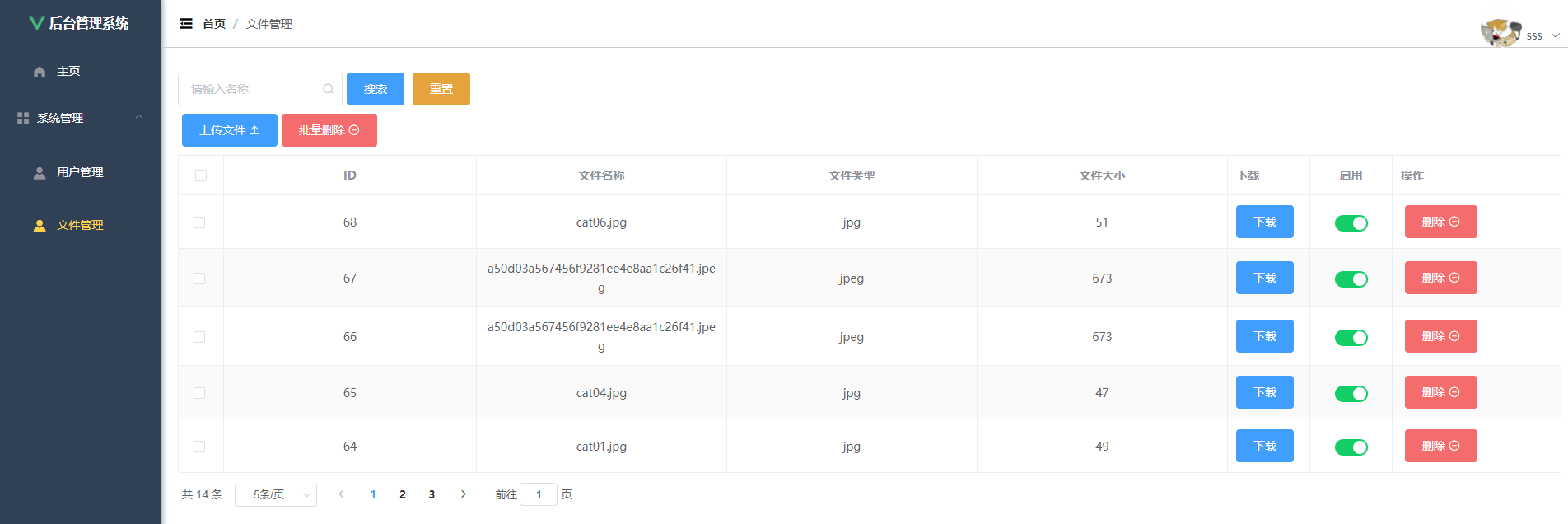
先展示最后的效果图
在Navicat中导入sql(复制下来然后在查询中粘贴运行就可以了)
/*
 Navicat Premium Data Transfer

 Source Server         : localhost
 Source Server Type    : MySQL
 Source Server Version : 80020
 Source Host           : localhost:3306
 Source Schema         : the_sound

 Target Server Type    : MySQL
 Target Server Version : 80020
 File Encoding         : 65001

 Date: 24/05/2022 09:47:56
*/

SET NAMES utf8mb4;
SET FOREIGN_KEY_CHECKS = 0;

-- ----------------------------
-- Table structure for sys_file
-- ----------------------------
DROP TABLE IF EXISTS `sys_file`;
CREATE TABLE `sys_file`  (
  `id` int(0) NOT NULL AUTO_INCREMENT COMMENT 'id',
  `name` varchar(255) CHARACTER SET utf8mb4 COLLATE utf8mb4_unicode_ci NULL DEFAULT NULL COMMENT '文件名称',
  `type` varchar(255) CHARACTER SET utf8mb4 COLLATE utf8mb4_unicode_ci NULL DEFAULT NULL COMMENT '文件类型',
  `size` bigint(0) NULL DEFAULT NULL COMMENT '文件大小(kb)',
  `url` varchar(255) CHARACTER SET utf8mb4 COLLATE utf8mb4_unicode_ci NULL DEFAULT NULL COMMENT '下载链接',
  `md5` varchar(255) CHARACTER SET utf8mb4 COLLATE utf8mb4_unicode_ci NULL DEFAULT NULL COMMENT '文件md5',
  `is_delete` tinyint(1) NULL DEFAULT 0 COMMENT '是否删除',
  `enable` tinyint(1) NULL DEFAULT 1 COMMENT '是否禁用链接',
  PRIMARY KEY (`id`) USING BTREE
) ENGINE = InnoDB AUTO_INCREMENT = 59 CHARACTER SET = utf8mb4 COLLATE = utf8mb4_unicode_ci ROW_FORMAT = Dynamic;

-- ----------------------------
-- Records of sys_file
-- ----------------------------
INSERT INTO `sys_file` VALUES (53, 'cat01.jpg', 'jpg', 49, 'http://localhost:8081/file/d42af3dcbdf448619bca2a600ba06977.jpg', '69a342bd86a6391ab2f11d625d1be66c', 0, 1);
INSERT INTO `sys_file` VALUES (56, 'cat02.jpg', 'jpg', 48, 'http://localhost:8081/file/1a233affbf6f4c4c91e0150077084d76.jpg', '125f8475aafbea2e6aefa4afe1a0b8b0', 0, 1);
INSERT INTO `sys_file` VALUES (57, 'cat01.jpg', 'jpg', 49, 'http://localhost:8081/file/d42af3dcbdf448619bca2a600ba06977.jpg', '69a342bd86a6391ab2f11d625d1be66c', 0, 1);
INSERT INTO `sys_file` VALUES (58, '1909.xlsx', 'xlsx', 7, 'http://localhost:8081/file/0ebc37a103924abb990999e5aac0e4fb.xlsx', 'b0dff391d5f1b3a0749b848e1cd47b97', 0, 1);
INSERT INTO `sys_file` VALUES (59, '1909A.xlsx', 'xlsx', 10, 'http://localhost:8081/file/23bfadb445f04dfe8407814414aea8cc.xlsx', '68c66db9bc4d4ca76a5ac860fabfe498', 0, 1);
INSERT INTO `sys_file` VALUES (60, 'a50d03a567456f9281ee4e8aa1c26f41.jpeg', 'jpeg', 673, 'http://localhost:8081/file/26567c539a884d74b578604330720de3.jpeg', '704bdfa63a60bc18d94dec17a4d5c97e', 0, 1);
INSERT INTO `sys_file` VALUES (61, 'cat04.jpg', 'jpg', 47, 'http://localhost:8081/file/56536d0b717b4b3a9790d566d72b1aec.jpg', '5f72d4abcfd428edee500ca0b25c0cf4', 0, 1);
INSERT INTO `sys_file` VALUES (62, 'cat02.jpg', 'jpg', 48, 'http://localhost:8081/file/1a233affbf6f4c4c91e0150077084d76.jpg', '125f8475aafbea2e6aefa4afe1a0b8b0', 0, 1);
INSERT INTO `sys_file` VALUES (63, 'cat02.jpg', 'jpg', 48, 'http://localhost:8081/file/1a233affbf6f4c4c91e0150077084d76.jpg', '125f8475aafbea2e6aefa4afe1a0b8b0', 0, 1);
INSERT INTO `sys_file` VALUES (64, 'cat01.jpg', 'jpg', 49, 'http://localhost:8081/file/d42af3dcbdf448619bca2a600ba06977.jpg', '69a342bd86a6391ab2f11d625d1be66c', 0, 1);
INSERT INTO `sys_file` VALUES (65, 'cat04.jpg', 'jpg', 47, 'http://localhost:8081/file/56536d0b717b4b3a9790d566d72b1aec.jpg', '5f72d4abcfd428edee500ca0b25c0cf4', 0, 1);
INSERT INTO `sys_file` VALUES (66, 'a50d03a567456f9281ee4e8aa1c26f41.jpeg', 'jpeg', 673, 'http://localhost:8081/file/26567c539a884d74b578604330720de3.jpeg', '704bdfa63a60bc18d94dec17a4d5c97e', 0, 1);
INSERT INTO `sys_file` VALUES (67, 'a50d03a567456f9281ee4e8aa1c26f41.jpeg', 'jpeg', 673, 'http://localhost:8081/file/26567c539a884d74b578604330720de3.jpeg', '704bdfa63a60bc18d94dec17a4d5c97e', 0, 1);
INSERT INTO `sys_file` VALUES (68, 'cat06.jpg', 'jpg', 51, 'http://localhost:8081/file/1c958e9a73634e5f857866148834e246.jpg', '4a2377f5fc57bbf4bcc2e2ae1076b6d5', 0, 1);

SET FOREIGN_KEY_CHECKS = 1;
后端springboot项目中
在 pom.xml 中添加(如果需要其它的配置请参照第一篇)
<!--    JWT    -->
<dependency>
    <groupId>com.auth0</groupId>
    <artifactId>java-jwt</artifactId>
    <version>3.10.3</version>
</dependency>
在resources文件夹中的 application.yml 添加(如果需要其它的配置请参照第一篇)
# 文件上传
files:
  upload:
#    文件上传路径
    path: E:/image/bilibili/files/
在 entity 中创建Files.java
import com.baomidou.mybatisplus.annotation.IdType;
import com.baomidou.mybatisplus.annotation.TableId;
import com.baomidou.mybatisplus.annotation.TableName;
import java.io.Serializable;
import lombok.Getter;
import lombok.Setter;

/**
 * <p>
 *
 * </p>
 *
 * @author the_sound
 * @since 2022-05-23
 */
@Getter
@Setter
@TableName("sys_file")
public class Files implements Serializable {

    private static final long serialVersionUID = 1L;

      /**
     * id
     */
        @TableId(value = "id", type = IdType.AUTO)
      private Integer id;

      /**
     * 文件名称
     */
      private String name;

      /**
     * 文件类型
     */
      private String type;

      /**
     * 文件大小(kb)
     */
      private Long size;

      /**
     * 下载链接
     */
      private String url;

      /**
     * 文件md5
     */
      private String md5;

      /**
     * 是否删除
     */
      private Boolean isDelete;

      /**
     * 是否禁用链接
     */
      private Boolean enable;


}
在config中的InterceptorConfig.java取消拦截
import com.boot.springboot.config.interceptor.JwtInterceptor;
import org.springframework.context.annotation.Bean;
import org.springframework.context.annotation.Configuration;
import org.springframework.web.servlet.config.annotation.InterceptorRegistry;
import org.springframework.web.servlet.config.annotation.WebMvcConfigurer;

/**
 * @author the_sound
 * @version 1.0
 * @description: 注册拦截器
 * 所有的配置类都要加一个 @Configuration 注解
 * @date 2022/5/22 19:19
 */
@Configuration
public class InterceptorConfig implements WebMvcConfigurer {

    @Override
    public void addInterceptors(InterceptorRegistry registry) {

        registry.addInterceptor(jwtInterceptor())
                // 拦截所有请求,通过判断 token 是否合法来决定是否需要登录
                .addPathPatterns("/**")
                // 排除规则
                .excludePathPatterns("/**/login", "/**/register", "/**/export", "/**/import","/file/**");
    }

    /**
     * @description: 将 JwtInterceptor 注册成一个bean 注入到容器中
     * @param:
     * @return: com.boot.springboot.config.interceptor.JwtInterceptor
     * @author ls
     * @date: 2022/5/22
     */
    @Bean
    public JwtInterceptor jwtInterceptor(){
        return new JwtInterceptor();
    }
}
在controller中创建 FilesController.java
import cn.hutool.core.io.FileUtil;
import cn.hutool.core.util.IdUtil;
import cn.hutool.core.util.StrUtil;
import cn.hutool.crypto.SecureUtil;
import com.baomidou.mybatisplus.core.conditions.query.QueryWrapper;
import com.baomidou.mybatisplus.extension.plugins.pagination.Page;
import com.boot.springboot.common.Result;
import com.boot.springboot.entity.Files;
import com.boot.springboot.mapper.FilesMapper;
import org.springframework.beans.factory.annotation.Value;
import org.springframework.web.bind.annotation.*;

import javax.annotation.Resource;
import javax.servlet.ServletOutputStream;
import javax.servlet.http.HttpServletResponse;
import java.io.File;
import java.io.IOException;
import java.net.URLEncoder;
import java.util.List;

import com.boot.springboot.service.IFilesService;

import org.springframework.web.bind.annotation.RestController;
import org.springframework.web.multipart.MultipartFile;

/**
 * <p>
 *  前端控制器
 * </p>
 *
 * @author the_sound
 * @since 2022-05-23
 */
@RestController
@RequestMapping("/file")
public class FilesController {

    @Resource
    private IFilesService filesService;

    @Resource
    private FilesMapper filesMapper;

    /**
     * @description: 在 yml 里面配置的文件上传路径,通过这个注解引进来,通过这样的方式就可以将路径拿过来,给他赋给这个变量中
     * @author ls
     */
    @Value("${files.upload.path}")
    private String fileUploadPath;

    /**
     * @description: 文件上传
     * 想实现的功能: 上传相同文件,但是只是数据库增加一条记录,磁盘不再新增内容相同的文件
     * @param: file 前端传过来的文件
     * @return: java.lang.String
     * @author ls
     * @date: 2022/5/23
     */
    @PostMapping("/upload")
    public String upload(@RequestParam MultipartFile file) throws IOException {
        // 原始名称
        String originalFilename = file.getOriginalFilename();
        // 获取文件类型
        String type = FileUtil.extName(originalFilename);
        // 获取文件大小
        long size = file.getSize();
        // 目录(精简前)
//        File uploadParentFile = new File(fileUploadPath);
//        // 判断目录是否存在,如果不存在的话则创建一个新的文件目录
//        // 不存在的话
//        if (!uploadParentFile.exists()){
//            // 创建目录
//            uploadParentFile.mkdirs();
//        }
        // 定义一个文件唯一的标识码
        String uuid = IdUtil.fastSimpleUUID();
        // 唯一的标识码 + . + 文件类型
        String fileUUID = uuid + StrUtil.DOT + type;
        // 最后文件存储的路径 目录
        File uploadFile = new File(fileUploadPath + fileUUID);
        // 判断父级目录是否存在,如果不存在的话则创建一个新的文件目录 (精简后)
        // 不存在的话
        if (!uploadFile.getParentFile().exists()){
            // 创建目录
            uploadFile.getParentFile().mkdirs();
        }
        // 定义url
        String url;
        // 获取文件的md5
        String md5 = SecureUtil.md5(file.getInputStream());
        // 从数据库查询是否存在相同的记录
        Files dbFiles = getFilesByMd5(md5);
        // 文件已存在
        if (dbFiles != null) {
            url = dbFiles.getUrl();
        } else {
            // 上传文件到磁盘
            file.transferTo(uploadFile);
            // 数据库若不存在重复文件,则不删除刚才上传的文件
            url = "http://localhost:8081/file/" + fileUUID;
        }

        // 存储数据库
        Files saveFiles = new Files();
        saveFiles.setName(originalFilename);
        saveFiles.setType(type);
        // 转成KB
        saveFiles.setSize(size/1024);
        saveFiles.setUrl(url);
        saveFiles.setMd5(md5);
        filesMapper.insert(saveFiles);
        return url;
    }

    // 通过流的方式下载

    /**
     * @description: 文件下载路径 http://localhost:8081/file/{fileUUID}
     * @param: fileUUID
response
     * @return: void
     * @author ls
     * @date: 2022/5/23
     */
    @GetMapping("/{fileUUID}")
    public void download(@PathVariable String fileUUID, HttpServletResponse response) throws IOException {
        // 根据文件的唯一标识码获取文件
        java.io.File uploadFile = new File(fileUploadPath + fileUUID);
        // 设置输出流的格式
        ServletOutputStream os = response.getOutputStream();
        response.addHeader("Content-Disposition","attachment;filename=" + URLEncoder.encode(fileUUID,"UTF-8"));
        response.setContentType("application/octet-stream");
        // 读取上传文件的字节流 (写出)
        os.write(FileUtil.readBytes(uploadFile));
        os.flush();
        os.close();
    }

    /**
     * @description: 通过文件的md5查询文件 (避免太过臃肿,单拎出来)
     * 设置md5的初衷是为了少占用磁盘空间,前面说数据库里面可以存放多个相同文件,但它们最终都指向唯一的一个文件,也就是文件只有一个但是指针有多个
     * @param: md5
     * @return: com.boot.springboot.entity.Files
     * @author ls
     * @date: 2022/5/23
     */
    private Files getFilesByMd5(String md5){
        // 查询文件的md5是否存在 在文件上传之前去数据库查一下,看看是否有相同文件,如果有了就省略不做
        QueryWrapper<Files> queryWrapper = new QueryWrapper<>();
        queryWrapper.eq("md5", md5);
        List<Files> filesList = filesMapper.selectList(queryWrapper);
        // 三目运算符 如果等于0就返回为null,不等于0就返回获取到的第一个
        return filesList.size() == 0 ? null : filesList.get(0);
    }

    // ===================================================================================================================

    /**
     * @description: 分页+模糊查
     * @param: pageNum
pageSize
name
     * @return: com.boot.springboot.common.Result
     * @author ls
     * @date: 2022/5/23
     */
    @GetMapping("/page")
    public Result findPage(@RequestParam Integer pageNum, @RequestParam Integer pageSize,
                           @RequestParam(defaultValue = "") String name) {
        QueryWrapper<Files> queryWrapper = new QueryWrapper<>();
        if (!"".equals(name)){
            queryWrapper.like("name",name);
        }
        // 查询未删除的记录
        queryWrapper.eq("is_delete", false);
        queryWrapper.orderByDesc("id");
        return Result.success(filesService.page(new Page<>(pageNum, pageSize), queryWrapper));
    }

    /**
     * @description: 更新字段
     * @param: files
     * @return: com.boot.springboot.common.Result
     * @author ls
     * @date: 2022/5/23
     */
    @PostMapping("/update")
    public Result update(@RequestBody Files files) {
        return Result.success(filesMapper.updateById(files));
    }

    /**
     * @description: 删除(逻辑)
     * @param: id
     * @return: com.boot.springboot.common.Result
     * @author ls
     * @date: 2022/5/23
     */
    @DeleteMapping("/{id}")
    public Result delete(@PathVariable Integer id) {
        Files files = filesMapper.selectById(id);
        files.setIsDelete(true);
        filesService.updateById(files);
        return Result.success();
    }

    /**
     * @description: 批量删除(逻辑)
     * @param: ids
     * @return: com.boot.springboot.common.Result
     * @author ls
     * @date: 2022/5/23
     */
    @PostMapping("/del/batch")
    public Result deleteBatch(@RequestBody List<Integer> ids) {
        // select * from sys_file where id in (id,id,id...)
        QueryWrapper<Files> queryWrapper = new QueryWrapper<>();
        queryWrapper.in("id", ids);
        List<Files> files = filesMapper.selectList(queryWrapper);
        for (Files file : files) {
            file.setIsDelete(true);
            filesMapper.updateById(file);
        }
        return Result.success();
    }
}
在service中创建interface接口 IFilesService.java(使用代码生成器生成,如果不想生成直接复制)
package com.boot.springboot.service;

import com.boot.springboot.entity.Files;
import com.baomidou.mybatisplus.extension.service.IService;

/**
 * <p>
 *  服务类
 * </p>
 *
 * @author ls
 * @since 2022-05-23
 */
public interface IFilesService extends IService<Files> {

}
在service的impl中创建 FilesServiceImpl.java(使用代码生成器生成,如果不想生成直接复制)
import com.boot.springboot.entity.Files;
import com.boot.springboot.mapper.FilesMapper;
import com.boot.springboot.service.IFilesService;
import com.baomidou.mybatisplus.extension.service.impl.ServiceImpl;
import org.springframework.stereotype.Service;

/**
 * <p>
 *  服务实现类
 * </p>
 *
 * @author the_sound
 * @since 2022-05-23
 */
@Service
public class FilesServiceImpl extends ServiceImpl<FilesMapper, Files> implements IFilesService {

}
在mapper中创建 FilesMapper.java(使用代码生成器生成,如果不想生成直接复制)
import com.boot.springboot.entity.Files;
import com.baomidou.mybatisplus.core.mapper.BaseMapper;
import org.apache.ibatis.annotations.Mapper;

/**
 * <p>
 *  Mapper 接口
 * </p>
 *
 * @author the_sound
 * @since 2022-05-23
 */
@Mapper
public interface FilesMapper extends BaseMapper<Files> {

}
在resources中的mapper创建 FilesMapper.xml(使用代码生成器生成,如果不想生成直接复制)
<?xml version="1.0" encoding="UTF-8"?>
<!DOCTYPE mapper PUBLIC "-//mybatis.org//DTD Mapper 3.0//EN" "http://mybatis.org/dtd/mybatis-3-mapper.dtd">
<mapper namespace="com.boot.springboot.mapper.FilesMapper">

</mapper>
这么整后端就完成了
前端vue
在views中创建File.vue
<template>
  <div>
    <div class="mg-10">
      <el-input v-model="name" style="width: 200px" suffix-icon="el-icon-search" placeholder="请输入名称"></el-input>
      <el-button class="ml-5" type="primary" @click="findPage()">搜索</el-button>
      <el-button class="ml-5" type="warning" @click="reset()">重置</el-button>
    </div>
    <div class="mg-10">
      <el-upload action="http://localhost:8081/file/upload" :show-file-list="false" accept="xlsx" :on-success="handleFileUploadSuccess" style="display: inline-block">
        <el-button type="primary" class="ml-5">上传文件 <i class="el-icon-upload2"></i></el-button>
      </el-upload>
      <el-popconfirm
          confirm-button-text='确定'
          cancel-button-text='不删了'
          icon="el-icon-info"
          icon-color="red"
          title="您确定删除选中信息吗?"
          @confirm="delBatch()"
          class="ml-5">
        <el-button type="danger" slot="reference">批量删除 <i class="el-icon-remove-outline"></i></el-button>
      </el-popconfirm>
    </div>

    <el-table :data="tableData" border stripe :header-cell-class-name="headerBg" @selection-change="handleSelectionChange">
      <el-table-column type="selection" width="55" align="center"></el-table-column>
      <el-table-column prop="id" label="ID" align="center"></el-table-column>
      <el-table-column prop="name" label="文件名称" align="center"></el-table-column>
      <el-table-column prop="type" label="文件类型" align="center"></el-table-column>
      <el-table-column prop="size" label="文件大小" align="center"></el-table-column>
      <el-table-column label="下载" width="100">
        <template slot-scope="scope">
          <el-button type="primary" @click="download(scope.row.url)">下载</el-button>
        </template>
      </el-table-column>
      <el-table-column prop="enable" label="启用" width="100" align="center">
        <template slot-scope="scope">
          <el-switch v-model="scope.row.enable" active-color="#13ce66" inactive-color="#ccc" @change="changeEnable(scope.row)"></el-switch>
        </template>
      </el-table-column>
      <el-table-column label="操作" width="205">
        <template slot-scope="scope">
          <el-popconfirm
              confirm-button-text='确定'
              cancel-button-text='不删了'
              icon="el-icon-info"
              icon-color="red"
              title="您确定删除吗?"
              @confirm="handleDel(scope.row.id)"
              class="ml-5">
            <el-button type="danger" slot="reference">删除 <i class="el-icon-remove-outline"></i></el-button>
          </el-popconfirm>
        </template>
      </el-table-column>
    </el-table>

    <!-- 分页
        分页数据和表格数据产生了联动
        前端传的值:
          :current-page="pageNum" 页码
          :page-size="pageSize" 每页个数
        后端传的值:
          :total="total" 总条数
    -->
    <div style="padding: 10px 0">
      <el-pagination
          @size-change="handleSizeChange"
          @current-change="handleCurrentChange"
          :current-page="pageNum"
          :page-sizes="[ 2, 5, 10, 15]"
          :page-size="pageSize"
          layout="total, sizes, prev, pager, next, jumper"
          :total="total">
      </el-pagination>
    </div>
  </div>
</template>

<script>
export default {
  name: "File",
  data() {
    return {
      tableData: [],
      name: '',
      multipleSelection: [], // 绑定多选按钮
      fileForm: {},
      total: 0, // 分页总条数
      pageNum: 1, // 页数
      pageSize: 5, // 条数
    }
  },
  created() {
    this.findPage()
  },
  methods: {
    // 分页
    handleSizeChange(pageSize) {
      console.log(`每页 ${pageSize} 条`);
      // 传给我们上面绑定的pageSize
      this.pageSize = pageSize
      // 请求数据,请求数据之后它会自动更新 pageSize
      this.findPage()
    },
    handleCurrentChange(pageNum) {
      console.log(`当前页: ${pageNum}`);
      // 传给我们上面绑定的pageNum
      this.pageNum = pageNum
      // 请求数据,请求数据之后它会自动更新 tableData
      this.findPage()
    },
    findPage() { // 搜索按钮
      this.request.get("http://localhost:8081/file/page", {
        params: {
          pageNum: this.pageNum,
          pageSize: this.pageSize,
          name: this.name,
        }
      }).then(res => {
        this.tableData = res.data.records
        this.total = res.data.total
      })
    },
    // 是否禁用链接
    changeEnable(row) {
      this.request.post("http://localhost:8081/file/update", row).then(res => {
        if (res.code === '200') {
          this.$message.success("操作成功")
        }
      })
    },
    reset() { // 重置按钮
      // 清空输入框
      this.name = ""
      this.findPage()
    },
    handleDel(id) { // 点击删除按钮执行
      this.request.delete("http://localhost:8081/file/" + id).then(res => {
        if (res.code === '200') {
          this.$message.success("删除成功")
          this.findPage()
        } else {
          this.$message.error("删除失败")
        }
      })
    },
    // 批量删除
    handleSelectionChange(val) {
      console.log(val)
      this.multipleSelection = val; // 将选中的对象数组赋进去
    },
    delBatch() {
      // 因为我们需要的是数组,所以我们通过map来把一个对象的数组变成了一个传id的一个数组
      let ids = this.multipleSelection.map(v => v.id) // [{},{},{}] => [1,2,3]
      // 因为delete不能传对象过去,所以改成post
      this.request.post("http://localhost:8081/file/del/batch", ids).then(res => {
        if (res.code === '200') {
          this.$message.success("批量删除成功")
          this.findPage()
        } else {
          this.$message.error("批量删除失败")
        }
      })
    },
    // 下载
    download(url) {
      window.open(url)
    },
    // 上传文件
    handleFileUploadSuccess(res) {
      console.log(res.data)
      this.findPage()
    },
  }
}
</script>

<style scoped>

</style>
在router 中的 index.js
import Vue from 'vue'
import VueRouter from 'vue-router'
import store from "@/store";

Vue.use(VueRouter)

const routes = [
  // {
  //   path: '/',
  //   name: 'home',
  //   component: HomeView
  // },
  {
    path: '/',
    name: 'Manage',
    component: () => import('../views/Manage.vue'),
    redirect: "/home",
    children: [
      { path: '/home', name: '首页', component: () => import('../views/Home.vue') },
      { path: '/user', name: '用户管理', component: () => import('../views/User.vue') },
      { path: '/person', name: '个人信息', component: () => import('../views/Person.vue') },
      { path: '/file', name: '文件管理', component: () => import('../views/File.vue') },
    ]
  },
  {
    path: '/login',
    name: 'Login',
    component: () => import('../views/Login.vue')
  },
  { // 注册
    path: '/register',
    name: 'Register',
    component: () => import('../views/Register.vue')
  },
]

const router = new VueRouter({
  // mode: "history",
  // base: process.env.BASE_URL,
  routes
})

router.beforeEach((to, from, next) => { // 路由守卫
  localStorage.setItem("currentPathName", to.name) // 设置当前路由名称
  store.commit("setPath")  // 触发store的数据更新
  next()
})

export default router
在components中创建的 Aside.vue
<template>
  <el-menu :default-openeds="['1', '3']" style="height: 100%;background-color: rgb(48, 65, 86);overflow-x: hidden"
           default-active="2"
           background-color="#304156FF"
           text-color="#fff"
           active-text-color="#ffd04b"
           :collapse-transition="false"
           :collapse="isCollapse"
           class="el-menu-vertical-demo"
           router
           @select="handleSelect"
  >
    <div style="height: 60px;line-height: 60px;text-align: center">
      <img src="../assets/logo.png" alt="" style="width: 20px;position: relative;top: 5px;margin-right: 5px"/>
      <b style="color: #fff" v-show="logoTextShow">后台管理系统</b>
    </div>
    <el-menu-item>
      <template slot="title">
        <el-menu-item index="/"><i class="el-icon-s-home"></i> 主页</el-menu-item>
      </template>
    </el-menu-item>
    <el-submenu index="2">
      <template slot="title">
        <i class="el-icon-menu"></i>
        <span slot="title">系统管理</span>
      </template>
      <el-menu-item-group>
        <el-menu-item index="/user"><i class="el-icon-s-custom"></i> 用户管理</el-menu-item>
      </el-menu-item-group>
      <el-menu-item-group>
        <el-menu-item index="/file"><i class="el-icon-s-custom"></i> 文件管理</el-menu-item>
      </el-menu-item-group>
    </el-submenu>
  </el-menu>
</template>

<script>
export default {
  name: "Aside",
  props: {
    isCollapse: Boolean,
    logoTextShow: Boolean
  }
}
</script>

<style scoped>

</style>
完成!全剧终!撒花!


 浙公网安备 33010602011771号