无脑操作:IDEA + maven + SpringBoot + JPA + Thymeleaf实现CRUD及分页
一、开发环境:
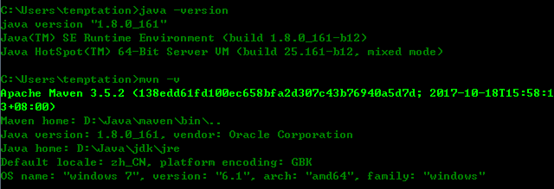
1、windows 7 企业版
2、IDEA 14
3、JDK 1.8
4、Maven 3.5.2
5、MariaDB
6、SQLYog
二、Maven设置:
Maven目录下的conf目录下的settings.xml做如下内容的添加:
1、使用阿里云的仓库,比官网访问速度快很多
1 <mirror>
2 <id>nexus-aliyun</id>
3 <mirrorOf>central</mirrorOf>
4 <name>Nexus aliyun</name>
5 <url>http://maven.aliyun.com/nexus/content/groups/public</url>
6 </mirror>
2、全局JDK配置

 1 <!-- 全局jdk配置,settings.xml -->
 2 <profile>
 3     <id>jdk18</id>
 4     <activation>
 5         <activeByDefault>true</activeByDefault>
 6         <jdk>1.8</jdk>
 7     </activation>
 8     <properties>
 9         <maven.compiler.source>1.8</maven.compiler.source>
10         <maven.compiler.target>1.8</maven.compiler.target>
11         <maven.compiler.compilerVersion>1.8</maven.compiler.compilerVersion>
12     </properties>
13 </profile>
三、IDEA基本设置:
1、Maven设置:选择Maven目录,同时配置文件和本地仓库

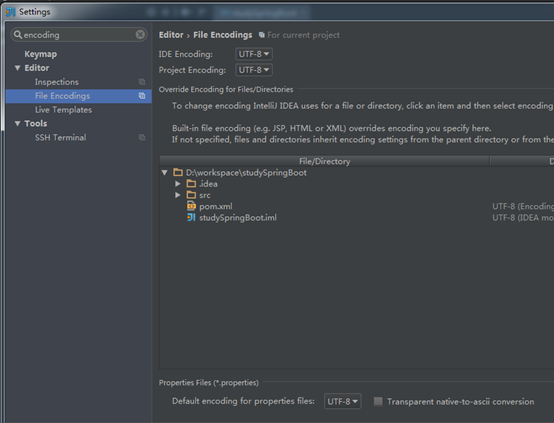
2、字符编码设置
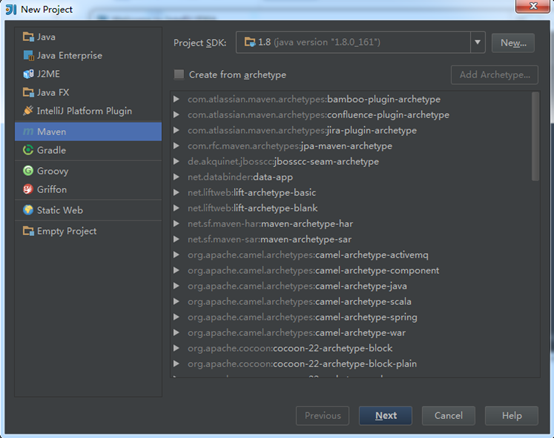
四、使用IDEA创建Maven工程:
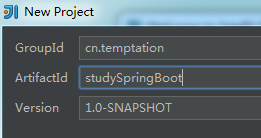
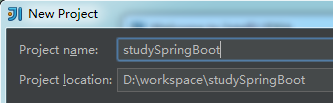

选择Enable Auto-Import,创建好的工程目录如下图:
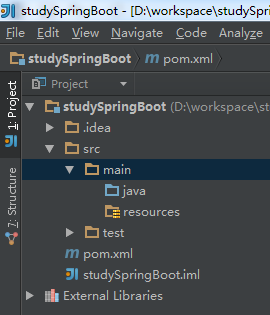
五、体验SpringBoot结合JPA的快速开发吧
1、pom.xml
 1 <?xml version="1.0" encoding="UTF-8"?>
 2 <project xmlns="http://maven.apache.org/POM/4.0.0"
 3          xmlns:xsi="http://www.w3.org/2001/XMLSchema-instance"
 4          xsi:schemaLocation="http://maven.apache.org/POM/4.0.0 http://maven.apache.org/xsd/maven-4.0.0.xsd">
 5     <modelVersion>4.0.0</modelVersion>
 6
 7     <groupId>cn.temptation</groupId>
 8     <artifactId>studySpringBoot</artifactId>
 9     <version>1.0-SNAPSHOT</version>
10
11     <!-- 使用spring boot的默认设置 -->
12     <parent>
13         <groupId>org.springframework.boot</groupId>
14         <artifactId>spring-boot-starter-parent</artifactId>
15         <version>2.0.0.RELEASE</version>
16     </parent>
17
18     <dependencies>
19         <!-- web -->
20         <dependency>
21             <groupId>org.springframework.boot</groupId>
22             <artifactId>spring-boot-starter-web</artifactId>
23         </dependency>
24         <!-- thymeleaf -->
25         <dependency>
26             <groupId>org.springframework.boot</groupId>
27             <artifactId>spring-boot-starter-thymeleaf</artifactId>
28         </dependency>
29         <!-- mysql-->
30         <dependency>
31             <groupId>mysql</groupId>
32             <artifactId>mysql-connector-java</artifactId>
33             <version>5.1.21</version>
34         </dependency>
35         <!-- jpa-->
36         <dependency>
37             <groupId>org.springframework.boot</groupId>
38             <artifactId>spring-boot-starter-data-jpa</artifactId>
39         </dependency>
40     </dependencies>
41 </project>
2、resources目录下新建application.properties(当然喜欢用yaml的可以用yaml)
1 # 数据库连接
2 spring.datasource.url=jdbc:mysql://127.0.0.1:3306/test
3 spring.datasource.username=root
4 spring.datasource.password=sa
5 spring.datasource.driver-class-name=com.mysql.jdbc.Driver
6
7 # JPA配置
8 spring.jpa.properties.hibernate.hbm2ddl.auto=update
3、创建SpringBoot程序启动类SpringbootApplication.java
 1 package cn.temptation;
 2
 3 import org.springframework.boot.SpringApplication;
 4 import org.springframework.boot.autoconfigure.SpringBootApplication;
 5
 6 @SpringBootApplication
 7 public class SpringbootApplication {
 8     public static void main(String[] args) {
 9         // SpringBoot项目启动
10         SpringApplication.run(SpringbootApplication.class, args);
11     }
12 }
4、创建实体类Category.java
 1 package cn.temptation.model;
 2
 3 import javax.persistence.*;
 4
 5 // 建库建表
 6 //DROP TABLE category;
 7 //
 8 //CREATE TABLE category
 9 //(
10 //    categoryid INT AUTO_INCREMENT PRIMARY KEY,
11 //    categoryname VARCHAR(10) NOT NULL
12 //);
13 //
14 //INSERT INTO category VALUES(NULL, '手机'), (NULL, '图书'), (NULL, '服装'), (NULL, '鞋帽');
15 //
16 //SELECT * FROM category;
17 @Entity
18 @Table(name = "category")
19 public class Category {
20     @Id
21     @GeneratedValue(strategy = GenerationType.IDENTITY)
22     @Column(name = "categoryid")
23     private Integer categoryid;
24
25     @Column(name = "categoryname")
26     private String categoryname;
27
28     public Integer getCategoryid() {
29         return categoryid;
30     }
31
32     public void setCategoryid(Integer categoryid) {
33         this.categoryid = categoryid;
34     }
35
36     public String getCategoryname() {
37         return categoryname;
38     }
39
40     public void setCategoryname(String categoryname) {
41         this.categoryname = categoryname;
42     }
43 }
5、创建DAO接口CategoryDao.java
1 package cn.temptation.dao;
2
3 import cn.temptation.model.Category;
4 import org.springframework.data.jpa.repository.JpaRepository;
5
6 public interface CategoryDao extends JpaRepository<Category, Integer> {
7
8 }
6、创建控制器类CategoryController.java
  1 package cn.temptation.web;
  2
  3 import cn.temptation.dao.CategoryDao;
  4 import cn.temptation.model.Category;
  5 import org.springframework.beans.factory.annotation.Autowired;
  6 import org.springframework.data.domain.Page;
  7 import org.springframework.data.domain.PageRequest;
  8 import org.springframework.data.domain.Pageable;
  9 import org.springframework.data.domain.Sort;
 10 import org.springframework.stereotype.Controller;
 11 import org.springframework.web.bind.annotation.RequestMapping;
 12 import org.springframework.web.bind.annotation.RequestParam;
 13 import org.springframework.web.servlet.ModelAndView;
 14
 15 import java.util.List;
 16
 17 @Controller
 18 public class CategoryController {
 19     @Autowired
 20     private CategoryDao categoryDao;
 21
 22     /**
 23      * 不分页查询
 24      *
 25      * @return
 26      */
 27 //    @RequestMapping("/categorylist")
 28 //    public ModelAndView categorylist() {
 29 //        List<Category> list = categoryDao.findAll();
 30 //
 31 //        ModelAndView mav = new ModelAndView("categorylist");
 32 //        mav.addObject("list", list);
 33 //        return mav;
 34 //    }
 35
 36     /**
 37      * 分页查询
 38      *
 39      * @return
 40      */
 41     @RequestMapping("/categorylist")
 42     public ModelAndView categorylist(@RequestParam(value = "start", defaultValue = "0") Integer start,
 43                                      @RequestParam(value = "limit", defaultValue = "2") Integer limit) {
 44         start = start < 0 ? 0 : start;
 45
 46         Sort sort = new Sort(Sort.DEFAULT_DIRECTION, "categoryid");
 47         Pageable pageable = new PageRequest(start, limit, sort);
 48         Page<Category> page = categoryDao.findAll(pageable);
 49
 50 //        System.out.println(page.getNumber());
 51 //        System.out.println(page.getNumberOfElements());
 52 //        System.out.println(page.getSize());
 53 //        System.out.println(page.getTotalElements());
 54 //        System.out.println(page.getTotalPages());
 55 //        System.out.println(page.isFirst());
 56 //        System.out.println(page.isLast());
 57
 58         ModelAndView mav = new ModelAndView("categorylist");
 59         mav.addObject("page", page);
 60         return mav;
 61     }
 62
 63     /**
 64      * 类别新增视图
 65      * @return
 66      */
 67     @RequestMapping("/categoryinit")
 68     public String categoryinit() {
 69         return "categoryinit";
 70     }
 71
 72     /**
 73      * 类别新增操作
 74      * @param model
 75      * @return
 76      */
 77     @RequestMapping("/categoryinsert")
 78     public String categoryinsert(Category model) {
 79         categoryDao.save(model);
 80         return "redirect:categorylist";
 81     }
 82
 83     /**
 84      * 类别删除操作
 85      * @param categoryid
 86      * @return
 87      */
 88     @RequestMapping("/categorydelete")
 89     public String categorydelete(Integer categoryid) {
 90         categoryDao.deleteById(categoryid);
 91         return "redirect:categorylist";
 92     }
 93
 94     /**
 95      * 类别编辑视图
 96      * @param categoryid
 97      * @return
 98      */
 99     @RequestMapping("/categoryedit")
100     public ModelAndView categoryedit(Integer categoryid) {
101         Category model = categoryDao.getOne(categoryid);
102
103         ModelAndView mav = new ModelAndView("categoryedit");
104         mav.addObject("category", model);
105         return mav;
106     }
107
108     /**
109      * 类别编辑操作
110      * @param model
111      * @return
112      */
113     @RequestMapping("/categoryupdate")
114     public String categoryupdate(Category model) {
115         categoryDao.save(model);
116         return "redirect:categorylist";
117     }
118 }
7、resources目录下新建templates目录,创建表现层:类别列表页面(categorylist.html)、类别新增页面(categoryinit.html)、类别编辑页面(categoryedit.html)
类别列表页面(categorylist.html)
1 <!DOCTYPE html>
2 <html lang="en">
3 <head>
4 <meta charset="UTF-8">
5 <title>类别列表</title>
6 <style>
7 table, th, td {
8 border: 1px solid green;
9 border-collapse: collapse;
10 }
11 </style>
12 </head>
13 <body>
14 <a th:href="@{/categoryinit}">新增</a>
15 <table>
16 <tr>
17 <th>类别编号</th>
18 <th>类别名称</th>
19 <th>操 作</th>
20 </tr>
21 <!--不分页遍历-->
22 <!--<tr th:each="item : ${list}">-->
23 <!--分页遍历-->
24 <tr th:each="item : ${page.content}">
25 <td th:text="${item.categoryid}">类别编号</td>
26 <td th:text="${item.categoryname}">类别名称</td>
27 <td>
28 <a th:href="@{/categoryedit(categoryid=${item.categoryid})}">编辑</a>
29 <a th:href="@{/categorydelete(categoryid=${item.categoryid})}">删除</a>
30 </td>
31 </tr>
32 </table>
33 <div>
34 <a th:href="@{/categorylist(start=0)}">[首页]</a>
35 <a th:if="${not page.isFirst()}" th:href="@{/categorylist(start=${page.number-1})}">[上页]</a>
36 <a th:if="${not page.isLast()}" th:href="@{/categorylist(start=${page.number+1})}">[下页]</a>
37 <a th:href="@{/categorylist(start=${page.totalPages-1})}">[末页]</a>
38 </div>
39 </body>
40 </html>
类别新增页面(categoryinit.html)
 1 <!DOCTYPE html>
 2 <html lang="en">
 3 <head>
 4     <meta charset="UTF-8">
 5     <title>类别新增</title>
 6 </head>
 7 <body>
 8 <form action="categoryinsert" method="post">
 9     <label for="txtCategoryname">类别名称:</label>
10     <input type="text" id="txtCategoryname" name="categoryname" /><br/>
11     <input type="submit" value="提交">
12 </form>
13 </body>
14 </html>
类别编辑页面(categoryedit.html)
 1 <!DOCTYPE html>
 2 <html lang="en">
 3 <head>
 4     <meta charset="UTF-8">
 5     <title>类别编辑</title>
 6 </head>
 7 <body>
 8 <form action="categoryupdate" method="post">
 9     <input type="hidden" id="txtCategoryid" name="categoryid" th:field="${category.categoryid}"/><br/>
10     <label for="txtCategoryname">类别名称:</label>
11     <input type="text" id="txtCategoryname" name="categoryname" th:field="${category.categoryname}"/><br/>
12     <input type="submit" value="提交">
13 </form>
14 </body>
15 </html>
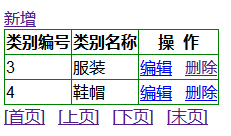
六、启动项目,运行效果如下

 浙公网安备 33010602011771号