
eclipse搭建springboot的项目
记录一次自己搭建springboot的经历
- springboot项目创建
这里借用别的博主分享的方法 https://blog.csdn.net/mousede/article/details/81285693
- 目录结构
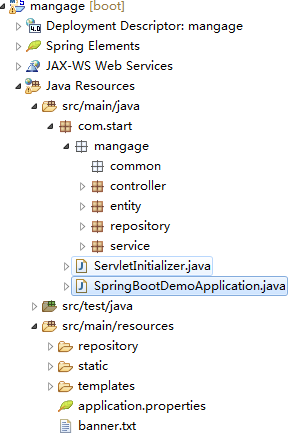
- 接下来是编写一个启动类
启动类:SpringBootDemoApplication
package com.start;

import org.mybatis.spring.annotation.MapperScan;
import org.springframework.boot.SpringApplication;
import org.springframework.boot.autoconfigure.SpringBootApplication;

@SpringBootApplication(scanBasePackages = "com")
@MapperScan({"com.start.mangage.repository","com.start.mangage.service"})
public class SpringBootDemoApplication {

    public static void main(String[] args) {
        SpringApplication.run(SpringBootDemoApplication.class,args);
    }
}
新建一个配置文件起名application.properties
#服务器端口号
server.port=8011
这里我使用maven建的项目 所以依赖就需要在pom.xml中加入下面一些依赖 原本的你不用管放里面就可以了
 <dependency>
        <groupId>org.springframework.boot</groupId>
        <artifactId>spring-boot-starter-tomcat</artifactId>
        <scope>provided</scope>
    </dependency>
    <dependency>
           <groupId>org.apache.tomcat.embed</groupId>
           <artifactId>tomcat-embed-jasper</artifactId>
          <scope>1.2</scope>
    </dependency>
    <dependency>
        <groupId>org.springframework.boot</groupId>
        <artifactId>spring-boot-starter-web</artifactId>
    </dependency>
  <build>
      <plugins>
      <!-- 资源文件拷贝插件 -->
         <plugin>
            <groupId>org.apache.maven.plugins</groupId>
            <artifactId>maven-resources-plugin</artifactId>
            <configuration>
                <encoding>UTF-8</encoding>
            </configuration>
        </plugin>
          <plugin>
              <groupId>org.springframework.boot</groupId>
              <artifactId>spring-boot-maven-plugin</artifactId>
          </plugin>
      </plugins>
</build>
到这里基本一个项目就搭建好啦,用浏览器访问http://localhost:8011就可以访问默认首页
下面是我第一次搭建过程中最为头疼的地方了 百度了很多才解决
- 如何访问静态资源
首先需要在目录中创建文件夹static(存放js,css等)和templates(存放页面文件jsp,html等)
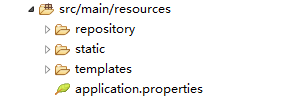
在pomxml中添加依赖
<!-- 访问静态资源 -->
    <!-- <dependency>
        <groupId>org.springframework.boot</groupId>
        <artifactId>spring-boot-starter-thymeleaf</artifactId>
    </dependency -->
<!-- jsp依赖 -->
    <dependency>
        <groupId>javax.servlet</groupId>
        <artifactId>javax.servlet-api</artifactId>
        <scope>provided</scope>
    </dependency>
        <dependency>
            <groupId>org.apache.tomcat.embed</groupId>
            <artifactId>tomcat-embed-jasper</artifactId>
            <scope>provided</scope>
        </dependency>
        <dependency>
            <groupId>org.apache.tomcat</groupId>
            <artifactId>tomcat-jsp-api</artifactId>
        </dependency>

<resources>
            <resource>
                <directory>src/main/java</directory>java文件的路径
                <includes>
                    <include>**/*.properties</include>
                    <include>**/*.*</include>
                </includes>
<!--                <filtering>false</filtering> -->
            </resource>
            <resource>
                <directory>src/main/resources</directory>资源文件的路径
                <includes>
                    <include>**/*.*</include>
                </includes>
            </resource>
        </resources>
这里一开始我用 thymeleaf 这里依赖导致我怎么也访问不到我的jsp格式的页面,后来我改用了jsp依赖就可以,就是一个依赖的问题把我这初学者难上了天,唉!
配置文件中添加
#配置jsp视图的位置和后缀
spring.mvc.static-path-pattern=/**
spring.mvc.view.prefix=/WEB-INF/jsp/
spring.mvc.view.suffix=.jsp
spring.resources.static-locations=classpath:/META-INF/resources/,classpath:/resources/,classpath:/static/,classpath:/public/
然后我建了一个controller类,测试了一下访问页面,成功访问到了。
勤能补拙,努力努力!

 浙公网安备 33010602011771号