

React中tab栏的实现
父组件的代码展示
class App extends React.Component{
    constructor(props){
        super(props);
        this.state={
            name:['流行','新款','精选'],   //这些数据为tab栏展示的数据
            currentTitle:'流行'
        }
    }
    render(){
        const {name,currentTitle} =this.state   //通过解构,下面直接拿到数据
        return(
            <div>
                <CurrentBar itemClick={index=>this.itemClick(index)} titles={name}/>   //子组件
            </div>
        )
    }
    itemClick(index){        //子组件给父组件传递事件
        const {name} = this.state
        const titles = name;
        console.log(index);
        this.setState({
            currentTitle:titles[index]
        })
    }
}
export default App;
子组件的代码展示
export default class CurrentBar extends Component {
    constructor(props){
        super(props);
        this.state={
            currentIndex:0
        }
    }
    render() {
        const {titles} = this.props;     //从父组件拿到数据,
        const {currentIndex} = this.state
        return (
            <div className='current-tab'>
                {
                    titles.map((item,index)=>{    //然后进行遍历
                        return (
                            <div key={item}
                                className={"currnet-item " + (index === currentIndex?"active":"")}
                                onClick={e=>this.itemClick(index)}
                            >
                                <span className='current-span'>{item}</span>  //每个span为一个数据展示
                            </div>
                        )
                    })
                }
            </div>
        )
    }
    itemClick(index){
        this.setState({
            currentIndex:index
        })

        const {itemClick} = this.props;   //从父组件拿到事件
        itemClick(index);
    }
}
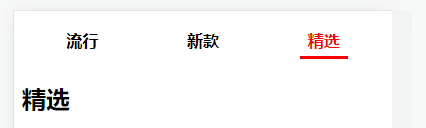
效果展示
人,一定不能懒,懒习惯了,稍微努力一下便以为是在拼命。

 浙公网安备 33010602011771号