
基础6——EL表达式和JSTL标签库

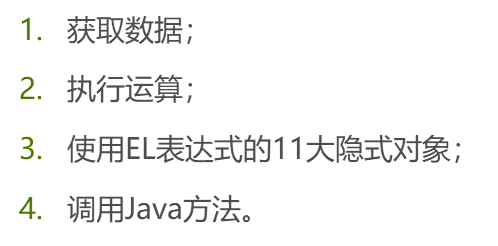
2.EL表达式的作用
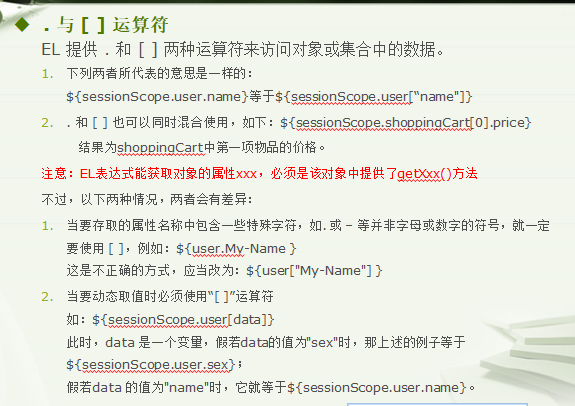
3.EL表达式的语法

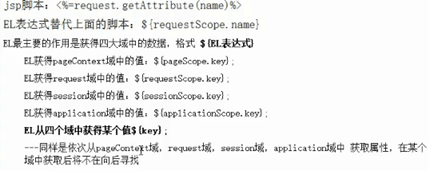
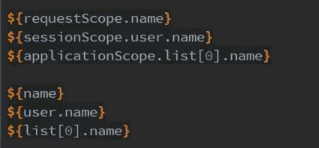
4.EL从域中获取数据

6.EL表达式运算
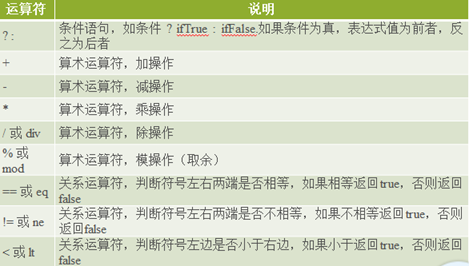
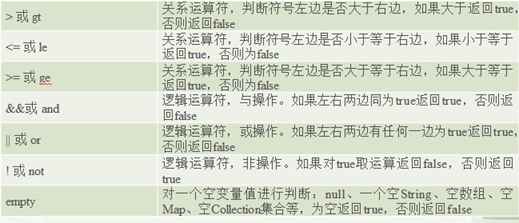
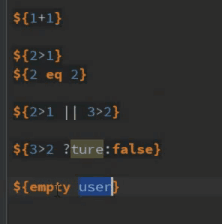
例子:
7.EL的内置对象
1)含义:就是可以直接在EL表达式里直接使用的对象。
2)EL内置对象说明
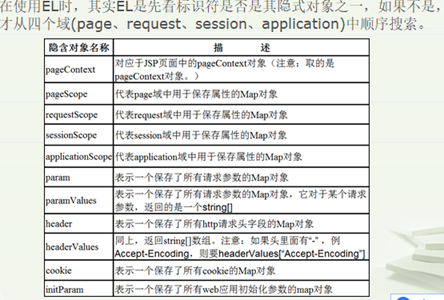
①EL和JSP一样拥有pageContext对象,通过在EL中使用pageContext对象,能获取JSP中其他几个隐式对象,然后再获取这些对象中
的属性。
②pageScope,requestScope,sessionScope,applicationScope这四个EL隐式对象分别代表了各自域中的Map对象,这个Map对象
保存了存在这些域中的键值对。通过EL表达式和这些隐式对象,我们可以直接从指定的域中获取存储的数据。
注意:我们使用EL表达式的内置对象比较多的就是获取域中的数据和pageContext,因为jsp多用于界面的展示,数据处理一般在servlet。而pageContext获取其他八大对象的方法如下:

8.自定义EL函数
1)简介:

2)语法:
3)实例
①自定义标签类
package com.hanchao.el;

import java.text.SimpleDateFormat;
import java.util.Date;

import com.hanchao.entity.User;

/**
 * 自定义EL表达式
 * 注意事项:方法必须是static的静态方法★
 * @author liweihan (liweihan@sohu-inc.com)
 * @version 1.0 (2014年11月14日 下午2:20:57)
 */
public class MyElTag {

    /**
     * 用来验证用户名是否为admin
     * [仅仅是测试,无意义]
     * @param user   实体类User
     * @return
     *
     * 2014年11月14日 下午2:27:14
     * liweihan
     */
    public static boolean checkUsername(User user) {
        if (user.getName().equals("admin")) {
            return true;
        }
        return false;
    }

    /**
     * 字符串反转
     * @param str 需要反转的字符串
     * @return
     *
     * 2014年11月14日 下午2:30:00
     * liweihan
     */
    public static String reverse(String str) {
        return new StringBuffer(str).reverse().toString();
    }

    /**
     * 返回字符串去掉前后空格的字符长度
     * @param str
     * @return
     *
     * 2014年11月14日 下午2:31:17
     * liweihan
     */
    public static int countStr(String str) {
        return str.trim().length();
    }

    /**
     * 格式化日期
     * @param date       日期
     * @param pattern    格式
     * @return
     *
     * 2014年11月14日 下午3:33:33
     * liweihan
     */
    public static String formatTime(Date date ,String pattern) {
        SimpleDateFormat simpleDateFormat = new SimpleDateFormat(pattern);
        return simpleDateFormat.format(date);
    }
}
②在WEB-INF下面建立一个tld文件:myel.tld
<?xml version="1.0" encoding="UTF-8"?>
<taglib xmlns="http://java.sun.com/xml/ns/j2ee"
  xmlns:xsi="http://www.w3.org/2001/XMLSchema-instance"
  xsi:schemaLocation="http://java.sun.com/xml/ns/j2ee http://java.sun.com/xml/ns/j2ee/web-jsptaglibrary_2_0.xsd"
  version="2.0">
    <!-- 定义函数的版本 -->
    <tlib-version>1.0</tlib-version>
    <short-name>el</short-name>
    <!-- 定义函数的名称  →
    <short-name>myel</short-name>
     -->
    <uri>http://so.tv.sohu.com/custom/functions</uri>

      <!-- 定义顶一个函数 -->
      <function>
          <!-- 函数描述 -->
          <description>check isOrNot admin</description>
          <!-- 函数名  → 注意:此处的名字和JSP页面上名字一样!
          <name>checkUsername</name>
          -->
          <name>check</name>
          <!-- 定义函数处理类 -->
          <function-class>com.hanchao.el.MyElTag</function-class>
          <!-- 函数参数说明,这个就是决定了这个名字的参数到底去调用那个方法的核心 -->
          <function-signature>
              boolean checkUsername(com.hanchao.entity.User)
          </function-signature>
          <!-- 例子 -->
          <example>${el:check(user)}</example>
      </function>

      <!-- 反转一个字符串 -->
      <function>
          <description>reverse a String</description>
          <name>reverse</name>
          <function-class>com.hanchao.el.MyElTag</function-class>
          <function-signature>
              java.lang.String reverse(java.lang.String)
          </function-signature>
      </function>

      <!-- 去掉前后空格后返回一个字符串的长度 -->
      <function>
          <description>get a String'length</description>
          <name>len</name>
          <function-class>com.hanchao.el.MyElTag</function-class>
          <function-signature>
              java.lang.Integer countStr(java.lang.String)
          </function-signature>
      </function>

      <!-- 格式化日期 -->
      <function>
          <description>formate date or time</description>
          <name>format</name>
          <function-class>com.hanchao.el.MyElTag</function-class>
          <function-signature>
              java.lang.String formatTime(java.util.Date,java.lang.String)
          </function-signature>
      </function>

</taglib>
③在web.xml中加入jsp-fig的配置
  <!-- 自定义EL表达式 -->
  <jsp-config>
      <taglib>
          <!-- 定义标签的引用地址,JSP页面时会用到  ,
          和tld文件的地址保持一致!但是tld文件中可以省略不写-->
          <taglib-uri>/myeltag</taglib-uri>
          <!-- 配置标签的TLD文件地址 -->
          <taglib-location>/WEB-INF/myel.tld</taglib-location>
      </taglib>
  </jsp-config>
④ JSP页面中使用
<%@ page language="java" contentType="text/html; charset=UTF-8" pageEncoding="UTF-8"%>
<%@ page import="com.hanchao.entity.User" %>
<%@ page import="java.util.Date" %>
<%@ taglib uri="/myeltag" prefix="m"%>
<!DOCTYPE html PUBLIC "-//W3C//DTD HTML 4.01 Transitional//EN" "http://www.w3.org/TR/html4/loose.dtd">
<html>
<head>
<meta http-equiv="Content-Type" content="text/html; charset=UTF-8">
<title>自定义EL表达式的简单学习</title>
</head>
<body>
    <h1>EL表达式的简单学习</h1>

    <%
        User user = new User();
        user.setName("admin1");
        request.setAttribute("user", user);
        pageContext.setAttribute("name"," 123456");
        application.setAttribute("date", new Date());
    %>

    <%--
        注意事项:
        1.checkUsername的值来源于tld文件的fucntion标签下的name的值!!
        2.myel的值与tld文件的short-name标签里面的值貌似关系不大!
          我们只需要在引入时定义prefix="xx",使用时${xx:}

       ${myel:checkUsername(user) }
     --%>

     ${m:check(user) }

     <hr />
     ${m:reverse(name) }

     <hr />
     ${m:len(name) }

     <hr />
     ${m:format(date,"yyyy-MM-dd") }

     <%--
       参考文章:
       http://954151190.iteye.com/blog/626727
       http://blog.sina.com.cn/s/blog_780a632b0100wrnq.html
      --%>
</body>
</html>
9.EL函数库
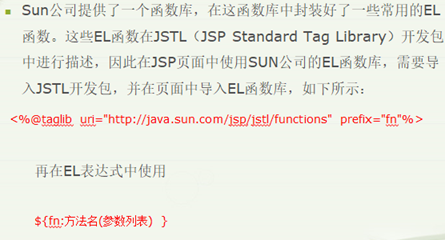
总结:常用的函数到时自己去查文档,不要死记,用的时候查查就好了。
实例:
package me.gacl.domain;
 2
 3 public class User {
 4
 5     /**
 6      * 兴趣爱好
 7      */
 8     private String likes[];
 9
10     public String[] getLikes() {
11         return likes;
12     }
13
14     public void setLikes(String[] likes) {
15         this.likes = likes;
16     }
17 }
jsp文件:
<%@ page language="java" import="java.util.*" pageEncoding="UTF-8"%>
<%@page import="me.gacl.domain.User"%>
<%--引入EL函数库 --%>
<%@taglib uri="http://java.sun.com/jsp/jstl/functions" prefix="fn" %>
<!DOCTYPE HTML>
<html>
  <head>
    <title>EL函数库中的方法使用范例</title>
  </head>

  <body>
  <h3>fn:toLowerCase函数使用范例:</h3>
      <%--fn:toLowerCase函数将一个字符串中包含的所有字符转换为小写形式,并返回转换后的字符串,
      它接收一个字符串类型的参数。fn:toLowerCase("")的返回值为空字符串--%>
      <%--fn:toLowerCase("Www.CNBLOGS.COM") 的返回值为字符串“www.cnblogs.com” --%>
      fn:toLowerCase("Www.CNBLOGS.COM")的结果是:${fn:toLowerCase("Www.CNBLOGS.COM")}
      <hr/>
      <h3>fn:toUpperCase函数使用范例:</h3>
      <%--fn:toUpperCase函数将一个字符串中包含的所有字符转换为大写形式,并返回转换后的字符串,
      它接收一个字符串类型的参数。fn:toUpperCase("")的返回值为空字符串--%>
      fn:toUpperCase("cnblogs.com")的结果是:${fn:toUpperCase("cnblogs.com")}
      <hr/>
      <h3>fn:trim函数使用范例:</h3>
      <%--fn:trim函数删除一个字符串的首尾的空格,并返回删除空格后的结果字符串,
      它接收一个字符串类型的参数。需要注意的是,fn:trim函数不能删除字符串中间位置的空格。--%>
      fn:trim("  cnblogs.com  ")的结果是:${fn:trim("  cnblogs.com  ")}
      <hr/>
      <h3>fn:length函数使用范例:</h3>
      <%--fn:length函数返回一个集合或数组大小,或返回一个字符串中包含的字符的个数,返回值为int类型。
      fn:length函数接收一个参数,这个参数可以是<c:forEach>标签的items属性支持的任何类型,
      包括任意类型的数组、java.util.Collection、java.util.Iterator、java.util.Enumeration、
      java.util.Map等类的实例对象和字符串。
      如果fn:length函数的参数为null或者是元素个数为0的集合或数组对象,则函数返回0;如果参数是空字符串,则函数返回0
      --%>
       <%
        List<String> list = Arrays.asList("1","2","3");
        request.setAttribute("list",list);
    %>
    fn:length(list)计算集合list的size的值是:${fn:length(list)}
    <br/>
      fn:length("cnblogs.com")计算字符串的长度是:${fn:length("cnblogs.com")}
      <hr/>
      <h3>fn:split函数使用范例:</h3>
      <%--
      fn:split函数以指定字符串作为分隔符,将一个字符串分割成字符串数组并返回这个字符串数组。
    fn:split函数接收两个字符串类型的参数,第一个参数表示要分割的字符串,第二个参数表示作为分隔符的字符串
      --%>
      fn:split("cnblogs.com",".")[0]的结果是:${fn:split("cnblogs.com",".")[0]}
      <hr/>
      <h3>fn:join函数使用范例:</h3>
      <%--
      fn:join函数以一个字符串作为分隔符,将一个字符串数组中的所有元素合并为一个字符串并返回合并后的结果字符串。
      fn:join函数接收两个参数,第一个参数是要操作的字符串数组,第二个参数是作为分隔符的字符串。
    如果fn:join函数的第二个参数是空字符串,则fn:join函数的返回值直接将元素连接起来。
      --%>
      <%
          String[] StringArray = {"www","iteye","com"};
          pageContext.setAttribute("StringArray", StringArray);
      %>
      <%--fn:join(StringArray,".")返回字符串“www.iteye.com”--%>
      fn:join(StringArray,".")的结果是:${fn:join(StringArray,".")}
      <br/>
      <%--fn:join(fn:split("www,iteye,com",","),".")的返回值为字符串“www.iteye.com”--%>
      fn:join(fn:split("www,iteye,com",","),".")的结果是:${fn:join(fn:split("www,iteye,com",","),".")}
      <hr/>

      <h3>fn:indexOf函数使用范例:</h3>
      <%--
      fn:indexOf函数返回指定字符串在一个字符串中第一次出现的索引值,返回值为int类型。
      fn:indexOf函数接收两个字符串类型的参数,如果第一个参数字符串中包含第二个参数字符串,
      那么,不管第二个参数字符串在第一个参数字符串中出现几次,fn:indexOf函数总是返回第一次出现的索引值;
      如果第一个参数中不包含第二个参数,则fn:indexOf函数返回-1。如果第二个参数为空字符串,则fn:indexOf函数总是返回0。
      --%>
      fn:indexOf("www.iteye.com","eye")的返回值为:${fn:indexOf("www.iteye.com","eye")}
      <hr/>

      <h3>fn:contains函数使用范例:</h3>
      <%--
      fn:contains函数检测一个字符串中是否包含指定的字符串,返回值为布尔类型。
      fn:contains函数在比较两个字符串是否相等时是大小写敏感的。
    fn:contains函数接收两个字符串类型的参数,如果第一个参数字符串中包含第二个参数字符串,则fn:contains函数返回true,否则返回false。
    如果第二个参数的值为空字符串,则fn:contains函数总是返回true。
    实际上,fn:contains(string, substring)等价于fn:indexOf(string, substring) != -1
    忽略大小的EL函数:fn:containsIgnoreCase
      --%>
        <%
        User user = new User();
        String likes[] = {"sing","dance"};
        user.setLikes(likes);
        //数据回显
        request.setAttribute("user",user);
    %>
    <%--使用el函数回显数据 --%>
   <input type="checkbox" name="like"
               vlaue="sing" ${fn:contains(fn:join(user.likes,","),"sing")?'checked':''}/>唱歌
   <input type="checkbox" name="like"
               value="dance"  ${fn:contains(fn:join(user.likes,","),"dance")?'checked':''}/>跳舞
   <input type="checkbox" name="like"
               value="basketball" ${fn:contains(fn:join(user.likes,","),"basketball")?'checked':''}/>蓝球
   <input type="checkbox" name="like"
               value="football"  ${fn:contains(fn:join(user.likes,","),"football")?'checked':''}/>足球
      <hr/>

      <h3>fn:startsWith函数和fn:endsWith函数使用范例:</h3>
      <%--
      fn:startsWith函数用于检测一个字符串是否是以指定字符串开始的,返回值为布尔类型。
    fn:startsWith函数接收两个字符串类型的参数,如果第一个参数字符串以第二个参数字符串开始,则函数返回true,否则函数返回false。
    如果第二个参数为空字符串,则fn:startsWith函数总是返回true。
    与fn:startsWith函数对应的另一个EL函数为:fn:endsWith,用于检测一个字符串是否是以指定字符串结束的,返回值为布尔类型。
      --%>
      fn:startsWith("www.iteye.com","iteye")的返回值为:${fn:startsWith("www.iteye.com","iteye")}
      <br/>
      fn:endsWith("www.iteye.com","com")的返回值为:${fn:endsWith("www.iteye.com","com")}
      <hr/>

      <h3>fn:replace使用范例:</h3>
      <%--
      fn:replace函数将一个字符串中包含的指定子字符串替换为其它的指定字符串,并返回替换后的结果字符串。
      fn:replace方法接收三个字符串类型的参数,第一个参数表示要操作的源字符串,第二个参数表示源字符串中要被替换的子字符串,
      第三个参数表示要被替换成的字符串。
      --%>
      fn:replace("www   iteye   com   ", " ", ".")的返回值为字符串:${fn:replace("www iteye com", " ", ".")}
      <hr/>

      <h3>fn:substring使用范例:</h3>
      <%--
      fn:substring函数用于截取一个字符串的子字符串并返回截取到的子字符串。
      fn:substring函数接收三个参数,第一个参数是用于指定要操作的源字符串,第二个参数是用于指定截取子字符串开始的索引值,
      第三个参数是用于指定截取子字符串结束的索引值,第二个参数和第三个参数都是int类型,其值都从0开始。
      --%>
      fn:substring("www.it315.org", 4, 9) 的返回值为字符串:${fn:substring("www.it315.org", 4, 9)}

      <h3>fn:substringAfter函数和fn:substringBefore函数使用范例:</h3>
      <%--
      fn:substringAfter函数用于截取并返回一个字符串中的指定子字符串第一次出现之后的子字符串。
      fn:substringAfter函数接收两个字符串类型的参数,第一个参数表示要操作的源字符串,第二个参数表示指定的子字符串
      与之对应的EL函数为:fn:substringBefore
      --%>
      fn:substringAfter("www.it315.org",".")的返回值为字符串:${fn:substringAfter("www.it315.org",".")}
      <br/>
      fn:substringBefore("www.it315.org",".")的返回值为字符串:${fn:substringBefore("www.it315.org",".")}
      <hr/>
  </body>
</html>
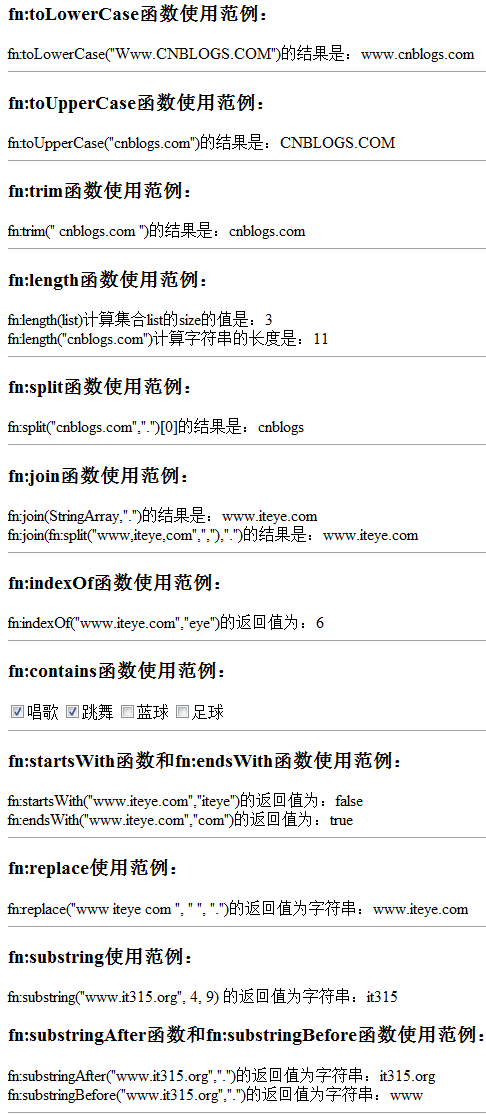
③效果图:
JSTL
引言:使用el和jstl都是为了简化jsp代码,而el是为了获取对象或者数据进行了简化,但是如果进行遍历或者是if语句,el是做不到的,此时,就需要jstl了。

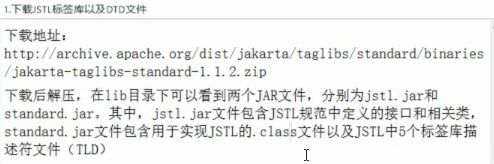
2.配置jstl
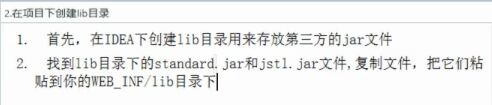
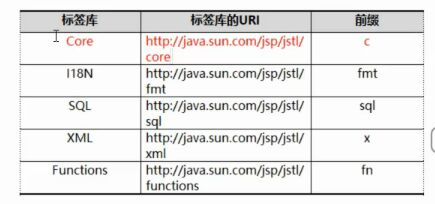
3.在jsp的首行添加<%@ taglib uri="http://java.sun.com/jsp/jstl/core" prefix="c" %>。(注意,如果使用其他库的话,prefix的值需要改变)
3.JSTL常用标签
1)常用标签分四类:分别为表达式操作,流程控制,迭代操作,URL操作。
2)表达式操作标签
①<c:out>
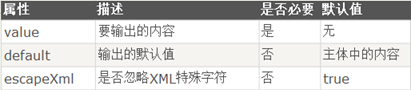

实例:
<!--输出Java Web应用开发与实践-->
<c:out value="Java Web应用开发与实践"/>
<!--若${param.name}不为null,输出name的值,否则输出unkown-->
<c:out value="${param.name}" default="unknow"/>
<!--输出“<p>有特殊字符</p>”-->
<c:out value="<p>有特殊字符</p>" escapeXml="true"/>
②<c:set>标签
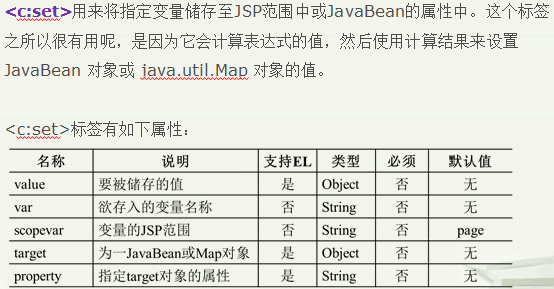
实例:
<!--定义一个范围为request的变量number,其值为30-->
<c:set var="number" scope="request" value="${10+20}"/>
<!--定义一个范围为session的变量number,其值为15-->
<c:set var="number" scope="session">
${6+9}
</c:set>
<!--定义一个范围为request的变量number,其值为请求参数number的值-->
<c:set var="number" scope="request" value="${param.number}"/>
③<c:remove>标签

实例:
<!--移除范围为session,名称为number的变量-->
<c:remove var="number"  scope="session"/>
④<c:catch>标签
实例:
<!--获取一个除数为0的异常信息,并存储于变量message中-->
<c:catch var="message">
<% int i=100/0;%>
</c:catch>
<!--输出错误信息message-->
<c:out value="${message}"/>
3)流程控制标签
⑤<c:if>标签
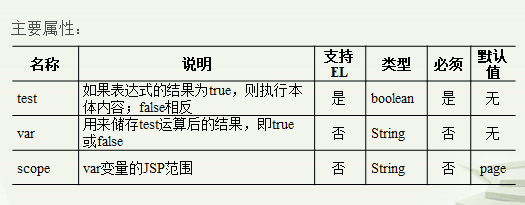
实例:
<!--判断number的值是否大于0,并将test表达式的值存储于变量result中-->
 <c:if test="${number>0}" scope="session" var="result">
       <c:out value="number大于0"/><br>
       <c:out value="${result}"/>
</c:if>
⑥<c:choose>标签

⑦<c:when>标签

⑧<c:otherwise>标签
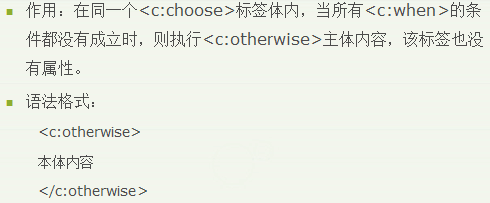
以上三个标签的实例:
<c:choose>
   <c:when test="${sex=="男"}">
           <c:out value="不帮忙"/>
   </c:when>
   <c:otherwise>
           <c:out value="帮忙"/>
    </c:otherwise>
</c:choose>
4)迭代标签
⑨<c:forEach>标签
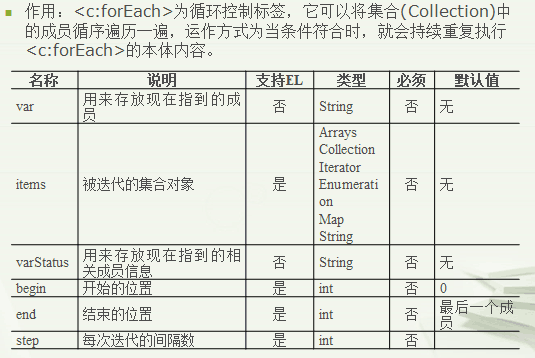
实例:
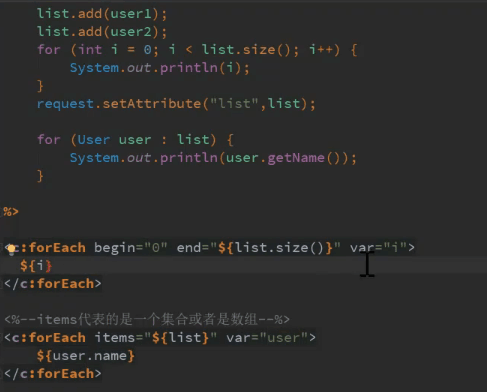
⑩<c:forTokens>标签
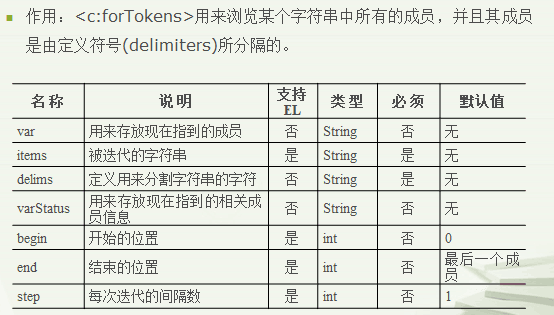
实例:
<%
String phoneNumber="0371-6566-6899";
session.setAttribute("phone",phoneNumber);
%>
<c:forTokens items="${sessionScope.phone}" delims="-" var="item">
${item}
</c:forTokens>
5)URL操作标签
<c:import>标签
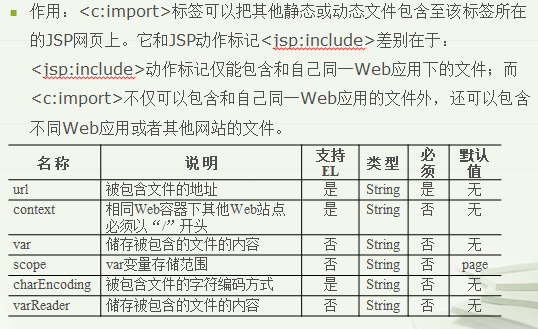
实例:
<!--把站点"http://henu.edu.cn"包含在本页面中-->
<c:import url="http://www.henu.edu.cn" charEncoding="gb2312"/>
<!--把页面传进来并同时传进一个参数和值-->
<c:import url="http://jwc.henu.edu.cn/ArticleShow.asp" charEncoding="gb2312">
<c:param name="ArticleID" value="730"/>
</c:import>
<c:url>标签
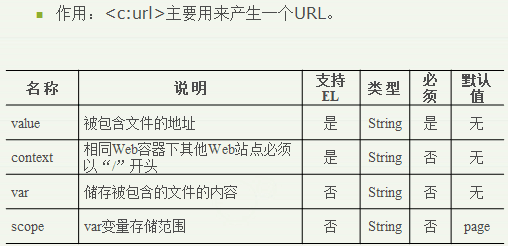
实例:
<!--一个超链接至"http://jwc.henu.edu.cn/ArticleShow.asp?ArticleID=730"-->
<a href="<c:url value="http://jwc.henu.edu.cn/ArticleShow.asp">
<c:param name="ArticleID" value="730"/></c:url>">
河南大学教务处 </a>
<c:redirect>标签
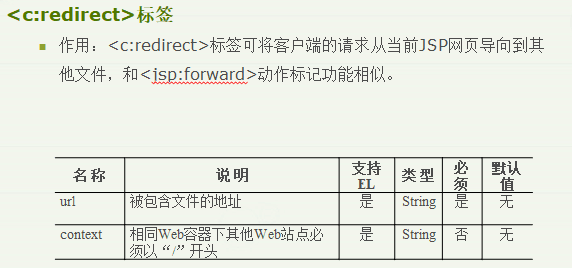
<c:redirect url="htp://jwc.henu.edu.cn/ArticleShow.asp">
<c:param name="ArticleID value="730"/>
</c:redirect>
注意:从上面的案例很明显可以知道,当使用jstl标签的时候,如果涉及到一些逻辑运算,简单计算的时候都需要配合EL表达式。

 浙公网安备 33010602011771号