
Mysql和Clickhouse数据查询-按照时间分组统计并且对无无数据的日期补0
最近在做数据查询需求的时候,遇到按照时间分组查询统计指标的需求,比如说查询模块的最近 15 天访问数据量,没有数据的日期补 0,以前对于这种类似的需求都是通过代码来补数据,想试试 sql 实现这种查询,因此查询了不少文章,对于类似实现方法的文章网上也有很多,差异也很多,因此这篇文章只作为一个参考,提供一个思路.
对于 mysql
比如刚才这个需求是是针对 MySQL 的,查询模块的最近 15 天访问数据量,没有数据的日期补 0。
对于这个 sql 我们主要思路是按照table 种日期字段进行分组,然后用一个日期序列对结果进行 join,没有数据的日期直接补 0:
select
	DATE_FORMAT(DATE_SUB(now(),INTERVAL xc day),'%Y-%m-%d') as date_str
from
(
-- 获取0-14 的序列  @xi:=@xi+1  每次执行都加一
select
	@xi := @xi +1 as xc
	from
	(select 1 union select 2 union select 3) xc1,
	(select 1 union select 2 union select 3 union select 4 union select 5) xc2,
	(select @xi := -1) xc0
)xcxc
执行结果如下:
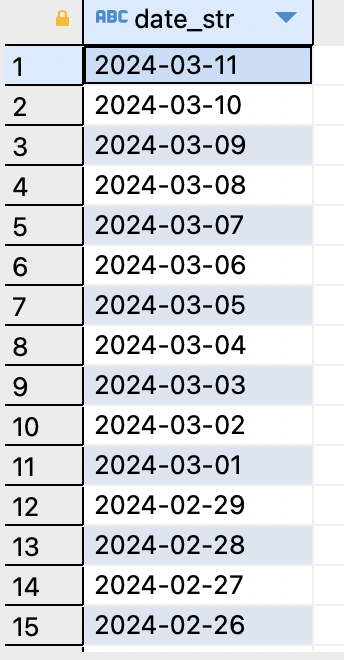
然后使用结果 left join 查询结果,null 就补0 即可。
对于 clickhouse
clickhouse提供的函数很多,也提供了类似需求的方案。对于 clickhouse 我接触不是很多,或许还有很多更好的方案。
需求按照分钟或者小时聚合数据:
-- 按照分钟统计
select
toStartOfInterval(start_t, INTERVAL 1 MINUTE) AS data_str,
count() AS records
FROM xxxx.xxxxxx
WHERE xxxxx
GROUP BY data_str
ORDER BY date_str
WITH fill
FROM toDateTime('2024-02-22 23:00:00')
TO toDateTime('2024-02-22 23:59:59')
step 1*60


-- 按照小时统计
select
toStartOfInterval(start_t, INTERVAL 1 hour) AS data_str,
count() AS records
FROM xxxx.xxxxxx
WHERE xxxxx
GROUP BY data_str
ORDER BY date_str
WITH fill
FROM toDateTime('2024-02-22 23:00:00')
TO toDateTime('2024-02-21 23:59:59')
step 1*3600
这里不贴图展示查询结果了。
主要是通过 2 个语法实现。
toStartOfInterval()和 with fill 。建议查看官方文档了解
https://clickhouse.com/docs/en/sql-reference/statements/select/order-by#filling-grouped-by-sorting-prefix
注意事项:ck 我的需求是使用 java 连接查询,使用 druid 连接 ck 的时候,需要去掉 wall filter,因为 ck 的语法 有些不太符合标准 sql,druid 的 sqlparser 会报错拦截。
以下来自官方文档
toStartOfInterval(date_or_date_with_time, INTERVAL x unit [, time_zone])
This function generalizes other toStartOf*() functions. For example,
toStartOfInterval(t, INTERVAL 1 year)returns the same astoStartOfYear(t),toStartOfInterval(t, INTERVAL 1 month)returns the same astoStartOfMonth(t),toStartOfInterval(t, INTERVAL 1 day)returns the same astoStartOfDay(t),toStartOfInterval(t, INTERVAL 15 minute)returns the same astoStartOfFifteenMinutes(t).
The calculation is performed relative to specific points in time:
| Interval | Start |
|---|---|
| year | year 0 |
| quarter | 1900 Q1 |
| month | 1900 January |
| week | 1970, 1st week (01-05) |
| day | 1970-01-01 |
| hour | (*) |
| minute | 1970-01-01 00:00:00 |
| second | 1970-01-01 00:00:00 |
| millisecond | 1970-01-01 00:00:00 |
| microsecond | 1970-01-01 00:00:00 |
| nanosecond | 1970-01-01 00:00:00 |
(*) hour intervals are special: the calculation is always performed relative to 00:00:00 (midnight) of the current day. As a result, only hour values between 1 and 23 are useful.
ORDER BY Expr WITH FILL Modifier
This modifier also can be combined with LIMIT … WITH TIES modifier.
WITH FILL modifier can be set after ORDER BY expr with optional FROM expr, TO expr and STEP expr parameters. All missed values of expr column will be filled sequentially and other columns will be filled as defaults.
To fill multiple columns, add WITH FILL modifier with optional parameters after each field name in ORDER BY section.
ORDER BY expr [WITH FILL] [FROM const_expr] [TO const_expr] [STEP const_numeric_expr], ... exprN [WITH FILL] [FROM expr] [TO expr] [STEP numeric_expr]
[INTERPOLATE [(col [AS expr], ... colN [AS exprN])]]
WITH FILL can be applied for fields with Numeric (all kinds of float, decimal, int) or Date/DateTime types. When applied for String fields, missed values are filled with empty strings. When FROM const_expr not defined sequence of filling use minimal expr field value from ORDER BY. When TO const_expr not defined sequence of filling use maximum expr field value from ORDER BY. When STEP const_numeric_expr defined then const_numeric_expr interprets as is for numeric types, as days for Date type, as seconds for DateTime type. It also supports INTERVAL data type representing time and date intervals. When STEP const_numeric_expr omitted then sequence of filling use 1.0 for numeric type, 1 day for Date type and 1 second for DateTime type. INTERPOLATE can be applied to columns not participating in ORDER BY WITH FILL. Such columns are filled based on previous fields values by applying expr. If expr is not present will repeat previous value. Omitted list will result in including all allowed columns.
Example of a query without WITH FILL:
SELECT n, source FROM (
   SELECT toFloat32(number % 10) AS n, 'original' AS source
   FROM numbers(10) WHERE number % 3 = 1
) ORDER BY n;
Result:
┌─n─┬─source───┐
│ 1 │ original │
│ 4 │ original │
│ 7 │ original │
└───┴──────────┘

 浙公网安备 33010602011771号