
【作业】too young too simple mediaplayer 2
too young too simple mediaplayer 2
这是一个简单的播放器,能且只能播放mp3和mp4文件或在线媒体文件,可以下载在线媒体文件。这些功能都通过右键菜单选取文件来使用。
https://github.com/lotsofone/HomeWorkPlayer
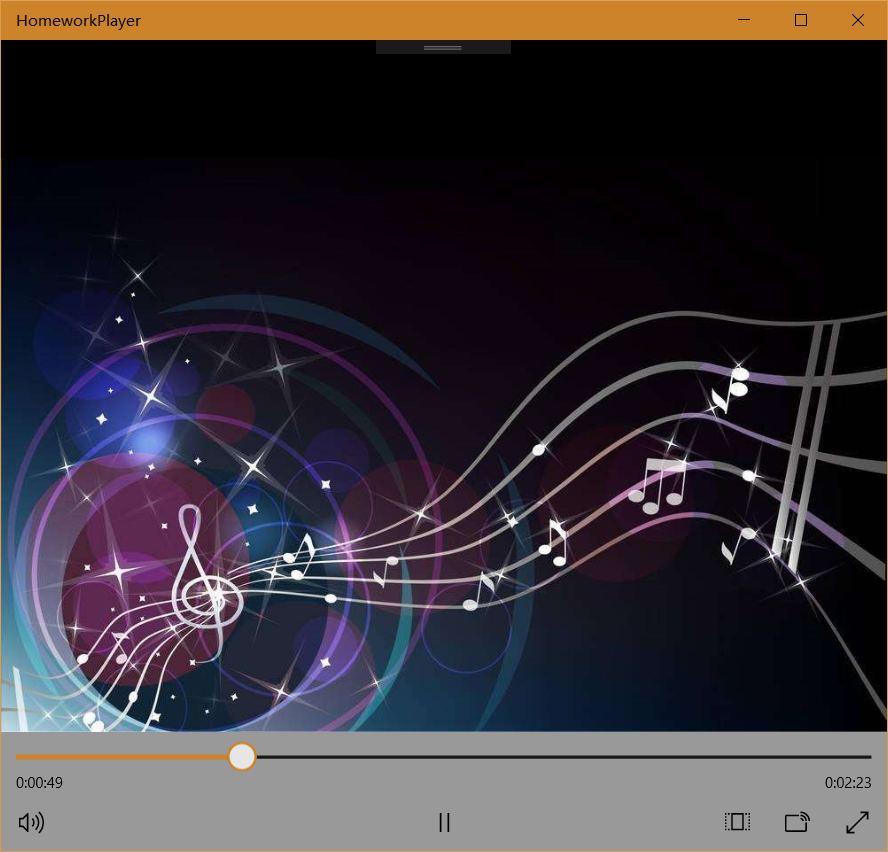
播放效果
下面分别是播放mp3和mp4的效果。

主要技术
选择在线文件
这个too-young-too-simple-media坚决不能使用无故遮挡应用的组件,不需要时全部必须隐藏,所以右键菜单又加了一个选择在线文件:
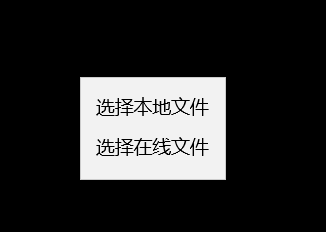
然后才会弹出一个输入框给你输入地址,可以下载或者播放:
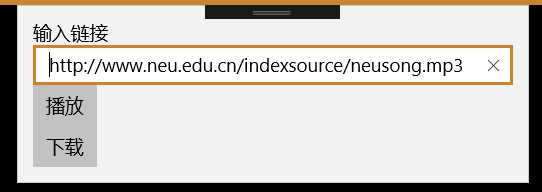
这个技术也比较简单,又用了一次flyout。之前就用过了,所以没有看网站,参考上一次的用法再用一次敲出如下代码:


        private async void Button_ClickAsync(object sender, RoutedEventArgs e)
        {
            MenuFlyoutItem mfi = (MenuFlyoutItem)sender;
            switch (mfi.Tag)
            {
                case "选择本地文件":
                    FileOpenPicker picker = new FileOpenPicker();
                    picker.ViewMode = PickerViewMode.Thumbnail;

                    picker.FileTypeFilter.Add(".mp4");
                    picker.FileTypeFilter.Add(".mp3");
                    StorageFile file = await picker.PickSingleFileAsync();

                    if (file != null)
                    {
                        var stream = await file.OpenAsync(Windows.Storage.FileAccessMode.Read);
                        mainplayer.SetSource(stream, file.ContentType);
                        musicpic.Opacity = 100;
                    }
                    else
                    {
                        musicpic.Opacity = 0;
                        return;
                    }
                    break;
                case "选择在线文件":
                    selectfile.ShowAt(mainplayer);
                    break;
            }
        }

        private void mainplayer_RightTapped(object sender, Windows.UI.Xaml.Input.RightTappedRoutedEventArgs e)
        {
            mainmenu.ShowAt(sender as UIElement, e.GetPosition(sender as UIElement));
            //Windows.UI.Xaml.Controls.Primitives.FlyoutBase.ShowAttachedFlyout((FrameworkElement)sender);
        }

        private void selectfilebutton_Click(object sender, RoutedEventArgs e)
        {
            Uri uri = new Uri(selectfiletext.Text);
            if (((Button)sender).Name== "selectfileplay")
            {
                mainplayer.Source = uri;
                musicpic.Opacity = 100;
            }
            else
            {

            }
            selectfile.Hide();
        }
                <MenuFlyout x:Name="mainmenu">
                    <MenuFlyoutItem Text="选择本地文件" Tag="选择本地文件" Click="Button_ClickAsync"/>
                    <MenuFlyoutItem Text="选择在线文件" Tag="选择在线文件" Click="Button_ClickAsync">
                        <FlyoutBase.AttachedFlyout>
                            <Flyout x:Name="selectfile">
                                <StackPanel Width="auto">
                                    <TextBlock>输入链接</TextBlock>
                                    <TextBox x:Name="selectfiletext" Width="auto" Text="http://www.neu.edu.cn/indexsource/neusong.mp3"></TextBox>
                                    <Button x:Name="selectfileplay" Click="selectfilebutton_Click" Content="播放"></Button>
                                    <Button x:Name="selectfiledownload" Click="selectfilebutton_Click" Content="下载"></Button>
                                </StackPanel>
                            </Flyout>
                        </FlyoutBase.AttachedFlyout>
                    </MenuFlyoutItem>
                </MenuFlyout>
播放在线文件
参考巨佬写的网站:
https://xfangfang.github.io/uwp/013#%E5%BC%80%E5%8F%91%E4%B8%80%E4%B8%AA%E8%B6%85%E7%BA%A7%E7%AE%80%E5%8D%95%E7%9A%84UWP%E5%AA%92%E4%BD%93%E6%92%AD%E6%94%BE%E5%99%A8+Part2
写了这些代码:
video_player.Source = MediaSource.CreateFromUri(new Uri(this.url));
不过我拿过来用发现不好使,原因是巨佬用了MediaPlayerElement,而我用的MediaElement,他的接口只需要传入uri就可以,不需要转MediaSource,所以自己接着敲:
            Uri uri = new Uri(selectfiletext.Text);
            if (((Button)sender).Name== "selectfileplay")
            {
                mainplayer.Source = uri;
                musicpic.Opacity = 100;
            }
下载在线文件
自古与文件相关的东西那都是非常磨叽的,有很多步骤,而且不理解为什么要搞那么多步骤。有时真的很想直接黑掉微软公司把他们的API给改掉了,但是想了想自己对操作系统都不是很了解。操作系统是一个巨坑,会讲文件作为资源怎么分配,我估计学完这个课就知道文件为什么总是这么墨迹了。
https://docs.microsoft.com/en-us/windows/uwp/files/quickstart-managing-folders-in-the-music-pictures-and-videos-libraries
微软的文档有示例代码,但是每一行都看不懂这代码有什么意义,所以先硬着头皮一行一行敲吧。
首先是要在appxmanifest里面把一些东西勾上。示例喊我勾好几个库,不过我只需要勾一个音乐库。

然后这个网页写了这些代码用以获取图片文件夹:
var myPictures = await Windows.Storage.StorageLibrary.GetLibraryAsync(Windows.Storage.KnownLibraryId.Pictures);
Windows.Storage.StorageFolder savePicturesFolder = myPictures.SaveFolder;
实际上有一个办法一行就能解决,这也是我用的办法:
var myMusic = KnownFolders.MusicLibrary;
然后要看本地是不是已经存在这个文件了,如果已经存在那就不需要下载了。
https://docs.microsoft.com/zh-cn/windows/uwp/files/quickstart-reading-and-writing-files#creating-a-file
这个网站告诉我们怎么打开文件,有如下代码:
Windows.Storage.StorageFolder storageFolder =
    Windows.Storage.ApplicationData.Current.LocalFolder;
Windows.Storage.StorageFile sampleFile =
    await storageFolder.CreateFileAsync("sample.txt",
        Windows.Storage.CreationCollisionOption.ReplaceExisting);
我看到其中有个CreationCollisionOption.ReplaceExisting,然后我查询了一下他的含义,然后自己换成了FailIfExists,这样已经下载了就会报错,处理后就不需要下载了。
之后要向服务器去请求这个文件,所以参考https://docs.microsoft.com/en-us/windows/uwp/networking/httpclient 的代码:
//Create an HTTP client object
Windows.Web.Http.HttpClient httpClient = new Windows.Web.Http.HttpClient();

//Add a user-agent header to the GET request.
var headers = httpClient.DefaultRequestHeaders;

//The safe way to add a header value is to use the TryParseAdd method and verify the return value is true,
//especially if the header value is coming from user input.
string header = "ie";
if (!headers.UserAgent.TryParseAdd(header))
{
    throw new Exception("Invalid header value: " + header);
}

header = "Mozilla/5.0 (compatible; MSIE 10.0; Windows NT 6.2; WOW64; Trident/6.0)";
if (!headers.UserAgent.TryParseAdd(header))
{
    throw new Exception("Invalid header value: " + header);
}

Uri requestUri = new Uri("http://www.contoso.com");

//Send the GET request asynchronously and retrieve the response as a string.
Windows.Web.Http.HttpResponseMessage httpResponse = new Windows.Web.Http.HttpResponseMessage();
string httpResponseBody = "";

try
{
    //Send the GET request
    httpResponse = await httpClient.GetAsync(requestUri);
    httpResponse.EnsureSuccessStatusCode();
    httpResponseBody = await httpResponse.Content.ReadAsStringAsync();
}
catch (Exception ex)
{
    httpResponseBody = "Error: " + ex.HResult.ToString("X") + " Message: " + ex.Message;
}
这个是真的看不懂了,一堆header啊乱七八糟的,都不知道这些是什么含义,下回问一问吧。反正我自己是用下面一行就取得了buffer:
buffer = await httpClient.GetBufferAsync(uri);
由于获得的文件是媒体文件,需要以二进制流的形式写入,网上有对应的代码,有buffer之后一行就能解决:
await Windows.Storage.FileIO.WriteBufferAsync(sampleFile, buffer);
所以最终下载文件部分的代码如下:
                var myMusics = await StorageLibrary.GetLibraryAsync(KnownLibraryId.Music);
                var myMusic = myMusics.SaveFolder;
                //var myMusic = KnownFolders.MusicLibrary;
                var fileName = Path.GetFileName(uri.LocalPath);
                try {
                    StorageFile musicFile = await myMusic.CreateFileAsync(fileName , Windows.Storage.CreationCollisionOption.FailIfExists);
                    if (musicFile != null)
                    {
                        Windows.Web.Http.HttpClient httpClient = new Windows.Web.Http.HttpClient();

                        IBuffer buffer;
                        try
                        {
                            buffer = await httpClient.GetBufferAsync(uri);
                        }
                        catch (Exception ex)
                        {
                            return;
                        }

                        await FileIO.WriteBufferAsync(musicFile, buffer);
                    }
                }
                catch(Exception ex)
                {

                }

 浙公网安备 33010602011771号