backstage~对接github和gitlab
1 统一社区认证
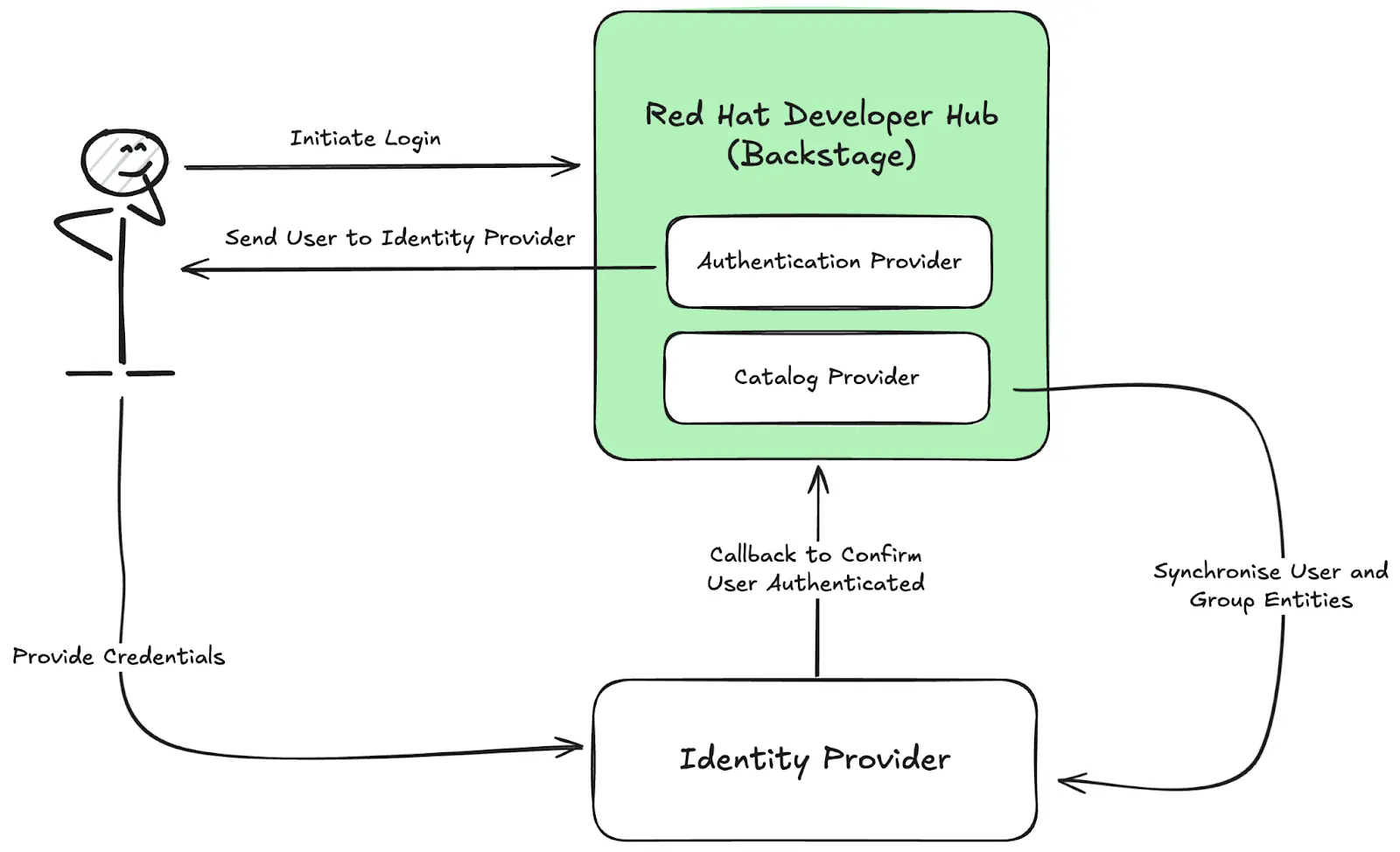
1.1 对接github登录
- 说明:https://github.com/bfyxzls/backstage/blob/master/docs/auth/github/provider.md
- 在github为backstage添加一个应用
- 开发者配置:https://github.com/settings/developers
- 复制client_id和cient_secret
- 回调地址为http://localhost:7007/api/auth/github/handler/frame
1.2 对接gitlab登录
- 说明:https://github.com/bfyxzls/backstage/blob/master/docs/auth/gitlab/provider.md
- 在github为backstage添加一个应用
- backstage中gitlab中需要配置自己公司gitlab地址,audience:https://gitlab.company.com
1.3 添加认证方式添加到登录页
- /app/src/App.tsx
const app = createApp({
  apis,
  components: {
    SignInPage: props => (
      <SignInPage
        {...props}
        auto
        providers={[
          'guest',
          {
            id: 'github-auth-provider',
            title: 'GitHub',
            message: 'Sign in using GitHub',
            apiRef: githubAuthApiRef,
          },
          {
            id: 'gitlab-auth-provider',
            title: 'GitLab',
            message: 'Sign in using GitHub',
            apiRef: gitlabAuthApiRef,
          },
        ]}
      />
    ),
  },
  ...
1.4 已登录的其它认证方式入口

1.5 注意事项
需要安装github插件
- yarn workspace backend add @backstage/plugin-auth-backend-module-github-provider
- 安装后,backend 的 index.ts 中添加它backend.add(import('@backstage/plugin-auth-backend-module-github-provider'));
- 本地http调试时,环境变量,禁用ssl,添加:NODE_TLS_REJECT_UNAUTHORIZED=0
- 安装gitlab与上面的github类似,直接安装@backstage/plugin-auth-backend-module-gitlab-provider包即可
2 从github或者gitlab拉取catalog
2.1 配置可信任域名
- 配置gitlab白名单
backend:
    reading:
        allow:
          - host: 192.168.xx.xx# 允许访问这个IP地址
          - host: github.com    # 通常已默认允许
          - host: gitlab.com    # 通常已默认允许
2.2 在github和gitlab上生产访问资源的token

2.2 配置github和gitlab的token
integrations:
  github:
    - host: github.com
      # This is a Personal Access Token or PAT from GitHub. You can find out how to generate this token, and more information
      # about setting up the GitHub integration here: https://backstage.io/docs/integrations/github/locations#configuration
      token: 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
  gitlab:
      - host: 192.168.xx.xx
        apiBaseUrl: http://192.168.xx.xx/api/v4
        token: hW_qU_iE7GGgXwzf2hZy
添加catalog从三方仓库
- url http://192.168.xx.xx/utility-infrastructure/keycloak-report/blob/master/catalog-info.yaml
- 点击analyze,然后import导入到backstage
刷新catelog
第三方资源文件有变更后,可以直接刷新它,来更新backstage中的信息

作者:仓储大叔,张占岭,
荣誉:微软MVP
QQ:853066980
支付宝扫一扫,为大叔打赏!


 浙公网安备 33010602011771号