
Pytest测试框架基础-Allure报告详解
本节主要介绍Allure的使用,如何生成更为丰富的测试报告。
一、常用的一些方法
1、@allure.feature()
用例按照模块进行区分,多个用例可以归属于一个模块,比如都是登录模块的
2、@allure.story()
单个用例的描述
3、@allure.title()
单个用例的标题
4、@allure.description()
单个用例的描述
5、@allure.step()
单个用例的步骤
6、@allure.severity()
单个用例的等级,等级分以下几种
-
- blocker 阻塞缺陷(功能未实现,无法下一步)
- critical 严重缺陷(功能点缺失)
- normal 一般缺陷(边界情况,格式错误)
- minor 次要缺陷(界面错误与ui需求不符)
- trivial 轻微缺陷(必须项无提示,或者提示不规范)
7、@allure.attachment()
添加附件
8、@allure.testcase()
测试用例的链接地址
9、@allure.link()
测试报告中需要的链接
10、@allure.issue()
测试的bug链接地址
二、实列
以百度搜索为例
import os
import time

from selenium import webdriver
import pytest
import allure
from selenium.webdriver.support.wait import WebDriverWait
from selenium.webdriver.support import expected_conditions as EC


@allure.feature("测试百度搜索模块")
@allure.link("百度url:https://www.baidu.com")
@allure.testcase("http://www.chandao.com",name='禅道测试用例网址')
class TestBaidu:

    def setup_class(self):
        self.driver = webdriver.Chrome()
        self.driver.maximize_window()
        allure.attach(body='这是一段文本 setup',name='setup文本',attachment_type=allure.attachment_type.TEXT)

    @allure.step('打开百度网页')
    def open(self):
        self.driver.get('https://www.baidu.com')

    @allure.step('输入纯英文搜索内容,如:selenium')
    @allure.story('测试输入框,内容为selenium')
    @pytest.mark.run(order=1)
    @allure.severity('critical')
    @allure.title('测试内容为 selenium')
    @allure.description('打开百度网页,测试输入内容为 selenium,判断搜索后标题是否为 selenium_百度搜索')

    def test_selenium(self):
        self.open()
        self.driver.find_element_by_id('kw').send_keys('selenium')
        self.driver.find_element_by_id('su').click()
        WebDriverWait(self.driver,5).until(EC.title_contains('selenium'))
        assert self.driver.title == 'selenium_百度搜索'

    @allure.step('输入纯中文搜索内容,如:自动化测试')
    @allure.story('测试输入框,内容为 自动化测试')
    @pytest.mark.run(order=2)
    @allure.severity('critical')
    @allure.title('测试内容为自动化测试')
    @allure.description('打开百度网页,测试输入内容为 自动化测试,判断搜索后标题是否为 自动化测试_百度搜索')
    def test_auto(self):
        self.open()
        self.driver.find_element_by_id('kw').send_keys('自动化测试')
        self.driver.find_element_by_id('su').click()
        WebDriverWait(self.driver, 5).until(EC.title_contains('自动化测试'))
        assert self.driver.title == '自动化测试_百度搜索'

    @allure.step('输入空格')
    @allure.story('测试输入框,内容为空格')
    @pytest.mark.run(order=3)
    @allure.severity('critical')
    @allure.title('测试内容为空')
    @allure.description('打开百度网页,测试输入内容为 空,点击后页面刷新,仍然为百度首页')
    def test_blank(self):
        self.open()
        self.driver.find_element_by_id('kw').send_keys(' ')
        self.driver.find_element_by_id('su').click()
        assert self.driver.title == '百度一下,你就知道'

    def teardown_class(self):
        time.sleep(1)
        self.driver.quit()
if __name__ == '__main__':

    pytest.main(['-vs', "test_baidu.py", "--alluredir", "./allure-result"])
    os.system(r"allure generate --clean ./allure-result -o ./allure-report")
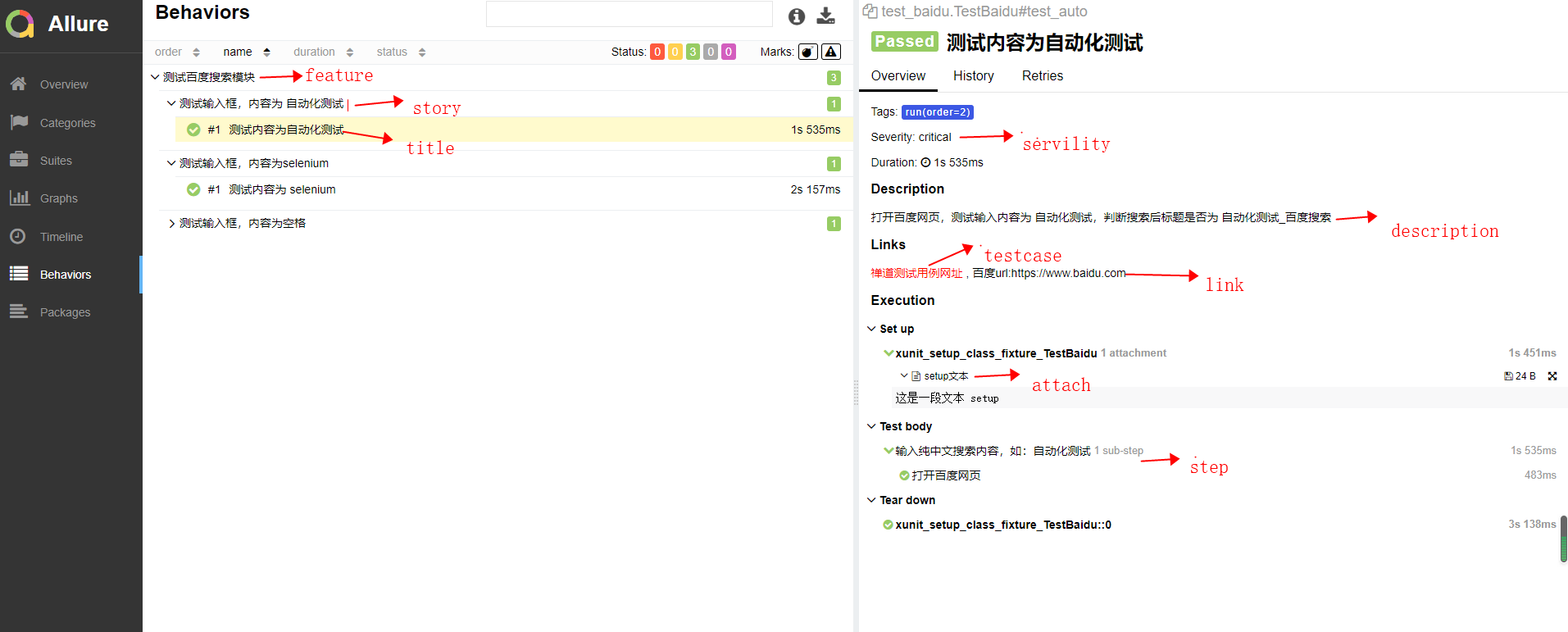
Allure测试报告结果如下
三、添加测试环境
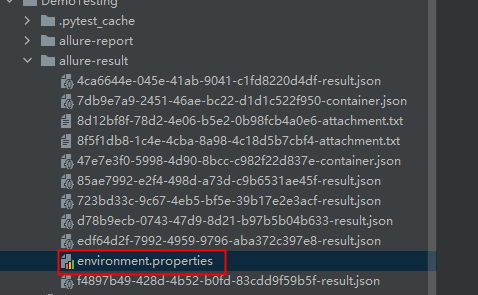
在allure根目录下面添加enviornment.properties
文件内容可以如下所示:
  systemVersion=win10
  Browser = Chrome
  Browser.Version = 91.0.4472.77
  pythonVersion=3.9.0
  baseUrl=https://www.baidu.com
  projectName=testing baidu search function
  author=longlongleg

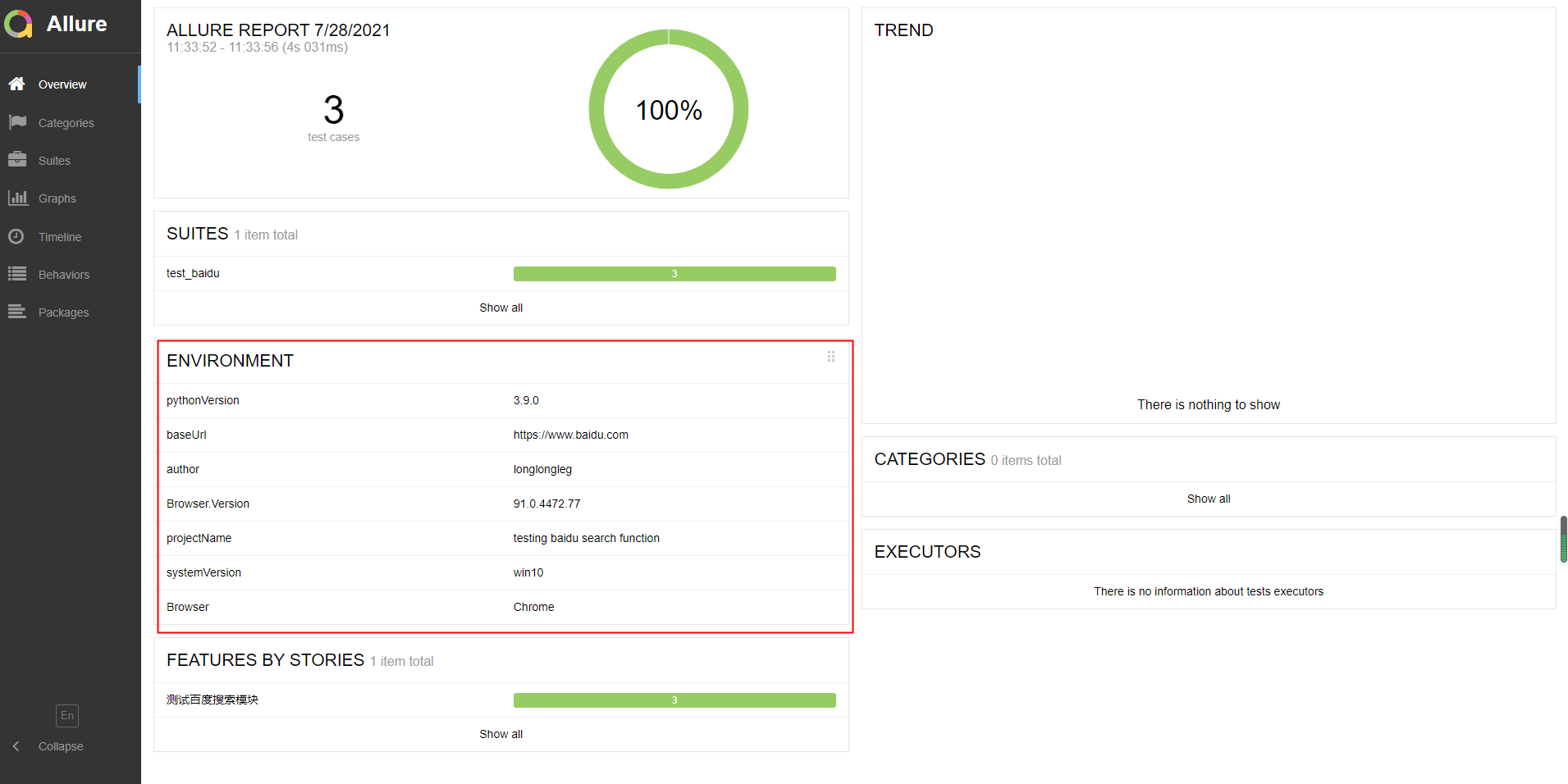
  allure首页报告会如下所示,如果没有以上操作,此处内容为空

 浙公网安备 33010602011771号