

spring boot自定义注解(1)—实现自定义操作日志注解
原文链接:spring boot自定义注解(1)—实现自定义操作日志注解 – 每天进步一点点
前面一篇文章简单介绍了常见的自定义注解:spring boot自定义注解(0)—常见类型
这篇文章介绍一下spring boot如何通过自定义注解实现记录操作日志过程。
0.准备工作
首先创建一个srping boot项目,如果不会可以参考这篇文章:Spring Boot(1)—创建并运行项目
需要引入AOP依赖和fastjson依赖
  <?xml version="1.0" encoding="UTF-8"?>
<project xmlns="http://maven.apache.org/POM/4.0.0" xmlns:xsi="http://www.w3.org/2001/XMLSchema-instance"
         xsi:schemaLocation="http://maven.apache.org/POM/4.0.0 https://maven.apache.org/xsd/maven-4.0.0.xsd">
    <modelVersion>4.0.0</modelVersion>
    <parent>
        <groupId>org.springframework.boot</groupId>
        <artifactId>spring-boot-starter-parent</artifactId>
        <version>2.7.7</version>
        <relativePath/> <!-- lookup parent from repository -->
    </parent>
    <groupId>site.longkui</groupId>
    <artifactId>app</artifactId>
    <version>0.0.1-SNAPSHOT</version>
    <name>app</name>
    <description>Demo project for Spring Boot</description>
    <properties>
        <java.version>1.8</java.version>
    </properties>
    <dependencies>
        <dependency>
            <groupId>org.springframework.boot</groupId>
            <artifactId>spring-boot-starter-web</artifactId>
        </dependency>

        <dependency>
            <groupId>org.springframework.boot</groupId>
            <artifactId>spring-boot-starter-test</artifactId>
            <scope>test</scope>
        </dependency>
        <!-- mysql  -->
        <dependency>
            <groupId>mysql</groupId>
            <artifactId>mysql-connector-java</artifactId>
            <version>5.1.34</version>
        </dependency>
        <!--mybatis -->
        <dependency>
            <groupId>org.mybatis.spring.boot</groupId>
            <artifactId>mybatis-spring-boot-starter</artifactId>
            <version>2.1.4</version>
        </dependency>

        <!-- aop -->
        <dependency>
            <groupId>org.aspectj</groupId>
            <artifactId>aspectjtools</artifactId>
            <version>1.8.9</version>
        </dependency>
        <!-- 引入 fastjson 依赖 -->
        <dependency>
            <groupId>com.alibaba</groupId>
            <artifactId>fastjson</artifactId>
            <version>1.2.79</version>
        </dependency>

    </dependencies>

    <build>
        <plugins>
            <plugin>
                <groupId>org.springframework.boot</groupId>
                <artifactId>spring-boot-maven-plugin</artifactId>
            </plugin>
        </plugins>
    </build>
</project>
编写sql,参考如下
DROP TABLE IF EXISTS `log_record`;
CREATE TABLE `log_record` (
`id` varchar(40) CHARACTER SET utf8 COLLATE utf8_general_ci NOT NULL COMMENT 'id主键',
`module` varchar(255) CHARACTER SET utf8 COLLATE utf8_general_ci NOT NULL COMMENT '所属模块',
`describe` varchar(255) CHARACTER SET utf8 COLLATE utf8_general_ci NOT NULL COMMENT '操作描述内容',
`path` varchar(255) CHARACTER SET utf8 COLLATE utf8_general_ci NOT NULL COMMENT '请求路径',
`method` varchar(20) CHARACTER SET utf8 COLLATE utf8_general_ci NOT NULL COMMENT '请求方法',
`IP` varchar(20) CHARACTER SET utf8 COLLATE utf8_general_ci NOT NULL COMMENT 'IP地址',
`qualifiedName` varchar(50) CHARACTER SET utf8 COLLATE utf8_general_ci NULL DEFAULT NULL COMMENT '请求名',
`inputParam` text CHARACTER SET utf8 COLLATE utf8_general_ci NULL COMMENT '请求参数',
`outputParam` text CHARACTER SET utf8 COLLATE utf8_general_ci NULL COMMENT '请出参数',
`errorMsg` text CHARACTER SET utf8 COLLATE utf8_general_ci NULL COMMENT '异常信息',
`requestTime` datetime NULL DEFAULT NULL COMMENT '请求开始时间',
`responseTime` datetime NULL DEFAULT NULL COMMENT '请求响应时间',
`costTime` varchar(255) CHARACTER SET utf8 COLLATE utf8_general_ci NULL DEFAULT NULL COMMENT '接口耗时',
`status` varchar(20) CHARACTER SET utf8 COLLATE utf8_general_ci NULL DEFAULT NULL COMMENT '请求是否成功',
`create_time` datetime NULL DEFAULT CURRENT_TIMESTAMP COMMENT '创建时间',
`update_time` datetime NULL DEFAULT CURRENT_TIMESTAMP ON UPDATE CURRENT_TIMESTAMP COMMENT '更新时间',
PRIMARY KEY (`id`) USING BTREE
) ENGINE = MyISAM CHARACTER SET = utf8 COLLATE = utf8_general_ci ROW_FORMAT = Dynamic;
SET FOREIGN_KEY_CHECKS = 1;
1.创建实体类
package site.longkui.app.entity.logrecord;
import java.io.Serializable;
import java.util.Date;
public class LogRecordEntity implements Serializable {
//主键id
private String id;
//所属模块
private String module;
//操作内容描述
private String describe;
//请求路径
private String path;
//请求方法
private String method;
//IP地址
private String IP;
//请求名
private String qualifiedName;
//请求参数
private String inputParam;
//请出参数
private String outputParam;
//异常信息
private String errorMsg;
//请求开始时间
private Date requestTime;
// 请求响应时间
private Date responseTime;
// 接口耗时,单位:ms
private String costTime;
// 请求是否成功
private String status;
public String getId() {
return id;
}
public void setId(String id) {
this.id = id;
}
public String getModule() {
return module;
}
public void setModule(String module) {
this.module = module;
}
public String getDescribe() {
return describe;
}
public void setDescribe(String describe) {
this.describe = describe;
}
public String getPath() {
return path;
}
public void setPath(String path) {
this.path = path;
}
public String getMethod() {
return method;
}
public void setMethod(String method) {
this.method = method;
}
public String getIP() {
return IP;
}
public void setIP(String IP) {
this.IP = IP;
}
public String getQualifiedName() {
return qualifiedName;
}
public void setQualifiedName(String qualifiedName) {
this.qualifiedName = qualifiedName;
}
public String getInputParam() {
return inputParam;
}
public void setInputParam(String inputParam) {
this.inputParam = inputParam;
}
public String getOutputParam() {
return outputParam;
}
public void setOutputParam(String outputParam) {
this.outputParam = outputParam;
}
public String getErrorMsg() {
return errorMsg;
}
public void setErrorMsg(String errorMsg) {
this.errorMsg = errorMsg;
}
public Date getRequestTime() {
return requestTime;
}
public void setRequestTime(Date requestTime) {
this.requestTime = requestTime;
}
public Date getResponseTime() {
return responseTime;
}
public void setResponseTime(String String) {
this.responseTime = responseTime;
}
public String getCostTime() {
return costTime;
}
public void setCostTime(String costTime) {
this.costTime = costTime;
}
public String getStatus() {
return status;
}
public void setStatus(String status) {
this.status = status;
}
@Override
public String toString() {
return "LogRecordEntity{" +
"id='" + id + '\'' +
", module='" + module + '\'' +
", describe='" + describe + '\'' +
", path='" + path + '\'' +
", method='" + method + '\'' +
", IP='" + IP + '\'' +
", qualifiedName='" + qualifiedName + '\'' +
", inputParam='" + inputParam + '\'' +
", outputParam='" + outputParam + '\'' +
", errorMsg='" + errorMsg + '\'' +
", requestTime='" + requestTime + '\'' +
", responseTime='" + responseTime + '\'' +
", costTime='" + costTime + '\'' +
", status='" + status + '\'' +
'}';
}
}
2.定义自定义注解
package site.longkui.app.annotate;
import java.lang.annotation.*;
@Target( {ElementType.METHOD, ElementType.PARAMETER})
@Retention(RetentionPolicy.RUNTIME)
@Documented
@Inherited
public @interface OperateLog {
//操作描述
String describe() default "";
//操作模块
String module() default "";
}
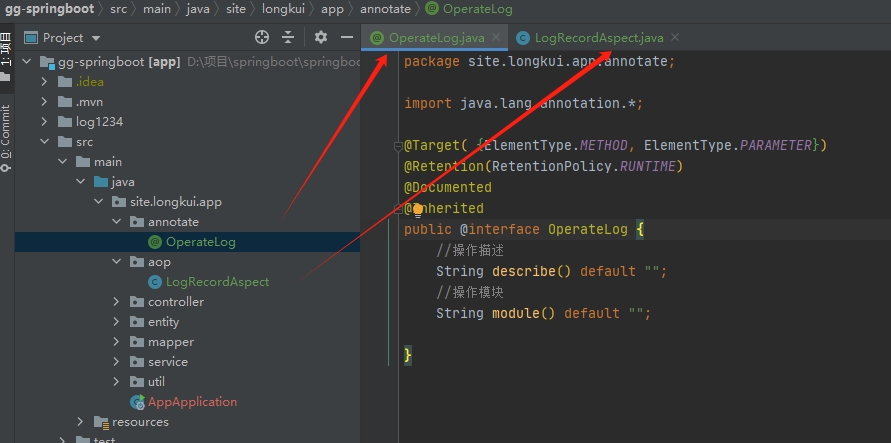
这个地方我们自定义了一个注解,这个注解使用在方法上面,用于标记AOP切面会拦截这个方法,并且记录请求日志信息。
3.定义AOP切面
package site.longkui.app.aop;
import com.alibaba.fastjson.JSON;
import com.alibaba.fastjson.JSONObject;
import org.aspectj.lang.ProceedingJoinPoint;
import org.aspectj.lang.annotation.*;
import org.aspectj.lang.reflect.MethodSignature;
import org.springframework.beans.factory.annotation.Autowired;
import org.springframework.stereotype.Component;
import org.springframework.web.context.request.RequestContextHolder;
import org.springframework.web.context.request.ServletRequestAttributes;
import site.longkui.app.annotate.OperateLog;
import site.longkui.app.entity.logrecord.LogRecordEntity;
import site.longkui.app.mapper.LogRecordMapper;
import javax.servlet.http.HttpServletRequest;
import java.io.PrintWriter;
import java.io.StringWriter;
import java.lang.reflect.Method;
import java.net.InetAddress;
import java.net.UnknownHostException;
import java.util.Date;
// 标记当前类是一个切面类
@Aspect
// 将当前类放入IOC容器
@Component
public class LogRecordAspect {
@Autowired
LogRecordMapper logRecordMapper;
/**
* 创建线程局部变量
*/
private ThreadLocal<LogRecordEntity> threadLocal = new ThreadLocal<>();
/**
* 定义切入点,这里我们使用AOP切入自定义【@OperateLog】注解的方法
*/
@Pointcut("@annotation(site.longkui.app.annotate.OperateLog)")
public void methodPointCut() {
}
/**
* 前置通知,【执行Controller方法之前】执行该通知方法
*/
@Before("methodPointCut()")
public void beforeAdvice() {
System.out.println("前置通知......");
}
/**
* 后置通知,【Controller方法执行完成,返回方法的返回值之前】执行该通知方法
*/
@After("methodPointCut()")
public void afterAdvice() {
System.out.println("后置通知......");
}
/**
* 环绕通知,执行Controller方法的前后执行
*
* @param point 连接点
*/
@Around("methodPointCut()")
public Object Around(ProceedingJoinPoint point) throws Throwable {
System.out.println("环绕通知之前.....");
// 获取当前请求对象
HttpServletRequest request = ((ServletRequestAttributes) RequestContextHolder
.getRequestAttributes()).getRequest();
if (request == null) {
return null;
}
//获取当前请求相关信息
LogRecordEntity logRecordEntity = new LogRecordEntity(); //实体类
logRecordEntity.setPath(request.getRequestURI()); //获取请求地址
logRecordEntity.setMethod(request.getMethod()); //获取请求方式
// logRecordEntity.setId(request.getRemoteHost()); //弃用,改用自定义方法
logRecordEntity.setIP(getIRealIPAddr(request)); //获取ip
logRecordEntity.setRequestTime(new Date(System.currentTimeMillis())); //获取系统时间作为请求时间
// 反射获取调用方法
MethodSignature signature = (MethodSignature) point.getSignature();
Method method = signature.getMethod();
if (method.isAnnotationPresent(OperateLog.class)) {
// 获取注解信息
OperateLog annotation = method.getAnnotation(OperateLog.class);
logRecordEntity.setModule(annotation.module()); //注解信息中的 module的内容
logRecordEntity.setDescribe(annotation.describe()); //注解信息中的 describe 的内容
}
//获取全限定类名称
String name = method.getName();
logRecordEntity.setQualifiedName(name);
// 获取请求参数
String inputParam = JSONObject.toJSONString(point.getArgs());
logRecordEntity.setInputParam(inputParam);
// 设置局部变量
threadLocal.set(logRecordEntity);
//此处打印获取的具体内容
System.out.println(logRecordEntity.toString());
//也可以调用既定方法往数据库里写入数据
//logRecordMapper.insertLogRecord(logRecordEntity);
Object ret = point.proceed();
return ret;
}
/**
* 返回值通知,Controller执行完成之后,返回方法的返回值时候执行
*
* @param ret 返回值的名称
*/
@AfterReturning(pointcut = "methodPointCut()", returning = "ret")
public Object afterReturning(Object ret) {
System.out.println("返回值通知......ret=" + ret);
// 获取日志实体对象
LogRecordEntity entity = this.getEntity();
String outputParam = JSON.toJSONString(ret);
entity.setOutputParam(outputParam); // 保存响应参数
entity.setStatus("成功"); // 设置成功标识
//保存到数据库中,在这里调用可以把返回值一起调用
threadLocal.remove();
System.out.println(entity);
try {
logRecordMapper.insertLogRecord(entity);
} catch (Exception e) {
e.toString();
}
return ret;
}
/**
* 异常通知,当Controller方法执行过程中出现异常时候,执行该通知
*
* @param ex 异常名称
*/
@AfterThrowing(pointcut = "methodPointCut()", throwing = "ex")
public void throwingAdvice(Throwable ex) {
System.out.println("异常通知......");
// 获取日志实体对象
LogRecordEntity entity = this.getEntity();
StringWriter errorMsg = new StringWriter();
ex.printStackTrace(new PrintWriter(errorMsg, true));
entity.setErrorMsg(errorMsg.toString()); // 保存响应参数
entity.setStatus("error"); // 设置成功标识
//可以插入到数据库中
threadLocal.remove();
System.out.println(entity);
}
//获取真实IP
private String getIRealIPAddr(HttpServletRequest request) {
String ipAddress;
ipAddress = request.getHeader("x-forwarded-for");
if (ipAddress == null || ipAddress.length() == 0
|| "unknown".equalsIgnoreCase(ipAddress)) {
ipAddress = request.getHeader("Proxy-Client-IP");
}
if (ipAddress == null || ipAddress.length() == 0
|| "unknown".equalsIgnoreCase(ipAddress)) {
ipAddress = request.getHeader("WL-Proxy-Client-IP");
}
if (ipAddress == null || ipAddress.length() == 0
|| "unknown".equalsIgnoreCase(ipAddress)) {
ipAddress = request.getRemoteAddr();
if (ipAddress.equals("127.0.0.1")
|| ipAddress.equals("0:0:0:0:0:0:0:1")) {
// 根据网卡取本机配置的IP
InetAddress inet = null;
try {
inet = InetAddress.getLocalHost();
} catch (UnknownHostException e) {
e.printStackTrace();
}
ipAddress = inet.getHostAddress();
}
}
// 对于通过多个代理的情况,第一个IP为客户端真实IP,多个IP按照','分割
if (ipAddress != null && ipAddress.length() > 15) { // "***.***.***.***".length()
// = 15
if (ipAddress.indexOf(",") > 0) {
ipAddress = ipAddress.substring(0, ipAddress.indexOf(","));
}
}
return ipAddress;
}
private LogRecordEntity getEntity() {
// 获取局部变量
LogRecordEntity entity = threadLocal.get();
long start = entity.getRequestTime().getTime();
long end = System.currentTimeMillis();
// 获取响应时间、耗时
entity.setCostTime((end - start) + "ms");
entity.setResponseTime(String.valueOf(end));
return entity;
}
}
这里我们写了切面,并且通过自定义方法logRecordMapper.insertLogRecord往数据库里写入数据。
4.编写测试类并进行测试
//根据id查询一个学生
@GetMapping("/getStudentById/{id}")
@OperateLog(describe = "根据id查询一个学生",module = "学生模块")
public JSONObject getStudentById(@PathVariable("id") String id){
try {
JSONObject jsonObject=studentsService.getStudentById(id);
return jsonObject;
}catch (Exception e){
e.toString();
logger.error(e.toString());
return null;
}
}
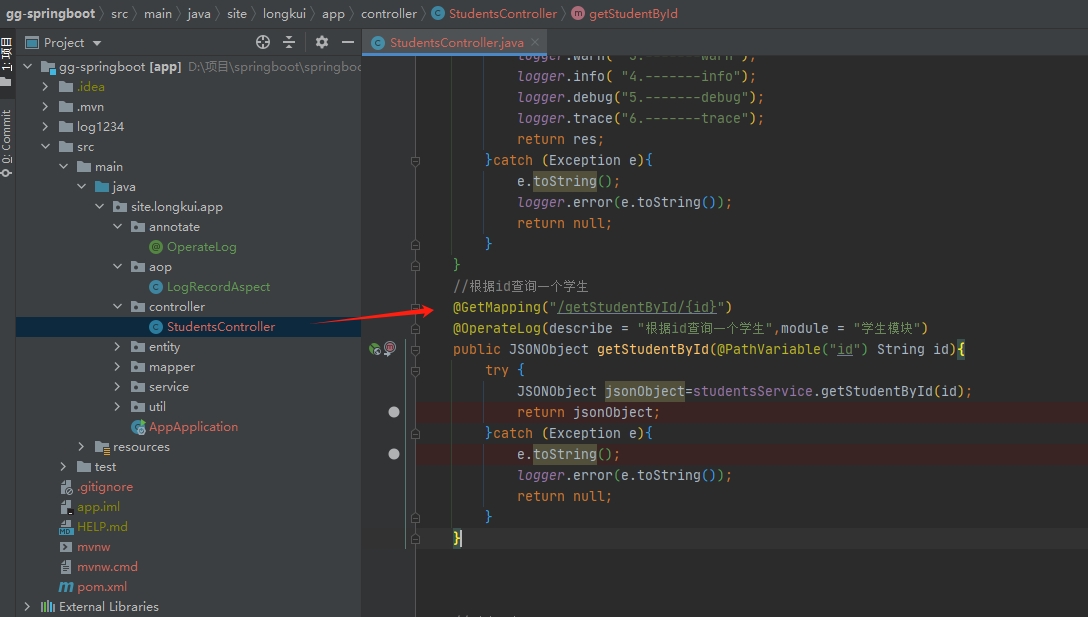
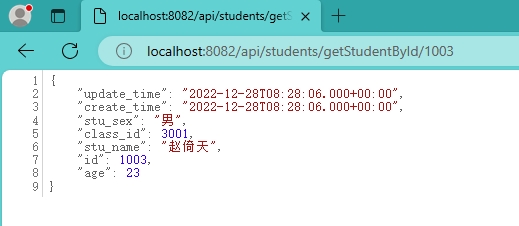
访问接口:localhost:8082/api/students/getList/1003
查看数据库的情况:
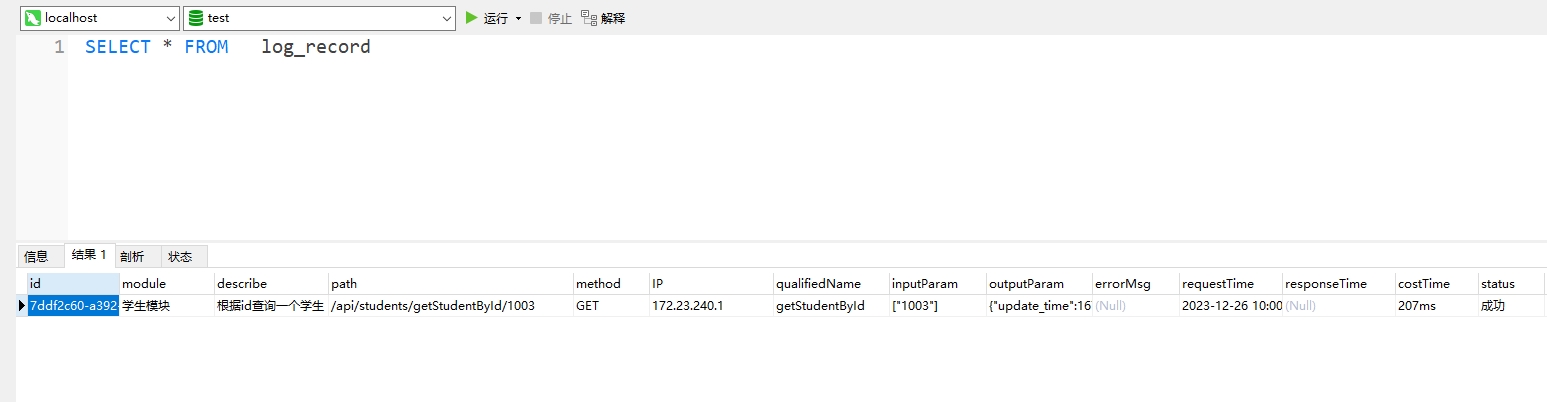
可以看到已经成功插入到数据库中了


 浙公网安备 33010602011771号