


华为设备配置ssh
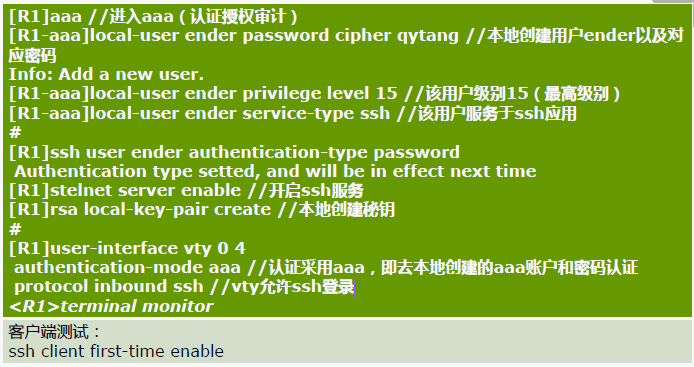
[R1-aaa]local-user huawei password cipher huawei privilege level 3
Info: Add a new user.
[R1-aaa]local-user huawei service-type ssh
[R1-aaa]q
[R1]ssh user huawei authentication-type password
Authentication type setted, and will be in effect next time
[R1]stelnet server enable
Info: Succeeded in starting the STELNET server.
[R1]rsa local-key-pair create
The key name will be: Host
% RSA keys defined for Host already exist.
Confirm to replace them? (y/n)[n]:y
The range of public key size is (512 ~ 2048).
NOTES: If the key modulus is greater than 512,
It will take a few minutes.
Input the bits in the modulus[default = 512]:1023
Generating keys...
....................................++++++
................++++++
.......++++++++
...++++++++
[R1]
[R1]user-interface vty 0 4
[R1-ui-vty0-4]authentication-mode aaa
[R1-ui-vty0-4]protocol inbound ssh
验收,R1与sw1链接口g0/0/1
[R1]dis cu int g0/0/1
[V200R003C00]
#
interface GigabitEthernet0/0/1
ip address 10.1.11.1 255.255.255.248
#
return
SW1 验证
[SW1]dis cu interface Vlanif 1
#
interface Vlanif1
ip address 10.1.11.2 255.255.255.248
#
return
[SW1]
#
interface Vlanif1
ip address 10.1.11.2 255.255.255.248
#
return
[SW1]
[SW1]ssh client first-time enable
[SW1]stelnet 10.1.11.1
Please input the username:huawei
Trying 10.1.11.1 ...
Press CTRL+K to abort
Connected to 10.1.11.1 ...
The server is not authenticated. Continue to access it? [Y/N] :y
Save the server's public key? [Y/N] :
May 28 2019 11:07:17-08:00 SW1 %%01SSH/4/CONTINUE_KEYEXCHANGE(l)[0]:The server had not been authenticated in the process of exchanging keys. When deciding whether to continue, the user chose Y.y
The server's public key will be saved with the name 10.1.11.1. Please wait...
May 28 2019 11:07:24-08:00 SW1 %%01SSH/4/SAVE_PUBLICKEY(l)[1]:When deciding whether to save the server's public key 10.1.11.1, the user chose Y.
Enter password: huawei
<R1>

 浙公网安备 33010602011771号