


SEATA学习笔记
场景:我需要一个分布式事物,也就是全局事物
使用第三方工具,SEATA来解决分布式事物
使用SEATA第一步,先下载客户端,进行配置,配置成数据适合自己的
首先配置,nacos依赖
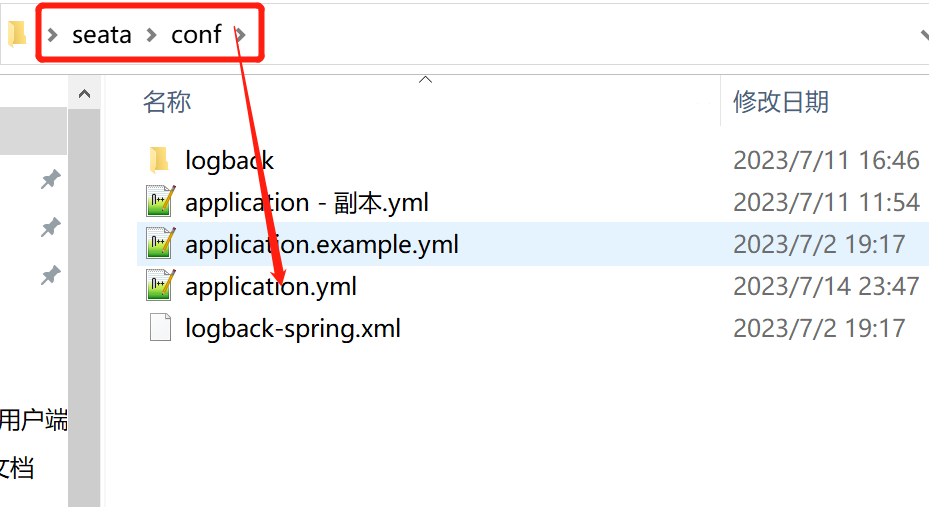
修改里面的数据
#  Copyright 1999-2019 Seata.io Group.
#
#  Licensed under the Apache License, Version 2.0 (the "License");
#  you may not use this file except in compliance with the License.
#  You may obtain a copy of the License at
#
#  http://www.apache.org/licenses/LICENSE-2.0
#
#  Unless required by applicable law or agreed to in writing, software
#  distributed under the License is distributed on an "AS IS" BASIS,
#  WITHOUT WARRANTIES OR CONDITIONS OF ANY KIND, either express or implied.
#  See the License for the specific language governing permissions and
#  limitations under the License.
#seata的端口
server:
  port: 7091

spring:
  application:
    name: seata-server

SEATA的日志管理,不用管理

logging:
  config: classpath:logback-spring.xml
  file:
    path: ${user.home}/logs/seata
  extend:
    logstash-appender:
      destination: 127.0.0.1:4560
    kafka-appender:
      bootstrap-servers: 127.0.0.1:9092
      topic: logback_to_logstash

console:
  user:
    username: seata
    password: seata
    #使用nacos作为配置,注册中心
seata:
  config:
    # support: nacos, consul, apollo, zk, etcd3
    type: nacos
    nacos:
      server-addr: 127.0.0.1:8848
      #命名空间的id
      namespace: 0f5e3af9-064b-44e3-8eb9-cf0f348434d6
      group: SEATA_GROUP
      data-id: seataServer.properties
  registry:
    # support: nacos, eureka, redis, zk, consul, etcd3, sofa
    type: nacos
    nacos:
    #注册的名字
      application: seata-server
      server-addr: 127.0.0.1:8848
      group: SEATA_GROUP
      namespace: 0f5e3af9-064b-44e3-8eb9-cf0f348434d6
  # store:
  #   # support: file 、 db 、 redis
  #   mode: nacos
#  server:
#    service-port: 8091 #If not configured, the default is '${server.port} + 1000'
  security:
    secretKey: SeataSecretKey0c382ef121d778043159209298fd40bf3850a017
    tokenValidityInMilliseconds: 1800000
    ignore:
      urls: /,/**/*.css,/**/*.js,/**/*.html,/**/*.map,/**/*.svg,/**/*.png,/**/*.jpeg,/**/*.ico,/api/v1/auth/login
按照下面这个条件去nacos中配置
 application: seata-server  服务名字
      server-addr: 127.0.0.1:8848 nacos地址
      group: SEATA_GROUP 服务所在的分组
      namespace: 0f5e3af9-064b-44e3-8eb9-cf0f348434d6 服务所属的命名空间
根据上面对seata的配置文件中配置的nacos命名空间和分组来创建一个seataServer.properties(这个名字也在上述配置)的配置文件,这里使用的是Mysql
#配置使用mysql存储
store.mode=db
store.lock.mode=db
store.session.mode=db

store.db.datasource=druid
store.db.dbType=mysql
store.db.driverClassName=com.mysql.cj.jdbc.Driver
store.db.url=jdbc:mysql://127.0.0.1:3306/seata?useUnicode=true&rewriteBatchedStatements=true&serverTimezone=GMT%2B8
store.db.user=root
store.db.password=123456
store.db.minConn=5
store.db.maxConn=30
store.db.globalTable=global_table
store.db.branchTable=branch_table
store.db.distributedLockTable=distributed_lock
store.db.queryLimit=100
store.db.lockTable=lock_table
store.db.maxWait=5000

#事务规则配置,针对server
server.recovery.committingRetryPeriod=1000
server.recovery.asynCommittingRetryPeriod=1000
server.recovery.rollbackingRetryPeriod=1000
server.recovery.timeoutRetryPeriod=1000
server.maxCommitRetryTimeout=-1
server.maxRollbackRetryTimeout=-1
server.rollbackRetryTimeoutUnlockEnable=false
server.distributedLockExpireTime=10000
server.xaerNotaRetryTimeout=60000
server.session.branchAsyncQueueSize=5000
server.session.enableBranchAsyncRemove=false
server.enableParallelRequestHandle=false

#Metrics 配置, 针对server
metrics.enabled=false
metrics.registryType=compact
metrics.exporterList=prometheus
metrics.exporterPrometheusPort=9898

#注意这个配置!!!
service.vgroupMapping.default_tx_group=default
service.default.grouplist=127.0.0.1:8091
SEATA配置结束可以启动
把SEATA引入项目
     <!--seata-->
     <dependency>
         <groupId>com.alibaba.cloud</groupId>
         <artifactId>spring-cloud-starter-alibaba-seata</artifactId>
排除默认版本
         <exclusions>
             <exclusion>
                 <groupId>io.seata</groupId>
                 <artifactId>seata-spring-boot-starter</artifactId>
             </exclusion>
         </exclusions>
     </dependency>
使用我们本地下载的这个SEATA版本
     <dependency>
         <groupId>io.seata</groupId>
         <artifactId>seata-spring-boot-starter</artifactId>
         <version>1.7.0</version>
     </dependency>
在bootstrap.yml配置SEATA在项目中的‘配置’
seata:
使用nacos注册
    registry:
       type: nacos
       nacos:
         server-addr: 127.0.0.1:8848
         namespace: seata
         group: SEATA_GROUP
         application: seata-server
    tx-service-group: default_tx_group
    service:
       vgroup-mapping:
         default_tx_group: default
SEATA在当前项目的模式
    data-source-proxy-mode: XA
在需要开启分布式事务的入口方法添加@GlobalTransactional注解即可
2.
使用seata的AT模式
seata:
    registry:
       type: nacos
       nacos:
         server-addr: 127.0.0.1:8848
         namespace: seata
         group: SEATA_GROUP
         application: seata-server
    tx-service-group: default_tx_group
    service:
       vgroup-mapping:
         default_tx_group: default
这里变成了AT
    data-source-proxy-mode: AT
AT模式需要每个微服务操作的数据库下面添加undo_log表
CREATE TABLE `undo_log` (
`id` bigint(20) NOT NULL AUTO_INCREMENT,
  `branch_id` bigint(20) NOT NULL, 总事物id
  `xid` varchar(100) NOT NULL, 当前事物id

  `context` varchar(128) NOT NULL,序列化使用的JSON

  `rollback_info` longblob NOT NULL,修改前,后的数据都在这里面
  `log_status` int(11) NOT NULL,
  `log_created` datetime NOT NULL,
  `log_modified` datetime NOT NULL,
  PRIMARY KEY (`id`),
  UNIQUE KEY `ux_undo_log` (`xid`,`branch_id`)
  ) ENGINE=InnoDB AUTO_INCREMENT=1 DEFAULT CHARSET=utf8;

 浙公网安备 33010602011771号