
vue3知识整合
视频讲解参考: 上尚硅谷Vue3入门到实战:https://www.bilibili.com/video/BV1Za4y1r7KE/?spm_id_from=333.337.search-card.all.click&vd_source=ef0d33a686084368f4ac59c8af6ffb72
作者笔记: https://gitee.com/marina-37/vue3_vite_ts.git
Vue3 教程简介
在Vue3 中
1.编码语言:javaScript, TypeScript(vue3推介TypeScript)
2.代码风格:组合式API, 选项式API (vue3推介组合式API)
3.简写形式: setup语法糖(最重要)
本课程采用的方式:
TypeScript + 组合式API + setup语法糖
主要是vue3的语法
内容丰富
1.核心:ref, reactive,computed, watch, 生命周期 .........
2.常用: hooks, 自定义ref, 路由,pinia, mitt ........
3.面试:组件通信, 响应式相关API ......
1.Vue3简介


1 2020年9月18日,Vue.js发布版3.0版本,代号:One Piece(n
2 经历了:4800+次提交、40+个RFC、600+次PR、300+贡献者
3 官方发版地址:Release v3.0.0 One Piece · vuejs/core
4 截止2023年10月,最新的公开版本为:3.3.4
1 1.1. 【性能的提升】
2 打包大小减少41%。
3
4 初次渲染快55%, 更新渲染快133%。
5
6 内存减少54%。
1 1.2.【 源码的升级】
2   使用Proxy 代替 defineProperty 实现响应式
3
4   重写虚拟DOM的实现和 Tree-shaking.
1 1.3. 【拥抱TypeScript】
2 Vue3可以更好的支持TypeScript。
1.4. 【新的特性】
1. Composition API (组合API):
setup
ref 与 reactive
computed 与 watch
2.新的内置组件:
Fragment
Teleport
Suspense
...............
3.其他改变:
新的生命周期钩子
data 选项应始终被声明为一个函数
移除keyCode支持作为 v-on 的修饰符
........
2.创建Vue3工程
 1 2.1. 【基于 vue-cli 创建】
 2
 3 ## 查看@vue/cli版本,确保@vue/cli版本在4.5.0以上
 4 vue --version
 5
 6 ## 安装或者升级你的@vue/cli
 7 npm install -g @vue/cli
 8
 9 ## 执行创建命令
10 vue create vue_test
11
12 ##  随后选择3.x
13 ##  Choose a version of Vue.js that you want to start the project with (Use arrow keys)
14 ##  > 3.x
15 ##    2.x
16
17 ## 启动
18 cd vue_test
19 npm run serve
2.2 基于vite 创建(推荐)
vite 是新一代前端构建工具, 官网地址:https://vitejs.cn,
vite的优势如下:
1.轻量快速的热重载(HMR),能实现极速的服务启动。
2.对 TypeScript, JSX, CSS 等支持开箱即用
3.真正的按需编译,不再等待整个应用编译完成
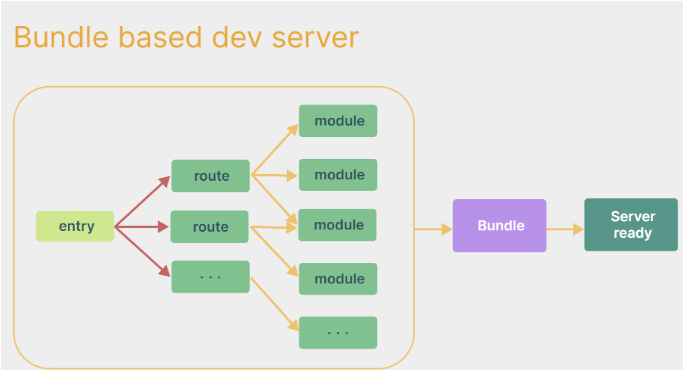
4,.webpack 构建 与 vite 构建对比图示如下
webpack
vite:
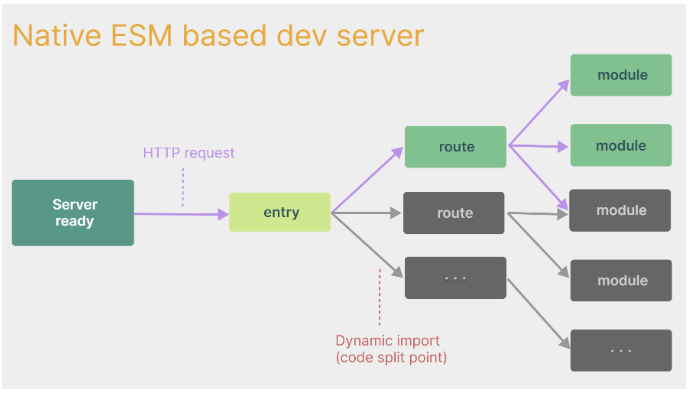
-
具体操作如下(点击查看官方文档)
## 1.创建命令:
npm create vue@latest
 1 ## 2.具体配置
 2 ## 配置项目名称
 3 √ Project name: vue3_test
 4 ## 是否添加TypeScript支持
 5 √ Add TypeScript?  Yes
 6 ## 是否添加JSX支持
 7 √ Add JSX Support?  No
 8 ## 是否添加路由环境
 9 √ Add Vue Router for Single Page Application development?  No
10 ## 是否添加pinia环境
11 √ Add Pinia for state management?  No
12 ## 是否添加单元测试
13 √ Add Vitest for Unit Testing?  No
14 ## 是否添加端到端测试方案
15 √ Add an End-to-End Testing Solution? » No
16 ## 是否添加ESLint语法检查
17 √ Add ESLint for code quality?  Yes
18 ## 是否添加Prettiert代码格式化
19 √ Add Prettier for code formatting?  No
完整文件目录:index.html是入口
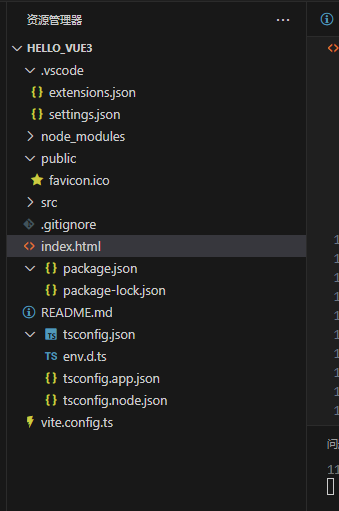
index.html 中 src = src/main.ts 指向项目的具体组件
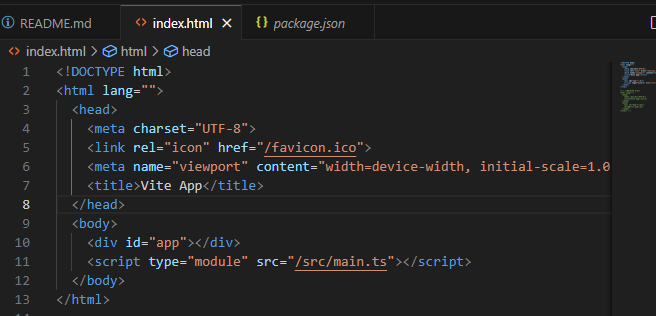
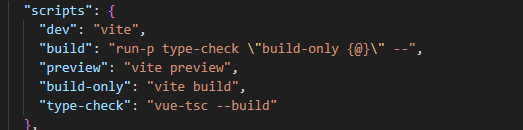
3. 执行命令 npm run dev
需要 在 package.json 文件中 scripts 下 提前配置
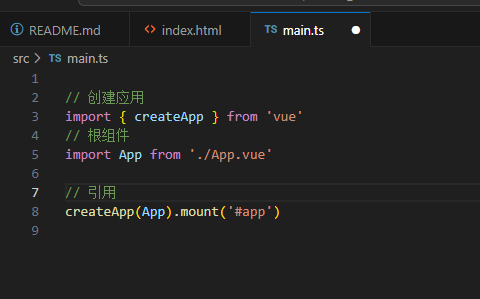
src/main.ts 做了三件事:
1创建应用,
2导入根组件,
3.引用
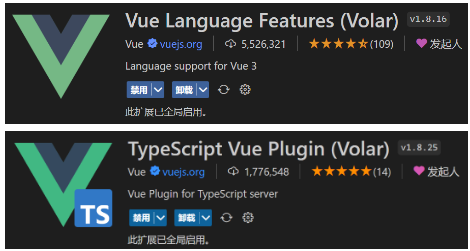
安装官方推荐的vscode插件
4. 总结:
Vite项目中,index.html是项目的入口文件,在项目最外层。- 加载
index.html后,Vite解析<script type="module" src="xxx">指向的JavaScript。 Vue3**中是通过 **createApp函数创建一个应用实例。
5.写一个App 组件
 1 <template>
 2   <div class="app">
 3     <h1>你好啊!</h1>
 4   </div>
 5 </template>
 6
 7 <script lang="ts">
 8   export default {
 9     name:'App' //组件名
10   }
11 </script>
12
13 <style>
14   .app {
15     background-color: #ddd;
16     box-shadow: 0 0 10px;
17     border-radius: 10px;
18     padding: 20px;
19   }
20 </style>
1 // 引入createApp用于创建应用
2 import {createApp} from 'vue'
3 // 引入App根组件
4 import App from './App.vue'
5
6 createApp(App).mount('#app')
6.一个简单的效果: components 组件
 1 <template>
 2   <div class="person">
 3     <h2>姓名:{{name}}</h2>
 4     <h2>年龄:{{age}}</h2>
 5     <button @click="changeName">修改名字</button>
 6     <button @click="changeAge">修改年龄</button>
 7     <button @click="showTel">查看联系方式</button>
 8   </div>
 9 </template>
10
11 <script lang="ts">
12   export default {
13     name:'Person',
14     data(){
15       return {
16         name:'张三',
17         age:18,
18         tel:'13888888888'
19       }
20     },
21     methods:{
22       // 修改姓名
23       changeName(){
24         this.name = 'zhang-san'
25       },
26       // 修改年龄
27       changeAge(){
28         this.age += 1
29       },
30       // 展示联系方式
31       showTel(){
32         alert(this.tel)
33       }
34     }
35   }
36 </script>
37
38 <style scoped>
39   .person {
40     background-color: skyblue;
41     box-shadow: 0 0 10px;
42     border-radius: 10px;
43     padding: 20px;
44   }
45   button {
46     margin: 0 5px;
47   }
48 </style>
 1 <template>
 2   <div class="app">
 3     <h1>你好啊!</h1>
 4     <Person/>
 5   </div>
 6 </template>
 7
 8 <script lang="ts">
 9   import Person from './components/Person.vue'
10
11   export default {
12     name:'App', //组件名
13     components:{Person} //注册组件
14   }
15 </script>
16
17 <style>
18   .app {
19     background-color: #ddd;
20     box-shadow: 0 0 10px;
21     border-radius: 10px;
22     padding: 20px;
23   }
24 </style>
3.Vue3 核心语法
3.1 【OptionsAPI 与 CompositionAPI】
-
Vue2的API设计是Options(配置)风格的。Vue3的API设计是Composition(组合)风格的。
Options API 的弊端
Options类型的 API,数据、方法、计算属性等,是分散在:data、methods、computed中的,若想新增或者修改一个需求,就需要分别修改:data、methods、computed,不便于维护和复用。
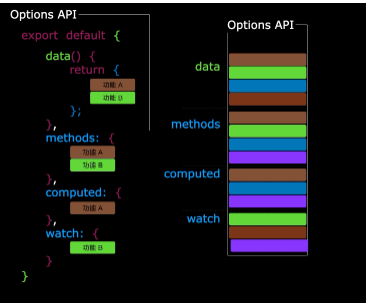
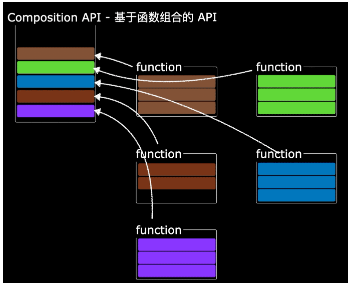
Composition API 的优势
可以用函数的方式,更加优雅的组织代码,让相关功能的代码更加有序的组织在一起。
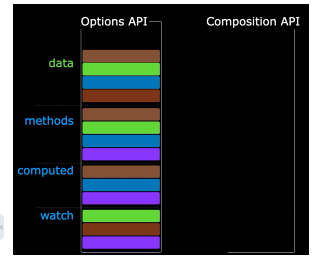 ——>
——>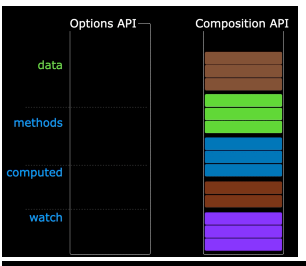 ---------------->
3.2. 【拉开序幕的 setup】
1 setup是Vue3中一个新的配置项,值是一个函数,它是 Composition API “表演的舞台”,组件中所用到的:数据、方法、计算属性、监视......等等,均配置在setup
2
3
4 特点如下:
5
6 setup函数返回的对象中的内容,可直接在模板中使用。
7 setup中访问this是undefined。
8 setup函数会在beforeCreate之前调用,它是“领先”所有钩子执行的。中。
setup 是 vue3 中的一个新的配置项,值是一个函数,他是 composition API "表演的舞台“ 组件中所用到的: 数据,方法,计算属性, 监视.......等等,均配置在 setup 中
特点如下:
setup 函数返回对象中的内容,可直接在模板中使用
setup 中访问 this 是 undefined.
setup 函数会在beforeCreate 之前调用,它是“领先”所有钩子执行的
代码:
 1 <template>
 2   <div class="person">
 3     <h2>姓名:{{name}}</h2>
 4     <h2>年龄:{{age}}</h2>
 5     <button @click="changeName">修改名字</button>
 6     <button @click="changeAge">修改年龄</button>
 7     <button @click="showTel">查看联系方式</button>
 8   </div>
 9 </template>
10
11 <script lang="ts">
12   export default {
13     name:'Person',
14     beforeCreate(){
15       console.log('beforeCreate')
16     },
17     setup(){
18       console.log(this) //setup中的this是undefined,Vue3在弱化this了
19       // 数据,原来是写在data中的,此时的name、age、tel都不是响应式的数据
20       let name = '张三'
21       let age = 18
22       let tel = '13888888888'
23
24       // 方法
25       function changeName() {
26         name = 'zhang-san' //注意:这样修改name,页面是没有变化的
27         console.log(name) //name确实改了,但name不是响应式的
28       }
29       function changeAge() {
30         age += 1 //注意:这样修改age,页面是没有变化的
31         console.log(age) //age确实改了,但age不是响应式的
32       }
33       function showTel() {
34         alert(tel)
35       }
36
37       // 将数据、方法交出去,模板中才可以使用
38       return {name,age,tel,changeName,changeAge,showTel}
39     }
40   }
41 </script>
42
43 <style scoped>
44   .person {
45     background-color: skyblue;
46     box-shadow: 0 0 10px;
47     border-radius: 10px;
48     padding: 20px;
49   }
50   button {
51     margin: 0 5px;
52   }
53 </style>
 1 <template>
 2   <Person/>
 3 </template>
 4
 5 <script lang="ts">
 6   import Person from './components/Person.vue'
 7
 8   export default {
 9     name:'App', //组件名
10     components:{Person} //注册组件
11   }
12 </script>
 1 <template>
 2   <div class="person">
 3     <h2>姓名:{{name}}</h2>
 4     <h2>年龄:{{age}}</h2>
 5     <button @click="changeName">修改名字</button>
 6     <button @click="changeAge">修改年龄</button>
 7     <button @click="showTel">查看联系方式</button>
 8   </div>
 9 </template>
10
11 <script lang="ts">
12   export default {
13     name:'Person',
14     beforeCreate(){
15       console.log('beforeCreate')
16     },
17     setup(){
18       console.log(this) //setup中的this是undefined,Vue3在弱化this了
19       // 数据,原来是写在data中的,此时的name、age、tel都不是响应式的数据
20       let name = '张三'
21       let age = 18
22       let tel = '13888888888'
23
24       // 方法
25       function changeName() {
26         name = 'zhang-san' //注意:这样修改name,页面是没有变化的
27         console.log(name) //name确实改了,但name不是响应式的
28       }
29       function changeAge() {
30         age += 1 //注意:这样修改age,页面是没有变化的
31         console.log(age) //age确实改了,但age不是响应式的
32       }
33       function showTel() {
34         alert(tel)
35       }
36
37       // 将数据、方法交出去,模板中才可以使用
38       return {name,age,tel,changeName,changeAge,showTel}
39
40       // setup的返回值也可以是一个渲染函数(可以将返回值渲染到页面上去,模板都展示不了了)
41       //vue3弱化this,因此setup的返回值:一个函数-->可以直接写成箭头函数
42       // return ()=>'哈哈'
43     }
44   }
45 </script>
46
47 <style scoped>
48   .person {
49     background-color: skyblue;
50     box-shadow: 0 0 10px;
51     border-radius: 10px;
52     padding: 20px;
53   }
54   button {
55     margin: 0 5px;
56   }
57 </style>
 1 <template>
 2   <div class="person">
 3     <h2>姓名:{{ name }}</h2>
 4     <h2>年龄:{{ age }}</h2>
 5     <button @click="changeName">修改名字</button>
 6     <button @click="changeAge">修改年龄</button>
 7     <button @click="showTel">查看联系方式</button>
 8     <hr>
 9     <h2>测试1:{{ a }}</h2>
10     <h2>测试2:{{ c }}</h2>
11     <h2>测试3:{{ d }}</h2>
12     <button @click="b">测试</button>
13   </div>
14 </template>
15
16 <script lang="ts">
17 export default {
18   name: 'Person',
19   beforeCreate() {
20     console.log('beforeCreate')
21   },
22   //原始vue2写法:可以通过this读取到setup的数据,反之不能
23   data() {
24     return {
25       a: 100,
26       c: this.name,
27       d: 900,
28       age: 90
29     }
30   },
31   methods: {
32     b() {
33       console.log('b')
34     }
35   },
36   //新vue3写法:执行时机早于beforeCreate
37   setup() {
38     // 数据,原来是写在data中的,此时的name、age、tel都不是响应式的数据
39     let name = '张三'
40     let age = 18
41     let tel = '13888888888'
42
43     // 方法
44     function changeName() {
45       name = 'zhang-san' //注意:这样修改name,页面是没有变化的
46       console.log(name) //name确实改了,但name不是响应式的
47     }
48     function changeAge() {
49       age += 1 //注意:这样修改age,页面是没有变化的
50       console.log(age) //age确实改了,但age不是响应式的
51     }
52     function showTel() {
53       alert(tel)
54     }
55
56     // 将数据、方法交出去,模板中才可以使用
57     return { name, age, tel, changeName, changeAge, showTel }
58   }
59 }
60 </script>
61
62 <style scoped>
63 .person {
64   background-color: skyblue;
65   box-shadow: 0 0 10px;
66   border-radius: 10px;
67   padding: 20px;
68 }
69
70 button {
71   margin: 0 5px;
72 }
73 </style>
注意:(setup 与 Options API 的关系)
-
Vue2的配置(data、methos......)中可以访问到setup中的属性、方法。- 但在
setup中不能访问到Vue2的配置(data、methos......)。 - 如果与
Vue2冲突,则setup优先。
setup函数有一个语法糖,这个语法糖,可以让我们把setup独立出去,代码如下:
 1 <template>
 2   <div class="person">
 3     <h2>姓名:{{name}}</h2>
 4     <h2>年龄:{{age}}</h2>
 5     <button @click="changName">修改名字</button>
 6     <button @click="changAge">年龄+1</button>
 7     <button @click="showTel">点我查看联系方式</button>
 8   </div>
 9 </template>
10
11 <script lang="ts">
12   export default {
13     name:'Person',
14   }
15 </script>
16
17 <!-- 下面的写法是setup语法糖 -->
18 <script setup lang="ts">
19   console.log(this) //undefined
20
21   // 数据(注意:此时的name、age、tel都不是响应式数据)
22   let name = '张三'
23   let age = 18
24   let tel = '13888888888'
25
26   // 方法
27   function changName(){
28     name = '李四'//注意:此时这么修改name页面是不变化的
29   }
30   function changAge(){
31     console.log(age)
32     age += 1 //注意:此时这么修改age页面是不变化的
33   }
34   function showTel(){
35     alert(tel)
36   }
37 </script>
1 第一步:npm i vite-plugin-vue-setup-extend -D
2 第二步:vite.config.ts
3 import { defineConfig } from 'vite'
4 import VueSetupExtend from 'vite-plugin-vue-setup-extend'
5
6 export default defineConfig({
7   plugins: [ VueSetupExtend() ]
8 })
9 第三步:<script setup lang="ts" name="Person">
1 import { defineConfig } from 'vite'
2 import VueSetupExtend from 'vite-plugin-vue-setup-extend'
3
4 export default defineConfig({
5   plugins: [ VueSetupExtend() ]
6 })
- 第三步:
<script setup lang="ts" name="Person">
3.3. 【ref 创建:基本类型的响应式数据】
- **作用:**定义响应式变量。
- 语法:let xxx = ref("初始值")
- **返回值:**一个
RefImpl的实例对象,简称ref对象或ref,ref对象的value属性是响应式的。 - 注意点:
tS中操作数据需要:xxx.value,但模板中不需要.value,直接使用即可。- 何时需要
.value?模板中不需要;包裹在响应式对象里面的ref不需要;未包裹的ref需要。 - 对于
let name = ref('张三')来说,name不是响应式的,name.value是响应式的。
 1 <template>
 2   <div class="person">
 3     <h2>姓名:{{ name }}</h2>
 4     <h2>年龄:{{ age }}</h2>
 5     <h2>地址:{{ address }}</h2>
 6     <button @click="changeName">修改名字</button>
 7     <button @click="changeAge">修改年龄</button>
 8     <button @click="showTel">查看联系方式</button>
 9   </div>
10 </template>
11
12 <script lang="ts" setup name="Person">
13 import { ref } from 'vue'
14 //响应式ref
15 let name = ref('张三')
16 let age = ref(18)
17 let tel = '13888888888'
18 let address = '北京昌平区宏福苑·宏福科技园'
19
20 console.log(1,name)
21 console.log(2,age)
22 console.log(3, address)
23 console.log(4, tel)
24
25 // 方法
26 function changeName() {
27   name.value = 'zhang-san' // JS中操作ref对象时候需要.value
28   console.log(name.value)
29 }
30 function changeAge() {
31   age.value += 1
32   console.log(age.value) // JS中操作ref对象时候需要.value
33 }
34 function showTel() {
35   alert(tel)
36 }
37 </script>
38
39 <style scoped>
40 .person {
41   background-color: skyblue;
42   box-shadow: 0 0 10px;
43   border-radius: 10px;
44   padding: 20px;
45 }
46
47 button {
48   margin: 0 5px;
49 }
50 </style>
3.4. 【reactive 创建:对象类型的响应式数据】
- 作用:定义一个响应式对象(基本类型不要用它,要用
ref,否则报错) - 语法:
let 响应式对象= reactive(源对象)。 - **返回值:**一个
Proxy的实例对象,简称:响应式对象。 - 注意点:
reactive定义的响应式数据是“深层次”的。 -
![]() src/components/Person.vue # reactive 创建对象类型的响应式数据
src/components/Person.vue # reactive 创建对象类型的响应式数据1 <template> 2 <div class="person"> 3 <h2>汽车信息:一辆{{ car.brand }}车,价值{{ car.price }}万</h2> 4 <button @click="changePrice">修改汽车的价格</button> 5 <br> 6 <h2>游戏列表:</h2> 7 <ul> 8 <li 9 v-for="g in games" 10 :key="g.id" 11 >{{ g.name }}</li> 12 </ul> 13 <button @click="changeFirstGame">修改第一个游戏的名字</button> 14 <hr> 15 <h2>测试:{{ obj.a.b.c }}</h2> 16 <button @click="changeObj">测试</button> 17 </div> 18 </template> 19 20 <script lang="ts" setup name="Person"> 21 import { reactive } from 'vue' 22 23 // 数据 24 let car = reactive({ brand: '奔驰', price: 100 }) 25 let games = reactive([ 26 { id: 'aysdytfsatr01', name: '王者荣耀' }, 27 { id: 'aysdytfsatr02', name: '原神' }, 28 { id: 'aysdytfsatr03', name: '三国志' } 29 ]) 30 let obj = reactive({ 31 a: { 32 b: { 33 c: 666 34 } 35 } 36 }) 37 38 console.log(car) 39 console.log(games) 40 41 // 方法 42 function changePrice() { 43 car.price += 10 44 console.log(car.price) 45 } 46 function changeFirstGame() { 47 games[0].name = '流星蝴蝶剑' 48 } 49 function changeObj() { 50 obj.a.b.c = 999 51 } 52 53 </script> 54 55 <style scoped> 56 .person { 57 background-color: skyblue; 58 box-shadow: 0 0 10px; 59 border-radius: 10px; 60 padding: 20px; 61 } 62 63 button { 64 margin: 0 5px; 65 } 66 67 li { 68 font-size: 20px; 69 } 70 </style>
3.5. 【ref 创建:对象类型的响应式数据】
- 其实ref 接收的数据可以是: 基本类型,对象类型
- 若ref 接收的是对象类型,内部其实也是调用了reactive 函数。
-
![]() src/components/Person.vue # ref 创建对象类型的响应式数据
src/components/Person.vue # ref 创建对象类型的响应式数据1 <template> 2 <div class="person"> 3 <h2>汽车信息:一辆{{ car.brand }}车,价值{{ car.price }}万</h2> 4 <button @click="changePrice">修改汽车的价格</button> 5 <br> 6 <h2>游戏列表:</h2> 7 <ul> 8 <li 9 v-for="g in games" 10 :key="g.id" 11 >{{ g.name }}</li> 12 </ul> 13 <button @click="changeFirstGame">修改第一个游戏的名字</button> 14 </div> 15 </template> 16 17 <script lang="ts" setup name="Person"> 18 import { ref, reactive } from 'vue' 19 20 // 数据 21 let car = ref({ brand: '奔驰', price: 100 }) 22 let games = ref([ 23 { id: 'aysdytfsatr01', name: '王者荣耀' }, 24 { id: 'aysdytfsatr02', name: '原神' }, 25 { id: 'aysdytfsatr03', name: '三国志' } 26 ]) 27 let obj = reactive({ x: 999 }) 28 29 console.log(car) 30 console.log(obj) 31 32 // 方法 33 function changePrice() { 34 car.value.price += 10 35 console.log(car.value.price) 36 } 37 function changeFirstGame() { 38 games.value[0].name = '流星蝴蝶剑' 39 } 40 41 </script> 42 43 <style scoped> 44 .person { 45 background-color: skyblue; 46 box-shadow: 0 0 10px; 47 border-radius: 10px; 48 padding: 20px; 49 } 50 51 button { 52 margin: 0 5px; 53 } 54 55 li { 56 font-size: 20px; 57 } 58 </style>
3.6. 【ref 对比 reactive】
宏观角度看:
1.ref 用来定义:基本类型数据。对象类型数据
2.reative 用来定义:对象类型数据
区别:
1.ref 创建的变量必须使用 。value (可以使用volar 插件 自动添加 .value).
2.reactive 重新分配一个新对象,会失去响应式(可以使用object.assign 去整体替换)
Object.assign(car, { brand: '奥拓', price: 1 })
 1 <template>
 2   <div class="person">
 3     <h2>汽车信息:一辆{{ car.brand }}车,价值{{ car.price }}万</h2>
 4     <button @click="changeBrand">修改汽车的品牌</button>
 5     <button @click="changePrice">修改汽车的价格</button>
 6     <button @click="changeCar">修改汽车</button>
 7     <hr>
 8     <h2>当前求和为:{{ sum }}</h2>
 9     <button @click="changeSum">点我sum+1</button>
10   </div>
11 </template>
12
13 <script lang="ts" setup name="Person">
14 import { ref, reactive } from 'vue'
15
16 // 数据
17 let car = reactive({ brand: '奔驰', price: 100 })
18 let sum = ref(0)
19
20 // 方法
21 function changeBrand() {
22   car.brand = '宝马'
23 }
24 function changePrice() {
25   car.price += 10
26 }
27 function changeCar() {
28   // car = {brand:'奥拓',price:1} //这么写页面不更新的
29   // car = reactive({brand:'奥拓',price:1}) //这么写页面不更新的
30
31   // 下面这个写法页面可以更新(覆盖追加到原对象里面)
32   Object.assign(car, { brand: '奥拓', price: 1 })
33 }
34 function changeSum() {
35   // sum = ref(9) //这么写页面不更新的
36   sum.value += 1
37 }
38
39 </script>
40
41 <style scoped>
42 .person {
43   background-color: skyblue;
44   box-shadow: 0 0 10px;
45   border-radius: 10px;
46   padding: 20px;
47 }
48
49 button {
50   margin: 0 5px;
51 }
52
53 li {
54   font-size: 20px;
55 }
56 </style>
- 使用原则:
- 若需要一个基本类型的响应式数据,必须使用
ref。- 若需要一个响应式对象,层级不深,
ref、reactive都可以。- 若需要一个响应式对象,且层级较深,推荐使用
reactive
3.7. 【toRefs 与 toRef】
- 作用:将一个响应式对象中的每一个属性,转换为
ref对象。并且改变解构的值,也会影响到原响应式对象的值。 - 备注:
toRefs与toRef功能一致,但toRefs可以批量转换。 - 语法如下:
![]() src/components/Person.vue # toRefs toRef 转换响应式对象中属性为ref对象, 并解构出来
src/components/Person.vue # toRefs toRef 转换响应式对象中属性为ref对象, 并解构出来1 <template> 2 <div class="person"> 3 <h2>姓名:{{person.name}}</h2> 4 <h2>年龄:{{person.age}},{{nl}}</h2> 5 <button @click="changeName">修改名字</button> 6 <button @click="changeAge">修改年龄</button> 7 </div> 8 </template> 9 10 <script lang="ts" setup name="Person"> 11 import {reactive,toRefs,toRef} from 'vue' 12 13 // 数据 14 let person = reactive({ 15 name:'张三', 16 age:18 17 }) 18 19 // 使用toRefs从person这个响应式对象中,解构出name、age,且name和age依然是响应式的 20 // name和age的值是ref类型,其value值指向的是person.name和person.age 21 let {name,age} = toRefs(person) 22 let nl = toRef(person,'age') 23 24 console.log(nl.value) 25 26 // 方法 27 function changeName(){ 28 name.value += '~' 29 console.log(name.value,person.name) 30 } 31 function changeAge(){ 32 age.value += 1 33 } 34 35 </script> 36 37 <style scoped> 38 .person { 39 background-color: skyblue; 40 box-shadow: 0 0 10px; 41 border-radius: 10px; 42 padding: 20px; 43 } 44 button { 45 margin: 0 5px; 46 } 47 li { 48 font-size: 20px; 49 } 50 </style>
3.8. 【computed】
作用:根据已有数据计算出新数据(和Vue2中的computed作用一致)。
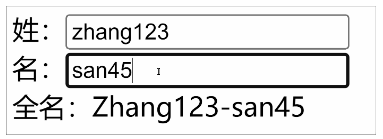
实现同样的功能,方法function没有缓存,模板调用几次,函数就执行几次;计算属性computed有缓存,模板调用多次,实际上只执行一次。
计算属性实际上是一个ref响应式对象,因此赋值时候需要加上.value
 1 <template>
 2   <div class="person">
 3     姓:<input
 4       type="text"
 5       v-model="firstName"
 6     > <br>
 7     名:<input
 8       type="text"
 9       v-model="lastName"
10     > <br>
11     <button @click="changeFullName">将全名改为li-si</button> <br>
12     全名:<span>{{ fullName }}</span> <br>
13     全名:<span>{{ fullName }}</span> <br>
14     全名:<span>{{ fullName }}</span> <br>
15     全名:<span>{{ fullName }}</span> <br>
16     全名:<span>{{ fullName }}</span> <br>
17     全名:<span>{{ fullName }}</span> <br>
18   </div>
19 </template>
20
21 <script lang="ts" setup name="Person">
22 import { ref, computed } from 'vue'
23
24 let firstName = ref('zhang')
25 let lastName = ref('san')
26
27 // fullName是一个计算属性,且是只读的
28 /* let fullName = computed(()=>{
29   console.log(1)
30   return firstName.value.slice(0,1).toUpperCase() + firstName.value.slice(1) + '-' + lastName.value
31 }) */
32
33 // fullName是一个计算属性,可读可写
34 let fullName = computed({
35   // 当fullName被读取时,get调用
36   get() {
37     return firstName.value.slice(0, 1).toUpperCase() + firstName.value.slice(1) + '-' + lastName.value
38   },
39   // 当fullName被修改时,set调用,且会收到修改的值
40   set(val) {
41     const [str1, str2] = val.split('-')
42     firstName.value = str1
43     lastName.value = str2
44   }
45 })
46
47 function changeFullName() {
48   fullName.value = 'li-si'
49 }
50 </script>
51
52 <style scoped>
53 .person {
54   background-color: skyblue;
55   box-shadow: 0 0 10px;
56   border-radius: 10px;
57   padding: 20px;
58 }
59
60 button {
61   margin: 0 5px;
62 }
63
64 li {
65   font-size: 20px;
66 }
67 </style>
v-model 输入可以传输到 script 定义参数中, script中的参数也可以映射过来,双向传输
3.9.【watch】重点
- 作用:监视数据的变化(和
Vue2中的watch作用一致) - 特点:
Vue3中的watch只能监视以下四种数据: - 1.ref 定义的数据
- 2.reactive 定义的数据
- 3.函数返回一个值(getter函数)
- 4.一个包含上述内容的数组
- 我们在
Vue3中使用watch的时候,通常会遇到以下几种情况: -
* 情况一
- 监视ref 定义的 【基本类型】数据,直接写数据名即可,监视的是其value值的改变
-
![]() src/components/Person.vue
src/components/Person.vue1 <template> 2 <div class="person"> 3 <h1>情况一:监视【ref】定义的【基本类型】数据</h1> 4 <h2>当前求和为:{{ sum }}</h2> 5 <button @click="changeSum">点我sum+1</button> 6 </div> 7 </template> 8 9 <script lang="ts" setup name="Person"> 10 import { ref, watch } from 'vue' 11 // 数据 12 let sum = ref(0) 13 // 方法 14 function changeSum() { 15 sum.value += 1 16 } 17 //监视-情况一:监视【ref】定义的【基本类型】数据 18 //此处sum不需要写.value 19 const stopWatch = watch(sum, (newValue, oldValue) => { 20 console.log('sum变化了', newValue, oldValue) 21 if (newValue >= 10) { 22 stopWatch() 23 } 24 }) 25 </script> 26 27 <style scoped> 28 .person { 29 background-color: skyblue; 30 box-shadow: 0 0 10px; 31 border-radius: 10px; 32 padding: 20px; 33 } 34 35 button { 36 margin: 0 5px; 37 } 38 39 li { 40 font-size: 20px; 41 } 42 </style>
-
* 情况二
- 监视ref 定义的 【对象类型】数据:直接写数据名,监视的是对象【地址值】,若想监视对象内部的数据,要手动开启深度监视。
- 注意:
- 若修改的是 ref 定义的对象的属性, newValue 和 oldValue 都是新值,因为它们是同一个对象
- 若修改整个
ref定义的对象,newValue是新值,oldValue是旧值,因为不是同一个对象了
 1 <template>
 2   <div class="person">
 3     <h1>情况二:监视【ref】定义的【对象类型】数据</h1>
 4     <h2>姓名:{{ person.name }}</h2>
 5     <h2>年龄:{{ person.age }}</h2>
 6     <button @click="changeName">修改名字</button>
 7     <button @click="changeAge">修改年龄</button>
 8     <button @click="changePerson">修改整个人</button>
 9   </div>
10 </template>
11
12 <script lang="ts" setup name="Person">
13 import { ref, watch } from 'vue'
14 // 数据
15 let person = ref({
16   name: '张三',
17   age: 18
18 })
19 // 方法
20 function changeName() {
21   person.value.name += '~'
22 }
23 function changeAge() {
24   person.value.age += 1
25 }
26 function changePerson() {
27   person.value = { name: '李四', age: 90 }
28 }
29 /*
30   监视-情况二:监视【ref】定义的【对象类型】数据,监视的是对象的地址值,若想监视对象内部属性的变化,需要手动开启深度监视
31   watch的第一个参数是:被监视的数据
32   watch的第二个参数是:监视的回调
33   watch的第三个参数是:配置对象(deep、immediate等等.....)
34 */
35 watch(person, (newValue, oldValue) => {
36   console.log('person变化了', newValue, oldValue)
37 }, { deep: true })
38
39 </script>
40
41 <style scoped>
42 .person {
43   background-color: skyblue;
44   box-shadow: 0 0 10px;
45   border-radius: 10px;
46   padding: 20px;
47 }
48
49 button {
50   margin: 0 5px;
51 }
52
53 li {
54   font-size: 20px;
55 }
56 </style>
* 情况三
监视reactive定义的【对象类型】数据,且默认开启了深度监视,且深层监视无法关闭。
无法监视地址值,因为对象地址值没有改变,本质上assign在原对象上进行的是赋值。
newValue和oldValue值相同,都是新值,还是因为对象地址值没有改变,本质上assign在原对象上进行的是赋值。
 1 <template>
 2   <div class="person">
 3     <h1>情况三:监视【reactive】定义的【对象类型】数据</h1>
 4     <h2>姓名:{{ person.name }}</h2>
 5     <h2>年龄:{{ person.age }}</h2>
 6     <button @click="changeName">修改名字</button>
 7     <button @click="changeAge">修改年龄</button>
 8     <button @click="changePerson">修改整个人</button>
 9     <hr>
10     <h2>测试:{{ obj.a.b.c }}</h2>
11     <button @click="test">修改obj.a.b.c</button>
12   </div>
13 </template>
14
15 <script lang="ts" setup name="Person">
16 import { reactive, watch } from 'vue'
17 // 数据
18 let person = reactive({
19   name: '张三',
20   age: 18
21 })
22 let obj = reactive({
23   a: {
24     b: {
25       c: 666
26     }
27   }
28 })
29 // 方法
30 function changeName() {
31   person.name += '~'
32 }
33 function changeAge() {
34   person.age += 1
35 }
36 function changePerson() {
37   // person = { name: '李四', age: 80 }//直接修改,不行
38   // person = reactive({ name: '李四', age: 80 })//包裹修改,也不行
39   Object.assign(person, { name: '李四', age: 80 })
40 }
41 function test() {
42   obj.a.b.c = 888
43 }
44
45 // 监视-情况三:监视【reactive】定义的【对象类型】数据,且默认是开启深度监视的
46 watch(person, (newValue, oldValue) => {
47   console.log('person变化了', newValue, oldValue)
48 })
49 watch(obj, (newValue, oldValue) => {
50   console.log('Obj变化了', newValue, oldValue)
51 })
52
53 </script>
54
55 <style scoped>
56 .person {
57   background-color: skyblue;
58   box-shadow: 0 0 10px;
59   border-radius: 10px;
60   padding: 20px;
61 }
62
63 button {
64   margin: 0 5px;
65 }
66
67 li {
68   font-size: 20px;
69 }
70 </style>
* 情况四
监视ref或reactive定义的【对象类型】数据中的某个属性,注意点如下:
-
若该属性值不是【对象类型】即【基本类型】,需要写成函数形式,此时oldValue是旧值,newValue是新值。
-
若该属性值是依然是【对象类型】,可直接编,也可写成函数,建议写成函数。
**直接写:**可以监视到对象内部属性a,b...的变化,但是监视不到整体的变化。整体改变时,对象地址值变化了,所以监视不到了。
**写函数(不开启深度监视):**监视不到对象内部属性a,b...的变化,但是可以监视到整体的变化,函数返回值监视的是对象的地址值,改变整体是产生一个新对象,所以能监视到,并且新值是新值,旧值是旧值。(不过对象内部属性a,b...的新旧值都是新值)
**写函数(开启深度监视)推荐:**既能监视到对象内部属性a,b...的变化,也可以监视到整体的变化,函数返回值监视的是对象的地址值,改变整体是产生一个新对象,所以能监视到,并且新值是新值,旧值是旧值。(不过对象内部属性a,b...的新旧值都是新值)
-
结论:监视的要是对象里的属性,那么最好写函数式。
注意点:若是对象监视的是地址值,需要关注对象内部,需要手动开启深度监视。
 1 <template>
 2   <div class="person">
 3     <h1>情况四:监视【ref】或【reactive】定义的【对象类型】数据中的某个属性</h1>
 4     <h2>姓名:{{ person.name }}</h2>
 5     <h2>年龄:{{ person.age }}</h2>
 6     <h2>汽车:{{ person.car.c1 }}、{{ person.car.c2 }}</h2>
 7     <button @click="changeName">修改名字</button>
 8     <button @click="changeAge">修改年龄</button>
 9     <button @click="changeC1">修改第一台车</button>
10     <button @click="changeC2">修改第二台车</button>
11     <button @click="changeCar">修改整个车</button>
12   </div>
13 </template>
14
15 <script lang="ts" setup name="Person">
16 import { reactive, watch } from 'vue'
17
18 // 数据
19 let person = reactive({
20   name: '张三',
21   age: 18,
22   car: {
23     c1: '奔驰',
24     c2: '宝马'
25   }
26 })
27 // 方法
28 function changeName() {
29   person.name += '~'
30 }
31 function changeAge() {
32   person.age += 1
33 }
34 function changeC1() {
35   person.car.c1 = '奥迪'
36 }
37 function changeC2() {
38   person.car.c2 = '大众'
39 }
40 function changeCar() {
41   person.car = { c1: '雅迪', c2: '爱玛' }
42 }
43
44 // 监视-情况四:监视响应式对象中的某个属性,且该属性是【基本类型】的,要写成函数式
45 /* watch(()=> person.name,(newValue,oldValue)=>{
46   console.log('person.name变化了',newValue,oldValue)
47 }) */
48
49 // 监视-情况四:监视响应式对象中的某个属性,且该属性是【对象类型】的,可以直接写,也能写函数,更推荐写函数
50 //直接写:可以监视到c1,c2的变化,但是监视不到整体的变化。整体改变时,对象地址值变化了,所以监视不到了。
51 // watch(person.car, (newValue, oldValue) => {
52 //   console.log('person.car变化了', newValue, oldValue)
53 // }, { deep: true })
54
55 //写函数(不开启深度监视):
56 //监视不到c1,c2的变化,但是可以监视到整体的变化,函数返回值监视的是对象的地址值,因此改变成一个新对象,新旧值也能维护的很好。
57 // watch(() => person.car, (newValue, oldValue) => {
58 //   console.log('person.car变化了', newValue, oldValue)
59 // })
60 //写函数(开启深度监视):
61 watch(() => person.car, (newValue, oldValue) => {
62   console.log('person.car变化了', newValue, oldValue)
63 }, { deep: true })
64
65 </script>
66
67 <style scoped>
68 .person {
69   background-color: skyblue;
70   box-shadow: 0 0 10px;
71   border-radius: 10px;
72   padding: 20px;
73 }
74
75 button {
76   margin: 0 5px;
77 }
78
79 li {
80   font-size: 20px;
81 }
82 </style>
* 情况五
监视上述的多个数据
 1 <template>
 2   <div class="person">
 3     <h1>情况五:监视上述的多个数据</h1>
 4     <h2>姓名:{{ person.name }}</h2>
 5     <h2>年龄:{{ person.age }}</h2>
 6     <h2>汽车:{{ person.car.c1 }}、{{ person.car.c2 }}</h2>
 7     <button @click="changeName">修改名字</button>
 8     <button @click="changeAge">修改年龄</button>
 9     <button @click="changeC1">修改第一台车</button>
10     <button @click="changeC2">修改第二台车</button>
11     <button @click="changeCar">修改整个车</button>
12   </div>
13 </template>
14
15 <script lang="ts" setup name="Person">
16   import {reactive,watch} from 'vue'
17
18   // 数据
19   let person = reactive({
20     name:'张三',
21     age:18,
22     car:{
23       c1:'奔驰',
24       c2:'宝马'
25     }
26   })
27   // 方法
28   function changeName(){
29     person.name += '~'
30   }
31   function changeAge(){
32     person.age += 1
33   }
34   function changeC1(){
35     person.car.c1 = '奥迪'
36   }
37   function changeC2(){
38     person.car.c2 = '大众'
39   }
40   function changeCar(){
41     person.car = {c1:'雅迪',c2:'爱玛'}
42   }
43
44   // 监视,情况五:监视上述的多个数据
45   watch([()=>person.name,person.car],(newValue,oldValue)=>{
46     console.log('person.car变化了',newValue,oldValue)
47   },{deep:true})
48
49 </script>
50
51 <style scoped>
52   .person {
53     background-color: skyblue;
54     box-shadow: 0 0 10px;
55     border-radius: 10px;
56     padding: 20px;
57   }
58   button {
59     margin: 0 5px;
60   }
61   li {
62     font-size: 20px;
63   }
64 </style>
3.10. 【watchEffect】
-
官网:立即运行一个函数,同时响应式地追踪其依赖,并在依赖更改时重新执行该函数。
-
watch对比watchEffect
- 都能监听响应式数据的变化,不同的是监听数据变化的方式不同
watch:要明确指出监视的数据watchEffect:不用明确指出监视的数据(函数中用到哪些属性,那就监视哪些属性)。
 1 <template>
 2   <div class="person">
 3     <h2>需求:当水温达到60度,或水位达到80cm时,给服务器发请求</h2>
 4     <h2>当前水温:{{ temp }}℃</h2>
 5     <h2>当前水位:{{ height }}cm</h2>
 6     <button @click="changeTemp">水温+10</button>
 7     <button @click="changeHeight">水位+10</button>
 8   </div>
 9 </template>
10
11 <script lang="ts" setup name="Person">
12 import { ref, watch, watchEffect } from 'vue'
13
14 // 数据
15 let temp = ref(10)
16 let height = ref(0)
17
18 // 方法
19 function changeTemp() {
20   temp.value += 10
21 }
22 function changeHeight() {
23   height.value += 10
24 }
25
26 // 监视 -- watch实现
27 /* watch([temp,height],(value)=>{
28   // 从value中获取最新的水温(newTemp)、最新的水位(newHeight)
29   let [newTemp,newHeight] = value
30   // 逻辑
31   if(newTemp >= 60 || newHeight >= 80){
32     console.log('给服务器发请求')
33   }
34 }) */
35
36 // 监视 -- watchEffect实现
37 watchEffect(() => {
38   if (temp.value >= 60 || height.value >= 80) {
39     console.log('给服务器发请求')
40   }
41 })
42
43 </script>
44
45 <style scoped>
46 .person {
47   background-color: skyblue;
48   box-shadow: 0 0 10px;
49   border-radius: 10px;
50   padding: 20px;
51 }
52
53 button {
54   margin: 0 5px;
55 }
56
57 li {
58   font-size: 20px;
59 }
60 </style>
3.11. 【标签的 ref 属性】
作用:用于注册模板引用。
-
用在普通
DOM标签上,获取的是DOM节点。 -
用在组件标签上,获取的是组件实例对象。
- 用在普通
DOM标签上:![]() src/components/Person.vue # ref 加在template 下 标签里面 类似 ref="tilte" 打标记, # 在DOM # 文档对象模型
src/components/Person.vue # ref 加在template 下 标签里面 类似 ref="tilte" 打标记, # 在DOM # 文档对象模型1 <template> 2 <div class="person"> 3 <h1>中国</h1> 4 <h2 ref="title2">北京</h2> 5 <h3>尚硅谷</h3> 6 <button @click="showLog">点我输出h2这个元素</button> 7 </div> 8 </template> 9 10 <script lang="ts" setup name="Person"> 11 import { ref } from 'vue' 12 13 // 创建一个title2,用于存储ref标记的内容 14 let title2 = ref() 15 let a = ref(0) 16 let b = ref(1) 17 let c = ref(2) 18 19 function showLog() { 20 console.log(title2.value) 21 } 22 23 defineExpose({ a, b, c }) 24 </script> 25 26 <style scoped> 27 .person { 28 background-color: skyblue; 29 box-shadow: 0 0 10px; 30 border-radius: 10px; 31 padding: 20px; 32 } 33 34 button { 35 margin: 0 5px; 36 } 37 38 li { 39 font-size: 20px; 40 } 41 </style>
![]() src/App.vue # ref 打标记以后 在一张大界面里面,不会造成同名冲突, 这也是 ref 标签的作用
src/App.vue # ref 打标记以后 在一张大界面里面,不会造成同名冲突, 这也是 ref 标签的作用1 <template> 2 <h2 ref="title2">你好</h2> 3 <button @click="showLog">测试</button> 4 <Person ref="ren" /> 5 </template> 6 7 <script lang="ts" setup name="App"> 8 import Person from './components/Person.vue' 9 import { ref } from 'vue' 10 11 let title2 = ref() 12 let ren = ref() 13 14 function showLog() { 15 // console.log(title2.value) 16 console.log(ren.value) 17 } 18 </script>
- 用在组件标签上:
![]() <Person ref="ren"/> defineExpose(a.b))
<Person ref="ren"/> defineExpose(a.b))1 <!-- 父组件App.vue --> 2 <template> 3 <Person ref="ren"/> 4 <button @click="test">测试</button> 5 </template> 6 7 <script lang="ts" setup name="App"> 8 import Person from './components/Person.vue' 9 import {ref} from 'vue' 10 11 let ren = ref() 12 13 function test(){ 14 console.log(ren.value.name) 15 console.log(ren.value.age) 16 } 17 </script> 18 19 20 <!-- 子组件Person.vue中要使用defineExpose暴露内容 --> 21 <script lang="ts" setup name="Person"> 22 import {ref,defineExpose} from 'vue' 23 // 数据 24 let name = ref('张三') 25 let age = ref(18) 26 /****************************/ 27 /****************************/ 28 // 使用defineExpose将组件中的数据导出交给外部 29 defineExpose({name,age}) 30 </script>
3.12 回顾TS中的_接口_泛型_自定义类型
.ts 中自定义一种 接口用来限制 vue 中 setup 中 对象中元素的属性类型,并提示
 1 // 定义一个接口,用于限制person对象的具体属性
 2 export interface PersonInter {
 3   id:string,
 4   name:string,
 5   age:number
 6 }
 7
 8 // 一个自定义类型
 9 // export type Persons = Array<PersonInter>
10 export type Persons = PersonInter[]
 1 <template>
 2   <div class="person">
 3     ???
 4   </div>
 5 </template>
 6
 7 <script lang="ts" setup name="Person">
 8 import { type PersonInter, type Persons } from '@/types'
 9
10 // let person:PersonInter = {id:'asyud7asfd01',name:'张三',age:60}
11
12 let personList1: Array<PersonInter> = [
13   { id: 'asyud7asfd01', name: '张三', age: 60 },
14   { id: 'asyud7asfd02', name: '李四', age: 18 },
15   { id: 'asyud7asfd03', name: '王五', age: 5 }
16 ]
17 let personList: Persons = [
18   { id: 'asyud7asfd01', name: '张三', age: 60 },
19   { id: 'asyud7asfd02', name: '李四', age: 18 },
20   { id: 'asyud7asfd03', name: '王五', age: 5 }
21 ]
22
23 </script>
24
25 <style scoped>
26 .person {
27   background-color: skyblue;
28   box-shadow: 0 0 10px;
29   border-radius: 10px;
30   padding: 20px;
31 }
32
33 button {
34   margin: 0 5px;
35 }
36
37 li {
38   font-size: 20px;
39 }
40 </style>
3.13. 【props】
父组件App.vue 向 子组件 Person.vue 传值
利用 defineProps 接收 withDefaults 设置默认值
 1 // 定义一个接口,用于限制person对象的具体属性
 2 export interface PersonInter {
 3   id:string,
 4   name:string,
 5   age:number,
 6 }
 7
 8 // 一个自定义类型
 9 // export type Persons = Array<PersonInter>
10 export type Persons = PersonInter[]
 1 <template>
 2   <!-- 务必看懂下面这一行代码 -->
 3   <!-- <h2 a="1+1" :b="1+1" c="x" :d="x" ref="qwe">测试</h2> -->
 4
 5   <Person a="哈哈" />
 6 </template>
 7
 8 <script lang="ts" setup name="App">
 9 import Person from './components/Person.vue'
10 import { reactive } from 'vue'
11 import { type Persons } from './types'
12
13 let x = 9
14
15 let personList = reactive<Persons>([
16   { id: 'asudfysafd01', name: '张三', age: 18 },
17   { id: 'asudfysafd02', name: '李四', age: 20 },
18   { id: 'asudfysaf)d03', name: '王五', age: 22 }
19 ])
20
21 </script>
 1 <template>
 2   <div class="person">
 3     <ul>
 4       <li
 5         v-for="p in list"
 6         :key="p.id"
 7       >
 8         {{ p.name }} -- {{ p.age }}
 9       </li>
10     </ul>
11   </div>
12 </template>
13
14 <script lang="ts" setup name="Person">
15 import { withDefaults } from 'vue'
16 import { defineProps } from 'vue'
17 import { type Persons } from '../types'
18
19 // 只接收list
20 // defineProps(['list'])
21
22 // 接收list + 限制类型
23 // defineProps<{list:Persons}>()
24
25 //  接收list + 限制类型 + 限制必要性 + 指定默认值
26 withDefaults(defineProps<{ list?: Persons }>(), {
27   list: () => [{ id: 'ausydgyu01', name: '康师傅·王麻子·特仑苏', age: 19 }]
28 })
29
30
31 // 接收list,同时将props保存起来
32 /* let x = defineProps(['list'])
33 console.log(x.list) */
34
35 </script>
36
37 <style scoped>
38 .person {
39   background-color: skyblue;
40   box-shadow: 0 0 10px;
41   border-radius: 10px;
42   padding: 20px;
43 }
44
45 button {
46   margin: 0 5px;
47 }
48
49 li {
50   font-size: 20px;
51 }
52 </style>
3.14. 【生命周期】
-
概念:
Vue组件实例在创建时要经历一系列的初始化步骤,在此过程中Vue会在合适的时机,调用特定的函数,从而让开发者有机会在特定阶段运行自己的代码,这些特定的函数统称为:生命周期钩子 -
规律:
生命周期整体分为四个阶段,分别是:创建、挂载、更新、销毁,每个阶段都有两个钩子,一前一后。
-
Vue2的生命周期创建阶段:
beforeCreate、created挂载阶段:
beforeMount、mounted更新阶段:
beforeUpdate、updated销毁阶段:
beforeDestroy、destroyed -
Vue3的生命周期创建阶段:
setup挂载阶段:
onBeforeMount、onMounted更新阶段:
onBeforeUpdate、onUpdated卸载阶段:
onBeforeUnmount、onUnmounted -
常用的钩子:
onMounted(挂载完毕)、onUpdated(更新完毕)、onBeforeUnmount(卸载之前) -
![]() src/App.vue
src/App.vue1 <template> 2 <Person v-if="isShow"/> 3 </template> 4 5 <script lang="ts" setup name="App"> 6 import Person from './components/Person.vue' 7 import {ref,onMounted} from 'vue' 8 9 let isShow = ref(true) 10 11 // 挂载完毕 12 onMounted(()=>{ 13 console.log('父---挂载完毕') 14 }) 15 16 </script>
![]() src/components/Person.vue
src/components/Person.vue1 <template> 2 <div class="person"> 3 <h2>当前求和为:{{ sum }}</h2> 4 <button @click="add">点我sum+1</button> 5 </div> 6 </template> 7 8 <script lang="ts" setup name="Person"> 9 import { ref, onBeforeMount, onMounted, onBeforeUpdate, onUpdated, onBeforeUnmount, onUnmounted } from 'vue' 10 11 // 数据 12 let sum = ref(0) 13 // 方法 14 function add() { 15 sum.value += 1 16 } 17 // 创建 18 console.log('创建') 19 20 // 挂载前 21 onBeforeMount(() => { 22 // console.log('挂载前') 23 }) 24 // 挂载完毕 25 onMounted(() => { 26 console.log('子---挂载完毕') 27 }) 28 // 更新前 29 onBeforeUpdate(() => { 30 // console.log('更新前') 31 }) 32 // 更新完毕 33 onUpdated(() => { 34 // console.log('更新完毕') 35 }) 36 // 卸载前 37 onBeforeUnmount(() => { 38 // console.log('卸载前') 39 }) 40 // 卸载完毕 41 onUnmounted(() => { 42 // console.log('卸载完毕') 43 }) 44 </script> 45 46 <style scoped> 47 .person { 48 background-color: skyblue; 49 box-shadow: 0 0 10px; 50 border-radius: 10px; 51 padding: 20px; 52 } 53 54 button { 55 margin: 0 5px; 56 } 57 58 li { 59 font-size: 20px; 60 } 61 </style>
3.15. 【自定义hook】
- 什么是hook? 本质是一个函数,把 setup 函数中使用的 composition API 进行封装,类似于 vue2.x 中的mixin.
- 自定义hook 的优势: 复用代码,让setup 中逻辑更清楚易懂
-
![]() src/App.vue
src/App.vue1 <template> 2 <Person/> 3 </template> 4 5 <script lang="ts" setup name="App"> 6 import Person from './components/Person.vue' 7 </script>
![]() src/components/Person.vue
src/components/Person.vue1 <template> 2 <div class="person"> 3 <h2>当前求和为:{{ sum }},放大10倍后:{{ bigSum }}</h2> 4 <button @click="add">点我sum+1</button> 5 <hr> 6 <img 7 v-for="(dog, index) in dogList" 8 :src="dog" 9 :key="index" 10 > 11 <br> 12 <button @click="getDog">再来一只小狗</button> 13 </div> 14 </template> 15 16 <script lang="ts" setup name="Person"> 17 import useSum from '@/hooks/useSum' 18 import useDog from '@/hooks/useDog' 19 20 const { sum, add, bigSum } = useSum() 21 const { dogList, getDog } = useDog() 22 </script> 23 24 <style scoped> 25 .person { 26 background-color: skyblue; 27 box-shadow: 0 0 10px; 28 border-radius: 10px; 29 padding: 20px; 30 } 31 32 button { 33 margin: 0 5px; 34 } 35 36 li { 37 font-size: 20px; 38 } 39 40 img { 41 height: 100px; 42 margin-right: 10px; 43 } 44 </style>
![]() src/hooks/useDog.ts # 命名规范 use+内容相关 首字母大写 (安装:npm i axios)
src/hooks/useDog.ts # 命名规范 use+内容相关 首字母大写 (安装:npm i axios)1 import {reactive,onMounted} from 'vue' 2 import axios from 'axios' 3 4 export default function (){ 5 // 数据 6 let dogList = reactive([ 7 'https://images.dog.ceo/breeds/pembroke/n02113023_4373.jpg' 8 ]) 9 // 方法 10 async function getDog(){ 11 try { 12 let result = await axios.get('https://dog.ceo/api/breed/pembroke/images/random') 13 dogList.push(result.data.message) 14 } catch (error) { 15 alert(error) 16 } 17 } 18 // 钩子 19 onMounted(()=>{ 20 getDog() 21 }) 22 // 向外部提供东西 23 return {dogList,getDog} 24 }
![]() src/hooks/useSum.ts
src/hooks/useSum.ts1 import { ref ,onMounted,computed} from 'vue' 2 3 export default function () { 4 // 数据 5 let sum = ref(0) 6 let bigSum = computed(()=>{ 7 return sum.value * 10 8 }) 9 10 // 方法 11 function add() { 12 sum.value += 1 13 } 14 15 // 钩子 16 onMounted(()=>{ 17 add() 18 }) 19 20 // 给外部提供东西 21 return {sum,add,bigSum} 22 }
4.1. 【对路由的理解】
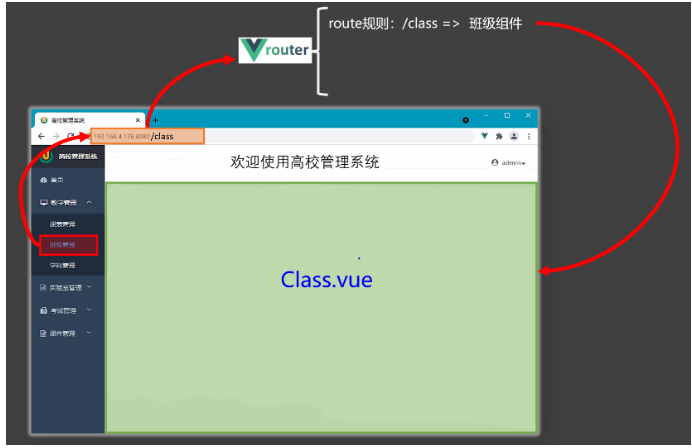
4.2. 【基本切换效果】
-
Vue3中要使用vue-router的最新版本,目前是4版本。 (安装命令:npm i vue-router)
 1 <template>
 2   <div class="app">
 3     <h2 class="title">Vue路由测试</h2>
 4     <!-- 导航区 -->
 5     <div class="navigate">
 6       <RouterLink to="/home" active-class="xiaozhupeiqi">首页</RouterLink>
 7       <RouterLink to="/news" active-class="xiaozhupeiqi">新闻</RouterLink>
 8       <RouterLink to="/about" active-class="xiaozhupeiqi">关于</RouterLink>
 9     </div>
10     <!-- 展示区 -->
11     <div class="main-content">
12       <RouterView></RouterView>
13     </div>
14   </div>
15 </template>
16
17 <script lang="ts" setup name="App">
18   import {RouterView,RouterLink} from 'vue-router'
19
20 </script>
21
22 <style>
23     /* App */
24   .title {
25     text-align: center;
26     word-spacing: 5px;
27     margin: 30px 0;
28     height: 70px;
29     line-height: 70px;
30     background-image: linear-gradient(45deg, gray, white);
31     border-radius: 10px;
32     box-shadow: 0 0 2px;
33     font-size: 30px;
34   }
35   .navigate {
36     display: flex;
37     justify-content: space-around;
38     margin: 0 100px;
39   }
40   .navigate a {
41     display: block;
42     text-align: center;
43     width: 90px;
44     height: 40px;
45     line-height: 40px;
46     border-radius: 10px;
47     background-color: gray;
48     text-decoration: none;
49     color: white;
50     font-size: 18px;
51     letter-spacing: 5px;
52   }
53   .navigate a.xiaozhupeiqi {
54     background-color: #64967E;
55     color: #ffc268;
56     font-weight: 900;
57     text-shadow: 0 0 1px black;
58     font-family: 微软雅黑;
59   }
60   .main-content {
61     margin: 0 auto;
62     margin-top: 30px;
63     border-radius: 10px;
64     width: 90%;
65     height: 400px;
66     border: 1px solid;
67   }
68 </style>
 1 // 创建一个路由器,并暴露出去
 2
 3 // 第一步:引入createRouter
 4 import { createRouter, createWebHistory } from 'vue-router'
 5 // 引入一个一个可能要呈现组件
 6 import Home from '@/components/Home.vue'
 7 import News from '@/components/News.vue'
 8 import About from '@/components/About.vue'
 9
10 // 第二步:创建路由器
11 const router = createRouter({
12   history: createWebHistory(), //路由器的工作模式(稍后讲解)
13   routes: [ //一个一个的路由规则
14     {
15       path: '/home',
16       component: Home
17     },
18     {
19       path: '/news',
20       component: News
21     },
22     {
23       path: '/about',
24       component: About
25     },
26   ]
27 })
28
29 // 暴露出去router
30 export default router
 1 <template>
 2   <div class="about">
 3     <h2>大家好,欢迎来到尚硅谷直播间</h2>
 4   </div>
 5 </template>
 6
 7 <script setup lang="ts" name="About">
 8
 9 </script>
10
11 <style scoped>
12 .about {
13   display: flex;
14   justify-content: center;
15   align-items: center;
16   height: 100%;
17   color: rgb(85, 84, 84);
18   font-size: 18px;
19 }
20 </style>
 1 <template>
 2   <div class="home">
 3     <img
 4       src="http://www.atguigu.com/images/index_new/logo.png"
 5       alt=""
 6     >
 7   </div>
 8 </template>
 9
10 <script setup lang="ts" name="Home">
11
12 </script>
13
14 <style scoped>
15 .home {
16   display: flex;
17   justify-content: center;
18   align-items: center;
19   height: 100%;
20 }
21 </style>
 1 <template>
 2   <div class="news">
 3     <ul>
 4       <li><a href="#">新闻001</a></li>
 5       <li><a href="#">新闻002</a></li>
 6       <li><a href="#">新闻003</a></li>
 7       <li><a href="#">新闻004</a></li>
 8     </ul>
 9   </div>
10 </template>
11
12 <script setup lang="ts" name="News">
13
14 </script>
15
16 <style scoped>
17 /* 新闻 */
18 .news {
19   padding: 0 20px;
20   display: flex;
21   justify-content: space-between;
22   height: 100%;
23 }
24
25 .news ul {
26   margin-top: 30px;
27   list-style: none;
28   padding-left: 10px;
29 }
30
31 .news li>a {
32   font-size: 18px;
33   line-height: 40px;
34   text-decoration: none;
35   color: #64967E;
36   text-shadow: 0 0 1px rgb(0, 84, 0);
37 }
38
39 .news-content {
40   width: 70%;
41   height: 90%;
42   border: 1px solid;
43   margin-top: 20px;
44   border-radius: 10px;
45 }
46 </style>
4.3. 【两个注意点】
1.路由组件通常存放在pages 或者 views 文件夹, 一般组件通常存放在 components 文件夹
2.通常点击导航,视觉效果上 “消失”了的路由组件, 默认是被卸载掉的,需要的时候再去挂载
- 路由组件:靠路由规则渲染出来的。 route: [{path:/demo, component:demo}]
- 一般组件:亲手写出来的标签。<demo/>
4.4.【路由器工作模式】
1.history模式
 1 优点:URL更加美观,不带有#,更接近传统的网站URL。
 2
 3 缺点:后期项目上线,需要服务端配合处理路径问题,否则刷新会有404错误。
 4
 5 const router = createRouter({
 6     history:createWebHistory(), //history模式
 7     /******/
 8 })
 9
10 各版本:
11
12 vue2——mode:'history'
13
14 vue3——history:createWebHistory()
15
16 React——BrowserRouter
2.hash模式
1 优点:兼容性更好,因为不需要服务器端处理路径。
2
3 缺点:URL带有#不太美观,且在SEO优化方面相对较差。
4
5 const router = createRouter({
6       history:createWebHashHistory(), //hash模式
7       /******/
8 })
4.5. 【to的两种写法】
<!-- 第一种:to的字符串写法 -->
<router-link active-class="active" to="/home">主页</router-link>

<!-- 第二种:to的对象写法 -->
<router-link active-class="active" :to="{path:'/home'}">Home</router-link>
4.6. 【命名路由】
作用:可以简化路由跳转及传参(后面就讲)。
给路由规则命名:name
 1 // 创建一个路由器,并暴露出去
 2
 3 // 第一步:引入createRouter
 4 import {createRouter,createWebHistory,createWebHashHistory} from 'vue-router'
 5 // 引入一个一个可能要呈现组件
 6 import Home from '@/pages/Home.vue'
 7 import News from '@/pages/News.vue'
 8 import About from '@/pages/About.vue'
 9
10 // 第二步:创建路由器
11 const router = createRouter({
12   history:createWebHashHistory(), //路由器的工作模式(稍后讲解)
13   routes:[ //一个一个的路由规则
14     {
15       name:'zhuye',
16       path:'/home',
17       component:Home
18     },
19     {
20       name:'xinwen',
21       path:'/news',
22       component:News
23     },
24     {
25       name:'guanyu',
26       path:'/about',
27       component:About
28     },
29   ]
30 })
31
32 // 暴露出去router
33 export default router
跳转路由 :
 1 <template>
 2   <div class="app">
 3     <Header/>
 4     <!-- 导航区 -->
 5     <div class="navigate">
 6       <RouterLink to="/home" active-class="active">首页</RouterLink>
 7       <RouterLink :to="{name:'xinwen'}" active-class="active">新闻</RouterLink>
 8       <RouterLink :to="{path:'/about'}" active-class="active">关于</RouterLink>
 9     </div>
10     <!-- 展示区 -->
11     <div class="main-content">
12       <RouterView></RouterView>
13     </div>
14   </div>
15 </template>
16
17 <script lang="ts" setup name="App">
18   import {RouterView,RouterLink} from 'vue-router'
19   import Header from './components/Header.vue'
20
21 </script>
22
23 <style>
24     /* App */
25   .navigate {
26     display: flex;
27     justify-content: space-around;
28     margin: 0 100px;
29   }
30   .navigate a {
31     display: block;
32     text-align: center;
33     width: 90px;
34     height: 40px;
35     line-height: 40px;
36     border-radius: 10px;
37     background-color: gray;
38     text-decoration: none;
39     color: white;
40     font-size: 18px;
41     letter-spacing: 5px;
42   }
43   .navigate a.active {
44     background-color: #64967E;
45     color: #ffc268;
46     font-weight: 900;
47     text-shadow: 0 0 1px black;
48     font-family: 微软雅黑;
49   }
50   .main-content {
51     margin: 0 auto;
52     margin-top: 30px;
53     border-radius: 10px;
54     width: 90%;
55     height: 400px;
56     border: 1px solid;
57   }
58 </style>
<!--简化后:直接通过名字跳转(to的对象写法配合name属性) -->
<!--:to写法(通过名字)-->
<router-link :to="{name:'guanyu'}">跳转</router-link>
<!--:to写法(通过路径)-->
<router-link :to="{path:'/about'}">跳转</router-link>
4.7. 【嵌套路由】
-
编写
News的子路由:Detail.vue![]() src/pages/Detail.vue
src/pages/Detail.vue1 <template> 2 <ul class="news-list"> 3 <li>编号:xxx</li> 4 <li>标题:xxx</li> 5 <li>内容:xxx</li> 6 </ul> 7 </template> 8 9 <script setup lang="ts" name="About"> 10 11 </script> 12 13 <style scoped> 14 .news-list { 15 list-style: none; 16 padding-left: 20px; 17 } 18 19 .news-list>li { 20 line-height: 30px; 21 } 22 </style>
-
配置路由规则,使用
children配置项:![]() src/router/index.ts
src/router/index.ts1 // 创建一个路由器,并暴露出去 2 3 // 第一步:引入createRouter 4 import {createRouter,createWebHistory,createWebHashHistory} from 'vue-router' 5 // 引入一个一个可能要呈现组件 6 import Home from '@/pages/Home.vue' 7 import News from '@/pages/News.vue' 8 import About from '@/pages/About.vue' 9 import Detail from '@/pages/Detail.vue' 10 11 // 第二步:创建路由器 12 const router = createRouter({ 13 history:createWebHistory(), //路由器的工作模式(稍后讲解) 14 routes:[ //一个一个的路由规则 15 { 16 name:'zhuye', 17 path:'/home', 18 component:Home 19 }, 20 { 21 name:'xinwen', 22 path:'/news', 23 component:News, 24 children:[ 25 { 26 path:'detail', 27 component:Detail 28 } 29 ] 30 }, 31 { 32 name:'guanyu', 33 path:'/about', 34 component:About 35 }, 36 ] 37 }) 38 39 // 暴露出去router 40 export default router
-
跳转路由(记得要加完整路径):![]() src/pages/News.vue
src/pages/News.vue1 <template> 2 <div class="news"> 3 <!-- 导航区 --> 4 <ul> 5 <li v-for="news in newsList" :key="news.id"> 6 <RouterLink to="/news/detail">{{news.title}}</RouterLink> 7 </li> 8 </ul> 9 <!-- 展示区 --> 10 <div class="news-content"> 11 <RouterView></RouterView> 12 </div> 13 </div> 14 </template> 15 16 <script setup lang="ts" name="News"> 17 import {reactive} from 'vue' 18 import {RouterView,RouterLink} from 'vue-router' 19 20 const newsList = reactive([ 21 {id:'asfdtrfay01',title:'很好的抗癌食物',content:'西蓝花'}, 22 {id:'asfdtrfay02',title:'如何一夜暴富',content:'学IT'}, 23 {id:'asfdtrfay03',title:'震惊,万万没想到',content:'明天是周一'}, 24 {id:'asfdtrfay04',title:'好消息!好消息!',content:'快过年了'} 25 ]) 26 27 </script> 28 29 <style scoped> 30 /* 新闻 */ 31 .news { 32 padding: 0 20px; 33 display: flex; 34 justify-content: space-between; 35 height: 100%; 36 } 37 .news ul { 38 margin-top: 30px; 39 list-style: none; 40 padding-left: 10px; 41 } 42 .news li>a { 43 font-size: 18px; 44 line-height: 40px; 45 text-decoration: none; 46 color: #64967E; 47 text-shadow: 0 0 1px rgb(0, 84, 0); 48 } 49 .news-content { 50 width: 70%; 51 height: 90%; 52 border: 1px solid; 53 margin-top: 20px; 54 border-radius: 10px; 55 } 56 </style>
-
-
<router-link to="/news/detail">xxxx</router-link> <!-- 或 --> <router-link :to="{path:'/news/detail'}">xxxx</router-link> - 记得去
Home组件中预留一个<router-view>import {RouterView,RouterLink} from 'vue-router'<RouterView></RouterView>
-
4.8. 【路由传参】
query参数
 1 <!-- 跳转并携带query参数(to的字符串写法) -->
 2 <router-link to="/news/detail?a=1&b=2&content=欢迎你">
 3     跳转
 4 </router-link>
 5
 6 <!-- 跳转并携带query参数(to的对象写法) -->
 7 <RouterLink
 8   :to="{
 9     //name:'xiang', //用name也可以跳转
10     path:'/news/detail',
11     query:{
12       id:news.id,
13       title:news.title,
14       content:news.content
15     }
16   }"
17 >
18   {{news.title}}
19 </RouterLink>
1 import {useRoute} from 'vue-router'
2 const route = useRoute()
3 // 打印query参数
4 console.log(route.query)
详细代码
 1 <template>
 2   <div class="news">
 3     <!-- 导航区 -->
 4     <ul>
 5       <li v-for="news in newsList" :key="news.id">
 6         <!-- 第一种写法 -->
 7         <!-- <RouterLink :to="`/news/detail?id=${news.id}&title=${news.title}&content=${news.content}`">{{news.title}}</RouterLink> -->
 8
 9         <!-- 第二种写法 -->
10         <RouterLink
11           :to="{
12             name:'xiang',
13             query:{
14               id:news.id,
15               title:news.title,
16               content:news.content
17             }
18           }"
19         >
20           {{news.title}}
21         </RouterLink>
22
23       </li>
24     </ul>
25     <!-- 展示区 -->
26     <div class="news-content">
27       <RouterView></RouterView>
28     </div>
29   </div>
30 </template>
31
32 <script setup lang="ts" name="News">
33   import {reactive} from 'vue'
34   import {RouterView,RouterLink} from 'vue-router'
35
36   const newsList = reactive([
37     {id:'asfdtrfay01',title:'很好的抗癌食物',content:'西蓝花'},
38     {id:'asfdtrfay02',title:'如何一夜暴富',content:'学IT'},
39     {id:'asfdtrfay03',title:'震惊,万万没想到',content:'明天是周一'},
40     {id:'asfdtrfay04',title:'好消息!好消息!',content:'快过年了'}
41   ])
42
43 </script>
44
45 <style scoped>
46 /* 新闻 */
47 .news {
48   padding: 0 20px;
49   display: flex;
50   justify-content: space-between;
51   height: 100%;
52 }
53 .news ul {
54   margin-top: 30px;
55   /* list-style: none; */
56   padding-left: 10px;
57 }
58 .news li::marker {
59   color: #64967E;
60 }
61 .news li>a {
62   font-size: 18px;
63   line-height: 40px;
64   text-decoration: none;
65   color: #64967E;
66   text-shadow: 0 0 1px rgb(0, 84, 0);
67 }
68 .news-content {
69   width: 70%;
70   height: 90%;
71   border: 1px solid;
72   margin-top: 20px;
73   border-radius: 10px;
74 }
75 </style>
 1 <template>
 2   <ul class="news-list">
 3     <li>编号:{{ query.id }}</li>
 4     <li>标题:{{ query.title }}</li>
 5     <li>内容:{{ query.content }}</li>
 6   </ul>
 7 </template>
 8
 9 <script setup lang="ts" name="About">
10   import {toRefs} from 'vue'
11   import {useRoute} from 'vue-router'
12   let route = useRoute()
13   let {query} = toRefs(route)
14
15
16 </script>
17
18 <style scoped>
19   .news-list {
20     list-style: none;
21     padding-left: 20px;
22   }
23
24   .news-list>li {
25     line-height: 30px;
26   }
27 </style>
 1 // 创建一个路由器,并暴露出去
 2
 3 // 第一步:引入createRouter
 4 import {createRouter,createWebHistory,createWebHashHistory} from 'vue-router'
 5 // 引入一个一个可能要呈现组件
 6 import Home from '@/pages/Home.vue'
 7 import News from '@/pages/News.vue'
 8 import About from '@/pages/About.vue'
 9 import Detail from '@/pages/Detail.vue'
10
11 // 第二步:创建路由器
12 const router = createRouter({
13   history:createWebHistory(), //路由器的工作模式(稍后讲解)
14   routes:[ //一个一个的路由规则
15     {
16       name:'zhuye',
17       path:'/home',
18       component:Home
19     },
20     {
21       name:'xinwen',
22       path:'/news',
23       component:News,
24       children:[
25         {
26           name:'xiang',
27           path:'detail',
28           component:Detail
29         }
30       ]
31     },
32     {
33       name:'guanyu',
34       path:'/about',
35       component:About
36     }
37   ]
38 })
39
40 // 暴露出去router
41 export default router
params参数
 1 <!-- 跳转并携带params参数(to的字符串写法) -->
 2 <RouterLink :to="`/news/detail/001/新闻001/内容001`">{{news.title}}</RouterLink>
 3
 4 <!-- 跳转并携带params参数(to的对象写法) -->
 5 <RouterLink
 6   :to="{
 7     name:'xiang', //用name跳转
 8     params:{
 9       id:news.id,
10       title:news.title,
11       content:news.title
12     }
13   }"
14 >
15   {{news.title}}
16 </RouterLink>
1 import {useRoute} from 'vue-router'
2 const route = useRoute()
3 // 打印params参数
4 console.log(route.params)
详细代码:
 1 <template>
 2   <div class="news">
 3     <!-- 导航区 -->
 4     <ul>
 5       <li v-for="news in newsList" :key="news.id">
 6         <!-- 第一种写法 -->
 7         <!-- <RouterLink :to="`/news/detail/${news.id}/${news.title}/${news.content}`">{{news.title}}</RouterLink> -->
 8
 9         <!-- 第二种写法 -->
10         <RouterLink
11           :to="{
12             name:'xiang',
13             params:{
14               id:news.id,
15               title:news.title,
16               content:news.content
17             }
18           }"
19         >
20           {{news.title}}
21         </RouterLink>
22       </li>
23     </ul>
24     <!-- 展示区 -->
25     <div class="news-content">
26       <RouterView></RouterView>
27     </div>
28   </div>
29 </template>
30
31 <script setup lang="ts" name="News">
32   import {reactive} from 'vue'
33   import {RouterView,RouterLink} from 'vue-router'
34
35   const newsList = reactive([
36     {id:'asfdtrfay01',title:'很好的抗癌食物',content:'西蓝花'},
37     {id:'asfdtrfay02',title:'如何一夜暴富',content:'学IT'},
38     {id:'asfdtrfay03',title:'震惊,万万没想到',content:'明天是周一'},
39     {id:'asfdtrfay04',title:'好消息!好消息!',content:'快过年了'}
40   ])
41
42 </script>
43
44 <style scoped>
45 /* 新闻 */
46 .news {
47   padding: 0 20px;
48   display: flex;
49   justify-content: space-between;
50   height: 100%;
51 }
52 .news ul {
53   margin-top: 30px;
54   /* list-style: none; */
55   padding-left: 10px;
56 }
57 .news li::marker {
58   color: #64967E;
59 }
60 .news li>a {
61   font-size: 18px;
62   line-height: 40px;
63   text-decoration: none;
64   color: #64967E;
65   text-shadow: 0 0 1px rgb(0, 84, 0);
66 }
67 .news-content {
68   width: 70%;
69   height: 90%;
70   border: 1px solid;
71   margin-top: 20px;
72   border-radius: 10px;
73 }
74 </style>
 1 <template>
 2   <ul class="news-list">
 3     <li>编号:{{ route.params.id }}</li>
 4     <li>标题:{{ route.params.title }}</li>
 5     <li>内容:{{ route.params.content }}</li>
 6   </ul>
 7 </template>
 8
 9 <script setup lang="ts" name="About">
10   import {useRoute} from 'vue-router'
11   const route = useRoute()
12   console.log(route)
13 </script>
14
15 <style scoped>
16   .news-list {
17     list-style: none;
18     padding-left: 20px;
19   }
20
21   .news-list>li {
22     line-height: 30px;
23   }
24 </style>
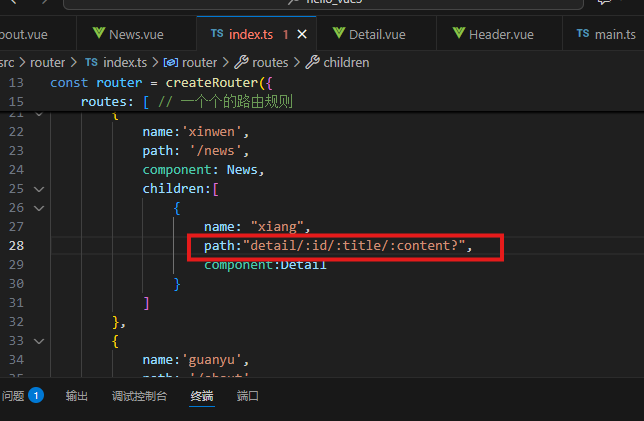
备注1:传递params参数时,若使用to的对象写法,必须使用name配置项,不能用path。
备注2:传递params参数时,需要提前在规则中占位。path: "detail/:id/:title/:content?",
4.9. 【路由的props配置】
作用:让路由组件更方便的收到参数(可以将路由参数作为props传给组件)
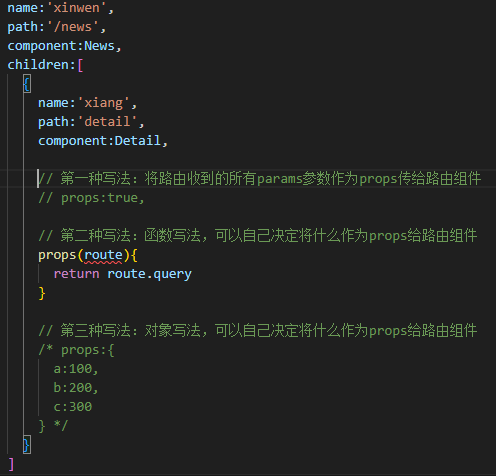
 1 // 创建一个路由器,并暴露出去
 2
 3 // 第一步:引入createRouter
 4 import {createRouter,createWebHistory,createWebHashHistory} from 'vue-router'
 5 // 引入一个一个可能要呈现组件
 6 import Home from '@/pages/Home.vue'
 7 import News from '@/pages/News.vue'
 8 import About from '@/pages/About.vue'
 9 import Detail from '@/pages/Detail.vue'
10
11 // 第二步:创建路由器
12 const router = createRouter({
13   history:createWebHistory(), //路由器的工作模式(稍后讲解)
14   routes:[ //一个一个的路由规则
15     {
16       name:'zhuye',
17       path:'/home',
18       component:Home
19     },
20     {
21       name:'xinwen',
22       path:'/news',
23       component:News,
24       children:[
25         {
26           name:'xiang',
27           path:'detail',
28           component:Detail,
29
30           // 第一种写法:将路由收到的所有params参数作为props传给路由组件
31           // props:true,
32
33           // 第二种写法:函数写法,可以自己决定将什么作为props给路由组件
34           props(route){
35             return route.query
36           }
37
38           // 第三种写法:对象写法,可以自己决定将什么作为props给路由组件
39           /* props:{
40             a:100,
41             b:200,
42             c:300
43           } */
44         }
45       ]
46     },
47     {
48       name:'guanyu',
49       path:'/about',
50       component:About
51     }
52   ]
53 })
54
55 // 暴露出去router
56 export default router
 1 <template>
 2   <ul class="news-list">
 3     <li>编号:{{id}}</li>
 4     <li>标题:{{title}}</li>
 5     <li>内容:{{content}}</li>
 6   </ul>
 7 </template>
 8
 9 <script setup lang="ts" name="About">
10   defineProps(['id','title','content'])
11 </script>
12
13 <style scoped>
14   .news-list {
15     list-style: none;
16     padding-left: 20px;
17   }
18
19   .news-list>li {
20     line-height: 30px;
21   }
22 </style>
4.10. 【 replace属性】
-
作用:控制路由跳转时操作浏览器历史记录的模式。
-
浏览器的历史记录有两种写入方式:分别为
push和replace:push是追加历史记录(默认值)。replace是替换当前记录。
开启replace模式: 不能回退
<RouterLink replace .......>News</RouterLink>
 1 <template>
 2   <div class="app">
 3     <Header/>
 4     <!-- 导航区 -->
 5     <div class="navigate">
 6       <RouterLink replace to="/home" active-class="active">首页</RouterLink>
 7       <RouterLink replace :to="{name:'xinwen'}" active-class="active">新闻</RouterLink>
 8       <RouterLink replace :to="{path:'/about'}" active-class="active">关于</RouterLink>
 9     </div>
10     <!-- 展示区 -->
11     <div class="main-content">
12       <RouterView></RouterView>
13     </div>
14   </div>
15 </template>
16
17 <script lang="ts" setup name="App">
18   import {RouterView,RouterLink} from 'vue-router'
19   import Header from './components/Header.vue'
20
21 </script>
22
23 <style>
24     /* App */
25   .navigate {
26     display: flex;
27     justify-content: space-around;
28     margin: 0 100px;
29   }
30   .navigate a {
31     display: block;
32     text-align: center;
33     width: 90px;
34     height: 40px;
35     line-height: 40px;
36     border-radius: 10px;
37     background-color: gray;
38     text-decoration: none;
39     color: white;
40     font-size: 18px;
41     letter-spacing: 5px;
42   }
43   .navigate a.active {
44     background-color: #64967E;
45     color: #ffc268;
46     font-weight: 900;
47     text-shadow: 0 0 1px black;
48     font-family: 微软雅黑;
49   }
50   .main-content {
51     margin: 0 auto;
52     margin-top: 30px;
53     border-radius: 10px;
54     width: 90%;
55     height: 400px;
56     border: 1px solid;
57   }
58 </style>
4.11. 【编程式导航】
路由组件的两个重要的属性:$route和$router变成了两个hooks
import {useRoute,useRouter} from 'vue-router'

const route = useRoute()
const router = useRouter()

console.log(route.query)
console.log(route.parmas)
console.log(router.push)
console.log(router.replace)
 1 <template>
 2   <div class="news">
 3     <!-- 导航区 -->
 4     <ul>
 5       <li v-for="news in newsList" :key="news.id">
 6         <button @click="showNewsDetail(news)">查看新闻</button>
 7         <RouterLink
 8           :to="{
 9             name:'xiang',
10             query:{
11               id:news.id,
12               title:news.title,
13               content:news.content
14             }
15           }"
16         >
17           {{news.title}}
18         </RouterLink>
19       </li>
20     </ul>
21     <!-- 展示区 -->
22     <div class="news-content">
23       <RouterView></RouterView>
24     </div>
25   </div>
26 </template>
27
28 <script setup lang="ts" name="News">
29   import {reactive} from 'vue'
30   import {RouterView,RouterLink,useRouter} from 'vue-router'
31
32   const newsList = reactive([
33     {id:'asfdtrfay01',title:'很好的抗癌食物',content:'西蓝花'},
34     {id:'asfdtrfay02',title:'如何一夜暴富',content:'学IT'},
35     {id:'asfdtrfay03',title:'震惊,万万没想到',content:'明天是周一'},
36     {id:'asfdtrfay04',title:'好消息!好消息!',content:'快过年了'}
37   ])
38
39   const router = useRouter()
40
41   interface NewsInter {
42     id:string,
43     title:string,
44     content:string
45   }
46
47   function showNewsDetail(news:NewsInter){
48     router.replace({
49       name:'xiang',
50       query:{
51         id:news.id,
52         title:news.title,
53         content:news.content
54       }
55     })
56   }
57
58 </script>
59
60 <style scoped>
61 /* 新闻 */
62 .news {
63   padding: 0 20px;
64   display: flex;
65   justify-content: space-between;
66   height: 100%;
67 }
68 .news ul {
69   margin-top: 30px;
70   /* list-style: none; */
71   padding-left: 10px;
72 }
73 .news li::marker {
74   color: #64967E;
75 }
76 .news li>a {
77   font-size: 18px;
78   line-height: 40px;
79   text-decoration: none;
80   color: #64967E;
81   text-shadow: 0 0 1px rgb(0, 84, 0);
82 }
83 .news-content {
84   width: 70%;
85   height: 90%;
86   border: 1px solid;
87   margin-top: 20px;
88   border-radius: 10px;
89 }
90 </style>
4.12. 【重定向】
-
作用:将特定的路径,重新定向到已有路由。
-
具体编码:
![]() src/router/index.ts
src/router/index.ts1 // 创建一个路由器,并暴露出去 2 3 // 第一步:引入createRouter 4 import {createRouter,createWebHistory,createWebHashHistory} from 'vue-router' 5 // 引入一个一个可能要呈现组件 6 import Home from '@/pages/Home.vue' 7 import News from '@/pages/News.vue' 8 import About from '@/pages/About.vue' 9 import Detail from '@/pages/Detail.vue' 10 11 // 第二步:创建路由器 12 const router = createRouter({ 13 history:createWebHistory(), //路由器的工作模式(稍后讲解) 14 routes:[ //一个一个的路由规则 15 { 16 name:'zhuye', 17 path:'/home', 18 component:Home 19 }, 20 { 21 name:'xinwen', 22 path:'/news', 23 component:News, 24 children:[ 25 { 26 name:'xiang', 27 path:'detail', 28 component:Detail, 29 30 // 第一种写法:将路由收到的所有params参数作为props传给路由组件 31 // props:true, 32 33 // 第二种写法:函数写法,可以自己决定将什么作为props给路由组件 34 props(route){ 35 return route.query 36 } 37 38 // 第三种写法:对象写法,可以自己决定将什么作为props给路由组件 39 /* props:{ 40 a:100, 41 b:200, 42 c:300 43 } */ 44 } 45 ] 46 }, 47 { 48 name:'guanyu', 49 path:'/about', 50 component:About 51 }, 52 { 53 path:'/', 54 redirect:'/home' 55 } 56 ] 57 }) 58 59 // 暴露出去router 60 export default router
{
    path:'/',
    redirect:'/about'
}
5. pinia
对Pinia的理解:集中式状态管理:redux, vuex(vue2 使用) pinia(vue3 使用)5.1【准备一个效果】
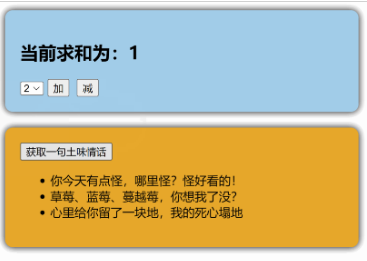
 1 <template>
 2   <Count/>
 3   <br>
 4   <LoveTalk/>
 5 </template>
 6
 7 <script setup lang="ts" name="App">
 8   import Count from './components/Count.vue'
 9   import LoveTalk from './components/LoveTalk.vue'
10 </script>
 1 <template>
 2   <div class="count">
 3     <h2>当前求和为:{{ sum }}</h2>
 4     <select v-model.number="n">
 5       <option value="1">1</option>
 6       <option value="2">2</option>
 7       <option value="3">3</option>
 8     </select>
 9     <button @click="add">加</button>
10     <button @click="minus">减</button>
11   </div>
12 </template>
13
14 <script setup lang="ts" name="Count">
15   import { ref } from "vue";
16   // 数据
17   let sum = ref(1) // 当前求和
18   let n = ref(1) // 用户选择的数字
19
20   // 方法
21   function add(){
22     sum.value += n.value
23   }
24   function minus(){
25     sum.value -= n.value
26   }
27 </script>
28
29 <style scoped>
30   .count {
31     background-color: skyblue;
32     padding: 10px;
33     border-radius: 10px;
34     box-shadow: 0 0 10px;
35   }
36   select,button {
37     margin: 0 5px;
38     height: 25px;
39   }
40 </style>
 1 <template>
 2   <div class="talk">
 3     <button @click="getLoveTalk">获取一句土味情话</button>
 4     <ul>
 5       <li v-for="talk in talkList" :key="talk.id">{{talk.title}}</li>
 6     </ul>
 7   </div>
 8 </template>
 9
10 <script setup lang="ts" name="LoveTalk">
11   import {reactive} from 'vue'
12   import axios from "axios";
13   import {nanoid} from 'nanoid'
14   // 数据
15   let talkList = reactive([
16     {id:'ftrfasdf01',title:'今天你有点怪,哪里怪?怪好看的!'},
17     {id:'ftrfasdf02',title:'草莓、蓝莓、蔓越莓,今天想我了没?'},
18     {id:'ftrfasdf03',title:'心里给你留了一块地,我的死心塌地'}
19   ])
20   // 方法
21   async function getLoveTalk(){
22     // 发请求,下面这行的写法是:连续解构赋值+重命名
23     let {data:{content:title}} = await axios.get('https://api.uomg.com/api/rand.qinghua?format=json')
24     // 把请求回来的字符串,包装成一个对象
25     let obj = {id:nanoid(),title}
26     // 放到数组中
27     talkList.unshift(obj)
28   }
29 </script>
30
31 <style scoped>
32   .talk {
33     background-color: orange;
34     padding: 10px;
35     border-radius: 10px;
36     box-shadow: 0 0 10px;
37   }
38 </style>
5.2【搭建 pinia 环境】
第一步:npm install pinia
 1 import { createApp } from 'vue'
 2 import App from './App.vue'
 3
 4 /* 引入createPinia,用于创建pinia */
 5 import { createPinia } from 'pinia'
 6
 7 /* 创建pinia */
 8 const pinia = createPinia()
 9 const app = createApp(App)
10
11 /* 使用插件 */{}
12 app.use(pinia)
13 app.mount('#app')
5.3【存储+读取数据】
-
Store是一个保存:状态、业务逻辑 的实体,每个组件都可以读取、写入它。 -
它有三个概念:
state、getter、action,相当于组件中的:data、computed和methods。
- 存取数据:放在src/store 下
 1 import {defineStore} from 'pinia'
 2
 3 export const useCountStore = defineStore('count',{
 4   // 真正存储数据的地方
 5   state(){
 6     return {
 7       sum:6
 8     }
 9   }
10 })
 1 import {defineStore} from 'pinia'
 2
 3 export const useTalkStore = defineStore('talk',{
 4   // 真正存储数据的地方
 5   state(){
 6     return {
 7       talkList:[
 8         {id:'ftrfasdf01',title:'今天你有点怪,哪里怪?怪好看的!'},
 9         {id:'ftrfasdf02',title:'草莓、蓝莓、蔓越莓,今天想我了没?'},
10         {id:'ftrfasdf03',title:'心里给你留了一块地,我的死心塌地'}
11       ]
12     }
13   }
14 })
- 读取数据:
 1 <template>
 2   <div class="count">
 3     <h2>当前求和为:{{ countStore.sum }}</h2>
 4     <select v-model.number="n">
 5       <option value="1">1</option>
 6       <option value="2">2</option>
 7       <option value="3">3</option>
 8     </select>
 9     <button @click="add">加</button>
10     <button @click="minus">减</button>
11   </div>
12 </template>
13
14 <script setup lang="ts" name="Count">
15   import { ref,reactive } from "vue";
16   import {useCountStore} from '@/store/count'
17
18   const countStore = useCountStore()
19
20   // 以下两种方式都可以拿到state中的数据
21   // console.log('@@@',countStore.sum)
22   // console.log('@@@',countStore.$state.sum)
23
24 /*   let obj = reactive({
25     a:1,
26     b:2,
27     c:ref(3)
28   })
29   let x = ref(9)
30   console.log(obj.a)
31   console.log(obj.b)
32   console.log(obj.c) */
33
34
35   // 数据
36   let n = ref(1) // 用户选择的数字
37   // 方法
38   function add(){
39
40   }
41   function minus(){
42
43   }
44 </script>
45
46 <style scoped>
47   .count {
48     background-color: skyblue;
49     padding: 10px;
50     border-radius: 10px;
51     box-shadow: 0 0 10px;
52   }
53   select,button {
54     margin: 0 5px;
55     height: 25px;
56   }
57 </style>
 1 <template>
 2   <div class="talk">
 3     <button @click="getLoveTalk">获取一句土味情话</button>
 4     <ul>
 5       <li v-for="talk in talkStore.talkList" :key="talk.id">{{talk.title}}</li>
 6     </ul>
 7   </div>
 8 </template>
 9
10 <script setup lang="ts" name="LoveTalk">
11   import {reactive} from 'vue'
12   import axios from "axios";
13   import {nanoid} from 'nanoid'
14   import {useTalkStore} from '@/store/loveTalk'
15
16   const talkStore = useTalkStore()
17
18   // 方法
19   async function getLoveTalk(){
20     // 发请求,下面这行的写法是:连续解构赋值+重命名
21     // let {data:{content:title}} = await axios.get('https://api.uomg.com/api/rand.qinghua?format=json')
22     // 把请求回来的字符串,包装成一个对象
23     // let obj = {id:nanoid(),title}
24     // 放到数组中
25     // talkList.unshift(obj)
26   }
27 </script>
28
29 <style scoped>
30   .talk {
31     background-color: orange;
32     padding: 10px;
33     border-radius: 10px;
34     box-shadow: 0 0 10px;
35   }
36 </style>
5.4.【修改数据】(三种方式)
-
第一种修改方式,直接修改
countStore.sum = 666 -
第二种修改方式:批量修改
countStore.$patch({ sum:999, school:'atguigu' }) -
第三种修改方式:借助
action修改(action中可以编写一些业务逻辑)![]() 详情
详情1 import { defineStore } from 'pinia' 2 3 export const useCountStore = defineStore('count', { 4 /*************/ 5 actions: { 6 //加 7 increment(value:number) { 8 if (this.sum < 10) { 9 //操作countStore中的sum 10 this.sum += value 11 } 12 }, 13 //减 14 decrement(value:number){ 15 if(this.sum > 1){ 16 this.sum -= value 17 } 18 } 19 }, 20 /*************/ 21 })
-
组件中调用
action即可// 使用countStore const countStore = useCountStore() // 调用对应action countStore.incrementOdd(n.value)![]() src/components/Count.vue # 修改数据的三种方式
src/components/Count.vue # 修改数据的三种方式1 <template> 2 <div class="count"> 3 <h2>当前求和为:{{ countStore.sum }}</h2> 4 <h3>欢迎来到:{{ countStore.school }},坐落于:{{ countStore.address }}</h3> 5 <select v-model.number="n"> 6 <option value="1">1</option> 7 <option value="2">2</option> 8 <option value="3">3</option> 9 </select> 10 <button @click="add">加</button> 11 <button @click="minus">减</button> 12 </div> 13 </template> 14 15 <script setup lang="ts" name="Count"> 16 import { ref,reactive } from "vue"; 17 // 引入useCountStore 18 import {useCountStore} from '@/store/count' 19 // 使用useCountStore,得到一个专门保存count相关的store 20 const countStore = useCountStore() 21 22 // 数据 23 let n = ref(1) // 用户选择的数字 24 // 方法 25 function add(){ 26 // 第一种修改方式 27 // countStore.sum += 1 28 29 // 第二种修改方式 30 /* countStore.$patch({ 31 sum:888, 32 school:'尚硅谷', 33 address:'北京' 34 }) */ 35 36 // 第三种修改方式 37 countStore.increment(n.value) 38 39 } 40 function minus(){ 41 42 } 43 </script> 44 45 <style scoped> 46 .count { 47 background-color: skyblue; 48 padding: 10px; 49 border-radius: 10px; 50 box-shadow: 0 0 10px; 51 } 52 select,button { 53 margin: 0 5px; 54 height: 25px; 55 } 56 </style>
![]() src/components/LoveTalk.vue
src/components/LoveTalk.vue1 <template> 2 <div class="talk"> 3 <button @click="getLoveTalk">获取一句土味情话</button> 4 <ul> 5 <li v-for="talk in talkStore.talkList" :key="talk.id">{{talk.title}}</li> 6 </ul> 7 </div> 8 </template> 9 10 <script setup lang="ts" name="LoveTalk"> 11 import {useTalkStore} from '@/store/loveTalk' 12 13 const talkStore = useTalkStore() 14 15 // 方法 16 function getLoveTalk(){ 17 talkStore.getATalk() 18 } 19 </script> 20 21 <style scoped> 22 .talk { 23 background-color: orange; 24 padding: 10px; 25 border-radius: 10px; 26 box-shadow: 0 0 10px; 27 } 28 </style>
![]() src/store/count.ts# action
src/store/count.ts# action1 import {defineStore} from 'pinia' 2 3 export const useCountStore = defineStore('count',{ 4 // actions里面放置的是一个一个的方法,用于响应组件中的“动作” 5 actions:{ 6 increment(value){ 7 console.log('increment被调用了',value) 8 if( this.sum < 10){ 9 // 修改数据(this是当前的store) 10 this.sum += value 11 } 12 } 13 }, 14 // 真正存储数据的地方 15 state(){ 16 return { 17 sum:6, 18 school:'atguigu', 19 address:'宏福科技园' 20 } 21 } 22 })
![]() src/store/loveTalk.ts # action
src/store/loveTalk.ts # action1 import {defineStore} from 'pinia' 2 import axios from 'axios' 3 import {nanoid} from 'nanoid' 4 5 export const useTalkStore = defineStore('talk',{ 6 actions:{ 7 async getATalk(){ 8 // 发请求,下面这行的写法是:连续解构赋值+重命名 9 let {data:{content:title}} = await axios.get('https://api.uomg.com/api/rand.qinghua?format=json') 10 // 把请求回来的字符串,包装成一个对象 11 let obj = {id:nanoid(),title} 12 // 放到数组中 13 this.talkList.unshift(obj) 14 } 15 }, 16 // 真正存储数据的地方 17 state(){ 18 return { 19 talkList:[ 20 {id:'ftrfasdf01',title:'今天你有点怪,哪里怪?怪好看的!'}, 21 {id:'ftrfasdf02',title:'草莓、蓝莓、蔓越莓,今天想我了没?'}, 22 {id:'ftrfasdf03',title:'心里给你留了一块地,我的死心塌地'} 23 ] 24 } 25 } 26 })
5.5.【storeToRefs】
- 借助
storeToRefs将store中的数据转为ref对象,方便在模板中使用。 - 注意:
pinia提供的storeToRefs只会将数据做转换,而Vue的toRefs会转换store中数据。
 1 <template>
 2   <div class="talk">
 3     <button @click="getLoveTalk">获取一句土味情话</button>
 4     <ul>
 5       <li
 6         v-for="talk in talkList"
 7         :key="talk.id"
 8       >{{ talk.title }}</li>
 9     </ul>
10   </div>
11 </template>
12
13 <script setup lang="ts" name="LoveTalk">
14 import { useTalkStore } from '@/store/loveTalk'
15 import { storeToRefs } from "pinia";
16
17 const talkStore = useTalkStore()
18 const { talkList } = storeToRefs(talkStore)
19
20 // 方法
21 function getLoveTalk() {
22   talkStore.getATalk()
23 }
24 </script>
25
26 <style scoped>
27 .talk {
28   background-color: orange;
29   padding: 10px;
30   border-radius: 10px;
31   box-shadow: 0 0 10px;
32 }
33 </style>
 1 <template>
 2   <div class="count">
 3     <h2>当前求和为:{{ sum }}</h2>
 4     <h3>欢迎来到:{{ school }},坐落于:{{ address }}</h3>
 5     <select v-model.number="n">
 6       <option value="1">1</option>
 7       <option value="2">2</option>
 8       <option value="3">3</option>
 9     </select>
10     <button @click="add">加</button>
11     <button @click="minus">减</button>
12   </div>
13 </template>
14
15 <script setup lang="ts" name="Count">
16 import { ref, reactive, toRefs } from "vue";
17 import { storeToRefs } from 'pinia'
18 // 引入useCountStore
19 import { useCountStore } from '@/store/count'
20 // 使用useCountStore,得到一个专门保存count相关的store
21 const countStore = useCountStore()
22 // storeToRefs只会关注sotre中数据,不会对方法进行ref包裹
23 const { sum, school, address } = storeToRefs(countStore)
24 // console.log('!!!!!',storeToRefs(countStore))
25
26 // 数据
27 let n = ref(1) // 用户选择的数字
28 // 方法
29 function add() {
30   countStore.increment(n.value)
31 }
32 function minus() {
33   countStore.sum -= n.value
34 }
35 </script>
36
37 <style scoped>
38 .count {
39   background-color: skyblue;
40   padding: 10px;
41   border-radius: 10px;
42   box-shadow: 0 0 10px;
43 }
44
45 select,
46 button {
47   margin: 0 5px;
48   height: 25px;
49 }
50 </style>
5.6.【getters】
-
概念:当
state中的数据,需要经过处理后再使用时,可以使用getters配置。 -
追加
getters配置。
 1 import {defineStore} from 'pinia'
 2
 3 export const useCountStore = defineStore('count',{
 4   // actions里面放置的是一个一个的方法,用于响应组件中的“动作”
 5   actions:{
 6     increment(value:number){
 7       console.log('increment被调用了',value)
 8       if( this.sum < 10){
 9         // 修改数据(this是当前的store)
10         this.sum += value
11       }
12     }
13   },
14   // 真正存储数据的地方
15   state(){
16     return {
17       sum:3,
18       school:'atguigu',
19       address:'宏福科技园'
20     }
21   },
22   getters:{
23     bigSum:state => state.sum * 10,
24     upperSchool():string{
25       return this.school.toUpperCase()
26     }
27   }
28 })
 1 <template>
 2   <div class="count">
 3     <h2>当前求和为:{{ sum }},放大10倍后:{{ bigSum }}</h2>
 4     <h3>欢迎来到:{{ school }},坐落于:{{ address }},大写:{{ upperSchool }}</h3>
 5     <select v-model.number="n">
 6       <option value="1">1</option>
 7       <option value="2">2</option>
 8       <option value="3">3</option>
 9     </select>
10     <button @click="add">加</button>
11     <button @click="minus">减</button>
12   </div>
13 </template>
14
15 <script setup lang="ts" name="Count">
16   import { ref,reactive,toRefs } from "vue";
17   import {storeToRefs} from 'pinia'
18   // 引入useCountStore
19   import {useCountStore} from '@/store/count'
20   // 使用useCountStore,得到一个专门保存count相关的store
21   const countStore = useCountStore()
22   // storeToRefs只会关注sotre中数据,不会对方法进行ref包裹
23   const {sum,school,address,bigSum,upperSchool} = storeToRefs(countStore)
24   // console.log('!!!!!',storeToRefs(countStore))
25
26   // 数据
27   let n = ref(1) // 用户选择的数字
28   // 方法
29   function add(){
30     countStore.increment(n.value)
31   }
32   function minus(){
33     countStore.sum -= n.value
34   }
35 </script>
36
37 <style scoped>
38   .count {
39     background-color: skyblue;
40     padding: 10px;
41     border-radius: 10px;
42     box-shadow: 0 0 10px;
43   }
44   select,button {
45     margin: 0 5px;
46     height: 25px;
47   }
48 </style>
5.7.【$subscribe】
通过 store 的 $subscribe() 方法侦听 state 及其变化
talkStore.$subscribe((mutate,state)=>{
  console.log('LoveTalk',mutate,state)
  localStorage.setItem('talk',JSON.stringify(talkList.value))
})
1 import { defineStore } from 'pinia' 2 import axios from 'axios' 3 import { nanoid } from 'nanoid' 4 5 export const useTalkStore = defineStore('talk', { 6 actions: { 7 async getATalk() { 8 // 发请求,下面这行的写法是:连续解构赋值+重命名 9 let { data: { content: title } } = await axios.get('https://api.uomg.com/api/rand.qinghua?format=json') 10 // 把请求回来的字符串,包装成一个对象 11 let obj = { id: nanoid(), title } 12 // 放到数组中 13 this.talkList.unshift(obj) 14 } 15 }, 16 // 真正存储数据的地方 17 state() { 18 return { 19 talkList: JSON.parse(localStorage.getItem('talkList') as string) || [] //避免是null无法调用unshift 20 } 21 } 22 })
 1 <template>
 2   <div class="talk">
 3     <button @click="getLoveTalk">获取一句土味情话</button>
 4     <ul>
 5       <li
 6         v-for="talk in talkList"
 7         :key="talk.id"
 8       >{{ talk.title }}</li>
 9     </ul>
10   </div>
11 </template>
12
13 <script setup lang="ts" name="LoveTalk">
14 import { useTalkStore } from '@/store/loveTalk'
15 import { storeToRefs } from "pinia";
16
17 const talkStore = useTalkStore()
18 const { talkList } = storeToRefs(talkStore)
19
20 talkStore.$subscribe((mutate, state) => {
21   console.log('talkStore里面保存的数据发生了变化', mutate, state)
22   //存入浏览器本地
23   localStorage.setItem('talkList', JSON.stringify(state.talkList))
24 })
25
26 // 方法
27 function getLoveTalk() {
28   talkStore.getATalk()
29 }
30 </script>
31
32 <style scoped>
33 .talk {
34   background-color: orange;
35   padding: 10px;
36   border-radius: 10px;
37   box-shadow: 0 0 10px;
38 }
39 </style>
5.8. 【store组合式写法】
 1 import {defineStore} from 'pinia'
 2 import axios from 'axios'
 3 import {nanoid} from 'nanoid'
 4
 5 /* export const useTalkStore = defineStore('talk',{
 6   actions:{
 7     async getATalk(){
 8       // 发请求,下面这行的写法是:连续解构赋值+重命名
 9       let {data:{content:title}} = await axios.get('https://api.uomg.com/api/rand.qinghua?format=json')
10       // 把请求回来的字符串,包装成一个对象
11       let obj = {id:nanoid(),title}
12       // 放到数组中
13       this.talkList.unshift(obj)
14     }
15   },
16   // 真正存储数据的地方
17   state(){
18     return {
19       talkList:JSON.parse(localStorage.getItem('talkList') as string) || []
20     }
21   }
22 })
23  */
24
25 import {reactive} from 'vue'
26 export const useTalkStore = defineStore('talk',()=>{
27   // talkList就是state
28   const talkList = reactive(
29     JSON.parse(localStorage.getItem('talkList') as string) || []
30   )
31
32   // getATalk函数相当于action
33   async function getATalk(){
34     // 发请求,下面这行的写法是:连续解构赋值+重命名
35     let {data:{content:title}} = await axios.get('https://api.uomg.com/api/rand.qinghua?format=json')
36     // 把请求回来的字符串,包装成一个对象
37     let obj = {id:nanoid(),title}
38     // 放到数组中
39     talkList.unshift(obj)
40   }
41   return {talkList,getATalk}
42 })
6. 组件通信
Vue3组件通信和Vue2的区别:
- 移出事件总线,使用
mitt代替。
vuex换成了pinia。- 把
.sync优化到了v-model里面了。 - 把
$listeners所有的东西,合并到$attrs中了。 $children被砍掉了。
常见搭配形式:
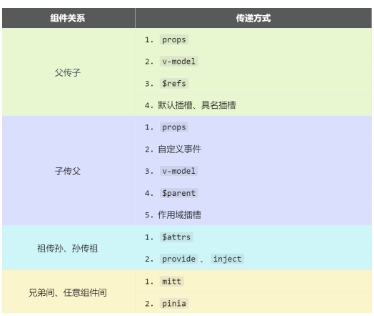
6.1. 【props】
概述:props是使用频率最高的一种通信方式,常用与 :父 ↔ 子。
- 若 父传子:属性值是非函数。
- 若 子传父:属性值是函数。
 1 <template>
 2   <div class="father">
 3     <h3>父组件</h3>
 4         <h4>汽车:{{ car }}</h4>
 5         <h4 v-show="toy">子给的玩具:{{ toy }}</h4>
 6         <Child :car="car" :sendToy="getToy"/>
 7   </div>
 8 </template>
 9
10 <script setup lang="ts" name="Father">
11     import Child from './Child.vue'
12     import {ref} from 'vue'
13     // 数据
14     let car = ref('奔驰')
15     let toy = ref('')
16     // 方法
17     function getToy(value:string){
18         toy.value = value
19     }
20 </script>
21
22 <style scoped>
23     .father{
24         background-color:rgb(165, 164, 164);
25         padding: 20px;
26         border-radius: 10px;
27     }
28 </style>
 1 <template>
 2   <div class="child">
 3     <h3>子组件</h3>
 4         <h4>玩具:{{ toy }}</h4>
 5         <h4>父给的车:{{ car }}</h4>
 6         <button @click="sendToy(toy)">把玩具给父亲</button>
 7   </div>
 8 </template>
 9
10 <script setup lang="ts" name="Child">
11     import {ref} from 'vue'
12     // 数据
13     let toy = ref('奥特曼')
14     // 声明接收props
15     defineProps(['car','sendToy'])
16 </script>
17
18 <style scoped>
19     .child{
20         background-color: skyblue;
21         padding: 10px;
22         box-shadow: 0 0 10px black;
23         border-radius: 10px;
24     }
25 </style>
6.2. 【自定义事件】
- 概述:自定义事件常用于:子 => 父。
- 注意区分好:原生事件、自定义事件。
- 原生事件:
- 事件名是特定的(
click、mosueenter等等) - 事件对象
$event: 是包含事件相关信息的对象(pageX、pageY、target、keyCode)
- 事件名是特定的(
- 自定义事件:
- 事件名是任意名称
- 事件对象
$event: 是调用emit时所提供的数据,可以是任意类型!!! - 命名方式尽量不要驼峰式,而是采取keybab-case式,即
send-toy
 1 <template>
 2   <div class="father">
 3     <h3>父组件</h3>
 4         <h4 v-show="toy">子给的玩具:{{ toy }}</h4>
 5         <!-- 给子组件Child绑定事件 -->
 6     <Child @send-toy="saveToy"/>
 7   </div>
 8 </template>
 9
10 <script setup lang="ts" name="Father">
11   import Child from './Child.vue'
12     import { ref } from "vue";
13     // 数据
14     let toy = ref('')
15     // 用于保存传递过来的玩具
16     function saveToy(value:string){
17         console.log('saveToy',value)
18         toy.value = value
19     }
20 </script>
21
22 <style scoped>
23     .father{
24         background-color:rgb(165, 164, 164);
25         padding: 20px;
26     border-radius: 10px;
27     }
28     .father button{
29         margin-right: 5px;
30     }
31 </style>
 1 <template>
 2   <div class="child">
 3     <h3>子组件</h3>
 4         <h4>玩具:{{ toy }}</h4>
 5         <button @click="emit('send-toy',toy)">测试</button>
 6   </div>
 7 </template>
 8
 9 <script setup lang="ts" name="Child">
10     import { ref } from "vue";
11     // 数据
12     let toy = ref('奥特曼')
13     // 声明事件
14     const emit =  defineEmits(['send-toy'])
15 </script>
16
17 <style scoped>
18     .child{
19         margin-top: 10px;
20         background-color: rgb(76, 209, 76);
21         padding: 10px;
22         box-shadow: 0 0 10px black;
23         border-radius: 10px;
24     }
25 </style>
6.3. 【mitt】
概述:与消息订阅与发布(pubsub)功能类似,可以实现任意组件间通信。
安装mitt
npm i mitt新建文件:src\utils\emitter.ts
- on 绑定事件
- emit 触发事件
- off 移除事件
- all.clear 移除全部事件
![]() src/utils/emitter.ts # npm i mitt
src/utils/emitter.ts # npm i mitt1 // 引入mitt 2 import mitt from 'mitt' 3 4 // 调用mitt得到emitter,emitter能:绑定事件、触发事件 5 const emitter = mitt() 6 7 /* // 绑定事件 8 emitter.on('test1',()=>{ 9 console.log('test1被调用了') 10 }) 11 emitter.on('test2',()=>{ 12 console.log('test2被调用了') 13 }) 14 15 // 触发事件 16 setInterval(() => { 17 emitter.emit('test1') 18 emitter.emit('test2') 19 }, 1000); 20 21 setTimeout(() => { 22 // emitter.off('test1') 23 // emitter.off('test2') 24 emitter.all.clear() 25 }, 3000); */ 26 27 28 // 暴露emitter 29 export default emitter
使用:
![]() src/pages/Father.vue
src/pages/Father.vue1 <template> 2 <div class="father"> 3 <h3>父组件</h3> 4 <Child1/> 5 <Child2/> 6 </div> 7 </template> 8 9 <script setup lang="ts" name="Father"> 10 import Child1 from './Child1.vue' 11 import Child2 from './Child2.vue' 12 </script> 13 14 <style scoped> 15 .father{ 16 background-color:rgb(165, 164, 164); 17 padding: 20px; 18 border-radius: 10px; 19 } 20 .father button{ 21 margin-left: 5px; 22 } 23 </style>
![]() src/pages/Child1.vue # emit 触发事件
src/pages/Child1.vue # emit 触发事件1 <template> 2 <div class="child1"> 3 <h3>子组件1</h3> 4 <h4>玩具:{{ toy }}</h4> 5 <button @click="emitter.emit('send-toy',toy)">玩具给弟弟</button> 6 </div> 7 </template> 8 9 <script setup lang="ts" name="Child1"> 10 import {ref} from 'vue' 11 import emitter from '@/utils/emitter'; 12 13 // 数据 14 let toy = ref('奥特曼') 15 </script> 16 17 <style scoped> 18 .child1{ 19 margin-top: 50px; 20 background-color: skyblue; 21 padding: 10px; 22 box-shadow: 0 0 10px black; 23 border-radius: 10px; 24 } 25 .child1 button{ 26 margin-right: 10px; 27 } 28 </style>
![]() src/pages/Child2.vue # on 绑定事件
src/pages/Child2.vue # on 绑定事件1 <template> 2 <div class="child2"> 3 <h3>子组件2</h3> 4 <h4>电脑:{{ computer }}</h4> 5 <h4>哥哥给的玩具:{{ toy }}</h4> 6 </div> 7 </template> 8 9 <script setup lang="ts" name="Child2"> 10 import {ref,onUnmounted} from 'vue' 11 import emitter from '@/utils/emitter'; 12 // 数据 13 let computer = ref('联想') 14 let toy = ref('') 15 16 // 给emitter绑定send-toy事件 17 emitter.on('send-toy',(value:any)=>{ 18 toy.value = value 19 }) 20 // 在组件卸载时解绑send-toy事件 21 onUnmounted(()=>{ 22 emitter.off('send-toy') 23 }) 24 </script> 25 26 <style scoped> 27 .child2{ 28 margin-top: 50px; 29 background-color: orange; 30 padding: 10px; 31 box-shadow: 0 0 10px black; 32 border-radius: 10px; 33 } 34 </style>
6.4.【v-model】
概述:实现 父↔子 之间相互通信。
2.前序知识 —— v-model的本质
v-model的本质
3.组件标签上的v-model的本质::moldeValue + update:modelValue事件。
<!-- 组件标签上使用v-model指令 --> 2 <AtguiguInput v-model="userName"/> 3 4 <!-- 组件标签上v-model的本质 --> 5 <AtguiguInput :modelValue="userName" @update:model-value="userName = $event"/> 6 在vue3中: 7 8 数据到页面 :modelValue="userName" 9 页面到数据 @update:model-value="userName = $event"
组件标签上使用v-model指令 本质
4.也可以更换value,例如改成abc
  <!-- 也可以更换value,例如改成abc-->
<AtguiguInput v-model:abc="userName"/>
5.如果value可以更换,那么就可以在组件标签上多次使用v-model
<AtguiguInput v-model:abc="userName" v-model:xyz="password"/>
6.关于$event到底是什么?什么时候能够.target?
对于原生事件,$event就是事件对象====>能.target
对于自定义事件,$event就是触发事件时,所传递的对象====>不能.target
 1 <template>
 2   <div class="father">
 3     <h3>父组件</h3>
 4     <h4>{{ username }}</h4>
 5     <h4>{{ password }}</h4>
 6     <!-- v-model用在html标签上 -->
 7     <!-- <input type="text" v-model="username"> -->
 8     <!-- <input type="text" :value="username" @input="username = (<HTMLInputElement>$event.target).value"> -->
 9
10     <!-- v-model用在组件标签上 -->
11     <!-- <AtguiguInput v-model="username"/> -->
12     <!-- <AtguiguInput
13       :modelValue="username"
14       @update:modelValue="username = $event"
15     /> -->
16
17     <!-- 修改modelValue -->
18     <AtguiguInput v-model:ming="username" v-model:mima="password"/>
19   </div>
20 </template>
21
22 <script setup lang="ts" name="Father">
23     import { ref } from "vue";
24   import AtguiguInput from './AtguiguInput.vue'
25   // 数据
26   let username = ref('zhansgan')
27   let password = ref('123456')
28 </script>
29
30 <style scoped>
31 .father {
32   padding: 20px;
33   background-color: rgb(165, 164, 164);
34   border-radius: 10px;
35 }
36 </style>
 1 <template>
 2   <input
 3     type="text"
 4     :value="ming"
 5     @input="emit('update:ming',(<HTMLInputElement>$event.target).value)"
 6   >
 7   <br>
 8   <input
 9     type="text"
10     :value="mima"
11     @input="emit('update:mima',(<HTMLInputElement>$event.target).value)"
12   >
13 </template>
14
15 <script setup lang="ts" name="AtguiguInput">
16   defineProps(['ming','mima'])
17   const emit = defineEmits(['update:ming','update:mima'])
18 </script>
19
20 <style scoped>
21   input {
22     border: 2px solid black;
23     background-image: linear-gradient(45deg,red,yellow,green);
24     height: 30px;
25     font-size: 20px;
26     color: white;
27   }
28 </style>
6.5.【$attrs 】
-
概述:
$attrs用于实现当前组件的父组件,向当前组件的子组件通信(祖→孙)。 -
具体说明:
$attrs是一个对象,包含所有父组件传入的标签属性。注意:
$attrs会自动排除props中声明的属性(可以认为声明过的props被子组件自己“消费”了)
 1 <template>
 2   <div class="father">
 3     <h3>父组件</h3>
 4         <h4>a:{{a}}</h4>
 5         <h4>b:{{b}}</h4>
 6         <h4>c:{{c}}</h4>
 7         <h4>d:{{d}}</h4>
 8         <Child :a="a" :b="b" :c="c" :d="d" v-bind="{x:100,y:200}" :updateA="updateA"/>
 9   </div>
10 </template>
11
12 <script setup lang="ts" name="Father">
13     import Child from './Child.vue'
14     import {ref} from 'vue'
15
16     let a = ref(1)
17     let b = ref(2)
18     let c = ref(3)
19     let d = ref(4)
20
21     function updateA(value:number){
22         a.value += value
23     }
24 </script>
25
26 <style scoped>
27     .father{
28         background-color: rgb(165, 164, 164);
29         padding: 20px;
30         border-radius: 10px;
31     }
32 </style>
 1 <template>
 2     <div class="child">
 3         <h3>子组件</h3>
 4         <GrandChild v-bind="$attrs"/>
 5     </div>
 6 </template>
 7
 8 <script setup lang="ts" name="Child">
 9     import GrandChild from './GrandChild.vue'
10 </script>
11
12 <style scoped>
13     .child{
14         margin-top: 20px;
15         background-color: skyblue;
16         padding: 20px;
17         border-radius: 10px;
18         box-shadow: 0 0 10px black;
19     }
20 </style>
 1 <template>
 2     <div class="grand-child">
 3         <h3>孙组件</h3>
 4         <h4>a:{{ a }}</h4>
 5         <h4>b:{{ b }}</h4>
 6         <h4>c:{{ c }}</h4>
 7         <h4>d:{{ d }}</h4>
 8         <h4>x:{{ x }}</h4>
 9         <h4>y:{{ y }}</h4>
10         <button @click="updateA(6)">点我将爷爷那的a更新</button>
11     </div>
12 </template>
13
14 <script setup lang="ts" name="GrandChild">
15     defineProps(['a','b','c','d','x','y','updateA'])
16 </script>
17
18 <style scoped>
19     .grand-child{
20         margin-top: 20px;
21         background-color: orange;
22         padding: 20px;
23         border-radius: 10px;
24         box-shadow: 0 0 10px black;
25     }
26 </style>
6.6. 【&amp;amp;amp;amp;amp;lt;span id="MathJax-Span-2" class="mrow"&amp;amp;amp;amp;amp;gt;&amp;amp;amp;amp;amp;lt;span id="MathJax-Span-3" class="mi"&amp;amp;amp;amp;amp;gt;r&amp;amp;amp;amp;amp;lt;span id="MathJax-Span-4" class="mi"&amp;amp;amp;amp;amp;gt;e&amp;amp;amp;amp;amp;lt;span id="MathJax-Span-5" class="mi"&amp;amp;amp;amp;amp;gt;f&amp;amp;amp;amp;amp;lt;span id="MathJax-Span-6" class="mi"&amp;amp;amp;amp;amp;gt;s&amp;amp;amp;amp;amp;lt;span id="MathJax-Span-7" class="texatom"&amp;amp;amp;amp;amp;gt;&amp;amp;amp;amp;amp;lt;span id="MathJax-Span-8" class="mrow"&amp;amp;amp;amp;amp;gt;&amp;amp;amp;amp;amp;lt;span id="MathJax-Span-9" class="mo"&amp;amp;amp;amp;amp;gt;、parent】
-
概述:
$refs用于 :父→子。$parent用于:子→父。
原理如下:
| 属性 | 说明 |
|---|---|
$refs |
值为对象,包含所有被ref属性标识的DOM元素或组件实例。 |
$parent |
值为对象,当前组件的父组件实例对象。 |
-
子组件需要将数据暴露出来,父组件才能被允许使用;同样的,父组件把需要子组件操作的数据暴露出来,子组件才能拿到使用。
// 宏函数把数据交给外部
defineExpose({ toy, book })
 1 <template>
 2     <div class="father">
 3         <h3>父组件</h3>
 4         <h4>房产:{{ house }}</h4>
 5         <button @click="changeToy">修改Child1的玩具</button>
 6         <button @click="changeComputer">修改Child2的电脑</button>
 7         <button @click="getAllChild($refs)">让所有孩子的书变多</button>
 8         <Child1 ref="c1"/>
 9         <Child2 ref="c2"/>
10     </div>
11 </template>
12
13 <script setup lang="ts" name="Father">
14     import Child1 from './Child1.vue'
15     import Child2 from './Child2.vue'
16     import { ref,reactive } from "vue";
17     let c1 = ref()
18     let c2 = ref()
19
20     // 注意点:当访问obj.c的时候,底层会自动读取value属性,因为c是在obj这个响应式对象中的
21     /* let obj = reactive({
22         a:1,
23         b:2,
24         c:ref(3)
25     })
26     let x = ref(4)
27
28     console.log(obj.a)
29     console.log(obj.b)
30     console.log(obj.c)
31     console.log(x) */
32
33
34     // 数据
35     let house = ref(4)
36     // 方法
37     function changeToy(){
38         c1.value.toy = '小猪佩奇'
39     }
40     function changeComputer(){
41         c2.value.computer = '华为'
42     }
43     function getAllChild(refs:{[key:string]:any}){
44         console.log(refs)
45         for (let key in refs){
46             refs[key].book += 3
47         }
48     }
49     // 向外部提供数据
50     defineExpose({house})
51 </script>
52
53 <style scoped>
54     .father {
55         background-color: rgb(165, 164, 164);
56         padding: 20px;
57         border-radius: 10px;
58     }
59
60     .father button {
61         margin-bottom: 10px;
62         margin-left: 10px;
63     }
64 </style>
 1 <template>
 2   <div class="child1">
 3     <h3>子组件1</h3>
 4         <h4>玩具:{{ toy }}</h4>
 5         <h4>书籍:{{ book }} 本</h4>
 6         <button @click="minusHouse($parent)">干掉父亲的一套房产</button>
 7   </div>
 8 </template>
 9
10 <script setup lang="ts" name="Child1">
11     import { ref } from "vue";
12     // 数据
13     let toy = ref('奥特曼')
14     let book = ref(3)
15
16     // 方法
17     function minusHouse(parent:any){
18         parent.house -= 1
19     }
20
21     // 把数据交给外部
22     defineExpose({toy,book})
23
24 </script>
25
26 <style scoped>
27     .child1{
28         margin-top: 20px;
29         background-color: skyblue;
30         padding: 20px;
31         border-radius: 10px;
32     box-shadow: 0 0 10px black;
33     }
34 </style>
 1 <template>
 2   <div class="child2">
 3     <h3>子组件2</h3>
 4         <h4>电脑:{{ computer }}</h4>
 5         <h4>书籍:{{ book }} 本</h4>
 6   </div>
 7 </template>
 8
 9 <script setup lang="ts" name="Child2">
10         import { ref } from "vue";
11         // 数据
12         let computer = ref('联想')
13         let book = ref(6)
14         // 把数据交给外部
15         defineExpose({computer,book})
16 </script>
17
18 <style scoped>
19     .child2{
20         margin-top: 20px;
21         background-color: orange;
22         padding: 20px;
23         border-radius: 10px;
24     box-shadow: 0 0 10px black;
25     }
26 </style>
6.7. 【provide、inject】
-
概述:实现祖孙组件直接通信
-
具体使用:
- 在祖先组件中通过
provide配置向后代组件提供数据 - 在后代组件中通过
inject配置来声明接收数据
- 在祖先组件中通过
-
具体编码:
【第一步】父组件中,使用
provide提供数据
注意:子组件中不用编写任何东西,是不受到任何打扰的
【第二步】孙组件中使用inject配置项接受数据
 1 <template>
 2   <div class="father">
 3     <h3>父组件</h3>
 4     <h4>银子:{{ money }}万元</h4>
 5     <h4>车子:一辆{{car.brand}}车,价值{{car.price}}万元</h4>
 6     <Child/>
 7   </div>
 8 </template>
 9
10 <script setup lang="ts" name="Father">
11   import Child from './Child.vue'
12   import {ref,reactive,provide} from 'vue'
13
14   let money = ref(100)
15   let car = reactive({
16     brand:'奔驰',
17     price:100
18   })
19   function updateMoney(value:number){
20     money.value -= value
21   }
22
23   // 向后代提供数据
24   provide('moneyContext',{money,updateMoney})
25   provide('car',car)
26
27 </script>
28
29 <style scoped>
30   .father {
31     background-color: rgb(165, 164, 164);
32     padding: 20px;
33     border-radius: 10px;
34   }
35 </style>
 1 <template>
 2   <div class="child">
 3     <h3>我是子组件</h3>
 4     <GrandChild/>
 5   </div>
 6 </template>
 7
 8 <script setup lang="ts" name="Child">
 9   import GrandChild from './GrandChild.vue'
10 </script>
11
12 <style scoped>
13   .child {
14     margin-top: 20px;
15     background-color: skyblue;
16     padding: 20px;
17     border-radius: 10px;
18     box-shadow: 0 0 10px black;
19   }
20 </style>
 1 <template>
 2   <div class="grand-child">
 3     <h3>我是孙组件</h3>
 4     <h4>银子:{{ money }}</h4>
 5     <h4>车子:一辆{{car.brand}}车,价值{{car.price}}万元</h4>
 6     <button @click="updateMoney(6)">花爷爷的钱</button>
 7   </div>
 8 </template>
 9
10 <script setup lang="ts" name="GrandChild">
11   import { inject } from "vue";
12
13   let {money,updateMoney} = inject('moneyContext',{money:0,updateMoney:(param:number)=>{}})
14   let car = inject('car',{brand:'未知',price:0})
15 </script>
16
17 <style scoped>
18   .grand-child{
19     background-color: orange;
20     padding: 20px;
21     border-radius: 10px;
22     box-shadow: 0 0 10px black;
23   }
24 </style>
6.8. 【pinia】
参考之前pinia部分的讲解
6.9. 【slot】
1. 默认插槽
 1 <template>
 2   <div class="father">
 3     <h3>父组件</h3>
 4     <div class="content">
 5       <Category title="热门游戏列表">
 6         <ul>
 7           <li v-for="g in games" :key="g.id">{{ g.name }}</li>
 8         </ul>
 9       </Category>
10       <Category title="今日美食城市">
11         <img :src="imgUrl" alt="">
12       </Category>
13       <Category title="今日影视推荐">
14         <video :src="videoUrl" controls></video>
15       </Category>
16     </div>
17   </div>
18 </template>
19
20 <script setup lang="ts" name="Father">
21   import Category from './Category.vue'
22   import { ref,reactive } from "vue";
23
24   let games = reactive([
25     {id:'asgytdfats01',name:'英雄联盟'},
26     {id:'asgytdfats02',name:'王者农药'},
27     {id:'asgytdfats03',name:'红色警戒'},
28     {id:'asgytdfats04',name:'斗罗大陆'}
29   ])
30   let imgUrl = ref('https://z1.ax1x.com/2023/11/19/piNxLo4.jpg')
31   let videoUrl = ref('http://clips.vorwaerts-gmbh.de/big_buck_bunny.mp4')
32
33 </script>
34
35 <style scoped>
36   .father {
37     background-color: rgb(165, 164, 164);
38     padding: 20px;
39     border-radius: 10px;
40   }
41   .content {
42     display: flex;
43     justify-content: space-evenly;
44   }
45   img,video {
46     width: 100%;
47   }
48 </style>
 1 <template>
 2   <div class="category">
 3     <h2>{{title}}</h2>
 4     <slot>默认内容</slot>
 5   </div>
 6 </template>
 7
 8 <script setup lang="ts" name="Category">
 9   defineProps(['title'])
10 </script>
11
12 <style scoped>
13   .category {
14     background-color: skyblue;
15     border-radius: 10px;
16     box-shadow: 0 0 10px;
17     padding: 10px;
18     width: 200px;
19     height: 300px;
20   }
21   h2 {
22     background-color: orange;
23     text-align: center;
24     font-size: 20px;
25     font-weight: 800;
26   }
27 </style>
2. 具名插槽
 1 <template>
 2   <div class="father">
 3     <h3>父组件</h3>
 4     <div class="content">
 5       <Category>
 6         <template v-slot:s2>
 7           <ul>
 8             <li v-for="g in games" :key="g.id">{{ g.name }}</li>
 9           </ul>
10         </template>
11         <template v-slot:s1>
12           <h2>热门游戏列表</h2>
13         </template>
14       </Category>
15
16       <Category>
17         <template v-slot:s2>
18           <img :src="imgUrl" alt="">
19         </template>
20         <template v-slot:s1>
21           <h2>今日美食城市</h2>
22         </template>
23       </Category>
24
25       <Category>
26         <template #s2>
27           <video video :src="videoUrl" controls></video>
28         </template>
29         <template #s1>
30           <h2>今日影视推荐</h2>
31         </template>
32       </Category>
33     </div>
34   </div>
35 </template>
36
37 <script setup lang="ts" name="Father">
38   import Category from './Category.vue'
39   import { ref,reactive } from "vue";
40
41   let games = reactive([
42     {id:'asgytdfats01',name:'英雄联盟'},
43     {id:'asgytdfats02',name:'王者农药'},
44     {id:'asgytdfats03',name:'红色警戒'},
45     {id:'asgytdfats04',name:'斗罗大陆'}
46   ])
47   let imgUrl = ref('https://z1.ax1x.com/2023/11/19/piNxLo4.jpg')
48   let videoUrl = ref('http://clips.vorwaerts-gmbh.de/big_buck_bunny.mp4')
49
50 </script>
51
52 <style scoped>
53   .father {
54     background-color: rgb(165, 164, 164);
55     padding: 20px;
56     border-radius: 10px;
57   }
58   .content {
59     display: flex;
60     justify-content: space-evenly;
61   }
62   img,video {
63     width: 100%;
64   }
65   h2 {
66     background-color: orange;
67     text-align: center;
68     font-size: 20px;
69     font-weight: 800;
70   }
71 </style>
 1 <template>
 2   <div class="category">
 3     <slot name="s1">默认内容1</slot>
 4     <slot name="s2">默认内容2</slot>
 5   </div>
 6 </template>
 7
 8 <script setup lang="ts" name="Category">
 9
10 </script>
11
12 <style scoped>
13   .category {
14     background-color: skyblue;
15     border-radius: 10px;
16     box-shadow: 0 0 10px;
17     padding: 10px;
18     width: 200px;
19     height: 300px;
20   }
21 </style>
3. 作用域插槽
-
理解:数据在组件的自身(子组件),但根据数据生成的结构需要组件的使用者(父组件)来决定。(新闻数据在
News组件中,但使用数据所遍历出来的结构由App组件决定) -
具体编码:
 1 <template>
 2   <div class="father">
 3     <h3>父组件</h3>
 4     <div class="content">
 5       <Game>
 6         <template v-slot="params">
 7           <ul>
 8             <li v-for="y in params.youxi" :key="y.id">
 9               {{ y.name }}
10             </li>
11           </ul>
12         </template>
13       </Game>
14
15       <Game>
16         <template v-slot="params">
17           <ol>
18             <li v-for="item in params.youxi" :key="item.id">
19               {{ item.name }}
20             </li>
21           </ol>
22         </template>
23       </Game>
24
25       <Game>
26         <template #default="{youxi}">
27           <h3 v-for="g in youxi" :key="g.id">{{ g.name }}</h3>
28         </template>
29       </Game>
30
31     </div>
32   </div>
33 </template>
34
35 <script setup lang="ts" name="Father">
36   import Game from './Game.vue'
37 </script>
38
39 <style scoped>
40   .father {
41     background-color: rgb(165, 164, 164);
42     padding: 20px;
43     border-radius: 10px;
44   }
45   .content {
46     display: flex;
47     justify-content: space-evenly;
48   }
49   img,video {
50     width: 100%;
51   }
52 </style>
 1 <template>
 2   <div class="game">
 3     <h2>游戏列表</h2>
 4     <slot :youxi="games" x="哈哈" y="你好"></slot>
 5   </div>
 6 </template>
 7
 8 <script setup lang="ts" name="Game">
 9   import {reactive} from 'vue'
10   let games = reactive([
11     {id:'asgytdfats01',name:'英雄联盟'},
12     {id:'asgytdfats02',name:'王者农药'},
13     {id:'asgytdfats03',name:'红色警戒'},
14     {id:'asgytdfats04',name:'斗罗大陆'}
15   ])
16 </script>
17
18 <style scoped>
19   .game {
20     width: 200px;
21     height: 300px;
22     background-color: skyblue;
23     border-radius: 10px;
24     box-shadow: 0 0 10px;
25   }
26   h2 {
27     background-color: orange;
28     text-align: center;
29     font-size: 20px;
30     font-weight: 800;
31   }
32 </style>
7. 其它 API
7.1.【shallowRef 与 shallowReactive 】
shallowRef
-
作用:创建一个响应式数据,但只对顶层属性进行响应式处理。
-
用法:
let myVar = shallowRef(initialValue); -
特点:只跟踪引用值的变化,不关心值内部的属性变化。
shallowReactive
-
作用:创建一个浅层响应式对象,只会使对象的最顶层属性变成响应式的,对象内部的嵌套属性则不会变成响应式的
-
用法:
const myObj = shallowReactive({ ... }); -
特点:对象的顶层属性是响应式的,但嵌套对象的属性不是。
总结
通过使用
shallowRef()和shallowReactive()来绕开深度响应。浅层式API创建的状态只在其顶层是响应式的,对所有深层的对象不会做任何处理,避免了对每一个内部属性做响应式所带来的性能成本,这使得属性的访问变得更快,可提升性能。![]() src/App.vue # shallowRef shallowReactive 只能修改变量名第一层的东西, 即ref 为 person.value 值可修改, person.value.name 不可修改, shallowReactive 同理只能修改第一层1 <template> 2 <div class="app"> 3 <h2>求和为:{{ sum }}</h2> 4 <h2>名字为:{{ person.name }}</h2> 5 <h2>年龄为:{{ person.age }}</h2> 6 <h2>汽车为:{{ car }}</h2> 7 <button @click="changeSum">sum+1</button> 8 <button @click="changeName">修改名字</button> 9 <button @click="changeAge">修改年龄</button> 10 <button @click="changePerson">修改整个人</button> 11 <span>|</span> 12 <button @click="changeBrand">修改品牌</button> 13 <button @click="changeColor">修改颜色</button> 14 <button @click="changeEngine">修改发动机</button> 15 </div> 16 </template> 17 18 <script setup lang="ts" name="App"> 19 import { ref, reactive, shallowRef, shallowReactive } from 'vue' 20 21 let sum = shallowRef(0) 22 let person = shallowRef({ 23 name: '张三', 24 age: 18 25 }) 26 let car = shallowReactive({ 27 barnd: '奔驰', 28 options: { 29 color: '红色', 30 engine: 'V8' 31 } 32 }) 33 34 function changeSum() { 35 sum.value += 1 36 } 37 function changeName() { 38 person.value.name = '李四' 39 } 40 function changeAge() { 41 person.value.age += 1 42 } 43 function changePerson() { 44 person.value = { name: 'tony', age: 100 } 45 } 46 /* ****************** */ 47 function changeBrand() { 48 car.barnd = '宝马' 49 } 50 function changeColor() { 51 car.options.color = '紫色' 52 } 53 function changeEngine() { 54 car.options.engine = 'V12' 55 } 56 57 </script> 58 59 <style scoped> 60 .app { 61 background-color: #ddd; 62 border-radius: 10px; 63 box-shadow: 0 0 10px; 64 padding: 10px; 65 } 66 67 button { 68 margin: 0 5px; 69 } 70 </style>
src/App.vue # shallowRef shallowReactive 只能修改变量名第一层的东西, 即ref 为 person.value 值可修改, person.value.name 不可修改, shallowReactive 同理只能修改第一层1 <template> 2 <div class="app"> 3 <h2>求和为:{{ sum }}</h2> 4 <h2>名字为:{{ person.name }}</h2> 5 <h2>年龄为:{{ person.age }}</h2> 6 <h2>汽车为:{{ car }}</h2> 7 <button @click="changeSum">sum+1</button> 8 <button @click="changeName">修改名字</button> 9 <button @click="changeAge">修改年龄</button> 10 <button @click="changePerson">修改整个人</button> 11 <span>|</span> 12 <button @click="changeBrand">修改品牌</button> 13 <button @click="changeColor">修改颜色</button> 14 <button @click="changeEngine">修改发动机</button> 15 </div> 16 </template> 17 18 <script setup lang="ts" name="App"> 19 import { ref, reactive, shallowRef, shallowReactive } from 'vue' 20 21 let sum = shallowRef(0) 22 let person = shallowRef({ 23 name: '张三', 24 age: 18 25 }) 26 let car = shallowReactive({ 27 barnd: '奔驰', 28 options: { 29 color: '红色', 30 engine: 'V8' 31 } 32 }) 33 34 function changeSum() { 35 sum.value += 1 36 } 37 function changeName() { 38 person.value.name = '李四' 39 } 40 function changeAge() { 41 person.value.age += 1 42 } 43 function changePerson() { 44 person.value = { name: 'tony', age: 100 } 45 } 46 /* ****************** */ 47 function changeBrand() { 48 car.barnd = '宝马' 49 } 50 function changeColor() { 51 car.options.color = '紫色' 52 } 53 function changeEngine() { 54 car.options.engine = 'V12' 55 } 56 57 </script> 58 59 <style scoped> 60 .app { 61 background-color: #ddd; 62 border-radius: 10px; 63 box-shadow: 0 0 10px; 64 padding: 10px; 65 } 66 67 button { 68 margin: 0 5px; 69 } 70 </style>![]() src/main.ts1 import {createApp} from 'vue' 2 import App from './App.vue' 3 4 // 创建应用 5 const app = createApp(App) 6 7 // 挂载应用 8 app.mount('#app')
src/main.ts1 import {createApp} from 'vue' 2 import App from './App.vue' 3 4 // 创建应用 5 const app = createApp(App) 6 7 // 挂载应用 8 app.mount('#app')
shallowReadonly
-
作用:与
readonly类似,但只作用于对象的顶层属性。 -
用法:
const original = reactive({ ... }); const shallowReadOnlyCopy = shallowReadonly(original); -
特点:
-
只将对象的顶层属性设置为只读,对象内部的嵌套属性仍然是可变的。
-
适用于只需保护对象顶层属性的场景。
-
 1 <template>
 2     <div class="app">
 3         <h2>当前sum1为:{{ sum1 }}</h2>
 4         <h2>当前sum2为:{{ sum2 }}</h2>
 5         <h2>当前car1为:{{ car1 }}</h2>
 6         <h2>当前car2为:{{ car2 }}</h2>
 7         <button @click="changeSum1">点我sum1+1</button>
 8         <button @click="changeSum2">点我sum2+1</button>
 9         <button @click="changeBrand2">修改品牌(car2)</button>
10         <button @click="changeColor2">修改颜色(car2)</button>
11         <button @click="changePrice2">修改价格(car2)</button>
12     </div>
13 </template>
14
15 <script setup lang="ts" name="App">
16     import { ref,reactive,readonly,shallowReadonly } from "vue";
17
18     let sum1 = ref(0)
19     let sum2 = readonly(sum1)
20     let car1 = reactive({
21         brand:'奔驰',
22         options:{
23             color:'红色',
24             price:100
25         }
26     })
27     let car2 = shallowReadonly(car1)
28
29     function changeSum1(){
30         sum1.value += 1
31     }
32     function changeSum2(){
33         sum2.value += 1 //sum2是不能修改的
34     }
35
36     function changeBrand2(){
37         car2.brand = '宝马'
38     }
39     function changeColor2(){
40         car2.options.color = '绿色'
41     }
42     function changePrice2(){
43         car2.options.price += 10
44     }
45 </script>
46
47 <style scoped>
48     .app {
49         background-color: #ddd;
50         border-radius: 10px;
51         box-shadow: 0 0 10px;
52         padding: 10px;
53     }
54     button {
55         margin:0 5px;
56     }
57 </style>
// readonly 参数响应数据或者对象 //readonly 限制别的用户修改引用的数据,对数据进行保护
// shallowReadonly 只限制浅层只读,例如对象是字典(只读),内部还有一个字典(可以正常修改)
7.3.【toRaw 与 markRaw】
toRaw
-
作用:用于获取一个响应式对象的原始对象,
toRaw返回的对象不再是响应式的,不会触发视图更新。官网描述:这是一个可以用于临时读取而不引起代理访问/跟踪开销,或是写入而不触发更改的特殊方法。不建议保存对原始对象的持久引用,请谨慎使用。
何时使用? —— 在需要将响应式对象传递给非
Vue的库或外部系统时,使用toRaw可以确保它们收到的是普通对象 -
具体编码:
markRaw
-
作用:标记一个对象,使其永远不会变成响应式的。
例如使用
mockjs时,为了防止误把mockjs变为响应式对象,可以使用markRaw去标记mockjs -
编码:
![]() src/App.vue # toRaw获取原始对象,不再是响应式,不改变页面, markRaw 标记对象,永远也不能变成响应式
src/App.vue # toRaw获取原始对象,不再是响应式,不改变页面, markRaw 标记对象,永远也不能变成响应式1 <template> 2 <div class="app"> 3 <h2>姓名:{{ person.name }}</h2> 4 <h2>年龄:{{ person.age }}</h2> 5 <button @click="person.age += 1">修改年龄</button> 6 <hr> 7 <h2>{{ car2 }}</h2> 8 <button @click="car2.price += 10">点我价格+10</button> 9 </div> 10 </template> 11 12 <script setup lang="ts" name="App"> 13 import { reactive,toRaw,markRaw } from "vue"; 14 import mockjs from 'mockjs' 15 16 /* toRaw */ 17 let person = reactive({ 18 name:'tony', 19 age:18 20 }) 21 // 用于获取一个响应式对象的原始对象 22 let rawPerson = toRaw(person) 23 // console.log('响应式对象',person) 24 // console.log('原始对象',rawPerson) 25 26 27 /* markRaw */ 28 let car = markRaw({brand:'奔驰',price:100}) 29 let car2 = reactive(car) 30 31 console.log(car) 32 console.log(car2) 33 34 let mockJs = markRaw(mockjs) 35 36 37 </script> 38 39 <style scoped> 40 .app { 41 background-color: #ddd; 42 border-radius: 10px; 43 box-shadow: 0 0 10px; 44 padding: 10px; 45 } 46 button { 47 margin:0 5px; 48 } 49 </style>
7.4.【customRef】
作用:创建一个自定义的ref,并对其依赖项跟踪和更新触发进行逻辑控制。
实现防抖效果(useSumRef.ts)封装在hooks里面:
 1 <template>
 2     <div class="app">
 3         <h2>{{ msg }}</h2>
 4         <input
 5             type="text"
 6             v-model="msg"
 7         >
 8     </div>
 9 </template>
10
11 <script setup lang="ts" name="App">
12 import { ref } from 'vue'
13 import useMsgRef from './useMsgRef'
14
15 // 使用Vue提供的默认ref定义响应式数据,数据一变,页面就更新
16 // let msg = ref('你好')
17
18 // 使用useMsgRef来定义一个响应式数据且有延迟效果
19 let { msg } = useMsgRef('你好', 2000)
20
21 </script>
22
23 <style scoped>
24 .app {
25     background-color: #ddd;
26     border-radius: 10px;
27     box-shadow: 0 0 10px;
28     padding: 10px;
29 }
30
31 button {
32     margin: 0 5px;
33 }
34 </style>
 1 import { customRef } from "vue";
 2
 3 export default function (initValue: string, delay: number) {
 4   // 使用Vue提供的customRef定义响应式数据
 5   let timer: number
 6
 7   // track(跟踪)、trigger(触发)
 8   let msg = customRef((track, trigger) => {
 9     return {
10       // get何时调用?—— msg被读取时
11       get() {
12         track() //告诉Vue数据msg很重要,你要对msg进行持续关注,一旦msg变化就去更新
13         return initValue
14       },
15       // set何时调用?—— msg被修改时
16       set(value) {
17         clearTimeout(timer)
18         timer= setTimeout(() => {
19           initValue = value
20           trigger() //通知Vue一下数据msg变化了
21         }, delay);
22       }
23     }
24   })
25   return { msg }
26 }
8. Vue3新组件
8.1. 【Teleport】
- 什么是Teleport?—— Teleport 是一种能够将我们的组件html结构移动到指定位置的技术.
 1 <template>
 2   <div class="outer">
 3     <h2>我是App组件</h2>
 4     <img
 5       src="http://www.atguigu.com/images/index_new/logo.png"
 6       alt=""
 7     >
 8     <br>
 9     <Modal />
10   </div>
11 </template>
12
13 <script setup lang="ts" name="App">
14 import Modal from "./Modal.vue";
15 </script>
16
17 <style>
18 .outer {
19   background-color: #ddd;
20   border-radius: 10px;
21   padding: 5px;
22   box-shadow: 0 0 10px;
23   width: 400px;
24   height: 400px;
25   filter: saturate(200%);
26 }
27
28 img {
29   width: 270px;
30 }
31 </style>
 1 <template>
 2   <button @click="isShow = true">展示弹窗</button>
 3   <teleport to='body'>
 4     <div
 5       class="modal"
 6       v-show="isShow"
 7     >
 8       <h2>我是弹窗的标题</h2>
 9       <p>我是弹窗的内容</p>
10       <button @click="isShow = false">关闭弹窗</button>
11     </div>
12   </teleport>
13 </template>
14
15 <script setup lang="ts" name="Modal">
16 import { ref } from 'vue'
17 let isShow = ref(false)
18 </script>
19
20 <style scoped>
21 .modal {
22   width: 200px;
23   height: 150px;
24   background-color: skyblue;
25   border-radius: 10px;
26   padding: 5px;
27   box-shadow: 0 0 5px;
28   text-align: center;
29   position: fixed;
30   left: 50%;
31   top: 20px;
32   margin-left: -100px;
33 }
34 </style>
8.2. 【Suspense】
- 等待异步组件时渲染一些额外内容,让应用有更好的用户体验
- 使用步骤:
- 异步引入组件
- 使用
Suspense包裹组件,并配置好default与fallback
 1 <template>
 2   <div class="app">
 3     <h2>我是App组件</h2>
 4     <Suspense>
 5       <template v-slot:default>
 6         <Child />
 7       </template>
 8       <!-- <template v-slot:fallback> -->
 9       <!-- <h2>加载中......</h2> -->
10       <!-- </template> -->
11     </Suspense>
12   </div>
13 </template>
14
15 <script setup lang="ts" name="App">
16 import { Suspense } from 'vue'
17 import Child from './Child.vue'
18 </script>
19
20 <style>
21 .app {
22   background-color: #ddd;
23   border-radius: 10px;
24   padding: 10px;
25   box-shadow: 0 0 10px;
26 }
27 </style>
 1 <template>
 2   <div class="child">
 3     <h2>我是Child组件</h2>
 4     <h3>当前求和为:{{ sum }}</h3>
 5   </div>
 6 </template>
 7
 8 <script setup lang="ts">
 9 import { ref } from 'vue'
10 import axios from 'axios'
11
12 let sum = ref(0)
13 let { data: { content } } = await axios.get('https://api.uomg.com/api/rand.qinghua?format=json')
14 console.log(content)
15
16 </script>
17
18 <style scoped>
19 .child {
20   background-color: skyblue;
21   border-radius: 10px;
22   padding: 10px;
23   box-shadow: 0 0 10px;
24 }
25 </style>
8.3.【全局API转移到应用对象】
app.component注册全局组件app.config配置对象app.directive注册全局指令app.mountapp.unmountapp.use
8.4.【其他】
-
过渡类名
v-enter修改为v-enter-from、过渡类名v-leave修改为v-leave-from。 -
keyCode作为v-on修饰符的支持。 -
v-model指令在组件上的使用已经被重新设计,替换掉了v-bind.sync。 -
v-if和v-for在同一个元素身上使用时的优先级发生了变化。 -
移除了
$on、$off和$once实例方法。 -
移除了过滤器
filter。 -
移除了
$children实例propert。....

 浙公网安备 33010602011771号