
模块:pyinstaller库的安装与使用
PyInstaller库的安装
(cmd命令行) pip install pyinstaller
如果安装失败
python 3.8 不兼容。
解决方案:安装和使用pyinstaller 4.0 development开发包
# pip install https://github.com/pyinstaller/pyinstaller/archive/develop.tar.gz
查看pip库
# pip list
使用pyinstall将.py文件打包可执行文件.exe
(cmd命令行) ,cd:进入安装了Pyinstall的目录D:\python3\Scripts,然后输入
pyinstaller -F D:\python3\MOOC\test1.py

回车后出现一串信息
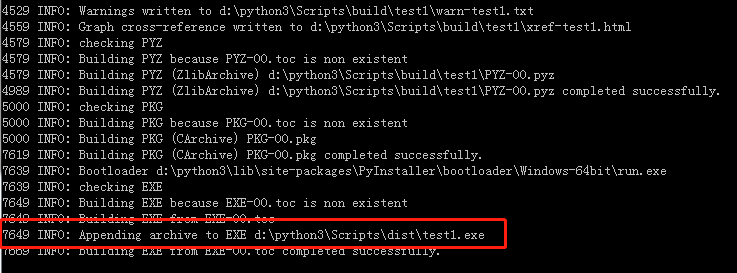
已结成功生成了exe文件和它的地址(开头是7649的那一行)
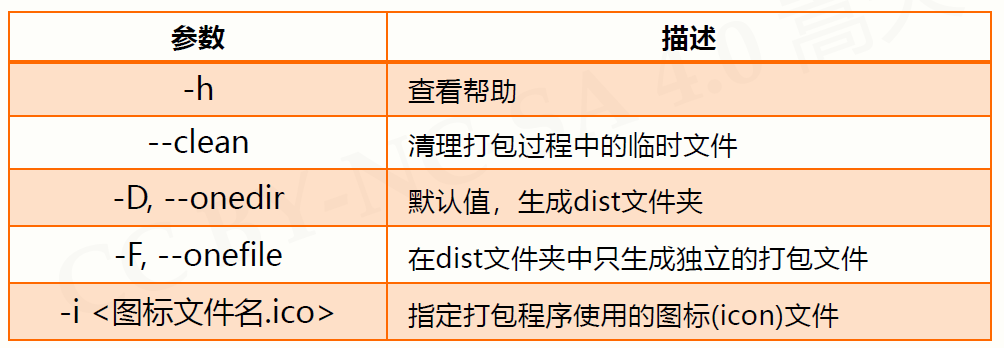
PyInstaller库常用参数
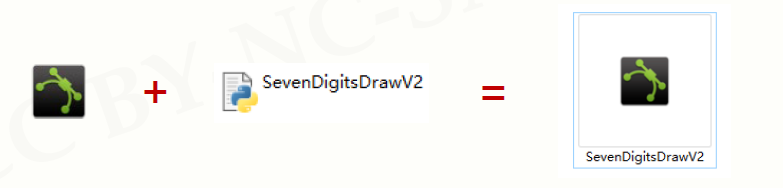
添加文件图标
转换ioc图片网站:http://www.bitbug.net/

pyinstaller-F <文件名.py>
pyinstaller–icurve.ico –F SevenDigitsDrawV2.py

 浙公网安备 33010602011771号