

12周作业
1、通过ansible Roles编排实现 httpd 角色的部署
#yum install -y ansible
[centos7]
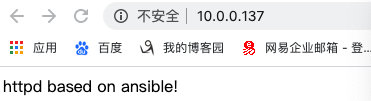
10.0.0.137
[centos8]
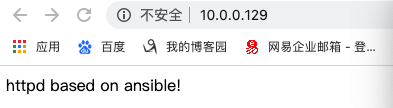
10.0.0.129
# mkdir /data/ansible/roles/httpd/{tasks,files,templates,vars,handlers} -pv
# cd /data/ansible/roles/httpd/tasks/
# vim tasks/group.yml
- name: create group
group: name=apache system=yes gid=80
# vim tasks/user.yml
- name: create user
user: name=apache system=yes shell=/sbin/nologin uid=80 group=apache
# vim tasks/install.yml
- name: install httpd
yum: name=httpd
#vim tasks/index.yml
- name: index.html
shell: echo "httpd based on ansible!" > /var/www/html/index.html
notify: restart httpd
#vim tasks/service.yml
- name: start service
service: name=httpd state=started
#vim tasks/main.yml
- include: group.yml
- include: user.yml
- include: install.yml
- include: index.html
- include: service.yml
# vim handlers/main.yml
- name: restart httpd
service: name=httpd state=restarted
# cd ../../
# vim roles_httpd.yml
---
- hosts: centos8:centos7
remote_user: root
roles:
- httpd
#ansible-playbook roles_httpd.yml
2、简述 MySQL 数据库访问的执行过程。
答:连接:数据库是单进程、多线程模型,因此用户访问时都会创建单独的线程连接,连接创建完成后,可以通过线程的方式发送请求,构建相应报文后通过此线程进行发送;由于是单进程模型,所以多用户访问会构成一个线程池来回应并发请求。
分析:用户在使用过程中,要给出其使用的子模式名称,发送请求后通过SQL接口解析请求,判断是否有权限访问,以及语言的语句、语法错误等,进而转换为可以在本地执行的操作。
查询:解析语句后,启动I/O程序,完成读取操作。
回复:依据之前的子模式类型等,将查询结果进行解析为客户可理解语言,返回查询结果和状态。
记录日志:记录系统工作日志。
3、S E L E C T 语句的完整语法较复杂,但至少包括的部分是 ( A)
A.仅 S E L E C T B.S E L E C T ,F R O M C.S E L E C T ,G R O U P D.S E L E C T ,I N T O
4、一张表的主键个数为 (C )
A.至多 3 个 B.没有限制 C.至多 1 个 D.至多 2 个

 浙公网安备 33010602011771号