
输入内容的时候,输入斜杠展示一个弹窗并且选中弹窗的内容可以追加到当前输入区的功能实现
先上效果图:
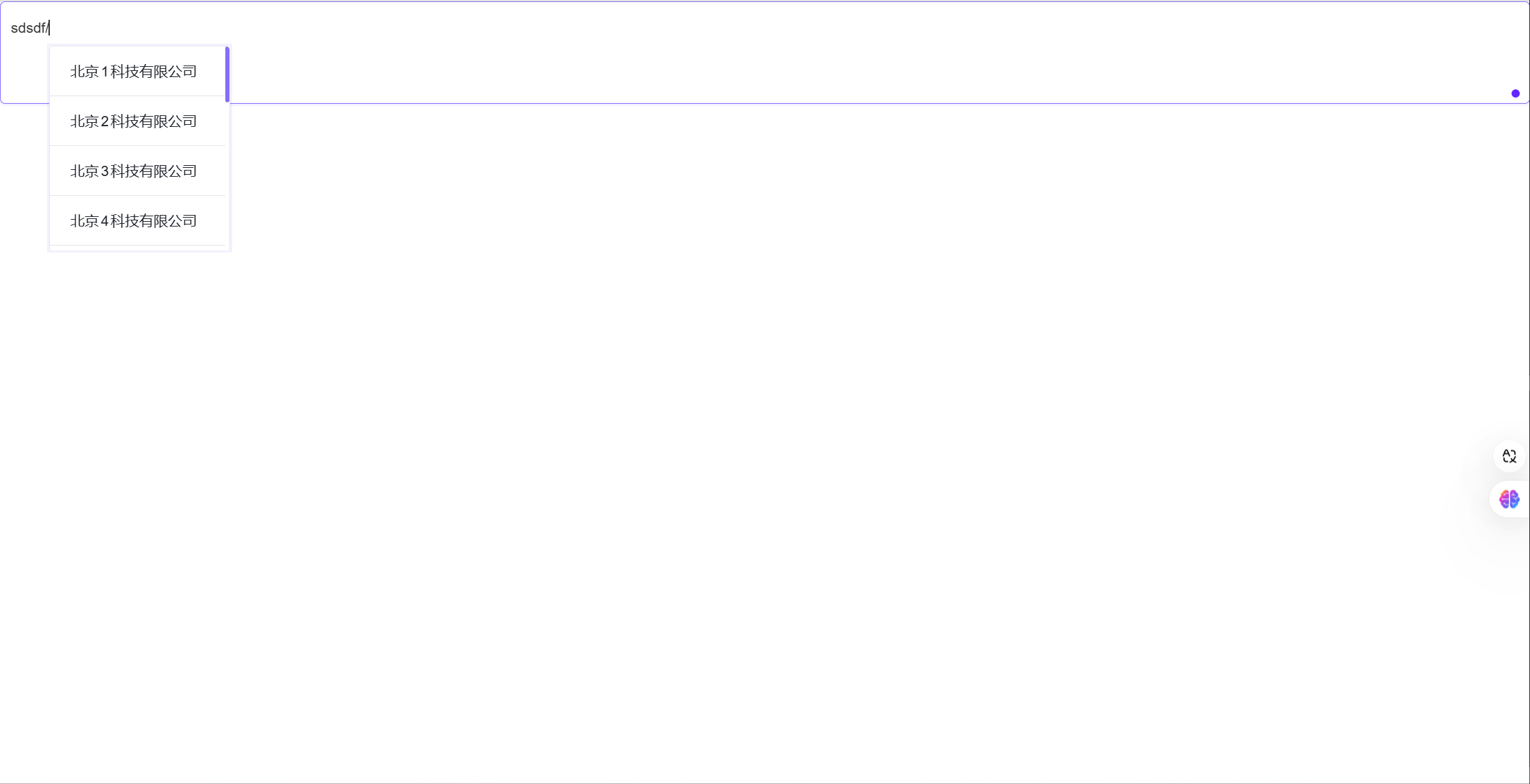
它也支持根据点击的位置以及键盘方向键的移动判断当光标处于斜杠后的时候弹出弹窗
代码如下:
import { defineComponent, ref, nextTick, onMounted, onUnmounted } from "vue";
import { List, ListItem } from "@arco-design/web-vue";
import "./index.less";

export default defineComponent({
  name: "MyComponent",
  setup() {
    const popupVisible = ref(false);
    const textareaRef = ref<HTMLElement | null>(null);
    let lastCaretPosition: any = null; // 记录光标位置

    /**
     * 更新光标位置
     */
    const updateCaretPosition = () => {
      const selection = window.getSelection();
      if (selection && selection.rangeCount > 0) {
        lastCaretPosition = selection.getRangeAt(0); // 记录光标位置
      }
    };

    /**
     * 设置弹窗位置
     * @param {HTMLElement} popover - 弹窗元素
     * @param {HTMLElement} textarea - 输入框元素
     */
    const setPopupPosition = (popover: HTMLElement, textarea: HTMLElement) => {
      if (popover && textarea) {
        const cursorPos = getCaretPosition();
        const rect = textarea.getBoundingClientRect();
        const offset = 10; // 光标和弹窗之间的额外空间

        popover.style.position = "absolute";

        // 调整垂直位置
        if (
          cursorPos.top + cursorPos.height + popover.offsetHeight >
          window.innerHeight
        ) {
          popover.style.top = `${
            rect.top +
            cursorPos.top -
            cursorPos.height -
            popover.offsetHeight +
            window.scrollY -
            offset
          }px`;
        } else {
          popover.style.top = `${
            rect.top +
            cursorPos.top +
            cursorPos.height +
            window.scrollY +
            offset
          }px`;
        }

        // 调整水平位置
        if (cursorPos.left + popover.offsetWidth > window.innerWidth) {
          popover.style.left = `${
            rect.left + cursorPos.left - popover.offsetWidth
          }px`;
        } else {
          popover.style.left = `${rect.left + cursorPos.left}px`;
        }
      }
    };

    /**
     * 处理输入事件
     * @param {InputEvent} inputValue - 输入事件对象
     */
    const handleInput = async (inputValue: InputEvent) => {
      const lastChar = (inputValue.data || "").slice(-1);
      if (lastChar === "/") {
        popupVisible.value = true;
        await nextTick();
        const textarea = textareaRef.value;
        if (textarea) {
          updateCaretPosition();
          const popover =
            document.querySelector<HTMLElement>(".instruction-list");
          if (popover) {
            setPopupPosition(popover, textarea);
          }
        }
      } else {
        popupVisible.value = false;
      }
    };

    /**
     * 处理键盘事件
     * @param {KeyboardEvent} event - 键盘事件对象
     */
    const handleKeyDown = (event: KeyboardEvent) => {
      if (
        ["ArrowUp", "ArrowDown", "ArrowLeft", "ArrowRight"].includes(event.key)
      ) {
        setTimeout(() => {
          checkCaretPosition();
          updateCaretPosition();
        }, 0);
      }
    };

    /**
     * 处理点击事件
     */
    const handleClick = async () => {
      await nextTick();
      checkCaretPosition();
      updateCaretPosition();
    };

    const createNode = (text: string) => {
      // 创建新的文本内容
      const newText = `<span class="highlight">${text}</span>`;
      const tmpSpan = document.createElement("span");
      tmpSpan.innerHTML = newText;
      tmpSpan.setAttribute("contentEditable", "false");
      return tmpSpan;
    };

    /**
     * 处理选择项点击事件
     * @param {string} item - 选择的项
     */
    const handleItemClick = (item: string) => {
      const selection = window.getSelection();

      // 如果之前保存了光标位置,则恢复它
      if (lastCaretPosition) {
        selection?.removeAllRanges();
        selection?.addRange(lastCaretPosition);
      }

      const range: any = selection?.getRangeAt(0);
      // 获取当前选区的第一个 Range 对象
      const startOffset = Math.max(range.startOffset - 1, 0);
      // 计算起始偏移量,确保它不会小于 0
      const endOffset = range.endOffset;
      // 获取结束偏移量
      if (range.startContainer.nodeType === Node.TEXT_NODE) {
        // 确保起始容器是文本节点
        range.setStart(range.startContainer, startOffset);
        // 设置 Range 的起始位置为调整后的起始偏移量
        range.setEnd(range.endContainer, endOffset);
        // 设置 Range 的结束位置
        range.deleteContents();
        // 删除 Range 内的内容
        const spanNode = createNode(item);
        // 创建包含选项文本的新节点
        range.insertNode(spanNode);
        // 将新节点插入到 Range 内
        range.setStartAfter(spanNode);
        // 将 Range 的起始位置设置到新节点之后
        range.setEndAfter(spanNode);
        // 将 Range 的结束位置设置到新节点之后
        selection?.removeAllRanges();
        // 清空当前的所有 Range
        selection?.addRange(range);
        // 将新的 Range 添加到选区
        popupVisible.value = false;
        // 隐藏弹窗
        textareaRef.value?.focus();
        // 重新聚焦到输入框
      }
    };

    /**
     * 检查光标位置
     */
    const checkCaretPosition = () => {
      const textarea = textareaRef.value;
      if (textarea) {
        const selection = window.getSelection();
        if (selection && selection.rangeCount > 0) {
          const range = selection.getRangeAt(0);
          const text = range.startContainer.textContent;
          const caretPos = range.startOffset;

          if (text && text[caretPos - 1] === "/" && caretPos > 0) {
            popupVisible.value = true;
            const popover =
              document.querySelector<HTMLElement>(".instruction-list");
            if (popover) {
              setPopupPosition(popover, textarea);
            }
          } else {
            popupVisible.value = false;
          }
        }
      }
    };

    /**
     * 获取光标位置
     * @returns {Object} 光标位置对象,包含 left、top 和 height 属性
     */
    const getCaretPosition = () => {
      const selection = window.getSelection();
      if (selection && selection.rangeCount > 0) {
        const range = selection.getRangeAt(0);
        const rect = range.getBoundingClientRect();
        return {
          left: rect.left,
          top: rect.top,
          height: rect.height,
        };
      }
      return { left: 0, top: 0, height: 0 };
    };

    onMounted(() => {
      const textarea = textareaRef.value;
      if (textarea) {
        textarea.addEventListener("keydown", handleKeyDown);
        textarea.addEventListener("click", handleClick);
      }
    });

    onUnmounted(() => {
      const textarea = textareaRef.value;
      if (textarea) {
        textarea.removeEventListener("keydown", handleKeyDown);
        textarea.removeEventListener("click", handleClick);
      }
    });

    return () => (
      <div style={{ position: "relative" }}>
        <div
          placeholder="请输入内容"
          contenteditable
          class="editor"
          allow-clear
          ref={textareaRef}
          onInput={handleInput}
        />
        <div id="popover" v-show={popupVisible.value}>
          <List class="instruction-list">
            <ListItem
              tabindex="0"
              onClick={() => handleItemClick("北京1科技有限公司")}
            >
              北京1科技有限公司
            </ListItem>
            <ListItem
              tabindex="0"
              onClick={() => handleItemClick("北京2科技有限公司")}
            >
              北京2科技有限公司
            </ListItem>
            <ListItem
              tabindex="0"
              onClick={() => handleItemClick("北京3科技有限公司")}
            >
              北京3科技有限公司
            </ListItem>
            <ListItem
              tabindex="0"
              onClick={() => handleItemClick("北京4科技有限公司")}
            >
              北京4科技有限公司
            </ListItem>
            <ListItem
              tabindex="0"
              onClick={() => handleItemClick("北京5科技有限公司")}
            >
              北京5科技有限公司
            </ListItem>
            <ListItem
              tabindex="0"
              onClick={() => handleItemClick("北京6科技有限公司")}
            >
              北京6科技有限公司
            </ListItem>
            <ListItem
              tabindex="0"
              onClick={() => handleItemClick("北京7科技有限公司")}
            >
              北京7科技有限公司
            </ListItem>
            <ListItem
              tabindex="0"
              onClick={() => handleItemClick("北京8科技有限公司")}
            >
              北京8科技有限公司
            </ListItem>
            <ListItem
              tabindex="0"
              onClick={() => handleItemClick("北京9科技有限公司")}
            >
              北京9科技有限公司
            </ListItem>
            <ListItem
              tabindex="0"
              onClick={() => handleItemClick("北京0科技有限公司")}
            >
              北京0科技有限公司
            </ListItem>
            <ListItem
              tabindex="0"
              onClick={() => handleItemClick("北京11科技有限公司")}
            >
              北京11科技有限公司
            </ListItem>
            <ListItem
              tabindex="0"
              onClick={() => handleItemClick("北京12科技有限公司")}
            >
              北京12科技有限公司
            </ListItem>
            <ListItem
              tabindex="0"
              onClick={() => handleItemClick("北京13科技有限公司")}
            >
              北京13科技有限公司
            </ListItem>
            <ListItem
              tabindex="0"
              onClick={() => handleItemClick("北京14科技有限公司")}
            >
              北京14科技有限公司
            </ListItem>
            <ListItem
              tabindex="0"
              onClick={() => handleItemClick("北京15科技有限公司")}
            >
              北京15科技有限公司
            </ListItem>
          </List>
        </div>
      </div>
    );
  },
});
CSS如下:
.instruction-list {
  height: 200px;
  z-index: 1000;
  background-color: #fff;
  box-shadow: 0 0 0 2px rgba(72, 5, 255, 0.06);
  .arco-list-content {
    height: 200px;
    overflow: auto;
    &::-webkit-scrollbar {
      background: transparent;
      width: 0.25rem;
      height: 0.2rem;
    }
    &::-webkit-scrollbar-thumb {
      /*滚动条里面小方块*/
      background: #856dfc;
      opacity: 0.12;
      border-radius: 0.125rem;
    }
    &::-webkit-scrollbar-track {
      /*滚动条里面轨道*/
      background: transparent;
    }
  }
}

.editor {
  margin: 0 auto;
  width: 100%;
  height: 100px;
  background: #fff;
  border: 1px solid #d9d9d9;
  border-radius: 5px;
  text-align: left;
  padding: 10px;
  overflow: auto;
  line-height: 30px;
  color: #333;
  &:hover {
    border-color: #856dfc;
  }
  &:focus {
    outline: none;
    border-color: #856dfc;
    box-shadow: 0 0 0 2px rgba(72, 5, 255, 0.06);
    border-inline-end-width: 1px;
  }
}

.highlight {
  display: inline-block;
  border: 1px solid purple;
  border-radius: 5px;
  padding: 2px 4px;
}
积累小的知识,才能成就大的智慧,希望网上少一些复制多一些原创有用的答案

 浙公网安备 33010602011771号