

SSM-CRUD
SSM-CRUD
说明:
SSM:SpringMVC+Spring+MyBatis
CRUD:
- Create(创建)
- Retrieve(查询)
- Update(更新)
- Delete(删除)
功能点
- 分页
- 数据校验
- jquery前端校验+JSR303后端校验
- Ajax
- Rest风格的URI;使用HTTP协议请求方式的动词,来表示对资源的操作(GET(查询),POST(新增),PUT(修改),DELETE(删除))
技术点
- 基础框架-ssm(SpringMVC+Spring+MyBatis)
- 数据库-MySQL
- 前端框架-bootstrap快速搭建简洁美观的界面
- 项目的依赖管理-Maven
- 分页插件-pagehelper
- 逆向工程-MyBatis Generator
基础环境搭建
一、创建一个Maven项目
- 项目的基本架构
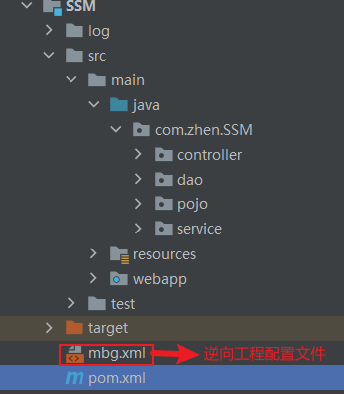
二、导入项目所依赖的jar包
-
spring
-
springmvc
-
mybatis
-
数据库连接池,驱动包
-
其他(servlet-api,junit ,log4j等)
pow.xml
<?xml version="1.0" encoding="UTF-8"?>
<project xmlns="http://maven.apache.org/POM/4.0.0"
         xmlns:xsi="http://www.w3.org/2001/XMLSchema-instance"
         xsi:schemaLocation="http://maven.apache.org/POM/4.0.0 http://maven.apache.org/xsd/maven-4.0.0.xsd">
    <parent>
        <artifactId>SSM-Project</artifactId>
        <groupId>con.zhen.SSM</groupId>
        <version>1.0-SNAPSHOT</version>
    </parent>
    <modelVersion>4.0.0</modelVersion>

    <artifactId>SSM</artifactId>
    <!--配置打包方式,web项目打包成war包形式-->
    <packaging>war</packaging>

    <properties>
        <maven.compiler.source>8</maven.compiler.source>
        <maven.compiler.target>8</maven.compiler.target>
    </properties>

    <dependencies>
        <!-- springmvc依赖-->
        <dependency>
            <groupId>org.springframework</groupId>
            <artifactId>spring-webmvc</artifactId>
            <version>5.3.9</version>
        </dependency>

        <!-- spring-test  Spring提供的单元测试依赖-->
        <dependency>
            <groupId>org.springframework</groupId>
            <artifactId>spring-test</artifactId>
            <version>5.3.9</version>
            <scope>test</scope>
        </dependency>

        <!-- spring基于 AspectJ 实现 AOP 操作 -->
        <dependency>
            <groupId>org.springframework</groupId>
            <artifactId>spring-aspects</artifactId>
            <version>5.3.9</version>
        </dependency>

        <!-- 事务管理-->
        <dependency>
            <groupId>org.springframework</groupId>
            <artifactId>spring-jdbc</artifactId>
            <version>5.3.9</version>
        </dependency>

        <!-- mybatis整合Spring -->
        <dependency>
            <groupId>org.mybatis</groupId>
            <artifactId>mybatis-spring</artifactId>
            <version>2.0.6</version>
        </dependency>

        <!-- mybatis -->
        <dependency>
            <groupId>org.mybatis</groupId>
            <artifactId>mybatis</artifactId>
            <version>3.5.7</version>
        </dependency>

        <!-- mybatis-generator  逆向工程 -->
        <dependency>
            <groupId>org.mybatis.generator</groupId>
            <artifactId>mybatis-generator-core</artifactId>
            <version>1.4.0</version>
        </dependency>

        <!-- mysql的数据库驱动 -->
        <dependency>
            <groupId>mysql</groupId>
            <artifactId>mysql-connector-java</artifactId>
            <version>8.0.26</version>
        </dependency>

        <!-- druid数据库连接池 -->
        <dependency>
            <groupId>com.alibaba</groupId>
            <artifactId>druid</artifactId>
            <version>1.2.6</version>
        </dependency>

        <!-- log4j -->
        <dependency>
            <groupId>log4j</groupId>
            <artifactId>log4j</artifactId>
            <version>1.2.17</version>
        </dependency>

        <!-- junit -->
        <dependency>
            <groupId>junit</groupId>
            <artifactId>junit</artifactId>
            <version>4.13.1</version>
            <scope>test</scope>
        </dependency>

        <!-- thymeleaf-spring5 整合包-->
        <dependency>
            <groupId>org.thymeleaf</groupId>
            <artifactId>thymeleaf-spring5</artifactId>
            <version>3.0.12.RELEASE</version>
        </dependency>

        <!-- javax.servlet-api -->
        <dependency>
            <groupId>javax.servlet</groupId>
            <artifactId>javax.servlet-api</artifactId>
            <version>4.0.1</version>
            <!--tomcat有提供所以要配置这个-->
            <scope>provided</scope>
        </dependency>

        <!-- pagehelper mybatis分页插件 -->
        <dependency>
            <groupId>com.github.pagehelper</groupId>
            <artifactId>pagehelper</artifactId>
            <version>5.2.1</version>
        </dependency>

        <!-- jquery -->
        <dependency>
            <groupId>org.webjars.bower</groupId>
            <artifactId>jquery</artifactId>
            <version>3.6.0</version>
        </dependency>

        <!-- 实体类数据格式校验依赖 -->
        <!--JSR303数据校验支持;tomcat7及以上的服务器,
		tomcat7以下的服务器:el表达式。额外给服务器的lib包中替换新的标准的el
		-->
        <!--注意不能导入超过6.2以上的包,不然没有用-->
        <dependency>
            <groupId>org.hibernate</groupId>
            <artifactId>hibernate-validator</artifactId>
            <version>6.2.0.Final</version>
        </dependency>

        <!-- jackson 前后端用json进行信息传递-->
        <dependency>
            <groupId>com.fasterxml.jackson.core</groupId>
            <artifactId>jackson-databind</artifactId>
            <version>2.12.4</version>
        </dependency>
    </dependencies>

</project>
三、Mybatis Generator 逆向工程
具体教程可以参考官方文档地址www.mybatis.org/generator/ ,这里用配置文件的方法
- 引入对应的依赖(maven仓库搜索Mybatis Generator)
- 根据MVC架构建立好对应的包
- 配置mbg.xml文件(官方文档有示例,复制修改即可)
mbg.xml
<?xml version="1.0" encoding="UTF-8"?>
<!DOCTYPE generatorConfiguration
        PUBLIC "-//mybatis.org//DTD MyBatis Generator Configuration 1.0//EN"
        "http://mybatis.org/dtd/mybatis-generator-config_1_0.dtd">

<generatorConfiguration>
    <context id="DB2Tables" targetRuntime="MyBatis3">
        <commentGenerator>
            <!--禁用生成注解-->
            <property name="suppressAllComments" value="true"/>
        </commentGenerator>
        <!--    数据库配置-->
        <jdbcConnection driverClass="com.mysql.jdbc.Driver"
                        connectionURL="jdbc:mysql://localhost:3306/ssm"
                        userId="root"
                        password="123456">
        </jdbcConnection>

        <!--如果包的路径没有建立好,会自动帮你建立-->
        <javaTypeResolver >
            <property name="forceBigDecimals" value="false" />
        </javaTypeResolver>
            <!--指定生成javabean的位置-->
        <javaModelGenerator targetPackage="com.zhen.SSM.pojo" targetProject=".\src\main\java">
            <property name="enableSubPackages" value="true" />
            <property name="trimStrings" value="true" />
        </javaModelGenerator>
        <!--指定生成mapper.xml的位置-->
        <sqlMapGenerator targetPackage="com.zhen.SSM.dao"  targetProject=".\src\main\resources">
            <property name="enableSubPackages" value="true" />
        </sqlMapGenerator>
        <!--指定生成mapper接口的位置-->
        <javaClientGenerator type="XMLMAPPER" targetPackage="com.zhen.SSM.dao"  targetProject=".\src\main\java">
            <property name="enableSubPackages" value="true" />
        </javaClientGenerator>

        <!-- table指定每个表的生成策略 -->
        <!--数据库里面的表名,以及所对应的bean类名-->
        <table tableName="tbl_emp" domainObjectName="Employee"></table>
        <table tableName="tbl_dept" domainObjectName="Department"></table>

    </context>
</generatorConfiguration>
- 运行java程序加载配置文件,即可自动生成配置文件中配置的东西
- 创建测试类
public class test {
    @Test
    public void test1() throws Exception {
        List<String> warnings = new ArrayList<String>();
        boolean overwrite = true;
        //配置文件路径,其他不用动运行即可
        File configFile = new File("mbg.xml");
        ConfigurationParser cp = new ConfigurationParser(warnings);
        Configuration config = cp.parseConfiguration(configFile);
        DefaultShellCallback callback = new DefaultShellCallback(overwrite);
        MyBatisGenerator myBatisGenerator = new MyBatisGenerator(config, callback, warnings);
        myBatisGenerator.generate(null);
    }
}
-
根据需要,自己修改自动生成的Mapper.xml,bean等里面的内容
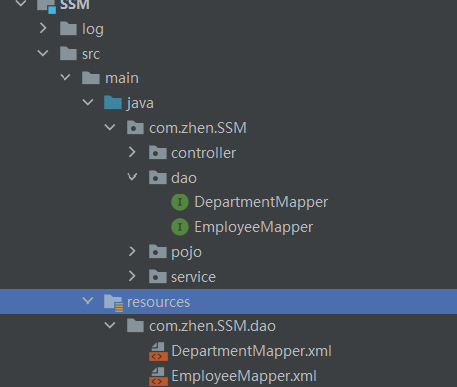
- 这里我将Mapper.xml放在了resources中,但是包名和放DAO接口的包名一样,打包的时候他们就会打包在一起了,因为resources和java文件夹都属于类路径
四、配置Spring和Mybeitis配置文件,整合Mybatis
-
dbConfig.properties
mysql.driver=com.mysql.jdbc.Driver mysql.url=jdbc:mysql://localhost:3306/ssm?useUnicode=true&characterEncoding=utf-8 mysql.username=root mysql.password=123456 -
applicationContext.xml
<?xml version="1.0" encoding="UTF-8"?>
<beans xmlns="http://www.springframework.org/schema/beans"
       xmlns:xsi="http://www.w3.org/2001/XMLSchema-instance"
       xmlns:context="http://www.springframework.org/schema/context"
       xmlns:mvc="http://mybatis.org/schema/mybatis-spring"
       xmlns:mybatis-spring="http://mybatis.org/schema/mybatis-spring"
       xmlns:tx="http://www.springframework.org/schema/tx" xmlns:aop="http://www.springframework.org/schema/aop"
       xsi:schemaLocation="http://www.springframework.org/schema/beans http://www.springframework.org/schema/beans/spring-beans.xsd http://www.springframework.org/schema/context https://www.springframework.org/schema/context/spring-context.xsd http://mybatis.org/schema/mybatis-spring http://mybatis.org/schema/mybatis-spring.xsd http://www.springframework.org/schema/tx http://www.springframework.org/schema/tx/spring-tx.xsd http://www.springframework.org/schema/aop https://www.springframework.org/schema/aop/spring-aop.xsd">

<!-- 组件扫描 -->
    <context:component-scan base-package="com.zhen.SSM">
        <context:exclude-filter type="annotation" expression="org.springframework.stereotype.Controller"/>
    </context:component-scan>

<!--    引入配置文件-->
    <context:property-placeholder location="classpath:dbConfig.properties"/>
<!--    创建数据库连接池对象-->
    <bean id="DataSource" class="com.alibaba.druid.pool.DruidDataSource">
        <property name="driverClassName" value="${mysql.driver}"/>
        <property name="url" value="${mysql.url}"/>
        <property name="username" value="${mysql.username}"/>
        <property name="password" value="${mysql.password}"/>
    </bean>
<!--================================整合mybatis配置=========================================-->
<!--    配置mybatis整合Spring-->
    <bean id="SqlSessionFactory" class="org.mybatis.spring.SqlSessionFactoryBean">
        <property name="dataSource" ref="DataSource"/>
        <property name="configLocation" value="classpath:mybatis-config.xml"/>
        <property name="mapperLocations" value="classpath:com/zhen/SSM/dao/*.xml"/>
    </bean>

    <!--配置一个可以批量操作的sqlSession-->
    <bean id="SqlSession" class="org.mybatis.spring.SqlSessionTemplate">
        <constructor-arg name="sqlSessionFactory" ref="SqlSessionFactory"></constructor-arg>
        <constructor-arg name="executorType" value="BATCH"></constructor-arg>
    </bean>
    <!-- 扫描所有的mapper接口的实现,让这些mapper能够自动注入;
        base-package:指定mapper接口的包名
         -->
    <mybatis-spring:scan base-package="com.zhen.SSM.dao"/>
<!--    ==================================事务管理配置========================================-->
    <bean id="DataSourceTransactionManager" class="org.springframework.jdbc.datasource.DataSourceTransactionManager">
        <property name="dataSource" ref="DataSource"/>
    </bean>

    <!-- 事务相关控制配置(通知):例如配置事务的传播机制 (用于增强的代码块)-->
    <tx:advice id="txAdvice" transaction-manager="DataSourceTransactionManager">
        <tx:attributes>
            <!-- 所有方法都是事务方法 -->
            <!--propagation事务的传播特性,默认为REQUIRED-->
            <tx:method name="*" propagation="REQUIRED"/>
            <!--方法名以get开始的所有方法  -->
            <!-- read-only 是否只读-->
            <tx:method name="get*" read-only="true" propagation="REQUIRED"/>
            <!--方法名以query开始的所有方法  -->
            <tx:method name="query*" read-only="true" propagation="REQUIRED"/>
        </tx:attributes>
    </tx:advice>
    <!--配置切面-->
    <aop:config>
        <!--配置切点,切入点表达式-->
        <!--对service包下所有以Service结尾的类中的任意参数的任意方法增强-->
        <aop:pointcut id="txPoint" expression="execution(* com.zhen.SSM.service.*Service.*(..))"/>
        <!-- 将通知织入切点形成切面 -->
        <aop:advisor advice-ref="txAdvice" pointcut-ref="txPoint"/>
    </aop:config>


    <!-- Spring配置文件的核心点(数据源、与mybatis的整合,事务控制) -->

</beans>
-
mybatis-config.xml
<?xml version="1.0" encoding="UTF-8" ?> <!DOCTYPE configuration PUBLIC "-//mybatis.org//DTD Config 3.0//EN" "http://mybatis.org/dtd/mybatis-3-config.dtd"> <configuration> <settings> <!--开启驼峰命名法--> <setting name="mapUnderscoreToCamelCase" value="true"/> <!--配置日记--> <setting name="logImpl" value="LOG4J"/> </settings> <!--别名--> <typeAliases> <package name="com.zhen.SSM.pojo"/> </typeAliases> <!--pagehelper分页插件--> <plugins> <!-- com.github.pagehelper为PageHelper类所在包名 --> <plugin interceptor="com.github.pagehelper.PageInterceptor"> <!-- 分页合理化参数,默认值为false。当该参数设置为 true 时,pageNum<=0 时会查询第一页, pageNum>pages(超过总数时),会查询最后一页。默认false 时,直接根据参数进行查询。--> <property name="reasonable" value="true"/> </plugin> </plugins> </configuration>- 分页插件的具体教程,可以去看官方文档https://mybatis.io/
-
log4j.properties(这个跟配置Spring和整合mybatis没有关系只是顺手就写了)
### Log4j配置 ###
#定义log4j的输出级别和输出目的地(目的地可以自定义名称,和后面的对应)
#[ level ] , appenderName1 , appenderName2
log4j.rootLogger=DEBUG,console,file
#-----------------------------------#
#1 定义日志输出目的地为控制台
log4j.appender.console = org.apache.log4j.ConsoleAppender
log4j.appender.console.Target = System.out
log4j.appender.console.Threshold=DEBUG
####可以灵活地指定日志输出格式,下面一行是指定具体的格式 ###
#%c: 输出日志信息所属的类目,通常就是所在类的全名
#%m: 输出代码中指定的消息,产生的日志具体信息
#%n: 输出一个回车换行符,Windows平台为"/r/n",Unix平台为"/n"输出日志信息换行
log4j.appender.console.layout = org.apache.log4j.PatternLayout
log4j.appender.console.layout.ConversionPattern=[%c]-%m%n
#-----------------------------------#
#2 文件大小到达指定尺寸的时候产生一个新的文件
log4j.appender.file = org.apache.log4j.RollingFileAppender
#日志文件输出目录
log4j.appender.file.File=log/info.log
#定义文件最大大小
log4j.appender.file.MaxFileSize=10mb
###输出日志信息###
#最低级别
log4j.appender.file.Threshold=ERROR
log4j.appender.file.layout=org.apache.log4j.PatternLayout
log4j.appender.file.layout.ConversionPattern=[%p][%d{yy-MM-dd}][%c]%m%n
#-----------------------------------#
#3 druid
log4j.logger.druid.sql=INFO
log4j.logger.druid.sql.DataSource=info
log4j.logger.druid.sql.Connection=info
log4j.logger.druid.sql.Statement=info
log4j.logger.druid.sql.ResultSet=info
#4 mybatis 显示SQL语句部分
log4j.logger.org.mybatis=DEBUG
#log4j.logger.cn.tibet.cas.dao=DEBUG
#log4j.logger.org.mybatis.common.jdbc.SimpleDataSource=DEBUG
#log4j.logger.org.mybatis.common.jdbc.ScriptRunner=DEBUG
#log4j.logger.org.mybatis.sqlmap.engine.impl.SqlMapClientDelegate=DEBUG
#log4j.logger.java.sql.Connection=DEBUG
log4j.logger.java.sql=DEBUG
log4j.logger.java.sql.Statement=DEBUG
log4j.logger.java.sql.ResultSet=DEBUG
log4j.logger.java.sql.PreparedStatement=DEBUG
五、搭建Spring单元测试环境
配置完Spring配置文件applicationContext.xml后,就可以搭建Spring提供的单元测试了。对于测试dao层的工作推荐Spring的项目就可以使用Spring的单元测试,可以自动注入我们需要的组件
*1、导入SpringTest模块
*2、@ContextConfiguration指定Spring配置文件的位置
*3、直接autowired要使用的组件即可
-
引入Spring-test依赖文件
-
开始配置单元测试类
Spring_test
@RunWith(SpringJUnit4ClassRunner.class)
/**
 * 引入spring-test依赖才有
 * 加载Spring配置文件
 *
 * 配合@RunWith(SpringJUnit4ClassRunner.class)使用
 */
@ContextConfiguration(value = "classpath:applicationContext.xml")
public class Spring_test {
    //这样就可以通过Spring的IOC管理bean了
    @Autowired
    private DepartmentMapper departmentMapper;
    @Autowired
    private SqlSession sqlSession;
    @Autowired
    private EmployeeMapper employeeMapper;
    @Test
    public void test2(){
        //因为员工表和部门表建立了外键,所以得先创建部门信息
//        departmentMapper.insert(new Department(null,"开发部"));
//        departmentMapper.insert(new Department(null,"测试部"));
        EmployeeMapper mapper = sqlSession.getMapper(EmployeeMapper.class);
        for(int i = 0;i<1000;i++){
            String uuid = UUID.randomUUID().toString().substring(0, 5);
            mapper.insert(new Employee(null,uuid,"m",uuid+"@qq.com",5));
        }
        System.out.println("添加成功");
    }
}
六、配置SpringMVC
- SpringMVC-config.xml
<?xml version="1.0" encoding="UTF-8"?>
<beans xmlns="http://www.springframework.org/schema/beans"
       xmlns:xsi="http://www.w3.org/2001/XMLSchema-instance"
       xmlns:context="http://www.springframework.org/schema/context"
       xmlns:mvc="http://www.springframework.org/schema/mvc"
       xsi:schemaLocation="http://www.springframework.org/schema/beans http://www.springframework.org/schema/beans/spring-beans.xsd http://www.springframework.org/schema/context https://www.springframework.org/schema/context/spring-context.xsd http://www.springframework.org/schema/mvc https://www.springframework.org/schema/mvc/spring-mvc.xsd">
<!--    禁用扫描器的默认行为(扫描全部),只用来扫描controller-->
    <context:component-scan base-package="com.zhen.SSM.controller" use-default-filters="false">
        <context:include-filter type="annotation" expression="org.springframework.stereotype.Controller"/>
    </context:component-scan>
    <!-- 配置Thymeleaf视图解析器 -->
    <bean id="viewResolver" class="org.thymeleaf.spring5.view.ThymeleafViewResolver">
        <property name="order" value="1"/>
        <property name="characterEncoding" value="UTF-8"/>
        <property name="templateEngine">
            <bean class="org.thymeleaf.spring5.SpringTemplateEngine">
                <property name="templateResolver">
                    <bean class="org.thymeleaf.spring5.templateresolver.SpringResourceTemplateResolver">

                        <!-- 视图前缀 -->
                        <property name="prefix" value="/WEB-INF/templates/"/>

                        <!-- 视图后缀 -->
                        <property name="suffix" value=".html"/>
                        <property name="templateMode" value="HTML5"/>
                        <property name="characterEncoding" value="UTF-8"/>
                    </bean>
                </property>
            </bean>
        </property>
    </bean>
<!--    视图控制器-->
    <mvc:view-controller path="/" view-name="index"/>
<!--    默认servlet-->
    <mvc:default-servlet-handler/>
<!--    注解驱动-->
    <mvc:annotation-driven/>
</beans>
-
在没有建立好前端页面时,或者想测试SpringMVC请求功能,可以使用Spring测试模块提供的测试请求功能,测试curd请求的正确性。Spring4测试的时候,需要servlet3.0的支持。 同上面的搭建Spring单元测试大经相同。
-
举个例子:
- 创建请求管理器
@Controller public class EmployeeController { @Autowired private EmployeeService employeeService; @RequestMapping("/") public String employees(@RequestParam(value = "pn", defaultValue = "1") Integer page, Model model) { //PageHelper.startPage对后面紧跟的查询进行分页处理 //每页显示10条数据 PageHelper.startPage(page, 10); List<Employee> allEmployee = employeeService.getAllEmployee(); // 使用pageInfo包装查询后的结果,只需要将pageInfo交给页面就行了。 // 封装了详细的分页信息,包括有我们查询出来的数据,传入分页条连续显示的页数 PageInfo pageInfo = new PageInfo(allEmployee, 5); model.addAttribute("pageInfo", pageInfo); return "success"; } }-
创建测试类
//声明此注解才能拿到ioc容器
@WebAppConfiguration
@RunWith(SpringJUnit4ClassRunner.class)
//Spring和SpringMVC的配置文件都要加载
@ContextConfiguration(value ={"classpath:applicationContext.xml","classpath:SpringMVC-config.xml"} )
public class MVCtest {

    //传入Springmvc的ioc
    @Autowired
    private WebApplicationContext context;
    // 虚拟mvc请求,获取到处理结果。
    private MockMvc mockMvc;
    //在测试方法执行前执行,对mockMvc初始化
    @Before
    public void init(){
        //建立一个虚拟请求
        mockMvc = MockMvcBuilders.webAppContextSetup(context).build();
    }
    @Test
    public void test() throws Exception {
        //模拟请求拿到返回值
        MvcResult result = mockMvc.perform(MockMvcRequestBuilders.get("/").param("pn", "2")).andReturn();
        //获取请求域
        MockHttpServletRequest request = result.getRequest();
        PageInfo pageInfo = (PageInfo) request.getAttribute("pageInfo");
        System.out.println("当前页"+pageInfo.getPageNum());
        System.out.println("总页数"+pageInfo.getPages());
        System.out.println("数据个数"+pageInfo.getTotal());
        for (int navigatepageNum : pageInfo.getNavigatepageNums()) {
            System.out.println(navigatepageNum);
        }

        for (Object o : pageInfo.getList()) {
            System.out.println(o);
        }

    }
}
-
七、webapp
一般创建maven工程不选任何模板的情况下是一个干净的目录,需要我们自己创建webapp文件夹(前提pow.xml中配置打包方式是war),还有弄出web.xml配置文件。
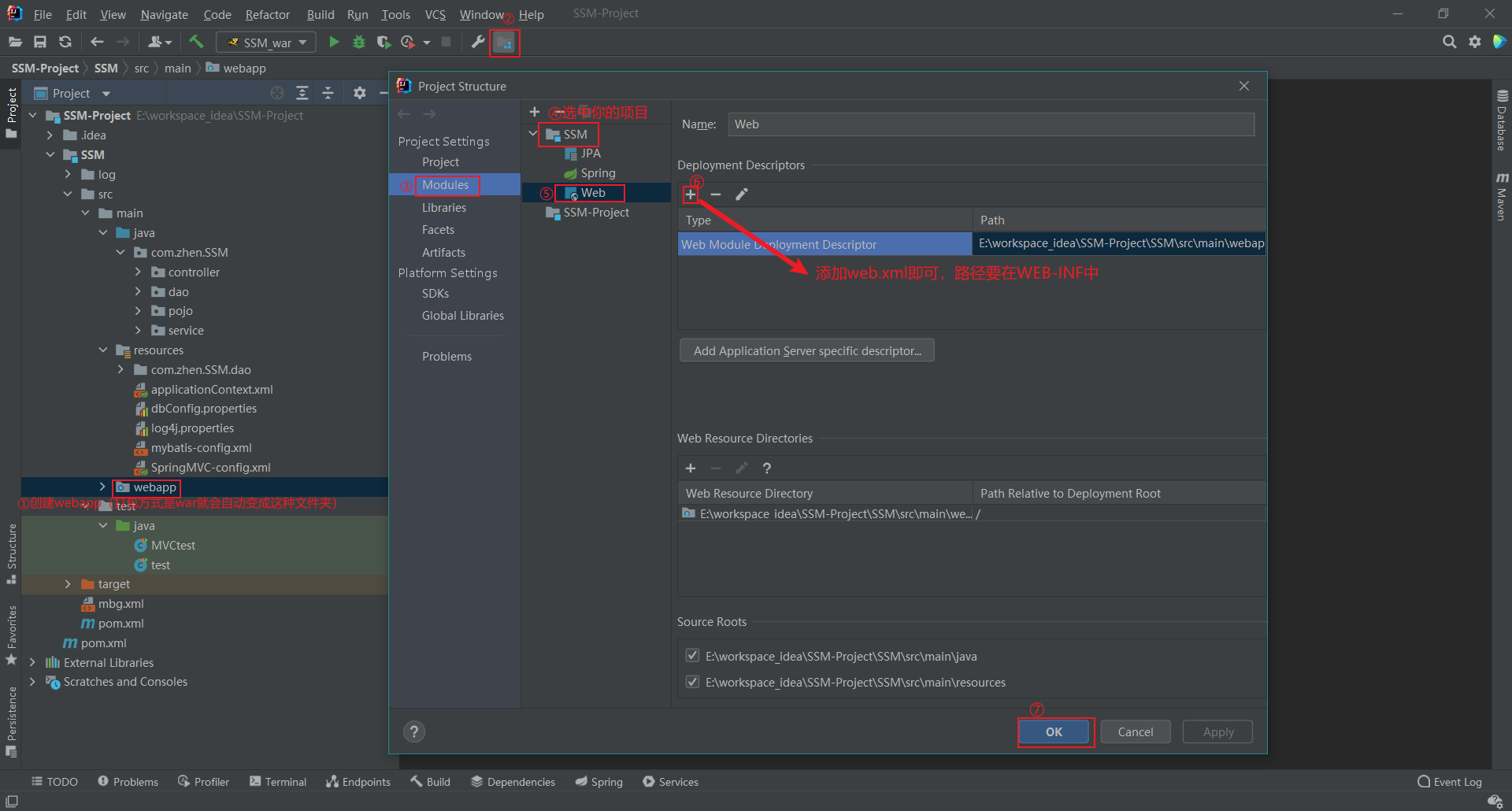
-
配置web.xml
<?xml version="1.0" encoding="UTF-8"?>
<web-app xmlns="http://xmlns.jcp.org/xml/ns/javaee"
         xmlns:xsi="http://www.w3.org/2001/XMLSchema-instance"
         xsi:schemaLocation="http://xmlns.jcp.org/xml/ns/javaee http://xmlns.jcp.org/xml/ns/javaee/web-app_4_0.xsd"
         version="4.0">
<!--    字符集过滤器-->
    <filter>
        <filter-name>CharacterEncodingFilter</filter-name>
        <filter-class>org.springframework.web.filter.CharacterEncodingFilter</filter-class>
        <init-param>
            <param-name>encoding</param-name>
            <param-value>UTF-8</param-value>
        </init-param>
        <init-param>
            <param-name>forceRequestEncoding</param-name>
            <param-value>true</param-value>
        </init-param>
        <init-param>
            <param-name>forceResponseEncoding</param-name>
            <param-value>true</param-value>
        </init-param>
    </filter>
    <filter-mapping>
        <filter-name>CharacterEncodingFilter</filter-name>
        <url-pattern>/*</url-pattern>
    </filter-mapping>

<!--    请求方式过滤器  将页面普通的post请求转为指定的delete或者put请求-->
    <filter>
        <filter-name>HiddenHttpMethodFilter</filter-name>
        <filter-class>org.springframework.web.filter.HiddenHttpMethodFilter</filter-class>
    </filter>
    <filter-mapping>
        <filter-name>HiddenHttpMethodFilter</filter-name>
        <url-pattern>/*</url-pattern>
    </filter-mapping>

    <!--ajax发送put的请求,将数据封装成map,但是此方法过时了,
    org.springframework 5.1之后使用 FormContentFilter
    代替 HttpPutFormContentFilter,并且支持"PUT", "PATCH", "DELETE"-->
<!--    <filter>-->
<!--        <filter-name>HttpPutFormContentFilter</filter-name>-->
<!--        <filter-class>org.springframework.web.filter.HttpPutFormContentFilter</filter-class>-->
<!--    </filter>-->
<!--    <filter-mapping>-->
<!--        <filter-name>HttpPutFormContentFilter</filter-name>-->
<!--        <url-pattern>/*</url-pattern>-->
<!--    </filter-mapping>-->
    <!--支持"PUT", "PATCH", "DELETE"-->
    <filter>
        <filter-name>FormContentFilter</filter-name>
        <filter-class>org.springframework.web.filter.FormContentFilter</filter-class>
    </filter>
    <filter-mapping>
        <filter-name>FormContentFilter</filter-name>
        <url-pattern>/*</url-pattern>
    </filter-mapping>

<!--    DispatcherServlet-->
    <servlet>
        <servlet-name>DispatcherServlet</servlet-name>
        <servlet-class>org.springframework.web.servlet.DispatcherServlet</servlet-class>
        <init-param>
            <param-name>contextConfigLocation</param-name>
            <param-value>classpath:SpringMVC-config.xml</param-value>
        </init-param>
<!--        服务器启动时加载配置文件-->
        <load-on-startup>1</load-on-startup>
    </servlet>
    <servlet-mapping>
        <servlet-name>DispatcherServlet</servlet-name>
        <url-pattern>/</url-pattern>
    </servlet-mapping>

    <!--Spring配置: needed for ContextLoaderListener -->
    <context-param>
        <param-name>contextConfigLocation</param-name>
        <param-value>classpath:applicationContext.xml</param-value>
    </context-param>
    <!-- ContextLoaderListener监听器 -->
    <!-- ContextLoaderListener监听器的作用就是启动Web容器时,自动装配ApplicationContext的配置信息-->
    <listener>
        <listener-class>org.springframework.web.context.ContextLoaderListener</listener-class>
    </listener>
</web-app>
引入BootStrap前端框架
-
在官网下载压缩包 BootStrap
-
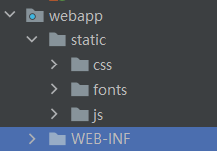
解压缩后把里面的文件放进webapp中的static文件夹中
-
然后在页面就可以引入了
	<!--引入maven导入的jquery.js-->
    <!-- jQuery (Bootstrap 的所有 JavaScript 插件都依赖 jQuery,所以必须放在前边) -->
    <!--这里用了thymeleaf解析技术-->
    <script type="text/javascript" th:src="@{webjars/jquery/3.6.0/dist/jquery.min.js}"></script>
    <!--引入Bootstrap的js文件和css样式文件-->
    <script th:src="@{/static/js/bootstrap.min.js}"></script>
    <link th:href="@{/static/css/bootstrap.min.css}" rel="stylesheet">
-
八、代码展示(具体细节看注释)
-
index.html
<!DOCTYPE html> <html lang="en" xmlns:th="http://www.thymeleaf.org"> <head> <meta charset="UTF-8"> <title>首页</title> <!-- 引入maven导入的jquery.js--> <!-- jQuery (Bootstrap 的所有 JavaScript 插件都依赖 jQuery,所以必须放在前边) --> <!--这里用了thymeleaf解析技术--> <script type="text/javascript" th:src="@{webjars/jquery/3.6.0/dist/jquery.min.js}"></script> <!--引入Bootstrap的js文件和css样式文件--> <script th:src="@{/static/js/bootstrap.min.js}"></script> <link th:href="@{/static/css/bootstrap.min.css}" rel="stylesheet"> </head> <body> <!-- Modal 添加员工模态框 --> <div class="modal fade" id="myAddEmpModal" tabindex="-1" role="dialog" aria-labelledby="myModalLabel"> <div class="modal-dialog" role="document"> <div class="modal-content"> <div class="modal-header"> <button type="button" class="close" data-dismiss="modal" aria-label="Close"><span aria-hidden="true">×</span> </button> <h4 class="modal-title" id="myModalLabel">添加员工</h4> </div> <div class="modal-body"> <!--添加一个表单--> <form class="form-horizontal"> <div class="form-group"> <label for="inputName" class="col-sm-2 control-label">Name</label> <div class="col-sm-10"> <input type="Name" name="name" class="form-control" id="inputName" placeholder="Name"> <!--提示信息--> <span id="helpBlock" class="help-block"></span> </div> </div> <div class="form-group"> <label for="inputEmail" class="col-sm-2 control-label">Email</label> <div class="col-sm-10"> <input type="email" name="email" class="form-control" id="inputEmail" placeholder="Email"> <!--提示信息--> <span id="helpBlock2" class="help-block"></span> </div> </div> <!--单选框--> <div class="form-group"> <label class="col-sm-2 control-label">Gender</label> <label class="radio-inline"> <!--设为默认选中--> <input type="radio" name="gender" id="inlineRadio1" value="m" checked="checked"> 男 </label> <label class="radio-inline"> <input type="radio" name="gender" id="inlineRadio2" value="f"> 女 </label> </div> <!--下拉列表--> <div class="form-group"> <label class="col-sm-2 control-label">Department</label> <!--设置长度--> <div class="col-xs-3"> <select class="form-control" name="dId" id="department"> <!--部门信息--> </select> </div> </div> </form> </div> <div class="modal-footer"> <button type="button" class="btn btn-default" data-dismiss="modal">关闭</button> <button type="button" class="btn btn-primary" id="saveEmpButton">保存</button> </div> </div> </div> </div> <!--修改员工信息模态框--> <!-- Modal --> <div class="modal fade" id="myUpdateModal" tabindex="-1" role="dialog" aria-labelledby="myModalLabel"> <div class="modal-dialog" role="document"> <div class="modal-content"> <div class="modal-header"> <button type="button" class="close" data-dismiss="modal" aria-label="Close"><span aria-hidden="true">×</span> </button> <h4 class="modal-title" id="myUpdateModalLabel">修改信息</h4> </div> <div class="modal-body"> <form class="form-horizontal"> <div class="form-group"> <label for="inputName" class="col-sm-2 control-label">Name</label> <div class="col-sm-10"> <!--用户名不可修改--> <p class="form-control-static" id="inputName_static"></p> </div> </div> <div class="form-group"> <label for="inputEmail_update" class="col-sm-2 control-label">Email</label> <div class="col-sm-10"> <input type="email" name="email" class="form-control" id="inputEmail_update" placeholder="Email"> <!--提示信息--> <span id="helpBlock_email_update" class="help-block"></span> </div> </div> <!--单选框--> <div class="form-group"> <label class="col-sm-2 control-label">Gender</label> <label class="radio-inline"> <!--设为默认选中--> <input type="radio" name="gender" id="inlineRadio1_update" value="m"> 男 </label> <label class="radio-inline"> <input type="radio" name="gender" id="inlineRadio2_update" value="f"> 女 </label> </div> <!--下拉列表--> <div class="form-group"> <label class="col-sm-2 control-label">Department</label> <!--设置长度--> <div class="col-xs-3"> <select class="form-control" name="dId" id="department_update"> <!--部门信息--> </select> </div> </div> </form> </div> <div class="modal-footer"> <button type="button" class="btn btn-default" data-dismiss="modal">关闭</button> <button type="button" class="btn btn-primary" id="updateEmpButton">更新</button> </div> </div> </div> </div> <div class="container"> <div class="row"> <div class="col-md-12"> <h1>SSM-CRUD</h1> </div> </div> <div class="row"> <div class="col-md-4 col-md-offset-9"> <button class="btn btn-success btn-sm" data-toggle="modal" data-target="#myAddEmpModal" id="addEmpButton"> <span class="glyphicon glyphicon-pencil" aria-hidden="true"></span>添加 </button> <button class="btn btn-danger btn-sm" id="multiple_DelEmp"> <span class="glyphicon glyphicon-trash" aria-hidden="true"></span>删除 </button> </div> </div> <div class="row"> <div class="col-md-12"> <table class="table table-hover" id="emp_table"> <!--要加<thead>标签否则会出现莫名其妙的问题--> <thead> <tr> <th><input type="checkbox" id="CheckboxWithAll"></th> <th>#</th> <th>name</th> <th>gender</th> <th>email</th> <th>department</th> <th>操作</th> </tr> </thead> <!--表体--> <tbody> <!-- 员工信息 --> <!-- 表体 --> </tbody> </table> </div> </div> <div class="row"> <div class="col-md-3" id="page_info_area"> <!--分页信息--> </div> <div class="col-md-6 col-md-offset-5"> <nav aria-label="Page navigation"> <!--分页条信息--> </nav> </div> </div> </div> <script type="text/javascript"> //保存总页数用来跳转到最后一页 var allPage; //保存当前页 var currentPage; //页面加载完之后 $(function () { //第一次访问首页 ajax(1); }); //============================================================================================= //ajax function ajax(pn) { $.ajax({ url: "/SSM_war/emp", data: "pn=" + pn, type: "get", dataType: "json", success: function (message) { //解析员工信息 parseEmp(message); //解析分页条 parsePage_nav(message); //解析分页信息 page_info(message); } }); //保存当前页 currentPage = pn; } //============================================================================================ //解析员工信息 function parseEmp(message) { //清空表体 $("#emp_table tbody").empty(); //将全选勾取消掉 $("#CheckboxWithAll").prop("checked", false); // 获取json数据里面的员工信息 var employees = message.extend.pageInfo.list; //遍历employs $.each(employees, function (i, item) { //创建表体中所需的标签对象 // <th>#</th> // <th>name</th> // <th>gender</th> // <th>email</th> // <th>department</th> // <th>操作</th> let tr = $("<tr></tr>"); $("<td></td>").append($("<input type='checkbox' class='Checkbox'>").attr("empId", item.id)).appendTo(tr); $("<td></td>").append(item.id).appendTo(tr); $("<td></td>").append(item.name).appendTo(tr); $("<td></td>").append(item.gender == "m" ? "男" : "女").appendTo(tr); $("<td></td>").append(item.email).appendTo(tr); $("<td></td>").append(item.department.deptName).appendTo(tr); let button_edit = $("<button id='button_edit'></button>").addClass("btn btn-success btn-sm") .append($("<span></span>").addClass("glyphicon glyphicon-pencil")).append("编辑"); button_edit.attr("empId", item.id); //编辑按绑定模态框 button_edit.attr("data-target", "#myUpdateModal"); button_edit.attr("data-toggle", "modal"); let button_del = $("<button></button>").addClass("btn btn-danger btn-sm") .append($("<span></span>").addClass("glyphicon glyphicon-trash")).attr("empId", item.id).attr("id", "button_del").append("删除"); $("<td></td>").append(button_edit).append(" ").append(button_del).appendTo(tr); tr.appendTo($("#emp_table tbody")); }); } //============================================================================================== //解析分页条 function parsePage_nav(message) { let nav = $("nav"); //清空分页体 nav.empty(); let pageInfo = message.extend.pageInfo; let ul = $("<ul></ul>").addClass("pagination"); //首页 let home_page = $("<a></a>").append("首页"); let home_page_li = $("<li></li>").append(home_page); //判断当前页是否第一页 if (!pageInfo.isFirstPage) { home_page.click(function () { ajax(1); }); } else { home_page_li.addClass("disabled"); } home_page_li.appendTo(ul); let previous = $("<a></a>").append("«"); let previousLi = $("<li></li>").append(previous); //判断是否有上一页,有就绑定事件 if (!pageInfo.hasPreviousPage) { previousLi.addClass("disabled"); } else { previous.click(function () { ajax(pageInfo.pageNum - 1); }); } previousLi.appendTo(ul); //遍历分页数 $.each(pageInfo.navigatepageNums, function (i, value) { let a = $("<a></a>").append(value); let li = $("<li></li>"); //判断是否是当前页,当前页不绑定事件 if (pageInfo.pageNum != value) { //绑定点击事件,跳转页面 a.click(function () { ajax(value); }); } else { //当前页高亮,不可点 li.addClass("active"); } li.append(a).appendTo(ul); }); let next = $("<a></a>").append("»"); let nextLi = $("<li></li>").append(next); //判断是否有下一页,有就绑定事件 if (!pageInfo.hasNextPage) { nextLi.addClass("disabled"); } else { next.click(function () { ajax(pageInfo.pageNum + 1); }); } nextLi.appendTo(ul); //末页 let last_page = $("<a></a>").append("末页"); let last_page_li = $("<li></li>").append(last_page); //判断当前页是否最后一页 if (!pageInfo.isLastPage) { last_page.click(function () { ajax(pageInfo.pages); }); } else { last_page_li.addClass("disabled"); } last_page_li.appendTo(ul); ul.appendTo(nav); //保存总页数 allPage = pageInfo.pages; } //============================================================================================ //分页信息 function page_info(message) { let pageInfo = message.extend.pageInfo; let pageInfoArea = $("#page_info_area"); //清空 pageInfoArea.empty(); $("<p></p>").addClass("text-primary") .append("总页数为") .append(pageInfo.pages) .append(",有") .append(pageInfo.total) .append("条记录,") .append("当前页为") .append(pageInfo.pageNum) .appendTo(pageInfoArea); } //=============================================================================================== //添加员工的按钮绑定事件,向服务器拿到部门信息 $("#addEmpButton").click(function () { //先清空下拉框 $("#department").empty(); $.ajax({ url: "/SSM_war/dep", type: "get", success: function (depMes) { //遍历departments信息 /** * {"code":"100","mes":"数据处理成功"," + * ""extend":{"departments":[{"deptId":5,"deptName":"开发部"}," + * "{"deptId":6,"deptName":"测试部"}]}} */ $.each(depMes.extend.departments, function (i, item) { $("<option></option>").append(item.deptName).attr("value", item.deptId).appendTo($("#department")); }); } }); }); //============================================================================================= //模态框中的添加员工,提交表单信息的按钮,进行事件绑定 $("#saveEmpButton").click(function () { //进行数据校验 //判断两个输入框的属性error,一个有错都不行 if ($("#inputEmail").attr("error") == "false" && $("#inputName").attr("error") == "false") { //$("#myAddEmpModal form").serialize()序列表表格内容为字符串(键值对形式)。 //(index):301 name=%E6%9D%8E%E5%AE%B6%E9%9C%87&email=445960228%40qq.com&gender=m&dId=6 // console.log($("#myAddEmpModal form").serialize()); $.ajax({ url: "/SSM_war/emp", type: "post", data: $("#myAddEmpModal form").serialize(), success: function (mes) { // console.log(mes); //后端校验 //判断数据是否处理成功 code-100 为处理成功 code-200 为处理失败 if (mes.code == 200) { if (mes.extend.error.name != undefined) { input_style("#inputName", "error", mes.extend.error.name); } if (mes.extend.error.email != undefined) { input_style("#inputEmail", "error", mes.extend.error.email); } } else { //关闭模态框 $('#myAddEmpModal').modal('hide'); //跳转到最后一页 //因为在mybatis配置文件中配置了分页插件的分页安全属性,pageNum<=0 时会查询第一页, //pageNum>pages(超过总数时),会查询最后一页。 ajax(allPage + 1); //添加成功后清除模态框里面的样式和内容 //reset()方法是DOM对象所有的 可把表单中的元素重置为它们的默认值。 $('#myAddEmpModal form')[0].reset(); } } }); } }); //============================================================================================= //模态框的两个输入框绑定框内内容改变事件 $("#inputName").change(function () { //进行内容校验 //先发到服务器查询该用户名可用 $.ajax({ url: "/SSM_war/queryName", type: "get", data: "name=" + $("#inputName").val(), dataType: "json", success: function (mes) { //code-200 用户名不可用 code-100 用户名可用 if (mes.code == 200) { input_style("#inputName", "error", mes.extend.name); } } }); //正则表达式,校验用户名是否由3-6字母数字下划线组成或者由2-5个汉字组成 //注意:‘|’该符号前后不能由空格,就是说正则表达式中不能有多余的符号 var regexp = /(^[a-z0-9_-]{6,16}$)|(^[\u2E80-\u9FFF]{2,5})/; if (!regexp.test($("#inputName").val())) { //调用文本框样式方法 input_style("#inputName", "error", "用户名格式错误,用户名是否由3-6字母数字下划线组成或者由2-5个汉字组成"); } else { input_style("#inputName", "success", ""); } }); $("#inputEmail").change(function () { //进行内容校验 email_check("#inputEmail"); }); //邮箱校验方法 function email_check(email_selector) { //正则表达式,校验邮箱 var regexp = /^([a-z0-9_\.-]+)@([\da-z\.-]+)\.([a-z\.]{2,6})$/; if (!regexp.test($(email_selector).val())) { //调用文本框样式方法 input_style(email_selector, "error", "邮箱格式错误"); return false; } else { input_style(email_selector, "success", ""); return true; } } //=========================================================================================== //文本框进行校验后的样式改变 function input_style(target, state, message) { let t = $(target); //清空样式 t.parent().removeClass("has-success has-error"); if ('success' == state) { t.parent().addClass("has-success"); t.next().text(""); //添加一个属性,表示该文本框内容格式有误或无误 t.attr("error", false); //做一个返回值,有需要时用于做判断 return true; } else { let t = $(target); t.parent().addClass("has-error"); t.next().text(message); //添加一个属性,表示该文本框内容格式有误或无误 t.attr("error", true); //做一个返回值,有需要时用于做判断 return false; } } //============================================================================================= //员工信息修改按钮绑定事件 //因为员工表单是动态创建的,因此如果我们按普通的获取按钮对象绑定事件是绑定不上的 // 1、我们是按钮创建之前就绑定了click,所以绑定不上。 //1)、可以在创建按钮的时候绑定。 2)、绑定点击.live() //jquery新版没有live,使用on()进行替代 $(document).on("click", "#button_edit", function () { //清空下拉框 $("#department_update").empty(); //添加部门信息 $.ajax({ url: "/SSM_war/dep", type: "get", success: function (depMes) { //遍历departments信息 /** * {"code":"100","mes":"数据处理成功"," + * ""extend":{"departments":[{"deptId":5,"deptName":"开发部"}," + * "{"deptId":6,"deptName":"测试部"}]}} */ $.each(depMes.extend.departments, function (i, item) { $("<option></option>").append(item.deptName).attr("value", item.deptId).appendTo($("#department_update")); }); } }); //通过Id查询用户信息 $.ajax({ url: "/SSM_war/emp/" + $(this).attr("empId"), type: "GET", dataType: "json", success: function (mes) { // console.log(mes); //重置模态框表单数据 $("#myUpdateModal form")[0].reset(); //为更新按钮添加属性,来存储员工id,yong此id更新数据 $("#updateEmpButton").attr("empId", mes.extend.employee.id); $("#inputName_static").text(mes.extend.employee.name); $("#inputEmail_update").val(mes.extend.employee.email); $("#myUpdateModal input[name='gender']").val([mes.extend.employee.gender]); $("#department_update").val([mes.extend.employee.department.deptId]); } }); }); //============================================================================================== //更新员工信息 $("#updateEmpButton").click(function () { //邮箱格式校验是否通过 if ($("#inputEmail_update").attr("error") == "true") { return; } if (confirm("你将修改" + $("#inputName_static").text() + "")) { $.ajax({ url: "/SSM_war/emp/" + $("#updateEmpButton").attr("empId"), //可以发送PUT、Delete等请求,但除了GET和POST请求服务不用另外配置外, // 其他都需要重新配置,详情请看相应的后端控制器注释 //或者可以用HiddenHttpMethodFilter过滤器的方法,来发送请求 type: "PUT", data: $("#myUpdateModal form").serialize(), success: function (mes) { alert("修改成功"); //跳到当前页 ajax(currentPage); //关闭模态框 $("#myUpdateModal").modal("hide"); } }); } }); //邮箱格式校验 $("#inputEmail_update").change(function () { email_check("#inputEmail_update"); }); //============================================================================================== //单个删除 $(document).on("click", "#button_del", function () { let tr = $(this).parent().parent(); if (confirm("你将要删除: " + $(tr).find("td").eq(2).text())) { $.ajax({ url: "/SSM_war/emp/" + $(this).attr("empId"), type: "DELETE", dataType: "json", success: function (mes) { ajax(currentPage); alert("删除成功"); } }); } }); //多个删除 //选择 $("#CheckboxWithAll").click(function () { //全选or全不选 $(".Checkbox").prop("checked", $(this).prop("checked")); }); //删除按钮 $("#multiple_DelEmp").click(function () { var empIds = ""; var empNames = ""; $.each($(".Checkbox:checked"), function (i, item) { //用‘-’来连接id empIds += $(item).attr("empId") + '-'; empNames += $(item).parents("tr").find("td:eq(2)").text() + ','; }); if (empIds.length != 0) { if (confirm("将要删除:" + empNames.substring(0, empNames.length - 1))) { $.ajax({ url: "/SSM_war/emp/" + empIds, type: "DELETE", success: function (mes) { alert("删除成功"); ajax(currentPage); } }); } } }); </script> </body> </html>Controller层
-
EmployeeController
@Controller public class EmployeeController { @Autowired private EmployeeService employeeService; /** * 获取员工信息并进行分页处理 * * @param page * @param model * @return */ @RequestMapping("/emp") @ResponseBody public Message employees(@RequestParam(value = "pn", defaultValue = "1") Integer page, Model model) { //PageHelper.startPage对后面紧跟的查询进行分页处理 //每页显示10条数据 PageHelper.startPage(page, 10); List<Employee> allEmployee = employeeService.getAllEmployee(); // 使用pageInfo包装查询后的结果,只需要将pageInfo交给页面就行了。 // 封装了详细的分页信息,包括有我们查询出来的数据,传入分页条连续显示的页数 PageInfo pageInfo = new PageInfo(allEmployee, 5); model.addAttribute("pageInfo", pageInfo); return Message.Success().add("pageInfo", pageInfo); } /** * 添加员工,进行数据校验并返回处理结果 * 1、支持JSR303校验 * 2、导入Hibernate-Validator(不能导入6.多以上的包,不然没有用) * 请求:/emp * method: delete-删除 get-获取信息 post-添加员工 put-更新员工信息 * <p> * 1、在需要校验的对象前添加@Valid注解开启校验功能, * 在被校验的对象之后添加BindingResult对象可以获取校验结果 * 2、bindingResult.hasErrors()判断是否校验通过, * 校验未通过,bindingResult.getFieldError().getDefaultMessage() * 获取在TestEntity的属性设置的自定义message, * 如果没有设置,则返回默认值"javax.validation.constraints.XXX.message" */ @RequestMapping(value = "/emp", method = RequestMethod.POST) @ResponseBody public Message insertEmp(@Valid Employee employee, BindingResult result) { //进行数据校验的一个判断,通过就添加数据进数据库,否则返回失败返回的message /* result.hasErrors():判断是否有错误 result.getFieldErrors()获取错误的结果集 */ if (result.hasErrors()) { HashMap<String, Object> error = new HashMap<>(); for (FieldError fieldError : result.getFieldErrors()) { System.out.println("错误字段" + fieldError.getField()); System.out.println("错误信息:" + fieldError.getDefaultMessage()); System.out.println("类名" + fieldError.getObjectName()); error.put(fieldError.getField(), fieldError.getDefaultMessage()); } return Message.Fail().add("error", error); } else { employeeService.addEmployee(employee); return Message.Success(); } } /** * 通过用户名查询该用户名是否可用 * * @param name * @return */ @RequestMapping(value = "/queryName", method = RequestMethod.GET) @ResponseBody public Message queryName(String name) { long count = employeeService.queryEmpCountByName(name); if (count > 0) { return Message.Fail().add("name", "该用户名不可用"); } else { return Message.Success(); } } /** * 通过Id查询员工信息 * * @param id * @return */ @RequestMapping(value = "/emp/{id}", method = RequestMethod.GET) @ResponseBody public Message queryEmpById(@PathVariable(value = "id") Integer id) { Employee employee = employeeService.queryEmpById(id); return Message.Success().add("employee", employee); } /** * 如果直接发送ajax=PUT形式的请求 * * 封装的数据 * * Employee * * [empId=1014, empName=null, gender=null, email=null, dId=null] * * * * 问题: * * 请求体中有数据; * * 但是Employee对象封装不上; * * update tbl_emp where emp_id = 1014; * * * * 原因: * * Tomcat: * * 1、将请求体中的数据,封装一个map。 * * 2、request.getParameter("empName")就会从这个map中取值。 * * 3、SpringMVC封装POJO对象的时候。 * * 会把POJO中每个属性的值,request.getParamter("email"); * * AJAX发送PUT请求引发的血案: * * PUT请求,请求体中的数据,request.getParameter("empName")拿不到 * * Tomcat一看是PUT不会封装请求体中的数据为map,只有POST形式的请求才封装请求体为map * * org.apache.catalina.connector.Request--parseParameters() (3111); * * * * protected String parseBodyMethods = "POST"; * * if( !getConnector().isParseBodyMethod(getMethod()) ) { * success = true; * return; * } * * * * * * 解决方案; * * 我们要能支持直接发送PUT、DELETE的请求还要封装请求体中的数据 * * 1、在web.xml中配置上HttpPutFormContentFilter(已经过时),用FormContentFilter; * * 2、他的作用:将请求体中的数据解析包装成一个map。 * * 3、request被重新包装,request.getParameter()被重写,就会从自己封装的map中取数据 * * 员工更新方法 * * @return */ //路径中的占位符名字跟pojo里面的属性名字一样的话,SpringMVC会自动将其封装进方法的pojo参数中 @RequestMapping(value = "/emp/{id}", method = RequestMethod.PUT) @ResponseBody public Message updateEmp(Employee employee) { employeeService.updateEmp(employee); System.out.println(employee); return Message.Success(); } /** * 单个删除和多个删除一起 * 如果是多个删除的话,每个Id之间是用‘-’连接的 * * @param ids * @return */ @RequestMapping(value = "/emp/{ids}", method = RequestMethod.DELETE) @ResponseBody public Message deleteEmpById(@PathVariable("ids") String ids) { if (ids.contains("-")) { ArrayList<Integer> empIds = new ArrayList<>(); //‘-’当作分割符 for (String s : ids.split("-")) { empIds.add(Integer.parseInt(s)); } employeeService.deleteEmpByIds(empIds); } else { Integer id = Integer.parseInt(ids); employeeService.deleteEmpById(id); } return Message.Success(); } } -
DepartmentController
/**
 * 获取department的信息
 */
@Controller
public class DepartmentController {
    @Autowired
    private DepartmentService departmentService;

    @RequestMapping(value = "/dep",method = RequestMethod.GET)
    @ResponseBody
    public Message getAllDeps(){
        return Message.Success().add("departments", departmentService.getDeps());
    }
}
Service层
-
EmployeeService
@Service public class EmployeeService { @Autowired private EmployeeMapper employeeMapper; @Autowired SqlSession batchSqlSession; //获取所有员工信息 public List<Employee> getAllEmployee(){ return employeeMapper.selectByExampleWithDep(null); } //添加员工 public void addEmployee(Employee employee){ employeeMapper.insertSelective(employee); } //通过名字查询 public long queryEmpCountByName(String name){ EmployeeExample employeeExample = new EmployeeExample(); EmployeeExample.Criteria criteria = employeeExample.createCriteria(); criteria.andNameEqualTo(name); return employeeMapper.countByExample(employeeExample); } //通过ID查询 public Employee queryEmpById(Integer id) { return employeeMapper.selectByPrimaryKeyWithDep(id); } //有选择性的根据主键更新 public void updateEmp(Employee employee) { employeeMapper.updateByPrimaryKeySelective(employee); } //根据id删除 public void deleteEmpById(Integer id) { employeeMapper.deleteByPrimaryKey(id); } //通过id集合删除多个 public void deleteEmpByIds(ArrayList<Integer> empIds) { EmployeeExample employeeExample = new EmployeeExample(); EmployeeExample.Criteria criteria = employeeExample.createCriteria(); criteria.andIdIn(empIds); EmployeeMapper mapper = batchSqlSession.getMapper(EmployeeMapper.class); mapper.deleteByExample(employeeExample); } } -
DepartmentService
@Service
public class DepartmentService {
    @Autowired
    private DepartmentMapper departmentMapper;

    public List<Department> getDeps(){
        return departmentMapper.selectByExample(null);
    }
}
DAO层都是逆向工程生成的,经过一些修改而已,就不放出来了
-
·
-
·
pojo
- Employee
package com.zhen.SSM.pojo;
import javax.validation.constraints.Pattern;

public class Employee {
    private Integer id;
    //数据校验
    @Pattern(regexp = "(^[a-zA-Z0-9_-]{6,16}$)|(^[\u2E80-\u9FFFa-zA-Z0-9_-]{2,5})",
            message = "用户名格式错误,用户名是否由3-6字母数字下划线组成或者由2-5个汉字组成")
    private String name;
    //m-男  f-女
    private String gender;
//    @Email  可以用这个注解进行校验,或者用@pattern自定义校验标准
    @Pattern(regexp = "^([a-z0-9_\\.-]+)@([\\da-z\\.-]+)\\.([a-z\\.]{2,6})$",
            message = "邮箱格式错误")
    private String email;

    private Integer dId;

    private Department department;

    public Employee() {
    }

    public Employee(Integer id, String name, String gender, String email, Integer dId) {
        this.id = id;
        this.name = name;
        this.gender = gender;
        this.email = email;
        this.dId = dId;
    }

    public Integer getId() {
        return id;
    }

    public void setId(Integer id) {
        this.id = id;
    }

    public String getName() {
        return name;
    }

    public void setName(String name) {
        this.name = name == null ? null : name.trim();
    }

    public String getGender() {
        return gender;
    }

    public void setGender(String gender) {
        this.gender = gender == null ? null : gender.trim();
    }

    public String getEmail() {
        return email;
    }

    public void setEmail(String email) {
        this.email = email == null ? null : email.trim();
    }

    public Integer getdId() {
        return dId;
    }

    public void setdId(Integer dId) {
        this.dId = dId;
    }

    public Department getDepartment() {
        return department;
    }

    public void setDepartment(Department department) {
        this.department = department;
    }

    @Override
    public String toString() {
        return "Employee{" +
                "id=" + id +
                ", name='" + name + '\'' +
                ", gender='" + gender + '\'' +
                ", email='" + email + '\'' +
                ", dId=" + dId +
                ", department=" + department +
                '}';
    }
}
-
Department
package com.zhen.SSM.pojo; public class Department { private Integer deptId; private String deptName; public Department() { } public Department(Integer deptId, String deptName) { this.deptId = deptId; this.deptName = deptName; } public Integer getDeptId() { return deptId; } public void setDeptId(Integer deptId) { this.deptId = deptId; } public String getDeptName() { return deptName; } public void setDeptName(String deptName) { this.deptName = deptName == null ? null : deptName.trim(); } @Override public String toString() { return deptName; } } -
Message
package com.zhen.SSM.pojo;

public class Message {
    //状态码 100-成功  200-失败
    private String code;
    //信息
    private String mes;
    //存储需要传递的信息
    private Map<String,Object> extend = new HashMap<>();

    private Message() {
    }

    public static Message Success(){
        Message message = new Message();
        message.setCode("100");
        message.setMes("数据处理成功");
        return message;
    }

    public static Message Fail(){
        Message message = new Message();
        message.setCode("200");
        message.setMes("数据处理失败");
        return message;
    }

    //链式方法
    public Message add(String name,Object mes){
        this.getExtend().put(name,mes);
        return this;
    }

    public String getCode() {
        return code;
    }

    public void setCode(String code) {
        this.code = code;
    }

    public String getMes() {
        return mes;
    }

    public void setMes(String mes) {
        this.mes = mes;
    }

    public Map<String, Object> getExtend() {
        return extend;
    }

    public void setExtend(Map<String, Object> extend) {
        this.extend = extend;
    }
}
EmployeeExample和DepartmentExample都是自动生成的,这里也不放出来了
总结
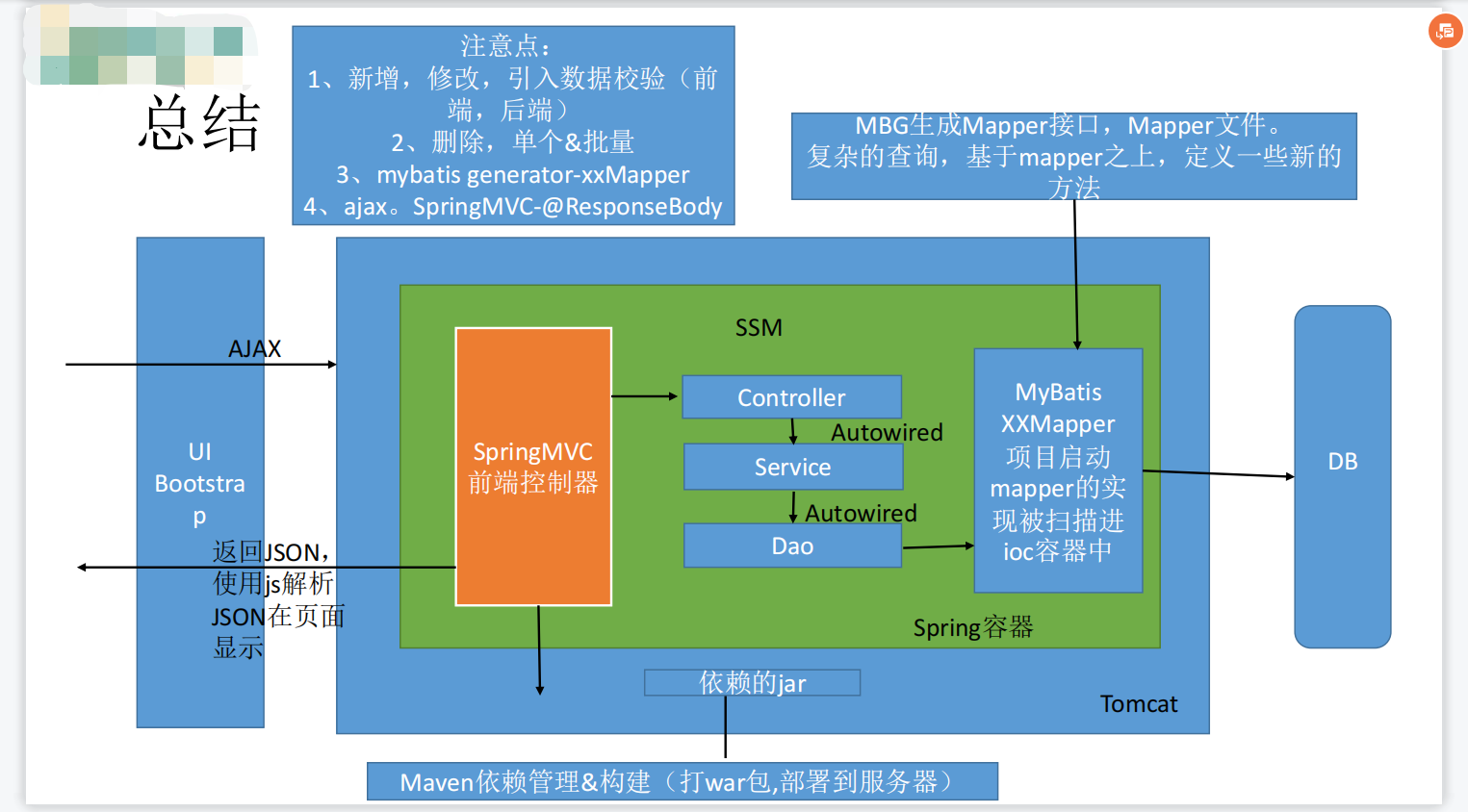
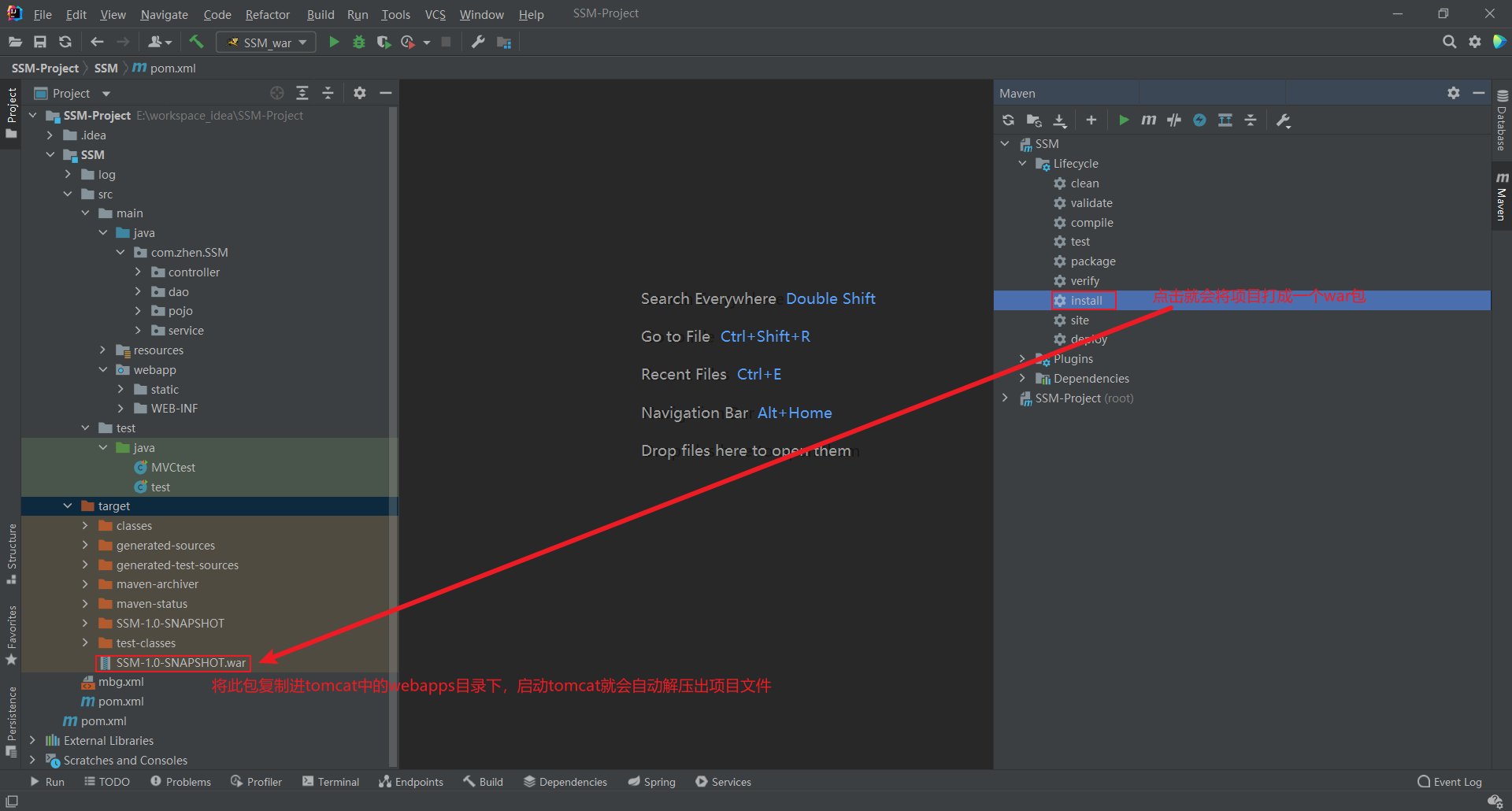
可以通过maven把项目进行打包然后将包放到tomcat的webapps目录进行部署

 浙公网安备 33010602011771号