
期中测试
题目要求
石家庄铁道大学在校学生行程统计(20分)
考试时间:180分钟
1、项目需求:
为了有效防止新冠疫情的传播,急需开发一套在校学生行程统计系统,完成信息统计,提前准备,有效保护在校学生的安全。
2.系统要求与功能设计
2.1 页面功能要求
(1)能够在Tomcat服务器中正确部署,并通过浏览器查看;(1分)
(2)网站页面整体风格统一;
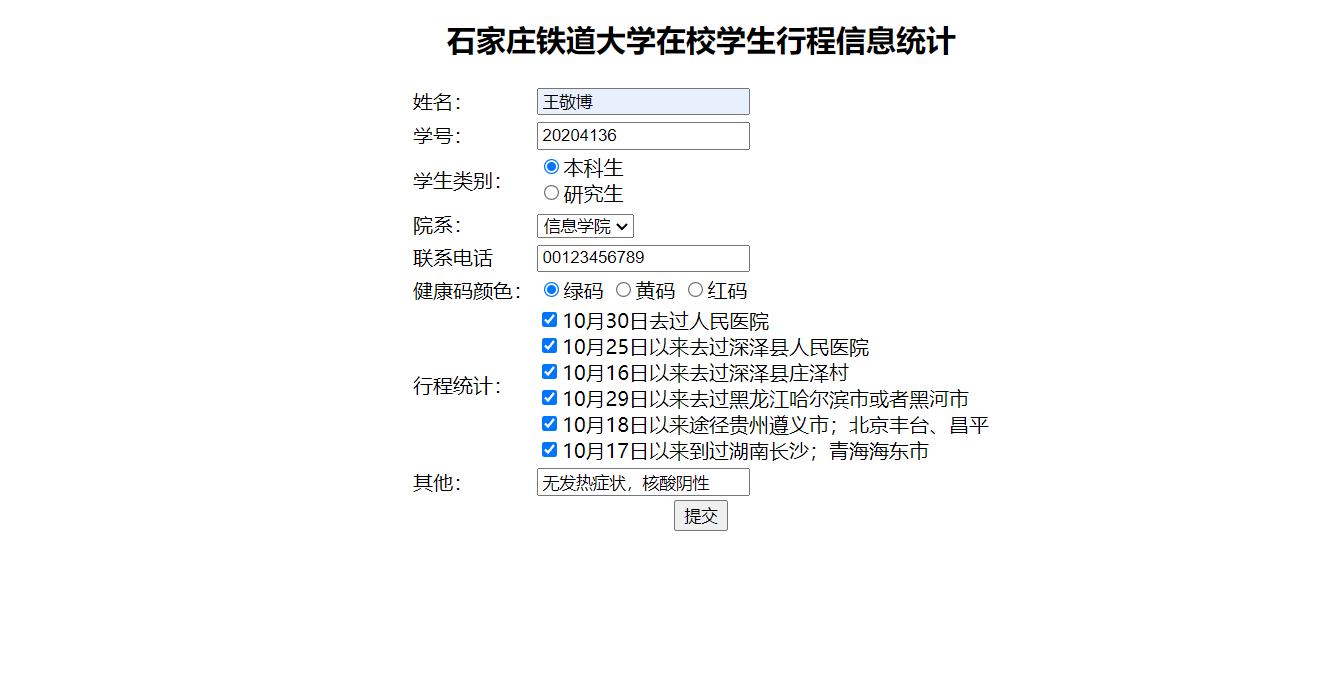
(3)石家庄铁道大学在校学生行程统计页面,页面效果如图所示:(15分)
页面详细信息如下表所示:
|
信息标题 |
信息类型 |
填写要求 |
|
姓名 |
文本框 |
|
|
学号 |
文本框 |
要求输入八位数字 |
|
学生类别 |
单选框 |
单选项:本科生或者研究生 |
|
院系 |
下拉列表框 |
下来列表框内容包括(土木学院、机械学院、交通学院、信息学院、经管学院) |
|
联系电话 |
文本框 |
要求输入11位数字 |
|
健康码颜色 |
单选框 |
单选选项(绿码、黄码、红码) |
|
行程统计 |
复选框 |
□10月30日去过人民医院 □10月25日以来去过深泽县人民医院 □10月16日以来去过深泽县庄泽村 □10月29日以来去过黑龙江哈尔滨市或者黑河市 □10月18日以来途径贵州遵义市;北京丰台、昌平 □10月17日以来到过湖南长沙;青海海东市 (以上选项可以多选) |
|
其他涉疫信息需要填报的 |
文本框 |
|
②点击“提交”按钮,保存成功则提示信息“填报成功”,失败则提示“信息填报错误”,并返回当前页面
评分标准:
①完成石家庄铁道大学在校学生行程统计页面(未完成0分,完成2分);
②保存行程信息入库(未完成0分,完成6分);
③学号和联系电话判断是否为指定位数的数字。(未完成0分,完成一个0.5,全部完成1分);
④学生类别和健康码颜色实现单选框选择功能(未完成0分,完成一个0.5,全部完成1分);
⑤实现院系下拉框功能(未完成0分,完成1分)。
⑥实现行程统计复选框功能(未完成0分,完成2分)
⑦实现提交后信息提示功能;(未完成0分,完成2分)
2.2 功能要求
(1)设计出合理的数据库和数据表,要求使用mysql、sqlserver、oracle三种数据库中一种(1分)
(2)使用Serverlet实现信息提交功能(1分)。
(3)使用Java Bean封装数据库连接操作(2分)。
这次考试连接数据库实现信息提交,相对简单,麻烦的是前台表单对于输入数据格式的限制比如限制输入11位数字,用到js的知识。
我把我的整个考试内容发到下面
工程目录分布如下
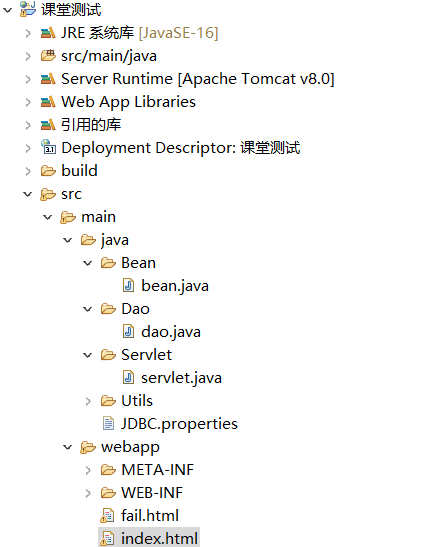
index.html
<!DOCTYPE html>
<html lang="en">

<head>
    <meta charset="UTF-8">
    <meta http-equiv="X-UA-Compatible" content="IE=edge">
    <meta name="viewport" content="width=device-width, initial-scale=1.0">
    <title>Document</title>
</head>


<body>
    <div id="addSubjectForm" align="center">
        <form action="/课堂测试/servlet?method=add" method="post" onsubmit="return sumbit_sure()">
            <tr>
                <h2>石家庄铁道大学在校学生行程信息统计</h2>
            </tr>

            <table align="center">
                <tr>
                    <td>姓名:</td>
                    <td>
                        <input type="text" name="name">
                    </td>
                </tr>

                <tr>
                    <td>学号:</td>
                    <td>
                        <input type="text" name="xuehao" id="1">
                    </td>
                </tr>

                <tr>
                    <td>学生类别:</td>
                    <td>
                        <input type="radio" name="type" value="本科生">本科生<br>
                        <input type="radio" name="type" value="研究生">研究生
                    </td>
                </tr>

                <tr>
                    <td>院系:</td>
                    <td>
                        <select name="yuanxi">
             <option value="土木学院">土木学院</option>
             <option value="交通学院">交通学院</option>
             <option value="机械学院">机械学院</option>
             <option value="经管学院" >经管学院</option>
             <option value="信息学院">信息学院</option>
             </select>
                    </td>
                </tr>

                <tr>
                    <td>联系电话</td>
                    <td>
                        <input type="text" name="dianhua" id="2">
                    </td>
                </tr>

                <tr>
                    <td> 健康码颜色:</td>
                    <td>
                        <input type="radio" name="colour" value="绿码">绿码
                        <input type="radio" name="colour" value="黄码">黄码
                        <input type="radio" name="colour" value="红码">红码

                    </td>
                </tr>

                <tr>
                    <td>行程统计:</td>
                    <td>
                        <input type="checkbox" name="xingcheng" value="10月30日去过人民医院">10月30日去过人民医院 <br>
                        <input type="checkbox" name="xingcheng" value="10月25日以来去过深泽县人民医院">10月25日以来去过深泽县人民医院<br>
                        <input type="checkbox" name="xingcheng" value="10月16日以来去过深泽县庄泽村">10月16日以来去过深泽县庄泽村<br>
                        <input type="checkbox" name="xingcheng" value="10月29日以来去过黑龙江哈尔滨市或者黑河市">10月29日以来去过黑龙江哈尔滨市或者黑河市<br>
                        <input type="checkbox" name="xingcheng" value="10月18日以来途径贵州遵义市;北京丰台、昌平">10月18日以来途径贵州遵义市;北京丰台、昌平<br>
                        <input type="checkbox" name="xingcheng" value="无住宅">10月17日以来到过湖南长沙;青海海东市<br>
                    </td>
                </tr>

                <tr>
                    <td>其他:</td>
                    <td>
                        <input type="text" name="other">
                    </td>
                </tr>
                <tr>
                    <td colspan="2">
                        <div align="center">
                            <input type="submit" value="提交">
                        </div>
                    </td>
                </tr>
        </form>
    </div>

</body>
<script language="javascript">
    /*校验是否全由8位数字组成 */
    function isStudentNo(str) {
        var reg = /^[0-9]{8}$/; /*定义验证表达式*/
        return reg.test(str); /*进行验证*/
    }
    /*校验电话码格式 */
    function isTelCode(str) {
        var reg = /^[0-9]{11}$/;
        return reg.test(str);
    }

    function sumbit_sure() {
        if (!isStudentNo(document.getElementById("1").value)) {
            alert("学号必须是8位数字");
            document.getElementById("1").focus(); //聚焦焦点到该输入框中
            return false;
        }
        if (!isTelCode(document.getElementById("2").value)) {
            alert("联系电话必须是11位");
            document.getElementById("2").focus();
            return false;
        }
        var gnl = confirm("确定要提交?");
        if (gnl == true) {
            alert("提交成功");
            return true;
        } else {
            return false;
        }
    }
</script>

</html>
fail.html
<!DOCTYPE html>
<html>
<head>
    <meta charset="UTF-8">
    <meta http-equiv="X-UA-Compatible" content="IE=edge">
    <meta name="viewport" content="width=device-width, initial-scale=1.0">
    <title>Document</title>
</head>


<body>
添加失败<br>
    <div id="addSubjectForm" align="center">
        <form action="/课堂测试/servlet?method=add" method="post" onsubmit="return sumbit_sure()">
            <tr>
                <h2>石家庄铁道大学在校学生行程信息统计</h2>
            </tr>

            <table align="center">
                <tr>
                    <td>姓名:</td>
                    <td>
                        <input type="text" name="name">
                    </td>
                </tr>

                <tr>
                    <td>学号:</td>
                    <td>
                        <input type="text" name="xuehao" id="1">
                    </td>
                </tr>

                <tr>
                    <td>学生类别:</td>
                    <td>
                        <input type="radio" name="type" value="本科生">本科生<br>
                        <input type="radio" name="type" value="研究生">研究生
                    </td>
                </tr>

                <tr>
                    <td>院系:</td>
                    <td>
                        <select name="yuanxi">
             <option value="土木学院">土木学院</option>
             <option value="交通学院">交通学院</option>
             <option value="机械学院">机械学院</option>
             <option value="经管学院" >经管学院</option>
             <option value="信息学院">信息学院</option>
             </select>
                    </td>
                </tr>

                <tr>
                    <td>联系电话</td>
                    <td>
                        <input type="text" name="dianhua" id="2">
                    </td>
                </tr>

                <tr>
                    <td> 健康码颜色:</td>
                    <td>
                        <input type="radio" name="colour" value="绿码">绿码
                        <input type="radio" name="colour" value="黄码">黄码
                        <input type="radio" name="colour" value="红码">红码

                    </td>
                </tr>

                <tr>
                    <td>行程统计:</td>
                    <td>
                        <input type="checkbox" name="xingcheng" value="10月30日去过人民医院">10月30日去过人民医院 <br>
                        <input type="checkbox" name="xingcheng" value="10月25日以来去过深泽县人民医院">10月25日以来去过深泽县人民医院<br>
                        <input type="checkbox" name="xingcheng" value="10月16日以来去过深泽县庄泽村">10月16日以来去过深泽县庄泽村<br>
                        <input type="checkbox" name="xingcheng" value="10月29日以来去过黑龙江哈尔滨市或者黑河市">10月29日以来去过黑龙江哈尔滨市或者黑河市<br>
                        <input type="checkbox" name="xingcheng" value="10月18日以来途径贵州遵义市;北京丰台、昌平">10月18日以来途径贵州遵义市;北京丰台、昌平<br>
                        <input type="checkbox" name="xingcheng" value="无住宅">10月17日以来到过湖南长沙;青海海东市<br>
                    </td>
                </tr>

                <tr>
                    <td>其他:</td>
                    <td>
                        <input type="text" name="other">
                    </td>
                </tr>
                <tr>
                    <td colspan="2">
                        <div align="center">
                            <input type="submit" value="提交">
                        </div>
                    </td>
                </tr>
        </form>
    </div>

</body>
<script language="javascript">
    /*校验是否全由8位数字组成 */
    function isStudentNo(str) {
        var reg = /^[0-9]{8}$/; /*定义验证表达式*/
        return reg.test(str); /*进行验证*/
    }
    /*校验电话码格式 */
    function isTelCode(str) {
        var reg = /^[0-9]{11}$/;
        return reg.test(str);
    }

    function sumbit_sure() {
        if (!isStudentNo(document.getElementById("1").value)) {
            alert("学号必须是8位数字");
            document.getElementById("1").focus(); //聚焦焦点到该输入框中
            return false;
        }
        if (!isTelCode(document.getElementById("2").value)) {
            alert("联系电话必须是11位");
            document.getElementById("2").focus();
            return false;
        }
        var gnl = confirm("确定要提交?");
        if (gnl == true) {
            alert("提交成功");
            return true;
        } else {
            return false;
        }
    }
</script>
</html>
bean
package Bean;

public class bean {
	private String name;
	private String xuehao;
	private String type;
	private String yuanxi;
	private String dianhua;
	private String colour;
	private String xingcheng;
	private String other;
	public bean(String name, String xuehao, String type, String yuanxi, String dianhua, String colour, String xingcheng,
			String other) {
		super();
		this.name = name;
		this.xuehao = xuehao;
		this.type = type;
		this.yuanxi = yuanxi;
		this.dianhua = dianhua;
		this.colour = colour;
		this.xingcheng = xingcheng;
		this.other = other;
	}
	public String getName() {
		return name;
	}
	public void setName(String name) {
		this.name = name;
	}
	public String getXuehao() {
		return xuehao;
	}
	public void setXuehao(String xuehao) {
		this.xuehao = xuehao;
	}
	public String getType() {
		return type;
	}
	public void setType(String type) {
		this.type = type;
	}
	public String getYuanxi() {
		return yuanxi;
	}
	public void setYuanxi(String yuanxi) {
		this.yuanxi = yuanxi;
	}
	public String getDianhua() {
		return dianhua;
	}
	public void setDianhua(String dianhua) {
		this.dianhua = dianhua;
	}
	public String getColour() {
		return colour;
	}
	public void setColour(String colour) {
		this.colour = colour;
	}
	public String getXingcheng() {
		return xingcheng;
	}
	public void setXingcheng(String xingcheng) {
		this.xingcheng = xingcheng;
	}
	public String getOther() {
		return other;
	}
	public void setOther(String other) {
		this.other = other;
	}
}
servlet层
package Servlet;

import java.io.IOException;
import java.sql.SQLException;

import javax.servlet.ServletException;
import javax.servlet.annotation.WebServlet;
import javax.servlet.http.HttpServlet;
import javax.servlet.http.HttpServletRequest;
import javax.servlet.http.HttpServletResponse;

import Bean.bean;
import Dao.dao;

/**
 * Servlet implementation class servlet
 */
@WebServlet("/servlet")
public class servlet extends HttpServlet {
    private static final long serialVersionUID = 1L;

    /**
     * @see HttpServlet#doGet(HttpServletRequest request, HttpServletResponse response)
     */
    protected void doGet(HttpServletRequest request, HttpServletResponse response) throws ServletException, IOException {
        // TODO Auto-generated method stub
        response.getWriter().append("Served at: ").append(request.getContextPath());
    }

    /**
     * @see HttpServlet#doPost(HttpServletRequest request, HttpServletResponse response)
     */
    protected void doPost(HttpServletRequest request, HttpServletResponse response) throws ServletException, IOException {
        // TODO Auto-generated method stub
        try {
            add(request, response);
        } catch (SQLException e) {
            // TODO 自动生成的 catch 块
            e.printStackTrace();
        } catch (IOException e) {
            // TODO 自动生成的 catch 块
            e.printStackTrace();
        }
    }

    void add(HttpServletRequest request, HttpServletResponse response) throws SQLException, IOException, ServletException
    {
request.setCharacterEncoding("UTF-8");
 String name=request.getParameter("name");
 String xuehao=request.getParameter("xuehao");
 String type=request.getParameter("type");
 String yuanxi=request.getParameter("yuanxi");
 String dianhua=request.getParameter("dianhua");
 String colour=request.getParameter("colour");
 String[] xingcheng=request.getParameterValues("xingcheng");
 String a="";
 for(int i=0;i<xingcheng.length;i++)
 a+=xingcheng[i]+",";
 String other=request.getParameter("other");
 bean p=new bean(name,xuehao,type,yuanxi,dianhua,colour,a,other);
 dao dao=new dao();
boolean flag= dao.add(p);
if(flag)
{
    response.setContentType("text/html;charset=UTF-8");
    response.getWriter().append("添加成功");
}
else
{

    request.getRequestDispatcher("fail.html").forward(request, response);
}
    }
}
dao层
package Dao;

import java.sql.Connection;
import java.sql.PreparedStatement;
import java.sql.SQLException;

import Bean.bean;
import Utils.JDBCUtils;

public class dao {

	private Connection connection ;
	private PreparedStatement preparedStatement ;
	private int i;


public boolean add(bean p) throws SQLException
{
	i=0;
	this.connection = JDBCUtils.getConnection();
	this.preparedStatement=null;
	String sql = "insert into yiqing(name,xuehao,type,yuanxi,dianhua,colour,xingcheng,other) values(?,?,?,?,?,?,?,?)";
	preparedStatement = connection.prepareStatement(sql);
	preparedStatement.setString(1,p.getName());
	preparedStatement.setString(2,p.getXuehao());
	preparedStatement.setString(3,p.getType());
	preparedStatement.setString(4,p.getYuanxi());
	preparedStatement.setString(5,p.getDianhua());
	preparedStatement.setString(6,p.getColour());
	preparedStatement.setString(7,p.getXingcheng());
	preparedStatement.setString(8,p.getOther());
	i = preparedStatement.executeUpdate();
	JDBCUtils.release((com.mysql.jdbc.Connection) connection,  preparedStatement);
	if(i==0)
	return false;
	else
		return true;
}
}
数据库我采用的是配置文件的方式
package Utils;

import java.io.FileReader;
import java.io.IOException;
import java.sql.DriverManager;
import java.sql.SQLException;
import java.util.Properties;

import com.mysql.jdbc.Connection;

/**
 * 这个类是jdbc的工具类
 * 提供getConnection方法
 * 提供close方法
 * 开发步骤:
 * 1.私有化构造函数,防止外界直接new对象
 * 2.提供getConnection,用来对外界提供获取数据连接
 * 3.提供close方法,用来关闭资源
 * 4.测试
 * @date 2018年3月23日
 *
 */
public class JDBCUtils {
    //将读取属性文件放在静态代码块中
    //保证文件只被读取一次,节省资源

	// 定义静态变量,使用静态代码获取配置文件的值
    private static String url;
    private static String user;
    private static String password;
    private static String driver;
    // 使用静态代码注册驱动并给静态变量赋值
    static{
        try {
            // 创建Properties集合类
            Properties pro = new Properties();
            // 获取src路径下文件,使用ClassLoader类加载器
            ClassLoader classLoader = JDBCUtils.class.getClassLoader();
            // URL定位了文件的绝对路径
            java.net.URL res = classLoader.getResource("JDBC.properties");
            // 获取字符串路径
            String path = res.getPath();
            // 读取文件
            pro.load(new FileReader(path));
            // 给静态变量赋值
            url = pro.getProperty("url");
            user = pro.getProperty("user");
            password = pro.getProperty("password");
            driver = pro.getProperty("driver");
            // 注册驱动
            Class.forName(driver);
        } catch (IOException e) {
            e.printStackTrace();
        } catch (ClassNotFoundException e) {
            e.printStackTrace();
        }
    }
	//blog.csdn.net/u012071918/article/details/76830055
    //1.私有化构造函数,
    // 防止外界直接new对象
    //private JDBCUtils(){}
    //2.提供getConnection,
    // 用来对外界提供获取数据连接
    public static java.sql.Connection getConnection() throws SQLException {
        return DriverManager.getConnection(url, user, password);
}

    // 3.提供close方法,用来关闭资源
    public static void release(Connection connection, java.sql.PreparedStatement preparedStatement) {

       /* if(resultSet!=null) {
            try {
                resultSet.close();
            } catch (SQLException e) {
                e.printStackTrace();
            }
        }*/
        if(preparedStatement!=null) {
            try {
                preparedStatement.close();
            } catch (SQLException e) {
                e.printStackTrace();
            }
        }
        if(connection!=null) {
            try {
                connection.close();
            } catch (SQLException e) {
                e.printStackTrace();
            }
        }
    }
}
数据库配置文件JDBC.properties
url=jdbc:mysql:///test?useUnicode=true&characterEncoding=utf8
user=root
password=root
driver=com.mysql.jdbc.Driver
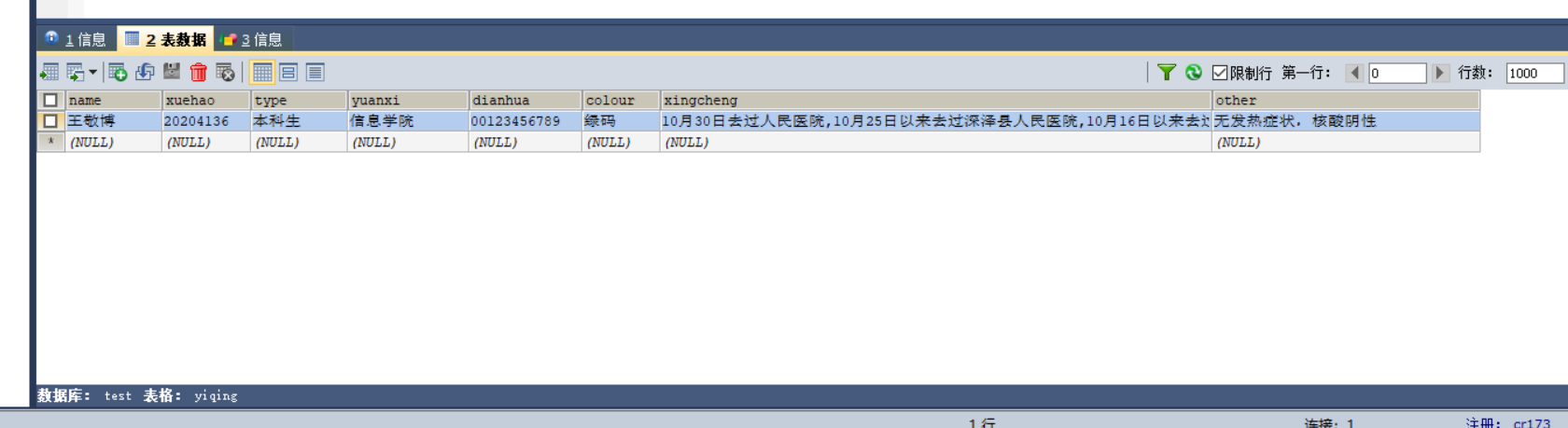
项目截图如下
以上是全部内容,供大家参考,如有bug,欢迎指正 。

 浙公网安备 33010602011771号