

学习笔记——JUNIT,JDK8(不推荐),文件流
一、学习重点
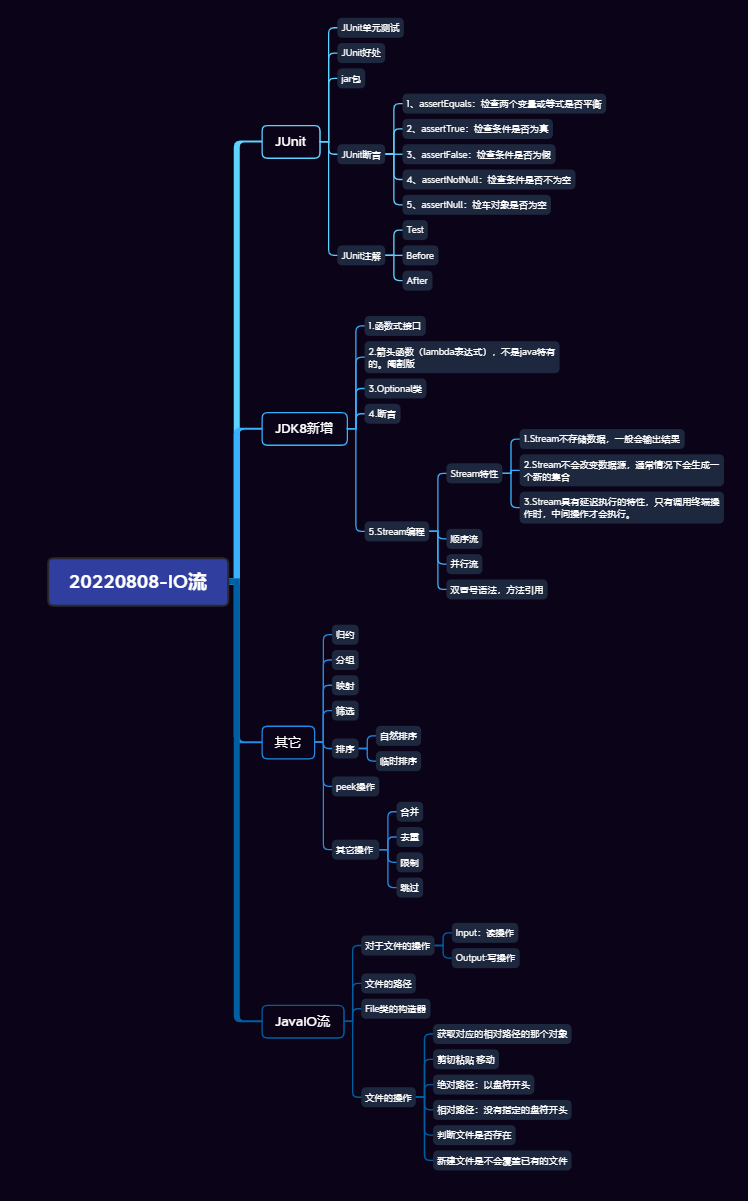
二、学习内容
文件工具类
    @Test
    public void test08() {
        File file = new File("D:\\QQ");
        File[] files = file.listFiles((f) -> {
            if (f.isFile()) {
                return true;
            }
            return false;
        });
        System.out.println(Arrays.toString(files));
//        String[] list = file.list((dir, name) -> {
//            if(dir.isDirectory()){
//                return true;
//            }
////            if (name.endsWith("xml")) {
////                return true;
////            }
//            return false;
//        });
//        System.out.println(Arrays.toString(list));
    }

    @Test
    public void test07() {
        File file = new File("E:\\workspace");
        String[] fileNames = file.list();
//        System.out.println(Arrays.toString(fileNames));
        File[] files = file.listFiles();
        System.out.println(Arrays.toString(files));
    }

    @Test
    public void test06() {
        File file = new File("d:/123.txt");
        File file1 = new File("bbb.txt");
//        System.out.println(file.getAbsolutePath());
//        System.out.println(file1.getAbsolutePath());
        // 获取对应的相对路径的那个对象
        File absoluteFile = file1.getAbsoluteFile();
//        System.out.println(file.getParent());
        File parentFile = file.getParentFile();
//        System.out.println(file.getName());
//        System.out.println(file1.getPath());
//        System.out.println(new Date(file.lastModified()));
//        System.out.println(file.length());
        // 剪切粘贴 移动
        file.renameTo(new File("d:\\aaa.txt"));
    }

    @Test
    public void test05() throws IOException {
        File file = new File("e:/aaa.txt");
        File file2 = new File("E:\\idea");
//        System.out.println(file.isHidden());
//        System.out.println(file.isFile());
//        System.out.println(file2.isDirectory());
        /*
            绝对路径和相对路径
            绝对路径:以盘符开头
            相对路径:没有指定的盘符开头
         */
//        System.out.println(file.isAbsolute());
        // 判断文件是否存在
//        System.out.println(file.exists());
        // 新建文件是不会覆盖已有的文件
//        System.out.println(file.createNewFile());
//        System.out.println(file2.mkdirs());
    }


    @Test
    public void test04() throws IOException {
        // 新建某一个路径下的某一个文件,这个路径还不存在,没有这个方法,需要我们封装工具类
        // 怎么做?
        /*
            思想:
            1.工具类,静态方法
            2.实体类,
         */
        File file = new File("e:/hello/abc.txt");
//        file.mkdirs();
//        file.mkdir();
        file.createNewFile();

    }

    @Test
    public void test03(){
        File file = new File("e:/hello");

//        boolean mkdir = file.mkdir();
        file.delete();
//        boolean b = file.mkdirs();
//        System.out.println(b);
//        try {
//            file.createNewFile();
//            System.out.println("创建成功...");
//        } catch (IOException e) {
//            throw new RuntimeException(e);
//        }
    }

    @Test
    public void test02(){
        File file = new File("e:\\aaa.txt");
        // 如果存在就删除,如果不存在就拉倒
        // file类的删除是不走回收站
        boolean delete = file.delete();
        System.out.println(delete);
    }

    @Test
    public void test01() {
        // 创建一个文件
        File file1 = new File("e:\\aaa.txt");
        try {
            file1.createNewFile();
            System.out.println("文件创建成功...");
        } catch (IOException e) {
            e.printStackTrace();
        }
    }
三、笔记内容
IO流
反射
网络通信
1、JUnit单元测试
JUnit是一个Java语言单元测试框架。
JUnit的好处
1、可以书写一系列的测试方法,对项目的所有接口或方法进行单元测试
2、启动后,自动化的测试。
3、只需要查看最后的结果。
4、每个单元测试的用例是相对独立的,由JUnit启动。
5、添加,删除,屏蔽测试方法
jar包
如果要引入第三方的插件,xxx.jar的文件
首先要把这个文件导入到我们的工程目录下
其次,要添加到工程的以来目录中
//Test注解是JUnit提供的一个单元测试注解
    //如果你的工程没有导入Junit的jar包,Test注解是不认识的
    /*
        测试方法:
        1、不能有返回值
        2、不能有参数列表
        3、必须有Test注解
     */
    @Test
    public void test01(){
        System.out.println("Hello JUnit");
    }
    @Test
    public void test02(){
        System.out.println("Hello JUnit02");
    }
JUnit断言
Junit的所有的断言都包含Assert类中
这个类提供了很多有用的断言来编写测试用例
只有失败的断言才会被记录
1、assertEquals:检查两个变量或等式是否平衡
2、assertTrue:检查条件是否为真
3、assertFalse:检查条件是否为假
4、assertNotNull:检查条件是否不为空
5、assertNull:检测对象是否为空
断言不成功会抛异常,即使程序正常运行但是结果不正确,也会以失败结束。
    @Test
    public void test01(){
       Assert.assertTrue(false);
    }
JUnit注解
1、Test
2、Before:在测试方法执行之前执行的方法
3、After
命名规范
单元测试类的类名:被测试类的类名 + Test
测试方法的命名:test + 被测试方法的方法名
    @Test
    public void test01(){
        System.out.println("test01方法执行");
    }
    @Test
    public void test02(){
        System.out.println("test02方法执行");
    }
    @Before
    public void testBefore(){
        System.out.println("testBefore方法执行");
    }
    @After
    public void testAfter(){
        System.out.println("testAfter方法执行");
    }
集合的面试题
1、Hashtable和ConcurrentHashMap性能测试
2、ArrayList和LinkedList性能测试
数组查询快,插入慢,链表插入快,查询慢
1、尾插数组快,链表满
2、遍历,数组快
3、头插,链表快,数组慢
4、随机删除,如果要过滤,建议用LinkedLlist
开发中,还是以 ArrayList 为主
/*我们尝试开辟50个线程,每个集合向集合中put100000个元素
      测试两个类所需的时间
     */
    @Test
    public void testArrayList() {
        List<Integer> list = new ArrayList<>();

        for (int i = 0; i < 10000000; i++) {
            list.add((int)Math.random()*100);
        }
        long start = System.currentTimeMillis();
//        for (int i = 0; i < list.size(); i++) {
//            list.get(i);
//        }
        Iterator<Integer> iterator = list.iterator();
        while(iterator.hasNext()) {
            // 随机删除
            if(iterator.next() > 500){
                iterator.remove();
            }
        }
        long end = System.currentTimeMillis();
        System.out.println("arraylist用时:" + (end - start));
    }

    @Test
    public void testLinkedList() {
        List<Integer> list = new LinkedList<>();

        for (int i = 0; i < 10000000; i++) {
            list.add((int)Math.random()*100);
        }
        long start = System.currentTimeMillis();
//        for (int i = 0; i < list.size(); i++) {
//            list.get(i);
//        }
        Iterator<Integer> iterator = list.iterator();
        while (iterator.hasNext()) {
            if(iterator.next() > 500){
                iterator.remove();
            }
//            iterator.next();
        }
        long end = System.currentTimeMillis();
        System.out.println("linkedlist用时:" + (end - start));
    }

    /* 我们尝试开辟50个线程,每个线程向集合中put100000个元素,
        测试两个类所需的时间
     */
    @Test
    public void hashtableTest() throws InterruptedException {
        final Map<Integer,Integer> map = new Hashtable<>(500000);
        // 计数器
//        final CountDownLatch countDownLatch = new CountDownLatch(50);
        System.out.println("开始测试hashtable-----------------------");
        long start = System.currentTimeMillis();
        for (int i = 0; i < 50; i++) {
            final int j = i;
            new Thread(()->{
                for (int k = 0;k < 100000;k++){
                    map.put(j*k,1);
                }
                // 记录添加的数据次数
//                countDownLatch.countDown();
            }).start();
        }
//        countDownLatch.await();
        long end = System.currentTimeMillis();
        System.out.println("hashtable执行了:" + (end - start)); // 1043ms
    }


    @Test
    public void testConcurrentHashMap() throws InterruptedException {
        final Map<Integer,Integer> map = new ConcurrentHashMap<>(500000);
        // 计数器
//        final CountDownLatch countDownLatch = new CountDownLatch(50);
        System.out.println("开始测试ConcurrentHashMap-----------------------");
        long start = System.currentTimeMillis();
        for (int i = 0; i < 50; i++) {
            final int j = i;
            new Thread(()->{
                for (int k = 0;k < 100000;k++){
                    map.put(j*k,1);
                }
                // 记录添加的数据次数
//                countDownLatch.countDown();
            }).start();
        }
//        countDownLatch.await();
        long end = System.currentTimeMillis();
        System.out.println("ConcurrentHashMap执行了:" + (end - start)); // 71ms
    }
JDK8新增
Stream编程
容器对象功能的增强
我们可以将流看做流水线,这个流水线是处理数据的流水线
当我们使用一个流的时候,通常包括三个步骤:
1.获取一个数据源
2.执行操作获取想要的结果
3.每次操作,原有的流对象不改变,返回一个新的Stream对象
Stream有几个特性:
1.Stream不存储数据,一般会输出结果
2.Stream不会改变数据源,通常情况下会生成一个新的集合
3.Stream具有延迟执行的特性,只有调用终端操作时,中间操作才会执行。
@Test
    public void test01() {
        List<String> list = Arrays.asList("a","b","c");
        // 创建一个顺序流
        Stream<String> stream = list.stream();
        // 创建一个并行流
        Stream<String> parallelStream = list.parallelStream();

        Stream<Integer> stream1 = Stream.of(1, 2, 3, 4, 5, 6);

        Stream<Integer> stream2 = Stream.iterate(0, (x) -> x + 3).limit(4);
    }
    // 创建一个复杂的集合
    List<Person> personList = new ArrayList<>();
    // 创建一个简单的集合
    List<Integer> simpleList = Arrays.asList(15,22,15,11,33,52,22,14,33,52);

    @Before
    public void before() {
        personList.add(new Person("张三",3000,23,"男","长春"));
        personList.add(new Person("李四",7000,34,"男","西安"));
        personList.add(new Person("王五",5000,22,"女","长春"));
        personList.add(new Person("小明",1000,33,"女","上海"));
        personList.add(new Person("小红",8000,44,"女","北京"));
        personList.add(new Person("小黑",6000,36,"女","南京"));
    }

    @Test
    public void test01(){
        // 打印集合元素
        // 双冒号语法,方法引用
        simpleList.stream().forEach(System.out::println);
        // 其实还可以简化操作
        simpleList.forEach(System.out::println);
    }

    @Test
    public void test02() {
        // 找到第一个元素
        Optional<Integer> first = simpleList.stream().findFirst();

        // 随便找一个
        // 如果没有并行,any也是第一个
        Optional<Integer> any = simpleList.stream().findAny();

        System.out.println("第一个:" + first.get());
        System.out.println("任意一个:" + any.get());
    }

    @Test
    public void test03() {
        // 判断有没有任意一个人年龄大于35岁
        // 任意匹配
        boolean b = personList.stream()
                .anyMatch(item -> item.getAge() > 35);
        System.out.println(b);

        // 判断是不是所有人年龄都大于35岁
        b = personList.stream().allMatch(item -> item.getAge() > 35);
        System.out.println(b);
    }

    @Test
    public void Ch07() {

        List<Integer> collect = simpleList.stream().collect(Collectors.toList());
        System.out.println(collect);
        Set<Integer> collect1 = simpleList.stream().collect(Collectors.toSet());
        System.out.println(collect1);
        Map<Integer, Integer> map = simpleList.stream()
                .collect(Collectors
                        .toMap(item -> item, item -> item + 1));
        System.out.println(map);
    }

    @Test
    public void Ch08() {
        // 统计
        long count = new Random().ints().limit(50).count();
        System.out.println(count);
        OptionalDouble average = new Random().ints().limit(50).average();
        average.ifPresent(System.out::println);
        int sum = new Random().ints().limit(50).sum();
        System.out.println(sum);
    }

    /*
        归约(reduce)缩减,把一个流缩减成一个值,
        可以实现对集合的求和,求乘积,求最值
     */
    @Test
    public void test09(){
        Integer result = simpleList.stream().reduce(1, (n1, n2) -> n1 - n2);
        System.out.println(result);
    }

    @Test
    public void test10(){
        List<String> list = Arrays.asList("A","B","C");
        String string = list.stream().collect(Collectors.joining("-"));
        System.out.println("拼接后的字符串:" + string);
    }

    /*
        分组将集合分为多个map,
        比如员工按性别分组
        员工按薪资是否高于8000分组
     */
    @Test
    public void test11() {
        // 根据工资分组
        Map<Boolean, List<Person>> collect = personList.stream().collect(Collectors.groupingBy(x -> x.getSalary() > 5000));
        System.out.println(collect);
        // 根据性别分组
        Map<String, List<Person>> collect1 = personList.stream().collect(Collectors.groupingBy(Person::getGender));
        System.out.println(collect1);

        // 将员工根据性别分组,再按地区分组
        Map<String, Map<String, List<Person>>> collect2 = personList.stream()
                .collect(Collectors.groupingBy(Person::getGender, Collectors.groupingBy(Person::getArea)));
        System.out.println(collect2);
    }

    /**
     * 筛选
     */
    @Test
    public void test12() {
//        simpleList.stream().filter(item -> item > 17).forEach(System.out::println);

        // 筛选员工中工资大于8000的人,并形成新的集合
        List<Person> collect = personList
                .stream()
                .filter(item -> item.getSalary() > 5000)
                .collect(Collectors.toList());
        System.out.println(collect);
    }

    /**
     * 映射
     * 将一个流的元素按照一定的映射规则映射到另一个流中。
     */
    @Test
    public void test13(){
        // 将员工的工资全部增加1000
//        personList
//                .stream().map(item -> {
//            item.setSalary(item.getSalary() + 1000);
//            return item;
//        }).forEach(System.out::println);
        List<StringBuilder> collect = simpleList.stream().map(item -> {
            StringBuilder strb = new StringBuilder();
            strb.append(item);
            return strb;
        }).collect(Collectors.toList());
        System.out.println(collect);
    }

    /**
     * 排序:sorted
     * 自然排序:
     * 临时排序:
     */
    @Test
    public void test14() {
        // 将员工按工资由低到高排序(自然排序--升序)
        List<String> collect = personList.stream()
                .sorted(Comparator.comparing(Person::getSalary))
                .map(Person::getName)
                .collect(Collectors.toList());
        System.out.println(collect);
        // 按照员工工资的降序
        List<String> collect1 = personList
                .stream()
                .sorted(Comparator.comparing(Person::getSalary).reversed())
                .map(Person::getName)
                .collect(Collectors.toList());
        System.out.println(collect1);
    }

    /**
     * peek操作,调试
     */
    @Test
    public void test15(){
        // 在stream中调试,stream不支持debug
        List<Person> collect = personList.stream()
                .filter(item -> item.getSalary() > 5000)
                .peek(System.out::println)
                .collect(Collectors.toList());
        System.out.println(collect);
    }

    /**
     * 其他操作:合并、去重、限制、跳过。。。。
     */
    @Test
    public void test16() {
        /*
            distinct:去重
            skip:跳过几个数据
            limit:限制使用几个数据
         */
        simpleList
                .stream()
                .distinct()
                .skip(2)
                .limit(6)
                .forEach(System.out::println);

    }
Person类
package com.jsoft.morning;

public class Person {

    private String name;
    private Integer salary;
    private Integer age;
    private String gender;
    private String area;

    public Person() {
    }

    public Person(String name, Integer salary, Integer age, String gender, String area) {
        this.name = name;
        this.salary = salary;
        this.age = age;
        this.gender = gender;
        this.area = area;
    }

    public String getName() {
        return name;
    }

    public void setName(String name) {
        this.name = name;
    }

    public Integer getSalary() {
        return salary;
    }

    public void setSalary(Integer salary) {
        this.salary = salary;
    }

    public Integer getAge() {
        return age;
    }

    public void setAge(Integer age) {
        this.age = age;
    }

    public String getGender() {
        return gender;
    }

    public void setGender(String gender) {
        this.gender = gender;
    }

    public String getArea() {
        return area;
    }

    public void setArea(String area) {
        this.area = area;
    }

    @Override
    public String toString() {
        return "Person{" +
                "name='" + name + '\'' +
                ", salary=" + salary +
                ", age=" + age +
                ", gender='" + gender + '\'' +
                ", area='" + area + '\'' +
                '}';
    }
}
JDK8函数式接口
Consumer<T>:消费者 void accept(T t)
Supplier:供应商 T get()
Function: R apply(T t),将一个数据转化成另一个数据
Predicate:断言,boolean test(T t),判断返回值是boolean
Optional类是java8为了解决null问题
JDK8新增:
1.函数式接口
2.箭头函数(lambda表达式),不是java特有的。阉割版
3.Optional类
4.断言
5.Stream编程
    @Test
    public void test01() {
        String str = null;
        // 返回一个对象值为空的Optional对象
//        Optional<String> empty = Optional.empty();
//        Optional<String> hello = Optional.of(str);
        Optional<String> o = Optional.ofNullable(null);
        System.out.println(o.get());
    }
Java IO流---对于文件的操作
Input:把数据从物理内存加载到运行内存。(读文件)
Output:把数据从运行内存写到物理内存。(写文件)
java.io包下的类
计算机的输入输出都是通过二进制完成。
0和1
工具类:File操作文件的类
1.文件的路径
正斜杠:左斜杠,撇,/
反斜杠:右斜杠,捺,\
在Unix/Linux,路径的分隔采用正斜杠/,
在windows中,路径分隔采用反斜杠\。
在java中,\代表转义
在File类中,定义了路径分隔符的常量,自动识别操作系统。
        System.out.println(File.separator);
        System.out.println("e:" + File.separator + "workspace");
        System.out.println(File.pathSeparator);
File类的构造器
public static void main(String[] args) {
        // file就代表了当前的目录
        File file1 = new File("E:\\workspace\\idea");
        System.out.println("file1 = " + file1);
        File file2 = new File("E:\\workspace\\idea","aaa");
        System.out.println("file2 = " + file2);
        File file3 = new File(file1,"aaa");
        System.out.println("file3 = " + file3);
    }
文件的操作
    @Test
    public void test08() {
        File file = new File("D:\\QQ");
        File[] files = file.listFiles((f) -> {
            if (f.isFile()) {
                return true;
            }
            return false;
        });
        System.out.println(Arrays.toString(files));
//        String[] list = file.list((dir, name) -> {
//            if(dir.isDirectory()){
//                return true;
//            }
////            if (name.endsWith("xml")) {
////                return true;
////            }
//            return false;
//        });
//        System.out.println(Arrays.toString(list));
    }

    @Test
    public void test07() {
        File file = new File("E:\\workspace");
        String[] fileNames = file.list();
//        System.out.println(Arrays.toString(fileNames));
        File[] files = file.listFiles();
        System.out.println(Arrays.toString(files));
    }

    @Test
    public void test06() {
        File file = new File("d:/123.txt");
        File file1 = new File("bbb.txt");
//        System.out.println(file.getAbsolutePath());
//        System.out.println(file1.getAbsolutePath());
        // 获取对应的相对路径的那个对象
        File absoluteFile = file1.getAbsoluteFile();
//        System.out.println(file.getParent());
        File parentFile = file.getParentFile();
//        System.out.println(file.getName());
//        System.out.println(file1.getPath());
//        System.out.println(new Date(file.lastModified()));
//        System.out.println(file.length());
        // 剪切粘贴 移动
        file.renameTo(new File("d:\\aaa.txt"));
    }

    @Test
    public void test05() throws IOException {
        File file = new File("e:/aaa.txt");
        File file2 = new File("E:\\idea");
//        System.out.println(file.isHidden());
//        System.out.println(file.isFile());
//        System.out.println(file2.isDirectory());
        /*
            绝对路径和相对路径
            绝对路径:以盘符开头
            相对路径:没有指定的盘符开头
         */
//        System.out.println(file.isAbsolute());
        // 判断文件是否存在
//        System.out.println(file.exists());
        // 新建文件是不会覆盖已有的文件
//        System.out.println(file.createNewFile());
//        System.out.println(file2.mkdirs());
    }


    @Test
    public void test04() throws IOException {
        // 新建某一个路径下的某一个文件,这个路径还不存在,没有这个方法,需要我们封装工具类
        // 怎么做?
        /*
            思想:
            1.工具类,静态方法
            2.实体类,
         */
        File file = new File("e:/hello/abc.txt");
//        file.mkdirs();
//        file.mkdir();
        file.createNewFile();

    }

    @Test
    public void test03(){
        File file = new File("e:/hello");

//        boolean mkdir = file.mkdir();
        file.delete();
//        boolean b = file.mkdirs();
//        System.out.println(b);
//        try {
//            file.createNewFile();
//            System.out.println("创建成功...");
//        } catch (IOException e) {
//            throw new RuntimeException(e);
//        }
    }

    @Test
    public void test02(){
        File file = new File("e:\\aaa.txt");
        // 如果存在就删除,如果不存在就拉倒
        // file类的删除是不走回收站
        boolean delete = file.delete();
        System.out.println(delete);
    }

    @Test
    public void test01() {
        // 创建一个文件
        File file1 = new File("e:\\aaa.txt");
        try {
            file1.createNewFile();
            System.out.println("文件创建成功...");
        } catch (IOException e) {
            e.printStackTrace();
        }
    }

 浙公网安备 33010602011771号