

Vue+Three.js 深度扩展:GLB 模型交互进阶(动画 / 标注 / 剖切 / 多视角) - 指南
资源下载 https://download.csdn.net/download/u012967771/92429839
上一篇文章我们实现了 GLB 模型的基础加载与交互控制,本文将聚焦5 个核心扩展方向,提供深层次的实现代码与可视化方案,涵盖模型动画播放、3D 空间标注、自定义剖切、状态导出导入、多视角切换,同时优化性能与交互体验,适合中高端 Web3D 场景(如数字孪生、产品可视化、虚拟仿真)。
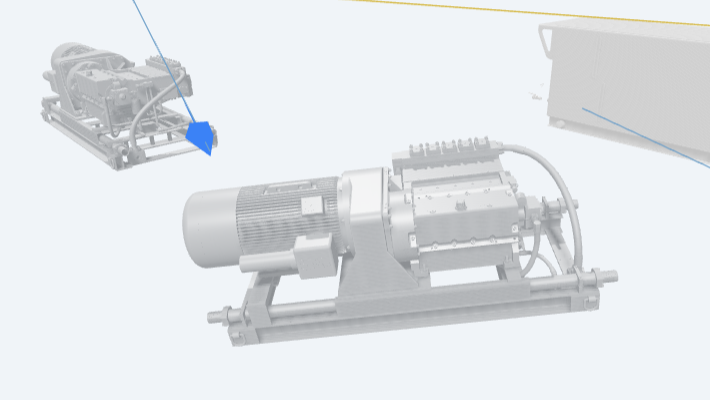
一、扩展功能总览
| 扩展功能 | 应用场景 | 核心价值 |
|---|---|---|
| 模型动画控制 | 产品演示、机械仿真 | 还原模型运动状态,提升沉浸感 |
| 3D 空间标注 | 设备说明、故障标记 | 精准关联模型与文字信息 |
| 自定义剖切 | 内部结构查看、数据可视化 | 突破表面限制,展示内部细节 |
| 状态导出导入 | 场景保存、多端同步 | 复用配置,提升协作效率 |
| 多视角切换 | 快速预览、重点展示 | 简化操作,聚焦关键区域 |
二、前置准备
基于上一篇基础组件,补充依赖(如需剖切功能):
npm install three @tweenjs/tween.js font-awesome three-bsp # three-bsp用于布尔运算剖切
三、深度扩展实现(含代码 + 配图)
扩展 1:GLB 模型动画控制(支持多动画轨道)
功能说明
GLB 模型常包含内置动画(如机械臂旋转、门开关),需实现「播放 / 暂停 / 进度控制 / 动画切换」功能,支持多动画轨道切换与速度调节。
核心实现代码
// 1. 新增状态管理
const animationMixer = ref(null); // 动画混合器
const activeAnimation = ref(null); // 当前激活动画
const animationList = ref([]); // 模型包含的动画轨道列表
const animationSpeed = ref(1.0); // 动画播放速度
const isAnimationPlaying = ref(false); // 动画播放状态
// 2. 模型加载时解析动画
const loadAllModels = async () => {
  // ... 原有加载逻辑 ...
  loader.load(
    modelConfig.url,
    (gltf) => {
      const model = gltf.scene;
      // ... 原有模型配置 ...
      // 解析动画轨道
      if (gltf.animations && gltf.animations.length > 0) {
        animationMixer.value = new THREE.AnimationMixer(model);
        // 收集动画轨道名称
        animationList.value = gltf.animations.map((anim, index) => ({
          index,
          name: anim.name || `动画${index + 1}`
        }));
        // 默认激活第一个动画
        activeAnimation.value = animationList.value[0];
        playAnimation(activeAnimation.value.index);
      }
      scene.add(model);
      // ... 原有逻辑 ...
    }
  );
};
// 3. 动画控制方法
const playAnimation = (index) => {
  if (!animationMixer.value || !animationList.value[index]) return;
  // 停止当前动画
  animationMixer.value.stopAllAction();
  // 播放目标动画
  const action = animationMixer.value.clipAction(
    gltf.animations[index]
  );
  action.setEffectiveTimeScale(animationSpeed.value);
  action.loop = THREE.LoopRepeat; // 循环播放
  action.play();
  activeAnimation.value = animationList.value[index];
  isAnimationPlaying.value = true;
};
const pauseAnimation = () => {
  if (!animationMixer.value) return;
  animationMixer.value.pauseAllActions();
  isAnimationPlaying.value = false;
};
const resumeAnimation = () => {
  if (!animationMixer.value) return;
  animationMixer.value.resumeAllActions();
  isAnimationPlaying.value = true;
};
// 4. 动画速度调节
const updateAnimationSpeed = (value) => {
  animationSpeed.value = parseFloat(value);
  if (animationMixer.value) {
    animationMixer.value._actions.forEach(action => {
      action.setEffectiveTimeScale(animationSpeed.value);
    });
  }
};
// 5. 动画循环更新(添加到原有动画循环中)
const startAnimationLoop = () => {
  const animate = () => {
    // ... 原有逻辑 ...
    animationMixer.value?.update(0.016); // 60fps更新频率
    renderer.render(scene, camera);
  };
  animate();
};
模板与样式(新增动画控制栏)

 浙公网安备 33010602011771号