

iText与OpenPDF使用差异及中文处理完全指南 - 实践
iText与OpenPDF使用差异及中文处理完全指南
在企业级Java应用开发中,PDF文档处理是一个常见的需求。随着iText许可证的变化,越来越多的开发者转向OpenPDF这个优秀的开源替代方案。本文将深入探讨iText与OpenPDF的差异,并重点解决中文处理的常见问题。
输出效果: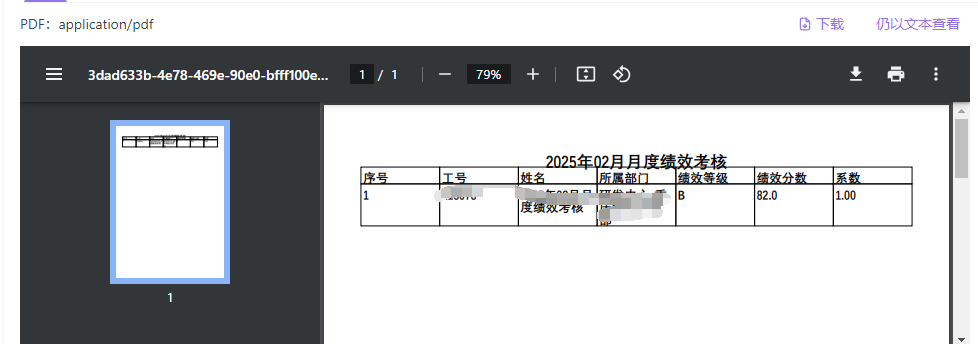
一、iText与OpenPDF概述
iText曾经是Java生态中最流行的PDF处理库,但其许可证从MPL/LGPL更改为AGPL后,许多商业项目无法继续使用。
OpenPDF是iText 4.2.0的一个分支,继承了iText 4.2.0的所有功能,并保持了Apache风格的许可证,是iText的理想替代品。
二、核心使用差异
1. 依赖配置差异
<!-- iText依赖 -->
  <dependency>
  <groupId>com.itextpdf</groupId>
  <artifactId>itextpdf</artifactId>
  <version>5.5.13</version>
  </dependency>
  <!-- OpenPDF依赖 -->
    <dependency>
    <groupId>com.github.librepdf</groupId>
    <artifactId>openpdf</artifactId>
    <version>1.3.30</version>
    </dependency>
2. 包路径差异
- iText:
com.itextpdf.text.* - OpenPDF:
com.lowagie.text.*
3. API使用对比
iText 7实现:
// 创建文档
PdfDocument pdfDoc = new PdfDocument(new PdfWriter(outputStream));
Document document = new Document(pdfDoc);
// 添加内容
PdfFont font = PdfFontFactory.createFont("STSong-Light", "UniGB-UCS2-H");
document.add(new Paragraph("Hello World").setFont(font));OpenPDF实现:
// 创建文档
Document document = new Document();
PdfWriter.getInstance(document, outputStream);
document.open();
// 添加内容
BaseFont baseFont = BaseFont.createFont("STSong-Light", "UniGB-UCS2-H", BaseFont.EMBEDDED);
Font font = new Font(baseFont);
document.add(new Paragraph("Hello World", font));
三、OpenPDF版本与Java兼容性
| OpenPDF版本 | Java最低版本 | Java最高版本 | 特点 |
|---|---|---|---|
| 1.0.x-1.2.x | Java 6 | Java 8 | 早期版本,稳定 |
| 1.3.x | Java 8 | Java 11 | 广泛使用,推荐 |
| 1.4.x | Java 8 | Java 17 | 新特性支持 |
| 2.0.x | Java 11 | Java 17 | 模块化改进 |
| 3.0.x | Java 17 | Java 21 | 最新特性 |
四、中文处理完整解决方案
中文乱码是PDF生成中最常见的问题,主要原因包括字体处理不当、编码设置错误等。
1. 字体加载策略
private BaseFont loadChineseFont() throws DocumentException, IOException {
try {
// 方案一:通过字节流加载资源字体(推荐)
InputStream fontStream = getClass().getClassLoader()
.getResourceAsStream("fonts/simsun.ttc");
if (fontStream != null) {
byte[] fontBytes = IOUtils.toByteArray(fontStream);
return BaseFont.createFont("simsun.ttc", BaseFont.IDENTITY_H,
BaseFont.EMBEDDED, true, fontBytes, null);
}
} catch (Exception e) {
// 方案二:使用系统字体
try {
String os = System.getProperty("os.name").toLowerCase();
if (os.contains("windows")) {
return BaseFont.createFont("c:\\windows\\fonts\\simsun.ttc,0",
BaseFont.IDENTITY_H, BaseFont.EMBEDDED);
} else if (os.contains("linux")) {
return BaseFont.createFont("/usr/share/fonts/truetype/noto/NotoSansCJK.ttc,0",
BaseFont.IDENTITY_H, BaseFont.EMBEDDED);
}
} catch (Exception ex) {
// 方案三:备用字体
return BaseFont.createFont("STSong-Light", "UniGB-UCS2-H", BaseFont.NOT_EMBEDDED);
}
}
throw new DocumentException("无法加载中文字体");
}
2. 完整的PDF生成示例
public void exportToPdf(HttpServletResponse response, List<
Data> dataList, String fileName)
throws IOException, DocumentException {
// 创建PDF文档
Document document = new Document();
PdfWriter.getInstance(document, response.getOutputStream());
document.open();
// 加载中文字体
BaseFont baseFont = loadChineseFont();
Font titleFont = new Font(baseFont, 16, Font.NORMAL);
Font contentFont = new Font(baseFont, 12, Font.NORMAL);
// 添加标题
Paragraph title = new Paragraph(fileName, titleFont);
// 注意:fileName必须是中文
title.setAlignment(Paragraph.ALIGN_CENTER);
document.add(title);
// 创建表格
PdfPTable table = new PdfPTable(3);
table.setWidthPercentage(100);
// 添加表头
table.addCell(new PdfPCell(new Phrase("列1", contentFont)));
table.addCell(new PdfPCell(new Phrase("列2", contentFont)));
table.addCell(new PdfPCell(new Phrase("列3", contentFont)));
// 添加数据
for (Data data : dataList) {
table.addCell(new PdfPCell(new Phrase(data.getField1(), contentFont)));
table.addCell(new PdfPCell(new Phrase(data.getField2(), contentFont)));
table.addCell(new PdfPCell(new Phrase(data.getField3(), contentFont)));
}
document.add(table);
document.close();
}
五、常见问题及解决方案
1. 版本兼容性问题
错误信息:
类文件具有错误的版本 65.0, 应为 52.0解决方案:确保OpenPDF版本与Java版本兼容。
2. 字体文件未找到
解决方案:
- 确保字体文件放置在
src/main/resources/fonts/目录下 - 使用系统字体作为备选方案
3. 部分中文显示正常,部分乱码
这种情况通常是因为:
- 不同文本元素使用了不同的字体
- 标题和正文使用了不同的Font对象
- 某些文本没有正确应用中文字体
解决方案:
// 确保所有文本都使用相同的字体对象
Font titleFont = new Font(chineseFont, 16, Font.NORMAL);
Font contentFont = new Font(chineseFont, 12, Font.NORMAL);
// 标题文本
Paragraph title = new Paragraph(fileName, titleFont);
// 表格内容
table.addCell(new PdfPCell(new Phrase("中文内容", contentFont)));
六、最佳实践建议
- 字体管理:统一管理字体加载,确保整个文档使用一致的字体
- 异常处理:提供多种字体加载方案,增强程序健壮性
- 版本选择:根据项目Java版本选择合适的OpenPDF版本
- 资源管理:将常用字体文件打包到应用资源中
- 测试验证:在不同操作系统和环境中测试中文显示效果
七、总结
OpenPDF作为iText的优秀开源替代品,为Java开发者提供了强大的PDF处理能力。通过正确处理字体和编码问题,可以轻松实现中文PDF文档的生成。在实际项目中,建议采用多层保障机制,确保在各种环境下都能正确显示中文内容。
选择合适的OpenPDF版本、正确配置字体、统一管理文本样式,是成功生成中文PDF的关键。希望本文能帮助开发者更好地使用OpenPDF处理中文PDF文档。

 浙公网安备 33010602011771号