

[stm32]C++控制台下绘点画图
// hui: 摘自: http://www.cnblogs.com/pianoid/archive/2011/05/27/2060001.html

//[stm32]C++控制台下绘点画图

#include <windows.h>
#include <stdio.h>
#include <conio.h>

HWND hwnd;
HDC hdc;

void DrawInit(void)
{
	//获取console的设备上下文句柄
	hwnd = GetConsoleWindow();
	hdc = GetDC(hwnd);
	//调整一下console背景颜色,
	// 	0=黑色   1=蓝色   2=绿色  3=浅绿色 4=红色 5=紫色 6=黄色
	//	7=白色   8=灰色   9=淡蓝色 A=淡绿色 B=淡浅绿色  C=淡红色
	//	D=淡紫色 E=淡黄色 F=亮白色
	system("color 70");
}

void DrawPoint(int x0, int y0)
{
	MoveToEx(hdc, x0, y0, NULL); //起点坐标
	LineTo(hdc, x0+1, y0+1); // 连线至该坐标
}

void DrawLine(int x0, int y0, int x1, int y1)
{
	MoveToEx(hdc, x0, y0, NULL); //起点坐标
	LineTo(hdc, x1, y1); // 连线至该坐标
}

void BresenhamCircle(int x0, int y0, int R) // Bresenham 画圆法
{
	int x=0;
	int y=R;
	int p=3-2*R;

	for(;x<=y;x++)
	{
		DrawPoint(x0 + x, y0 + y);
		if(p>=0)
		{
			p+=4*(x-y)+10;
			y--;
		}
		else
		{
			p+=4*x+6;
		}
	}
}

void main(void)
{
	DrawInit();

	for (int i=0; i<50; i++)
	{
		DrawPoint(i+20, 120);
	}

	BresenhamCircle(50,50,100);

	system("timeout /t 60");
}
C++控制台下绘点画图
很多颜色// hui 参考: https://blog.csdn.net/chenqiai0/article/details/8045123
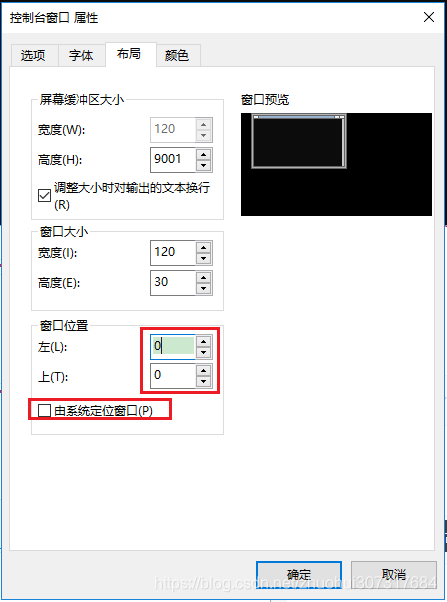
注:要改变窗口起始位置,只能通过设置系统默认值,方法见附件。
// hui 控制台部分参考自: http://www.cnblogs.com/pianoid/archive/2011/05/27/2060001.html
// hui 画彩色线条参考自: https://blog.csdn.net/chenqiai0/article/details/8045123

#include <iostream>
#define _AFXDLL
#include <afx.h>

using namespace std;

HWND hwnd = GetConsoleWindow();
HDC hdc = GetDC(hwnd);//获取console的设备上下文句柄

void DrawBackground(void)
{
	for (int y=20; y<20+480; y++)
	{
		for(int x=50; x<50+320; x++)
			SetPixel(hdc, x, y, RGB(255,255,255));
	}
}

void main(void)
{
	system("mode con cols=80 lines=40");//改变宽高

	while (1)
	{
		DrawBackground();
		char a;cin>>a;
	}
}
进阶代码:
lcd_driver.h
#pragma once

#define LCD_HEIGHT 800
#define LCD_WIDTH 480

void lcd_Init(void);
void DrawPoint24(int x, int y, COLORREF color);
void DrawPoint16(int x, int y, unsigned short color16);
lcd_driver.cpp
#include <iostream>
#define _AFXDLL
#include <afx.h>
#include "lcd_driver.h"

using namespace std;

HWND hwnd = GetConsoleWindow();
HDC hdc = GetDC(hwnd);//获取console的设备上下文句柄

const int x0 = 50;
const int y0 = 100;

void DrawPoint24(int x, int y, COLORREF color)
{
	SetPixel(hdc, x0+x, y0+y, color);
}

void DrawPoint16(int x, int y, unsigned short color16)
{
	unsigned char R = (color16 >> 11) * (double)0xFF / 0x1F ;
	unsigned char G = (color16 >> 5 & 0x2F) * (double)0xFF / 0x2F ;
	unsigned char B = (color16 & 0x1F) * (double)0xFF / 0x1F ;
	DrawPoint24(x, y, RGB(R, G, B));
}

#define RGB24_WHITE RGB(255,255,255)
#define RGB24_RED 0x0000ff
#define RGB16_RED 0xF800

void DrawBackground(void)
{
	int height = LCD_HEIGHT;
	int width = LCD_WIDTH;
	for (int y=0; y<height; y++)
	{
		int x = 0;
		for(x=0; x<width/2; x++)
			DrawPoint24(x, y, RGB24_RED);

		for( ; x<width; x++)
			DrawPoint16(x, y, RGB16_RED);
	}
}

void lcd_Init(void)
{
	system("mode con cols=80 lines=60");//改变宽高
	DrawBackground();
}
【转载】c++ API 在屏幕上(或窗口中)的(x,y)坐标绘制一个点
https://blog.csdn.net/u013077144/article/details/51211840
C++ opencv小练习绘制点,直线,圆,椭圆等基本图像
https://blog.csdn.net/wwxy1995/article/details/82887179
C++实现glut绘制点、直线、多边形、圆
https://www.cnblogs.com/wsine/p/4639050.html
附录1:如何设置CMD窗口的位置
参考:https://jingyan.baidu.com/article/22fe7ceddeda2d3002617f81.html
a.
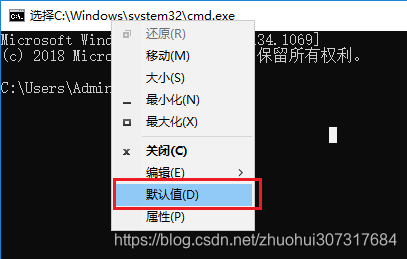
b.这下面是默认值。
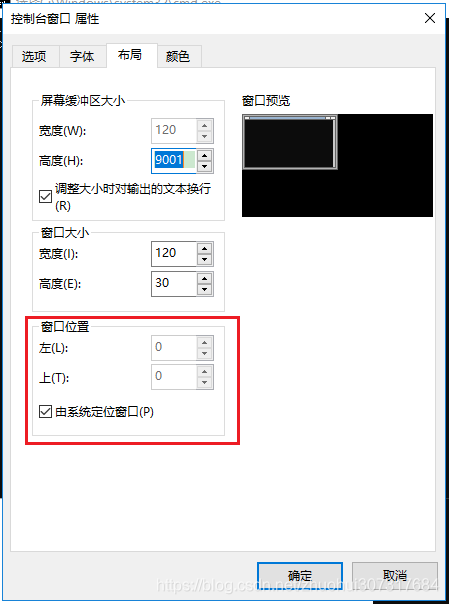
改为:


 浙公网安备 33010602011771号