


日志重定向:让 qDebug() 实时显示在 Qt 窗口中
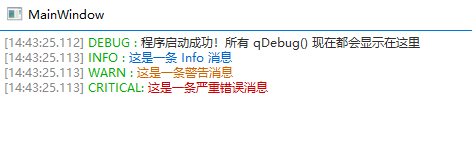
效果
![]() main.cpp
main.cpp
![]() mainwindow.cpp
mainwindow.cpp
源码


#include "mainwindow.h" // 包含主窗口头文件
#include <QApplication> // 包含 QApplication
#include <QTextEdit>    // 包含 QTextEdit,用于显示日志
#include <QScrollBar>   // 包含 QScrollBar(虽然这个例子中没直接用,但有时用于控制滚动条)
#include <QDateTime>    // 包含 QDateTime,用于获取时间戳
#include <QMetaObject>  // 包含 QMetaObject,用于跨线程调用
#include <QFileInfo>    // 包含 QFileInfo(此例中未使用,但常用于文件操作)
#include <QTextBlock>   // 包含 QTextBlock(此例中未使用,用于文本块操作)
#include <QTextDocument> // 包含 QTextDocument(此例中未使用,是 QTextEdit 的底层文档)
#include <QTextCursor>  // 包含 QTextCursor,用于控制文本编辑器的光标

// 全局静态指针,指向用于显示日志的 QTextEdit 控件
static QTextEdit *g_logEdit = nullptr;

/**
 * @brief 自定义消息处理器,用于将 Qt 消息(qDebug, qInfo 等)重定向到 g_logEdit 控件。
 * * @param type 消息类型 (QtDebugMsg, QtInfoMsg, etc.)
 * @param context 消息上下文(包含文件名、行号、函数名等)
 * @param msg 实际的消息字符串
 */
void redirectOutput(QtMsgType type, const QMessageLogContext &context, const QString &msg)
{
    // 如果日志控件未设置,则直接返回,不处理消息
    if (!g_logEdit) return;

    QString prefix, color;
    // 根据消息类型设置前缀和颜色(使用 HTML 颜色代码)
    switch (type) {
    case QtDebugMsg:    prefix = "DEBUG";    color = "#2d2d2d"; break; // 深灰色
    case QtInfoMsg:     prefix = "INFO";     color = "#0066cc"; break; // 蓝色
    case QtWarningMsg:  prefix = "WARN";     color = "#cc6600"; break; // 橙色
    case QtCriticalMsg: prefix = "CRITICAL"; color = "#cc0000"; break; // 红色
    case QtFatalMsg:    prefix = "FATAL";    color = "#990000"; break; // 深红色
    default:            prefix = "UNKNOWN";  color = "#808080"; break; // 灰色
    }

    // 关键步骤:转义消息字符串,防止用户输入的内容(如 `<` 或 `&`)被解释为 HTML 标签
    // toHtmlEscaped() 只转义必要的字符,保持单行文本的格式。
    QString escapedMsg = msg.toHtmlEscaped(); // 只转义 <>&",保持单行

    // 如果原始消息中包含换行符 `\n`,并且希望在 QTextEdit 中也换行,
    // 可以使用:escapedMsg = msg.replace("\n", "<br/>").toHtmlEscaped();

    // 格式化日志行,使用 HTML 标签进行着色和格式控制
    QString line = QString(
                       // 使用 C++11 的原始字符串字面量 R"(...)" 避免对引号和反斜杠的转义
                       R"(<font color="#888888">[%1]</font> <font color="#00aa00">%2:</font> <font color="%3">%4</font><br>)"
                       )
                       // %1:时间戳 (hh:mm:ss.zzz)
                       .arg(QDateTime::currentDateTime().toString("hh:mm:ss.zzz"))
                       // %2:日志级别前缀,-8 表示固定宽度左对齐
                       .arg(prefix, -8)
                       // %3:日志文本颜色
                       .arg(color)
                       // %4:转义后的日志内容
                       .arg(escapedMsg); // 使用转义后的 msg,并用 <br> 强制换行

    // 因为日志消息可能在非 GUI 线程中产生,所以必须使用 QMetaObject::invokeMethod
    // 将更新 UI 的操作(插入 HTML)放入 GUI 线程的事件队列中。
    QMetaObject::invokeMethod(g_logEdit, [line]() {
        QTextEdit *edit = g_logEdit;
        // 移动光标到文档末尾
        edit->moveCursor(QTextCursor::End);
        // 插入格式化好的 HTML 日志行
        edit->insertHtml(line);
        // 确保光标(和文档末尾)可见,实现自动滚动
        edit->ensureCursorVisible();
    }, Qt::QueuedConnection); // 使用 Qt::QueuedConnection 确保是异步跨线程调用
}

/**
 * @brief 程序的入口点
 */
int main(int argc, char *argv[])
{
    // 创建 QApplication 实例
    QApplication a(argc, argv);

    // 安装自定义消息处理器,替换 Qt 默认的处理器
    qInstallMessageHandler(redirectOutput);

    // 创建主窗口实例
    MainWindow w;
    // 查找主窗口中名为 "textEditLog" 的 QTextEdit 控件,并将其赋值给全局指针
    g_logEdit = w.findChild<QTextEdit*>("textEditLog");

    // 显示主窗口
    w.show();

    // 发送一些测试消息,它们现在应该会被重定向到 QTextEdit 控件中
    qDebug() << "程序启动成功!所有 qDebug() 现在都会显示在这里";
    qInfo()    << "这是一条 Info 消息";
    qWarning() << "这是一条警告消息";
    qCritical()<< "这是一条严重错误消息";

    // 启动 Qt 事件循环
    return a.exec();
}
#include "mainwindow.h" // 包含主窗口的头文件
#include "ui_mainwindow.h" // 包含由 Qt Designer 生成的 UI 头文件
#include <QTextEdit>    // 包含 QTextEdit 控件
#include <QVBoxLayout>  // 包含 QVBoxLayout(虽然这里没有直接使用布局类,但包含了常用的 UI 控件头文件)

/**
 * @brief MainWindow 类的构造函数
 * @param parent 父 QWidget 指针,通常为 nullptr
 */
MainWindow::MainWindow(QWidget *parent)
    : QMainWindow(parent) // 调用 QMainWindow 基类的构造函数
    , ui(new Ui::MainWindow) // 初始化 ui 成员指针
{
    // 设置由 Qt Designer 生成的界面元素(如果使用 designer 的话,但这里主要通过代码创建控件)
    ui->setupUi(this);

    // ---------- 创建并配置日志文本框 ----------

    // 动态创建 QTextEdit 控件,并指定父对象为当前 MainWindow
    QTextEdit *logEdit = new QTextEdit(this);

    // 设置对象的名称。这个名字 ("textEditLog") 是 main.cpp 中用于查找并关联日志重定向函数的关键!
    logEdit->setObjectName(QStringLiteral("textEditLog"));

    // 设置文本框为只读,用户不能手动编辑日志内容
    logEdit->setReadOnly(true);

    // 设置行自动换行模式为不换行。日志通常需要水平滚动条来查看完整的一行。
    logEdit->setLineWrapMode(QTextEdit::NoWrap);

    // 使用 QStyleSheet 设置日志文本框的样式
    logEdit->setStyleSheet(R"(
        QTextEdit {
            // 设置等宽字体,如 Consolas,以保持日志时间戳和前缀对齐整齐
            font-family: "Consolas", "Courier New", "DejaVu Sans Mono", monospace;
            // 设置字体大小
            font-size: 10pt;
            // 移除默认的边框,使外观更简洁
            border: none;
        }
    )");

    // 将新创建的日志文本框设置为 MainWindow 的中心控件
    setCentralWidget(logEdit);
}

/**
 * @brief MainWindow 类的析构函数
 */
MainWindow::~MainWindow()
{
    // 释放由 ui 成员指针指向的资源
    delete ui;
}

 浙公网安备 33010602011771号