


QT加载图像
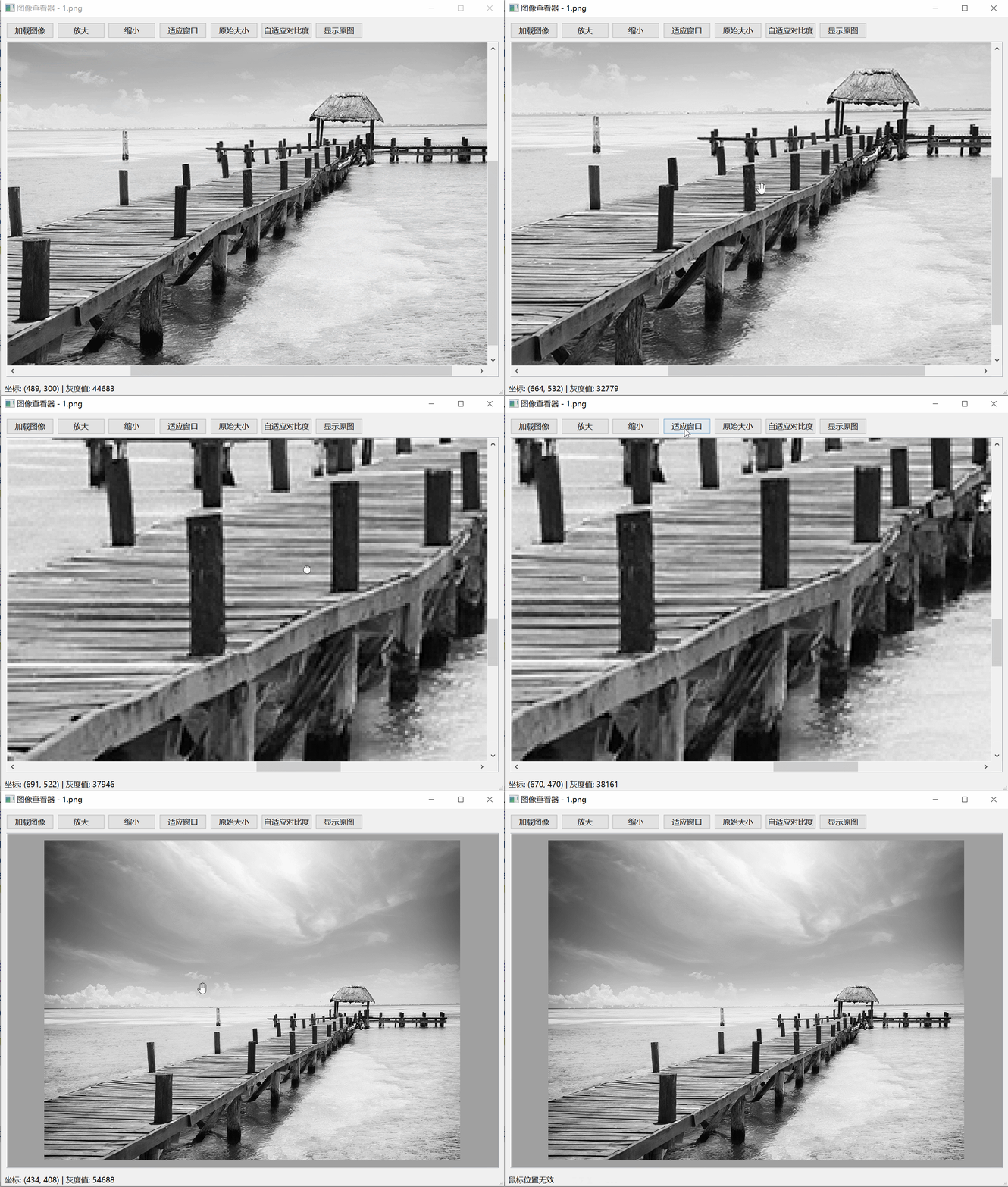
图像查看


#ifndef MAINWINDOW_H
#define MAINWINDOW_H

#include <QMainWindow>
#include <QGraphicsView>
#include <QGraphicsScene>
#include <QGraphicsPixmapItem>
#include <QVBoxLayout>
#include <QHBoxLayout>
#include <QPushButton>
#include <QFileDialog>
#include <QMessageBox>
#include <QImage>
#include <QPixmap>
#include <QStatusBar>
#include <QTransform>
#include <QWheelEvent>
#include <QMouseEvent>
#include <QKeyEvent>
#include <QEvent>
#include <QPoint>
#include <QPainter>

class MainWindow : public QMainWindow
{
    Q_OBJECT

public:
    MainWindow(QWidget *parent = nullptr);
    ~MainWindow();

protected:
    void keyPressEvent(QKeyEvent *event) override;
    void keyReleaseEvent(QKeyEvent *event) override;
    bool eventFilter(QObject *obj, QEvent *event) override;

private slots:
    void loadImage();
    void zoomIn();
    void zoomOut();
    void fitToWindow();
    void originalSize();
    void autoContrast();
    void showOriginal();

private:
    void setupUI();
    void updateImageDisplay();
    void updateStatusBar(int x, int y);
    void applyAutoContrast();
    int getPixelValue(const QImage &img, int x, int y);

    QWidget *centralWidget;
    QVBoxLayout *mainLayout;
    QHBoxLayout *buttonLayout;
    QGraphicsScene *scene;
    QGraphicsView *view;
    QGraphicsPixmapItem *pixmapItem;
    QPushButton *loadButton;
    QPushButton *zoomInButton;
    QPushButton *zoomOutButton;
    QPushButton *fitButton;
    QPushButton *originalButton;
    QPushButton *autoContrastButton;
    QPushButton *showOriginalButton;

    QImage originalImage;  // 存储当前显示图像(可能已应用对比度)
    QImage unmodifiedOriginalImage;  // 存储未变换的原始图像
    double scaleFactor;
    bool ctrlPressed;  // 跟踪Ctrl键状态

    // 拖拽平移(QGraphicsView 内置)
    bool leftMousePressed;
    QPoint lastDragPos;

    // 缩放限制(已取消)
    // static constexpr double MAX_SCALE_FACTOR = 10.0;  // 最大缩放限制
    // static constexpr double MIN_SCALE_FACTOR = 0.01;  // 最小缩放限制
};

#endif // MAINWINDOW_H
#include "mainwindow.h"
#include <QApplication>
#include <algorithm>  // for std::min, std::max
#include <QCursor>

MainWindow::MainWindow(QWidget *parent)
    : QMainWindow(parent), scaleFactor(1.0), ctrlPressed(false),
    leftMousePressed(false), lastDragPos(0, 0),
    scene(nullptr), view(nullptr), pixmapItem(nullptr)
{
    setupUI();
    // view->installEventFilter(this);  // 安装事件过滤器以捕获滚轮事件
    view->viewport()->installEventFilter(this);  // 安装到 viewport 而非 view
}

MainWindow::~MainWindow()
{
}

void MainWindow::setupUI()
{
    centralWidget = new QWidget(this);
    setCentralWidget(centralWidget);

    mainLayout = new QVBoxLayout(centralWidget);
    buttonLayout = new QHBoxLayout();

    // 创建按钮
    loadButton = new QPushButton("加载图像", this);
    zoomInButton = new QPushButton("放大", this);
    zoomOutButton = new QPushButton("缩小", this);
    fitButton = new QPushButton("适应窗口", this);
    originalButton = new QPushButton("原始大小", this);
    autoContrastButton = new QPushButton("自适应对比度", this);
    showOriginalButton = new QPushButton("显示原图", this);

    // 连接信号槽
    connect(loadButton, &QPushButton::clicked, this, &MainWindow::loadImage);
    connect(zoomInButton, &QPushButton::clicked, this, &MainWindow::zoomIn);
    connect(zoomOutButton, &QPushButton::clicked, this, &MainWindow::zoomOut);
    connect(fitButton, &QPushButton::clicked, this, &MainWindow::fitToWindow);
    connect(originalButton, &QPushButton::clicked, this, &MainWindow::originalSize);
    connect(autoContrastButton, &QPushButton::clicked, this, &MainWindow::autoContrast);
    connect(showOriginalButton, &QPushButton::clicked, this, &MainWindow::showOriginal);

    // 创建场景和视图(替换 scrollArea 和 imageLabel)
    scene = new QGraphicsScene(this);
    view = new QGraphicsView(scene, this);
    view->setAlignment(Qt::AlignCenter);
    view->setBackgroundBrush(view->palette().brush(QPalette::Dark));
    view->setDragMode(QGraphicsView::ScrollHandDrag);  // 启用内置拖拽平移
    view->setTransformationAnchor(QGraphicsView::AnchorUnderMouse);  // 缩放锚点在鼠标下
    view->setResizeAnchor(QGraphicsView::AnchorViewCenter);  // 窗口调整大小时居中
    view->setRenderHint(QPainter::Antialiasing, false);  // 禁用抗锯齿以保持像素化
    view->setMouseTracking(true);  // 启用鼠标跟踪
    view->setVisible(false);

    // 布局设置
    buttonLayout->addWidget(loadButton);
    buttonLayout->addWidget(zoomInButton);
    buttonLayout->addWidget(zoomOutButton);
    buttonLayout->addWidget(fitButton);
    buttonLayout->addWidget(originalButton);
    buttonLayout->addWidget(autoContrastButton);
    buttonLayout->addWidget(showOriginalButton);
    buttonLayout->addStretch();

    mainLayout->addLayout(buttonLayout);
    mainLayout->addWidget(view);

    // 状态栏
    statusBar()->showMessage("准备就绪");

    setWindowTitle("图像查看器");
    resize(800, 600);
}

void MainWindow::loadImage()
{
    QString fileName = QFileDialog::getOpenFileName(
        this,
        "打开图像",
        "",
        "图像文件 (*.tif *.tiff *.png *.jpg *.jpeg *.bmp *.gif *.ico);;所有文件 (*.*)"
        );

    if (fileName.isEmpty()) {
        return;
    }

    originalImage = QImage(fileName);

    if (originalImage.isNull()) {
        QMessageBox::warning(this, "错误",
                             "无法加载图像!\n"
                             "请确保:\n"
                             "1. 文件格式正确\n"
                             "2. Qt已安装相应插件\n"
                             "3. 文件没有损坏");
        return;
    }

    // 支持8位和16位灰度图像,如果不是灰度则转换为16位灰度
    if (originalImage.format() != QImage::Format_Grayscale8 &&
        originalImage.format() != QImage::Format_Grayscale16) {
        originalImage = originalImage.convertToFormat(QImage::Format_Grayscale16);
    }

    // 存储未变换的原始图像
    unmodifiedOriginalImage = originalImage;

    scaleFactor = 1.0;

    // 清空场景并添加新项
    scene->clear();
    pixmapItem = new QGraphicsPixmapItem(QPixmap::fromImage(originalImage));
    pixmapItem->setTransformationMode(Qt::FastTransformation);  // 像素化缩放
    scene->addItem(pixmapItem);

    view->setVisible(true);
    updateImageDisplay();

    // 更新状态栏
    QFileInfo fileInfo(fileName);
    int bitDepth = (originalImage.format() == QImage::Format_Grayscale8 ? 8 : 16);
    statusBar()->showMessage(QString("已加载: %1 | 尺寸: %2x%3 | 格式: %4位灰度")
                                 .arg(fileInfo.fileName())
                                 .arg(originalImage.width())
                                 .arg(originalImage.height())
                                 .arg(bitDepth));

    setWindowTitle(QString("图像查看器 - %1").arg(fileInfo.fileName()));
}

void MainWindow::updateImageDisplay()
{
    if (originalImage.isNull() || !pixmapItem) return;

    // 更新 pixmapItem 的 pixmap(无缩放生成,使用原图像)
    pixmapItem->setPixmap(QPixmap::fromImage(originalImage));

    // 应用缩放变换(无内存增加)
    QTransform transform = QTransform::fromScale(scaleFactor, scaleFactor);
    view->setTransform(transform);

    // 调整场景边界
    scene->setSceneRect(pixmapItem->boundingRect());
}

void MainWindow::updateStatusBar(int x, int y)
{
    if (originalImage.isNull() || x < 0 || y < 0 || x >= originalImage.width() || y >= originalImage.height()) {
        statusBar()->showMessage("鼠标位置无效");
        return;
    }

    int grayValue = getPixelValue(originalImage, x, y);

    statusBar()->showMessage(QString("坐标: (%1, %2) | 灰度值: %3").arg(x).arg(y).arg(grayValue));
}

int MainWindow::getPixelValue(const QImage &img, int x, int y)
{
    if (img.format() == QImage::Format_Grayscale16) {
        // 对于16位灰度,手动读取像素值
        const quint16 *pixel = reinterpret_cast<const quint16*>(img.scanLine(y)) + x;
        return static_cast<int>(*pixel);
    } else {
        // 对于8位灰度
        return qGray(img.pixel(x, y));
    }
}

bool MainWindow::eventFilter(QObject *obj, QEvent *event)
{
    // 修改检查:
    if (obj == view->viewport()) {  // 而非 obj == view
        if (event->type() == QEvent::Wheel && ctrlPressed) {
            QWheelEvent *wheelEvent = static_cast<QWheelEvent*>(event);
            QPoint pos = wheelEvent->position().toPoint();  // Qt6;Qt5 用 wheelEvent->pos()
            double oldScale = scaleFactor;
            double zoomFactor = (wheelEvent->angleDelta().y() > 0) ? 1.25 : 0.8;
            double newScale = oldScale * zoomFactor;
            scaleFactor = newScale;

            // 缩放以鼠标为中心(由于 AnchorUnderMouse 已设置)
            view->scale(zoomFactor, zoomFactor);
            // 更新状态栏(使用缩放前场景点)
            QPointF scenePos = view->mapToScene(pos);
            updateStatusBar(static_cast<int>(scenePos.x()), static_cast<int>(scenePos.y()));
            return true;  // 消费事件
        } else if (event->type() == QEvent::MouseMove) {
            // 可选调试:qDebug() << "MouseMove captured at viewport";
            QMouseEvent *me = static_cast<QMouseEvent*>(event);
            QPointF scenePos = view->mapToScene(me->pos());
            // 场景坐标即原始图像坐标(考虑 scaleFactor,但 mapToScene 已处理)
            int imageX = static_cast<int>(scenePos.x());
            int imageY = static_cast<int>(scenePos.y());
            updateStatusBar(imageX, imageY);
            return false;  // 不消费,让 view 继续处理(如拖拽)
        }
    }
    return QMainWindow::eventFilter(obj, event);
}

void MainWindow::keyPressEvent(QKeyEvent *event)
{
    if (event->key() == Qt::Key_Control) {
        ctrlPressed = true;
    }
    QMainWindow::keyPressEvent(event);
}

void MainWindow::keyReleaseEvent(QKeyEvent *event)
{
    if (event->key() == Qt::Key_Control) {
        ctrlPressed = false;
    }
    QMainWindow::keyReleaseEvent(event);
}

void MainWindow::zoomIn()
{
    double factor = 1.25;
    double newScale = scaleFactor * factor;
    // 取消最大缩放限制检查
    // 以视图中心缩放
    view->setTransformationAnchor(QGraphicsView::AnchorViewCenter);
    view->scale(factor, factor);
    view->setTransformationAnchor(QGraphicsView::AnchorUnderMouse);
    scaleFactor = newScale;
}

void MainWindow::zoomOut()
{
    double factor = 0.8;
    double newScale = scaleFactor * factor;
    // 取消最小缩放限制检查
    // 以视图中心缩放
    view->setTransformationAnchor(QGraphicsView::AnchorViewCenter);
    view->scale(factor, factor);
    view->setTransformationAnchor(QGraphicsView::AnchorUnderMouse);
    scaleFactor = newScale;
}

void MainWindow::fitToWindow()
{
    if (originalImage.isNull()) return;

    view->fitInView(scene->itemsBoundingRect(), Qt::KeepAspectRatio);
    scaleFactor = view->transform().m11();  // 更新 scaleFactor 为实际值
}

void MainWindow::originalSize()
{
    // 以视图中心重置
    view->setTransformationAnchor(QGraphicsView::AnchorViewCenter);
    view->setTransform(QTransform());
    view->setTransformationAnchor(QGraphicsView::AnchorUnderMouse);
    scaleFactor = 1.0;
}

void MainWindow::autoContrast()
{
    if (originalImage.isNull()) return;

    applyAutoContrast();
    updateImageDisplay();

    statusBar()->showMessage("已应用自适应对比度");
}

void MainWindow::showOriginal()
{
    if (unmodifiedOriginalImage.isNull()) return;

    originalImage = unmodifiedOriginalImage;
    updateImageDisplay();

    statusBar()->showMessage("已恢复原图");
}

void MainWindow::applyAutoContrast()
{
    // 简单的自适应对比度:计算直方图,找到min/max非零值,进行拉伸
    if (originalImage.format() != QImage::Format_Grayscale8 &&
        originalImage.format() != QImage::Format_Grayscale16) {
        return;
    }

    int width = originalImage.width();
    int height = originalImage.height();
    int maxPossible = (originalImage.format() == QImage::Format_Grayscale8 ? 255 : 65535);
    int minVal = maxPossible, maxVal = 0;

    // 找到实际min/max
    for (int y = 0; y < height; ++y) {
        for (int x = 0; x < width; ++x) {
            int val = getPixelValue(originalImage, x, y);
            minVal = std::min(minVal, val);
            maxVal = std::max(maxVal, val);
        }
    }

    if (minVal == maxVal) return;  // 全黑或全白,无需调整

    QImage contrastedImage(originalImage.size(), originalImage.format());

    if (originalImage.format() == QImage::Format_Grayscale8) {
        for (int y = 0; y < height; ++y) {
            uchar *srcLine = originalImage.scanLine(y);
            uchar *dstLine = contrastedImage.scanLine(y);
            for (int x = 0; x < width; ++x) {
                int val = srcLine[x];
                long long stretched = static_cast<long long>(val - minVal) * 255LL / (maxVal - minVal);
                dstLine[x] = static_cast<uchar>(stretched);
            }
        }
    } else {  // 16位
        for (int y = 0; y < height; ++y) {
            const quint16 *srcLine = reinterpret_cast<const quint16*>(originalImage.scanLine(y));
            quint16 *dstLine = reinterpret_cast<quint16*>(contrastedImage.scanLine(y));
            for (int x = 0; x < width; ++x) {
                int val = srcLine[x];
                long long stretched = static_cast<long long>(val - minVal) * 65535LL / (maxVal - minVal);
                dstLine[x] = static_cast<quint16>(stretched);
            }
        }
    }

    originalImage = contrastedImage;  // 更新显示图像
}
图像播放
#ifndef MAINWINDOW_H
#define MAINWINDOW_H

#include <QMainWindow>
#include <QImage>
#include <QPixmap>
#include <QGraphicsScene>
#include <QGraphicsView>
#include <QGraphicsPixmapItem>
#include <QPushButton>
#include <QVBoxLayout>
#include <QHBoxLayout>
#include <QWidget>
#include <QFileDialog>
#include <QMessageBox>
#include <QSpinBox>
#include <QLabel>
#include <QTimer>
#include <QKeyEvent>
#include <QMouseEvent>
#include <QWheelEvent>
#include <QDir>
#include <QFileInfo>
#include <vector>
#include <algorithm> // for std::min, std::max

QT_BEGIN_NAMESPACE
QT_END_NAMESPACE

class MainWindow : public QMainWindow
{
    Q_OBJECT

public:
    explicit MainWindow(QWidget *parent = nullptr);
    ~MainWindow();

protected:
    bool eventFilter(QObject *obj, QEvent *event) override;
    void keyPressEvent(QKeyEvent *event) override;
    void keyReleaseEvent(QKeyEvent *event) override;

private slots:
    void loadDirectory();
    void startImageLoop();
    void stopImageLoop();
    void refreshImages();
    void updateLoopInterval(int ms);
    void zoomIn();
    void zoomOut();
    void fitToWindow();
    void originalSize();
    void autoContrast();
    void showOriginal();
    void updateImageDisplay();
    void updateStatusBar(int x, int y);

private:
    // UI 组件
    QWidget *centralWidget;
    QVBoxLayout *mainLayout;
    QHBoxLayout *buttonLayout;
    QPushButton *loadButton;
    QPushButton *zoomInButton;
    QPushButton *zoomOutButton;
    QPushButton *fitButton;
    QPushButton *originalButton;
    QPushButton *autoContrastButton;
    QPushButton *showOriginalButton;
    QPushButton *startPlayButton;
    QPushButton *stopPlayButton;
    QSpinBox *intervalSpinBox;
    QLabel *intervalLabel; // 可选,如果需要

    // 图像和视图组件
    QGraphicsScene *scene;
    QGraphicsView *view;
    QGraphicsPixmapItem *pixmapItem;
    QImage originalImage;
    QImage unmodifiedOriginalImage;

    // 交互状态
    double scaleFactor;
    bool ctrlPressed;
    bool leftMousePressed;
    QPoint lastDragPos;

    // 循环播放相关
    QTimer *refreshTimer;
    bool useLoop;
    int currentImageIndex;
    int loopInterval;
    std::vector<QImage> loopedImages;
    std::vector<QString> loopedFileNames;

    // 私有辅助函数
    void setupUI();
    QImage applyContrastStretch(const QImage& src, int minV, int maxV);
    void applyAutoContrast();
    int getPixelValue(const QImage &img, int x, int y);
    void updateWindowTitle();

signals:
    // 如果需要自定义信号,可在此添加
};

#endif // MAINWINDOW_H
#include "mainwindow.h"
#include <QApplication>
#include <algorithm> // for std::min, std::max
#include <QCursor>
#include <QTimer> // 新增:用于定时器
#include <vector> // 新增:用于存储多张图像
#include <QFileDialog>
#include <QDir>
#include <QMessageBox>
#include <QLabel>
#include <QSpinBox>
#include <QFileInfo>
#include <QStatusBar>
#include <QScrollBar>

MainWindow::MainWindow(QWidget *parent)
    : QMainWindow(parent), scaleFactor(1.0), ctrlPressed(false),
    leftMousePressed(false), lastDragPos(0, 0),
    scene(nullptr), view(nullptr), pixmapItem(nullptr),
    refreshTimer(nullptr), useLoop(false), currentImageIndex(0), loopInterval(100)
{
    setupUI();
    // 移除自动启动图像循环
    // view->installEventFilter(this); // 安装事件过滤器以捕获滚轮事件
    view->viewport()->installEventFilter(this); // 安装到 viewport 而非 view
}
MainWindow::~MainWindow()
{
    if (refreshTimer) {
        refreshTimer->stop();
        delete refreshTimer;
    }
    loopedImages.clear(); // 释放循环图像内存
    loopedFileNames.clear();
}
void MainWindow::setupUI()
{
    centralWidget = new QWidget(this);
    setCentralWidget(centralWidget);
    mainLayout = new QVBoxLayout(centralWidget);
    buttonLayout = new QHBoxLayout();
    // 创建按钮
    loadButton = new QPushButton("加载目录", this);
    zoomInButton = new QPushButton("放大", this);
    zoomOutButton = new QPushButton("缩小", this);
    fitButton = new QPushButton("适应窗口", this);
    originalButton = new QPushButton("原始大小", this);
    autoContrastButton = new QPushButton("自适应对比度", this);
    showOriginalButton = new QPushButton("显示原图", this);
    // 新增:开始播放和停止播放按钮
    startPlayButton = new QPushButton("开始播放", this);
    stopPlayButton = new QPushButton("停止播放", this);
    // 新增:间隔设置
    QLabel* intervalLabel = new QLabel("间隔:", this);
    intervalSpinBox = new QSpinBox(this);
    intervalSpinBox->setRange(1, 10000);
    intervalSpinBox->setValue(100);
    intervalSpinBox->setSuffix(" ms");
    // 连接信号槽
    connect(loadButton, &QPushButton::clicked, this, &MainWindow::loadDirectory);
    connect(startPlayButton, &QPushButton::clicked, this, &MainWindow::startImageLoop);
    connect(stopPlayButton, &QPushButton::clicked, this, &MainWindow::stopImageLoop);
    connect(zoomInButton, &QPushButton::clicked, this, &MainWindow::zoomIn);
    connect(zoomOutButton, &QPushButton::clicked, this, &MainWindow::zoomOut);
    connect(fitButton, &QPushButton::clicked, this, &MainWindow::fitToWindow);
    connect(originalButton, &QPushButton::clicked, this, &MainWindow::originalSize);
    connect(autoContrastButton, &QPushButton::clicked, this, &MainWindow::autoContrast);
    connect(showOriginalButton, &QPushButton::clicked, this, &MainWindow::showOriginal);
    connect(intervalSpinBox, QOverload<int>::of(&QSpinBox::valueChanged), this, &MainWindow::updateLoopInterval);
    // 创建场景和视图(替换 scrollArea 和 imageLabel)
    scene = new QGraphicsScene(this);
    view = new QGraphicsView(scene, this);
    view->setAlignment(Qt::AlignCenter);
    view->setBackgroundBrush(view->palette().brush(QPalette::Dark));
    view->setDragMode(QGraphicsView::ScrollHandDrag); // 启用内置拖拽平移
    view->setTransformationAnchor(QGraphicsView::AnchorUnderMouse); // 缩放锚点在鼠标下
    view->setResizeAnchor(QGraphicsView::AnchorViewCenter); // 窗口调整大小时居中
    view->setRenderHint(QPainter::Antialiasing, false); // 禁用抗锯齿以保持像素化
    view->setMouseTracking(true); // 启用鼠标跟踪
    view->setDragMode(QGraphicsView::NoDrag); // 改为 NoDrag 以禁用内置拖拽
    view->setCursor(Qt::ArrowCursor); // 默认指针形状
    view->setVisible(false);
    // 布局设置
    buttonLayout->addWidget(loadButton);
    buttonLayout->addWidget(startPlayButton);
    buttonLayout->addWidget(stopPlayButton);
    buttonLayout->addWidget(zoomInButton);
    buttonLayout->addWidget(zoomOutButton);
    buttonLayout->addWidget(fitButton);
    buttonLayout->addWidget(originalButton);
    buttonLayout->addWidget(autoContrastButton);
    buttonLayout->addWidget(showOriginalButton);
    buttonLayout->addWidget(intervalLabel);
    buttonLayout->addWidget(intervalSpinBox);
    buttonLayout->addStretch();
    mainLayout->addLayout(buttonLayout);
    mainLayout->addWidget(view);
    // 状态栏
    statusBar()->showMessage("准备就绪");
    setWindowTitle("图像查看器");
    resize(800, 600);
}
// 新增:应用固定范围的自适应对比度拉伸
QImage MainWindow::applyContrastStretch(const QImage& src, int minV, int maxV)
{
    if (src.isNull() || minV == maxV) return src;
    QImage dst(src.size(), src.format());
    int width = src.width();
    int height = src.height();
    // 假设为 Grayscale16 格式
    for (int y = 0; y < height; ++y) {
        const quint16 *srcLine = reinterpret_cast<const quint16*>(src.scanLine(y));
        quint16 *dstLine = reinterpret_cast<quint16*>(dst.scanLine(y));
        for (int x = 0; x < width; ++x) {
            int val = srcLine[x];
            long long stretched = static_cast<long long>(val - minV) * 65535LL / (maxV - minV);
            dstLine[x] = static_cast<quint16>(std::max(0LL, std::min(65535LL, stretched)));
        }
    }
    return dst;
}
// 新增:加载目录中的所有图像
void MainWindow::loadDirectory()
{
    if (useLoop) {
        stopImageLoop(); // 如果在循环中,加载新目录时停止循环
    }
    QString dirPath = QFileDialog::getExistingDirectory(
        this,
        "选择图像目录",
        "",
        QFileDialog::ShowDirsOnly | QFileDialog::DontResolveSymlinks
        );
    if (dirPath.isEmpty()) {
        return;
    }
    // 扫描目录
    QDir dir(dirPath);
    QStringList filters = {
        "*.tif", "*.tiff", "*.png", "*.jpg", "*.jpeg", "*.bmp", "*.gif", "*.ico"
    };
    QStringList fileNames = dir.entryList(filters, QDir::Files, QDir::Name); // 按名称排序
    if (fileNames.isEmpty()) {
        QMessageBox::warning(this, "错误", "目录中没有找到支持的图像文件!");
        return;
    }
    loopedImages.clear();
    loopedFileNames.clear();
    bool allLoaded = true;
    for (const QString& fileName : fileNames) {
        QString fullPath = dir.absoluteFilePath(fileName);
        QImage img(fullPath);
        if (img.isNull()) {
            allLoaded = false;
            continue;
        }
        // 支持8位和16位灰度图像,如果不是灰度则转换为16位灰度
        if (img.format() != QImage::Format_Grayscale8 &&
            img.format() != QImage::Format_Grayscale16) {
            img = img.convertToFormat(QImage::Format_Grayscale16);
        }
        loopedImages.push_back(img);
        loopedFileNames.push_back(fileName);
    }
    if (loopedImages.empty()) {
        QMessageBox::warning(this, "错误", "无法加载任何图像文件!请检查文件格式和完整性。");
        return;
    }
    if (!allLoaded) {
        QMessageBox::warning(this, "警告", QString("部分文件加载失败!成功加载 %1 张图像。").arg(loopedImages.size()));
    }
    // 计算第一张图像的 min/max 作为全局自适应系数
    const QImage& firstImage = loopedImages[0];
    int width = firstImage.width();
    int height = firstImage.height();
    int minVal = 65535, maxVal = 0;
    for (int y = 0; y < height; ++y) {
        for (int x = 0; x < width; ++x) {
            int val = getPixelValue(firstImage, x, y);
            minVal = std::min(minVal, val);
            maxVal = std::max(maxVal, val);
        }
    }
    // 应用固定范围拉伸到所有图像
    if (minVal != maxVal) {
        for (auto& img : loopedImages) {
            img = applyContrastStretch(img, minVal, maxVal);
        }
    }
    // 初始化
    scaleFactor = 1.0;
    currentImageIndex = 0;
    originalImage = loopedImages[0];
    unmodifiedOriginalImage = loopedImages[0]; // 已应用对比度
    // 清空场景并添加新项
    scene->clear();
    pixmapItem = new QGraphicsPixmapItem(QPixmap::fromImage(originalImage));
    pixmapItem->setTransformationMode(Qt::FastTransformation); // 像素化缩放
    scene->addItem(pixmapItem);
    view->setVisible(true);
    updateImageDisplay();
    // 更新状态栏
    statusBar()->showMessage(QString("目录加载完成: %1 张图像 | 点击开始播放").arg(loopedImages.size()));
    setWindowTitle(QString("图像查看器 - 已加载目录 (%1 张图像)").arg(loopedImages.size()));
}
// 新增:更新循环间隔
void MainWindow::updateLoopInterval(int ms)
{
    loopInterval = ms;
    if (useLoop && refreshTimer) {
        refreshTimer->setInterval(ms);
    }
}
// 新增:启动图像循环功能(基于已加载的目录图像)
void MainWindow::startImageLoop()
{
    if (loopedImages.empty()) {
        QMessageBox::warning(this, "错误", "请先加载目录!");
        return;
    }
    if (useLoop) {
        return; // 已启动
    }
    // 初始化
    currentImageIndex = 0;
    originalImage = loopedImages[0];
    updateImageDisplay();
    // 创建并启动定时器
    if (!refreshTimer) {
        refreshTimer = new QTimer(this);
        connect(refreshTimer, &QTimer::timeout, this, &MainWindow::refreshImages);
    }
    refreshTimer->setInterval(loopInterval);
    refreshTimer->start();
    useLoop = true;
    // 更新状态栏
    statusBar()->showMessage(QString("已启动图像循环刷新 (%1 ms 间隔,已应用自适应对比度)").arg(loopInterval));
    updateWindowTitle(); // 更新标题显示当前图像
}
// 新增:停止图像循环
void MainWindow::stopImageLoop()
{
    if (!useLoop || !refreshTimer) return;
    refreshTimer->stop();
    useLoop = false;
    statusBar()->showMessage("已停止图像循环");
    setWindowTitle("图像查看器");
    // 保留最后一张图像显示
}
// 新增:刷新图像的槽函数
void MainWindow::refreshImages()
{
    if (!useLoop || loopedImages.empty()) return;
    currentImageIndex = (currentImageIndex + 1) % loopedImages.size(); // 循环索引
    originalImage = loopedImages[currentImageIndex];
    updateImageDisplay();
    updateWindowTitle(); // 更新标题
    // 更新状态栏显示当前图像(可选,减少频率以避免性能问题)
    // statusBar()->showMessage(QString("循环刷新: %1 | 尺寸: %2x%3")
    // .arg(QFileInfo(loopedFileNames[currentImageIndex]).fileName())
    // .arg(originalImage.width())
    // .arg(originalImage.height()));
}
// 新增:更新窗口标题
void MainWindow::updateWindowTitle()
{
    if (loopedFileNames.empty()) return;
    setWindowTitle(QString("图像查看器 - 循环模式 (%1 / %2): %3")
                       .arg(currentImageIndex + 1)
                       .arg(loopedImages.size())
                       .arg(QFileInfo(loopedFileNames[currentImageIndex]).fileName()));
}

void MainWindow::updateImageDisplay()
{
    if (originalImage.isNull() || !pixmapItem) return;
    // 更新 pixmapItem 的 pixmap(无缩放生成,使用原图像)
    pixmapItem->setPixmap(QPixmap::fromImage(originalImage));
    // 应用缩放变换(无内存增加)
    QTransform transform = QTransform::fromScale(scaleFactor, scaleFactor);
    view->setTransform(transform);
    // 调整场景边界
    scene->setSceneRect(pixmapItem->boundingRect());
    // 强制视图更新(确保刷新)
    view->viewport()->update();
}
void MainWindow::updateStatusBar(int x, int y)
{
    if (originalImage.isNull() || x < 0 || y < 0 || x >= originalImage.width() || y >= originalImage.height()) {
        statusBar()->showMessage("鼠标位置无效");
        return;
    }
    int grayValue = getPixelValue(originalImage, x, y);
    statusBar()->showMessage(QString("坐标: (%1, %2) | 灰度值: %3").arg(x).arg(y).arg(grayValue));
}
int MainWindow::getPixelValue(const QImage &img, int x, int y)
{
    if (img.format() == QImage::Format_Grayscale16) {
        // 对于16位灰度,手动读取像素值
        const quint16 *pixel = reinterpret_cast<const quint16*>(img.scanLine(y)) + x;
        return static_cast<int>(*pixel);
    } else {
        // 对于8位灰度
        return qGray(img.pixel(x, y));
    }
}
bool MainWindow::eventFilter(QObject *obj, QEvent *event)
{
    if (obj == view->viewport()) {
        if (event->type() == QEvent::Wheel && ctrlPressed) {
            QWheelEvent *wheelEvent = static_cast<QWheelEvent*>(event);
            QPoint pos = wheelEvent->position().toPoint(); // Qt6;Qt5 用 wheelEvent->pos()
            double oldScale = scaleFactor;
            double zoomFactor = (wheelEvent->angleDelta().y() > 0) ? 1.25 : 0.8;
            double newScale = oldScale * zoomFactor;
            scaleFactor = newScale;
            // 缩放以鼠标为中心(由于 AnchorUnderMouse 已设置)
            view->scale(zoomFactor, zoomFactor);
            // 更新状态栏(使用缩放前场景点)
            QPointF scenePos = view->mapToScene(pos);
            updateStatusBar(static_cast<int>(scenePos.x()), static_cast<int>(scenePos.y()));
            return true; // 消费事件
        } else if (event->type() == QEvent::MouseButtonPress) {
            QMouseEvent *me = static_cast<QMouseEvent*>(event);
            if (me->button() == Qt::LeftButton && !ctrlPressed) { // 避免与缩放冲突
                leftMousePressed = true;
                lastDragPos = me->pos();
                view->viewport()->setCursor(Qt::ClosedHandCursor);
                return true; // 消费事件,开始拖拽
            }
        } else if (event->type() == QEvent::MouseButtonRelease) {
            QMouseEvent *me = static_cast<QMouseEvent*>(event);
            if (me->button() == Qt::LeftButton && leftMousePressed) {
                leftMousePressed = false;
                view->viewport()->setCursor(Qt::ArrowCursor);
                return false; // 释放事件,让视图处理
            }
        } else if (event->type() == QEvent::MouseMove) {
            QMouseEvent *me = static_cast<QMouseEvent*>(event);
            if (leftMousePressed) {
                // 拖拽逻辑
                QPoint delta = me->pos() - lastDragPos;
                lastDragPos = me->pos();
                // 通过滚动条实现平移
                QScrollBar *hBar = view->horizontalScrollBar();
                QScrollBar *vBar = view->verticalScrollBar();
                hBar->setValue(hBar->value() - delta.x());
                vBar->setValue(vBar->value() - delta.y());
                return true; // 消费事件
            } else {
                // 更新状态栏
                QPointF scenePos = view->mapToScene(me->pos());
                int imageX = static_cast<int>(scenePos.x());
                int imageY = static_cast<int>(scenePos.y());
                updateStatusBar(imageX, imageY);
                return false; // 不消费,让视图继续处理
            }
        }
    }
    return QMainWindow::eventFilter(obj, event);
}
void MainWindow::keyPressEvent(QKeyEvent *event)
{
    if (event->key() == Qt::Key_Control) {
        ctrlPressed = true;
    }
    QMainWindow::keyPressEvent(event);
}
void MainWindow::keyReleaseEvent(QKeyEvent *event)
{
    if (event->key() == Qt::Key_Control) {
        ctrlPressed = false;
    }
    QMainWindow::keyReleaseEvent(event);
}
void MainWindow::zoomIn()
{
    double factor = 1.25;
    double newScale = scaleFactor * factor;
    // 取消最大缩放限制检查
    // 以视图中心缩放
    view->setTransformationAnchor(QGraphicsView::AnchorViewCenter);
    view->scale(factor, factor);
    view->setTransformationAnchor(QGraphicsView::AnchorUnderMouse);
    scaleFactor = newScale;
}
void MainWindow::zoomOut()
{
    double factor = 0.8;
    double newScale = scaleFactor * factor;
    // 取消最小缩放限制检查
    // 以视图中心缩放
    view->setTransformationAnchor(QGraphicsView::AnchorViewCenter);
    view->scale(factor, factor);
    view->setTransformationAnchor(QGraphicsView::AnchorUnderMouse);
    scaleFactor = newScale;
}
void MainWindow::fitToWindow()
{
    if (originalImage.isNull()) return;
    view->fitInView(scene->itemsBoundingRect(), Qt::KeepAspectRatio);
    scaleFactor = view->transform().m11(); // 更新 scaleFactor 为实际值
}
void MainWindow::originalSize()
{
    // 以视图中心重置
    view->setTransformationAnchor(QGraphicsView::AnchorViewCenter);
    view->setTransform(QTransform());
    view->setTransformationAnchor(QGraphicsView::AnchorUnderMouse);
    scaleFactor = 1.0;
}
void MainWindow::autoContrast()
{
    if (originalImage.isNull() || useLoop) { // 在循环模式下禁用对比度(避免干扰循环)
        if (useLoop) {
            statusBar()->showMessage("循环模式下无法应用对比度(已预应用)");
        }
        return;
    }
    applyAutoContrast();
    updateImageDisplay();
    statusBar()->showMessage("已应用自适应对比度");
}
void MainWindow::showOriginal()
{
    if (unmodifiedOriginalImage.isNull() || useLoop) { // 在循环模式下禁用
        if (useLoop) {
            statusBar()->showMessage("循环模式下无法恢复原图(已预应用对比度)");
        }
        return;
    }
    originalImage = unmodifiedOriginalImage;
    updateImageDisplay();
    statusBar()->showMessage("已恢复原图");
}
void MainWindow::applyAutoContrast()
{
    // 简单的自适应对比度:计算直方图,找到min/max非零值,进行拉伸
    if (originalImage.format() != QImage::Format_Grayscale8 &&
        originalImage.format() != QImage::Format_Grayscale16) {
        return;
    }
    int width = originalImage.width();
    int height = originalImage.height();
    int maxPossible = (originalImage.format() == QImage::Format_Grayscale8 ? 255 : 65535);
    int minVal = maxPossible, maxVal = 0;
    // 找到实际min/max
    for (int y = 0; y < height; ++y) {
        for (int x = 0; x < width; ++x) {
            int val = getPixelValue(originalImage, x, y);
            minVal = std::min(minVal, val);
            maxVal = std::max(maxVal, val);
        }
    }
    if (minVal == maxVal) return; // 全黑或全白,无需调整
    QImage contrastedImage(originalImage.size(), originalImage.format());
    if (originalImage.format() == QImage::Format_Grayscale8) {
        for (int y = 0; y < height; ++y) {
            uchar *srcLine = originalImage.scanLine(y);
            uchar *dstLine = contrastedImage.scanLine(y);
            for (int x = 0; x < width; ++x) {
                int val = srcLine[x];
                long long stretched = static_cast<long long>(val - minVal) * 255LL / (maxVal - minVal);
                dstLine[x] = static_cast<uchar>(stretched);
            }
        }
    } else { // 16位
        for (int y = 0; y < height; ++y) {
            const quint16 *srcLine = reinterpret_cast<const quint16*>(originalImage.scanLine(y));
            quint16 *dstLine = reinterpret_cast<quint16*>(contrastedImage.scanLine(y));
            for (int x = 0; x < width; ++x) {
                int val = srcLine[x];
                long long stretched = static_cast<long long>(val - minVal) * 65535LL / (maxVal - minVal);
                dstLine[x] = static_cast<quint16>(stretched);
            }
        }
    }
    originalImage = contrastedImage; // 更新显示图像
}


 浙公网安备 33010602011771号