


WPF 后台代码实现绑定
using System.ComponentModel;
using System.Windows;
using System.Windows.Controls;
using System.Windows.Data;

namespace WpfApp2
{
    /// <summary>
    /// MainWindow.xaml 的交互逻辑
    /// </summary>
    public partial class MainWindow : Window, INotifyPropertyChanged
    {
        public MainWindow()
        {
            InitializeComponent();
            //实例化绑定对象
            Binding textBinding = new Binding();
            //设置要绑定源
            textBinding.Source = this;//绑定MainWindow类
            //设置要绑定属性
            textBinding.Path = new PropertyPath("TxtValue");//绑定MainWindow类下的TxtValue属性。
            textBinding.Mode = BindingMode.TwoWay;//绑定模式双向绑定
            //设置绑定到要绑定的控件
            this.myTb.SetBinding(TextBlock.TextProperty, textBinding);
        }
        private string _text = "Text";
        public string TxtValue
        {
            get { return _text; }
            set
            {
                _text = value;
                OnPropertyChanged("TxtValue");
            }
        }

        public event PropertyChangedEventHandler PropertyChanged;
        protected void OnPropertyChanged(string info)
        {
            var handler = PropertyChanged;
            handler?.Invoke(this, new PropertyChangedEventArgs(info));
        }
    }
}
<Window x:Class="WpfApp2.MainWindow"
        xmlns="http://schemas.microsoft.com/winfx/2006/xaml/presentation"
        xmlns:x="http://schemas.microsoft.com/winfx/2006/xaml"
        xmlns:d="http://schemas.microsoft.com/expression/blend/2008"
        xmlns:mc="http://schemas.openxmlformats.org/markup-compatibility/2006"
        xmlns:local="clr-namespace:WpfApp2"
        mc:Ignorable="d"
        Title="MainWindow" Height="450" Width="800">
    <Grid>
        <TextBlock x:Name="myTb"/>
    </Grid>
</Window>
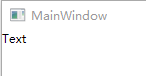
生成结果如下

 浙公网安备 33010602011771号