


WPF使用并发词典ConcurrentDictionary实现MVVM(二)-绑定命令
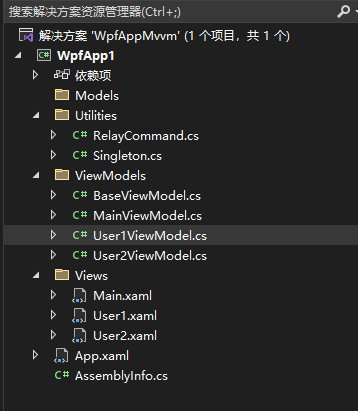
在上一个博客中增加一个RelayCommand.cs,然后在User1ViewModel.cs中增加一个BtnCommand,最后在User1.xaml中绑定Command="{Binding BtnCommand}"这个命令。


using System;
using System.Collections.Generic;
using System.Diagnostics;
using System.Linq;
using System.Text;
using System.Threading.Tasks;
using System.Windows.Input;

namespace WpfApp1.Utilities
{
    public class RelayCommand : ICommand
    {
        public RelayCommand(Action execute)
            : this(execute, null)
        {
        }

        public RelayCommand(Action execute, Func<bool> canExecute)
        {
            if (execute == null)
                throw new ArgumentNullException("execute");

            _execute = execute;
            _canExecute = canExecute;
        }

        [DebuggerStepThrough]
        public bool CanExecute(object parameter)
        {
            return _canExecute == null ? true : _canExecute();
        }
        public event EventHandler CanExecuteChanged
        {   //这里把实现注释掉了,这样在SL下面也可以用。
            add { }
            remove { }
            //add
            //{
            //    if (_canExecute != null)
            //        CommandManager.RequerySuggested += value;
            //}
            //remove
            //{
            //    if (_canExecute != null)
            //        CommandManager.RequerySuggested -= value;
            //}
        }

        public void Execute(object parameter)
        {
            _execute();
        }

        readonly Action _execute;
        readonly Func<bool> _canExecute;
    }
}
using System;
using System.Collections.Generic;
using System.Linq;
using System.Text;
using System.Threading.Tasks;
using WpfApp1.Utilities;

namespace WpfApp1.ViewModels
{
    public class User1ViewModel : ViewModels.BaseViewModel
    {
        private string _text = "我是User1页面";
        public string Text
        {
            get { return _text; }
            set
            {
                _text = value;
                OnPropertyChanged("Text");
            }
        }
        private RelayCommand btnCommand;
        public RelayCommand BtnCommand
        {
            get
            {
                if (btnCommand == null)
                    btnCommand = new RelayCommand(() => ExcuteBtnLogAmpCommand());
                return btnCommand;
            }
            set { btnCommand = value; }
        }
        public void ExcuteBtnLogAmpCommand()
        {
            Singleton<MainViewModel>.Instance.Text = "页面1绑定命令触发事件";
        }
    }

}
<UserControl x:Class="WpfApp1.Views.User1"
             xmlns="http://schemas.microsoft.com/winfx/2006/xaml/presentation"
             xmlns:x="http://schemas.microsoft.com/winfx/2006/xaml"
             xmlns:mc="http://schemas.openxmlformats.org/markup-compatibility/2006"
             xmlns:d="http://schemas.microsoft.com/expression/blend/2008"
             xmlns:local="clr-namespace:WpfApp1.Views"
             mc:Ignorable="d"
             d:DesignHeight="450" d:DesignWidth="800" Background="AliceBlue">
    <StackPanel VerticalAlignment="Center">
        <TextBlock HorizontalAlignment="Center"  TextWrapping="Wrap" Text="{Binding Text}" VerticalAlignment="Center"/>
        <Button Content="用户1界面访问主页面" Command="{Binding BtnCommand}" Click="Button_Click_User1" HorizontalAlignment="Center"  VerticalAlignment="Center"/>
    </StackPanel>
</UserControl>

 浙公网安备 33010602011771号