

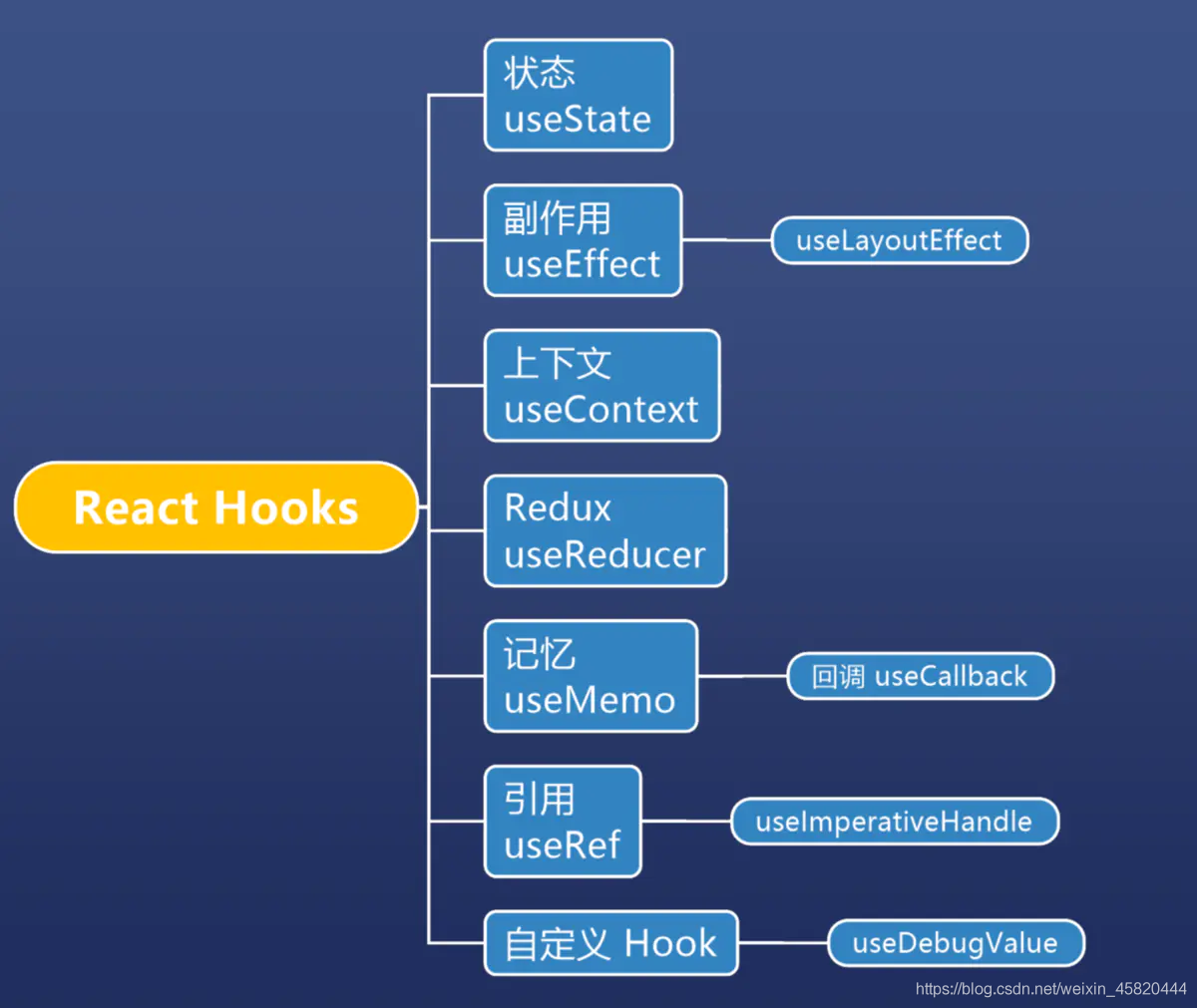
React Hooks方法
1.useState
import React, { useState } from "react";

/*
    目标:
        掌握useState的使用

        作用:实现响应式数据的
        用法:引入,useState构造响应式数据
          const [val,修改val的函数]=useState(val的初始值)

          注意点:
          1.hook都必须是以use开头的
          2.必须在函数的最顶层使用

*/

export default function App() {
  const [user, setUser] = React.useState({ name: "Jack", age: 18 });
  const onClick = () => {
    //setUser不可以局部更新,如果只改变其中一个,那么整个数据都会被覆盖
    // setUser({
    // name: 'Frank'
    // })
    setUser({
      ...user, //拷贝之前的所有属性
      name: "Frank", //这里的name覆盖之前的name
    });
  };
  return (
    <div className="App">
      <h1>{user.name}</h1>
      <h2>{user.age}</h2>
      <button onClick={onClick}>Click</button>
    </div>
  );
}
注意事项:
地址要进行改变
setState(obj) 如果obj地址不变,那么React就认为数据没有变化,不会更新视图
2.useEffect
// 副作用hook用来处理一些React之外的事件
//但是其实EffectHook最常见的使用场景是模拟生命周期
// 用法:当useEffect依赖的数据发生变化,就会调用回调函数
// useEffect(回调函数,[依赖的数据])
import React, { useEffect, useState } from "react";

export default function EffectHook() {
  const [val, setVal] = useState(0);
  // 当前这个用法,模拟了componentDidUpdated这个生命周期
  //   useEffect(() => {
  //     console.log(1);
  //   }, [val]);
  //   setInterval(() => {
  //     setVal(val + 1);
  //   }, 1000);

  // 使用useEffect模拟componentDidMount
  //   useEffect(() => {
  //     //该回调函数会在第一次渲染的时候调用一次
  //     console.log(3);
  //   }, []);

  useEffect(() => {
    // 在回调函数里面返回一个函数
    return () => {
      console.log("卸载");
    };
  }, []);
  return <div></div>;
}
3.useContext
import React, { useState, createContext, useContext } from "react";

/*
    目标:
        学会使用useContext 使用context进行多级组件传递数据

        用法:
            1.createContext
            2.Provider
            3.useContext
                const data=useContext(MyContext)
                data为 Provider给的value的值
                MyContext为在第一步创建的context的变量

*/

// 1.创建一个context
const MyContext = createContext();

export default function ContextStudy() {
  const [count, setCount] = useState(5);
  const add = () => {
    setCount(count + 1);
  };
  // 2.需要一个Provider
  return (
    <MyContext.Provider value={{ count, add }}>
      <Parent></Parent>
    </MyContext.Provider>
  );
}

function Parent() {
  return <Child></Child>;
}

function Child() {
  const data = useContext(MyContext);
  console.log(data);
  return (
      <div>
          <h3>孙子</h3>
          <p>{data.count}</p>
          <button onClick={data.add}>++</button>
      </div>
  )
}
4.useReducer
import React, { useReducer, useState } from "react";
/*
    目标:
        掌握 ReducerHook

        作用: 解决 useState 在处理数据比较复杂的时候的使用问题

        [数据,处理数据的委托] = useReducer(处理函数,数据初始值)
*/

function useCount() {
  const [count, setCount] = useState(0);
  //   const add1 = () => {
  //     setCount(count + 1);
  //   };
  //   const add2 = () => {
  //     setCount(count - 1);
  //   };
  //   const add3 = () => {
  //     setCount(count + 5);
  //   };

  //   function add({ type, pyload }) {
  //     if (type == "add1") {
  //       setCount(count + 1);
  //     } else if (type === "add2") {
  //       setCount(count - 1);
  //     }
  //   }
  //   return [count, add];
}

const reducer = (state, action) => {
  console.log(action);
  //判断action的type进行处理
  switch (action.type) {
    case "add1":
      state++;
      break;
    case "add2":
      state--;
      break;
    case "add3":
      state += action.pyload;
      break;
  }
  return state;
};

export default function ReducerHook() {
  const [count, dispatch] = useReducer(reducer, 0);

  return (
    <div>
      <div>ReducerHook</div>
      <p>{count}</p>
      <button onClick={() => dispatch({ type: "add1", pyload: 10 })}>++</button>
      <button onClick={() => dispatch({ type: "add2" })}>++</button>
      <button onClick={() => dispatch({ type: "add3", pyload: 5 })}>++</button>
    </div>
  );
}
5.useRef
import React, { useEffect, useRef } from "react";

export default function RefHook() {
  const btn = useRef();
  const sp = useRef();
  // console.log(btn);
  // 在componentDidMount后获取
  useEffect(() => {
    console.log(btn.current);
    console.log(sp.current);
  }, []);
  return (
    <div>
      <button ref={btn}>Button</button>
      <span ref={sp}>你好</span>
    </div>
  );
}
6.自定义Hook
import React, { useState } from "react";
/*
    目标:
        自定义Hook
        把自己处理数据的过程变成一个hook

    要求:
        hook都要以use开头

    好处:
        1.代码简洁,方便书写和维护
        2.逻辑会更加独立
*/

function useCount() {
  const [count, setCount] = useState(0);
  const onClick = () => {
     setCount(count + 1);
  };
  return [count, onClick];
}
export default function CusHook() {
  const [a, b] = useCount();
  return (
    <div>
      <h1>CusHook</h1>
      <p>{a}</p>
      <button onClick={b}>++</button>
    </div>
  );
}

 浙公网安备 33010602011771号