

ROS2之话题
功能包的大致流程:setup.py进行注册然后在colcon build进行构建,然后source install/setup.sh 更新环境最后ros2 run 包名 注册名 进行运行
在 ROS2 中,话题(Topic) 是一种用于节点间 发布/订阅通信 的机制。
可以把话题理解为一个 命名的数据通道:
-
节点(Node) 可以通过 发布者(Publisher) 将消息发送到某个话题上。
-
其他节点 可以通过 订阅者(Subscriber) 订阅同一个话题,从而接收这些消息。
-
消息(Message) 是在话题中传递的数据,通常有固定的数据结构(例如:位置、速度、图像等)。
特点
-
解耦通信:发布者和订阅者不需要知道对方是谁,只要约定好话题名称和消息类型,就能通信。
-
异步传输:发布者发送消息后不需要等待,订阅者在收到时会自动回调。
-
多对多关系:
-
一个话题可以有多个发布者。
-
一个话题也可以有多个订阅者。
-
所有订阅者都会收到相同的消息副本。
-
话题只是一个数据通道是动态存在的,当节点创建发布者或者订阅者时这个话题会被随之动态创建,如果该话题没有一个节点订阅或者发布的话则会自动注销节省资源。
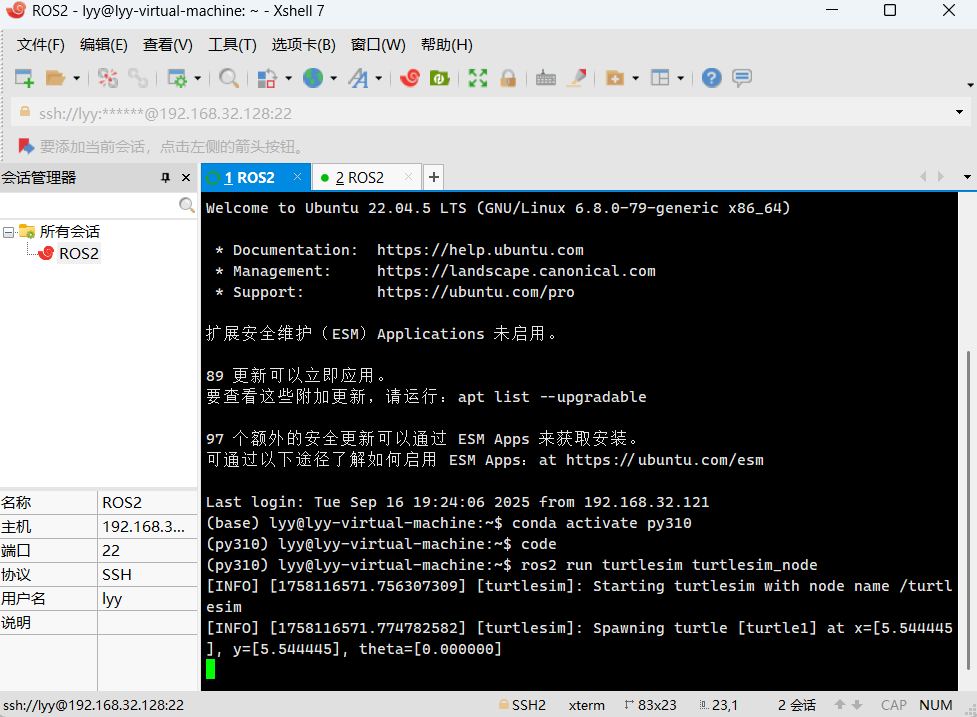
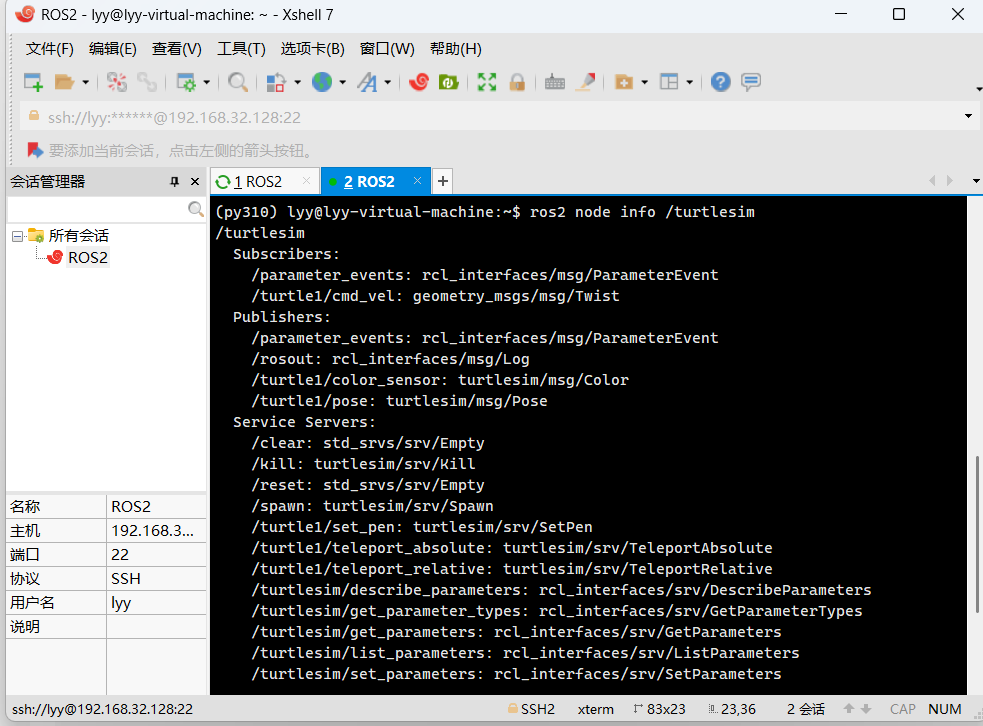
打开小海龟模拟器,然后输出其节点信息
Subscribers(订阅者)
表示这个节点正在 监听/接收 的话题:
-
/parameter_events:监听参数变化事件。 -
/turtle1/cmd_vel:接收速度控制指令(geometry_msgs/msg/Twist),这个就是你用来控制小乌龟运动的入口。
Publishers(发布者)
表示这个节点会向外 发布 的话题:
-
/parameter_events:发布参数变化事件。 -
/rosout:发布日志信息,供ros2 topic echo /rosout查看。 -
/turtle1/color_sensor:发布小乌龟当前位置的颜色(turtlesim/msg/Color)。 -
/turtle1/pose:发布小乌龟的位姿(turtlesim/msg/Pose)。
节点信息概括
订阅者 ——> 话题名 : 消息类型 发布者 ——> 话题名 : 消息类型
服务端 ——> 服务名 : 服务类型 服务客户端 ——> 服务名 : 服务类型
动作服务端 ——> 动作名 : 动作类型 动作客户端 ——> 动作名 : 动作类型
一个节点可以包含多个发布者和订阅者,用于将消息发布到不同的话题或者从不同的话题接受消息,如果节点没有该话题的发布者和订阅者那该节点就无法从该话题发布和接收消息
发布者和订阅者之间是异步的,发布与订阅互不等待,由Executor 负责轮询和调度
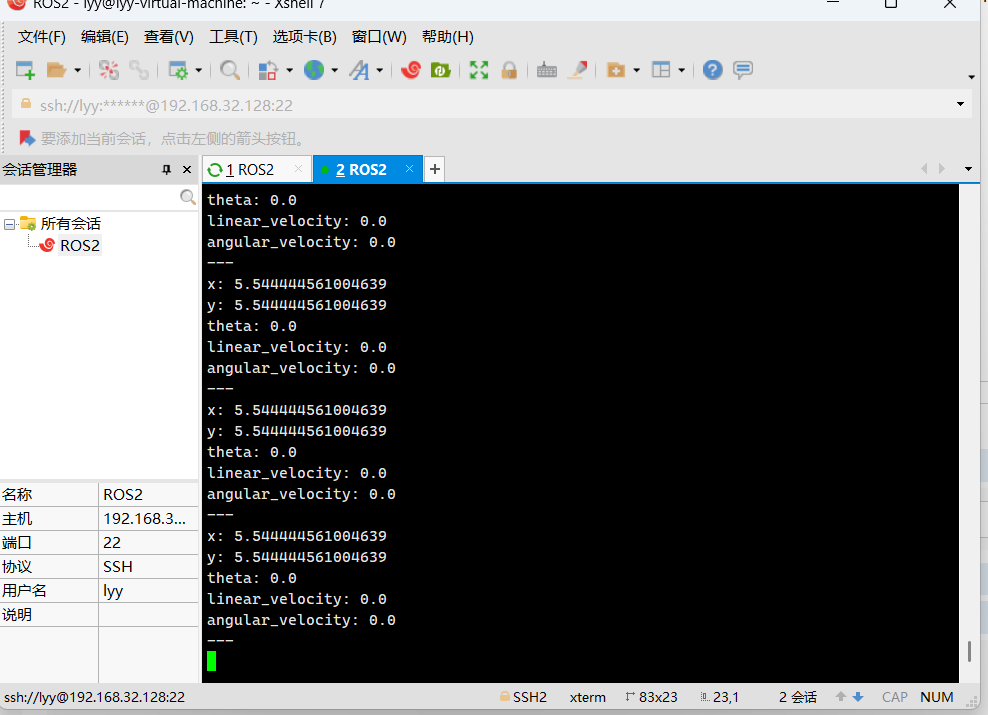
这些为该节点关联的话题,输出其中一个话题的信息,ros2 topic echo /turtle1/pose,输出小乌龟的位姿的信息
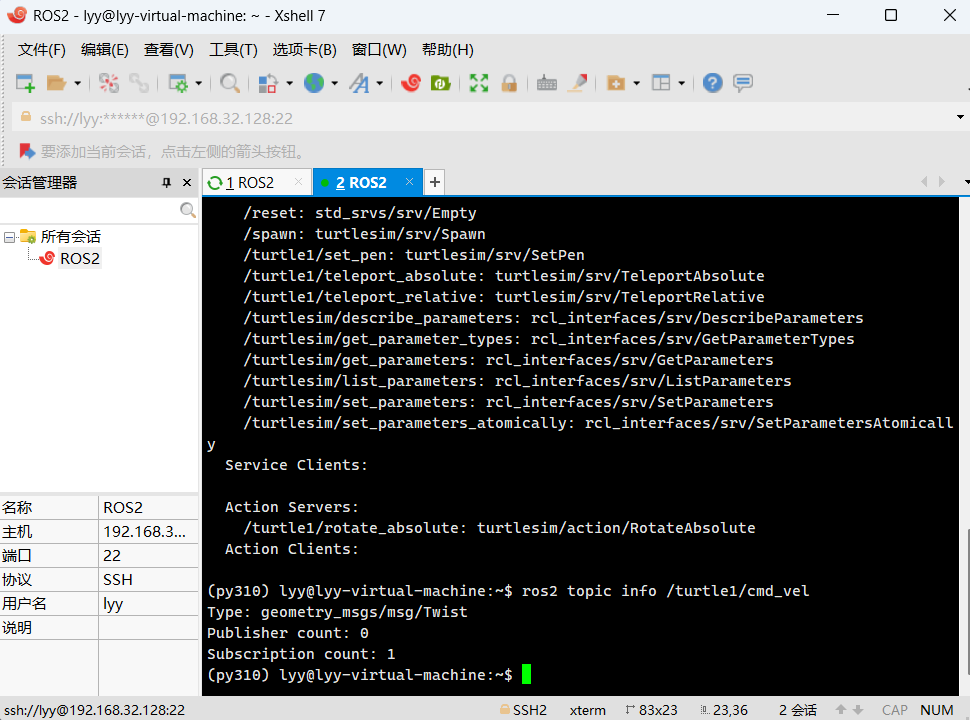
ros2 topic info /turtle1/cmd_vel,查看该话题的详细信息,包含了话题类型,该话题发布者和订阅者的数量
在 ROS2 中,interface 的作用是定义和描述节点之间通信所使用的数据结构,包括 消息(msg)、服务(srv) 和 动作(action)。它相当于通信的“协议说明书”,规定了话题传输的数据格式、服务的请求与响应格式,以及动作的目标、反馈和结果格式,使得不同节点之间能够在约定的数据结构下进行解耦通信。
ros2 interface 命令是用来 列出和查看 ROS2 中定义的各种通信接口(msg/srv/action),方便我们理解节点通信时的数据结构。
# 查看所有接口(包括消息、服务、动作)
ros2 interface list# 只看消息类型
ros2 interface list | grep msg# 只看服务类型
ros2 interface list | grep srv# 只看动作类型
ros2 interface list | grep action# 查看某个接口的定义(结构体内容)
ros2 interface show <interface_type>
通过话题发布小说
import rclpy
import requests
from bs4 import BeautifulSoup
from rclpy.node import Node
from example_interfaces.msg import String
from queue import Queue


class NovelPubNode(Node):

    def __init__(self,node_name):
        super().__init__(node_name)
        self.get_logger().info(f'{node_name},start!')
        # 小说行队列
        self.novel_queue = Queue()
        # 发布者创建,话题名是 novel,消息类型是 String,10为消息队列长度,最多能储存10条消息
        self.novel_publisher = self.create_publisher(String,'novel',10)
        # 间隔5秒发布一行小说,设置一个定时器,每 5 秒触发一次 timer_callback 回调函数
        self.create_timer(5,self.timer_callback)

    # 回调函数
    def timer_callback(self):
        #每次定时器触发,从队列里取出一行小说。
        if self.novel_queue.qsize() > 0:
            line =self.novel_queue.get()
            msg = String()
            # 把这行小说封装成 String 消息,发布到 novel 话题
            msg.data = line
            self.novel_publisher.publish(msg)
            self.get_logger().info(f'publish {msg}')

    # 下载小说并按行分割
    def download(self,url):
        response = requests.get(url)
        response.encoding = 'utf-8'
        soup = BeautifulSoup(response.text, 'html.parser')
        div = soup.find("div", class_="article")
        lines = div.get_text(separator="\n", strip=True).split("\n")
        self.get_logger().info(f'{url} -> {len(lines)}')
        for line in lines:
            self.novel_queue.put(line)

def main():
    rclpy.init()
    node = NovelPubNode('novel_pub_node')
    node.download('https://www.qimao.com/shuku/1747899/')
    rclpy.spin(node)
    rclpy.shutdown()
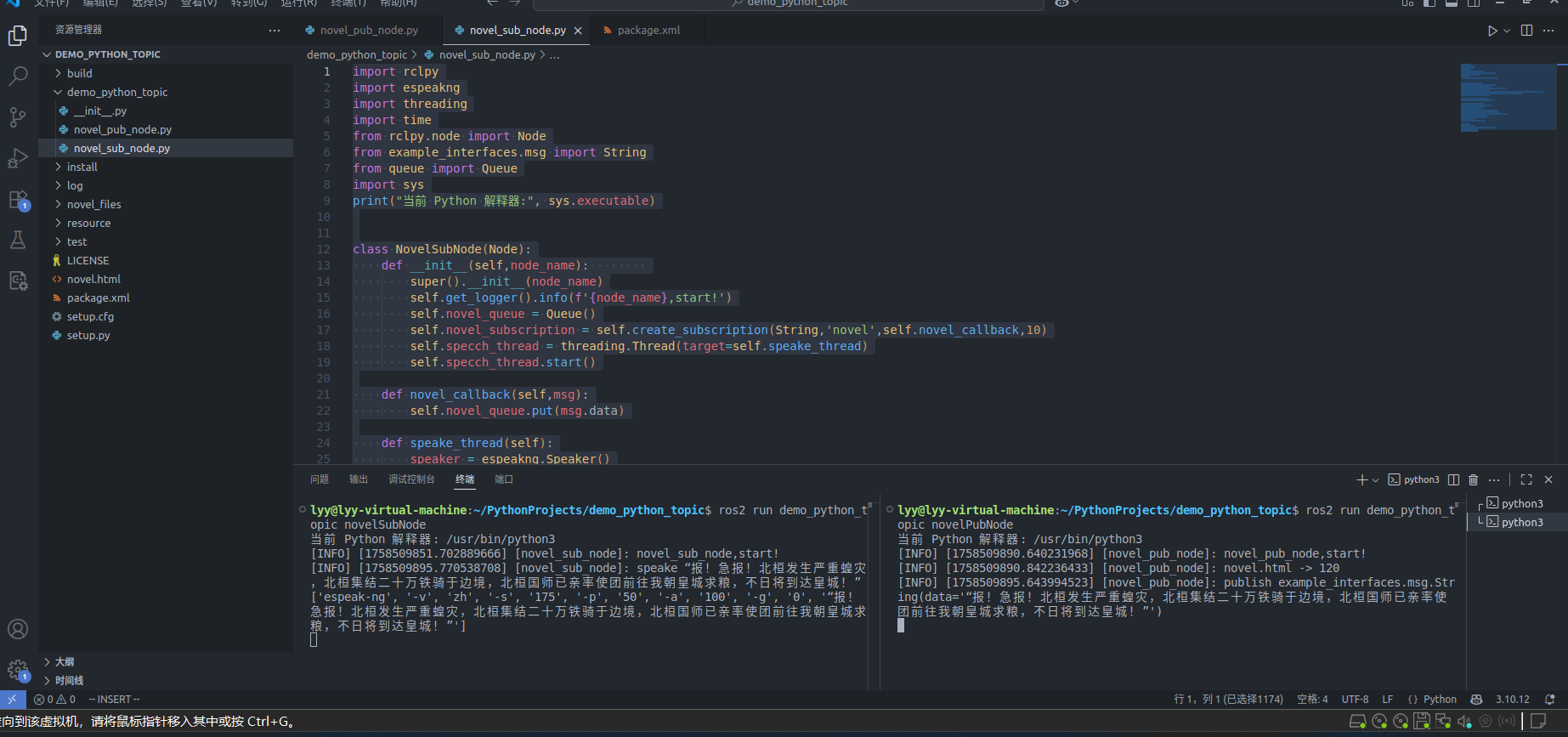
以上便是通过python构建一个发布者逐行发布小说内容,接下来我们构建一个订阅者订阅小说并转换为语音朗读出来
安装两个关键语音库
pip install espeakng
sudo apt install espeak-ng
msg是一样的,即使可能这两个msg不在同一个进程甚至不在同一个电脑中运行的程序,只要节点在同一个 ROS2 网络(DDS 域)中运行,相同话题下的得到的msg就是一样的
ROS2默认读取的都是系统的python环境,用虚拟的python环境容易出问题,于是我把虚拟环境退出来了,同时发现之前的网站通过反爬机制导致我爬取失败,于是我直接把网站源码下载了下来进行一个读取解析
# 退出虚拟环境
conda deactivate
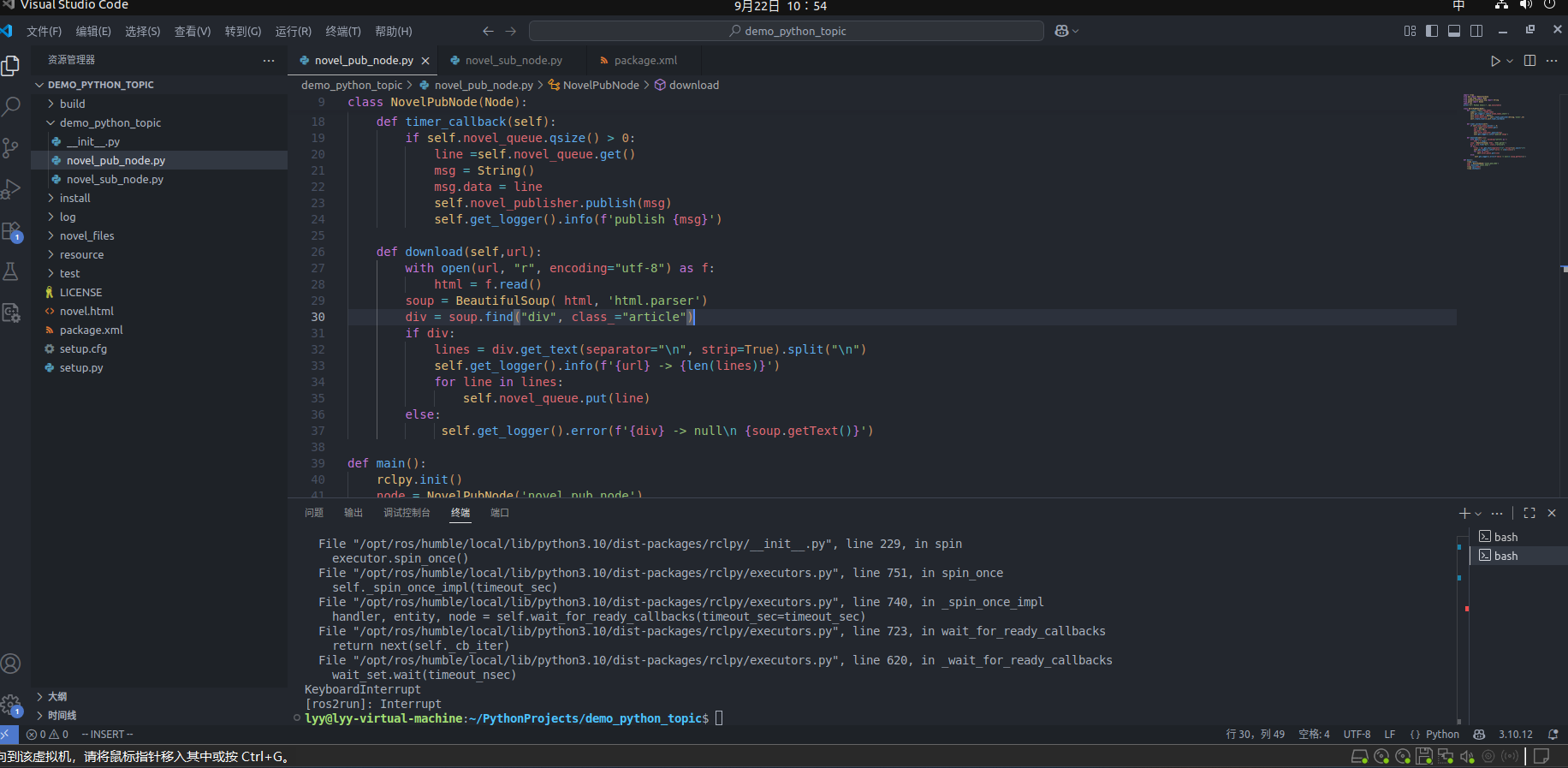
发布者的回调函数靠设置定时器触发,而订阅者的回调函数则是靠接受到消息来进行触发
import rclpy
from bs4 import BeautifulSoup
from rclpy.node import Node
from example_interfaces.msg import String
from queue import Queue
import sys
print("当前 Python 解释器:", sys.executable)

class NovelPubNode(Node):
    def __init__(self,node_name):
        super().__init__(node_name)
        self.get_logger().info(f'{node_name},start!')
        self.novel_queue = Queue()
        self.novel_publisher = self.create_publisher(String,'novel',10)
        self.create_timer(5,self.timer_callback)


    def timer_callback(self):
        if self.novel_queue.qsize() > 0:
            line =self.novel_queue.get()
            msg = String()
            msg.data = line
            self.novel_publisher.publish(msg)
            self.get_logger().info(f'publish {msg}')

    def download(self,url):
        with open(url, "r", encoding="utf-8") as f:
            html = f.read()
        soup = BeautifulSoup( html, 'html.parser')
        div = soup.find("div", class_="article")
        if div:
            lines = div.get_text(separator="\n", strip=True).split("\n")
            self.get_logger().info(f'{url} -> {len(lines)}')
            for line in lines:
                self.novel_queue.put(line)
        else:
             self.get_logger().error(f'{div} -> null\n {soup.getText()}')

def main():
    rclpy.init()
    node = NovelPubNode('novel_pub_node')
    node.download('novel.html')
    rclpy.spin(node)
    rclpy.shutdown()
import rclpy
import espeakng
import threading
import time
from rclpy.node import Node
from example_interfaces.msg import String
from queue import Queue
import sys
print("当前 Python 解释器:", sys.executable)
class NovelSubNode(Node):
def __init__(self,node_name):
super().__init__(node_name)
self.get_logger().info(f'{node_name},start!')
self.novel_queue = Queue()
self.novel_subscription = self.create_subscription(String,'novel',self.novel_callback,10)
# 创建新的线程来读取小说内容,因为小说队列的更新和读取小说内容应当是同步进行的,如果只有一个线程读取的话,在读小说的同时后续发布的小说内容无法及时接收到队列里面,导致内容丢失
self.specch_thread = threading.Thread(target=self.speake_thread)
self.specch_thread.start()
def novel_callback(self,msg):
self.novel_queue.put(msg.data)
def speake_thread(self):
speaker = espeakng.Speaker()
speaker.voice = 'zh'
# ROS 上下文 = ROS 程序运行的全局环境,查看上下文是否正常
while rclpy.ok():
if self.novel_queue.qsize() > 0:
line = self.novel_queue.get()
self.get_logger().info(f'speake {line}')
speaker.say(line)
speaker.wait()
else:
time.sleep(1)
def main():
rclpy.init()
node = NovelSubNode('novel_sub_node')
rclpy.spin(node)
rclpy.shutdown()<?xml version="1.0"?>
<?xml-model href="http://download.ros.org/schema/package_format3.xsd" schematypens="http://www.w3.org/2001/XMLSchema"?>
<package format="3">
<name>demo_python_topic</name>
<version>0.0.0</version>
<description>TODO: Package description</description>
<maintainer email="lyy@todo.todo">lyy</maintainer>
<license>Apache-2.0</license>
<depend>rclpy</depend>
<depend>example_interfaces</depend>
<depend>espeakng</depend>
<depend>bs4</depend>
<test_depend>ament_copyright</test_depend>
<test_depend>ament_flake8</test_depend>
<test_depend>ament_pep257</test_depend>
<test_depend>python3-pytest</test_depend>
<export>
<build_type>ament_python</build_type>
</export>
</package> entry_points={
'console_scripts': [
'novelPubNode = demo_python_topic.novel_pub_node:main',
'novelSubNode = demo_python_topic.novel_sub_node:main'
],
},
C++订阅和发布话题
使用C++创建发布者控制海龟画圈,再创建订阅者订阅海龟的位置实现闭环控制
先采用ROS2命令创建功能包,加上依赖包,入下cmake所示
cmake_minimum_required(VERSION 3.8)
project(demo_cpp_topic)

if(CMAKE_COMPILER_IS_GNUCXX OR CMAKE_CXX_COMPILER_ID MATCHES "Clang")
  add_compile_options(-Wall -Wextra -Wpedantic)
endif()

# find dependencies
find_package(ament_cmake REQUIRED)
find_package(rclcpp REQUIRED)
find_package(geometry_msgs REQUIRED)
find_package(turtlesim REQUIRED)

add_executable(turtleCircle src/turtle_circle.cpp)

ament_target_dependencies(turtleCircle rclcpp geometry_msgs turtlesim)

if(BUILD_TESTING)
  find_package(ament_lint_auto REQUIRED)
  # the following line skips the linter which checks for copyrights
  # comment the line when a copyright and license is added to all source files
  set(ament_cmake_copyright_FOUND TRUE)
  # the following line skips cpplint (only works in a git repo)
  # comment the line when this package is in a git repo and when
  # a copyright and license is added to all source files
  set(ament_cmake_cpplint_FOUND TRUE)
  ament_lint_auto_find_test_dependencies()
endif()

install(TARGETS turtleCircle
DESTINATION lib/${PROJECT_NAME}
)

ament_package()
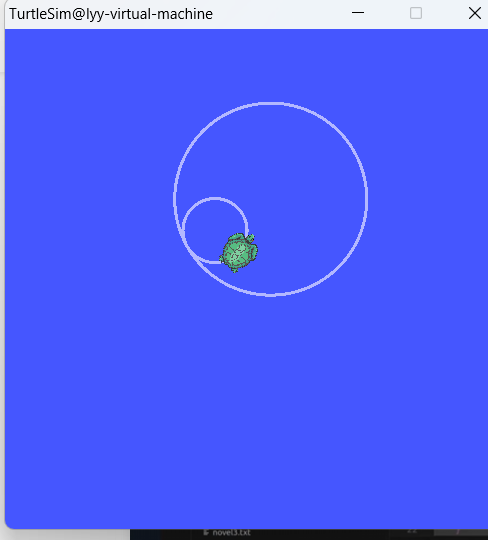
创建发布者,控制海龟画圆,设置角速度控制画圆的大小,设置线速度控制画圆的快慢
bind:C++11 引入的函数适配器,用来 把一个可调用对象(函数/成员函数/函数对象/λ表达式)绑定成另一个函数对象,搭配 std::placeholders::_1, _2, ... 保留一部分参数给以后传入,返回一个未指定类型的可调用对象(函数对象),可通过 auto 接收,或用 std::function 存储。
说起bind就得介绍一下和bind息息相关的概念柯里化了
#include <iostream>

int main() {
    // 柯里化的三数相加函数:
    // 第一步:接收a,返回一个等待b的函数
    auto add = [](int a) {
        // 第二步:接收b,返回一个等待c的函数
        return [a](int b) {
            // 第三步:接收c,计算并返回结果(所有参数齐全)
            return [a, b](int c) {
                return a + b + c;
            };
        };
    };

    // 分步传参调用
    int step1 = 1;                  // 第一个参数
    auto after_step1 = add(step1);  // 传入a=1,得到等待b的函数

    int step2 = 2;                  // 第二个参数
    auto after_step2 = after_step1(step2);  // 传入b=2,得到等待c的函数

    int step3 = 3;                  // 第三个参数
    int result = after_step2(step3);  // 传入c=3,计算结果

    std::cout << "1 + 2 + 3 = " << result << std::endl;  // 输出:6

    // 也可以直接链式调用
    std::cout << "4 + 5 + 6 = " << add(4)(5)(6) << std::endl;  // 输出:15

    return 0;
}
// 每次都会调用返回下一层的函数对象,区分返回函数对象和返回函数执行结果两种情况,add(step1)这里得到的是函数执行结果, auto add = [](int a)这里得到的是函数对象订阅者传入的回调函数需要注意create_subscription 要求回调函数的签名必须匹配,因此对于传入不同函数当回调函数有不用的处理方式
当回调函数是普通全局函数或类的静态成员函数时,可直接传递函数名,因为这类函数的签名可以天然匹配订阅回调的要求(无隐含参数);当回调函数是类的非静态成员函数时,不能直接传递函数名,必须用 std::bind(或 lambda 表达式)绑定 this 指针,因为非静态成员函数有一个隐含的第一个参数 this(指向当前对象实例),导致其实际签名与回调要求不匹配。
#include <rclcpp/rclcpp.hpp>
#include <geometry_msgs/msg/twist.hpp>
#include <chrono>
using namespace std;
using namespace rclcpp;

class TurtlrCircleNode:public Node
{
    private:
    // 一个智能指针,指向一个定时器对象
    TimerBase::SharedPtr timer;
    // 一个智能指针,指向一个发布者对象,其消息类型为geometry_msgs::msg::Twist
    Publisher<geometry_msgs::msg::Twist>::SharedPtr publisher;

    public:
    // 构造函数, explicit用于防止隐式格式转换
    explicit TurtlrCircleNode(const string& node_name):Node(node_name){
        publisher = this->create_publisher<geometry_msgs::msg::Twist>("/turtle1/cmd_vel", 10);
        // 1000ms触发一次回调函数将指令发布到话题中
        //非静态成员函数的 “完整签名” 中,隐含了一个this 指针作为第一个参数,不符合回调函数返回值为void的要求,绑定 this 指针,明确函数所属的对象,消去隐含的 this 参数,适配定时器的回调签名
        //这里只能传入&TurtlrCircleNode::timer_callback用于确定为某一个实例化的方法
        timer = this->create_wall_timer(1000ms,bind(&TurtlrCircleNode::timer_callback,this));
    }

    void timer_callback(){
        auto msg = geometry_msgs::msg::Twist();
        // 设置线速度和角速度
        msg.linear.x = 1.0;
        msg.angular.z = 0.5;
        publisher->publish(msg);
    }

};

int main(int argc,char** argv){
    init(argc,argv);
    auto node = make_shared<TurtlrCircleNode>("turtle_circle");
    RCLCPP_INFO(node->get_logger(),"turtle_circle start");
    spin(node);
    shutdown();
    return 0;

}
大圆的角速度为0.5,小圆的角速度为1.5
#include <rclcpp/rclcpp.hpp>
#include <turtlesim/msg/pose.hpp>
#include <geometry_msgs/msg/twist.hpp>
using namespace std;
using namespace rclcpp;

class TurtlrControlNode:public Node
{
    private:
    Publisher<geometry_msgs::msg::Twist>::SharedPtr publisher;
    Subscription<turtlesim::msg::Pose>::SharedPtr subsciber;
    // 设置目标地点的坐标
    double target_x {1.0};
    double target_y {1.0};
    double k {1.0};
    double max_speed {3.0};
    public:
    explicit TurtlrControlNode(const string& node_name):Node(node_name){
        publisher = this->create_publisher<geometry_msgs::msg::Twist>("/turtle1/cmd_vel", 10);
        // 从话题中订阅得到乌龟的位置信息来进行方向和速度的调整
        subsciber = this->create_subscription<turtlesim::msg::Pose>("/turtle1/pose", 10,bind(&TurtlrControlNode::pose_callback,this,placeholders::_1));
    }
    // 订阅者绑定的回调函数通常没有返回值
    void pose_callback(const turtlesim::msg::Pose::SharedPtr pose){
        auto current_x = pose->x;
        auto current_y = pose->y;
        RCLCPP_INFO(this->get_logger(),"x=%f y=%f \n",current_x,current_y);
        // 计算欧几里得距离
        auto distance = sqrt((target_x-current_x)*(target_x-current_x)+(target_y-current_y)*(target_y-current_y));
        // 计算需要旋转的角度,通过反三角函数由arctan得到
        auto angle = atan2((target_y-current_y),(target_x-current_x)) - pose->theta;
        auto msg = geometry_msgs::msg::Twist();
        // 当距离很大时调节角度和速度
        if(distance>0.1){
        // 如果角度偏差很大调节角度
            if(fabs(angle)>0.2){
                msg.angular.z = fabs(angle);
            }else{
        // 角度偏差还运训范围内则调剂速度
                msg.linear.x = k*distance;
            }
        }
        // 限制最大速度
        if(msg.linear.x > max_speed){
            msg.linear.x = max_speed;
        }
        // 将调节完的角度和速度发布到话题中控制海龟向目标点移动
        publisher->publish(msg);

    }

};

int main(int argc,char** argv){
    init(argc,argv);
    auto node = make_shared<TurtlrControlNode>("turtle_control");
    RCLCPP_INFO(node->get_logger(),"turtle_control start");
    spin(node);
    shutdown();
    return 0;

}
修改cmake
cmake_minimum_required(VERSION 3.8)
project(demo_cpp_topic)
if(CMAKE_COMPILER_IS_GNUCXX OR CMAKE_CXX_COMPILER_ID MATCHES "Clang")
add_compile_options(-Wall -Wextra -Wpedantic)
endif()
# find dependencies
find_package(ament_cmake REQUIRED)
find_package(rclcpp REQUIRED)
find_package(geometry_msgs REQUIRED)
find_package(turtlesim REQUIRED)
# 多功能包配置
add_executable(turtleCircle src/turtle_circle.cpp)
add_executable(turtleControl src/turtle_control.cpp)
ament_target_dependencies(turtleCircle rclcpp geometry_msgs turtlesim)
ament_target_dependencies(turtleControl rclcpp geometry_msgs turtlesim)
if(BUILD_TESTING)
find_package(ament_lint_auto REQUIRED)
# the following line skips the linter which checks for copyrights
# comment the line when a copyright and license is added to all source files
set(ament_cmake_copyright_FOUND TRUE)
# the following line skips cpplint (only works in a git repo)
# comment the line when this package is in a git repo and when
# a copyright and license is added to all source files
set(ament_cmake_cpplint_FOUND TRUE)
ament_lint_auto_find_test_dependencies()
endif()
install(TARGETS turtleCircle turtleControl
DESTINATION lib/${PROJECT_NAME}
)
ament_package()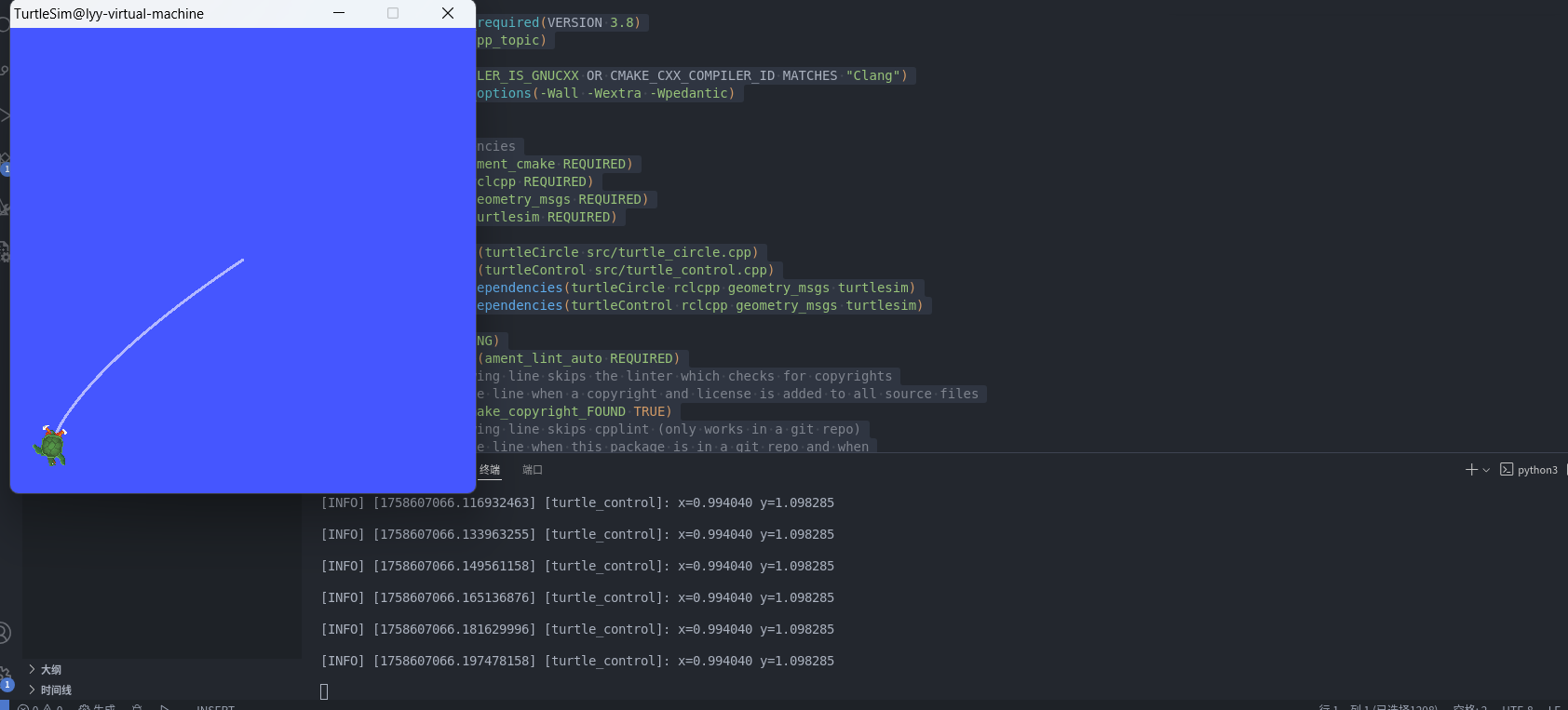 C++成功实现小海龟的闭环控制向目标移动,从上面可以看出创建发布者一般需要的都是三个参数,消息类型,话题名称和消息队列的长度,而订阅者一般会多一个回调函数用于处理接收到的消息。
接下来是我自己想到的一个话题案例一个话题计算其余话题每句话的字符个数并返回给每个话题
消息接口
builtin_interfaces/Time stamp
string user_name
string message
int32 length
bool is_calculated
cmake_minimum_required(VERSION 3.8)
project(demo_cpp_test)
if(CMAKE_COMPILER_IS_GNUCXX OR CMAKE_CXX_COMPILER_ID MATCHES "Clang")
add_compile_options(-Wall -Wextra -Wpedantic)
endif()
# 以下的顺序为一般顺序
# ${PROJECT_NAME} 当前包
# find dependencies
find_package(ament_cmake REQUIRED)
find_package(rclcpp REQUIRED)
find_package(rosidl_default_generators REQUIRED)
# 本包自定义的消息类型不需要导入而外包的则需要
find_package(builtin_interfaces REQUIRED)
# 生成消息代码(必须在add_executable之前,确保头文件先生成)
rosidl_generate_interfaces(${PROJECT_NAME}
"msg/MyMessage.msg"
DEPENDENCIES builtin_interfaces
)
add_executable(topicNode1 src/topic_node1.cpp) # 注意:源文件需写全后缀(.cpp)
ament_target_dependencies(topicNode1 rclcpp builtin_interfaces)
add_executable(topicNode2 src/topic_node2.cpp)
ament_target_dependencies(topicNode2 rclcpp builtin_interfaces)
add_executable(topicNode3 src/topic_node3.cpp)
ament_target_dependencies(topicNode3 rclcpp builtin_interfaces)
# 将自定义消息的类型支持库链接到目标
rosidl_get_typesupport_target(
myMessage
${PROJECT_NAME}
"rosidl_typesupport_cpp" # 类型支持后端(C++ 用这个,Python 无需此步骤)
)
target_link_libraries(topicNode1 ${myMessage})
target_link_libraries(topicNode2 ${myMessage})
target_link_libraries(topicNode3 ${myMessage})
if(BUILD_TESTING)
find_package(ament_lint_auto REQUIRED)
# the following line skips the linter which checks for copyrights
# comment the line when a copyright and license is added to all source files
set(ament_cmake_copyright_FOUND TRUE)
# the following line skips cpplint (only works in a git repo)
# comment the line when this package is in a git repo and when
# a copyright and license is added to all source files
set(ament_cmake_cpplint_FOUND TRUE)
ament_lint_auto_find_test_dependencies()
endif()
install(TARGETS topicNode1 topicNode2 topicNode3
DESTINATION lib/${PROJECT_NAME}
)
install(DIRECTORY msg launch
DESTINATION share/${PROJECT_NAME}
)
# 导出消息运行时依赖(供其他包依赖时使用)
ament_export_dependencies(rosidl_default_runtime)
ament_package()对应的launch文件,一般都为python文件
import launch
import launch_ros

def generate_launch_description():
    return launch.LaunchDescription(
        [
            launch_ros.actions.Node(
                package = 'demo_cpp_test',
                executable = 'topicNode1',
                name = 'topic_node1',
            ),
            launch_ros.actions.Node(
                package = 'demo_cpp_test',
                executable = 'topicNode2',
                name = 'topic_node2',
            ),
            launch_ros.actions.Node(
                package = 'demo_cpp_test',
                executable = 'topicNode3',
                name = 'topic_node3',
            ),
        ]
    )
三个自定义的节点
#include <iostream>
#include <rclcpp/rclcpp.hpp>
#include <demo_cpp_test/msg/my_message.hpp>
#include <functional>

class CenterNode:public rclcpp::Node{

    public:
    explicit CenterNode(const std::string &node_name):Node(node_name){
        RCLCPP_INFO(this -> get_logger(), "topic_node1 已启动");
        publisher = this -> create_publisher <demo_cpp_test::msg::MyMessage>("chat_topic",10);
        // this作为隐藏参数无占位符
        subcription = this -> create_subscription <demo_cpp_test::msg::MyMessage>("chat_topic",10,std::bind(&CenterNode::calculate,this,std::placeholders::_1));
    }
    // 常量共享指针因为订阅者一般不会修改原消息,而且原来消息发给本节点的副本在订阅完就实效
    // ROS2的消息机制就算每个节点都会收到原消息的副本,且消息一般都是一次性的,不会被重复利用
    void calculate(const demo_cpp_test::msg::MyMessage::SharedPtr msg){ // 使用共享指针参数因为对于只读的数据可以避免多次拷贝数据副本浪费内存,每多一个消息副本指针,计数器就加一,实际上这样消息副本只需要有一份,所有订阅者接受指向该消息的共享指针就行了
        if(msg -> is_calculated) return;
        // 对订阅消息作出回应一般创建新消息
        auto process_msg = demo_cpp_test::msg::MyMessage();
        process_msg.stamp = msg -> stamp;
        process_msg.user_name = msg -> user_name;
        process_msg.message = msg -> message;
        process_msg.length = msg -> message.length();
        process_msg.is_calculated = true;
        publisher->publish(process_msg);
        RCLCPP_INFO(this->get_logger(), "%s 发送的消息 %s 已处理", msg->user_name.c_str(), msg->message.c_str());
    }
    private:
    // 一般发布者和订阅者不会修改其内部成员数据只执行相应的操作,通过共享指针不仅能和节点保持生命周期,发布者和订阅者的共享指针,其 “共享” 是 对自身对象所有权的共享(节点和框架共同管理生命周期)
    rclcpp::Publisher<demo_cpp_test::msg::MyMessage>::SharedPtr publisher;
    rclcpp::Subscription<demo_cpp_test::msg::MyMessage>::SharedPtr subcription;

};

int main(int argc,char** argv){
    rclcpp::init(argc,argv);
    // ROS2的rclcpp::spin函数强制要求传入std::shared_ptr<rclcpp::Node>类型及其子类型的参数
    rclcpp::spin(std::make_shared<CenterNode>("topic_node1"));
    rclcpp::shutdown();
}
#include <iostream>
#include <rclcpp/rclcpp.hpp>
#include <demo_cpp_test/msg/my_message.hpp>
#include <functional>
#include <chrono>
#include <vector>
#include <random>
class TwoNode:public rclcpp::Node{
public:
explicit TwoNode(const std::string &node_name):Node(node_name){
RCLCPP_INFO(this->get_logger(), " topic_node2 已启动");
publisher = this -> create_publisher <demo_cpp_test::msg::MyMessage>("chat_topic",10);
candidate_messages_ = {
"Hello from TwoNode!",
"ROS2 topic communication test",
"Let's calculate message length",
"Is this message processed?",
"Random message here!"
};
std::random_device rd;
rng_.seed(rd());
dist_ = std::uniform_int_distribution<int>(0, candidate_messages_.size() - 1);
timer = this -> create_wall_timer(std::chrono::milliseconds(1000),bind(&TwoNode::sendMessage,this));
subcription = this -> create_subscription <demo_cpp_test::msg::MyMessage>("chat_topic",10,std::bind(&TwoNode::getResult,this,std::placeholders::_1));
}
void getResult(const demo_cpp_test::msg::MyMessage::SharedPtr msg){
if(!msg->is_calculated) return;
if(msg->user_name == "topic_node2"){
RCLCPP_INFO(this->get_logger(), "%s 本次说了 %d 个字",msg->user_name.c_str(),msg->length);
}
}
void sendMessage(){
demo_cpp_test::msg::MyMessage msg;
msg.stamp = this->get_clock()->now();
msg.user_name = "topic_node2";
int random_idx = dist_(rng_);
msg.message = candidate_messages_[random_idx];
msg.is_calculated = false;
RCLCPP_INFO(this->get_logger(),"%s 发送消息 %s", msg.user_name.c_str(), msg.message.c_str());
publisher->publish(msg);
}
private:
rclcpp::Publisher<demo_cpp_test::msg::MyMessage>::SharedPtr publisher;
rclcpp::Subscription<demo_cpp_test::msg::MyMessage>::SharedPtr subcription;
rclcpp::TimerBase::SharedPtr timer;
std::vector<std::string> candidate_messages_;
std::mt19937 rng_;
std::uniform_int_distribution<int> dist_;
};
int main(int argc,char** argv){
rclcpp::init(argc,argv);
rclcpp::spin(std::make_shared<TwoNode>("topic_node2"));
rclcpp::shutdown();
}#include <iostream>
#include <rclcpp/rclcpp.hpp>
#include <demo_cpp_test/msg/my_message.hpp>
#include <functional>
#include <chrono>
#include <vector>
#include <random>
class ThreeNode:public rclcpp::Node{
public:
explicit ThreeNode(const std::string &node_name):Node(node_name){
RCLCPP_INFO(this->get_logger(), " topic_node3 已启动");
publisher = this -> create_publisher <demo_cpp_test::msg::MyMessage>("chat_topic",10);
candidate_messages_ = {
"Hello from ThreeNode!",
"ROS2 topic communication test",
"Let's calculate message length",
"Is this message processed?",
"Random message here!"
};
std::random_device rd;
rng_.seed(rd());
dist_ = std::uniform_int_distribution<int>(0, candidate_messages_.size() - 1);
timer = this -> create_wall_timer(std::chrono::milliseconds(1000),bind(&ThreeNode::sendMessage,this));
subcription = this -> create_subscription <demo_cpp_test::msg::MyMessage>("chat_topic",10,std::bind(&ThreeNode::getResult,this,std::placeholders::_1));
}
void getResult(const demo_cpp_test::msg::MyMessage::SharedPtr msg){
if(!msg->is_calculated) return;
if(msg->user_name == "topic_node3"){
RCLCPP_INFO(this->get_logger(), "%s 本次说了 %d 个字",msg->user_name.c_str(),msg->length);
}
}
void sendMessage(){
demo_cpp_test::msg::MyMessage msg;
msg.stamp = this->get_clock()->now();
msg.user_name = "topic_node3";
int random_idx = dist_(rng_);
msg.message = candidate_messages_[random_idx];
msg.is_calculated = false;
RCLCPP_INFO(this->get_logger(),"%s 发送消息 %s", msg.user_name.c_str(), msg.message.c_str());
publisher->publish(msg);
}
private:
rclcpp::Publisher<demo_cpp_test::msg::MyMessage>::SharedPtr publisher;
rclcpp::Subscription<demo_cpp_test::msg::MyMessage>::SharedPtr subcription;
rclcpp::TimerBase::SharedPtr timer;
std::vector<std::string> candidate_messages_;
std::mt19937 rng_;
std::uniform_int_distribution<int> dist_;
};
int main(int argc,char** argv){
rclcpp::init(argc,argv);
rclcpp::spin(std::make_shared<ThreeNode>("topic_node3"));
rclcpp::shutdown();
}

 浙公网安备 33010602011771号