
红帽认证 模拟考试-下午RHCE
RHCE模拟练习v3.0 1.5h
[环境信息]
模拟环境:server0、desktop0
root密码:redhat
example.com: 172.25.0.0/24
cracker.com: 172.24.3.0/24
YUM: http://content.example.com/rhel7.0/x86_64/dvd
==server/desktop==
# lab nfskrb5 setup //仅模拟环境
1. 配置server0和desktop0 YUM
命令行:
yum-config-manager --add-repo=
2. 配置server0和desktop0上的SELinux环境为enforcing
3. 配置server0和desktop0上的访问控制,拒绝cracker.com域中的主机访问SSH
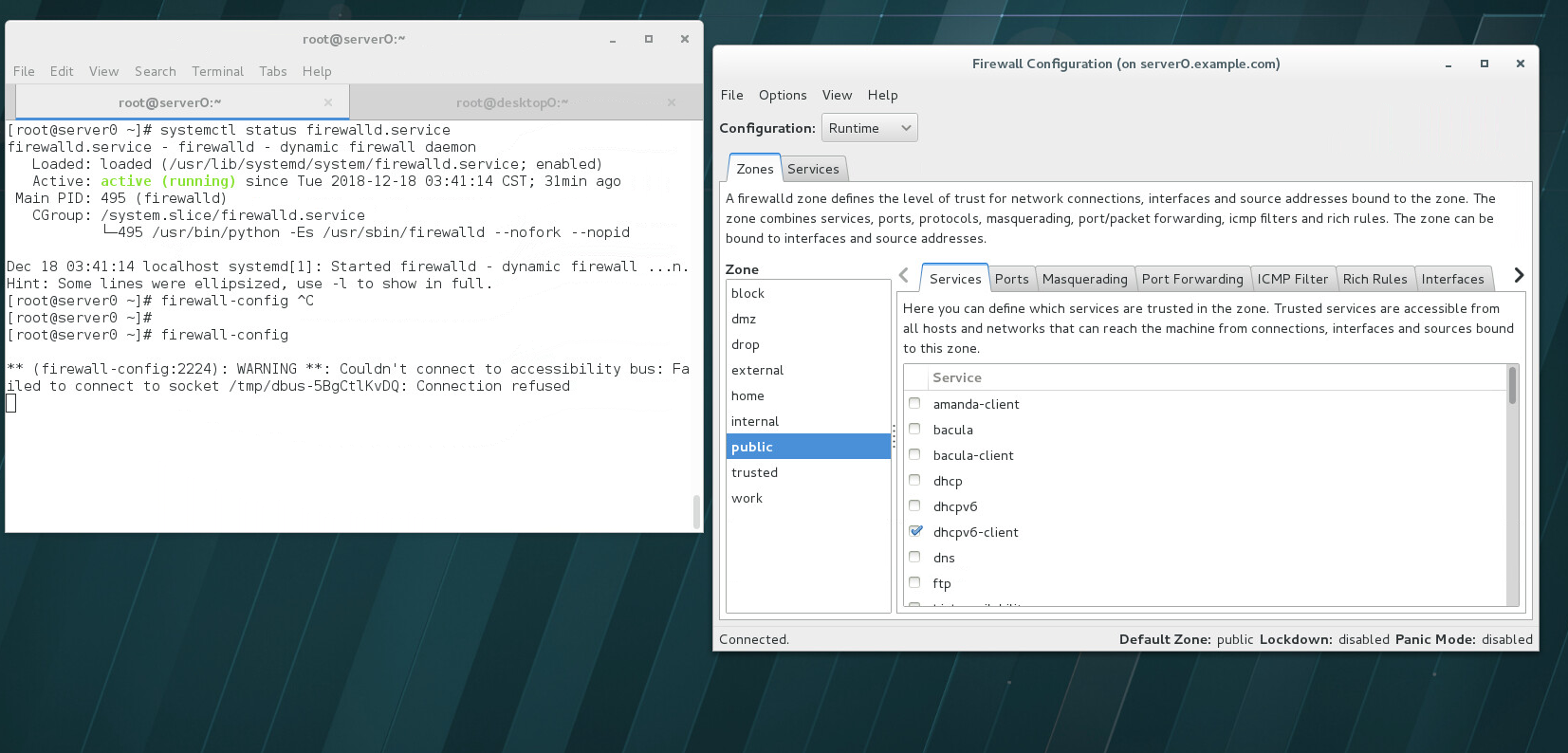
富规则:
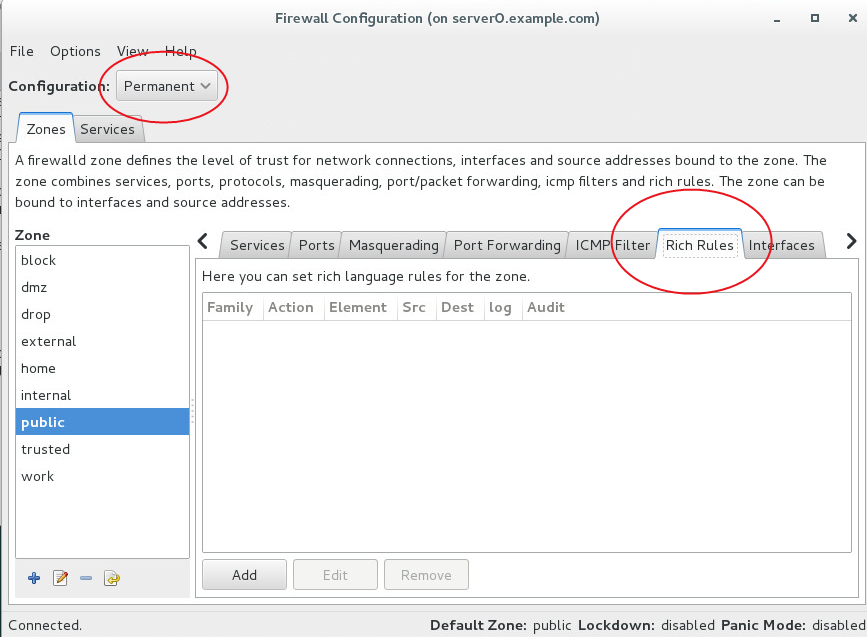
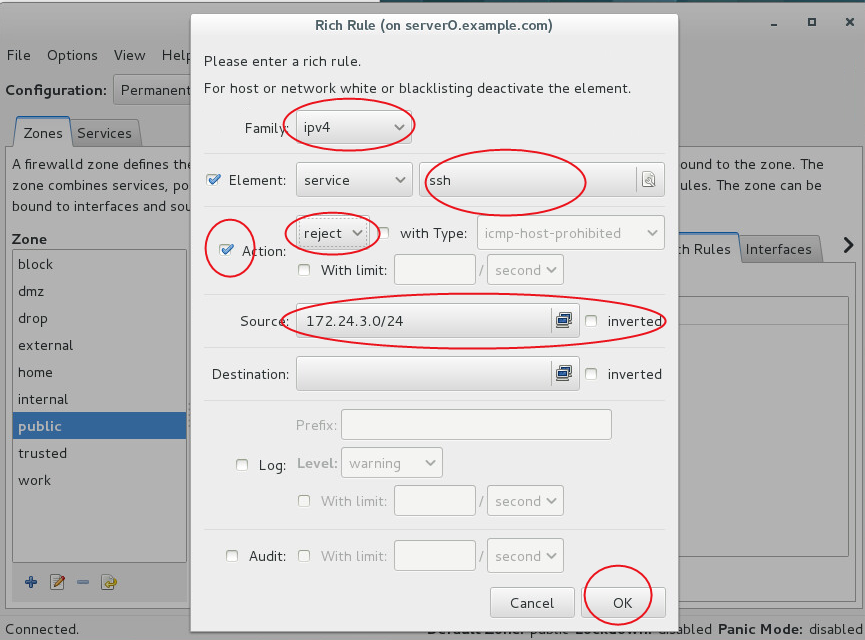
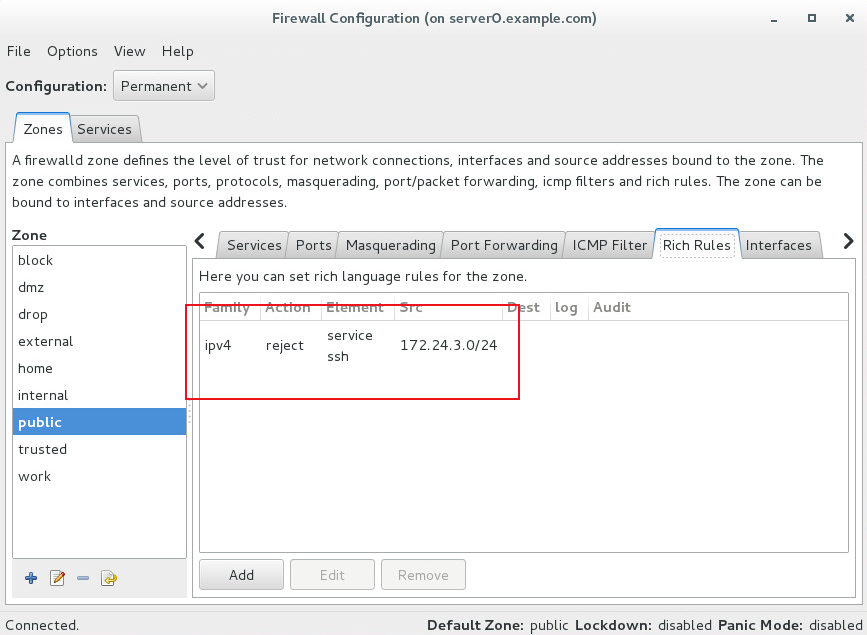
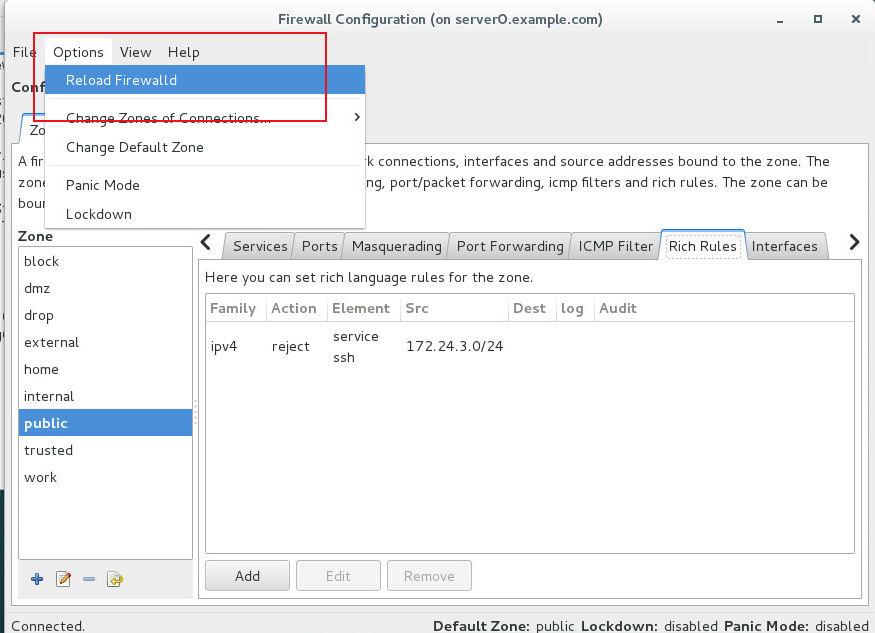
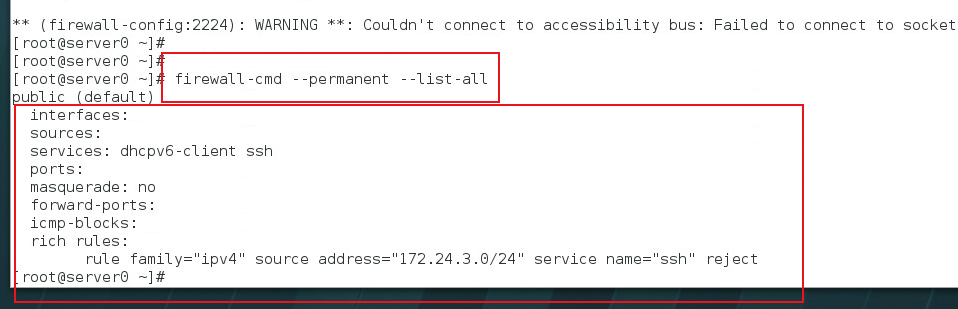
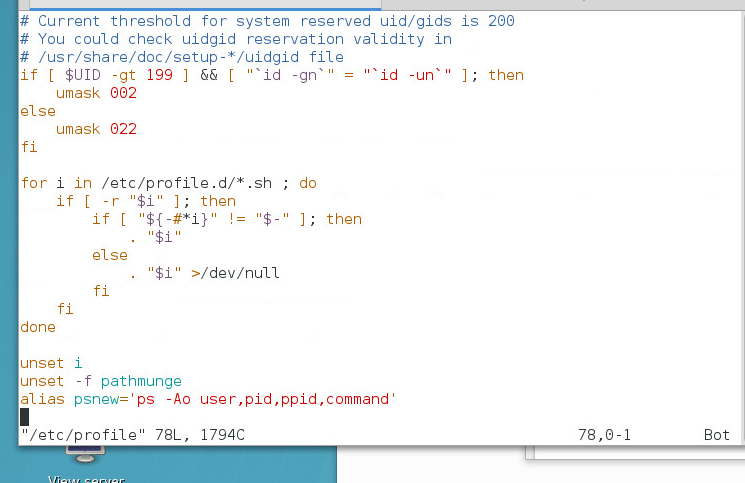
4. server0和desktop0针对所有用户创建自定义命令psnew,执行该命令是将执行ps -Ao user,pid,ppid,command
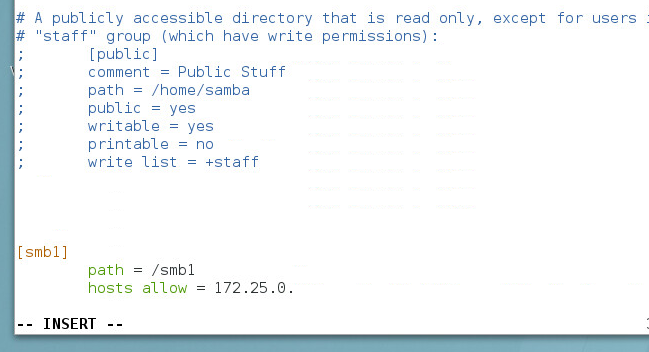
5. 配置server0服务器SMB,工作组为STAFF,共享目录/smb1, 共享名smb1,只有example.com域中主机访问共享smb1,smb1必须可浏览;用户ldapuser1必须能够读取共享中的内容,密码tianyun。
6. 配置server0服务器samba,共享目录/smb2,共享名smb2,只有example.com域中主机访问。用户ldapuser1
读取, ldapuser2读写,密码都为tianyun;desktop0以multiuser方式自动挂接到/mnt/smb2
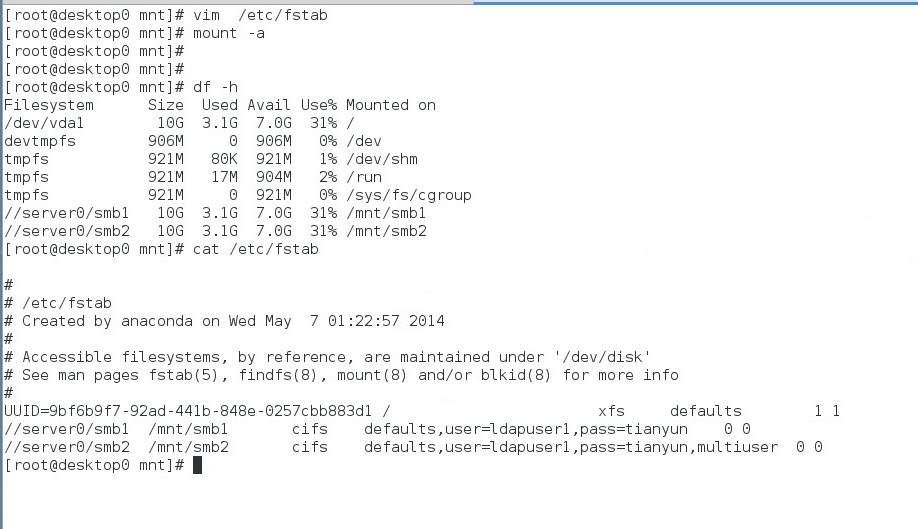
7. 配置server0 NFS服务
以只读的方式共享目录/nfs1,只能被example.com域中主机访问;
以读写的方式共享目录/nfs2,能被example.com域中主机访问
访问/nfs2需要Kerberos安全加密,密钥为 http://classroom.example.com/pub/keytabs/server0.keytab
目录/nfs2应包含名为private拥有者为ldapuser5的子目录,用户ldapuser5能以读写的方式访问/nfs2/private
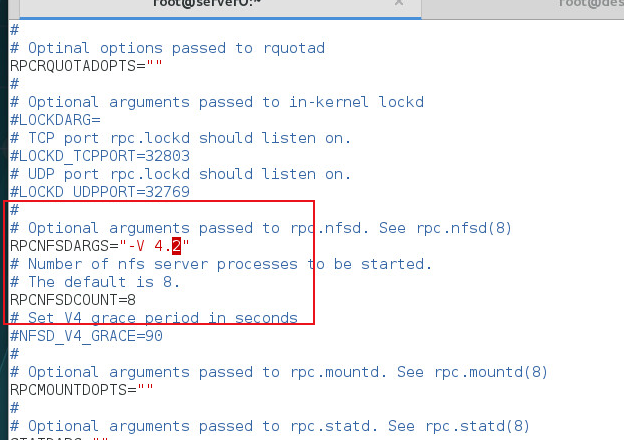
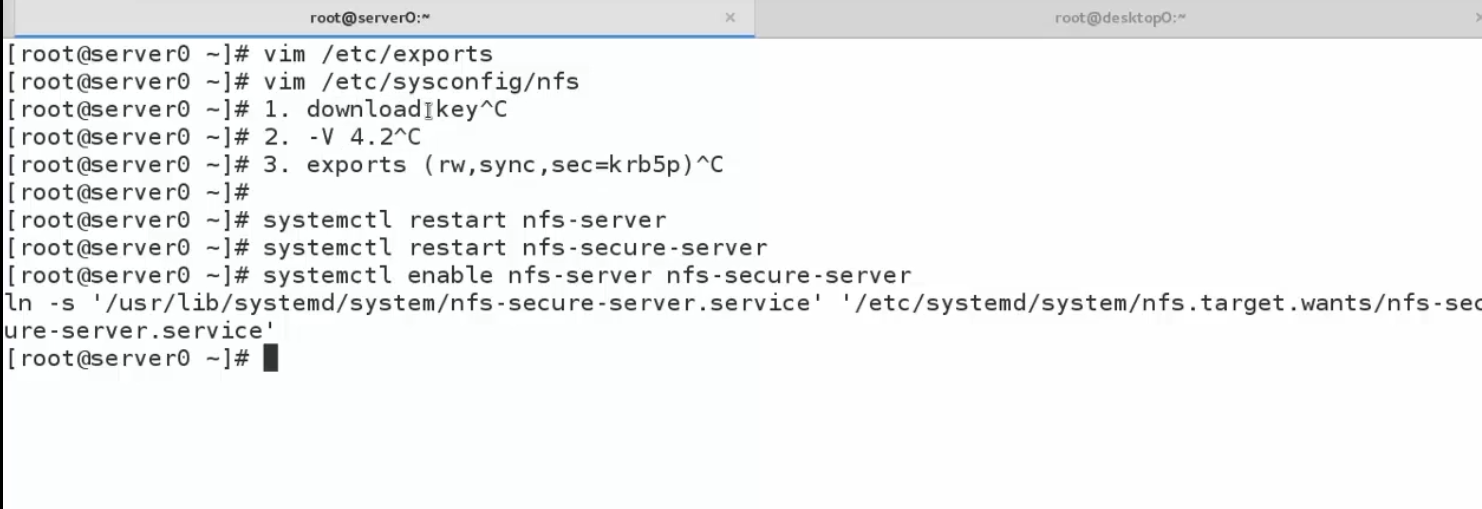
8. 配置desktop0挂载NFS
/nfs1挂载到/mnt/nfs1
/nfs2挂载到/mnt/nfssecure,并使用安全的方式,密钥为:http://classroom.example.com/pub/keytabs/desktop0.keytab
ldapuser5用户能在/mnt/nfssecure/private上创建文件
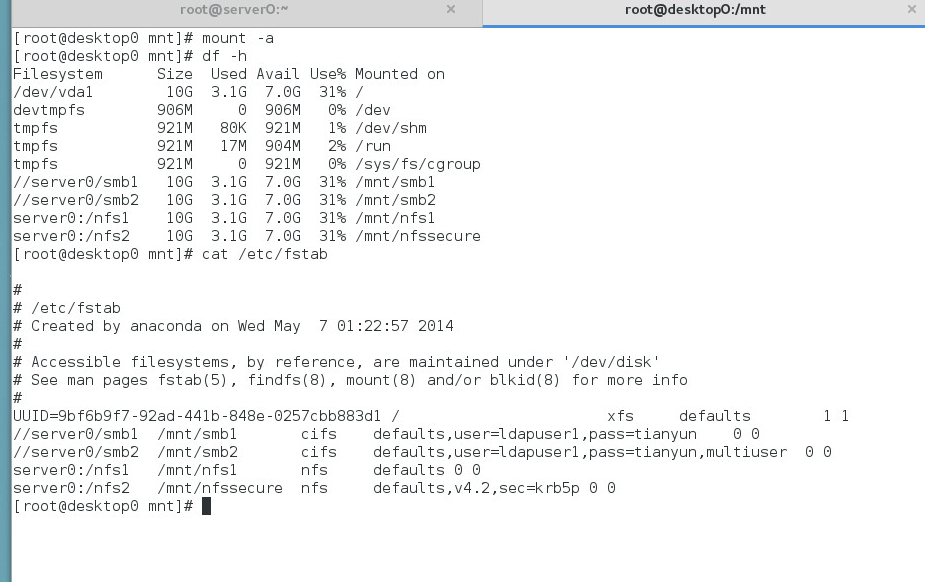
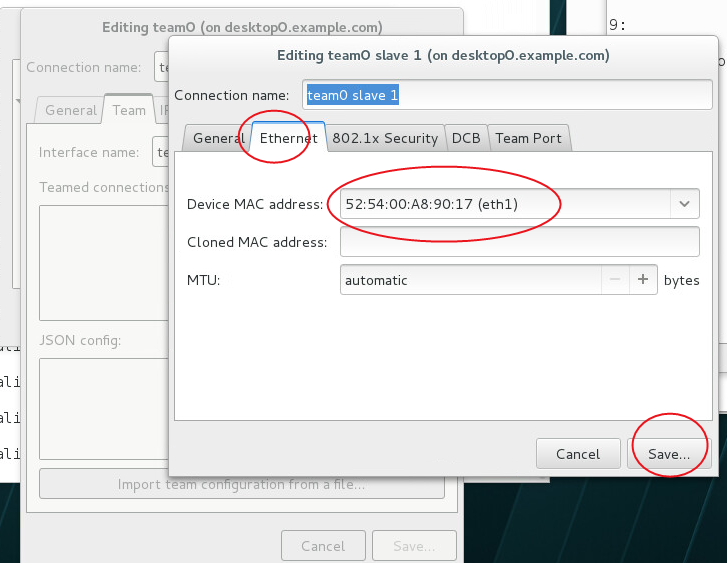
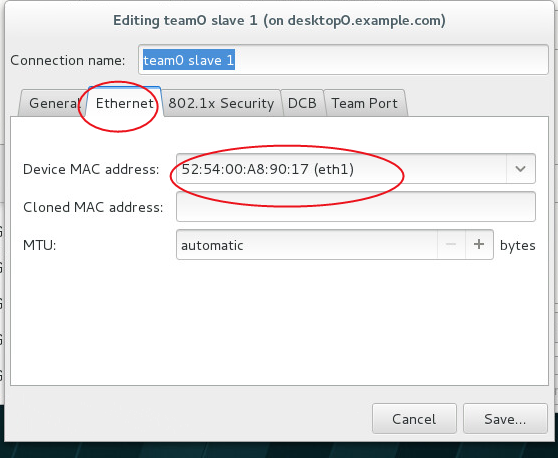
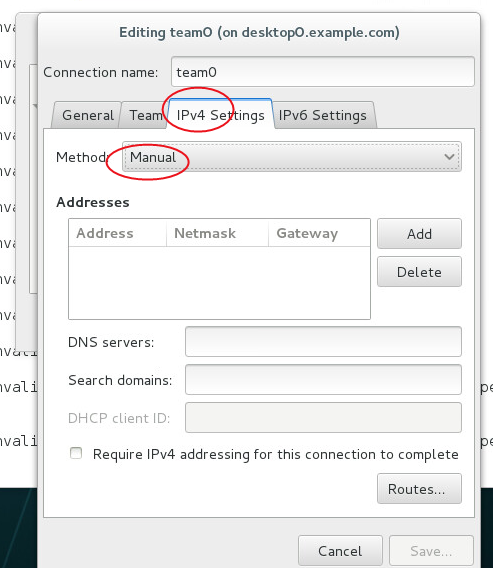
9. 配置server0和desktop0上的链路聚合,使用接口eth1、eth2。当一个接口失效时仍然能够工作。
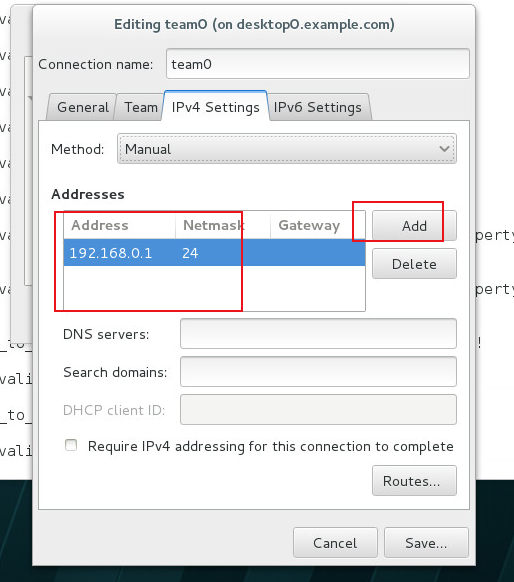
server0: 192.168.0.1/255.255.255.0
desktop0: 192.168.0.2/255.255.255.0
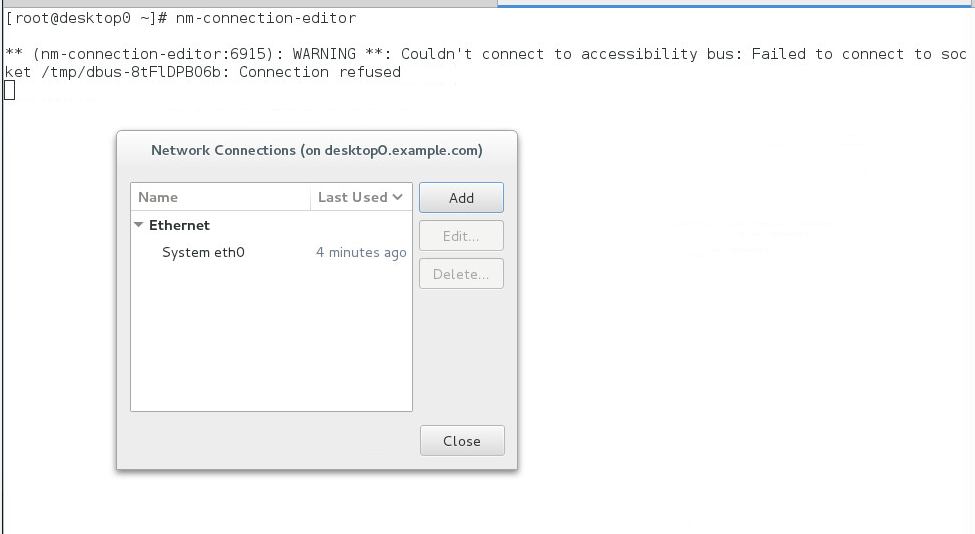
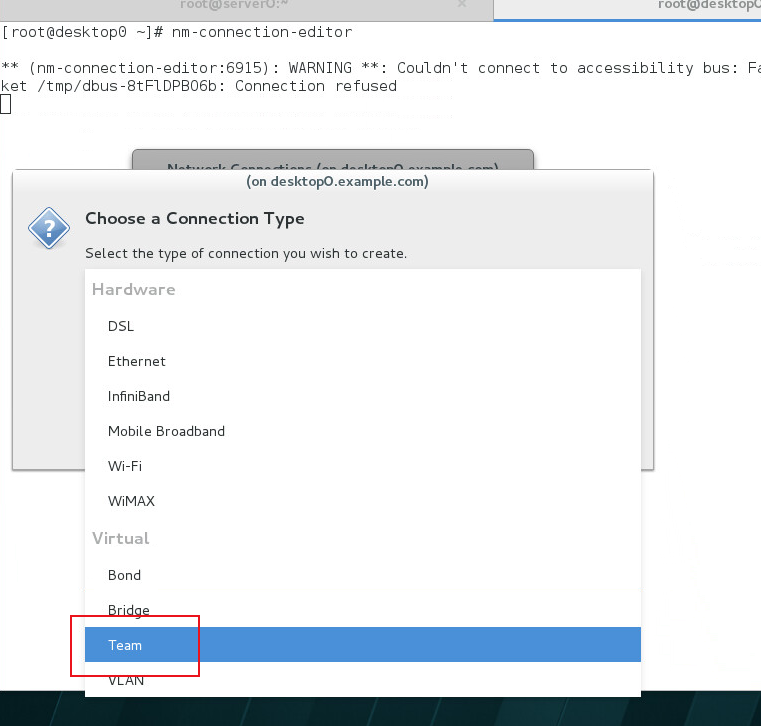
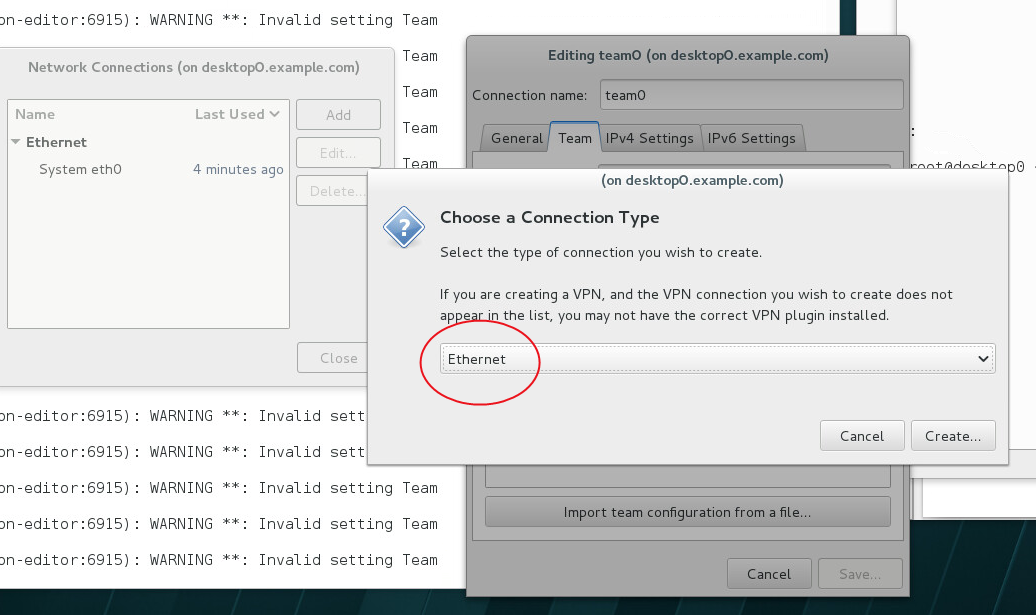
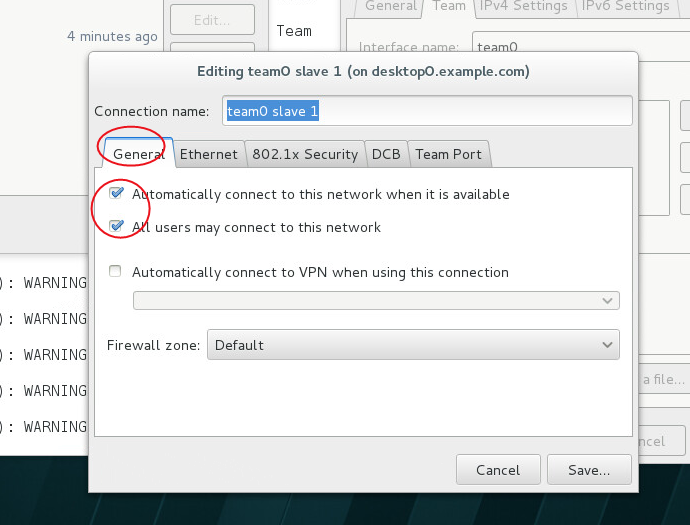
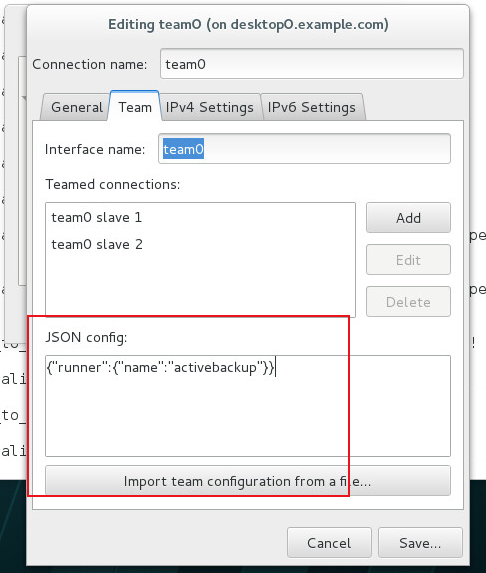
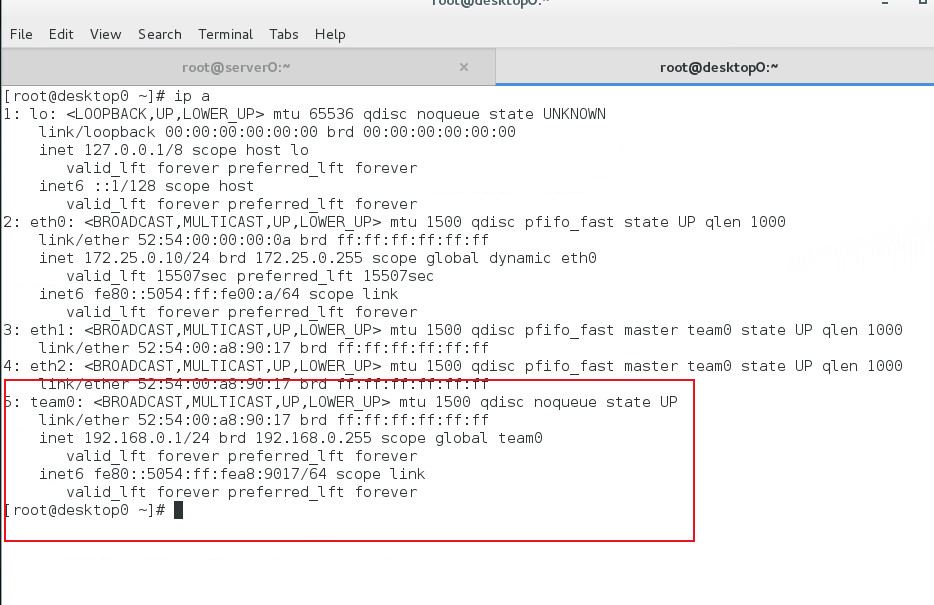
nmcli connection reload
nmcli connection up eth0
10. 配置server0端口转发,从172.25.10.0/24网段访问server0端口6666/tcp时,转发到80/tcp
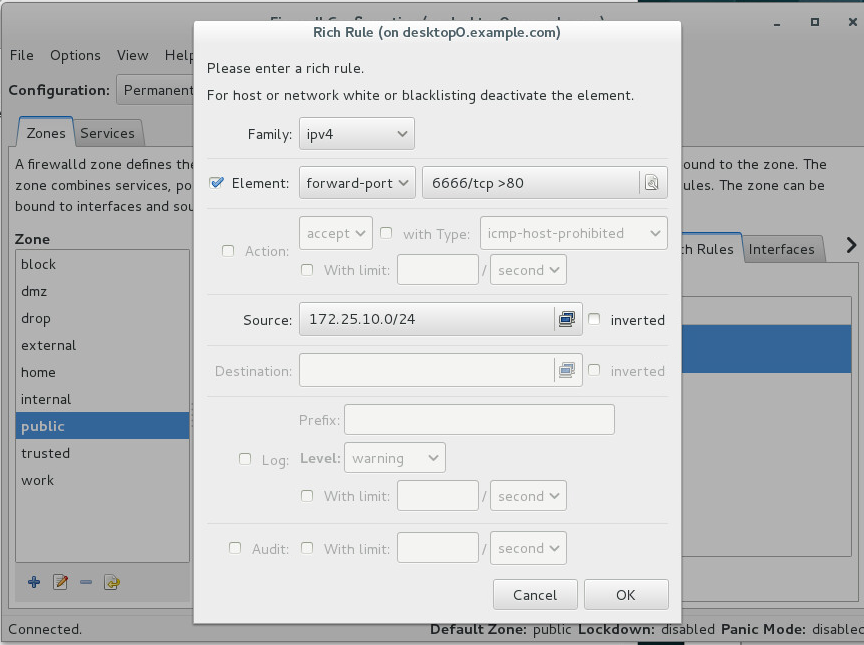
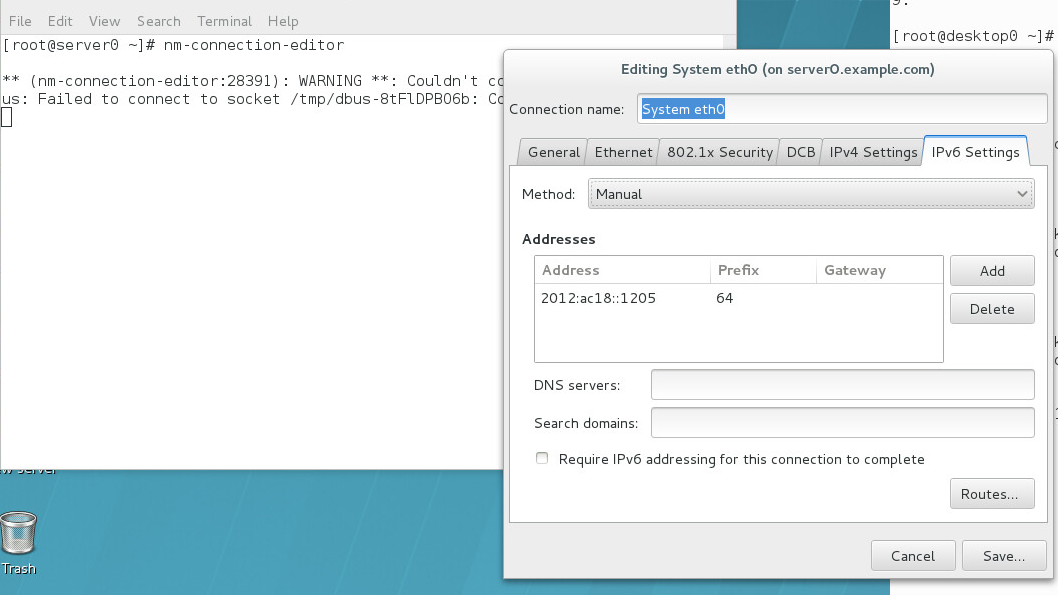
11. 配置server0和desktop0上的IPv6 ,使用接口 ,使用接口 ,使用接口 eth0eth0 ,相互可以 ,相互可以 ping ping 通,原 通,原 IPv4IPv4 IPv4仍然有效。 仍然有效。 仍然有效。
server0: 2012:ac18::1205/64
desktop0: 2012:ac18::120a/64
12. 配置server0和desktop0邮件服务
server0和desktop0不接收外部邮件
本地发送的邮件会路由到 smtp.example.com
本地发送的邮件显示来自 example.com
可以通过发送邮件到本地用户ldapuser0来测试配置,可通过http://smtp.example.com/received_mail/0查看
13. 配置server0 ISCSI 服务端
提供iscsi磁盘名为 iqn.2017-04.com.tianyun:server0
使用iscsi_store作为其后端卷,其大小为2G
此服务只能被desktop0.example.com访问
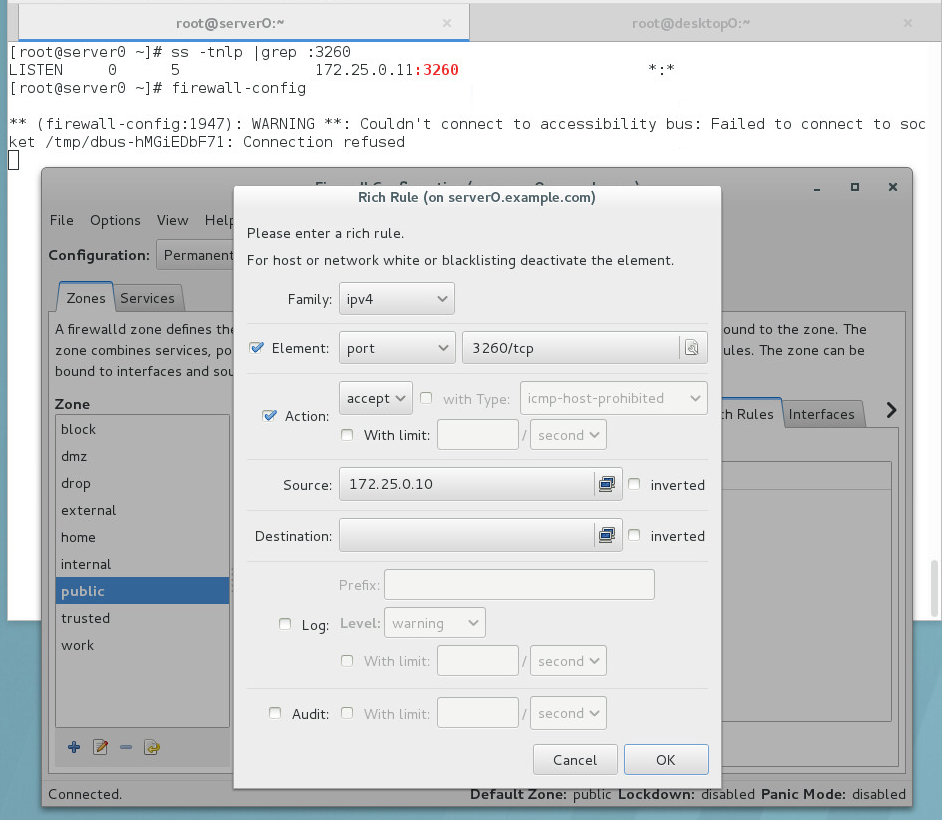
提供服务的端口为3260
[root@server0 ~]# fdisk /dev/vdb
Welcome to fdisk (util-linux 2.23.2).
Changes will remain in memory only, until you decide to write them.
Be careful before using the write command.
Command (m for help): p
Disk /dev/vdb: 10.7 GB, 10737418240 bytes, 20971520 sectors
Units = sectors of 1 * 512 = 512 bytes
Sector size (logical/physical): 512 bytes / 512 bytes
I/O size (minimum/optimal): 512 bytes / 512 bytes
Disk label type: dos
Disk identifier: 0x000e9e50
Device Boot Start End Blocks Id System
/dev/vdb1 2048 1050623 524288 8e Linux LVM
Command (m for help): n
Partition type:
p primary (1 primary, 0 extended, 3 free)
e extended
Select (default p): p
Partition number (2-4, default 2):
First sector (1050624-20971519, default 1050624):
Using default value 1050624
Last sector, +sectors or +size{K,M,G} (1050624-20971519, default 20971519): +2G
Partition 2 of type Linux and of size 2 GiB is set
Command (m for help): p
Disk /dev/vdb: 10.7 GB, 10737418240 bytes, 20971520 sectors
Units = sectors of 1 * 512 = 512 bytes
Sector size (logical/physical): 512 bytes / 512 bytes
I/O size (minimum/optimal): 512 bytes / 512 bytes
Disk label type: dos
Disk identifier: 0x000e9e50
Device Boot Start End Blocks Id System
/dev/vdb1 2048 1050623 524288 8e Linux LVM
/dev/vdb2 1050624 5244927 2097152 83 Linux
Command (m for help): w
The partition table has been altered!
Calling ioctl() to re-read partition table.
WARNING: Re-reading the partition table failed with error 16: Device or resource busy.
The kernel still uses the old table. The new table will be used at
the next reboot or after you run partprobe(8) or kpartx(8)
Syncing disks.
[root@server0 ~]# partprobe /dev/vdb
[root@server0 ~]# ll /dev/vdb*
brw-rw----. 1 root disk 253, 16 Dec 20 05:45 /dev/vdb
brw-rw----. 1 root disk 253, 17 Dec 20 05:40 /dev/vdb1
brw-rw----. 1 root disk 253, 18 Dec 20 05:45 /dev/vdb2
[root@server0 ~]#
[root@server0 ~]# yum install targetcli -y
Loaded plugins: langpacks
rhel_dvd | 4.1 kB 00:00:00
Resolving Dependencies
--> Running transaction check
---> Package targetcli.noarch 0:2.1.fb34-1.el7 will be installed
--> Processing Dependency: python-rtslib >= 2.1.fb41 for package: targetcli-2.1.fb34-1.el7.noarch
--> Processing Dependency: python-configshell for package: targetcli-2.1.fb34-1.el7.noarch
--> Running transaction check
---> Package python-configshell.noarch 1:1.1.fb11-3.el7 will be installed
--> Processing Dependency: pyparsing for package: 1:python-configshell-1.1.fb11-3.el7.noarch
--> Processing Dependency: python-urwid for package: 1:python-configshell-1.1.fb11-3.el7.noarch
---> Package python-rtslib.noarch 0:2.1.fb46-1.el7 will be installed
--> Processing Dependency: python-kmod for package: python-rtslib-2.1.fb46-1.el7.noarch
--> Running transaction check
---> Package pyparsing.noarch 0:1.5.6-9.el7 will be installed
---> Package python-kmod.x86_64 0:0.9-4.el7 will be installed
---> Package python-urwid.x86_64 0:1.1.1-3.el7 will be installed
--> Finished Dependency Resolution
Dependencies Resolved
======================================================================================================
Package Arch Version Repository Size
======================================================================================================
Installing:
targetcli noarch 2.1.fb34-1.el7 rhel_dvd 55 k
Installing for dependencies:
pyparsing noarch 1.5.6-9.el7 rhel_dvd 94 k
python-configshell noarch 1:1.1.fb11-3.el7 rhel_dvd 64 k
python-kmod x86_64 0.9-4.el7 rhel_dvd 57 k
python-rtslib noarch 2.1.fb46-1.el7 rhel_dvd 75 k
python-urwid x86_64 1.1.1-3.el7 rhel_dvd 654 k
Transaction Summary
======================================================================================================
Install 1 Package (+5 Dependent packages)
Total download size: 998 k
Installed size: 3.9 M
Downloading packages:
(1/6): python-configshell-1.1.fb11-3.el7.noarch.rpm | 64 kB 00:00:00
(2/6): pyparsing-1.5.6-9.el7.noarch.rpm | 94 kB 00:00:00
(3/6): python-kmod-0.9-4.el7.x86_64.rpm | 57 kB 00:00:00
(4/6): python-rtslib-2.1.fb46-1.el7.noarch.rpm | 75 kB 00:00:00
(5/6): targetcli-2.1.fb34-1.el7.noarch.rpm | 55 kB 00:00:00
(6/6): python-urwid-1.1.1-3.el7.x86_64.rpm | 654 kB 00:00:00
------------------------------------------------------------------------------------------------------
Total 1.2 MB/s | 998 kB 00:00:00
Running transaction check
Running transaction test
Transaction test succeeded
Running transaction
Installing : python-kmod-0.9-4.el7.x86_64 1/6
Installing : python-rtslib-2.1.fb46-1.el7.noarch 2/6
Installing : pyparsing-1.5.6-9.el7.noarch 3/6
Installing : python-urwid-1.1.1-3.el7.x86_64 4/6
Installing : 1:python-configshell-1.1.fb11-3.el7.noarch 5/6
Installing : targetcli-2.1.fb34-1.el7.noarch 6/6
Verifying : python-rtslib-2.1.fb46-1.el7.noarch 1/6
Verifying : python-urwid-1.1.1-3.el7.x86_64 2/6
Verifying : targetcli-2.1.fb34-1.el7.noarch 3/6
Verifying : 1:python-configshell-1.1.fb11-3.el7.noarch 4/6
Verifying : pyparsing-1.5.6-9.el7.noarch 5/6
Verifying : python-kmod-0.9-4.el7.x86_64 6/6
Installed:
targetcli.noarch 0:2.1.fb34-1.el7
Dependency Installed:
pyparsing.noarch 0:1.5.6-9.el7 python-configshell.noarch 1:1.1.fb11-3.el7
python-kmod.x86_64 0:0.9-4.el7 python-rtslib.noarch 0:2.1.fb46-1.el7
python-urwid.x86_64 0:1.1.1-3.el7
Complete!
[root@server0 ~]#
[root@server0 ~]# systemctl restart target.service
[root@server0 ~]# systemctl enable target.service
ln -s '/usr/lib/systemd/system/target.service' '/etc/systemd/system/multi-user.target.wants/target.service'
[root@server0 ~]#
[root@server0 ~]# targetcli
Warning: Could not load preferences file /root/.targetcli/prefs.bin.
targetcli shell version 2.1.fb34
Copyright 2011-2013 by Datera, Inc and others.
For help on commands, type 'help'.

/> ls
o- / ........................................................................................... [...]
o- backstores ................................................................................ [...]
| o- block .................................................................... [Storage Objects: 0]
| o- fileio ................................................................... [Storage Objects: 0]
| o- pscsi .................................................................... [Storage Objects: 0]
| o- ramdisk .................................................................. [Storage Objects: 0]
o- iscsi .............................................................................. [Targets: 0]
o- loopback ........................................................................... [Targets: 0]
/> /backstores/block create iscsi_store /dev/vdb2
Created block storage object iscsi_store using /dev/vdb2.
/> ls
o- / ........................................................................................... [...]
o- backstores ................................................................................ [...]
| o- block .................................................................... [Storage Objects: 1]
| | o- iscsi_store ..................................... [/dev/vdb2 (2.0GiB) write-thru deactivated]
| o- fileio ................................................................... [Storage Objects: 0]
| o- pscsi .................................................................... [Storage Objects: 0]
| o- ramdisk .................................................................. [Storage Objects: 0]
o- iscsi .............................................................................. [Targets: 0]
o- loopback ........................................................................... [Targets: 0]
/> /iscsi create iqn.2017-04.com.tianyun:server0
Created target iqn.2017-04.com.tianyun:server0.
Created TPG 1.
/> ls
o- / ........................................................................................... [...]
o- backstores ................................................................................ [...]
| o- block .................................................................... [Storage Objects: 1]
| | o- iscsi_store ..................................... [/dev/vdb2 (2.0GiB) write-thru deactivated]
| o- fileio ................................................................... [Storage Objects: 0]
| o- pscsi .................................................................... [Storage Objects: 0]
| o- ramdisk .................................................................. [Storage Objects: 0]
o- iscsi .............................................................................. [Targets: 1]
| o- iqn.2017-04.com.tianyun:server0 ..................................................... [TPGs: 1]
| o- tpg1 ................................................................. [no-gen-acls, no-auth]
| o- acls ............................................................................ [ACLs: 0]
| o- luns ............................................................................ [LUNs: 0]
| o- portals ...................................................................... [Portals: 0]
o- loopback ........................................................................... [Targets: 0]
/> /iscsi/iqn.2017-04.com.tianyun:server0/tpg1/acls create iqn.2017-04.com.tianyun:desktop0
Created Node ACL for iqn.2017-04.com.tianyun:desktop0
/> ls
o- / ........................................................................................... [...]
o- backstores ................................................................................ [...]
| o- block .................................................................... [Storage Objects: 1]
| | o- iscsi_store ..................................... [/dev/vdb2 (2.0GiB) write-thru deactivated]
| o- fileio ................................................................... [Storage Objects: 0]
| o- pscsi .................................................................... [Storage Objects: 0]
| o- ramdisk .................................................................. [Storage Objects: 0]
o- iscsi .............................................................................. [Targets: 1]
| o- iqn.2017-04.com.tianyun:server0 ..................................................... [TPGs: 1]
| o- tpg1 ................................................................. [no-gen-acls, no-auth]
| o- acls ............................................................................ [ACLs: 1]
| | o- iqn.2017-04.com.tianyun:desktop0 ....................................... [Mapped LUNs: 0]
| o- luns ............................................................................ [LUNs: 0]
| o- portals ...................................................................... [Portals: 0]
o- loopback ........................................................................... [Targets: 0]
/> /iscsi/iqn.2017-04.com.tianyun:server0/tpg1/luns create /backstores/block/iscsi_store
Created LUN 0.
Created LUN 0->0 mapping in node ACL iqn.2017-04.com.tianyun:desktop0
/> ls
o- / ........................................................................................... [...]
o- backstores ................................................................................ [...]
| o- block .................................................................... [Storage Objects: 1]
| | o- iscsi_store ....................................... [/dev/vdb2 (2.0GiB) write-thru activated]
| o- fileio ................................................................... [Storage Objects: 0]
| o- pscsi .................................................................... [Storage Objects: 0]
| o- ramdisk .................................................................. [Storage Objects: 0]
o- iscsi .............................................................................. [Targets: 1]
| o- iqn.2017-04.com.tianyun:server0 ..................................................... [TPGs: 1]
| o- tpg1 ................................................................. [no-gen-acls, no-auth]
| o- acls ............................................................................ [ACLs: 1]
| | o- iqn.2017-04.com.tianyun:desktop0 ....................................... [Mapped LUNs: 1]
| | o- mapped_lun0 ............................................. [lun0 block/iscsi_store (rw)]
| o- luns ............................................................................ [LUNs: 1]
| | o- lun0 .................................................... [block/iscsi_store (/dev/vdb2)]
| o- portals ...................................................................... [Portals: 0]
o- loopback ........................................................................... [Targets: 0]
/> /iscsi/iqn.2017-04.com.tianyun:server0/tpg1/portals create 172.25.0.11 3260
Using default IP port 3260
Created network portal 172.25.0.11:3260.
/> ls
o- / ........................................................................................... [...]
o- backstores ................................................................................ [...]
| o- block .................................................................... [Storage Objects: 1]
| | o- iscsi_store ....................................... [/dev/vdb2 (2.0GiB) write-thru activated]
| o- fileio ................................................................... [Storage Objects: 0]
| o- pscsi .................................................................... [Storage Objects: 0]
| o- ramdisk .................................................................. [Storage Objects: 0]
o- iscsi .............................................................................. [Targets: 1]
| o- iqn.2017-04.com.tianyun:server0 ..................................................... [TPGs: 1]
| o- tpg1 ................................................................. [no-gen-acls, no-auth]
| o- acls ............................................................................ [ACLs: 1]
| | o- iqn.2017-04.com.tianyun:desktop0 ....................................... [Mapped LUNs: 1]
| | o- mapped_lun0 ............................................. [lun0 block/iscsi_store (rw)]
| o- luns ............................................................................ [LUNs: 1]
| | o- lun0 .................................................... [block/iscsi_store (/dev/vdb2)]
| o- portals ...................................................................... [Portals: 1]
| o- 172.25.0.11:3260 ................................................................... [OK]
o- loopback ........................................................................... [Targets: 0]
/> saveconfig
Last 10 configs saved in /etc/target/backup.
Configuration saved to /etc/target/saveconfig.json
/> exit
Global pref auto_save_on_exit=true
Last 10 configs saved in /etc/target/backup.
Configuration saved to /etc/target/saveconfig.json
[root@server0 ~]#
[root@server0 ~]# ss -tnlp |grep :3260
LISTEN 0 5 172.25.0.11:3260 *:*
[root@server0 ~]# firewall-config
** (firewall-config:1947): WARNING **: Couldn't connect to accessibility bus: Failed to connect to socket /tmp/dbus-hMGiEDbF71: Connection refused
[root@server0 ~]# firewall-cmd --permanent --list-all
public (default)
interfaces:
sources:
services: dhcpv6-client ssh
ports:
masquerade: no
forward-ports:
icmp-blocks:
rich rules:
rule family="ipv4" source address="172.25.0.10" port port="3260" protocol="tcp" accept
[root@server0 ~]#
14. 配置desktop0 ISCSI 客户端
自动连接 iqn.2017-04.com.tianyun:server0
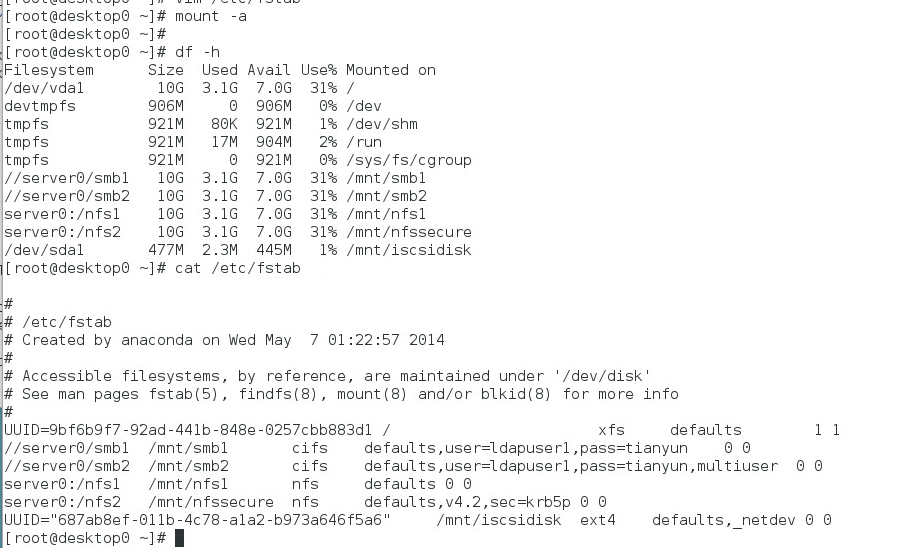
创建大小为500M的分区,格式化为 ext4文件系统,自动挂载到/mnt/iscsidisk
[root@desktop0 ~]# yum install iscsi* -y


[root@desktop0 ~]# systemctl restart iscsid.service
[root@desktop0 ~]# systemctl enable iscsid.service
ln -s '/usr/lib/systemd/system/iscsid.service' '/etc/systemd/system/multi-user.target.wants/iscsid.service'

[root@desktop0 ~]# vim /etc/iscsi/initiatorname.iscsi

[root@desktop0 ~]# cat /etc/iscsi/initiatorname.iscsi
InitiatorName=iqn.2017-04.com.tianyun:desktop0


[root@desktop0 ~]# systemctl restart iscsid.service
[root@desktop0 ~]# systemctl restart iscsid.service
[root@desktop0 ~]#
[root@desktop0 ~]#
[root@desktop0 ~]# iscsiadm -m discovery -t st -p server0
172.25.0.11:3260,1 iqn.2017-04.com.tianyun:server0
[root@desktop0 ~]#
[root@desktop0 ~]# systemctl restart iscsi
[root@desktop0 ~]# systemctl enable iscsi
[root@desktop0 ~]# lsblk
NAME MAJ:MIN RM SIZE RO TYPE MOUNTPOINT
sda 8:0 0 2G 0 disk
vda 253:0 0 10G 0 disk
└─vda1 253:1 0 10G 0 part /
vdb 253:16 0 10G 0 disk

[root@desktop0 ~]# fdisk /dev/sda
Welcome to fdisk (util-linux 2.23.2).

Changes will remain in memory only, until you decide to write them.
Be careful before using the write command.

Device does not contain a recognized partition table
Building a new DOS disklabel with disk identifier 0x289ad0ad.

Command (m for help): n
Partition type:
p primary (0 primary, 0 extended, 4 free)
e extended
Select (default p): p
Partition number (1-4, default 1):
First sector (8192-4194303, default 8192):
Using default value 8192
Last sector, +sectors or +size{K,M,G} (8192-4194303, default 4194303): +500M
Partition 1 of type Linux and of size 500 MiB is set

Command (m for help): w
The partition table has been altered!

Calling ioctl() to re-read partition table.
Syncing disks.

[root@desktop0 ~]# partprobe /dev/sda
[root@desktop0 ~]# ll /dev/sda*
brw-rw----. 1 root disk 8, 0 Dec 20 06:08 /dev/sda
brw-rw----. 1 root disk 8, 1 Dec 20 06:08 /dev/sda1

[root@desktop0 ~]# mkfs.ext4 /dev/sda1
mke2fs 1.42.9 (28-Dec-2013)
Filesystem label=
OS type: Linux
Block size=1024 (log=0)
Fragment size=1024 (log=0)
Stride=0 blocks, Stripe width=4096 blocks
128016 inodes, 512000 blocks
25600 blocks (5.00%) reserved for the super user
First data block=1
Maximum filesystem blocks=34078720
63 block groups
8192 blocks per group, 8192 fragments per group
2032 inodes per group
Superblock backups stored on blocks:
8193, 24577, 40961, 57345, 73729, 204801, 221185, 401409

Allocating group tables: done
Writing inode tables: done
Creating journal (8192 blocks): done
Writing superblocks and filesystem accounting information: done

[root@desktop0 ~]# mkdir /mnt/iscsidisk
[root@desktop0 ~]# blkid
/dev/vda1: UUID="9bf6b9f7-92ad-441b-848e-0257cbb883d1" TYPE="xfs"
/dev/sda1: UUID="51f42e86-0126-419c-a378-8bccdeeab0e6" TYPE="ext4"

[root@desktop0 ~]# vim /etc/fstab
[root@desktop0 ~]# cat /etc/fstab

#
# /etc/fstab
# Created by anaconda on Wed May 7 01:22:57 2014
#
# Accessible filesystems, by reference, are maintained under '/dev/disk'
# See man pages fstab(5), findfs(8), mount(8) and/or blkid(8) for more info
#
UUID=9bf6b9f7-92ad-441b-848e-0257cbb883d1 / xfs defaults 1 1
UUID="51f42e86-0126-419c-a378-8bccdeeab0e6" /mnt/iscsidisk    ext4 defaults,_netdev 0 0

[root@desktop0 ~]# mount -a
[root@desktop0 ~]# df -Th
Filesystem Type Size Used Avail Use% Mounted on
/dev/vda1 xfs 10G 3.1G 7.0G 31% /
devtmpfs devtmpfs 906M 0 906M 0% /dev
tmpfs tmpfs 921M 80K 921M 1% /dev/shm
tmpfs tmpfs 921M 17M 904M 2% /run
tmpfs tmpfs 921M 0 921M 0% /sys/fs/cgroup
/dev/sda1 ext4 477M 2.3M 445M 1% /mnt/iscsidisk
[root@desktop0 ~]#
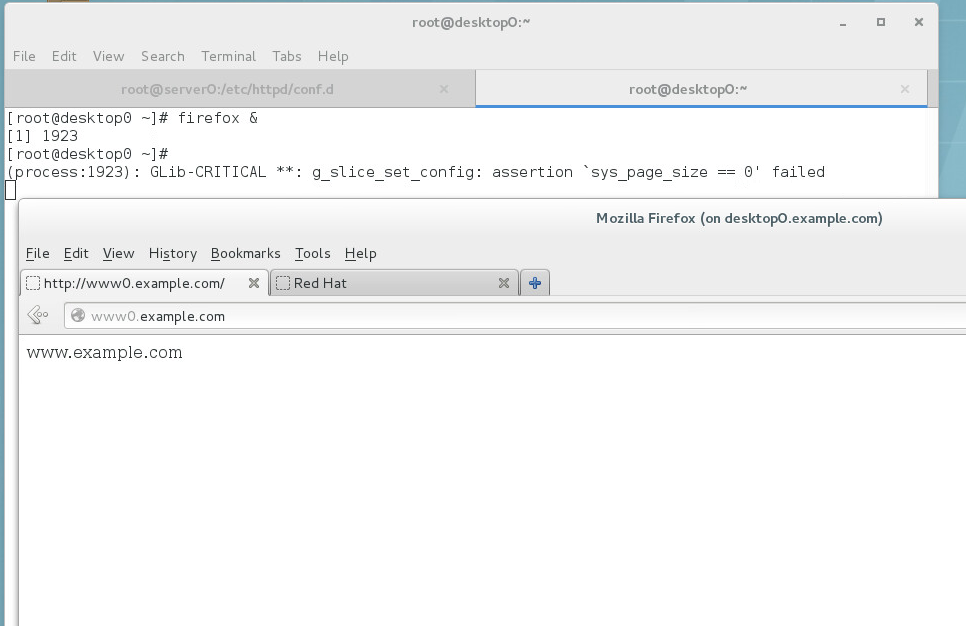
15. 配置server0 web服务,http://www0.example.com
网页:http://classroom.example.com/content/exam/webs/www.html,命名index.html,勿修改内容
将index.html拷贝到 DocumentRoot 目录下;
来自example.com域的客户端可以访问web服务;
来自cracker.com域的客户端拒绝访问web服务。
[root@server0 ~]# yum install httpd mod_ssl mod_wsgi -y
Loaded plugins: langpacks
Resolving Dependencies
--> Running transaction check
---> Package httpd.x86_64 0:2.4.6-17.el7 will be installed
--> Processing Dependency: httpd-tools = 2.4.6-17.el7 for package: httpd-2.4.6-17.el7.x86_64
--> Processing Dependency: /etc/mime.types for package: httpd-2.4.6-17.el7.x86_64
--> Processing Dependency: libapr-1.so.0()(64bit) for package: httpd-2.4.6-17.el7.x86_64
--> Processing Dependency: libaprutil-1.so.0()(64bit) for package: httpd-2.4.6-17.el7.x86_64
---> Package mod_ssl.x86_64 1:2.4.6-17.el7 will be installed
---> Package mod_wsgi.x86_64 0:3.4-11.el7 will be installed
--> Running transaction check
---> Package apr.x86_64 0:1.4.8-3.el7 will be installed
---> Package apr-util.x86_64 0:1.5.2-6.el7 will be installed
---> Package httpd-tools.x86_64 0:2.4.6-17.el7 will be installed
---> Package mailcap.noarch 0:2.1.41-2.el7 will be installed
--> Finished Dependency Resolution

Dependencies Resolved

======================================================================================================
 Package                  Arch                Version                     Repository             Size
======================================================================================================
Installing:
 httpd                    x86_64              2.4.6-17.el7                rhel_dvd              1.2 M
 mod_ssl                  x86_64              1:2.4.6-17.el7              rhel_dvd               97 k
 mod_wsgi                 x86_64              3.4-11.el7                  rhel_dvd               76 k
Installing for dependencies:
 apr                      x86_64              1.4.8-3.el7                 rhel_dvd              103 k
 apr-util                 x86_64              1.5.2-6.el7                 rhel_dvd               92 k
 httpd-tools              x86_64              2.4.6-17.el7                rhel_dvd               77 k
 mailcap                  noarch              2.1.41-2.el7                rhel_dvd               31 k

Transaction Summary
======================================================================================================
Install  3 Packages (+4 Dependent packages)

Total download size: 1.6 M
Installed size: 4.7 M
Downloading packages:
(1/7): apr-util-1.5.2-6.el7.x86_64.rpm                                         |  92 kB  00:00:00
(2/7): apr-1.4.8-3.el7.x86_64.rpm                                              | 103 kB  00:00:00
(3/7): httpd-tools-2.4.6-17.el7.x86_64.rpm                                     |  77 kB  00:00:00
(4/7): httpd-2.4.6-17.el7.x86_64.rpm                                           | 1.2 MB  00:00:00
(5/7): mailcap-2.1.41-2.el7.noarch.rpm                                         |  31 kB  00:00:00
(6/7): mod_ssl-2.4.6-17.el7.x86_64.rpm                                         |  97 kB  00:00:00
(7/7): mod_wsgi-3.4-11.el7.x86_64.rpm                                          |  76 kB  00:00:00
------------------------------------------------------------------------------------------------------
Total                                                                 3.0 MB/s | 1.6 MB  00:00:00
Running transaction check
Running transaction test
Transaction test succeeded
Running transaction
  Installing : apr-1.4.8-3.el7.x86_64                                                             1/7
  Installing : apr-util-1.5.2-6.el7.x86_64                                                        2/7
  Installing : httpd-tools-2.4.6-17.el7.x86_64                                                    3/7
  Installing : mailcap-2.1.41-2.el7.noarch                                                        4/7
  Installing : httpd-2.4.6-17.el7.x86_64                                                          5/7
  Installing : 1:mod_ssl-2.4.6-17.el7.x86_64                                                      6/7
  Installing : mod_wsgi-3.4-11.el7.x86_64                                                         7/7
  Verifying  : apr-1.4.8-3.el7.x86_64                                                             1/7
  Verifying  : mailcap-2.1.41-2.el7.noarch                                                        2/7
  Verifying  : 1:mod_ssl-2.4.6-17.el7.x86_64                                                      3/7
  Verifying  : httpd-2.4.6-17.el7.x86_64                                                          4/7
  Verifying  : mod_wsgi-3.4-11.el7.x86_64                                                         5/7
  Verifying  : apr-util-1.5.2-6.el7.x86_64                                                        6/7
  Verifying  : httpd-tools-2.4.6-17.el7.x86_64                                                    7/7

Installed:
  httpd.x86_64 0:2.4.6-17.el7     mod_ssl.x86_64 1:2.4.6-17.el7     mod_wsgi.x86_64 0:3.4-11.el7

Dependency Installed:
  apr.x86_64 0:1.4.8-3.el7        apr-util.x86_64 0:1.5.2-6.el7   httpd-tools.x86_64 0:2.4.6-17.el7
  mailcap.noarch 0:2.1.41-2.el7

Complete!
[root@server0 ~]#


[root@server0 ~]# firewall-cmd --permanent --add-service=http
success
[root@server0 ~]# firewall-cmd --permanent --add-service=https
success
[root@server0 ~]# firewall-cmd --reload
success
[root@server0 ~]# wget http://classroom.example.com/content/exam/webs/www.html -O  /var/www/html/index.html
--2018-12-20 06:31:24--  http://classroom.example.com/content/exam/webs/www.html
Resolving classroom.example.com (classroom.example.com)... 172.25.254.254
Connecting to classroom.example.com (classroom.example.com)|172.25.254.254|:80... connected.
HTTP request sent, awaiting response... 200 OK
Length: 16 [text/html]
Saving to: ‘/var/www/html/index.html’

100%[============================================================>] 16          --.-K/s   in 0s

2018-12-20 06:31:24 (1.90 MB/s) - ‘/var/www/html/index.html’ saved [16/16]

[root@server0 ~]# ls /var/www/html/
index.html
[root@server0 ~]#

[root@server0 ~]#
[root@server0 ~]# cd /etc/httpd/conf
[root@server0 conf]# cd .
[root@server0 conf]# cd
[root@server0 ~]# cd /etc/httpd/conf
conf/           conf.d/         conf.modules.d/
[root@server0 ~]# cd /etc/httpd/conf.d/
[root@server0 conf.d]# ls
autoindex.conf  README  ssl.conf  userdir.conf  welcome.conf


[root@server0 conf.d]# vim www0.example.com.conf

[root@server0 conf.d]# cat www0.example.com.conf
<VirtualHost *:80>
  ServerName www0.example.com
  DocumentRoot /var/www/html

</VirtualHost>

<Directory "/var/www/html">
  <RequireAll>
    Require all granted
    Require not ip 172.24.3.0/24
  </RequireAll>
</Directory>


[root@server0 conf.d]# systemctl restart httpd.service
[root@server0 conf.d]# systemctl enable httpd.service
ln -s '/usr/lib/systemd/system/httpd.service' '/etc/systemd/system/multi-user.target.wants/httpd.service'
[root@server0 conf.d]#
16. 配置server0 安全的web服务
网站https://www0.example.com 启用TLS加密。
已签名证书 http://classroom/pub/tls/certs/www0.crt
此证书的密钥 http://classroom/pub/tls/private/www0.key
此证书的授权信息从http://classroom/pub/example-ca.crt获取
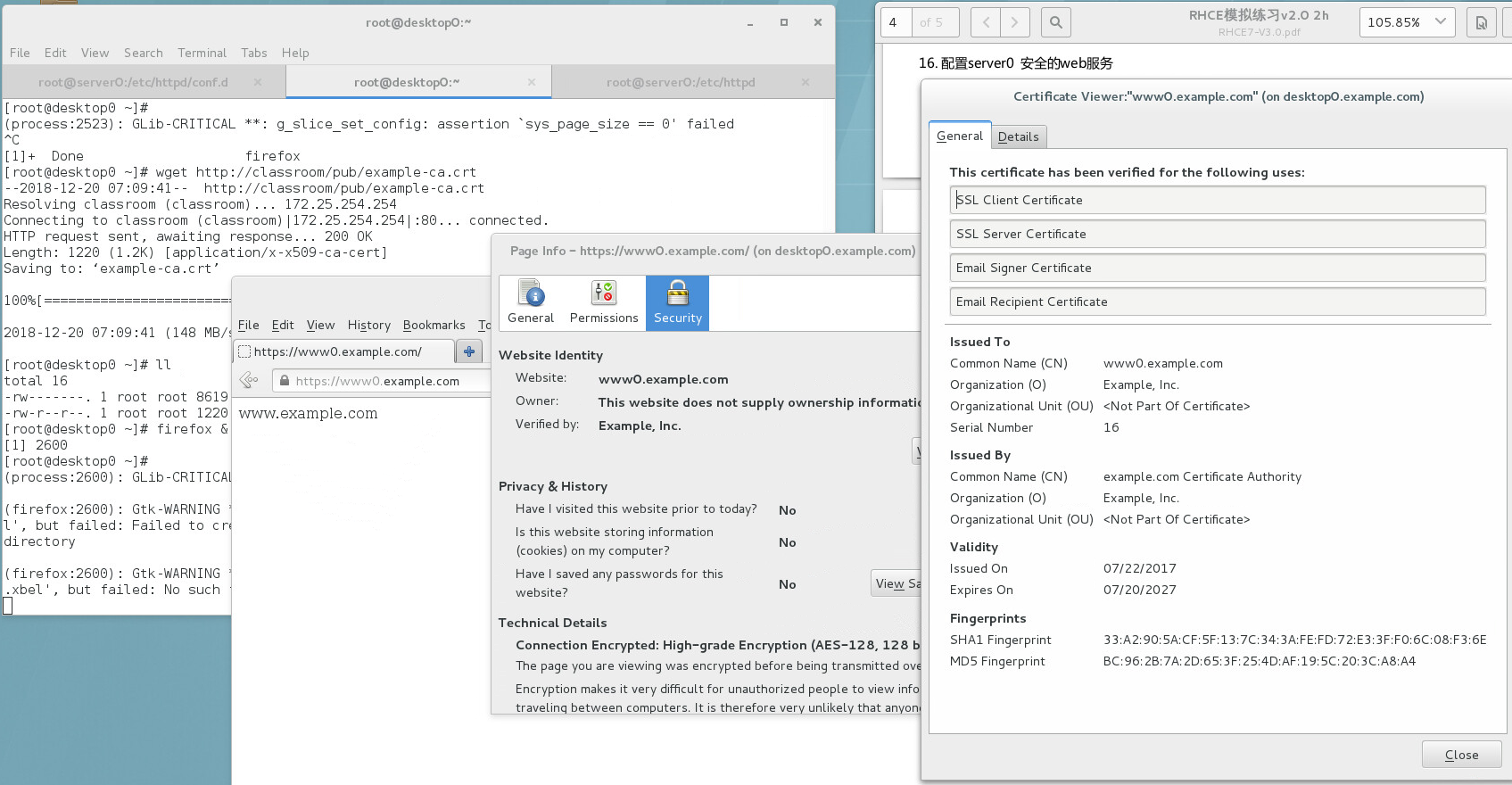
[root@server0 ~]# cd /etc/httpd/
[root@server0 httpd]# ls
conf  conf.d  conf.modules.d  logs  modules  run
[root@server0 httpd]# wget http://classroom/pub/tls/certs/www0.crt
--2018-12-20 07:05:33--  http://classroom/pub/tls/certs/www0.crt
Resolving classroom (classroom)... 172.25.254.254
Connecting to classroom (classroom)|172.25.254.254|:80... connected.
HTTP request sent, awaiting response... 200 OK
Length: 3499 (3.4K) [application/x-x509-ca-cert]
Saving to: ‘www0.crt’

100%[============================================================>] 3,499       --.-K/s   in 0s

2018-12-20 07:05:33 (271 MB/s) - ‘www0.crt’ saved [3499/3499]

[root@server0 httpd]# wget http://classroom/pub/tls/private/www0.key
--2018-12-20 07:05:46--  http://classroom/pub/tls/private/www0.key
Resolving classroom (classroom)... 172.25.254.254
Connecting to classroom (classroom)|172.25.254.254|:80... connected.
HTTP request sent, awaiting response... 200 OK
Length: 912
Saving to: ‘www0.key’

100%[============================================================>] 912         --.-K/s   in 0s

2018-12-20 07:05:46 (113 MB/s) - ‘www0.key’ saved [912/912]

[root@server0 httpd]# ll
total 16
drwxr-xr-x. 2 root root   35 Dec 20 06:28 conf
drwxr-xr-x. 2 root root 4096 Dec 20 07:05 conf.d
drwxr-xr-x. 2 root root 4096 Dec 20 06:28 conf.modules.d
lrwxrwxrwx. 1 root root   19 Dec 20 06:28 logs -> ../../var/log/httpd
lrwxrwxrwx. 1 root root   29 Dec 20 06:28 modules -> ../../usr/lib64/httpd/modules
lrwxrwxrwx. 1 root root   10 Dec 20 06:28 run -> /run/httpd
-rw-r--r--. 1 root root 3499 Jul 22  2017 www0.crt
-rw-r--r--. 1 root root  912 Jul 22  2017 www0.key
[root@server0 httpd]# ll /etc/httpd/www0.crt
-rw-r--r--. 1 root root 3499 Jul 22  2017 /etc/httpd/www0.crt
[root@server0 httpd]#


vim  /etc/httpd/conf.d/ssl_conf     复制ssl配置


[root@server0 conf.d]# cat www0.example.com.conf
<VirtualHost *:80>
  ServerName www0.example.com
  DocumentRoot /var/www/html

</VirtualHost>

<VirtualHost *:443>
  ServerName www0.example.com
  DocumentRoot /var/www/html
  SSLEngine on
  SSLCertificateFile /etc/httpd/www0.crt
  SSLCertificateKeyFile /etc/httpd/www0.key

</VirtualHost>


<Directory "/var/www/html">
  <RequireAll>
    Require all granted
    Require not ip 172.24.3.0/24
  </RequireAll>
</Directory>
[root@server0 conf.d]#
[root@server0 conf.d]# systemctl restart httpd.service
17. 配置server0 虚拟主机,http://server0.example.com
DocumentRoot 为 /var/www/virtual
网页:http://classroom.example.com/pub/webs/server.html,命名index.html,勿修改内容
将index.html拷贝到虚拟机 DocumentRoot 目录下;
确保ldapuser5用户能够在 /var/www/virtual下创建文件;
原始网站 http://www0.example.com 必须仍能访问
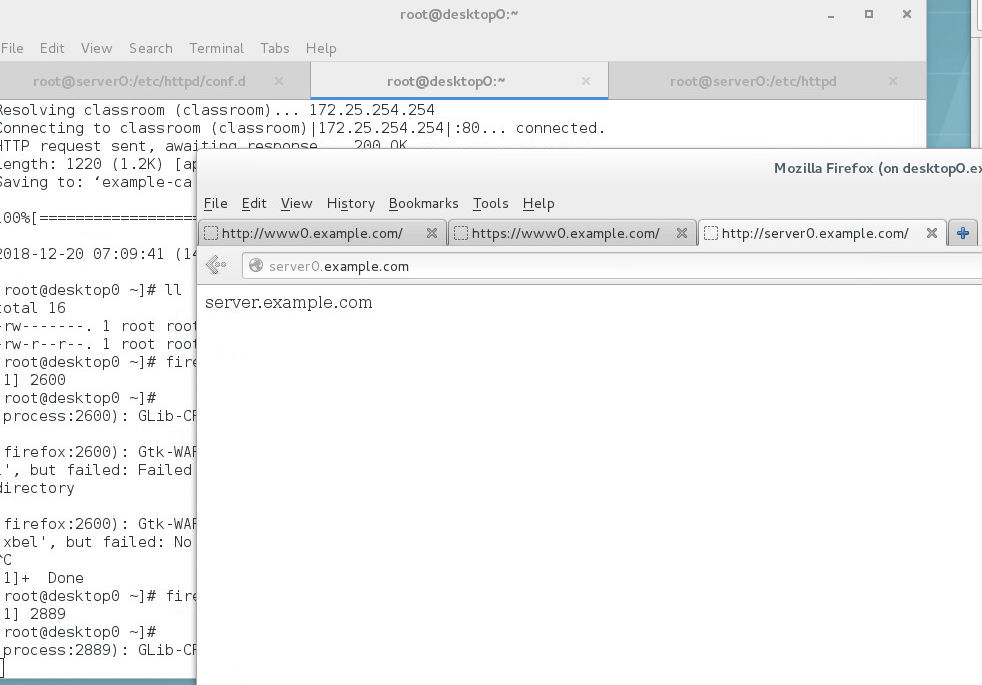
[root@server0 conf.d]# mkdir /var/www/virtual
[root@server0 conf.d]# wget http://classroom.example.com/content/exam/webs/server.html -O /var/www/virtual/index.html
--2018-12-20 07:21:01--  http://classroom.example.com/content/exam/webs/server.html
Resolving classroom.example.com (classroom.example.com)... 172.25.254.254
Connecting to classroom.example.com (classroom.example.com)|172.25.254.254|:80... connected.
HTTP request sent, awaiting response... 200 OK
Length: 19 [text/html]
Saving to: ‘/var/www/virtual/index.html’

100%[============================================================>] 19          --.-K/s   in 0s

2018-12-20 07:21:01 (1.99 MB/s) - ‘/var/www/virtual/index.html’ saved [19/19]

[root@server0 conf.d]# ls /var/www/virtual/
index.html
[root@server0 conf.d]# ll -dZ
drwxr-xr-x. root root system_u:object_r:httpd_config_t:s0 .

[root@server0 conf.d]# id ldapuser5
uid=1705(ldapuser5) gid=1705(ldapuser5) groups=1705(ldapuser5)
[root@server0 conf.d]# setfacl -m u:ldapuser5:rwx /var/www/virtual/
[root@server0 conf.d]# getfacl /var/www/virtual/
getfacl: Removing leading '/' from absolute path names
# file: var/www/virtual/
# owner: root
# group: root
user::rwx
user:ldapuser5:rwx
group::r-x
mask::rwx
other::r-x

[root@server0 conf.d]# cp www0.example.com.conf  server0.example.com.conf
[root@server0 conf.d]# ll
total 36
-rw-r--r--. 1 root root 2893 Mar 20  2014 autoindex.conf
-rw-r--r--. 1 root root  366 Mar 20  2014 README
-rw-r--r--. 1 root root  421 Dec 20 07:25 server0.example.com.conf
-rw-r--r--. 1 root root 9426 Dec 20 07:05 ssl.conf
-rw-r--r--. 1 root root 1252 Mar 20  2014 userdir.conf
-rw-r--r--. 1 root root  516 Mar 20  2014 welcome.conf
-rw-r--r--. 1 root root  421 Dec 20 07:06 www0.example.com.conf
[root@server0 conf.d]# vim server0.example.com.conf
[root@server0 conf.d]# systemctl restart httpd.service
[root@server0 conf.d]# cat server0.example.com.conf
<VirtualHost *:80>
  ServerName server0.example.com
  DocumentRoot /var/www/virtual

</VirtualHost>


<Directory "/var/www/virtual">
  Require all granted
</Directory>
[root@server0 conf.d]#
18. 配置server0 web内容访问
在server0的 web服务器的DocumentRoot目录下创建目录private
网页:http://classroom.example.com/content/exam/webs/private.html,命名为index.html,勿修改内容
从server0 任何人可以浏览private的内容,但从其它系统不能访问该目录的内容。
[root@server0 conf.d]# mkdir /var/www/virtual/private
[root@server0 conf.d]# wget http://classroom.example.com/content/exam/webs/private.html -O /var/www/virtual/private/index.html
--2018-12-20 07:34:08--  http://classroom.example.com/content/exam/webs/private.html
Resolving classroom.example.com (classroom.example.com)... 172.25.254.254
Connecting to classroom.example.com (classroom.example.com)|172.25.254.254|:80... connected.
HTTP request sent, awaiting response... 200 OK
Length: 14 [text/html]
Saving to: ‘/var/www/virtual/private/index.html’

100%[============================================================>] 14          --.-K/s   in 0s

2018-12-20 07:34:08 (1.65 MB/s) - ‘/var/www/virtual/private/index.html’ saved [14/14]

[root@server0 conf.d]# cat /var/www/virtual/private/index.html
private test.


[root@server0 conf.d]# vim server0.example.com.conf

[root@server0 conf.d]# cat server0.example.com.conf
<VirtualHost *:80>
  ServerName server0.example.com
  DocumentRoot /var/www/virtual
</VirtualHost>

<Directory "/var/www/virtual">
  Require all granted
</Directory>

<Directory "/var/www/virtual/private">
  Require local
</Directory>

[root@server0 conf.d]# systemctl restart httpd.service
[root@server0 conf.d]# curl http://server0.example.com/private/
private test.
[root@server0 conf.d]#
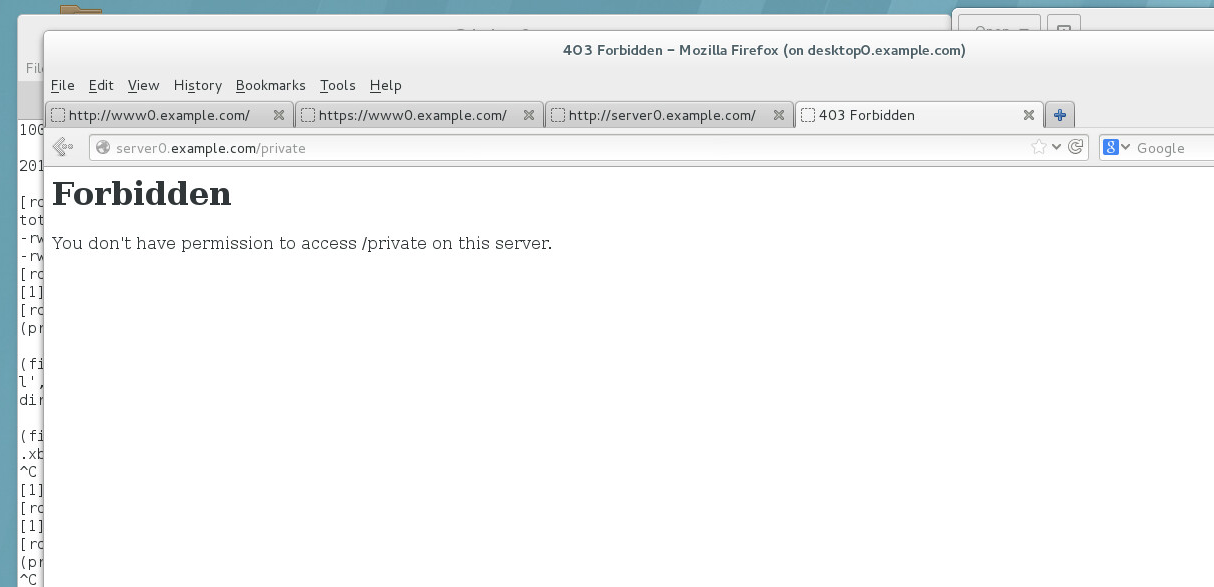
19. 配置server0 实现动态web内容
动态内容由 webapp0.example.com 虚拟主机提供
虚拟机监听端口为 8888/tcp
Python application http://classroom.example.com/content/exam/webs/webapp.wsgi
放置在适当的位置,勿修改脚本中的内容
客户端访问http://webapp0.example.com:8888时能接收到动态内容
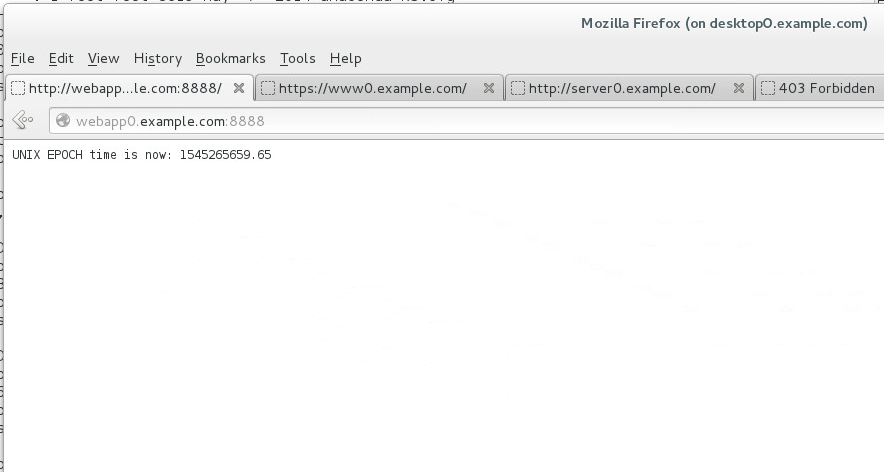
[root@server0 conf.d]# yum install mod_wsgi -y

[root@server0 conf.d]# mkdir /var/www/webapp0
[root@server0 conf.d]# wget http://classroom.example.com/content/exam/webs/webapp.wsgi -O /var/www/webapp0/webapp.wsgi
--2018-12-20 08:13:40--  http://classroom.example.com/content/exam/webs/webapp.wsgi
Resolving classroom.example.com (classroom.example.com)... 172.25.254.254
Connecting to classroom.example.com (classroom.example.com)|172.25.254.254|:80... connected.
HTTP request sent, awaiting response... 200 OK
Length: 397
Saving to: ‘/var/www/webapp0/webapp.wsgi’

100%[============================================================>] 397         --.-K/s   in 0s

2018-12-20 08:13:40 (42.0 MB/s) - ‘/var/www/webapp0/webapp.wsgi’ saved [397/397]

[root@server0 conf.d]# cat /var/www/webapp0/webapp.wsgi
#!/usr/bin/env python
import time

def application (environ, start_response):
  response_body = 'UNIX EPOCH time is now: %s\n' % time.time()
  status = '200 OK'
  response_headers = [('Content-Type', 'text/plain'),
                      ('Content-Length', '1'),
                      ('Content-Length', str(len(response_body)))]
  start_response(status, response_headers)
  return [response_body]
[root@server0 conf.d]#
[root@server0 conf.d]# cp server0.example.com.conf     webapp0.example.com.conf

[root@server0 conf.d]# ls /var/www/webapp0/webapp.wsgi
/var/www/webapp0/webapp.wsgi
[root@server0 conf.d]#

[root@server0 conf.d]# vim webapp0.example.com.conf
[root@server0 conf.d]# cat webapp0.example.com.conf
Listen 8888
<VirtualHost *:8888>
  ServerName webapp0.example.com
  WSGIScriptAlias / /var/www/webapp0/webapp.wsgi
</VirtualHost>

<Directory "/var/www/webapp0">
  Require all granted
</Directory>
[root@server0 conf.d]# semanage port -a -t http_port_t -p tcp 8888
[root@server0 conf.d]# semanage port -l |grep http
http_cache_port_t              tcp      8080, 8118, 8123, 10001-10010
http_cache_port_t              udp      3130
http_port_t                    tcp      8888, 80, 81, 443, 488, 8008, 8009, 8443, 9000
pegasus_http_port_t            tcp      5988
pegasus_https_port_t           tcp      5989
[root@server0 conf.d]# systemctl restart httpd.service
[root@server0 conf.d]# firewall-cmd --permanent --add-port=8888/tcp
success
[root@server0 conf.d]# firewall-cmd --reload
success
[root@server0 conf.d]# systemctl restart httpd.service

[root@server0 conf.d]# ss -tnlp |egrep '80|443|8888'
LISTEN     0      128                       *:43802                    *:*      users:(("rpc.statd",1112,10))
LISTEN     0      128                      :::443                     :::*      users:(("httpd",5162,6),("httpd",5161,6),("httpd",5160,6),("httpd",5159,6),("httpd",5158,6),("httpd",5157,6))
LISTEN     0      128                      :::80                      :::*      users:(("httpd",5162,4),("httpd",5161,4),("httpd",5160,4),("httpd",5159,4),("httpd",5158,4),("httpd",5157,4))
LISTEN     0      128                      :::8888                    :::*      users:(("httpd",5162,8),("httpd",5161,8),("httpd",5160,8),("httpd",5159,8),("httpd",5158,8),("httpd",5157,8))
[root@server0 conf.d]#
20. 配置server0 Shell script,/root/script1.sh。
执行/root/script1.sh foo,输出bar
执行/root/script1.sh bar 输出foo
没有任何参数时,输出 Usage /root/script1.sh bar|foo
[root@server0 home]# cat foo.sh
#!/bin/bash
if[ "$1"="redhat" ];then
    echo "fedora"
elif[ "$1"="fedora" ];then
    echo "redhat"
else
    echo "/root/foo.sh redhat|fedora" 1>&2
fi

[root@server0 home]# cat to.sh
#!/bin/bash            #设置解释器为bash
if [ "$1" = "redhat" ];then   #如果输入值等于redhat
        echo "fedora"      #则打印 fedora
elif [ "$1" = "fedora" ];then    #反之如果输入的值等于fedo
        echo "redhat"        #则打印redhat
else                           #如果输入是其他值
        echo "/root/foo.sh redhat | fedora" 1>&2  #则输出该行
fi

[root@server0 home]# cat name.sh
#!/bin/bash
if [ $# -eq 1 ];then
       if [ -f "$1" ];then
            while read username ;do
            useradd -s /bin/false $username
            echo redhat|passwd  --stdin $username &>/dev/null  #需要密码才加入
                done < $1
        else
                echo "Input file not found"
                exit 1
        fi
else
        echo "Usage: /root/barchusers userfile"
        exit 2
fi

[root@server0 home]#
21. 配置server0 添加用户脚本: /root/batchusers
脚本要求提供一个参数,此参数就是包含用户名列表的文件;
如果没有参数,应给出提示 Usage: /root/batchusers userfile 然后退出返回相应的值;
如果提供一个不存在的文件名,应给出提示消息 Input file not found 然后退出返回相应的值;
设置/bin/false为添加用户默认shell。
22. 配置server0 Mariadb数据库
1) 安装Mariadb
2) 配置root户只能从本地登录,密码为tianyun
3) 禁用匿名用户访问
4) 创建数据库Concats
5) 导入数据到Concats, http://classroom.example.com/content/exam/mariadb/mariadb.dump
6) 授权Luigi用户可以从本地以select方式访问数据库Concats中的表,密码tianyun。
7) 按要求实现单表查询,提交结果
8) 按要求实现多表查询,提交结果
lab nfskrb5 setup
yum install -y openldap openldap-clients sssd authconfig-gtk
1:yum
[root@server0 ~]# cat /etc/yum.repos.d/rhel_dvd.repo
# Created by cloud-init on Wed, 07 Jan 2015 03:21:35 +0000
[rhel_dvd]
gpgcheck = 0
enabled = 1
baseurl = http://content.example.com/rhel7.0/x86_64/dvd
name = Remote classroom copy of dvd
2:SElinux
[root@server0 ~]# cat /etc/selinux/config
# This file controls the state of SELinux on the system.
# SELINUX= can take one of these three values:
# enforcing - SELinux security policy is enforced.
# permissive - SELinux prints warnings instead of enforcing.
# disabled - No SELinux policy is loaded.
SELINUX=enforcing
# SELINUXTYPE= can take one of these two values:
# targeted - Targeted processes are protected,
# minimum - Modification of targeted policy. Only selected processes are protected.
# mls - Multi Level Security protection.
SELINUXTYPE=targeted
3:ssh
[root@server0 ~]# firewall-config
4 alias
[root@server0 ~]# vim /etc/profile
[root@server0 ~]# source /etc/profile
[root@desktop0 ~]# tail /etc/profile
. "$i"
else
. "$i" >/dev/null
fi
fi
done
unset i
unset -f pathmunge
alias psnew='ps -Ao user,pid,ppid,command'
5:
1;yum install
2;configure
3;start&enable
4;firewalld
5;SElinux
[root@server0 ~]# yum -y install samba samba-client cifs-utils
Loaded plugins: langpacks
rhel_dvd | 4.1 kB 00:00
Resolving Dependencies
--> Running transaction check
---> Package cifs-utils.x86_64 0:6.2-6.el7 will be installed
---> Package samba.x86_64 0:4.1.1-31.el7 will be installed
---> Package samba-client.x86_64 0:4.1.1-31.el7 will be installed
--> Finished Dependency Resolution
Dependencies Resolved
================================================================================
Package Arch Version Repository Size
================================================================================
Installing:
cifs-utils x86_64 6.2-6.el7 rhel_dvd 83 k
samba x86_64 4.1.1-31.el7 rhel_dvd 527 k
samba-client x86_64 4.1.1-31.el7 rhel_dvd 513 k
Transaction Summary
================================================================================
Install 3 Packages
Total download size: 1.1 M
Installed size: 3.1 M
Downloading packages:
(1/3): cifs-utils-6.2-6.el7.x86_64.rpm | 83 kB 00:00
(2/3): samba-4.1.1-31.el7.x86_64.rpm | 527 kB 00:00
(3/3): samba-client-4.1.1-31.el7.x86_64.rpm | 513 kB 00:00
--------------------------------------------------------------------------------
Total 2.8 MB/s | 1.1 MB 00:00
Running transaction check
Running transaction test
Transaction test succeeded
Running transaction
Installing : samba-4.1.1-31.el7.x86_64 1/3
Installing : cifs-utils-6.2-6.el7.x86_64 2/3
Installing : samba-client-4.1.1-31.el7.x86_64 3/3
Verifying : samba-client-4.1.1-31.el7.x86_64 1/3
Verifying : cifs-utils-6.2-6.el7.x86_64 2/3
Verifying : samba-4.1.1-31.el7.x86_64 3/3
Installed:
cifs-utils.x86_64 0:6.2-6.el7 samba.x86_64 0:4.1.1-31.el7
samba-client.x86_64 0:4.1.1-31.el7
Complete!
[root@server0 ~]#
[root@server0 ~]# id ldapuser1
uid=1701(ldapuser1) gid=1701(ldapuser1) groups=1701(ldapuser1)
[root@server0 ~]# smbpasswd -a ldapuser1
New SMB password:
Retype new SMB password:
Added user ldapuser1.
[root@server0 ~]# vim /etc/samba/
lmhosts smb.conf
[root@server0 ~]# vim /etc/samba/smb.conf
[root@server0 ~]# systemctl restart nmb smb
[root@server0 ~]# systemctl enable nmb.service smb.service
ln -s '/usr/lib/systemd/system/nmb.service' '/etc/systemd/system/multi-user.target.wants/nmb.service'
ln -s '/usr/lib/systemd/system/smb.service' '/etc/systemd/system/multi-user.target.wants/smb.service'
[root@server0 ~]# firewall-cmd --permanent --add-service=samba
success
[root@server0 ~]# firewall-cmd --reload
success
[root@server0 ~]#
[smb1]
path = /smb1
hosts allow = 172.25.0.
[root@server0 ~]# chcon -R -t samba_share_t /smb1
[root@server0 ~]# ll -dZ /smb1/
drwxr-xr-x. root root unconfined_u:object_r:samba_share_t:s0 /smb1/
[root@server0 ~]#
desktop
[root@desktop0 ~]# yum install samba-client cifs-utils -y
[root@desktop0 ~]# mount -t cifs -ouser=ldapuser1,pass=tianyun //server0/smb1 /mnt
[root@desktop0 ~]# df -h
Filesystem Size Used Avail Use% Mounted on
/dev/vda1 10G 3.1G 7.0G 31% /
devtmpfs 906M 0 906M 0% /dev
tmpfs 921M 80K 921M 1% /dev/shm
tmpfs 921M 17M 904M 2% /run
tmpfs 921M 0 921M 0% /sys/fs/cgroup
//server0/smb1 10G 3.1G 7.0G 31% /mnt
[root@desktop0 ~]#
B:
[root@server0 ~]# smbpasswd -a ldapuser2
New SMB password:
Retype new SMB password:
Added user ldapuser2.
[root@server0 ~]#
[root@server0 ~]#
[root@server0 ~]#
[root@server0 ~]# mkdir /smb2
[root@server0 ~]#
[root@server0 ~]# chcon -R -t samba_share_t /smb2
[root@server0 ~]#
[root@server0 ~]# ll -dZ /smb2
drwxr-xr-x. root root unconfined_u:object_r:samba_share_t:s0 /smb2
[root@server0 ~]#
[root@server0 ~]# setfacl -m u:ldapuser2:rwx /smb2
[root@server0 ~]#
[root@server0 ~]# getfacl /smb2
getfacl: Removing leading '/' from absolute path names
# file: smb2
# owner: root
# group: root
user::rwx
user:ldapuser2:rwx
group::r-x
mask::rwx
other::r-x
[root@server0 ~]#
[smb1]
path = /smb1
hosts allow = 172.25.0.
[smb2]
path = /smb2
hosts allow = 172.25.0.
valid users = ldapuser1,ldapuser2
write list = ldapuser2
[root@desktop0 ~]# yum install samba-client cifs-utils -y
Loaded plugins: langpacks
Package samba-client-4.1.1-31.el7.x86_64 already installed and latest version
Package cifs-utils-6.2-6.el7.x86_64 already installed and latest version
Nothing to do
[root@desktop0 ~]#
//server0/smb1 /mnt/smb1 cifs defaults,user=ldapuser1,pass=tianyun 0 0
//server0/smb2 /mnt/smb2 cifs defaults,user=ldapuser1,pass=tianyun,multiuser 0 0
[root@desktop0 ~]# df -h
Filesystem Size Used Avail Use% Mounted on
/dev/vda1 10G 3.1G 7.0G 31% /
devtmpfs 906M 0 906M 0% /dev
tmpfs 921M 80K 921M 1% /dev/shm
tmpfs 921M 17M 904M 2% /run
tmpfs 921M 0 921M 0% /sys/fs/cgroup
//server0/smb1 10G 3.1G 7.0G 31% /mnt/smb1
//server0/smb2 10G 3.1G 7.0G 31% /mnt/smb2
[root@desktop0 ~]#
[root@desktop0 ~]# su - ldapuser1
[ldapuser1@desktop0 ~]$
[ldapuser1@desktop0 ~]$ ls /mnt/smb2
ls: cannot access /mnt/smb2: Permission denied
[ldapuser1@desktop0 ~]$
[ldapuser1@desktop0 ~]$ cifscreds add server0
Password:
[ldapuser1@desktop0 ~]$ ls /mnt/smb2
[ldapuser1@desktop0 ~]$ touch /mnt/smb2
touch: setting times of ‘/mnt/smb2’: Permission denied
[ldapuser1@desktop0 ~]$
[ldapuser1@desktop0 ~]$ ls /mnt/smb2
hosts
[ldapuser1@desktop0 ~]$ exit
logout
[root@desktop0 ~]# su - ldapuser2
[ldapuser2@desktop0 ~]$
[ldapuser2@desktop0 ~]$ cifscreds add server0
Password:
[ldapuser2@desktop0 ~]$
[ldapuser2@desktop0 ~]$ ls /mnt/smb2/
hosts
[ldapuser2@desktop0 ~]$ touch /mnt/smb2/file
[ldapuser2@desktop0 ~]$
[ldapuser2@desktop0 ~]$ ls /mnt/smb2/
file hosts
[ldapuser2@desktop0 ~]$
7:
[root@server0 ~]# yum install nfs-utils -y
[root@server0 ~]# systemctl start nfs-server.service
[root@server0 ~]# systemctl enable nfs-secure.service
ln -s '/usr/lib/systemd/system/nfs-secure.service' '/etc/systemd/system/nfs.target.wants/nfs-secure.service'
[root@server0 ~]#
[root@server0 ~]#
[root@server0 ~]#
[root@server0 ~]# mkdir /nfs1
[root@server0 ~]# mkdir /nfs2
[root@server0 ~]# mkdir /nfs2/private
[root@server0 ~]# chown ldapuser5 /nfs2/private/
[root@server0 ~]#
[root@server0 ~]# ll -d /nfs2/private/
drwxr-xr-x. 2 ldapuser5 root 6 Dec 19 05:56 /nfs2/private/
[root@server0 ~]#
[root@server0 ~]#
[root@server0 ~]# vim /etc/exports
[root@server0 ~]# cat /etc/exports
/nfs1 172.25.0.0/24(ro,sync)
[root@server0 ~]#
[root@server0 ~]# systemctl restart nfs-server.service
[root@server0 ~]# firewall-cmd --permanent --add-service=nfs
success
[root@server0 ~]# firewall-cmd --reload
success
[root@server0 ~]#
[root@desktop0 ~]# yum install nfs-utils -y
Loaded plugins: langpacks
Package 1:nfs-utils-1.3.0-0.el7.x86_64 already installed and latest version
Nothing to do
[root@desktop0 ~]#
[root@desktop0 ~]# cat /etc/fstab
#
# /etc/fstab
# Created by anaconda on Wed May 7 01:22:57 2014
#
# Accessible filesystems, by reference, are maintained under '/dev/disk'
# See man pages fstab(5), findfs(8), mount(8) and/or blkid(8) for more info
#
UUID=9bf6b9f7-92ad-441b-848e-0257cbb883d1 / xfs defaults 1 1
//server0/smb1 /mnt/smb1 cifs defaults,user=ldapuser1,pass=tianyun 0 0
//server0/smb2 /mnt/smb2 cifs defaults,user=ldapuser1,pass=tianyun,multiuser 0 0
server0:/nfs1 /mnt/nfs1 nfs defaults 0 0
[root@desktop0 ~]#
[root@desktop0 ~]# mount -a
[root@desktop0 ~]#
[root@desktop0 ~]# df -h
Filesystem Size Used Avail Use% Mounted on
/dev/vda1 10G 3.1G 7.0G 31% /
devtmpfs 906M 0 906M 0% /dev
tmpfs 921M 80K 921M 1% /dev/shm
tmpfs 921M 17M 904M 2% /run
tmpfs 921M 0 921M 0% /sys/fs/cgroup
//server0/smb1 10G 3.1G 7.0G 31% /mnt/smb1
//server0/smb2 10G 3.1G 7.0G 31% /mnt/smb2
classroom.example.com:/home/guests/ldapuser2 10G 3.3G 6.7G 34% /home/guests/ldapuser2
server0:/nfs1 10G 3.1G 7.0G 31% /mnt/nfs1
[root@desktop0 ~]#
[root@desktop0 ~]# ls /mnt/nfs1/
[root@desktop0 ~]#
[root@desktop0 ~]# touch /mnt/nfs1/file
touch: cannot touch ‘/mnt/nfs1/file’: Read-only file system
[root@desktop0 ~]#
[root@desktop0 ~]#
[root@desktop0 ~]# cat /mnt/nfs1/hosts
127.0.0.1 localhost localhost.localdomain localhost4 localhost4.localdomain4
::1 localhost localhost.localdomain localhost6 localhost6.localdomain6
172.25.254.254 classroom.example.com
172.25.254.254 content.example.com
172.25.0.11 server0.example.com
[root@desktop0 ~]#
[root@server0 ~]# exportfs -v
/nfs1 172.25.0.0/24(ro,wdelay,root_squash,no_subtree_check,sec=sys,ro,secure,root_squash,no_all_squash)
[root@server0 ~]#
[root@server0 ~]#
B:
[root@server0 ~]# ls -ld /nfs2/private/
drwxr-xr-x. 2 ldapuser5 root 6 Dec 19 05:56 /nfs2/private/
[root@server0 ~]#
[root@server0 ~]#
[root@server0 ~]#
[root@server0 ~]# wget http://classroom.example.com/pub/keytabs/server0.keytab -O /etc/krb5.keytab
--2018-12-19 06:11:50-- http://classroom.example.com/pub/keytabs/server0.keytab
Resolving classroom.example.com (classroom.example.com)... 172.25.254.254
Connecting to classroom.example.com (classroom.example.com)|172.25.254.254|:80... connected.
HTTP request sent, awaiting response... 200 OK
Length: 1242 (1.2K)
Saving to: ‘/etc/krb5.keytab’
100%[=================================================>] 1,242 --.-K/s in 0s
2018-12-19 06:11:50 (169 MB/s) - ‘/etc/krb5.keytab’ saved [1242/1242]
[root@server0 ~]#
[root@server0 ~]# ls /etc/krb5.keytab
/etc/krb5.keytab
[root@server0 ~]#
[root@server0 ~]# vim /etc/exports
[root@server0 ~]# cat /etc/exports
/nfs1 172.25.0.0/24(ro,sync)
/nfs2 172.25.0.0/24(ro,sync,sec=krb5p)
[root@server0 ~]#
[root@server0 ~]# vim /etc/sysconfig/nfs
[root@server0 ~]# grep -e "-V 4.2" /etc/sysconfig/nfs
RPCNFSDARGS="-V 4.2"
[root@server0 ~]#
[root@server0 ~]# systemctl restart nfs-server.service
[root@server0 ~]# systemctl enable nfs-server.service
[root@server0 ~]# systemctl restart nfs-secure.service
[root@server0 ~]# systemctl enable nfs-secure-server.service
ln -s '/usr/lib/systemd/system/nfs-secure-server.service' '/etc/systemd/system/nfs.target.wants/nfs-secure-server.service'
[root@server0 ~]#
[root@server0 ~]#
[root@desktop0 ~]# wget http://classroom.example.com/pub/keytabs/desktop0.keytab -O /etc/krb5.keytab
--2018-12-18 22:27:30-- http://classroom.example.com/pub/keytabs/desktop0.keytab
Resolving classroom.example.com (classroom.example.com)... 172.25.254.254
Connecting to classroom.example.com (classroom.example.com)|172.25.254.254|:80... connected.
HTTP request sent, awaiting response... 200 OK
Length: 1258 (1.2K)
Saving to: ‘/etc/krb5.keytab’
100%[=================================================>] 1,258 --.-K/s in 0s
2018-12-18 22:27:30 (159 MB/s) - ‘/etc/krb5.keytab’ saved [1258/1258]
[root@desktop0 ~]# mkdir /mnt/nfssecure
[root@desktop0 ~]# vim /etc/fstab
[root@desktop0 ~]# cat /etc/fstab
#
# /etc/fstab
# Created by anaconda on Wed May 7 01:22:57 2014
#
# Accessible filesystems, by reference, are maintained under '/dev/disk'
# See man pages fstab(5), findfs(8), mount(8) and/or blkid(8) for more info
#
UUID=9bf6b9f7-92ad-441b-848e-0257cbb883d1 / xfs defaults 1 1
//server0/smb1 /mnt/smb1 cifs defaults,user=ldapuser1,pass=tianyun 0 0
//server0/smb2 /mnt/smb2 cifs defaults,user=ldapuser1,pass=tianyun,multiuser 0 0
server0:/nfs1 /mnt/nfs1 nfs defaults 0 0
server0:/nfs2 /mnt/nfssecure nfs defaults,V4.2,sec=krb5p 0 0
[root@desktop0 ~]#
[root@desktop0 ~]# systemctl restart nfs-secure.service
[root@desktop0 ~]# systemctl enable nfs-secure.service
ln -s '/usr/lib/systemd/system/nfs-secure.service' '/etc/systemd/system/nfs.target.wants/nfs-secure.service'
[root@desktop0 ~]#
9:
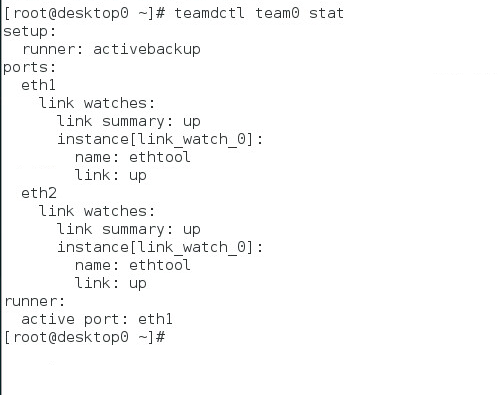
[root@desktop0 ~]# nm-connection-editor
[root@desktop0 ~]# teamdctl team0 stat
setup:
runner: activebackup
ports:
eth1
link watches:
link summary: up
instance[link_watch_0]:
name: ethtool
link: up
eth2
link watches:
link summary: up
instance[link_watch_0]:
name: ethtool
link: up
runner:
active port: eth1
[root@desktop0 ~]#
{"runner":{"name":"activebackup"}}
1:
[root@server0 ~]# yum-config-manager --add-repo=

2:
[root@server0 ~]#getenforce
[root@server0 ~]# vim /etc/selinux/config
[root@server0 ~]# reboot

3:
[root@server0 ~]# firewall-config

4:
[root@server0 ~]# vim /etc/profile
[root@desktop0 ~]# vim /etc/profile

5:
server:
[root@server0 ~]# yum -y install samba samba-client cifs-utils
[root@server0 ~]# id ldapuser1
[root@server0 ~]# smbpasswd -a ldapuser1
[root@server0 ~]# vim /etc/samba/smb.conf
[root@server0 ~]# systemctl enable nmb.service smb.service

[root@server0 ~]# firewall-cmd --permanent --add-service=samba
[root@server0 ~]# firewall-cmd --reload
[root@server0 ~]# chcon -R -t samba_share_t /smb1

[root@server0 ~]# smbpasswd -a ldapuser2
[root@server0 ~]# mkdir /smb2
[root@server0 ~]# chcon -R -t samba_share_t /smb2
[root@server0 ~]# setfacl -m u:ldapuser2:rwx /smb2
[root@server0 ~]# getfacl /smb2

6
desktop:
[root@desktop0 ~]# yum install samba-client cifs-utils -y
测试:
[root@desktop0 ~]# mount -t cifs -ouser=ldapuser1,pass=tianyun //server0/smb1 /mnt
[root@desktop0 ~]# df -h
[root@desktop0 ~]# su - ldapuser1
[ldapuser1@desktop0 ~]$ cifscreds add server0
[root@desktop0 ~]# su - ldapuser2
[ldapuser2@desktop0 ~]$ cifscreds add server0


7 server NFS
[root@server0 ~]# yum install nfs-utils -y
[root@server0 ~]# systemctl start nfs-server.service
[root@server0 ~]# systemctl enable nfs-secure.service
[root@server0 ~]# mkdir /nfs1
[root@server0 ~]# mkdir /nfs2
[root@server0 ~]# mkdir /nfs2/private
[root@server0 ~]# chown ldapuser5 /nfs2/private/
[root@server0 ~]# vim /etc/exports
[root@server0 ~]# systemctl restart nfs-server.service
[root@server0 ~]# firewall-cmd --permanent --add-service=nfs
[root@server0 ~]# firewall-cmd --reload

[root@server0 ~]# wget http://classroom.example.com/pub/keytabs/server0.keytab -O /etc/krb5.keytab
[root@server0 ~]# vim /etc/sysconfig/nfs
[root@server0 ~]# systemctl restart nfs-server.service
[root@server0 ~]# systemctl enable nfs-server.service
[root@server0 ~]# systemctl restart nfs-secure.service
[root@server0 ~]# systemctl enable nfs-secure-server.service

8
desktop
[root@desktop0 ~]# yum install nfs-utils -y
[root@desktop0 ~]# wget http://classroom.example.com/pub/keytabs/desktop0.keytab -O /etc/krb5.keytab
[root@desktop0 ~]# mkdir /mnt/nfssecure
[root@desktop0 ~]# vim /etc/fstab
[root@desktop0 ~]# systemctl restart nfs-secure.service
[root@desktop0 ~]# systemctl enable nfs-secure.service


9:
[root@server0 ~]# nm-connection-editor

{"runner":{"name":"activebackup"}}


[root@server0 ~]# teamdctl team0 stat
[root@desktop0 ~]# nm-connection-editor
[root@desktop0 ~]# teamdctl team0 stat

10:
[root@server0 ~]# firewall-config

11:
[root@server0 ~]# nm-connection-editor

12:
[root@server0 ~]# cd /usr/share/doc/postfix-2.10.1/README_FILES
[root@server0 README_FILES]# vim  STANDARD_CONFIGURATION_README
[root@server0 ~]# vim  /etc/postfix/main.cf

myhostname = server0.example.com
myorigin = example.com
relayhost = [smtp.example.com]
inet_interfaces = loopback-only
mydestination =
local_transport = error:local mail delivery is disabled

[root@server0 ~]# systemctl restart postfix.service
[root@server0 ~]# firewall-cmd --permanent --add-service=smtp
[root@server0 ~]# firewall-cmd --reload

13:
[root@server0 ~]# fdisk /dev/vdb
[root@server0 ~]# yum install targetcli -y
[root@server0 ~]# systemctl restart target.service
[root@server0 ~]# systemctl enable target.service

[root@server0 ~]# targetcli

/> /backstores/block create iscsi_store /dev/vdb2
/> /iscsi create iqn.2017-04.com.tianyun:server0
/> /iscsi/iqn.2017-04.com.tianyun:server0/tpg1/acls create iqn.2017-04.com.tianyun:desktop0
/> /iscsi/iqn.2017-04.com.tianyun:server0/tpg1/luns create /backstores/block/iscsi_store
/> /iscsi/iqn.2017-04.com.tianyun:server0/tpg1/portals create 172.25.0.11 3260
/> saveconfig

[root@server0 ~]# ss -tnlp |grep :3260
[root@server0 ~]# ss -tnlp |grep :3260


14:
[root@desktop0 ~]# yum install iscsi* -y
[root@desktop0 ~]# systemctl restart iscsid.service
[root@desktop0 ~]# systemctl enable iscsid.service

[root@desktop0 ~]# vim /etc/iscsi/initiatorname.iscsi
[root@desktop0 ~]# systemctl restart iscsid.service
[root@desktop0 ~]# systemctl restart iscsid.service
[root@desktop0 ~]# iscsiadm -m discovery -t st -p server0

[root@desktop0 ~]# systemctl restart iscsi
[root@desktop0 ~]# systemctl enable iscsi

[root@desktop0 ~]# fdisk /dev/sda

[root@desktop0 ~]# partprobe /dev/sda
[root@desktop0 ~]# mkfs.ext4 /dev/sda1
[root@desktop0 ~]# mkdir /mnt/iscsidisk
[root@desktop0 ~]# blkid
[root@desktop0 ~]# vim /etc/fstab
[root@desktop0 ~]# mount -a
[root@desktop0 ~]# df -Th

15:
[root@server0 ~]# yum install httpd mod_ssl mod_wsgi -y
[root@server0 ~]# firewall-cmd --permanent --add-service=http
[root@server0 ~]# firewall-cmd --permanent --add-service=https
[root@server0 ~]# firewall-cmd --reload
[root@server0 ~]# wget http://classroom.example.com/content/exam/webs/www.html -O /var/www/html/index.html


[root@server0 ~]# cd /etc/httpd/conf.d/
[root@server0 conf.d]# vim www0.example.com.conf

<VirtualHost *:80>
ServerName www0.example.com
DocumentRoot /var/www/html

</VirtualHost>

<Directory "/var/www/html">
<RequireAll>
Require all granted
Require not ip 172.24.3.0/24
</RequireAll>
</Directory>


[root@server0 conf.d]# systemctl restart httpd.service
[root@server0 conf.d]# systemctl enable httpd.service

16:
[root@server0 ~]# cd /etc/httpd/
[root@server0 httpd]# wget http://classroom/pub/tls/certs/www0.crt
[root@server0 httpd]# wget http://classroom/pub/tls/private/www0.key

[root@server0 conf.d]# vim www0.example.com.conf

<VirtualHost *:80>
ServerName www0.example.com
DocumentRoot /var/www/html

</VirtualHost>

<VirtualHost *:443>
ServerName www0.example.com
DocumentRoot /var/www/html
SSLEngine on
SSLCertificateFile /etc/httpd/www0.crt
SSLCertificateKeyFile /etc/httpd/www0.key

</VirtualHost>


<Directory "/var/www/html">
<RequireAll>
Require all granted
Require not ip 172.24.3.0/24
</RequireAll>
</Directory>

[root@server0 conf.d]# systemctl restart httpd.service

17:
[root@server0 conf.d]# mkdir /var/www/virtual
[root@server0 conf.d]# wget http://classroom.example.com/content/exam/webs/server.html -O /var/www/virtual/index.html
[root@server0 conf.d]# id ldapuser5
[root@server0 conf.d]# setfacl -m u:ldapuser5:rwx /var/www/virtual/
[root@server0 conf.d]# getfacl /var/www/virtual/
[root@server0 conf.d]# cp www0.example.com.conf server0.example.com.conf

[root@server0 conf.d]# vim server0.example.com.conf

<VirtualHost *:80>
ServerName server0.example.com
DocumentRoot /var/www/virtual

</VirtualHost>


<Directory "/var/www/virtual">
Require all granted
</Directory>

[root@server0 conf.d]# systemctl restart httpd.service


18:
[root@server0 conf.d]# mkdir /var/www/virtual/private
[root@server0 conf.d]# wget http://classroom.example.com/content/exam/webs/private.html -O /var/www/virtual/private/index.html

[root@server0 conf.d]# cat /var/www/virtual/private/index.html
private test.
[root@server0 conf.d]# cp www0.example.com.confserver0.example.com.conf

[root@server0 conf.d]# vim server0.example.com.conf

<VirtualHost *:80>
ServerName server0.example.com
DocumentRoot /var/www/virtual
</VirtualHost>

<Directory "/var/www/virtual">
Require all granted
</Directory>

<Directory "/var/www/virtual/private">
Require local
</Directory>


[root@server0 conf.d]# systemctl restart httpd.service
[root@server0 conf.d]# curl http://server0.example.com/private/private test.


19:
[root@server0 conf.d]# yum install mod_wsgi -y

[root@server0 conf.d]# mkdir /var/www/webapp0
[root@server0 conf.d]# wget http://classroom.example.com/content/exam/webs/webapp.wsgi -O /var/www/webapp0/webapp.wsgi
[root@server0 conf.d]# cp server0.example.com.confwebapp0.example.com.conf

[root@server0 conf.d]# vim webapp0.example.com.conf

Listen 8888
<VirtualHost *:8888>
ServerName webapp0.example.com
WSGIScriptAlias / /var/www/webapp0/webapp.wsgi
</VirtualHost>

<Directory "/var/www/webapp0">
Require all granted
</Directory>

[root@server0 conf.d]# semanage port -a -t http_port_t -p tcp 8888
[root@server0 conf.d]# semanage port -l |grep http

[root@server0 conf.d]# systemctl restart httpd.service
[root@server0 conf.d]# firewall-cmd --permanent --add-port=8888/tcp

[root@server0 conf.d]# firewall-cmd --reload
[root@server0 conf.d]# systemctl restart httpd.service
[root@server0 conf.d]# ss -tnlp |egrep '80|443|8888'

20:

#!/usr/bin/bash
case  "$1" in
foo)
            echo "bar"
            ;;
bar)
            echo "foot"
             ;;
*)
            echo 'usage   /root/script1.sh  bar|foo'
esac


21:
#!/usr/bin/bash
if [ $# -eq 0 ];then
echo "Usage: /root/batchusers userfile"
exit 1
fi
if [ ! -f "$1" ];then
echo "Input file not found"
exit 2
fi

for user in `cat $1`
do
id $user &>/dev/null
if [ $? -eq 0 ];then
echo "user $user already exists"
else
useradd $user -s /bin/false
echo "user $user is created"
fi
done


22:Mariadb

[root@server0 ~]# yum install mariadb mariadb-server -y
[root@server0 ~]#systemctl start mariadb
[root@server0 ~]#systemctl enable mariadb
[root@server0 ~]# firewall-cmd --permanent --add-service=mysql
[root@server0 ~]# firewall-cmd --reload

[root@server0 ~]# mysql_secure_installation
[root@server0 ~]# mysql -uroot -ptianyun

MariaDB [(none)]> show databases;

[root@server0 ~]# mysql -uroot -ptianyuan Concats < mariadb.dump

MariaDB [Concats]> GRANT SELECT ON Concats.* TO 'Luigi'@'localhost' IDENTIFIED BY 'tianyun';
MariaDB [Concats]> flush privileges;
[root@server0 ~]# mysql -uLuigi -ptianyun Concats
MariaDB [Concats]> show tables;

MariaDB [Concats]> select * from manufacturer;


MariaDB [Concats]> select * from manufacturer  limit 5;
MariaDB [Concats]> select * from manufacturer where name='SanDisk';


MariaDB [Concats]> select * from product where price>210;
MariaDB [Concats]> select * from manufacturer where name='Sony';

MariaDB [Concats]> select product.price,manufacturer.name from product,manufacturer where product.id_manufacturer=manufacturer.id and product.price>210 and manufacturer.name='Sony';


MariaDB [Concats]> select product.name,product.price,manufacturer.name
    -> from product,manufacturer
    -> where product.id_manufacturer=manufacturer.id
    -> and product.price>210 and manufacturer.name='Sony';

 浙公网安备 33010602011771号