
使用Netty的Websocket实现简单的聊天室
关于Websocket协议大家可以看我的另一篇博客的介绍 WebSocket协议看这篇就够了
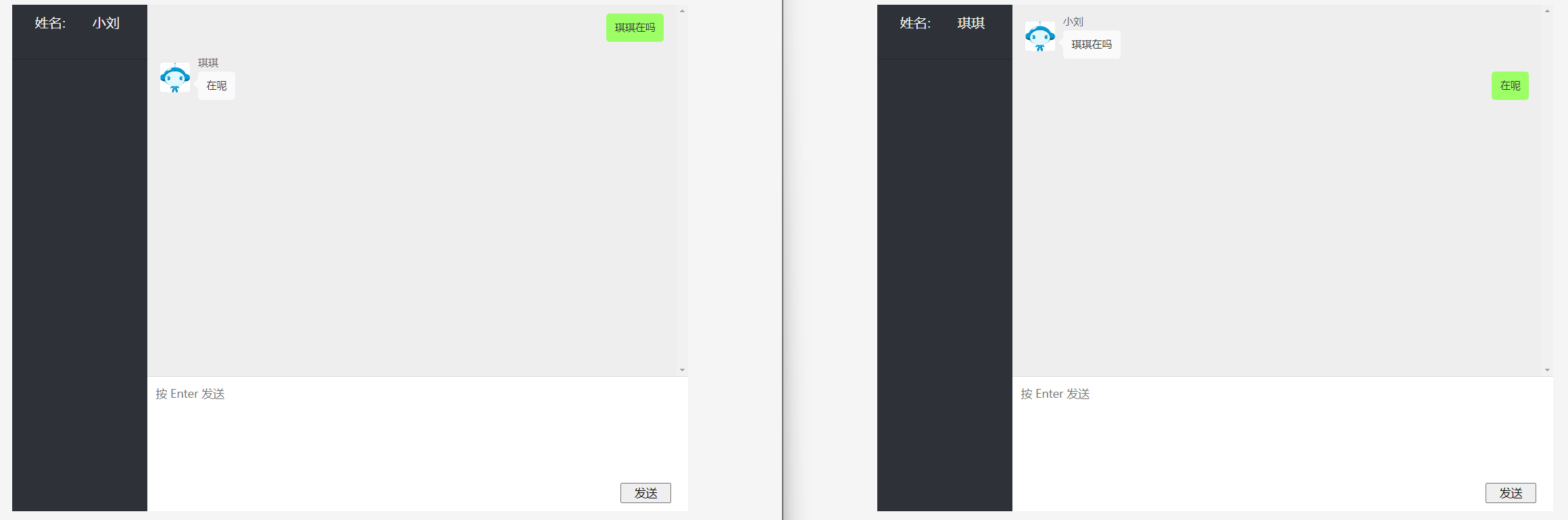
一、实现效果
- 使用SpringBoot启动Netty服务端,Netty服务端开启WebSocket协议的使用。
- 访问前端页面来连接WebSocket服务端,在聊天窗口中发送的消息能被其他用户接收到。
二、核心代码
<dependencies>
  <dependency>
    <groupId>org.springframework.boot</groupId>
    <artifactId>spring-boot-starter</artifactId>
  </dependency>
  <dependency>
    <groupId>org.springframework.boot</groupId>
    <artifactId>spring-boot-devtools</artifactId>
    <scope>runtime</scope>
    <optional>true</optional>
  </dependency>
  <dependency>
    <groupId>org.springframework.boot</groupId>
    <artifactId>spring-boot-starter-test</artifactId>
    <scope>test</scope>
  </dependency>
  <!--整合web模块-->
  <dependency>
    <groupId>org.springframework.boot</groupId>
    <artifactId>spring-boot-starter-web</artifactId>
  </dependency>
  <!--整合模板引擎 -->
  <dependency>
    <groupId>org.springframework.boot</groupId>
    <artifactId>spring-boot-starter-thymeleaf</artifactId>
  </dependency>
  <dependency>
    <groupId>org.projectlombok</groupId>
    <artifactId>lombok</artifactId>
  </dependency>

  <!--引入netty依赖 -->
  <dependency>
    <groupId>io.netty</groupId>
    <artifactId>netty-all</artifactId>
  </dependency>
</dependencies>
@Component
@ChannelHandler.Sharable//设置多个channel通道共享handler
public class WebSocketHandler extends SimpleChannelInboundHandler<TextWebSocketFrame> {

/**
* 用一个线程安全的容器,来保存连接信息
*/
private  List<Channel> channelList = Collections.synchronizedList(new ArrayList<>());


/**
* 通道就绪时的响应
*
* @param ctx ctx
* @throws Exception 异常
*/
@Override
public void channelActive(ChannelHandlerContext ctx) throws Exception {
    Channel channel = ctx.channel();
    channelList.add(channel);
    String remoteAddress = channel.remoteAddress().toString().substring(1);
    System.out.println("[server]:" + remoteAddress + " 上线");
}

/**
* 通道断开时
*
* @param ctx ctx
* @throws Exception 异常
*/
@Override
public void channelInactive(ChannelHandlerContext ctx) throws Exception {
    Channel channel = ctx.channel();
    channelList.remove(channel);
    String remoteAddress = channel.remoteAddress().toString().substring(1);
    System.out.println("[server]:" + remoteAddress + " 下线");
}

@Override
public void exceptionCaught(ChannelHandlerContext ctx, Throwable cause) throws Exception {
    cause.printStackTrace();
    Channel channel = ctx.channel();
    channelList.remove(channel);
    String remoteAddress = channel.remoteAddress().toString().substring(1);
    System.out.println("[server]:" + remoteAddress + " 因异常下线");
}

@Override
protected void channelRead0(ChannelHandlerContext ctx, TextWebSocketFrame textWebSocketFrame) throws Exception {
    Channel currentChannel = ctx.channel();
    String text = textWebSocketFrame.text();

    for (Channel channel : channelList) {
        if (channel == currentChannel) {
            continue;
        }
        String remoteAddress = channel.remoteAddress().toString().substring(1);
        TextWebSocketFrame responseTextWebSocketFrame = new TextWebSocketFrame( text);
        channel.writeAndFlush(responseTextWebSocketFrame);
    }
}
核心代码
@Component
    public class WebSocketChannelInit extends ChannelInitializer {

        @Autowired
        NettyConfig nettyConfig;

        @Autowired
        WebSocketHandler webSocketHandler;

        @Autowired
        NettyHttpServerChannelHandler nettyHttpServerChannelHandler;

        @Override
        protected void initChannel(Channel channel) throws Exception {
            ChannelPipeline pipeline = channel.pipeline();
            /*
            WebSocket 协议的建立是基于 HTTP 的,客户端会先发送一个 HTTP 请求,
            然后服务器通过该请求判断是否为 WebSocket 连接,若是 WebSocket 连接,
            则进行握手升级(handshake upgrade)操作,转换为 WebSocket 连接。在这个阶段,
            需要使用 HttpServerCodec 处理器解析 HTTP 请求
            */
            pipeline.addLast(new HttpServerCodec());
            //用于处理握手请求中的数据传输,保证服务端能够正确地与客户端建立 WebSocket 连接
            pipeline.addLast(new ChunkedWriteHandler());
            //Http消息聚合 当客户端发送一个大的 POST 请求时,它可能会被分成多个消息进行传输,
            //在服务器端需要将这些消息聚合成一个完整的 HTTP 消息才能进行处理。
            pipeline.addLast(new HttpObjectAggregator(8000));
            //用于处理 WebSocket 协议
            pipeline.addLast(new WebSocketServerProtocolHandler(nettyConfig.getPath()));
            //添加自定义的 Http消息处理器,只处理自己对应泛型的消息(如果只需要处理Websocket可以删掉这个)
            pipeline.addLast(nettyHttpServerChannelHandler);
            //添加自定义的 WebSocket 服务端处理器
            pipeline.addLast(webSocketHandler);

        }
    }
Netty Websocket服务端
@Component
public class NettyWebSocketServer implements Runnable {
    @Autowired
    NettyConfig nettyConfig;

    @Autowired
    WebSocketChannelInit webSocketChannelInit;
    //初始化两个线程组
    private EventLoopGroup bossGroup=new NioEventLoopGroup(1);
    private EventLoopGroup workerGroup=new NioEventLoopGroup();

    @PreDestroy
    public void close(){
        bossGroup.shutdownGracefully();
        workerGroup.shutdownGracefully();
    }


    @Override
    public void run() {
        try{
            //1、创建启动器
            ServerBootstrap serverBootstrap=new ServerBootstrap();

            //2、设置线程组
            serverBootstrap.group(bossGroup, workerGroup);

            //3、设置参数
            serverBootstrap.channel(NioServerSocketChannel.class)
                    //添加日志打印
                    .handler(new LoggingHandler(LogLevel.DEBUG))
                    //添加初始化器
                    .childHandler(webSocketChannelInit);

            //4、启动
            ChannelFuture channelFuture = serverBootstrap.bind(nettyConfig.getPort()).sync();
            System.out.println("-------Netty服务端启动成功 端口:"+nettyConfig.getPort());
            channelFuture.channel().closeFuture().sync();
        }catch (Exception e){
            e.printStackTrace();
        }finally {
            bossGroup.shutdownGracefully();
            workerGroup.shutdownGracefully();
        }

    }
}
@SpringBootApplication
public class NettySpringbootApplication implements CommandLineRunner {


    public static void main(String[] args) {
        SpringApplication.run(NettySpringbootApplication.class, args);
    }

    @Autowired
    NettyWebSocketServer nettyWebSocketServer;

    @Override
    public void run(String... args) throws Exception {
        new Thread(nettyWebSocketServer).start();
    }
}

 浙公网安备 33010602011771号